
wmic.exe command-line utility from Microsoft’s Experimental (Future Platforms) branch, turning a long-running deprecation notice into a compatibility test for the earliest Windows builds. Neowin reported the flight on August 17, and the accompanying release notes also retire the Drag Tray feature, add small Windows Security interface changes, and fix a Magnifier launch problem.
The WMIC removal is the change administrators should take seriously. Microsoft has been clear that WMI is not being removed: the Windows Management Instrumentation service, its APIs, and management queries remain available. What disappears in this build is the legacy command-line wrapper that generations of batch files, deployment scripts, inventory tools, and troubleshooting runbooks still invoke as wmic.
Microsoft’s own support guidance puts the timing in sharper focus than the Insider changelog does. WMIC was deprecated in Windows 10 in 2021, became disabled by default in newer Windows 11 releases, and was removed during upgrades to Windows 11 25H2 unless an administrator added it back as a Feature on Demand. Microsoft says the next Windows feature update in 2026 will remove WMIC completely, including the option to reinstall it as an on-demand component. Build 29648.1000 is therefore an early test of the end state, rather than evidence that the utility has already vanished from supported retail Windows.
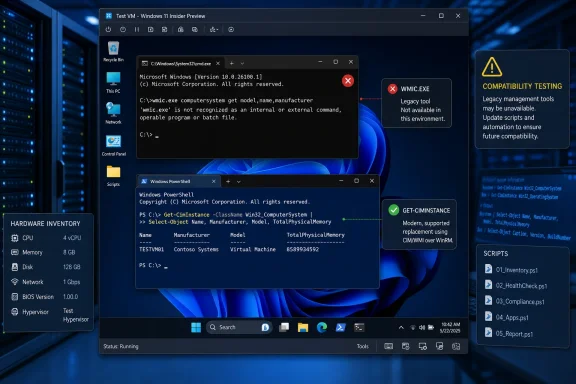 WMIC scripts now have a concrete failure point
For most home users, the absence of wmic.exe will pass unnoticed. The tool’s importance is concentrated in old automation: scripts that retrieve BIOS serial numbers, enumerate installed software, find processes, query disks, check hardware models, or collect operating-system data from endpoints.
The catch is that many of those scripts are not maintained in a central source repository. They live in login scripts, MDT or Configuration Manager task sequences, help-desk documentation, vendor deployment packages, remote-management jobs, and one-off batch files passed down between administrators. A Windows feature upgrade can expose that dependency only when a technician needs the script during an incident.
Build 29648.1000 provides an inexpensive way to find those assumptions now. A test VM on the Future Platforms branch can reveal whether software launches wmic.exe, whether batch files fail cleanly, and whether a tool has a supported PowerShell or API-based replacement. It is a better test than merely checking whether WMIC is installed on Windows 11 25H2, where it can still be added back and temporarily conceal an unresolved dependency.
Microsoft’s supported migration path is PowerShell and the underlying WMI interfaces. The direct replacement for many read-only WMIC queries is Get-CimInstance, which uses the Common Information Model interface rather than the old WMIC command syntax. For example, a process-name query previously issued through wmic path win32_process get Name can be replaced with a PowerShell query against Win32_Process.
That does not mean every migration is a search-and-replace job. WMIC’s alias-driven output, formatting switches, and use inside batch files can be baked into parsers and downstream tools. An old script may expect a header on a particular line, consume a CSV-like string, or use WMIC’s return behavior to decide whether a deployment proceeds. The management data remains available; the calling convention does not.
Future Platforms is the right place for a disruptive test
Microsoft’s April overhaul of the Windows Insider Program changed how this release should be read. Experimental (Future Platforms) is the successor path for the old Canary 29500-series builds and is expressly not aligned to a retail Windows version. Microsoft describes it as its earliest Windows preview, where changes can be altered, delayed, or never ship.
That distinction matters here. Microsoft’s public WMIC removal plan independently establishes that the command-line tool is on its way out, but build 29648.1000 does not identify the retail release that will carry the final removal. Administrators should not write “WMIC removed in Windows 11 26H1” into compatibility matrices based on this flight. Microsoft’s support document gives only “the next Windows feature update in 2026,” while this branch deliberately has no matching production version.
It also is not a sensible production pilot channel. Microsoft says moving off Future Platforms requires a clean installation because the branch does not line up with a retail production build. That makes it suitable for disposable test machines and virtual machines, not for the workstation used to run an organization’s actual deployment, endpoint-management, or incident-response tooling.
The practical task is narrower than a broad operating-system validation exercise: inventory all uses of wmic, run them against a system where it is absent, and assign an owner to any script that fails. In particular, teams should check:
- Batch files, task-sequence steps, and remote-execution jobs should be searched for
wmic,wmic.exe, and calls to executables that may spawn WMIC indirectly. - Hardware inventory and asset-tag collection should be validated because BIOS, baseboard, disk, and computer-system queries are common WMIC uses.
- Third-party installers and support tools should be tested rather than assumed compatible, especially when their documentation still provides WMIC-based troubleshooting commands.
- Replacement PowerShell commands should be tested under the same execution policy, privileges, remoting configuration, and output-parsing requirements as the legacy job.
A significant benefit of doing this before Microsoft removes the Feature on Demand option is that organizations can distinguish a script defect from a migration problem. Once the fallback package is gone, re-enabling WMIC will no longer be a quick workaround for a failed upgrade or a broken recovery procedure.
Drag Tray has been withdrawn without a successor
The other outright removal in build 29648.1000 is Drag Tray, an experimental interface intended to help users move content after dragging it toward the top of the display. Microsoft says it is removing the experience after Insider feedback and is exploring a replacement for a later update.
There is no replacement in this build, no migration setting, and no promise that the future feature will work the same way. That is normal for an Experimental branch, but it leaves one clear conclusion: Drag Tray should not be treated as an emerging Windows workflow that developers or administrators need to document, train around, or support.
The withdrawal is also a useful reminder of the difference between Future Platforms and the Beta channel. Microsoft has said Beta builds preview features it plans to ship in the near term, while Experimental is where early ideas are exposed to feedback. A feature appearing on an Experimental desktop is evidence that Microsoft is testing it, not that it has won a place in a public Windows release.
Windows Security changes are mostly visual, with one enterprise signal
Build 29648.1000 begins a set of small Windows Security UI adjustments intended to align the app with the rest of Windows. Microsoft does not enumerate the visual changes, so administrators should avoid building screenshots or internal instructions around the exact layout of this build.
The more functional change affects enterprise-managed devices with Microsoft Defender for Endpoint enabled. Those systems will show that management status at the top of the Windows Security app’s Virus & threat protection page. For help-desk staff and users, that can reduce ambiguity about why certain antivirus settings are unavailable or controlled by policy.
It does not add Defender for Endpoint to unmanaged PCs, change an organization’s licensing, or indicate that local Windows Security has suddenly become a full Defender portal. It is a status cue inside the client interface. The operational value will depend on whether the indicator is consistent across the other Windows Insider branches and eventually reaches retail builds.
Microsoft also says it fixed a Magnifier launch issue that affected some users in the previous flight, plus an underlying UI-shifting problem in certain applications. The known-issues list remains more important for anyone running the build: Microsoft is investigating a repeatedly blinking mouse pointer and installation failures carrying error 0x80070005, with fixes expected in the next flight.
The immediate consequence of build 29648.1000 is straightforward: test anything that calls WMIC while a supported fallback still exists, but do it on a non-production Future Platforms machine. The command-line utility’s removal is no longer a distant deprecation notice; this build shows the compatibility break that Windows administrators will need to have resolved before the next feature update makes it permanent.
