
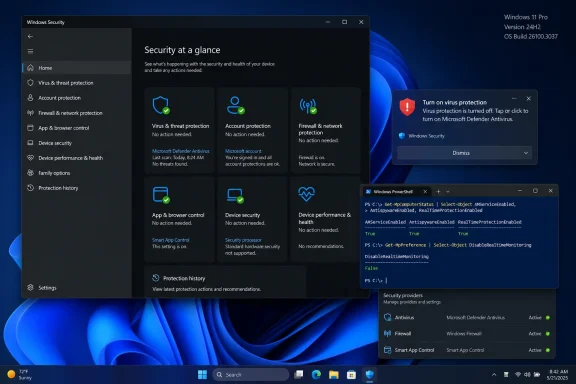
MakeUseOf reported the issue after users on Windows 11 24H2 and 25H2, particularly systems on build 26100.8973 or 26200.8973, began receiving Windows Security toasts saying virus protection was off while Defender’s real-time protection remained enabled. Separate reports on Microsoft’s Community Hub, Microsoft Q&A, ElevenForum, Reddit, and technical-support forums describe the same pattern: a recurring startup notification, apparently functional Defender protection, and no obvious failure recorded in the Windows Security interface.
Microsoft has not listed the condition among the known issues for Windows 11 24H2 or 25H2. That omission does not disprove the reports, but it changes the operational advice: do not dismiss the warning based solely on a reassuring toast theory, and do not uninstall security software in response to it.
 The KB5101684 connection is weaker than it first appears
The reports have been clustered around Windows 11 builds 26100.8973 for 24H2 and 26200.8973 for 25H2. Microsoft’s July 28 optional preview update, KB5101684, produced those build numbers. Microsoft describes the update as applying to all editions of 24H2 and 25H2 and says it was released in phases, rather than describing it as an Insider-only package.
That matters because “Insider Release Preview” is an incomplete explanation for the affected population. A device can receive an optional preview update outside the Insider program, depending on its Windows Update settings and rollout eligibility. Admins should therefore inventory the build and update history on a device before declaring the alert confined to Insiders.
More importantly, one Microsoft Q&A report describes repeated “Turn on virus protection” messages on July 21—a week before KB5101684 was released on July 28. That does not rule out a build-specific interaction, a Defender platform update, or a later regression that widened the problem. It does mean KB5101684 cannot yet be presented as the established cause.
The better description is narrower: reports have been seen on systems carrying builds associated with KB5101684, but neither Microsoft nor independent technical reporting has demonstrated causation. The distinction is important for IT teams deciding whether to pause an optional update; rolling back a cumulative preview is a disruptive response to a link that remains unproven.
Windows Security is a status dashboard, not Defender’s engine
Microsoft’s Windows Security documentation makes clear that the Windows Security app, Windows Security Service, and Windows Security Center service collect and display protection information. Microsoft Defender Antivirus runs separately from that reporting layer.
In practical terms, a bad Windows Security status message can coexist with a working Defender engine. The Community Hub report is consistent with that possibility: its author said Microsoft support checked the PC and found the protection stack operating normally, while the warning returned after logon. Similar reports describe Defender scans and real-time protection continuing to work despite the toast.
But a dashboard error is only one explanation. Real security failures can also create the same notification: disabled real-time protection, a broken Defender service, an expired or malfunctioning third-party antivirus installation, damaged Windows Security components, or management policies that alter the endpoint’s protection configuration.
Users should therefore regard the toast as a trigger for verification, not as a diagnosis. The notification alone does not prove Defender is disabled. It also does not prove the endpoint is protected.
Check the active antivirus provider before resetting anything
For a consumer PC that relies on Microsoft Defender Antivirus, the most useful first check is Windows Security itself. Open Windows Security > Virus & threat protection and inspect the protection status and real-time protection setting. If the screen shows active protection and a quick scan runs normally, that is encouraging—but it is still worth checking the Defender service state through PowerShell if the notification persists.
Run an elevated PowerShell window and use:
Get-MpComputerStatus | Select-Object AMServiceEnabled, AntivirusEnabled, RealTimeProtectionEnabled, AntivirusSignatureLastUpdated
Microsoft documents Get-MpComputerStatus as the Defender cmdlet for returning the antimalware status on a machine. On a PC where Defender is meant to be the active antivirus, the first three fields should normally show True. The signature timestamp should also be recent enough to show the device is receiving intelligence updates.
The command has a critical limitation that MakeUseOf’s broad reassurance glosses over: it is a Defender check, not a universal “this PC has antivirus” check. Microsoft says Defender Antivirus automatically disables itself when a supported, up-to-date third-party antivirus product is installed and registered with Windows Security. In that configuration, AntivirusEnabled or RealTimeProtectionEnabled being False for Defender may be normal.
For machines with Norton, McAfee, Bitdefender, ESET, Malwarebytes configured as the registered antivirus, or an enterprise endpoint product, first open Windows Security > Virus & threat protection > Manage providers. Confirm which product Windows Security identifies as the active antivirus, then validate that product using its own console or management portal. Do not force Defender back on if a corporate security product is intended to own that role.
This is especially important after an antivirus removal. A partially uninstalled third-party suite can leave services, drivers, or Security Center registration records behind, producing confusing combinations of a disabled Defender engine and a security product that no longer protects the machine.
A small set of checks separates a false alert from a security incident
If the notification appears but Defender is supposed to be active, administrators and experienced users should capture the state before resetting the Windows Security app or changing policy. A screenshot of the alert, the Windows version from winver, installed update history, Defender platform and signature versions, and PowerShell output is more useful to Microsoft than a generic Feedback Hub report saying “Defender is broken.”
The immediate escalation threshold is straightforward:
- Treat the warning as potentially real if
AMServiceEnabled,AntivirusEnabled, orRealTimeProtectionEnabledremainsFalsewhen Defender should be the active provider. - Treat it as potentially real if Virus & threat protection cannot start a scan, the real-time protection switch turns itself off, or Defender signatures fail to update.
- Treat it as potentially real if Windows Security lists no active provider, particularly after a third-party antivirus suite was removed or updated.
- Treat it as a management investigation on business devices if Intune, Group Policy, Configuration Manager, or an endpoint protection platform controls Defender settings.
If all of those checks show a healthy, active Defender instance and the only defect is the periodic notification, repairing or resetting the Windows Security app is a reasonable low-risk cleanup step. On Windows 11, the exact Settings path can vary with the build, but it is generally available through the Windows Security app’s advanced options. A reboot afterward will establish whether the startup toast returns.
Do not make wholesale changes first. Uninstalling and reinstalling antivirus software can remove protection temporarily, alter Security Center registration, and obscure the evidence needed to identify a reporting regression. On managed devices, local resets may also conflict with corporate policies and should go through the endpoint-management team.
Microsoft still needs to identify the affected configuration
The evidence now establishes a repeatable symptom across multiple user reports, including reports on build 26200.8973 and a Microsoft Community Hub thread in which the warning appeared at a consistent interval after sign-in. It does not establish how many devices are affected, whether the trigger is a Windows cumulative update, a Microsoft Defender platform or security-intelligence release, a particular Security Center registration state, or an interaction with third-party antivirus remnants.
Microsoft’s KB5101684 release notes currently say the company is not aware of known issues with that update. The release notes also do not mention changes to Microsoft Defender Antivirus or Windows Security that would explain the warning. Until Microsoft publishes a known-issue entry, a Defender platform update note, or a fix, organizations should resist attributing every case to KB5101684.
For affected users whose protection checks are healthy, the practical consequence is annoyance rather than an immediate loss of malware protection. For everyone else—especially machines where the active provider is unclear or real-time protection cannot stay enabled—the same notification remains a security incident until the endpoint proves otherwise.
