
There is an important limitation to the report: gHacks did not identify the originating Windows update, affected Windows 11 versions, Edge version, release-health advisory ID, or a workaround. No second outlet had independently reported those particulars by August 16. That makes this a confirmed issue worth monitoring, but not enough evidence to justify rolling back Windows updates or changing enterprise IE-mode policy globally.
Microsoft’s own documentation shows why that distinction matters. IE mode is still explicitly supported in Edge for sites whose functionality is unavailable in modern browsers, and organizations normally control it through an Enterprise Mode Site List and Edge policy. A site failing to render in IE mode can therefore stem from at least three different layers: a Windows regression, an Edge update, or a configuration and site-list problem. Treating all three as the same incident could turn a limited outage into a broader one.
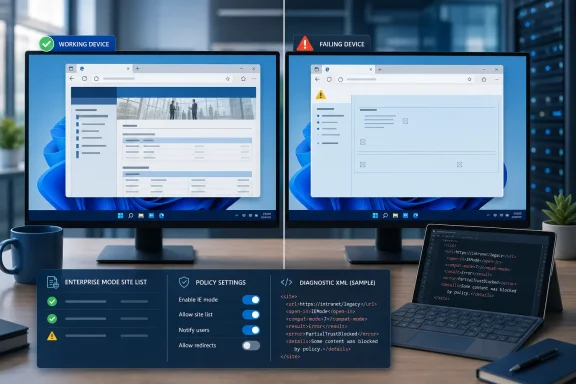 The report lacks the identifiers administrators need
The useful part of Microsoft’s Windows release-health system is supposed to be its specificity. A normal entry identifies affected Windows versions, the update or build that introduced the condition, the status of Microsoft’s investigation, mitigation information, and eventually the KB article that resolves it.
Those identifiers are absent from the gHacks report. Microsoft’s public Windows 11 release information confirms that the latest August security releases arrived on August 11, 2026: KB5121003 for Windows 11 versions 24H2 and 25H2, KB5121000 for version 26H1, and KB5120240 for version 23H2. But temporal proximity is not causation. Until Microsoft ties the IE-mode failure to a specific KB, build, or Edge release, admins should not assume that an August cumulative update is responsible.
That omission also means the scope remains unclear. The report says “some users,” but does not establish whether the condition affects Windows 11 24H2, 25H2, 26H1, Enterprise LTSC installations, particular Edge channels, managed devices only, or devices with a particular policy configuration. Those are material differences in an enterprise environment.
A break affecting only a manually invoked compatibility command has a very different operational impact from one that stops policy-mapped enterprise sites from opening in IE mode. So does an issue limited to an Edge build versus one embedded in the Windows servicing stack. Microsoft has not publicly supplied enough detail to collapse those possibilities into a single diagnosis.
Edge 142 has a separate IE-mode behavior change
The timing is especially confusing because Microsoft has documented a separate change in Edge Stable version 142: manual “Reload in IE mode” entry points were removed from the interface on consumer devices by default. Microsoft says that change does not affect enterprise customers whose devices are properly configured with group policy.
This is not automatically the same problem described by gHacks. The reported Windows 11 issue concerns IE mode failing to load sites correctly; Edge’s documented version-142 behavior concerns whether users can see a manual UI command for entering IE mode. But users and help desks may describe either one as “IE mode is broken,” and the visible symptom can look identical: a legacy site opens in normal Edge rendering instead of the compatibility engine.
The practical dividing line is how the site is intended to enter IE mode. A consumer or lightly managed device that relied on a user selecting the menu item may now be encountering the Edge 142 interface change. A managed organization using an Enterprise Mode Site List should instead verify whether the URL remains assigned to IE mode by policy and whether Edge is successfully retrieving that list.
Microsoft’s Edge support documentation says the manual reload control on managed devices is available only when an organization has configured policy to permit unconfigured sites to reload in IE mode. That makes a missing menu item a policy and product-behavior question first—not proof that the Windows bug reported by gHacks has struck the device.
Verify the deployment before changing it
Organizations experiencing failures should collect evidence from a small affected group before removing policies, rebuilding profiles, or directing users to alter browser settings. The goal is to establish whether Edge is receiving the site list, classifying the URL for IE mode, and launching its compatibility engine as expected.
Microsoft provides two built-in Edge pages that are more useful than screenshots of a failed intranet portal. The edge://compat/enterprise page shows Enterprise Mode Site List status and related compatibility information. The edge://compat/iediagnostic page exposes IE-mode diagnostic data and can export it as XML, including configuration details relevant to administrators.
A disciplined first pass should establish the following:
- Confirm the exact Windows edition, Windows build, Edge channel, and Edge version on both working and failing machines.
- Compare the Enterprise Mode Site List URL, last download status, version number, and affected URL mapping between those machines.
- Check whether the affected page is supposed to enter IE mode automatically through the enterprise list or manually through the Edge interface.
- Preserve the IE-mode diagnostic export and relevant Edge policy results before changing settings or uninstalling updates.
- Record the first observed failure time, since it may distinguish a Windows update deployment from an Edge update or a server-side site-list change.
Do not respond by enabling the retired Internet Explorer desktop application, loosening TLS settings, or disabling browser security controls. Microsoft permanently retired the Internet Explorer 11 desktop application in June 2022, and IE mode exists to keep narrowly defined legacy dependencies working within Edge’s managed framework. Reintroducing obsolete browser behavior is not a durable incident response plan.
The same caution applies to deleting the Enterprise Mode Site List or broadly disabling IE-mode policy. Those actions can make a specific failure harder to diagnose and may immediately disrupt users whose sites still depend on controlled compatibility settings.
The missing workaround is the operational story
Microsoft has reportedly acknowledged the IE-mode defect but has not yet published a workaround or a fix timetable. For affected IT teams, that is more consequential than the confirmation itself: there is currently no vendor-approved mitigation to deploy through Intune, Group Policy, Windows Update for Business, or WSUS.
Microsoft’s release-health guidance distinguishes an investigating issue from a confirmed one and from a mitigated one. A confirmed status means Microsoft has determined that Windows users are affected and is working on mitigation and root-cause analysis; it does not mean a workaround exists. Until Microsoft moves the issue to mitigated or resolved and names the remediation, administrators should avoid presenting any improvised fix as vendor-backed.
For business-critical legacy applications, the appropriate contingency may be procedural rather than technical: identify affected roles, retain access to alternate workflows, and preserve a known-working test device or pilot ring while the issue is characterized. If a software vendor maintains the legacy application, provide it with the IE-mode diagnostics, the Edge version, and the exact failing URL pattern rather than simply reporting that “Edge stopped working.”
The key unanswered item is still the one gHacks could not provide: Microsoft needs to publish the advisory or originating update that defines who is affected. Until then, Edge 142’s intentional removal of consumer manual entry points and a potential Windows 11 IE-mode regression must be treated as separate possibilities—especially in environments where a single policy change can affect every legacy web application at once.
