
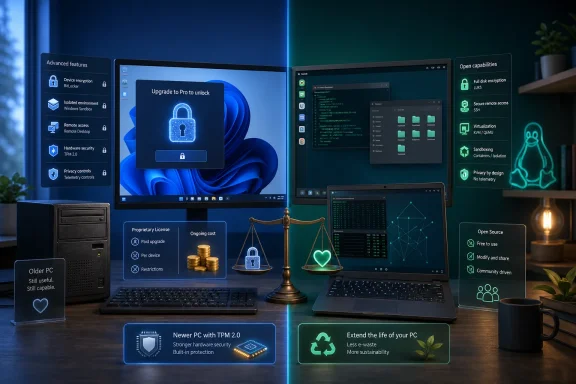
Microsoft’s retail editions are not merely different support contracts. Windows 11 Pro is the gatekeeper for features that technically minded home users and small-office administrators can reasonably see as baseline tools: hosting Remote Desktop sessions, using Windows Sandbox, and accessing the full BitLocker management experience. Linux, meanwhile, generally exposes comparable building blocks at no license charge, even if it does not always package them into an equally polished workflow.
That distinction matters more in August 2026 than it did a decade ago. Windows 10 reached end of support on October 14, 2025, and the choices made around Windows 11 eligibility, Extended Security Updates, and edition-specific features have put the effective price of staying inside Microsoft’s ecosystem under new scrutiny.
 Windows Is Not “Always Paid,” but Its Tiers Are Real
How-To Geek’s broadest claim—that Windows always costs money while Linux is free—is directionally true in a licensing sense but too simple in practice. Most consumer PCs ship with an OEM Windows license included in the purchase price, so users do not usually pay Microsoft at the point of setup. Linux distributions such as Ubuntu, Fedora, Debian, Linux Mint, and openSUSE can be downloaded, installed, modified, and redistributed at no charge.
The important difference is what happens when a Windows Home user needs a capability Microsoft has assigned to Pro. A retail upgrade is a paid edition change, whereas a Linux installation does not normally distinguish between a “home” and “professional” entitlement for disk encryption, SSH access, virtualization primitives, or policy-level privacy settings.
That does not mean all Linux software is free of cost. Red Hat Enterprise Linux, SUSE Linux Enterprise, Canonical support, hosted management tools, and third-party desktop software can all carry commercial pricing. The distinction is that the operating system’s core capabilities are usually not disabled until a higher SKU is purchased.
For enthusiasts who build their own PCs, repurpose older systems, or manage a family fleet, that licensing model has practical consequences. The question is not simply whether Windows is worth its license fee. It is whether a user who already owns Windows 11 Home should have to pay again to turn on features already present elsewhere in the platform.
Windows 11’s TPM Rule Is a Security Baseline—and a Migration Cost
The hardware argument is also more nuanced than “Linux has no requirements.” Modern Linux distributions have requirements of their own, and an aging PC can still run into graphics-driver, Wi-Fi, firmware, browser, or application-support limits. But Linux’s flexibility makes it much easier to keep an older machine useful.
Microsoft’s published Windows 11 requirements still call for a supported 64-bit processor, UEFI firmware with Secure Boot capability, and TPM 2.0. Microsoft frames that combination as part of a security baseline intended to support modern protections. That is a defensible design goal: TPM-backed key protection, measured boot, BitLocker integration, Windows Hello, and virtualization-based security are not arbitrary features.
The cost appears when otherwise functional Windows 10 hardware is excluded from the supported upgrade path. Unsupported Windows 11 installations exist, but they are explicitly outside Microsoft’s supported configuration and can complicate future servicing expectations. That leaves users with a choice between buying newer hardware, staying on an operating system whose normal support ended last year, paying for temporary updates, or moving to another OS.
Linux cannot replicate every Windows workload on that hardware. A PC dependent on Adobe Creative Cloud, proprietary engineering software, anti-cheat-protected games, or a specialized line-of-business application may have no practical migration path. But for web, office, media, development, home-server, and many general computing roles, a current Linux distribution can give a machine a second life without requiring TPM 2.0.
That is not an argument against TPM. It is an argument that a security requirement can become an upgrade mandate when it is fused to an operating-system lifecycle.
The Support Comparison Favors Linux, With Caveats
How-To Geek rightly identifies the awkward timing of Microsoft’s consumer Extended Security Updates program. Microsoft offers Windows 10 consumer ESU coverage through October 2026, providing critical and important security updates but not feature work, ordinary bug fixes, or standard technical support. Microsoft’s paid route has been priced at $30 in the United States, while enrollment alternatives have involved Microsoft Rewards or Windows Backup synchronization through a Microsoft account.
Calling those latter routes “free” depends on the definition. No cash changes hands, but users may reasonably object to an account requirement, cloud synchronization, or an engagement program being part of the trade. Independent coverage from Tom’s Hardware and TechRadar also noted the Microsoft-account requirement attached to consumer ESU enrollment, including for users choosing the paid option.
Linux’s long-term-support story is simpler at the desktop level, although it is not uniform. Canonical says Ubuntu LTS releases receive five years of standard security maintenance. Ubuntu 24.04 LTS is supported through May 2029 under that standard window, while Ubuntu 26.04 LTS extends through May 2031. Expanded coverage beyond the standard period belongs to Ubuntu Pro, though Canonical offers its Pro entitlement free for personal use on up to five machines.
Debian offers another model. The Debian Project moved Debian 12 “Bookworm” to its LTS team in July 2026; it is scheduled for support until June 30, 2028, completing a five-year lifecycle from its June 2023 release. Debian’s LTS period has limits, including a smaller supported architecture list and the reality that package coverage requires active community maintenance.
So Linux does not eliminate lifecycle planning. It does, however, usually let users receive the base operating system and its published LTS updates without an extra consumer security-extension transaction.
Encryption, Sandboxing, and RDP Expose the Home–Pro Boundary
The strongest part of the seven-feature argument concerns functions many security-conscious users regard as standard equipment.
Windows 11 Home supports Device Encryption on eligible hardware, and Microsoft notes that it can automatically protect a device while saving the recovery key to a Microsoft or work account. That means it is not accurate to say Home users have no encryption at all. The limitation is control and consistency: full BitLocker configuration, including the familiar administrative tooling and broader deployment options, belongs to Pro, Enterprise, and Education scenarios.
Linux’s LUKS and dm-crypt stack is available without a paid edition. Most major installers offer full-disk encryption during setup, and advanced users retain substantial control over passphrases, key files, volume layouts, and unlock mechanisms. The trade-off is operational responsibility. There is no vendor account quietly holding a recovery key by default; losing recovery material can mean losing the data.
Windows Sandbox is a clearer SKU divide. Microsoft’s own documentation says the disposable Windows environment is available on Pro, Enterprise, and Education editions—not Home. It requires virtualization support, at least 4 GB of RAM, and suitable storage and CPU resources. For testing a suspicious installer or opening an untrusted document in a clean throwaway environment, it is one of Windows’ most approachable security tools.
Linux supplies several free ways to isolate software, including KVM virtual machines, containers, user namespaces, Flatpak’s application sandboxing, Bubblewrap, and purpose-built systems such as Qubes OS. But How-To Geek is right to note that these are not a one-for-one consumer experience. Windows Sandbox has a notably simple workflow: enable the feature, launch it, test the item, close the window, and discard the session. Linux offers greater choice, but often demands more knowledge.
Remote access produces a similar result. Microsoft confirms that Windows Home can act as an RDP client but cannot host incoming Remote Desktop connections; Pro, Enterprise, Education, and Windows Server can. Free VNC tools, RustDesk, Chrome Remote Desktop, and other alternatives can fill the gap, so Windows Home is not incapable of remote administration. Still, the built-in RDP host is a Pro feature.
Linux’s OpenSSH server is free and ubiquitous, and GUI forwarding or tools such as Waypipe can extend a remote workflow past the terminal. Administrators should not mistake “available” for “safe by default,” however. Exposing either RDP or SSH directly to the public internet is a bad plan; VPN access, strong authentication, patching, and least privilege remain essential regardless of platform.
Privacy Is the Least Clean Comparison
The telemetry claim needs the most restraint. Microsoft lets Windows 10 and Windows 11 users decline optional diagnostic data, but Microsoft’s support documentation says required diagnostic data remains the minimum needed to keep a device reliable, secure, and operating normally. The company describes that data as information about the device, its configuration and capabilities, and whether it is functioning properly.
Microsoft’s enterprise management documentation provides more granular policy controls, including a “diagnostic data off” option for certain Enterprise, Education, and Server configurations. That distinction is real, and it reinforces the editorial’s complaint that the consumer editions offer less control than higher-tier deployments.
But “Linux” is not a single privacy policy. Ubuntu, Fedora, Linux Mint, KDE Plasma, GNOME, browsers, package managers, desktop apps, and cloud-connected services all have distinct data practices. Many ask before submitting reports; some collect limited information by default; nearly all can be configured or replaced. The central advantage is not that every Linux distribution is telemetry-free out of the box. It is that users generally have more ability to inspect, remove, or substitute the components involved.
The more useful conclusion is not that Windows users should automatically abandon Windows Pro, or that Linux offers a frictionless replacement for every Windows setup. It is that Microsoft has drawn the Home–Pro line through features that increasingly resemble ordinary defensive and administrative tooling. As Windows 10 ESU coverage approaches its October 2026 endpoint, that product decision will make Linux look less like a hobbyist alternative and more like a financially rational exit route for users with compatible workloads.
