

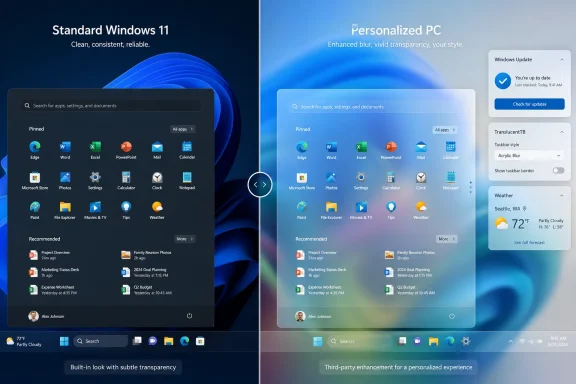
Windows Latest first reported the exchange, citing replies from March Rogers, Microsoft’s Partner Director of Design, to feedback on X. Rogers’ stated test for a large-scale visual change was whether enough users benefit to justify the investment, whether it meets usability and accessibility requirements, and whether Microsoft can deliver it at sufficient quality. He also said Windows will not receive “immediate changes” to its existing transparency options.
That is an unambiguous not now, rather than a commitment to build a Liquid Glass equivalent later. It also leaves a conspicuous gap in Microsoft’s wider 2026 Windows 11 quality program: the company is moving quickly on visible Start and taskbar personalization, but opacity and translucency controls are outside the announced work.
Microsoft’s customization push stops at transparency intensity
Microsoft’s March Windows quality roadmap divided the work into Performance, Reliability, and Craft. Under Craft, it promised greater personalization and control, specifically naming taskbar positions, a smaller taskbar, a more configurable Start menu, quieter setup, fewer distractions, and clearer Search results.
The company has since shipped some of those controls to the Experimental channel for Windows Insiders. Microsoft’s May announcement describes taskbar placement on any screen edge, alignment controls, a compact taskbar mode, independent toggles for Start’s Pinned, Recommended/Recent, and All sections, Small and Large Start layouts, and an option to hide the account name and image while presenting.
Those are substantial reversals from early Windows 11, where the taskbar’s bottom-only placement and rigid Start layout became recurring complaints. But they are also largely layout decisions: what appears on screen, where it appears, and how much space it takes. A user-set translucency level would be a system visual-material policy, touching contrast behavior across wallpapers, light and dark themes, high-contrast settings, battery-saving states, Remote Desktop sessions, low-end graphics hardware, and every surface that shares the material.
Microsoft has already built much of the underlying machinery. Its current developer documentation distinguishes between Mica, an opaque wallpaper-tinted material intended for long-lived app surfaces, and Desktop Acrylic, a live blurred view of content behind a surface. In other words, Windows 11 is not incapable of rendering a frosted desktop effect. The decision is about exposing and supporting a broad user control across Windows’ own shell, rather than merely offering APIs that developers can selectively use in individual apps.
Microsoft’s documentation also confirms why Rogers raised accessibility. System backdrop materials fall back to solid colors when transparency is disabled, contrast themes are enabled, Remote Desktop or virtual-machine conditions prevent compositor blending, or hardware does not meet the graphics requirements. Desktop Acrylic is additionally disabled by Battery Saver. A global “more glass” slider would need clear, predictable behavior across all of those states, not merely look good in a single screenshot.
“Vista did it first” gets the history partly right
The comparison to Windows Vista’s Aero Glass is visually understandable but technically loose. Vista, released in 2007, made translucent window frames and blurred glass-like chrome central to the premium Windows experience. It is a direct ancestor of today’s demand for richer Windows transparency and proof that Microsoft has long understood the appeal of depth, blur, and wallpaper visibility.
But Aero Glass was not Liquid Glass, because Liquid Glass is Apple’s modern product name and a broader design system rather than a generic label for translucent UI. Calling Vista the first Liquid Glass interface blurs a historical visual influence into a claim about a technology that did not exist at the time.
There is a second, more concrete error in the usual Aero-to-Windows-11 shorthand. Windows 8 did not replace Aero with Acrylic and Mica. Windows 8 pivoted to a much flatter visual language; Acrylic arrived years later as part of Fluent Design, while Mica was introduced with Windows 11. Microsoft’s own developer guidance describes Mica as a new opaque material in Windows 11 and Acrylic as a semi-transparent frosted material designed for transient surfaces such as menus and flyouts.
That history changes the reading of this story. Windows did not lose the capability to do glass after Vista and then wait two decades for a third-party rediscovery. Microsoft’s current design stack deliberately contains both subdued wallpaper tinting and live frosted blur. What it is declining to do is let users turn that capability into a more aggressive, shell-wide personal preference.
The legibility concern is real, but it is not a complete technical explanation. Microsoft’s Acrylic guidance says the material is designed with blur, tint, noise, and an exclusion blend layer to preserve readable UI, and warns developers about custom opacity and color combinations that could compromise contrast. That is exactly the kind of work a native control would require: not a single opacity percentage, but bounded settings with robust fallback behavior.
Windhawk is a workaround, not a native feature
Windows Latest points users to Windhawk’s Windows 11 Start Menu Styler and Windows 11 Taskbar Styler mods, including themes called TranslucentStartMenu and TranslucentTaskbar. The Start Menu Styler catalog also includes themes named WindowGlass, LiquidGlass, Down Aero, and TintedGlass, illustrating how far community customization already goes beyond Windows’ built-in single transparency toggle.
For a personal PC where the owner accepts the risk, that is a legitimate option. Windhawk’s Start Menu Styler targets StartMenuExperienceHost.exe, SearchHost.exe, and SearchApp.exe, and its TranslucentStartMenu theme can adjust blur and tint values. Users can create a convincing frosted Start menu without waiting for Microsoft to bless the design direction.
But the suggestion that third-party mods fill the same role as an operating-system option leaves out an operational detail. Windhawk’s own documentation says its engine is injected into most processes by default, apart from critical and incompatible exclusions, so that it can intercept process creation and load relevant mods early. The project also acknowledges that code injection can conflict with antivirus or other security software.
That does not make Windhawk suspect software, nor does open source eliminate the need for judgment. It does mean its place is different from a supported personalization setting. A native setting can be validated against each Windows build, disabled automatically when accessibility policy requires it, and serviced through the normal support path. A shell mod has to follow private or undocumented UI structures that Microsoft may change at any time.
The mod’s own styling guidance exposes that dependency. It provides different content for the redesigned Windows 11 Start menu rolling out through version 25H2, and notes that Start menu XAML resources used for customization were obtained outside normal public tooling. This is precisely why a theme that works on one Insider build can need revisions after a Start menu redesign, even when the overall Windows version has not changed.
For managed endpoints, that distinction should end the discussion. Enterprise administrators should not interpret Microsoft’s acknowledgement of the developer community as a recommendation to deploy injection-based shell theming. It creates another compatibility variable for Windows updates, endpoint security products, remote support, and incident triage—without a Microsoft support commitment if a future Explorer, Start, or Search update breaks the configuration.
The stronger criticism is about priority, not glass
Microsoft’s stated standard for a change—user benefit, accessibility, and quality—is reasonable. The company has been explicit that it is trying to repair deeper Windows 11 issues: faster File Explorer operations, a lower baseline memory footprint, more responsive WinUI 3-based experiences, driver quality, update reliability, and fewer forced disruptions. Those jobs should outrank a decorative material slider.
The awkward part is that Microsoft is simultaneously presenting Start and taskbar personalization as a flagship proof point for its Craft initiative. It will now let users move the taskbar to the top or sides, shrink it, reorganize Start, hide multiple Start sections, and obscure their account identity during screen sharing. Those changes are welcome, but they set a high bar for explaining why users may control the geometry of Windows’ most persistent UI while Microsoft cannot yet offer more nuanced control over its appearance.
A restrained option would not need to recreate Apple’s design wholesale. Windows could expose a small set of accessibility-safe material presets for supported shell surfaces, preserve the current behavior as the default, and retain solid-color fallbacks under contrast themes, Battery Saver, Remote Desktop, or unsupported hardware. Microsoft has published the design guidance and materials necessary to make that possible; it has not said it will do the product work.
For now, Windows 11 users have a clear choice. Keep the supported built-in transparency setting for a stable, low-maintenance desktop, or use Windhawk on a personal machine with the expectation that future Start, Search, taskbar, security-software, or Windows feature updates may demand troubleshooting. Microsoft’s next visible personalization milestone remains the Experimental-channel taskbar and Start work—not a native control for making Windows more transparent.