
Windows Central highlighted the failure this week after moving its CD-ripping workflow from Microsoft’s player to Exact Audio Copy, or EAC. The underlying problem is not an isolated disc or a bad optical drive. The Register tested the behavior on Windows 10 and Windows 11 systems in January and found that different CDs which had been recognized in the past now returned no album data. Microsoft has not published a retirement notice explaining the change or a supported replacement for the lookup service.
Microsoft’s own support documentation, meanwhile, still tells customers to connect to the internet so Windows Media Player can automatically retrieve the CD title, artist and track names. The same page still instructs people to use Find album info after ripping to update media information and album art. Those directions describe a server-backed feature that, in practice, no longer works.
For anyone archiving a music collection rather than making a few disposable MP3s, the service shutdown changes which Windows tool makes sense.
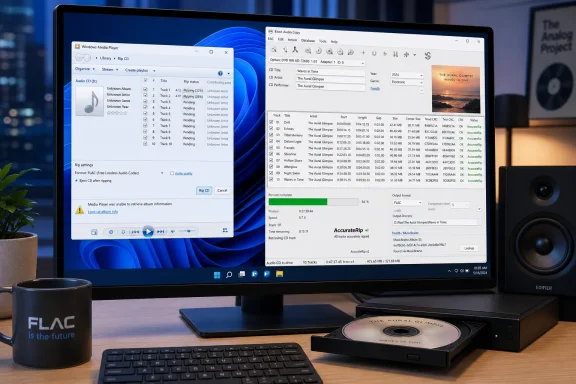 Microsoft’s documentation now describes a broken workflow
The immediate issue is metadata, not the basic extraction of audio. Audio CDs ordinarily do not contain the complete artist, album, track-title, genre and artwork package that people expect in a digital music library. Some carry CD-Text, but many discs — particularly older pressings — depend on an online database lookup to translate the disc’s table of contents into human-readable details.
Windows Media Player historically handled that lookup through Microsoft’s online service. The Register reported that the endpoint associated with the service stopped supplying metadata before Christmas 2025, and said Microsoft did not answer its request for confirmation or a workaround. Windows Central’s August 18 report describes the same failure in the Windows 11-era player: the lookup control remains visible, but returns an error.
That leaves an awkward contradiction in Microsoft’s public record. The support page continues to state that Windows Media Player can fetch track and album details online, and it continues to document the post-rip search feature. Yet Microsoft Q&A responses from moderators and external support staff now tell users that the automatic lookup has been retired and cannot be restored.
Those Q&A pages are not a product announcement, and they do not establish when Microsoft made the decision or who supplied the discontinued database. But the behavior has been independently reproduced, and Microsoft’s documentation has not caught up. For a feature whose entire purpose is to save users from manual data entry, leaving an active-looking command that produces an error is a poor failure mode.
“Media Player” and “Windows Media Player” are not the same thing
Microsoft’s naming makes this more confusing than it needs to be. Windows 11 includes the newer Media Player app, while the older desktop program survives as Windows Media Player Legacy. The legacy application is the one Microsoft’s current ripping documentation describes, including its WMA, WAV and MP3 output options and the familiar Rip settings controls.
The distinction matters when following advice found online. A Windows 11 user may open the newer Media Player app and expect the same settings, while a guide is actually referring to the legacy desktop player. Conversely, some reports loosely call both applications “Media Player,” even though their interfaces and capabilities differ.
The failure itself appears to span the older Microsoft media stack’s online metadata path, not merely a missing button in one version of the user interface. The important operational conclusion is simpler: do not begin a large archival rip assuming Microsoft’s bundled software will automatically produce correctly named and tagged files.
If a collection has already been ripped with placeholder data, the audio files may still be usable. The work shifts to a tagging utility such as MusicBrainz Picard or Mp3tag, where users can identify releases and write corrected metadata into existing files. But that is a repair process, not a substitute for getting the release, disc number, track order, album artist and artwork right while the physical disc is still in the drive.
Exact Audio Copy offers verification, not magic
Windows Central’s suggested replacement, Exact Audio Copy, is a long-running Windows CD extractor designed around more cautious reading and verification than the stock player. Its current official download is EAC 1.8, released in July 2024, and includes FLAC support. FLAC is useful for archiving because it is lossless: the encoded file can be decoded back to the original audio data, unlike a lossy MP3 or AAC conversion.
The central EAC feature is secure extraction. The program can reread audio data and flag locations where a drive cannot confidently correct an error. Its AccurateRip integration adds a second check: after a compatible disc is extracted, EAC can compare each track’s checksum against a database of other users’ rips. A match with meaningful confidence is strong evidence that the extracted track matches known-good results.
That is a real advantage for aging, scratched or poorly manufactured discs. It is also important not to oversell it. AccurateRip cannot validate a track if the disc is absent from its database, and it cannot turn unreadable sectors into perfect audio. A positive result verifies a matching checksum; an inconclusive result means the user should inspect EAC’s extraction log and, if the disc matters, try another drive or a cleaned disc.
Metadata and extraction verification are separate jobs. EAC’s developer says version 1.7 integrated the AccurateRip metadata service after removing freedb support, and also updated its MusicBrainz plug-in to improve artist data, covers and lyrics. MusicBrainz separately lists EAC among Windows rippers that can use its database. That combination gives EAC a path that Microsoft’s player no longer provides: query an actively maintained metadata source, then create tagged archival files in the same workflow.
The paid default is optional, but lookup results still need review
A small trap awaits first-time EAC users. Its bundled GD3 metadata option is a commercial service: EAC’s site says users can make 10 queries before purchasing a $7.99 lifetime license. Windows Central correctly notes that the metadata provider can be changed, and MusicBrainz is a free alternative.
Free does not mean every result is automatically correct. MusicBrainz uses a community-maintained catalog of releases, which is especially valuable for variations such as regional pressings, remasters, bonus discs and classical-music credits. It also means users should examine the chosen release before committing tags. A disc with the right album name but the wrong edition can produce misleading dates, track titles, disc totals or cover art.
For a repeatable archive workflow, the safer sequence is:
- Configure EAC for FLAC output and establish a filename pattern that includes album artist, album title, disc number and track number.
- Select a metadata source, then review the proposed release against the physical CD before extracting.
- Keep EAC’s log and check AccurateRip results after the rip, particularly for damaged or rare discs.
- Use a tag editor afterward for corrections rather than relying on folder names as the only source of identification.
The last point is more important than it sounds. File paths are easily changed when music moves between a NAS, phone, media server and backup disk. Embedded tags travel with the music file; a filename alone does not carry enough context to preserve a complicated multi-disc release cleanly.
Microsoft has removed the convenience layer, not CD support
Microsoft has not removed CD ripping from Windows outright. The legacy player can still copy audio from a disc, and its official documentation still presents the task as supported. What is gone is the hosted database that made the feature useful for people who expected a finished library rather than raw audio files named “Track 1.”
That is why this is more than nostalgia for a retired Windows Media Player feature. Metadata lookup is the point at which a CD rip becomes a manageable digital record. Without it, Microsoft’s out-of-box option asks users to accept manual cataloging or hunt for a third-party workflow after the files already exist.
For new rips, EAC paired with MusicBrainz provides a credible replacement and adds verification the Microsoft tool never emphasized. For existing libraries, the immediate priority is to audit unknown albums, missing artwork and generic filenames before those files are copied into several backups and devices.
