
WinGet can fail before an installer starts, while an installer can complete without making the expected command usable by the running script. WindowsForum user reports on WinGet provisioning, upgrades, maintenance, secure software installation, and workstation setup show why repeatable package-management workflows are attractive. Enterprise approval, however, requires evidence from the production account, management mechanism, and operating-system configuration—not only from an administrator’s Windows 11 terminal.
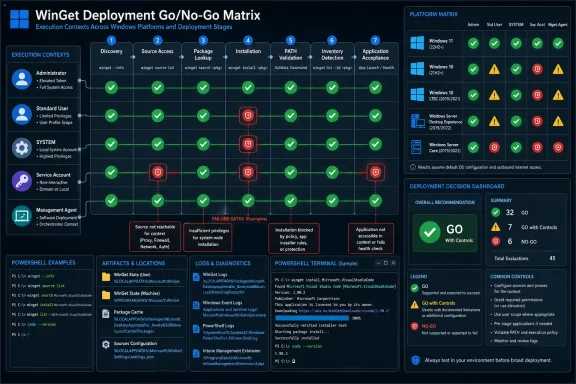 Build the Matrix Before Expanding the Pilot
Do not treat Windows 10 or Windows Server as a single test target. Create cohorts that reflect the actual fleet, including Windows 10 desktop, Windows 10 LTSC, Windows Server with Desktop Experience, Windows Server Core, interactive administrator sessions, standard-user sessions, and noninteractive management contexts.
Test both clean and previously configured systems. A machine on which an engineer has manually repaired prerequisites, refreshed a source, or opened a new shell is not representative of unattended deployment.
Use the following PowerShell preflight as a working template. Replace the example values with the production package ID, source, application command, artifact path, and acceptance arguments. Run it through the same management mechanism and under the same identity that will perform the production deployment.
param(
    [string]$PackageId = "Git.Git",
    [string]$SourceName = "winget",
    [string]$AppCommand = "git",
    [string]$ArtifactPath = "C:\Program Files\Git\cmd\git.exe",
    [string]$LogPath = "C:\ProgramData\WinGet-Rollout\preflight.log"
)

$ErrorActionPreference = "Continue"
New-Item -ItemType Directory -Force -Path (Split-Path $LogPath) | Out-Null
Start-Transcript -Path $LogPath -Append

Write-Host "Identity: $([Security.Principal.WindowsIdentity]::GetCurrent().Name)"
Write-Host "PowerShell process: $PID"
Get-CimInstance Win32_OperatingSystem |
    Select-Object Caption, Version, BuildNumber, OSArchitecture

winget --version
$WingetVersionExitCode = $LASTEXITCODE
Write-Host "winget --version exit code: $WingetVersionExitCode"

winget source list
$SourceListExitCode = $LASTEXITCODE
Write-Host "winget source list exit code: $SourceListExitCode"

winget search --id $PackageId --exact --source $SourceName
$SearchExitCode = $LASTEXITCODE
Write-Host "Exact package search exit code: $SearchExitCode"

if ($WingetVersionExitCode -eq 0 -and $SearchExitCode -eq 0) {
    winget install --id $PackageId --exact --source $SourceName `
        --accept-source-agreements --accept-package-agreements --silent
    $InstallExitCode = $LASTEXITCODE
    Write-Host "Install exit code: $InstallExitCode"
} else {
    $InstallExitCode = $null
    Write-Host "Install skipped because preflight failed."
}

Get-Command $AppCommand -ErrorAction Continue
$CurrentProcessCommandFound = [bool](Get-Command $AppCommand -ErrorAction SilentlyContinue)

$ArtifactPresent = Test-Path $ArtifactPath
Write-Host "Artifact present: $ArtifactPresent"

powershell.exe -NoProfile -Command `
    "Get-Command $AppCommand -ErrorAction Stop; $AppCommand --version"
$FreshProcessExitCode = $LASTEXITCODE
Write-Host "Fresh-process validation exit code: $FreshProcessExitCode"

winget list --id $PackageId --exact
$InventoryExitCode = $LASTEXITCODE
Write-Host "WinGet inventory signal exit code: $InventoryExitCode"

[pscustomobject]@{
    PackageId                 = $PackageId
    SourceName                = $SourceName
    WingetVersionExitCode     = $WingetVersionExitCode
    SourceListExitCode        = $SourceListExitCode
    SearchExitCode            = $SearchExitCode
    InstallExitCode           = $InstallExitCode
    CurrentProcessCommandFound = $CurrentProcessCommandFound
    ArtifactPresent           = $ArtifactPresent
    FreshProcessExitCode      = $FreshProcessExitCode
    InventoryExitCode         = $InventoryExitCode
} | Format-List

Stop-Transcript
If the application does not support --version, replace that argument with its documented noninteractive health or version command. If no command-line interface exists, use an application-specific artifact, service, API, or launch test.
Administrators should populate the matrix’s source-access fields by running both winget source list and the planned exact package lookup under the production account and execution context. Source enumeration proves only that WinGet can enumerate configured sources. It does not prove that the required package can be retrieved from the selected source. A source can appear in the list while an exact search still fails because of identity, network, policy, metadata, or context differences.
Use an operational matrix rather than a summary score:
| OS version / installation type | Execution identity | Management mechanism | Package ID | Source name | Exact command | Exit code | Artifact path | Validation command | Log location | Remediation owner | Exclusion decision |
|---|---|---|---|---|---|---|---|---|---|---|---|
| Windows 10 desktop | Domain user | Management agent | <ID> | <source> | winget install --id <ID> --exact --source <source> ... | <code> | <path> | <app> --version | <path> | <team/person> | Go / Fix / Exclude |
| Windows 10 LTSC | SYSTEM | Scheduled task | <ID> | <source> | winget search --id <ID> --exact --source <source> | <code> | <path> | <acceptance test> | <path> | <team/person> | Go / Fix / Exclude |
| Server Desktop Experience | Service account | Remote orchestration | <ID> | <source> | <exact production command> | <code> | <path> | <acceptance test> | <path> | <team/person> | Go / Fix / Exclude |
| Server Core | SYSTEM | Provisioning script | <ID> | <source> | <exact production command> | <code> | <path> | <acceptance test> | <path> | <team/person> | Go / Fix / Exclude |
Create additional rows for current-process resolution, fresh-process resolution, package inventory, and application acceptance when those results differ. Do not average failures into a fleet-wide success percentage. A red result blocks that package and cohort until it has a tested remediation or an explicit exclusion approved by the named owner.
Command Discovery Is Its Own Deployment Gate
A WinGet script cannot use winget.exe when the production account cannot resolve it unless the workflow explicitly includes a tested bootstrap process. Run winget --version first, capture $LASTEXITCODE, and stop before package operations if discovery fails.
Classify that result as a WinGet command-discovery failure, not an installer failure. This distinction prevents useless retries and exposes cases where an engineer’s interactive shell succeeds while a management agent, service account, or scheduled task does not.
Microsoft’s WinGet GitHub issue #4718 documents a different limitation: winget list --id "Microsoft.PowerShell" failed to show an installed package that appeared in broader winget list output. Keep that finding limited to installed-package detection. It is not evidence that WinGet itself was unavailable.
Accordingly, winget list --id is a deliberately fallible inventory signal, not the recommended sole acceptance test. Record it alongside an application-specific command such as <app> --version, an expected service state, or another test directly tied to the application’s purpose.
PATH and Command Resolution Need Current- and Fresh-Process Tests
Longstanding WinGet discussions, including issue #1781, reinforce the need to examine PATH and command-resolution behavior in LTSC and Server deployment scenarios. The supplied issue material does not establish a reliable delay, refresh interval, or restart requirement. Automation should therefore test what the current process can resolve and what a newly launched process can resolve instead of assuming that an arbitrary sleep will fix the problem.
A package can update the environment while the PowerShell process that launched the installation retains its earlier PATH value. This sequence may consequently fail:
winget install --id <ID> --exact
<app> --version
After installation, run Get-Command <app> in the existing process and then validate through a clean child process:
powershell.exe -NoProfile -Command "Get-Command <app>; <app> --version"
If the child process succeeds while the parent fails, record a process-environment or command-resolution problem. Possible policies include validating in a clean child process, invoking a stable known artifact path, or ending the workflow before dependent steps and resuming them in a new session. Use only a remediation tested for that cohort.
Windows Server Needs Separate Evidence
Server support and deployment expectations require explicit discussion rather than extrapolation from Windows client results. Separate Server Desktop Experience and Server Core in the matrix, and add rows for every Server version, installation history, identity, and orchestration mechanism that materially changes execution.
A successful interactive administrator test proves only that particular context. Production orchestration can use a different profile, environment, network path, source configuration, and installation scope. A package found under one identity may not be discoverable or usable under another.
WindowsForum’s earlier reports on WinGet provisioning and maintenance illustrate the practical value of replacing manual downloads and repetitive installer work with consistent commands. Its reports on automation risks and migration away from legacy scripting also reinforce the need to identify ownership, execution scope, validation, and fallback behavior before changing production systems.
Handle Failures by Stage
Preserve enough evidence to distinguish the following cases:
winget --versionfails: stop and assign command discovery or bootstrap remediation.winget source listsucceeds but exact search fails: investigate the selected source, package ID, production identity, network path, and policy; do not mark source access as fully passed.- Search succeeds but installation returns a nonzero exit code: preserve the transcript and installer evidence for package remediation.
- Installation succeeds but
Get-Commandfails only in the parent: classify it as current-process command resolution and apply the approved session policy. - Artifact and application validation succeed but
winget list --idmisses the package: record an inventory discrepancy; do not uninstall or reinstall automatically based on that signal alone. - WinGet reports success but the acceptance command fails: block deployment because the application is not usable for its intended purpose.
Approval should occur per package, cohort, identity, and management mechanism. Windows 11 success cannot authorize Windows 10 LTSC, Server Desktop Experience, Server Core, or noninteractive execution without matching evidence.
Frequently Asked Questions
Is winget list --id enough to prove that an application is installed?
No. Issue #4718 shows that an exact-ID query can miss an installed package. Treat it as an inventory signal and pair it with an application-specific acceptance command or artifact check.
Does a successful winget source list prove package access?
No. It proves that the context can enumerate configured sources. Run the exact planned lookup, such as winget search --id <ID> --exact --source <source>, under the production account to test package discovery.
Should automation add a sleep after installation to wait for PATH?
Not as a general solution. Test the current process and a fresh process. Then use a cohort-specific policy based on observed command resolution.
What is the minimum go/no-go requirement?
The production context must pass WinGet discovery, source enumeration, exact package lookup, installation, artifact checks, fresh-process validation, and the application-specific acceptance test. Every failure needs a remediation owner or an explicit exclusion decision.
