
📎 AI Summary:
The thread discusses an issue with remote desktop access to a Windows server, caused by missing RDS CALs licenses after previously connecting normally. The original poster seeks guidance on resolving the licensing error. A contributor explains that RDS CALs are required for terminal services, and if not needed, RDS can be uninstalled, with additional advice for server administrators on management and alternative login methods. The overall sentiment is informative, aiming to troubleshoot and resolve the licensing issue.

djamel zbn

New Member
Joined
Nov 24, 2022
Messages
2
Thread Author #1
hello,
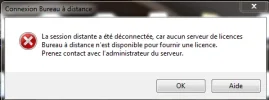
i try to access into my server in remote desktop but i have an erreur message showing that there is no licences remote desktop access.
before this erreur message show i was connecting normaly into my server with RDS.
how can i resolve this issue ??
 

Attachments

  • rds erreur.webp
    rds erreur.webp
    11.8 KB · Views: 48
Solution
If you're not the admin of the server, the admin will need to install the RDS license manger and as RDS CALs. If the feature is not needed then uninstall RDS. Server admins can access the server with the admin switch /v or in the gui under advanced settings. These are the two console logins that work without RDS

Neemobeer

Windows Forum Team
Staff member
Joined
Jul 4, 2015
Messages
8,995
If you have terminal services enabled (RDS) you need RDS CALs licenses to use that feature
 

Neemobeer

Windows Forum Team
Staff member
Joined
Jul 4, 2015
Messages
8,995
If you're not the admin of the server, the admin will need to install the RDS license manger and as RDS CALs. If the feature is not needed then uninstall RDS. Server admins can access the server with the admin switch /v or in the gui under advanced settings. These are the two console logins that work without RDS
 

Solution