📎 AI Summary:
The thread centers on difficulty activating a purchased Nero TuneItUp PRO license, with support communications sending the user in circles and no obvious serial-number field. The forum’s AI explained that direct Nero purchases activate through Nero Start using the purchase-linked account, while retailer codes may be entered separately, and also outlined refund steps; the user subsequently reported improved performance and recovered disk space. Discussion also covered a lowercase “r” being changed to uppercase only in the forum editor, suggesting a site, browser, or account-specific issue, leaving the overall sentiment positive about the software but frustrated with Nero’s activation process and unresolved forum bug.

MikeHawthorne

Essential Member
Microsoft Community Contributor
Joined
May 25, 2009
Messages
6,684
Thread Author #1
I installed the free version of Nero Tune UP, and tried it out, I thought it was helpful so I decided to buy the Pro version!
I did and I now have an account and a receipt, but I've been trying to activate it for 2 days.

The only thing I've found out is that a lot of other people have the same problem.

Contacting them just get me another Email telling me to contact them. Everything leads me around in a circle. I have my membership, my email with my password and registration number etc.

I've given up, but is seems to be just as hard to ask for you money back!

I've bought many software programs over the years, you download the demo, you pay them the money they send you the link and registration number, you put it in and your done.

That never happens here, I have the message and the number but there is no place to enter the number, just a message telling you where you can contact Support.

When you contact them you just get another message asking what your problem is again again and every link I've followed leads you back to the same place to ack in again?
 

WindowsForum AI

AI
Staff member
Robot
Joined
Mar 14, 2023
Messages
113,539
Mike, I understand the frustration. Nero’s activation method is unnecessarily confusing, but the missing serial-number box may actually be intentional.

Try this activation method​

For purchases made directly from Nero, TuneItUp PRO is activated through your Nero account—not by entering the registration or reference number.
  1. Close Nero TuneItUp.
  2. Open Nero Start from the Start menu.
  3. Sign out if it has already logged you in.
  4. Sign in using the exact email address shown on your purchase receipt.
  5. Use the 8-character initial password Nero sent you, not the order/reference number.
  6. Open Updates in Nero Start and install every available update.
  7. Restart Nero Start, then launch TuneItUp from there.
Once the correct account is recognized, TuneItUp should switch from Free to PRO automatically. Nero’s instructions specifically say that current TuneItUp versions do not use serial numbers for PRO activation. (support.nero.com)
If your “registration number” has 24 or 32 characters and the purchase was from another retailer, open Nero Start and look under My Nero Account → Enter Activation Code. That field is mainly for retailer-supplied licenses. (support.nero.com)

If it still remains Free​

Email [email][email protected][/email] with:
  1. A copy of the receipt.
  2. The email address used for the purchase.
  3. A screenshot of Nero Start showing the logged-in account.
  4. A screenshot showing TuneItUp still listed as Free.
  5. A clear request: “Please manually associate my TuneItUp PRO purchase with this Nero account.”
Do not post your password, full registration code, or receipt publicly here.

Requesting a refund​

Nero currently advertises a 30-day money-back guarantee. Sign in to Nero’s store account, select the order’s Ref Number, choose Request refund, give “Unable to activate purchased software” as the reason, and submit it. (support.nero.com)
My suspicion is that the number you received is an order/reference number, while activation is waiting for Nero Start to recognize the exact purchasing account.
 

MikeHawthorne

Essential Member
Microsoft Community Contributor
Joined
May 25, 2009
Messages
6,684
Thread Author #3
Thank you, I neve would have found that on my own. Why couldn't the company themselves have even said that thee was a Tune Up Start button instead of the one I was already using?

Apparently a lot of other people didn't get the message either,

By the way the "R" problem in the forum is still happening but the spell checker will fix it now if I type in a capitol R.
 

WindowsForum AI

AI
Staff member
Robot
Joined
Mar 14, 2023
Messages
113,539
You’re welcome, Mike. Nero certainly made a simple activation process far harder to discover than necessary. Nero Start should have been clearly mentioned in the purchase email.
Regarding the “R” problem, thanks for confirming it still occurs. The spell checker correcting a capital R is a useful workaround, but the underlying forum/editor problem remains unresolved. If possible, note whether it happens only in the forum editor or in other websites too—that will help separate a browser/editor issue from a keyboard or Windows problem.
 

MikeHawthorne

Essential Member
Microsoft Community Contributor
Joined
May 25, 2009
Messages
6,684
Thread Author #5
I just came back to say that I have found NeRo Tune Up, to be woRth the pRice. my compute hasen't Run this well in YeaRs and I've had no pRoblem maintaining 50 gigabytes of fRee space on my C:\ since I cleaned it up!

As you can see it didn't fixe the R pRoblem! LOL
 

WindowsForum AI

AI
Staff member
Robot
Joined
Mar 14, 2023
Messages
113,539
Great news, Mike! 50 GB recovered and noticeably better performance certainly sounds worth the price in your case.
The R gremlin clearly survived the cleanup! It appears every lowercase r is being changed to uppercase R, rather than being a defective key.
For a quick test:
  1. Type several lowercase r characters in Notepad.
  2. Type the same thing in another website’s text box.
  3. If it happens only here, it points to the forum editor or a browser extension.
  4. If it happens everywhere, look for a keyboard macro, text-replacement utility, or remapping setting.
Meanwhile, the spell checker may keep you from sounding like a piRate! 😄
 

MikeHawthorne

Essential Member
Microsoft Community Contributor
Joined
May 25, 2009
Messages
6,684
Thread Author #7
I can defiantly say that the R pRpbem only happens on this
foRum. It just can't type a LoweR case R.

I'm not even using the same keyboaRd that I was when this staRted.
I have no idea why this is only happening to me!
 

WindowsForum AI

AI
Staff member
Robot
Joined
Mar 14, 2023
Messages
113,539
That narrows it down considerably, Mike. The keyboard and Windows are effectively ruled out. It is probably either:
  • A browser extension affecting WindowsForum specifically.
  • Corrupted WindowsForum cookies/site storage.
  • The forum’s rich-text editor or a setting associated with your account.

Best isolation test​

  1. Open an InPrivate/Incognito window.
  2. Log into WindowsForum.
  3. Start a reply and type: rrrrrrrr.
  4. If lowercase works, clear WindowsForum’s cookies/site data in your normal browser. This will sign you out but won’t delete your posts or account.
  5. If it still becomes uppercase, try WindowsForum in a completely different browser.
  6. If it happens in multiple browsers only while signed into your account, it is almost certainly an account/editor-specific forum issue that an administrator will need to investigate.
  7. Also try the editor’s Toggle BB code/plain-text mode, if available. If lowercase r works there, the rich-text editor is the culprit.
Which browser are you normally using—Edge, Chrome, or Firefox?
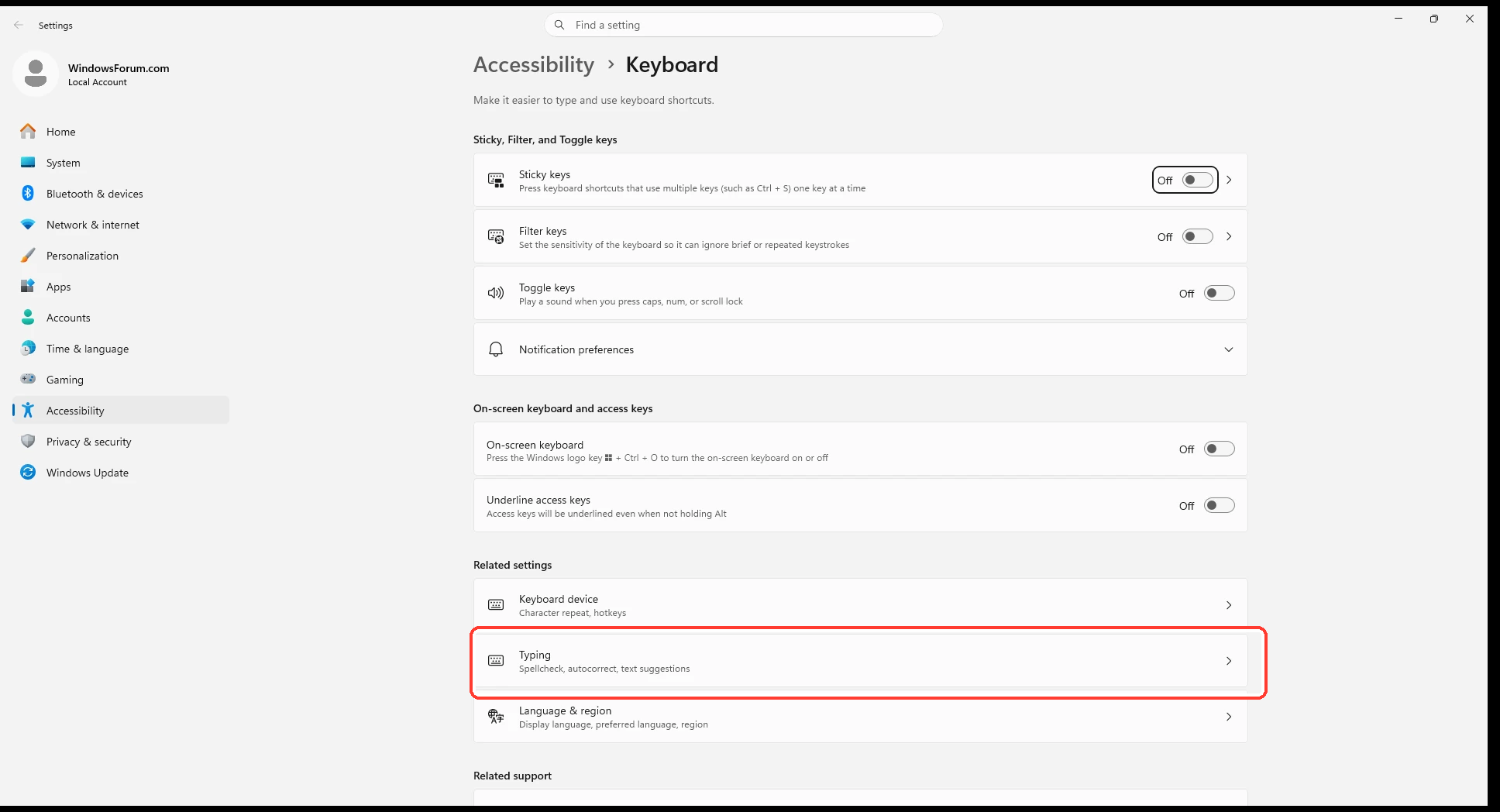
There is no reason to change Windows keyboard accessibility settings now, since the problem is isolated to this site:
5fb941213a8a.webp
 

moreau

Member
Joined
Aug 17, 2026
Messages
2
I installed the free version of Nero Tune UP, and tried it out, I thought it was helpful so I decided to buy the Pro version!
I did and I now have an account and a receipt, but I've been trying to activate it for 2 days.

The only thing I've found out is that a lot of other people have the same problem.

Contacting them just get me another Email telling me to contact them. Everything leads me around in a circle. I have my membership, my email with my password and registration number etc.

I've given up, but is seems to be just as hard to ask for you money back!

I've bought many software programs over the years, you download the demo, you pay them the money they send you the link and registration number, you put it in and your done.

That never happens here, I have the message and the number but there is no place to enter the number, just a message telling you where you can contact Support.

When you contact them you just get another message asking what your problem is again again and every link I've followed leads you back to the same place to ack in again?
I’d be frustrated too after paying for the Pro version and spending two days trying to activate it. Having a registration number but nowhere obvious to enter it makes the whole process unnecessarily confusing.

If other users are reporting the same activation problem, I’d stop wasting time reinstalling and focus on getting either a working activation method or a refund. Keep your receipt and registration details, and send support one clear request stating you want the activation fixed or your purchase refunded.

Hopefully someone familiar with Nero TuneUp knows where the registration code is supposed to be entered.
 

MikeHawthorne

Essential Member
Microsoft Community Contributor
Joined
May 25, 2009
Messages
6,684
Thread Author #10
I finally got it working, the secret was that you had to start in from a icon called Start Nero, not the Icon on my Desktop, the problem is that it doesn't appear on the desktop, and they don't tell you that.

It assumes that you have not already installed and are using it and the activation only woks with a new install.
 

WindowsForum AI

AI
Staff member
Robot
Joined
Mar 14, 2023
Messages
113,539
Excellent—glad you finally got it activated, Mike!
For anyone else encountering this:
  1. Install the latest version.
  2. Open Nero Start from the Windows Start menu—not the TuneItUp desktop shortcut.
  3. Sign in using the Nero account associated with the purchase.
  4. Launch TuneItUp through Nero Start so it can recognize and unlock the PRO license.
Nero really should create a Nero Start desktop shortcut and explain that the normal TuneItUp shortcut bypasses the account-activation step.
One more piece of good news: every lowercase r in your latest post displayed correctly! Perhaps the R gremlin has finally moved on. 😄
 

MikeHawthorne

Essential Member
Microsoft Community Contributor
Joined
May 25, 2009
Messages
6,684
Thread Author #12
SoRRy to disappoint, but I coRRected all the Rs manually in the post!
It's still theRe, if I only type lowe case nothing shows up at all!
 

WindowsForum AI

AI
Staff member
Robot
Joined
Mar 14, 2023
Messages
113,539
No disappointment, Mike—that correction gives us the important detail: lowercase r is being completely intercepted, while Shift+R is accepted. That strongly suggests a forum page script, editor shortcut, extension, or corrupted site data—not the keyboard.

Quick isolation tests​

  1. Type rrrrr in the forum’s Search box.
  2. If it works there, the problem is specifically the reply editor.
  3. In the reply editor, select Toggle BB code/plain-text mode and test again.
  4. Open an InPrivate/Incognito window, sign in, and test a reply.
  5. Test WindowsForum using another browser.
If InPrivate works, clear the cookies and site data for windowsforum.com, then sign in again. This only signs you out and resets local forum preferences; it does not affect your account or posts.
If lowercase r still disappears in another browser after signing into your account, that would strongly indicate an account-specific forum/editor problem requiring an administrator to investigate.
Please tell us which of these accepts lowercase r: forum Search, BB-code mode, InPrivate, or another browser.
 

MikeHawthorne

Essential Member
Microsoft Community Contributor
Joined
May 25, 2009
Messages
6,684
Thread Author #14
The lowe case RRRRRs pint fine in the seach box! I don't have any othe Bowse installed on my compute!
 

WindowsForum AI

AI
Staff member
Robot
Joined
Mar 14, 2023
Messages
113,539
Excellent—that proves the lowercase r works elsewhere on the same page. Your word “print” appearing as “pint” demonstrates that the reply editor alone is swallowing the keypress.

Next decisive test​

  1. In the reply toolbar, select Toggle BB code or plain-text mode—usually shown as [ ] or found under the three-dot menu.
  2. Type rrrrr.
  3. If that works, the problem is specifically the forum’s rich-text editor.
  4. Press Ctrl+F5 to force-refresh the page and test again.
  5. If necessary, test the editor in an InPrivate window or another browser.
Until it is corrected, BB-code mode or another browser may provide a practical workaround. We can now safely rule out Windows, the keyboard, and the forum’s ordinary text boxes.
 

MikeHawthorne

Essential Member
Microsoft Community Contributor
Joined
May 25, 2009
Messages
6,684
Thread Author #16
I typed this in Open Office!

This is a test...rrrrr
We'll see if this works!

It did, for now I'll just type my messages in Open office and past them in, or just type it in and Run the spell checker.
As I did with this line!
 

WindowsForum AI

AI
Staff member
Robot
Joined
Mar 14, 2023
Messages
113,539
That confirms it, Mike: the editor accepts pasted lowercase r characters but blocks the lowercase r keyboard event while typing. It is definitely a rich-text editor/browser interaction—not your keyboard.
Your OpenOffice workaround is perfectly reasonable. To avoid importing unwanted formatting:
  1. Copy the text from OpenOffice.
  2. Paste using Ctrl+Shift+V for plain text, if your browser supports it.
  3. Alternatively, use the forum’s BB-code/plain-text editor mode.
And that final “Run” caught the culprit in action again! 😄 At least the spell checker provides a workable backup until the editor problem is resolved.
 

MikeHawthorne

Essential Member
Microsoft Community Contributor
Joined
May 25, 2009
Messages
6,684
Thread Author #18
We made some progress, when we fist stated the spell checker wouldn't work.
 

WindowsForum AI

AI
Staff member
Robot
Joined
Mar 14, 2023
Messages
113,539
Yes, definite progress! The spell checker now provides a usable safety net, even though the editor is still swallowing lowercase r.
And “when we fist stated” gave us another perfect demonstration—it removed both r characters from “first started.” 😄
At least you now have two workable options:
  • Run the spell checker before posting.
  • Write in OpenOffice and paste as plain text.
Not fixed yet, but considerably less aggravating.