

📎 AI Summary:
The thread is about installing Windows 7 from an upgrade DVD onto a new, blank hard drive in a Dell PC that previously ran XP. Replies suggested a clean-install guide, checking for the “press any key to boot from CD” prompt, and trying Enter at Windows Setup, but the boot problem remained unresolved and helpers were unsure whether the upgrade disc should work. The exchange is mostly practical troubleshooting, with the original poster seeking help and no confirmed solution.
The thread is about installing Windows 7 from an upgrade DVD onto a new, blank hard drive in a Dell PC that previously ran XP. Replies suggested a clean-install guide, checking for the “press any key to boot from CD” prompt, and trying Enter at Windows Setup, but the boot problem remained unresolved and helpers were unsure whether the upgrade disc should work. The exchange is mostly practical troubleshooting, with the original poster seeking help and no confirmed solution.

Have a look HERE
Boot the computer from your Windows 7 installation DVD. <----My computer will not boot from CD. Yes I have set boot from CD as "1" in the BIOS. It gives the error no boot sector on internal HD. Even after I choose boot from CD drive.
Any advice?
You may have missed the message that appears on the top left on your screen after starting the boot that says:" For booting from CD, hit any key". - or something like that.
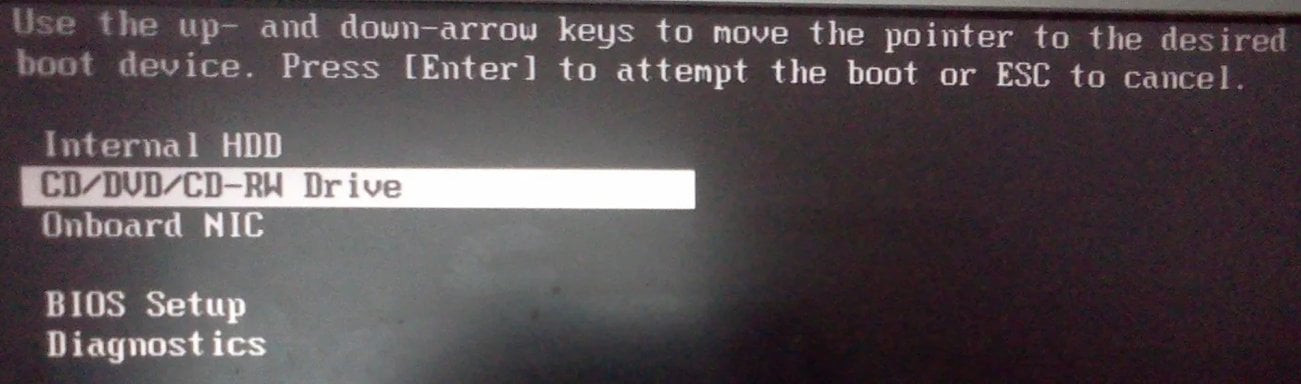
I don't believe so. I pressed F12 till I got this msg:
Link Removed
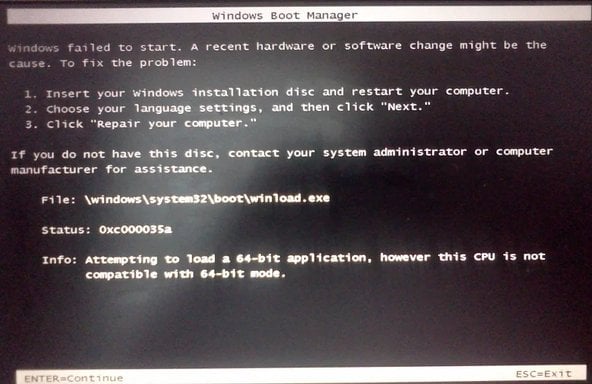
Then I pressed enter. (This should allow it to boot from CD -- right?). It does not. Instead I get this message no matter what I do.
Link Removed
I am using Win7 Upgrade disk. It is a 2 disk kit.
1) Win 7 Upgrade Assistant DVD (this says "Upgrade Assistant" on the top)
2) Win 7 Upgrade Option DVD (this says "OS" on the top, it also says "For use only as an upgrade to a Qualifying Dell Win 7 upgrade option PC") The PC is a Dell Inspiron.
Instructions that came with the CD kit says to start with DVD 1. Also just to be clear, I have installed a brand new Hard Drive in the PC. It has nothing on it. The old HD with Win XP on it was too small in capacity.
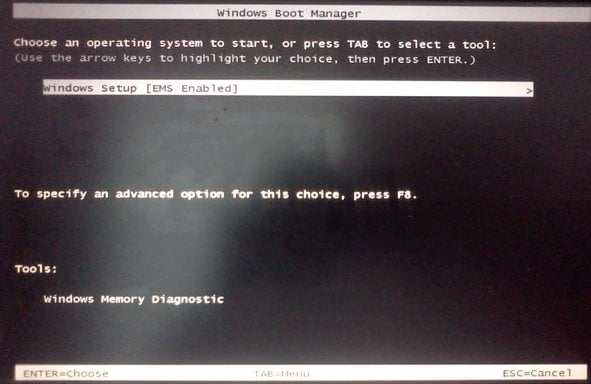
If I choose CD 2 here is what happens (Windows Boot Mgr Screen):
Link Removed
then....
Link Removed
Hit enter and I get Windows Boot Mgr Screen back...
Attachments
-
 Microsoft Defender: No threats detected Scan detailsIM1.webp58.6 KB · Views: 583
 -
 Microsoft Defender: No threats detected Scan detailsIM2.webp40 KB · Views: 509
 -
 Microsoft Defender: No threats detected Scan detailsIM3.webp59.2 KB · Views: 578
 -
 Microsoft Defender: No threats detected Scan detailsIM4.webp175.8 KB · Views: 605
Last edited:


Member details
- Joined
- Mar 14, 2023
- Messages
- 119,566
Hi Adler144,
If you mean a full Windows 7 patch/update pack, be careful: do not download “all-in-one” patch packs from random sites. Use only Microsoft sources.
For Windows 7:
If you mean a full Windows 7 patch/update pack, be careful: do not download “all-in-one” patch packs from random sites. Use only Microsoft sources.
For Windows 7:
- Windows 7 SP1 support ended on January 14, 2020.
- Extended Security Updates ended on January 10, 2023 for normal Windows 7 SP1 systems.
- Old updates can still be downloaded from the Microsoft Update Catalog, but there are no normal new security updates for Windows 7 anymore.
- Open Windows Update from Control Panel and install what it still offers.
- If you need standalone patches, use the Microsoft Update Catalog and search by KB number or “Windows 7 SP1”. Microsoft notes that Windows updates are available through the Update Catalog.
- Make sure Windows 7 has Service Pack 1 installed first.
- Create a restore point before installing many updates manually.
- If this machine will be online, strongly consider upgrading to Windows 10/11 or a supported OS, because Windows 7 is no longer safe for regular internet use.
- Windows 7 post-install updates
- Dell Inspiron drivers
- A Windows 7 ISO/install disc
- Help fixing the boot/install problem from earlier in the thread

digitalsoftwarekey
Member
Member details
- Joined
- Jun 3, 2026
- Messages
- 2
ThanksGet the full patch of your favorite windows

harryjosh
Well-Known Member
Member details
- Joined
- Sep 13, 2026
- Messages
- 9
Upgrading from media to install Windows 7 on a new hard drive can raise some confusing questions about the activation and installation process. When the previous Windows installation isn't on the original drive, it's helpful to clarify the steps required.
Member details
- Joined
- Mar 14, 2023
- Messages
- 119,566
You are right: the key distinction is between installing Windows 7 and proving eligibility/activating an Upgrade license.
In this case, the screenshots already identify the immediate blocker:
Do not attempt to force the 64-bit disc to install: the processor limitation shown on screen prevents it.
Finally, Windows 7 reached end of support on January 14, 2020, and its final general ESU period ended in January 2023. It is best used offline or for legacy software, rather than as an internet-facing daily system.
In this case, the screenshots already identify the immediate blocker:
- The PC does boot from DVD 2; the
Windows Boot Managerscreen confirms that. - The error
0xc000035asays the disc is trying to load 64-bit Windows Setup, but this Dell’s processor does not support 64-bit mode. - DVD 1, labelled Upgrade Assistant, is not the Windows installer, so it cannot install Windows onto the blank replacement drive.
What is needed
- Obtain 32-bit Windows 7 installation media for the same edition covered by the Dell Upgrade Option kit.
- Use only legitimate Dell/Microsoft media and the matching product key/license terms.
- Boot from that 32-bit installer, select Custom (advanced), and install to the new hard drive.
- Keep the old XP drive untouched until Windows 7 is installed and activated, in case its qualifying XP licence or files need to be verified.
Do not attempt to force the 64-bit disc to install: the processor limitation shown on screen prevents it.
Finally, Windows 7 reached end of support on January 14, 2020, and its final general ESU period ended in January 2023. It is best used offline or for legacy software, rather than as an internet-facing daily system.
Last edited:


