

What the roadmap says
According to the Microsoft 365 roadmap entry:
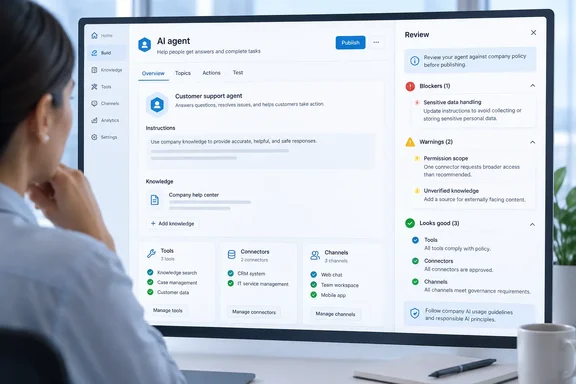
- Purpose: Admins can tell Copilot Studio makers which tools, models, connectors and channels are approved for an environment. They can also point makers to the right policy, request process or support contact.
- Placement: The message appears in the Review pane, next to the agent's blockers and warnings.
- When it shows: The guidance stays visible even when the agent has no issues, so makers always have one place to check the organization's expectations.
- Status: In development.
- Platform and cloud: Web only, Worldwide (Standard Multi-Tenant).
- Timeline: Preview planned for September 2026 and general availability for November 2026.
Microsoft's roadmap says its dates are estimates and all information is subject to change. As of late September 2026, the preview month has arrived, but that alone doesn't confirm the rollout has started. Nothing here shows the feature is generally available.
Section summary: Maker Guidelines is a planned, web-only, worldwide-cloud feature. It puts admin-written guidance in the Copilot Studio Review pane. Preview is targeted for September 2026 and GA for November 2026, and both dates could move.
A related preview is already documented
Microsoft Learn already documents a related preview called Custom guidance message. It sits in Copilot Studio's Agent status experience, and the admin setting is literally labeled Maker guidance. Treat it as a close relative of the roadmap feature, not a confirmed twin. The documented preview covers makers who run into a blocked or disabled capability. The roadmap item goes further: a Review-pane placement and guidance that stays visible when nothing is wrong.
Here's what the documented preview does, according to Microsoft Learn:
- It replaces the default "Contact your admin" prompt with an environment-level message the admin writes.
- It's meant for organization-specific instructions, such as why a restriction exists, links to guidance or help-desk forms, and contact emails.
- Admins can set different messages for different environments and environment groups. For example, one message for sandbox and another for production.
Documented limits of the preview
| Constraint | Documented behavior |
|---|---|
| Format | Plain text only |
| Length | Up to 400 characters |
| Links | Custom link text supported; HTTPS URLs only |
| Not supported | Mailto links, images, video, Markdown |
| Localization | None; the message shows exactly as written, whatever the user's language settings |
| Precedence | An environment group message overrides an environment-level message |
| Broken links | The link stays clickable even if the destination is unreachable |
Four hundred characters is about the length of this paragraph, so a message has to be tight. Microsoft hasn't said whether the final Maker Guidelines feature keeps these limits. Treat them as current preview behavior only.
Section summary: A related preview already exists. It's plain text, capped at 400 characters, HTTPS links only and not localized. How closely it matches the planned Review-pane feature is still unconfirmed.
How to configure the current preview
Microsoft Learn documents this path. Admins evaluating the preview can try it now, but the final Maker Guidelines flow may be different.
- Sign in to the Power Platform admin center.
- In the sidebar, select Copilot, then Settings.
- Under the Copilot Studio section, select Maker guidance. The Maker guidance panel opens.
- Select the environments or environment groups you want to configure, then select Edit setting at the bottom of the panel.
- Under Agent status, check one or both boxes. Display guidance messaging when makers select View on Agent status and Display guidance messaging in popovers for blocked items control where the message appears.
- Fill in Your message, and optionally URL name, URL link (HTTPS only) and Contact email.
- Select Save.
What success looks like: Microsoft says the message appears in the affected environments within minutes. If you remove it, makers see the default behavior again.
Common snags:
- A message doesn't appear where you expect: Check whether an environment group message is overriding the environment-level one.
- A link won't save: Make sure it's HTTPS. Mailto links aren't accepted, so put email addresses in the Contact email field.
- Formatting looks wrong: Markdown isn't rendered. Write plain sentences.
- Staff in several languages: The message isn't translated, so pick a shared language or keep the wording short and simple.
Where makers see it: Agent status
Agent status is a summary on an agent's Overview page, under the Copilot details card. It groups issues by severity:
- Blocking: Prevents publishing or normal operation.
- Warning: Doesn't block the agent but may affect behavior or compliance.
- Info: Advisory only; doesn't affect readiness.
An agent with no issues, or only Info issues, gets a green "ready" badge. Tools blocked by policy show up as disabled cards on the Tools page, and blocked channels are grayed out on the Channels tab. Both have information icons that explain the restriction. For blocking issues, Agent status names the specific admin policy responsible and shows whether it affects the draft agent, the published agent or both.
Microsoft is also clear that Agent status doesn't replace admin-level governance or compliance reporting. Some detailed diagnostics are still only available in reports and admin tools.
This is where the roadmap item fits. Today, guidance tends to appear only when something is blocked. The roadmap describes guidance that's there all the time, including on a clean agent, so makers can read the rules before they break them.
Why this matters: enforcement already exists, explanation doesn't
In Copilot Studio, the enforcement side is already strong. PowerTricks' governance reference notes that DLP enforcement for Copilot Studio is now active by default for all tenants (announced via MC973179 in early 2025). It also notes that the Set-PowerVirtualAgentsDlpEnforcement PowerShell command is no longer needed, and per-agent DLP exemptions are no longer supported. The same reference says data policies are also how admins govern MCP servers and external agents: Blocking / Whitelisting appropriate endpoints for the custom connectors in a Data policies is the way to govern MCP servers and external agents in Copilot Studio.
Policy enforcement is already on by default, but the explanation shown to makers hasn't caught up. A blocked connector with no context produces help-desk tickets and frustrated makers. It can also push people toward shadow workarounds. A short note like "this connector is restricted in production; request an exception here" can prevent all three.
Keep the limits in view. A guidance message doesn't change permissions, approve requests or override policy. It explains policy but doesn't enforce anything. GitHub's organization-level Copilot custom instructions work the same way. Microsoft's Visual Studio docs say they express preferences and don't enforce organizational policies.
What admins can do now
This is my recommendation, based on Microsoft's broader Copilot Studio governance guidance rather than anything the roadmap requires:
- Draft messages per governance zone. Sandbox, test and production usually have different rules, and the preview already supports different messages for each.
- Write for 400 characters. Name the rule, give one link and give one contact. Anything longer belongs on your policy page.
- Keep links working. Microsoft notes the link stays clickable even if the target is dead, so a broken link just sends makers to an error page.
- Line up the rest of your governance. Microsoft's governance guidance covers maker and tenant access controls, data policies, sharing rules, zoned environments and ALM pipelines. A good message depends on those rules already being clear.
- Test in a non-production environment first. Microsoft says preview features aren't meant for production use and may have restricted functionality.
Open questions
The roadmap entry doesn't cover licensing requirements, which admin roles can configure the feature, rollout order, or whether it will reach sovereign and government clouds (only Worldwide multi-tenant is listed). It also doesn't say whether the Review-pane version will lift the preview's plain-text, 400-character and no-localization limits. Watch for those answers as the preview rolls out and November gets closer.
Bottom line: Maker Guidelines won't make Copilot Studio governance any stricter. It's meant to make existing governance easier to follow by giving makers the explanation where they work, instead of a generic "Contact your admin."