

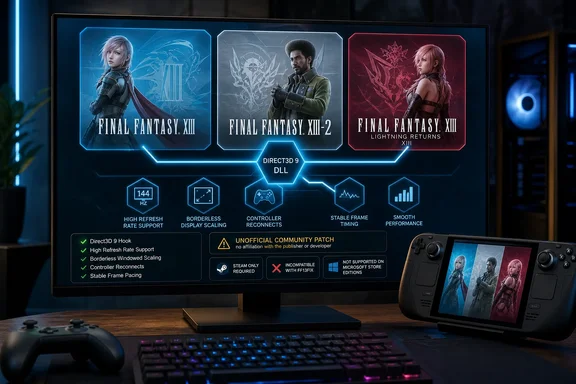
Wccftech first highlighted the package over the weekend, but the primary record is clearer than the report’s headline: FF13NovaFix is a d3d9.dll proxy authored by KartinX, whose GitHub account is Kartin8. It hooks the games’ Direct3D 9 calls to correct broken behavior that became conspicuous on modern Windows PCs, high-refresh monitors, and handheld PCs. The same DLL is intended to work across all three games, although Nexus Mods hosts separate pages because its site structure associates a mod with one game at a time.
For PC players, this is potentially the most coherent baseline fix the trilogy has received. It consolidates many functions that previously demanded a mixture of older patches, configuration edits, and game-specific workarounds—while making an explicit break with one of the most common existing tools, FF13Fix.
A 12-year PC support gap, but three different release dates
The headline’s “12 years” is accurate for the first game, but it flattens the trilogy’s staggered PC history. Square Enix released Final Fantasy XIII on Steam on October 9, 2014, Final Fantasy XIII-2 on December 11, 2014, and Lightning Returns on December 10, 2015. In other words, the oldest port has carried its baggage for nearly 12 years, while the newest has been on PC for just under 11.
Square Enix marketed the original Steam release as optimized for PC and running at 60 frames per second. Its store pages also advertised high-end graphics settings for Lightning Returns, including up to 4K resolution and a 60-fps ceiling. Those claims did not guarantee that the games’ animation, simulation, UI placement, controller handling, and window behavior would remain correct when players used contemporary displays or tried to uncap performance.
That distinction is exactly what FF13NovaFix addresses. A game can render a high frame rate and still be technically broken at that rate if game logic, root motion, camera motion, cutscene animation, or combat timing assumes a narrower frame-time range. In XIII-2, the reported consequences were not cosmetic: the mod lists simulation timing, root motion, chain updates, model initialization, Chocobo race camera movement, and the prologue battle among its high-FPS fixes.
The mod does not turn the trilogy into a native DirectX 12 or modern-engine remaster. It keeps the original games on their Direct3D 9 foundation. What it does is remove several of the limits and failure points that made the Steam editions feel like preserved console-era executables rather than maintained Windows software.
High frame rates are now treated as a compatibility problem
The strongest part of FF13NovaFix is its recognition that unlockable frame rates require repairs, rather than just an .ini toggle. Older FF13Fix could remove a frame-rate limit in XIII and XIII-2, but its own documentation warned that doing so could make facial animation look wrong during in-engine scenes. It also removed controller hot-plugging support as part of eliminating periodic controller scans that caused stutter.
FF13NovaFix says it corrects facial animations at high frame rates in all three titles, then adds deeper per-game fixes. For the original Final Fantasy XIII, that includes field movement and Titan’s Trials route behavior. For XIII-2, it reaches further into timing-dependent behavior that could otherwise make a faster PC actively less reliable than a 60 Hz setup.
Lightning Returns has its own wrinkle. Its Steam page specifies a maximum supported frame rate of 60 fps, but NovaFix removes the game’s forced VSync cap. That wording matters: removing a forced cap is not a blanket promise that every configuration will behave perfectly at every uncapped frame rate. The developer separately says that Savior’s Patch, an existing Lightning Returns mod focused on FPS and stuttering improvements, can be loaded alongside NovaFix through its add-on system.
For users with 120 Hz, 144 Hz, 165 Hz, or 240 Hz monitors, the practical gain is control. NovaFix exposes VSync, refresh-rate selection, triple buffering, and frame limiting in XIII and XIII-2, with the official launcher’s settings also surfaced in-game. Rather than blindly uncap every title, players can set a stable limit matched to their monitor and GPU headroom.
Resolution and input fixes address the ordinary Windows experience
The original ports were built around assumptions that have aged poorly: 720p-centered UI layout, fullscreen behavior tied to a fixed display mode, and controller support that did not gracefully follow how people use PCs now. NovaFix adds proper monitor selection, borderless and borderless-fullscreen modes, automatic keyboard/controller prompt switching, fast controller reconnect, and XInput vibration.
It also fixes UI clipping and alignment above 720p in XIII and XIII-2, improves UI rendering, and adds anisotropic filtering without altering the intended treatment of pixel-art and interface textures. In XIII-2, it identifies a specific one-pixel HUD sampling error above 720p and restores alpha-tested shadow detail, with an optional faster shadow-rendering mode and mip LOD-bias control.
These are unglamorous fixes, but they determine whether a game behaves normally when moved between a desktop, a living-room display, and a handheld dock. The earlier FF13Fix could correct some higher-resolution screen effects and a 720p-hardcoded rectangle in the first game’s enemy-scan text. NovaFix’s scope is broader, particularly for XIII-2 and Lightning Returns.
There is a hard limitation for ultrawide users: NovaFix does not currently provide ultrawide support. The developer says it can be chained with existing ultrawide mods, so 21:9 and 32:9 players should not remove their current aspect-ratio solution expecting this DLL to replace it.
Do not install it on top of FF13Fix
The immediate risk is not the file drop itself; it is treating NovaFix like one more DLL in an already layered mod setup. Both FF13Fix and NovaFix use the filename d3d9.dll, and the NovaFix documentation explicitly says they are incompatible. Users should replace FF13Fix rather than load both together.
That warning is more consequential than it first appears. The old FF13Fix documentation recommends a 4 GB Large Address Aware patch for Final Fantasy XIII and XIII-2, particularly with high resolutions, triple buffering, DXVK, ReShade, or HD asset mods. NovaFix similarly says a 4 GB patch is effectively necessary, but its author recommends using the Nova Chrysalia mod loader for that one-time patching step.
According to the NovaFix documentation, arbitrary alternatives can either require the old FF13Fix stack or trigger Steam DRM. The loader is not required for day-to-day launching after it has applied its patch, but the game executable still needs the additional memory headroom. NovaFix’s author warns that without it, a game may crash before gameplay.
The basic Windows installation is simple:
- Copy NovaFix’s
d3d9.dllnext toffxiiiimg.exefor Final Fantasy XIII,ffxiii2img.exefor Final Fantasy XIII-2, orLRFF13.exefor Lightning Returns. - Back up the complete save directory before changing a live installation, particularly for XIII-2, where NovaFix also changes how Steam Cloud save conflicts are handled.
- Open the mod menu with F10, then set a sensible frame limit before trying an uncapped configuration.
- Remove FF13Fix rather than attempting to chain it, and add compatible standalone DLL or ASI mods through NovaFix’s
addonsfolder where possible.
The save handling in XIII-2 deserves attention. NovaFix claims to fix Steam Cloud save crashes and to reconcile newer saves copied between PCs or edited externally instead of silently overwriting one with another. That could be a meaningful improvement for players returning to old saves across desktop and handheld devices, but it is also a reason to keep a manual backup until the first release has accumulated wider testing.
Steam Deck support is real, Microsoft Store support is absent
NovaFix was designed with Linux in mind, its author says, and its in-game menu can be operated from a controller. Steam Deck users can open it by holding Start and Back or clicking both analog sticks, avoiding the need to bind F10. Under Proton, the prescribed launch option overrides Wine’s Direct3D 9 handling so the DLL is loaded.
That is better than an afterthought, but it does not mean every component is magically platform-neutral. Windows users who rely on local DXVK or ReShade need the package’s specified folder layout; putting a second d3d9.dll beside the game is a recipe for a crash. The mod author also flags overlays, recording tools, background processes, and Windows laptop power modes as common performance complications, recommending OBS Game Capture rather than Window Capture or Display Capture.
More importantly, Microsoft Store and PC Game Pass editions are not supported. The mod’s own documentation says so twice, including for Nova Chrysalia. That exclusion leaves a real split between PC storefronts: players who bought the Steam versions have a supported path, while players using the Microsoft-distributed versions remain on the old community-fix landscape.
FF13NovaFix is an unusually substantial first release, but it is still version 1.0.0 of an unofficial injector released one day ago. Square Enix has not issued a corresponding patch or endorsed it. Steam owners who want the trilogy to behave properly on current Windows hardware now have a cleaner route than the old patchwork; Microsoft Store owners do not.
References
- Square Enix Left Final Fantasy XIII Trilogy Broken On PC For 12 Years, But Fix Finally Solves High FPS Issues Wccftech · 2026-09-14T09:28:15+00:00