

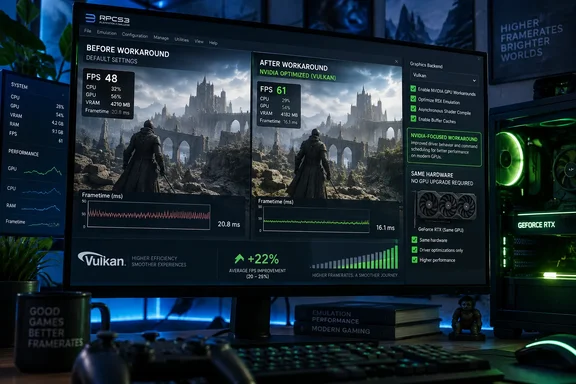
The important correction to the headlines is that NVIDIA has not released a driver fix. This is an emulator-side workaround discovered by RPCS3 contributor Yahfz and incorporated by the project itself. Notebookcheck first reported the claimed benchmark figures; Overclock3D separately reports that the team measured the 20-to-25-percent range in Red Dead Redemption, including a demanding boat scene.
RPCS3 announced the change on September 16, 2026, and said actual results will vary according to the PC configuration, game, and even the scene being rendered. That caveat is substantial. PS3 emulation routinely shifts between CPU-bound, GPU-bound, shader-compilation-bound, and synchronization-bound workloads, so an improvement in the graphics-driver path cannot create a uniform FPS uplift across every title or every moment of the same title.
This is a workaround, not a GeForce driver update
The wording matters because it changes what users should do next. There is no NVIDIA driver version listed as affected, no release-note entry from NVIDIA acknowledging the problem, and no stated driver version where the issue is fixed. Installing a new GeForce driver alone is therefore not the reported remedy; installing the current RPCS3 build is.
RPCS3 is a rolling-release project rather than software with a conventional stable channel. Its GitHub releases page explicitly warns that its numbered tags are milestones rather than stable builds and directs users to the newest official build. That makes the update path more direct for enthusiasts, but it also means users should document their current build and preserve working settings before changing an installation used for long-running game saves or custom patches.
The project’s message also says the workaround should help “most games,” rather than naming a compatibility subset. That is encouraging but incomplete. Neither RPCS3 nor the coverage reviewed here publishes a title-by-title list, pre- and post-patch frametime captures, minimum-FPS data, or a GPU-generation matrix. A 25-percent average-FPS gain in a single scene can be useful, but it does not establish a 25-percent gain for every game, nor does it tell users whether the improvement reduces the stutters that make emulation feel worse than an average-FPS counter suggests.
In short, this is a performance fix worth testing, not a new benchmark baseline that should be assumed for all GeForce-equipped PCs.
The reported gains span two very different NVIDIA systems
The two systems cited by RPCS3 are notable because they cover a wide range of host hardware. The Core i9-13900K and RTX 3080 test reported a 20-percent FPS improvement, while the Ryzen 7 9800X3D and RTX 5090 test reached 25 percent. Those are both high-end configurations, but they combine substantially different CPU architectures and GeForce generations.
That does not prove every NVIDIA generation benefits equally. It does, however, make a purely card-specific regression less likely than a bottleneck in a graphics-driver behavior that can appear across multiple generations. The test pair also weakens the assumption that buying a faster GPU always solves an emulator performance problem. The RTX 5090 result suggests even NVIDIA’s flagship hardware could have been held back by software behavior before it reached a hardware limit.
For the average Windows PC gamer, the most useful expectation is proportional rather than absolute: if a title was already GPU-limited on a GeForce card and spends meaningful time in the affected driver path, the workaround may create visible headroom. That could mean holding a target frame rate more consistently, raising internal resolution in a game that supports it, or reducing dips in demanding scenes. If the game is constrained by RPCS3’s CPU emulation of the PlayStation 3’s Cell processor, the benefit may be negligible.
The claimed results also should not be translated directly from one title to another. Red Dead Redemption is useful as a stress case, especially in an open scene that keeps both the emulator and graphics stack busy, but it is not a stand-in for every PS3 workload. A title with demanding SPU emulation may remain host-CPU-limited; another with expensive shader or render-pass behavior may respond far more strongly.
AMD users should not expect a matching uplift
RPCS3 says the identified bottleneck affected NVIDIA cards and did not constrain AMD Radeon GPUs. The result is an unusual kind of update: it potentially narrows an emulator-specific performance gap without changing AMD performance at all.
That does not make Radeon hardware categorically faster or slower for RPCS3. It means this particular workaround targets an NVIDIA path. Users comparing PC builds should resist treating one emulator update as a permanent vendor ranking; performance in PS3 emulation is heavily shaped by the host CPU, individual game behavior, renderer settings, driver revisions, and the emulator build in use.
There is some useful historical context in RPCS3’s own graphics-driver issue tracker. The project has documented NVIDIA Vulkan problems before, including a performance issue it reported to NVIDIA’s developer forum in October 2020 that received no reply, according to the tracker. It has also recorded older NVIDIA driver bugs that were eventually addressed in GeForce releases, including SPIR-V optimization problems and Windows driver instability.
Those entries do not establish that the newly worked-around performance issue is the same as the 2020 report. RPCS3 has not publicly identified the technical mechanism, driver branch, or bug tracker number for this week’s change. But the project’s record does show that emulator developers have had to accommodate vendor-specific Vulkan behavior before—and that some reports have been fixed only after extended delays.
NVIDIA’s reporting channel is part of the story
RPCS3 used its announcement to publicly ask NVIDIA for a concrete channel through which independent software vendors can submit driver bugs and receive fixes. The team said it had tried NVIDIA’s developer forums in the past without success and had given up.
That complaint is not proof that NVIDIA ignored this newly identified problem; NVIDIA has not publicly responded as of September 17, 2026. It does expose a practical weakness in the path between niche, technically sophisticated Windows software and a GPU vendor. Emulator projects tend to expose unusual API patterns, synchronization demands, and rendering workloads that mainstream games may not reproduce. If a driver flaw is visible only under those conditions, developers need a route beyond consumer support scripts and public forums.
The immediate consequence is that RPCS3 has taken on the maintenance burden. A driver-level correction could potentially help other applications that reach the same problematic behavior. An emulator-specific workaround benefits RPCS3 users now, but it may need to be maintained, retested, and possibly revised as both the project and NVIDIA’s drivers evolve.
That distinction is particularly relevant for administrators or advanced users who maintain a known-good Windows gaming setup. Updating RPCS3 is low-risk compared with experimenting with beta graphics drivers, but it also means the behavior is tied to a particular emulator build. If a future NVIDIA driver changes the underlying behavior, users should verify performance rather than assuming the workaround will always remain necessary or beneficial.
What GeForce users should test before changing settings
The sensible first move is to update RPCS3 from its official current-build channel while keeping the same NVIDIA driver, per-game configuration, internal resolution, frame cap, and patch set. Changing several variables at once makes it impossible to tell whether the new code path delivered the improvement.
A quick, meaningful comparison does not require a full benchmarking lab:
- Use a repeatable saved-game location or replayable sequence, ideally one that previously produced persistent GPU load or obvious FPS drops.
- Let shader compilation settle before recording a comparison, because first-run compilation stutter can obscure changes in sustained rendering performance.
- Record both average FPS and frametimes, since a higher average does not necessarily mean smoother motion.
- Check whether GPU utilization changes during the same scene, but do not mistake higher utilization alone for a performance win.
- Keep an eye out for rendering regressions, crashes, or altered frame pacing, and report reproducible findings through RPCS3’s established community channels.
Users on older GeForce cards are the largest unanswered group. The public examples cover an RTX 3080 and RTX 5090, while RPCS3’s own compatibility documentation distinguishes between legacy and supported NVIDIA driver stacks across older architectures. There is no published evidence yet that a GTX 900-, GTX 1000-, GTX 1600-, or RTX 2000-series card will see the same percentage gain.
For now, the news is concrete: current RPCS3 builds contain a GeForce-focused workaround with large gains in the project’s selected tests. The unresolved part sits with NVIDIA. Until the company acknowledges the bug and names an affected driver range, update the emulator, measure your own games, and do not confuse this with a driver fix.