

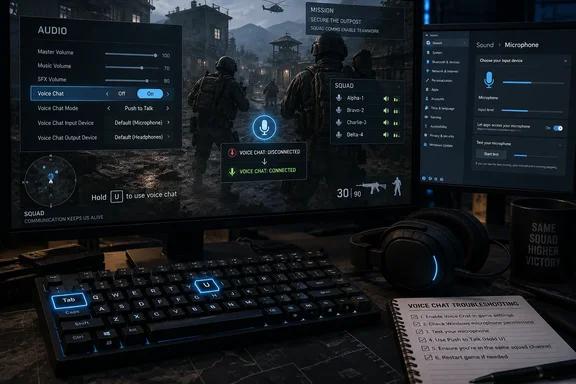
WindowsReport’s five-step guide gets the basic recovery order mostly right, but its most useful detail needs context: the in-game Voice Chat off/on toggle is the only workaround Bulkhead publicly recommended for the documented September outage. The popular Tab, then U, then U sequence is a community-discovered reconnect method that has helped some players, but it is not evidence of a permanent repair—and recent reports show it can fail even when the microphone passes WARDOGS’ own test.
The practical takeaway is simple. First determine whether WARDOGS lost its connection to voice infrastructure, whether the game has selected the wrong input device, or whether the player is using the wrong channel or push-to-talk binding. Those are separate failures that look nearly identical from the player’s side.
Reset the WARDOGS voice session before touching drivers
Bulkhead’s September 4 message, reproduced by Insider Gaming and shared through the WARDOGS community, said some Closed Beta players were losing in-game voice chat because of a third-party outage affecting multiple titles. The developer said the problem was outside its direct control and advised players to toggle Voice Chat off and back on in the Audio settings.
That is the first step worth trying:
- Open Settings in WARDOGS and go to Audio.
- Disable Voice Chat and apply the setting.
- Wait several seconds, re-enable Voice Chat, and apply it again.
- Join or rejoin a match, then test both your intended voice channel and microphone activity.
The reason this comes first is not that it repairs a headset. It forces WARDOGS to establish a new session with its voice provider. If a match join left the client connected to a failed or unavailable voice session, cycling the setting may obtain a working connection without a full game restart.
Community reports point to a second reset path. In a match, opening the scoreboard with Tab and pressing U twice appears to disconnect and reconnect VOIP. Players have described seeing a connection state change after the second press; some say repeating the sequence until the status reads connected restores squad communications.
Treat that as a low-cost workaround rather than a guaranteed fix. Steam Community posts from September 11 and September 12 describe players who had already used the U reset without success. The technique can restore a broken session, but it cannot make a provider-side outage disappear and it cannot fix an incorrect device or keybind.
Squad voice and proximity voice can fail differently
A key omission from generic “mic not working” advice is that WARDOGS has more than one voice context. Players distinguish between squad VOIP and local or proximity VOIP, and a failure in one does not prove the other is broken.
One Steam Community report described a player who thought squad communication was failing, only to discover they were not assigned to a squad. Another player reported the reverse: squad chat worked while local chat did not. Reddit threads from the September incident also include reports of a working microphone in Windows and in WARDOGS’ menu test, yet no usable in-match proximity transmission.
Before changing system settings, verify the basics in the current match:
- Confirm that you are actually in a squad before testing the squad channel.
- Check that the relevant voice bindings are assigned and that you are holding the expected push-to-talk key.
- Test proximity and squad communication separately rather than assuming one result applies to both.
- Ask a squadmate whether they can hear anyone else, because a whole squad losing voice at once strongly suggests a service or server problem.
WARDOGS’ own safety information confirms that text chat runs through the game’s servers while voice chat is delivered by a third-party service. That architecture matters when diagnosing an outage: text chat continuing to work does not clear the voice system, and failed VOIP does not necessarily mean the main game server is down.
It also explains why a match change can appear to fix the problem. If one voice session fails during a server transition and a newly joined session connects correctly, leaving and joining another server can be more effective than repeatedly changing Windows settings. It is a reasonable next action after the in-game voice reset, particularly when proximity chat vanishes for an entire match.
Windows can verify the microphone, but it cannot clear a WARDOGS outage
If other players can hear each other but cannot hear you, shift attention to the local PC. Begin with Windows 11’s microphone controls: open Settings > Privacy & security > Microphone and make sure microphone access and desktop-app access are enabled. WARDOGS is a desktop game, so the desktop-app permission is the relevant control; it may not appear as a neatly named per-app switch.
Then go to Settings > System > Sound and check the selected input device. Speak into the intended microphone and watch the input meter. USB headsets, wireless base stations, webcams, controller microphones, NVIDIA Broadcast, virtual cables, and audio interfaces can all leave Windows with several plausible inputs. A game selecting a stale or unwanted default device can produce the familiar result where Discord works, Windows sees the microphone, and WARDOGS does not transmit.
Steam’s microphone test is useful here as a dividing line. Valve recommends using the Voice settings in Friends & Chat to test the active microphone and verify the input selection. If both Windows and Steam receive audio but WARDOGS does not, the evidence points away from a failed physical microphone.
That does not conclusively prove a WARDOGS infrastructure fault. The game can still be bound to the wrong in-game input, an incorrect push-to-talk setting, or a dead voice session. But it does mean a driver reinstall should not be the first response. Reinstalling a game client is even less compelling when multiple squadmates lose communications together or when the game’s own voice-status message indicates it failed to connect to a VOIP server.
What the September reports do and do not establish
The documented September 4 incident establishes that WARDOGS has experienced a third-party VOIP disruption. It does not establish that every microphone complaint on September 16 is part of a live outage, nor has Bulkhead publicly identified a universal permanent fix, recovery timetable, or a replacement provider.
Player reports since launch are consistent with several overlapping conditions:
- Some players lose voice after joining or changing matches, which makes an in-game reconnect or server switch a sensible first response.
- Some players can hear others but cannot transmit, which is more consistent with an input-device, binding, or channel-selection issue.
- Some players report a working menu microphone test but no in-match voice, which suggests the menu test alone cannot validate the live voice path.
- Some players report total squad-wide silence, which is the clearest sign to stop changing local settings and wait for a service-side recovery.
The distinction matters for support teams as well as players. A local input problem should be documented with the selected Windows device, the WARDOGS input setting, whether Steam’s mic test passes, and whether push-to-talk works in both channels. A suspected service issue should record the approximate time, server or match, whether squadmates were affected, and any on-screen VOIP connection status. “Voice chat is broken” is far less useful to Bulkhead than evidence that separates a failed microphone capture from a failed connection.
The sensible escalation order
For a player whose voice dies mid-match, the least destructive troubleshooting sequence is to toggle Voice Chat in WARDOGS, use the scoreboard reconnect if necessary, and join another server. Restart WARDOGS and Steam only if those steps fail. Check Windows microphone privacy, device selection, WARDOGS channel bindings, and Steam’s microphone test when the problem appears limited to your PC.
Leave driver reinstalls, configuration-file edits, and a full WARDOGS reinstall for later, if at all. None of those actions addresses the failure Bulkhead described on September 4, and the current player reports show that a valid Windows microphone can still fail inside a live WARDOGS voice session.
For now, WARDOGS’ VOIP troubleshooting is less about finding one magic fix than avoiding the wrong one. A failed in-game reconnect is useful diagnostic evidence: it means the player should check the channel and input path if everyone else can communicate, or stop troubleshooting locally if the whole squad has gone silent.
References
- WARDOGS Voice Chat Not Working? 5 Fixes for Mic & VOIP Issues Windows Report · 2026-09-16T09:16:35+00:00