
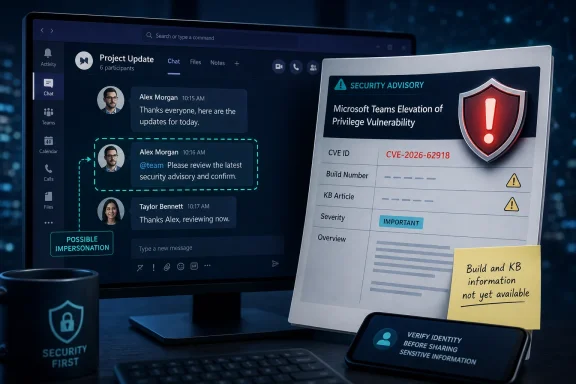
Microsoft has published CVE-2026-62918 as a Microsoft Teams Spoofing Vulnerability, but the disclosure currently gives administrators far less to act on than its timing and product name suggest. The entry went live at 7:00 a.m. Pacific time on Thursday, August 6, 2026—five days before Microsoft’s next scheduled Patch Tuesday on August 11—without a corresponding Teams build number, KB article, affected-version range, exploit description, or customer mitigation notice.
That leaves one immediately practical conclusion: do not treat CVE-2026-62918 as a Windows patch deployment task yet. Microsoft has identified a security issue involving Teams and classified its impact as spoofing, but it has not publicly supplied the information needed to determine whether the remedy is a Teams client update, a server-side service change, a tenant configuration adjustment, or a combination of those measures.
WindowsForum’s review of Microsoft’s Security Update Guide entry, Microsoft’s public CVRF documentation, and searches of the National Vulnerability Database and CVE Program record system found no independently published technical analysis, proof of concept, exploitation report, or additional vendor advisory for CVE-2026-62918 as of Thursday afternoon, August 6. The vulnerability exists as a Microsoft-issued CVE, but the operational facts around it remain largely undisclosed.
“Spoofing” is a Microsoft impact category, not a complete description of what an attacker can do. It generally means a security weakness could enable an attacker to impersonate a trusted identity, interface element, message origin, resource, or other signal that a user or administrator relies on when deciding whether to trust an interaction.
For a Teams vulnerability, that broad label covers materially different risks. A flaw could potentially affect how a caller or chat sender is represented, how a notification is rendered, how an external identity is distinguished from an internal one, or how a link, meeting invitation, shared item, tenant name, or other trusted-looking object appears to a user. Those scenarios have different remediation paths and different levels of urgency.
Microsoft has not said which of those possibilities applies to CVE-2026-62918. The company has also not publicly identified an attack vector, required attacker access, user-interaction requirement, privileges required, confidentiality or integrity impact, CVSS score, or whether it considers exploitation more or less likely.
The text accompanying the submitted advisory material describes Microsoft’s Exploit Code Maturity metric in general terms. That is explanatory boilerplate about how Microsoft communicates confidence in public exploit availability and technical detail; it is not evidence that working exploit code for CVE-2026-62918 is public. Administrators should be careful not to read that generic metric description as an exploitation warning.
This distinction matters because Teams is a cloud-connected collaboration product with a fast-moving service component. A CVE attached to Teams can be remediated in ways that do not resemble a monthly Windows cumulative update. Until Microsoft identifies the affected component and remediation state, a blanket instruction to “patch Teams” would be more ritual than response.
CVE-2026-62918 does not currently provide those operational anchors in publicly discoverable material. There is no named Windows update, no Microsoft 365 Apps update channel release, no New Teams version number, and no Classic Teams version number associated with the entry. There is also no published statement identifying Windows, macOS, Android, iOS, web, virtual desktop, or government-cloud scope.
That omission has a direct consequence for vulnerability-management teams. A scanner alert keyed only to the CVE cannot reliably tell an administrator which device inventory is exposed, because Microsoft has not published the software-version boundaries necessary to make that determination. Security teams should avoid closing or escalating a finding based solely on the presence of Teams.exe, the Teams Machine-Wide Installer, or an arbitrary client version.
The issue is particularly relevant for organizations that still maintain multiple Teams delivery methods. The current Teams client is serviced differently from the legacy Electron-based client, and many Microsoft 365 environments mix desktop clients with browser use, shared-device installations, virtual desktop infrastructure, and mobile access. A CVE record that says only “Microsoft Teams” is insufficient to establish that all of those paths are affected.
Microsoft’s public Security Update Guide is authoritative for the fact that it has assigned and published CVE-2026-62918. It is not, at this stage, an adequate remediation bulletin. The vendor needs to clarify three points: the affected Teams component, whether mitigation is already deployed across the service, and the action—if any—required from tenant administrators or endpoint-management teams.
Teams has already become a frequent channel for ordinary social engineering: external users posing as help-desk personnel, fraudulent chat requests, malicious links, and requests to start Quick Assist or other remote-support sessions. Those attacks use legitimate platform features and deception; they do not require a Teams product vulnerability. The Cloud Security Alliance has documented recent Teams phishing and Quick Assist abuse, while Microsoft’s own Teams guidance warns users about external contacts attempting spam, phishing, or impersonation.
That existing abuse pattern changes the operational context of a newly disclosed Teams spoofing CVE. Users are accustomed to making rapid trust decisions inside chats and calls, often based on a display name, apparent organizational affiliation, warning banner, or familiar-looking request. If CVE-2026-62918 concerns the representation of any of those signals, its practical risk could be higher than a bare “spoofing” label conveys. But Microsoft has not said that it does.
Security teams should therefore keep two tracks separate:
The immediate administrative work is more modest and more defensible. Confirm that Teams clients are supported and updating normally; identify estates where legacy clients, disconnected VDI images, or frozen application packages prevent routine servicing; and preserve the ability to rapidly deploy a Teams update if Microsoft later assigns one.
Teams administrators should also review external-access policy with a clear business case in mind. Microsoft documents that allowing all external domains is the default organization-level posture for Teams federation, while allow lists can restrict external chat, calling, and meetings to approved organizations. Restricting federation will not “patch” CVE-2026-62918, and it may disrupt legitimate partner communication, but it can reduce the routine impersonation exposure that attackers already exploit through Teams.
For users, the message should remain concrete: an unsolicited Teams contact claiming to be IT support should be verified through the organization’s established support channel, not through the caller’s chosen chat or call. Requests to launch Quick Assist, approve an MFA prompt, disclose a verification code, install software, or authenticate to an unfamiliar page should trigger the same escalation process as suspicious email.
There is no indication at present that the flaw is being exploited in the wild, and no public evidence connects it to the Teams phishing campaigns documented this year. There is also no basis to claim the issue has been fully mitigated by a Microsoft service-side change. Both claims would require details Microsoft has not provided.
For now, the vulnerability belongs on the watch list rather than the emergency change calendar. The next meaningful milestone is a revised Microsoft Security Update Guide entry that names affected Teams versions or confirms a service-side mitigation; until then, CVE-2026-62918 is a real Microsoft disclosure with an unresolved remediation path.
WindowsForum’s review of Microsoft’s Security Update Guide entry, Microsoft’s public CVRF documentation, and searches of the National Vulnerability Database and CVE Program record system found no independently published technical analysis, proof of concept, exploitation report, or additional vendor advisory for CVE-2026-62918 as of Thursday afternoon, August 6. The vulnerability exists as a Microsoft-issued CVE, but the operational facts around it remain largely undisclosed.
Microsoft’s advisory establishes the category, not the attack path
“Spoofing” is a Microsoft impact category, not a complete description of what an attacker can do. It generally means a security weakness could enable an attacker to impersonate a trusted identity, interface element, message origin, resource, or other signal that a user or administrator relies on when deciding whether to trust an interaction.For a Teams vulnerability, that broad label covers materially different risks. A flaw could potentially affect how a caller or chat sender is represented, how a notification is rendered, how an external identity is distinguished from an internal one, or how a link, meeting invitation, shared item, tenant name, or other trusted-looking object appears to a user. Those scenarios have different remediation paths and different levels of urgency.
Microsoft has not said which of those possibilities applies to CVE-2026-62918. The company has also not publicly identified an attack vector, required attacker access, user-interaction requirement, privileges required, confidentiality or integrity impact, CVSS score, or whether it considers exploitation more or less likely.
The text accompanying the submitted advisory material describes Microsoft’s Exploit Code Maturity metric in general terms. That is explanatory boilerplate about how Microsoft communicates confidence in public exploit availability and technical detail; it is not evidence that working exploit code for CVE-2026-62918 is public. Administrators should be careful not to read that generic metric description as an exploitation warning.
This distinction matters because Teams is a cloud-connected collaboration product with a fast-moving service component. A CVE attached to Teams can be remediated in ways that do not resemble a monthly Windows cumulative update. Until Microsoft identifies the affected component and remediation state, a blanket instruction to “patch Teams” would be more ritual than response.
The missing build and KB number are the real limitation
Microsoft security disclosures normally give enterprises enough data to map a vulnerability to products and updates. That may include a security update identifier, a fixed release, an affected product table, a severity rating, a CVSS vector, or guidance that the issue has already been mitigated in the service.CVE-2026-62918 does not currently provide those operational anchors in publicly discoverable material. There is no named Windows update, no Microsoft 365 Apps update channel release, no New Teams version number, and no Classic Teams version number associated with the entry. There is also no published statement identifying Windows, macOS, Android, iOS, web, virtual desktop, or government-cloud scope.
That omission has a direct consequence for vulnerability-management teams. A scanner alert keyed only to the CVE cannot reliably tell an administrator which device inventory is exposed, because Microsoft has not published the software-version boundaries necessary to make that determination. Security teams should avoid closing or escalating a finding based solely on the presence of Teams.exe, the Teams Machine-Wide Installer, or an arbitrary client version.
The issue is particularly relevant for organizations that still maintain multiple Teams delivery methods. The current Teams client is serviced differently from the legacy Electron-based client, and many Microsoft 365 environments mix desktop clients with browser use, shared-device installations, virtual desktop infrastructure, and mobile access. A CVE record that says only “Microsoft Teams” is insufficient to establish that all of those paths are affected.
Microsoft’s public Security Update Guide is authoritative for the fact that it has assigned and published CVE-2026-62918. It is not, at this stage, an adequate remediation bulletin. The vendor needs to clarify three points: the affected Teams component, whether mitigation is already deployed across the service, and the action—if any—required from tenant administrators or endpoint-management teams.
Teams impersonation campaigns make the ambiguity harder to manage
The absence of technical detail does not mean every suspicious Teams contact is an exploit of CVE-2026-62918. In fact, organizations should resist making that connection without evidence.Teams has already become a frequent channel for ordinary social engineering: external users posing as help-desk personnel, fraudulent chat requests, malicious links, and requests to start Quick Assist or other remote-support sessions. Those attacks use legitimate platform features and deception; they do not require a Teams product vulnerability. The Cloud Security Alliance has documented recent Teams phishing and Quick Assist abuse, while Microsoft’s own Teams guidance warns users about external contacts attempting spam, phishing, or impersonation.
That existing abuse pattern changes the operational context of a newly disclosed Teams spoofing CVE. Users are accustomed to making rapid trust decisions inside chats and calls, often based on a display name, apparent organizational affiliation, warning banner, or familiar-looking request. If CVE-2026-62918 concerns the representation of any of those signals, its practical risk could be higher than a bare “spoofing” label conveys. But Microsoft has not said that it does.
Security teams should therefore keep two tracks separate:
- Treat reports of fake internal IT staff, unexpected external chat requests, remote-access requests, and suspicious Teams links as phishing or impersonation incidents under existing response procedures.
- Track CVE-2026-62918 as an unresolved product-security disclosure until Microsoft publishes the affected surface and a remedy.
There is no basis yet for an emergency endpoint rollout
With no Microsoft-issued KB or fixed client build tied to CVE-2026-62918, organizations should not rush an untested Teams installer into production and call the exposure resolved. Updating supported Teams clients remains sound hygiene, especially on shared workstations and VDI images, but it cannot be represented as a confirmed fix for this CVE until Microsoft says so.The immediate administrative work is more modest and more defensible. Confirm that Teams clients are supported and updating normally; identify estates where legacy clients, disconnected VDI images, or frozen application packages prevent routine servicing; and preserve the ability to rapidly deploy a Teams update if Microsoft later assigns one.
Teams administrators should also review external-access policy with a clear business case in mind. Microsoft documents that allowing all external domains is the default organization-level posture for Teams federation, while allow lists can restrict external chat, calling, and meetings to approved organizations. Restricting federation will not “patch” CVE-2026-62918, and it may disrupt legitimate partner communication, but it can reduce the routine impersonation exposure that attackers already exploit through Teams.
For users, the message should remain concrete: an unsolicited Teams contact claiming to be IT support should be verified through the organization’s established support channel, not through the caller’s chosen chat or call. Requests to launch Quick Assist, approve an MFA prompt, disclose a verification code, install software, or authenticate to an unfamiliar page should trigger the same escalation process as suspicious email.
Microsoft needs to state whether customers must do anything
The unusual part of CVE-2026-62918 is not that Microsoft issued a Teams spoofing CVE. It is that the company disclosed the identifier without publicly providing the minimum information enterprises need to assess scope or validate remediation.There is no indication at present that the flaw is being exploited in the wild, and no public evidence connects it to the Teams phishing campaigns documented this year. There is also no basis to claim the issue has been fully mitigated by a Microsoft service-side change. Both claims would require details Microsoft has not provided.
For now, the vulnerability belongs on the watch list rather than the emergency change calendar. The next meaningful milestone is a revised Microsoft Security Update Guide entry that names affected Teams versions or confirms a service-side mitigation; until then, CVE-2026-62918 is a real Microsoft disclosure with an unresolved remediation path.
References
- Primary source: MSRC
Published: 2026-08-06T07:00:00-07:00
Security Update Guide - Microsoft Security Response Center
msrc.microsoft.com
- Related coverage: msrc.microsoft.com
Security Update Guide - Microsoft Security Response Center
msrc.microsoft.com
- Related coverage: nvd.nist.gov
NVD - Vulnerabilities
nvd.nist.gov
- Related coverage: labs.cloudsecurityalliance.org
Microsoft Teams as Phishing Infrastructure: The A0Backdoor Campaign and the Industrialization of Collaboration-Platform Attacks
PDF documentlabs.cloudsecurityalliance.org
- Related coverage: cert.europa.eu
- Related coverage: cve.org
- Related coverage: cisa.gov
- Related coverage: cve.org
- Related coverage: cisa.gov
Siemens SIMATIC HMI Devices Vulnerabilities | CISA
www.cisa.gov
- Related coverage: github.com
Provide an API to get the CVRF for a single CVE (previously worked in old portal site) · Issue #94 · microsoft/MSRC-Microsoft-Security-Updates-API · GitHub
The old endpoints around the portal api used to provide a nice clean lookup by CVE: https://portal.msrc.microsoft.com/api/security-guidance/en-us/CVE/ Response: CVRF response in json or xml based on the headers used for the request. ie: ...
github.com
- Related coverage: learn.microsoft.com
List devices by vulnerability - Microsoft Defender for Endpoint | Microsoft Learn
Retrieves a list of devices affected by a vulnerability.learn.microsoft.com - Related coverage: github.com
GitHub - microsoft/MSRC-Microsoft-Security-Updates-API: Repo with getting started projects for the Microsoft Security Updates API (msrc.microsoft.com/update-guide) · GitHub
Repo with getting started projects for the Microsoft Security Updates API (msrc.microsoft.com/update-guide) - microsoft/MSRC-Microsoft-Security-Updates-API
github.com
- Related coverage: vulnerabilities.ncsc.nl
- Related coverage: microsoft.com
continuing-to-listen-good-news-about-the-security-update-guide-api
www.microsoft.com
- Related coverage: microsoft.com
Announcing the CVRF API 3.0 upgrade
www.microsoft.com
- Related coverage: vulnerabilities.ncsc.nl
- Related coverage: advisories.ncsc.nl
- Related coverage: linkedin.com
Announcing the CVRF API 3.0 upgrade | Microsoft Security Response Center
CVRF API 3.0 is here! It's faster and more secure. Update your PowerShell module with a few simple commands for an improved experience. Learn more in our blog post: https://lnkd.in/gws23XaHwww.linkedin.com
- Related coverage: techradar.com
Microsoft 365 users hit by phishing scheme posing as RingCentral emails | TechRadar
Greatness PhaaS are going after Microsoft 365 accountswww.techradar.com - Related coverage: support.microsoft.com
Prevent spam or phishing attempts from external chats in Microsoft Teams | Microsoft Support
Ensure your security from spam, phishing, or impersonation attempts from external chats in Microsoft Teams.support.microsoft.com - Related coverage: learn.microsoft.com
IT Admins - Manage external meetings and chat with people and organizations using Microsoft identities - Microsoft Teams | Microsoft Learn
For IT admins - Learn how to configure chat and meetings with people outside your organization who use Microsoft Entra ID, Microsoft Teams Essentials, or Skype.learn.microsoft.com - Related coverage: labs.cloudsecurityalliance.org
Microsoft Teams as Phishing Infrastructure: The A0Backdoor Campaign and the Industrialization of Collaboration-Platform Attacks – Lab Space
Microsoft Teams as Phishing Infrastructure: The A0Backdoor Campaign and the Industrialization of Collaboration-Platform Attacks --- Key Takeaways A threat cluster tracked by BlueVoyant as "Blitz Brigantine"—assessed with moderate-to-high confidence as a continuation of the Storm-1811 activity...labs.cloudsecurityalliance.org - Related coverage: support.microsoft.com
Protect yourself from phishing | Microsoft Support
Learn how to identify a phishing scam, designed to steal money via fake emails.support.microsoft.com - Related coverage: techcommunity.microsoft.com
- Related coverage: cdn-dynmedia-1.microsoft.com
- Related coverage: techradar.com
Watch out Microsoft Teams users - hackers are spreading a dangerous new phishing scam, here's what we know | TechRadar
Hackers are pretending to be solving a spam problemwww.techradar.com - Related coverage: windowscentral.com
Microsoft Teams will add new protections as attackers target external calls with brand impersonation tactics | Windows Central
Microsoft Teams will soon warn you about brand impersonators who call you.www.windowscentral.com - Related coverage: kiplinger.com
New Scam Targets Microsoft Users, FBI Warns. Here's How to Protect Yourself | Kiplinger
This phishing scam doesn't rely on a fake website. Instead, it tricks users into approving access themselves.www.kiplinger.com - Related coverage: tomsguide.com
Loading…
www.tomsguide.com - Related coverage: as.com
FBI emite advertencia de seguridad para usuarios de Teams, Outlook y OneDrive: Esto es lo que deben hacer - AS USA
El FBI alertó a los usuarios de Microsoft 365 en Teams, Outlook y OneDrive, sobre Kali365, plataforma emergente de phishing.as.com