

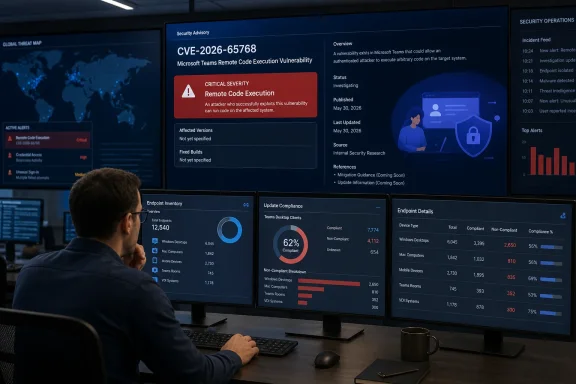
That absence is the story here. A remote-code-execution label in Microsoft’s catalog is enough to put Teams on a security team’s immediate review list, but it does not establish that an unauthenticated attacker can compromise a workstation merely by sending a chat or joining a meeting. Microsoft applies the same impact label to flaws with very different prerequisites, from a user opening crafted content to attacks requiring an existing account, a particular feature, or a specific client platform.
The Microsoft Security Response Center listing was published at 7:00 a.m. Pacific time on Tuesday, August 11. As of the initial publication window, neither the CVE Program’s public record nor the National Vulnerability Database surfaced a corresponding indexed entry for CVE-2026-65768. That is not proof that the vulnerability is unpatched or undisclosed elsewhere; new Microsoft entries frequently reach external indexes after the vendor’s own guide. It does mean admins should treat Microsoft’s advisory—not a vulnerability scanner’s currently incomplete enrichment—as the primary record for this CVE today.
The CVE title tells administrators less than it appears to
“Remote code execution” is an impact classification: it says that successful exploitation can cause code to run in the context of the affected component. It does not answer the operational questions that determine urgency. Those include whether the flaw affects the new Teams desktop client, Teams for Mac, Teams mobile clients, Teams Rooms, the web application, or a service-side component operated by Microsoft.
Microsoft has not publicly identified any of those boundaries in the information currently available for CVE-2026-65768. There is also no published indication, in the material available at release, that exploitation is public, occurring in the wild, or assessed as likely. Those omissions should not be filled in with assumptions based on the word “remote.”
The distinction matters especially for Teams because an administrator may see the product in several very different forms across the same organization. A Windows user running the packaged desktop application, a user in a browser session, a frontline worker on Android or iOS, and a Teams Rooms device can all be described internally as “Teams endpoints,” while receiving updates through different mechanisms and operating under different controls.
A Teams client flaw can therefore create a patch-management problem without being a Windows Update problem. Installing the August cumulative update for Windows 11 may be necessary for other vulnerabilities released today, but it cannot be assumed to remediate CVE-2026-65768 unless Microsoft explicitly links the Teams issue to a Windows servicing package. The initial advisory information does not provide that link.
Teams’ update model is the practical weak point
Microsoft’s own Teams documentation says desktop clients update on a regular cadence and are normally rolled out gradually, while a critical update can bypass that schedule. That architecture is useful when the client is allowed to self-update; it becomes a blind spot when an enterprise has deliberately constrained application delivery.
Microsoft also documents several reasons Teams automatic updating can fail. A desktop installation placed under Program Files through a script rather than in its default per-user location may not update itself. The client updates only when it has an opportunity to be idle, and users need to be signed in for update downloads to occur. Those conditions are common in managed estates with shared devices, nonpersistent desktops, restricted endpoints, and users who shut down their machines immediately after a shift.
For CVE-2026-65768, that makes version inventory more important than a blanket assumption that Teams is self-patching. Administrators should identify which client families are deployed, how each is installed, and whether they can prove update compliance from device-management or application telemetry. “Teams is configured to auto-update” is a policy statement; it is not evidence that every endpoint received a security release.
Virtual desktop infrastructure deserves separate scrutiny. Persistent and nonpersistent VDI images can preserve an older Teams build, block an updater, or revert a remediated user profile at logoff. The same applies to kiosks, meeting-room hardware, regulated devices with frozen images, and endpoints that reach Teams through proxy or content-delivery restrictions.
Microsoft’s Teams update documentation notes that blocked Teams content-delivery endpoints can prevent updates. In a routine feature rollout, that usually produces stale UI behavior. In a security response, it can leave a supposedly managed client outside the vendor’s remedial path.
Do not confuse this CVE with last year’s Teams RCE
CVE-2026-65768 is a new identifier and should not be collapsed into the earlier CVE-2025-53783, another Microsoft Teams remote code execution vulnerability published on August 12, 2025. The CVE Program record for CVE-2025-53783 describes a heap-based buffer overflow affecting Teams for Android and Teams for Desktop, with affected builds defined through specific fixed-version thresholds.
That older record is useful context, but it does not tell us the mechanism or scope of CVE-2026-65768. Teams has had RCE advisories spanning multiple client platforms over time, and identical advisory titles can mask materially different prerequisites. Security teams should avoid using last year’s affected-version list as a proxy for the current issue, or marking the new CVE remediated simply because a device was updated for CVE-2025-53783.
The timing is also notable. CVE-2026-65768 arrived on Microsoft’s August security-release day, but Teams client servicing does not necessarily follow the same packaging and deployment rhythm as Windows cumulative updates. The device owner, endpoint-management team, and Microsoft 365 administrator may each believe another group owns the fix. That is precisely how cloud-client vulnerabilities remain open after a patch day closes.
What administrators can verify now
Until Microsoft publishes the missing affected-product and remediation details—or external databases ingest them—Teams administrators should treat this as an evidence-gathering exercise rather than a reason to invent mitigations.
- Confirm the installed Teams version and installation method on representative Windows endpoints, especially devices using scripted installs, VDI, kiosks, shared PCs, and Teams Rooms.
- Verify that Teams update traffic is not blocked by proxy, firewall, CDN, or endpoint-control policies, and that clients have recently completed an update cycle.
- Check the Microsoft 365 admin center and Teams client release information for a security-specific build or service notice associated with CVE-2026-65768.
- Keep Windows OS patching and Teams client patching as separate compliance tracks unless Microsoft explicitly connects this CVE to a Windows update package.
- Preserve current Teams client-version telemetry before a broad update rollout, so incident responders can later establish whether a suspect endpoint was running a vulnerable build.
The immediate conclusion is narrower than the headline suggests but more useful: CVE-2026-65768 is a vendor-published Teams RCE advisory that warrants prompt client-update verification, yet the public record currently does not support claims about severity, exploitability, attack prerequisites, or affected Teams editions. The first concrete remediation milestone will be Microsoft naming the fixed builds and platforms; until then, organizations that cannot account for how Teams updates across their fleet should assume they cannot yet prove exposure—or remediation.