

HR departments are being pushed into AI governance in 2026 because employee-facing tools now touch hiring, accommodation, discipline, payroll, policy, and workforce planning, even as the leading large language models differ sharply in reliability, privacy posture, enterprise integration, cost, and legal-document performance. The uncomfortable answer is that there is no “best” model for HR. There are only models whose failure modes are more or less tolerable for a given workflow. The governance job is not to crown a winner, but to stop a general-purpose chatbot from becoming an invisible decision-maker in employment matters.
The newest phase of workplace AI is not arriving through a clean procurement process. It is arriving through browser tabs, productivity suites, meeting transcripts, spreadsheet assistants, recruiting tools, help-desk agents, and the quiet habit of pasting a difficult paragraph into whatever chatbot happens to be open.
That makes HR the owner of a problem it did not fully create. IT can manage identity, access, logging, and data loss prevention. Legal can define prohibited uses and litigation exposure. Procurement can negotiate vendor terms. But HR sits closest to the decisions where the harm becomes personal: who gets hired, who gets promoted, who is disciplined, who receives an accommodation, and who is told their job is gone.
That is why the usual enterprise AI playbook feels inadequate here. A hallucinated marketing tagline is embarrassing. A hallucinated disciplinary summary can become evidence. A badly summarized Slack thread is annoying. A badly summarized harassment complaint is a governance failure.
The HR technology conversation has therefore moved from “which model is smartest?” to “which model should be allowed near which category of work?” That sounds like a subtle shift, but it changes everything. It turns LLM selection from a productivity debate into a risk-tiering exercise.
The headline numbers are striking. GPT-5.5 performs strongly on Harvey’s BigLaw Bench, with a reported 91.7 percent score on legal and professional document reasoning. But on Harvey’s stricter Legal Agent Benchmark, which tests end-to-end autonomous task completion, the same model reportedly scores just 3.75 percent. Claude leads that agent benchmark at 10.4 percent, while Gemini 2.5 Pro is reported at 0.8 percent.
Those are not normal product-review deltas. They are a reminder that “good at reasoning over a document” and “safe to let loose as an autonomous agent” are different claims. HR leaders who blur that distinction are likely to over-deploy tools that perform impressively in demos and unreliably in the messy middle of real employment processes.
The important lesson is not that one benchmark should dictate enterprise strategy. Benchmarks are always partial, and vendors optimize toward them once they become visible. The lesson is that autonomy remains the danger zone. A model can be useful as a drafting assistant, summarizer, or second-pass reviewer while still being a poor candidate for unsupervised workflow execution.
That distinction should become the spine of HR’s AI policy. If a human is reading, editing, verifying, and accepting responsibility for the output, the risk is bounded. If the model is classifying, escalating, responding, rejecting, approving, or generating records without close review, the model has crossed from assistance into delegated judgment.
For HR, GPT-5.5’s strength is breadth. It can draft policies, summarize interview notes, convert messy text into structured tables, produce first-pass employee communications, and help managers phrase difficult messages more clearly. In a human-reviewed workflow, that is valuable. A model that can turn a rambling manager’s account into a coherent draft can save real time, especially in employee relations teams that are drowning in repetitive documentation.
The weakness is calibration. Confident models are seductive because they reduce friction. They write as if they know. They make uncertainty disappear from the page. That is precisely why they are risky in HR documentation, where uncertainty is often the most important fact in the room.
A termination memo, accommodation letter, or disciplinary record should preserve ambiguity where ambiguity exists. If a witness account conflicts with another witness account, the document should say so. If a policy exception has not been approved, the draft should not imply that it has. If a jurisdiction-specific employment rule is unclear, the output should slow the process down rather than glide over the gap.
That is where GPT-5.5’s reported Legal Agent Benchmark score matters. It does not mean the model is useless. It means HR should treat it as a powerful drafting system with a human brake, not as a reliable autonomous operator. The governance posture should be: use it widely for low-risk and reviewed work, but do not let its fluency masquerade as institutional judgment.
That matters in HR because the best output is not always the most decisive output. In sensitive employee documentation, a model that says “this record is incomplete” may be more valuable than one that produces a pristine draft from bad inputs. A model that flags missing facts can protect an organization from the false confidence that automation tends to create.
The privacy posture is also important. Anthropic’s commercial terms have emphasized that inputs and outputs from commercial products are not used by default to train models. For HR teams handling employee records, medical accommodation requests, investigations, grievances, and compensation data, that is not a nice-to-have. It is part of the minimum viable governance conversation.
Claude’s weakness is that caution does not equal omniscience. It is not necessarily the strongest option for numerical workforce modeling, complex spreadsheet work, or analytics-heavy compensation scenarios. HR teams that need to model headcount, attrition, pay equity, or benefits cost may find that the document model they trust most is not the data tool they need most.
There is also a procurement reality. Enterprise pricing that requires a sales conversation can slow adoption for smaller teams and create uneven internal use. If employees can expense or casually access one tool while the preferred governance tool sits behind procurement, the practical default may become the less governed option.
That integration changes the adoption curve. HR employees do not need to move documents across tools, copy sensitive material into a separate interface, or learn an entirely new work surface. For onboarding packets, benefits forms, policy drafts, meeting summaries, and employee communications, embedded assistance can be more useful than raw model performance.
The downside is that embedded convenience can normalize overuse. If AI is everywhere in the productivity suite, employees may stop thinking of it as a distinct system with distinct risks. The assistant becomes part of the furniture, and the act of asking it to summarize a sensitive folder feels no different from searching the folder.
That is why Gemini’s weaker reported performance on Harvey’s Legal Agent Benchmark should not be waved away. A low score on autonomous legal task completion does not prevent Gemini from being useful in HR operations. But it should prevent organizations from treating Workspace-native convenience as evidence of legal or procedural reliability.
Gemini may be a strong fit for routine productivity work in Google-heavy organizations. It is a weaker fit for unsupervised employment-document workflows where the cost of a wrong conclusion is high. As with the other models, the problem is not whether HR can use it. The problem is whether HR can keep the use case from drifting.
For WindowsForum readers, this is the familiar Microsoft advantage. The company does not need to win every benchmark if it controls the workflow surface. If HR records are in SharePoint, compensation models are in Excel, and performance discussions are in Teams, Copilot’s integration can be more persuasive than a rival model’s cleaner answer in a browser window.
The governance upside is real. Copilot can operate within Microsoft 365’s identity, permissioning, compliance, and security architecture. That does not make it risk-free, but it reduces the uncontrolled-copy-and-paste behavior that has haunted early enterprise AI adoption. If sensitive data is going to be processed, many organizations would rather process it inside the tenant they already govern than in a consumer-style tool outside the perimeter.
The Excel point deserves special attention. HR is full of semi-structured work masquerading as spreadsheet work: headcount planning, compensation bands, merit cycles, workforce reductions, benefits uptake, attrition analysis, and pay equity reviews. A model that can assist inside Excel without forcing data into a separate system has obvious operational appeal.
But Microsoft’s advantage is not free. Copilot’s per-user pricing sits on top of the underlying Microsoft 365 subscription, and the all-in cost becomes meaningful at scale. HR leaders should not approve Copilot merely because “we already have Microsoft.” They should ask which roles need it, which workflows justify it, and which uses are better served by cheaper automation or traditional reporting.
That makes Grok interesting as a research and intelligence tool. HR compliance teams could use a live-connected system to monitor developments, produce briefings, compare jurisdictions, or identify emerging policy issues. In an environment where employment law can shift across states, sectors, and agencies, recency is not cosmetic.
But live data is not the same as enterprise trust. The youngest major platform in the comparison also has the thinnest track record for HR-grade compliance, procurement maturity, and institutional risk management. That matters because employment data is not merely confidential; it is often deeply personal.
The right stance is therefore narrow. Use Grok-like live systems to watch the outside world. Do not rush to make them custodians of the inside one. A tool can be excellent for regulatory horizon-scanning and still be inappropriate for performance records, medical notes, complaint files, or termination workflows.
This distinction is likely to become more important as vendors race to attach live browsing, retrieval, and agentic workflows to their platforms. HR should not let “current” become a synonym for “safe.” In governance terms, recency is one capability among many, and sometimes not the most important one.
Open-source and low-cost AI will tempt organizations under pressure to show savings. That temptation will be strongest in functions with high document volume and limited budgets, which describes plenty of HR operations. But employee records are the wrong place to discover the hidden cost of a bargain model.
This is where HR governance must be specific rather than theatrical. A policy that says “do not use risky AI tools” is almost useless. A policy that names categories of prohibited data and prohibits entry into unapproved public models is enforceable. It gives employees a rule they can follow and gives the organization a standard it can defend.
DeepSeek also illustrates a broader truth: model quality is not governance quality. A tool can be capable and still be unsuitable. A model can be cheap and still create expensive downstream risk. In HR, the acceptable vendor pool is smaller than the leaderboard suggests.
That is the shadow-AI problem in plain clothes. Employees do not usually think they are creating a data governance incident. They think they are summarizing notes, improving a message, checking a policy, or making a difficult task less painful.
HR policies often fail here because they are written at the wrong altitude. “Use AI responsibly” sounds polished, but it does not tell an HR generalist whether they can paste an employee’s medical restriction into a chatbot to draft an accommodation response. “Do not enter personally identifiable employee data into unapproved AI systems” is less elegant and much more useful.
The policy should also distinguish between public tools, enterprise tools, and integrated tools. A browser chatbot on a personal account is not the same risk as a tenant-governed Microsoft 365 Copilot deployment. A commercial Claude account under enterprise terms is not the same thing as a free consumer account. These distinctions are boring until litigation begins, at which point they become the whole story.
Training should be equally concrete. HR employees need examples: investigation notes, disciplinary drafts, payroll records, medical documentation, visa information, compensation spreadsheets, interview feedback, and performance reviews. If the policy does not name the materials people actually touch, it will not change behavior.
Low-risk drafting is the easiest lane. Job-posting language, internal newsletter copy, benefits reminders, meeting agendas, and first-pass policy explanations can benefit from broad generalist models. Human review still matters, but the blast radius is modest.
Medium-risk work requires tighter controls. Summaries of employee relations notes, manager coaching scripts, performance-review language, and policy interpretations should use approved enterprise tools and documented human review. The model can assist, but it should not become the author of record without scrutiny.
High-risk work should be treated differently. Accommodation decisions, harassment investigations, disciplinary actions, terminations, pay decisions, reductions in force, and legally sensitive notices require human ownership, legal review where appropriate, and a clear audit trail. In those contexts, the model’s contribution should be visible, bounded, and reviewable.
Autonomous workflows deserve the strictest gate. If an AI system is going to classify employees, trigger notices, recommend actions, escalate cases, or generate final documents at scale, HR should assume it is building a regulated system even where the law has not fully caught up. That means testing, monitoring, appeal paths, bias review, vendor due diligence, and logs that show who approved what.
This is where the agent benchmark numbers become useful. They remind HR leaders that the gap between “assistant” and “agent” is not branding. It is a shift in accountability.
Microsoft and Google are betting that the suite becomes the control plane. If AI is embedded in the apps where work already happens, organizations can apply existing identity controls, retention policies, eDiscovery processes, permissions, and administrative oversight. That is a compelling argument for IT departments that do not want a dozen uncoordinated AI vendors touching sensitive data.
But suite-native AI also centralizes risk. If permissions are messy in SharePoint, Copilot can expose the mess faster. If old HR folders are over-shared, an AI assistant can make that oversharing more discoverable. If Teams channels contain sensitive employee discussions with loose membership, the model did not create the governance problem; it merely made the consequences easier to trigger.
That means Copilot readiness is not just a licensing question. It is an information architecture question. Before HR celebrates AI inside Microsoft 365, it needs to know whether its files, groups, labels, and permissions are ready for an assistant that can synthesize across them.
The same logic applies to Google Workspace. Gemini’s convenience depends on the quality of the workspace governance underneath it. AI does not fix stale permissions, inconsistent folder design, or poor retention practices. It amplifies whatever environment it is placed in.
That requires HR to translate technical distinctions into workplace behavior. Employees do not need a lecture on context windows, tokenization, retrieval-augmented generation, or training data retention. They need to know which tools are approved, which data is prohibited, when review is mandatory, and who owns the final decision.
The best policies will be boring in the right way. They will say that AI-generated employment documents must be reviewed by a human before use. They will say that AI output cannot be the sole basis for hiring, promotion, discipline, accommodation, or termination decisions. They will say that employees must not enter personal employee data into unapproved systems. They will say that high-risk uses require pre-approval, testing, and monitoring.
They will also make room for productive use. A fear-based AI policy will simply drive usage underground. HR’s goal should not be to make employees afraid of AI. It should be to make safe use easier than unsafe use.
That means giving employees approved tools that actually work. If the sanctioned assistant is slow, unavailable, or inferior for everyday tasks, workers will route around it. Governance fails when compliance feels like punishment.
Copilot’s pricing illustrates the issue. A $30-per-user monthly add-on may be defensible for employees who live in Outlook, Word, Excel, Teams, and SharePoint all day. It is harder to justify for occasional users whose AI needs are narrow. The right licensing strategy may be role-based rather than universal.
The same applies to Claude, Gemini, and other models. High-risk document teams may deserve access to the most cautious and privacy-aligned model. Analytics teams may need tools better suited to numerical work. HR service centers may need workflow automation more than frontier-model prose.
Cost governance should therefore be tied to use-case governance. Do not buy the same model for everyone and then hope usage patterns become rational. Decide which work needs which capability, then license accordingly.
This is also a communication issue. Employees are more likely to accept AI usage rules if the organization explains that different tasks carry different costs and risks. “We do not trust you” is a corrosive message. “We are matching tools to data sensitivity, legal exposure, and cost” is an adult one.
The first audit should be practical. Which tools are in use? Which are approved? Which touch employee data? Which generate outputs used in decisions? Which vendors retain data? Which tools are connected to email, calendars, drives, applicant tracking systems, HRIS platforms, or collaboration archives?
That audit will likely reveal that the greatest risk is not the most advanced model. It is the least visible workflow. A small tool summarizing exit interviews may create more exposure than a heavily governed Copilot deployment. A recruiting plugin may matter more than a chatbot if it influences candidate ranking.
Once HR has the map, model selection becomes easier. Claude may belong near sensitive drafting. Copilot may belong in Microsoft-native operations. Gemini may make sense in Workspace-heavy environments. Grok may be useful for external monitoring. GPT-5.5 may serve as a broad drafting and reasoning assistant where review is strong. DeepSeek and similar public tools may be excluded from employee-data use entirely.
Without the audit, those choices are mostly vibes.
The next year of HR AI will not be won by the department with the flashiest chatbot pilot. It will be won by the department that can explain, in plain language, which tools are allowed to touch which work and why. The models will keep changing, the benchmarks will keep moving, and the vendors will keep promising safer autonomy. HR’s job is to remember that employment decisions are not just workflows to be optimized; they are human events that require accountable judgment, even when a machine helps write the first draft.
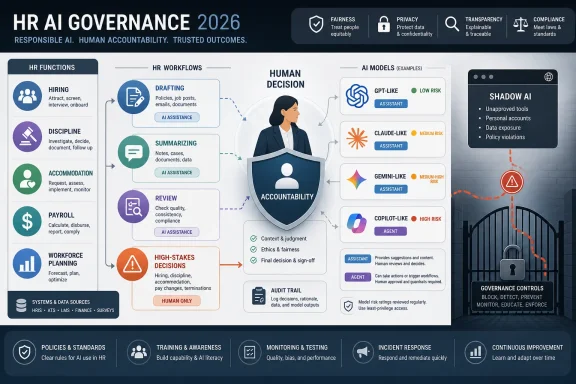 HR Inherits the AI Problem Because Everyone Else Already Deployed It
The newest phase of workplace AI is not arriving through a clean procurement process. It is arriving through browser tabs, productivity suites, meeting transcripts, spreadsheet assistants, recruiting tools, help-desk agents, and the quiet habit of pasting a difficult paragraph into whatever chatbot happens to be open.That makes HR the owner of a problem it did not fully create. IT can manage identity, access, logging, and data loss prevention. Legal can define prohibited uses and litigation exposure. Procurement can negotiate vendor terms. But HR sits closest to the decisions where the harm becomes personal: who gets hired, who gets promoted, who is disciplined, who receives an accommodation, and who is told their job is gone.
That is why the usual enterprise AI playbook feels inadequate here. A hallucinated marketing tagline is embarrassing. A hallucinated disciplinary summary can become evidence. A badly summarized Slack thread is annoying. A badly summarized harassment complaint is a governance failure.
The HR technology conversation has therefore moved from “which model is smartest?” to “which model should be allowed near which category of work?” That sounds like a subtle shift, but it changes everything. It turns LLM selection from a productivity debate into a risk-tiering exercise.
Benchmarks Matter Less Than the Shape of Failure
The HRD comparison of major LLM platforms leans heavily on Harvey’s legal benchmarks, and for good reason. Employment work is not identical to legal work, but the overlap is obvious: document reasoning, factual consistency, policy interpretation, issue spotting, and cautious drafting all matter when a model is touching sensitive workplace decisions.The headline numbers are striking. GPT-5.5 performs strongly on Harvey’s BigLaw Bench, with a reported 91.7 percent score on legal and professional document reasoning. But on Harvey’s stricter Legal Agent Benchmark, which tests end-to-end autonomous task completion, the same model reportedly scores just 3.75 percent. Claude leads that agent benchmark at 10.4 percent, while Gemini 2.5 Pro is reported at 0.8 percent.
Those are not normal product-review deltas. They are a reminder that “good at reasoning over a document” and “safe to let loose as an autonomous agent” are different claims. HR leaders who blur that distinction are likely to over-deploy tools that perform impressively in demos and unreliably in the messy middle of real employment processes.
The important lesson is not that one benchmark should dictate enterprise strategy. Benchmarks are always partial, and vendors optimize toward them once they become visible. The lesson is that autonomy remains the danger zone. A model can be useful as a drafting assistant, summarizer, or second-pass reviewer while still being a poor candidate for unsupervised workflow execution.
That distinction should become the spine of HR’s AI policy. If a human is reading, editing, verifying, and accepting responsibility for the output, the risk is bounded. If the model is classifying, escalating, responding, rejecting, approving, or generating records without close review, the model has crossed from assistance into delegated judgment.
GPT-5.5 Is the Generalist That Needs a Seatbelt
GPT-5.5, as described in the HRD piece, is the model many employees will reach for first because it is broad, fluent, and familiar. That matters. In enterprise technology, the tool that employees already know often beats the tool with the cleaner architecture diagram.For HR, GPT-5.5’s strength is breadth. It can draft policies, summarize interview notes, convert messy text into structured tables, produce first-pass employee communications, and help managers phrase difficult messages more clearly. In a human-reviewed workflow, that is valuable. A model that can turn a rambling manager’s account into a coherent draft can save real time, especially in employee relations teams that are drowning in repetitive documentation.
The weakness is calibration. Confident models are seductive because they reduce friction. They write as if they know. They make uncertainty disappear from the page. That is precisely why they are risky in HR documentation, where uncertainty is often the most important fact in the room.
A termination memo, accommodation letter, or disciplinary record should preserve ambiguity where ambiguity exists. If a witness account conflicts with another witness account, the document should say so. If a policy exception has not been approved, the draft should not imply that it has. If a jurisdiction-specific employment rule is unclear, the output should slow the process down rather than glide over the gap.
That is where GPT-5.5’s reported Legal Agent Benchmark score matters. It does not mean the model is useless. It means HR should treat it as a powerful drafting system with a human brake, not as a reliable autonomous operator. The governance posture should be: use it widely for low-risk and reviewed work, but do not let its fluency masquerade as institutional judgment.
Claude Makes Its Case Where Caution Is the Product
Claude’s pitch to HR is not simply that it can write well. It is that its personality, for lack of a better word, is better suited to certain high-stakes document tasks. Enterprise users have often described Claude as more cautious, more precise, and less eager to bulldoze uncertainty into a polished answer.That matters in HR because the best output is not always the most decisive output. In sensitive employee documentation, a model that says “this record is incomplete” may be more valuable than one that produces a pristine draft from bad inputs. A model that flags missing facts can protect an organization from the false confidence that automation tends to create.
The privacy posture is also important. Anthropic’s commercial terms have emphasized that inputs and outputs from commercial products are not used by default to train models. For HR teams handling employee records, medical accommodation requests, investigations, grievances, and compensation data, that is not a nice-to-have. It is part of the minimum viable governance conversation.
Claude’s weakness is that caution does not equal omniscience. It is not necessarily the strongest option for numerical workforce modeling, complex spreadsheet work, or analytics-heavy compensation scenarios. HR teams that need to model headcount, attrition, pay equity, or benefits cost may find that the document model they trust most is not the data tool they need most.
There is also a procurement reality. Enterprise pricing that requires a sales conversation can slow adoption for smaller teams and create uneven internal use. If employees can expense or casually access one tool while the preferred governance tool sits behind procurement, the practical default may become the less governed option.
Gemini’s Real Advantage Is the Workspace It Lives In
Google Gemini 2.5 Pro is not best understood as a standalone chatbot competing feature-for-feature with Claude or GPT-5.5. Its strongest case is environmental. If an HR department lives in Google Workspace, Gemini’s value comes from being inside Gmail, Docs, Drive, and Meet.That integration changes the adoption curve. HR employees do not need to move documents across tools, copy sensitive material into a separate interface, or learn an entirely new work surface. For onboarding packets, benefits forms, policy drafts, meeting summaries, and employee communications, embedded assistance can be more useful than raw model performance.
The downside is that embedded convenience can normalize overuse. If AI is everywhere in the productivity suite, employees may stop thinking of it as a distinct system with distinct risks. The assistant becomes part of the furniture, and the act of asking it to summarize a sensitive folder feels no different from searching the folder.
That is why Gemini’s weaker reported performance on Harvey’s Legal Agent Benchmark should not be waved away. A low score on autonomous legal task completion does not prevent Gemini from being useful in HR operations. But it should prevent organizations from treating Workspace-native convenience as evidence of legal or procedural reliability.
Gemini may be a strong fit for routine productivity work in Google-heavy organizations. It is a weaker fit for unsupervised employment-document workflows where the cost of a wrong conclusion is high. As with the other models, the problem is not whether HR can use it. The problem is whether HR can keep the use case from drifting.
Copilot Is the Governance Shortcut With a Cost Center Attached
Microsoft Copilot may be the most consequential AI platform for HR not because it is always the best model, but because it is already where enterprise work happens. Outlook, Word, Excel, Teams, and SharePoint are the operating environment for many HR departments. A model embedded there inherits a level of organizational gravity that standalone tools struggle to match.For WindowsForum readers, this is the familiar Microsoft advantage. The company does not need to win every benchmark if it controls the workflow surface. If HR records are in SharePoint, compensation models are in Excel, and performance discussions are in Teams, Copilot’s integration can be more persuasive than a rival model’s cleaner answer in a browser window.
The governance upside is real. Copilot can operate within Microsoft 365’s identity, permissioning, compliance, and security architecture. That does not make it risk-free, but it reduces the uncontrolled-copy-and-paste behavior that has haunted early enterprise AI adoption. If sensitive data is going to be processed, many organizations would rather process it inside the tenant they already govern than in a consumer-style tool outside the perimeter.
The Excel point deserves special attention. HR is full of semi-structured work masquerading as spreadsheet work: headcount planning, compensation bands, merit cycles, workforce reductions, benefits uptake, attrition analysis, and pay equity reviews. A model that can assist inside Excel without forcing data into a separate system has obvious operational appeal.
But Microsoft’s advantage is not free. Copilot’s per-user pricing sits on top of the underlying Microsoft 365 subscription, and the all-in cost becomes meaningful at scale. HR leaders should not approve Copilot merely because “we already have Microsoft.” They should ask which roles need it, which workflows justify it, and which uses are better served by cheaper automation or traditional reporting.
Grok’s Live Data Pitch Is Useful Until It Touches Employee Records
Grok 4’s differentiator, as framed in the HRD piece, is live data. For HR teams trying to keep pace with regulatory updates, agency guidance, state-level employment law changes, and fast-moving court decisions, that is an attractive proposition. A model that can reason over information published this morning has a different utility profile from one bounded by a training cutoff.That makes Grok interesting as a research and intelligence tool. HR compliance teams could use a live-connected system to monitor developments, produce briefings, compare jurisdictions, or identify emerging policy issues. In an environment where employment law can shift across states, sectors, and agencies, recency is not cosmetic.
But live data is not the same as enterprise trust. The youngest major platform in the comparison also has the thinnest track record for HR-grade compliance, procurement maturity, and institutional risk management. That matters because employment data is not merely confidential; it is often deeply personal.
The right stance is therefore narrow. Use Grok-like live systems to watch the outside world. Do not rush to make them custodians of the inside one. A tool can be excellent for regulatory horizon-scanning and still be inappropriate for performance records, medical notes, complaint files, or termination workflows.
This distinction is likely to become more important as vendors race to attach live browsing, retrieval, and agentic workflows to their platforms. HR should not let “current” become a synonym for “safe.” In governance terms, recency is one capability among many, and sometimes not the most important one.
DeepSeek Shows Why Cheap AI Can Be Expensive
The HRD article’s exclusion of DeepSeek from HR use is blunt, and it should be. The issue is not whether DeepSeek’s models can benchmark well or run cheaply. The issue is whether an HR department can defend sending employee data into a public system whose data storage and legal obligations create unacceptable exposure.Open-source and low-cost AI will tempt organizations under pressure to show savings. That temptation will be strongest in functions with high document volume and limited budgets, which describes plenty of HR operations. But employee records are the wrong place to discover the hidden cost of a bargain model.
This is where HR governance must be specific rather than theatrical. A policy that says “do not use risky AI tools” is almost useless. A policy that names categories of prohibited data and prohibits entry into unapproved public models is enforceable. It gives employees a rule they can follow and gives the organization a standard it can defend.
DeepSeek also illustrates a broader truth: model quality is not governance quality. A tool can be capable and still be unsuitable. A model can be cheap and still create expensive downstream risk. In HR, the acceptable vendor pool is smaller than the leaderboard suggests.
The Shadow-AI Problem Is Really a Policy Design Problem
The most common AI failure in HR may not be a vendor outage, a hallucinated answer, or a hostile prompt injection. It may be a well-meaning employee pasting sensitive information into an unapproved tool because the official workflow is slower, vaguer, or less useful.That is the shadow-AI problem in plain clothes. Employees do not usually think they are creating a data governance incident. They think they are summarizing notes, improving a message, checking a policy, or making a difficult task less painful.
HR policies often fail here because they are written at the wrong altitude. “Use AI responsibly” sounds polished, but it does not tell an HR generalist whether they can paste an employee’s medical restriction into a chatbot to draft an accommodation response. “Do not enter personally identifiable employee data into unapproved AI systems” is less elegant and much more useful.
The policy should also distinguish between public tools, enterprise tools, and integrated tools. A browser chatbot on a personal account is not the same risk as a tenant-governed Microsoft 365 Copilot deployment. A commercial Claude account under enterprise terms is not the same thing as a free consumer account. These distinctions are boring until litigation begins, at which point they become the whole story.
Training should be equally concrete. HR employees need examples: investigation notes, disciplinary drafts, payroll records, medical documentation, visa information, compensation spreadsheets, interview feedback, and performance reviews. If the policy does not name the materials people actually touch, it will not change behavior.
The Real Divide Is Not Between Models, but Between Workflows
The most useful way for HR to think about LLMs is not as a ranking. It is as a workflow map. Different models belong in different lanes because HR work itself has different risk profiles.Low-risk drafting is the easiest lane. Job-posting language, internal newsletter copy, benefits reminders, meeting agendas, and first-pass policy explanations can benefit from broad generalist models. Human review still matters, but the blast radius is modest.
Medium-risk work requires tighter controls. Summaries of employee relations notes, manager coaching scripts, performance-review language, and policy interpretations should use approved enterprise tools and documented human review. The model can assist, but it should not become the author of record without scrutiny.
High-risk work should be treated differently. Accommodation decisions, harassment investigations, disciplinary actions, terminations, pay decisions, reductions in force, and legally sensitive notices require human ownership, legal review where appropriate, and a clear audit trail. In those contexts, the model’s contribution should be visible, bounded, and reviewable.
Autonomous workflows deserve the strictest gate. If an AI system is going to classify employees, trigger notices, recommend actions, escalate cases, or generate final documents at scale, HR should assume it is building a regulated system even where the law has not fully caught up. That means testing, monitoring, appeal paths, bias review, vendor due diligence, and logs that show who approved what.
This is where the agent benchmark numbers become useful. They remind HR leaders that the gap between “assistant” and “agent” is not branding. It is a shift in accountability.
Microsoft and Google Want the Suite to Become the Control Plane
For WindowsForum’s core audience, the practical battle may not be OpenAI versus Anthropic versus Google versus xAI. It may be whether AI governance happens inside the productivity suite or outside it.Microsoft and Google are betting that the suite becomes the control plane. If AI is embedded in the apps where work already happens, organizations can apply existing identity controls, retention policies, eDiscovery processes, permissions, and administrative oversight. That is a compelling argument for IT departments that do not want a dozen uncoordinated AI vendors touching sensitive data.
But suite-native AI also centralizes risk. If permissions are messy in SharePoint, Copilot can expose the mess faster. If old HR folders are over-shared, an AI assistant can make that oversharing more discoverable. If Teams channels contain sensitive employee discussions with loose membership, the model did not create the governance problem; it merely made the consequences easier to trigger.
That means Copilot readiness is not just a licensing question. It is an information architecture question. Before HR celebrates AI inside Microsoft 365, it needs to know whether its files, groups, labels, and permissions are ready for an assistant that can synthesize across them.
The same logic applies to Google Workspace. Gemini’s convenience depends on the quality of the workspace governance underneath it. AI does not fix stale permissions, inconsistent folder design, or poor retention practices. It amplifies whatever environment it is placed in.
HR’s New Job Is to Translate Model Risk Into Human Rules
The most important governance work will not be done in model cards or procurement scorecards. It will be done in ordinary rules that employees can understand under deadline pressure.That requires HR to translate technical distinctions into workplace behavior. Employees do not need a lecture on context windows, tokenization, retrieval-augmented generation, or training data retention. They need to know which tools are approved, which data is prohibited, when review is mandatory, and who owns the final decision.
The best policies will be boring in the right way. They will say that AI-generated employment documents must be reviewed by a human before use. They will say that AI output cannot be the sole basis for hiring, promotion, discipline, accommodation, or termination decisions. They will say that employees must not enter personal employee data into unapproved systems. They will say that high-risk uses require pre-approval, testing, and monitoring.
They will also make room for productive use. A fear-based AI policy will simply drive usage underground. HR’s goal should not be to make employees afraid of AI. It should be to make safe use easier than unsafe use.
That means giving employees approved tools that actually work. If the sanctioned assistant is slow, unavailable, or inferior for everyday tasks, workers will route around it. Governance fails when compliance feels like punishment.
The AI Governance Conversation Has to Include Cost
Cost is not separate from governance. It shapes behavior. If a company rolls out a powerful tool broadly and then abruptly restricts it because usage is too expensive, employees experience that as whiplash. If only senior staff receive approved tools, junior employees may turn to free public models. If token-based usage is invisible, finance will eventually impose limits that HR has to explain.Copilot’s pricing illustrates the issue. A $30-per-user monthly add-on may be defensible for employees who live in Outlook, Word, Excel, Teams, and SharePoint all day. It is harder to justify for occasional users whose AI needs are narrow. The right licensing strategy may be role-based rather than universal.
The same applies to Claude, Gemini, and other models. High-risk document teams may deserve access to the most cautious and privacy-aligned model. Analytics teams may need tools better suited to numerical work. HR service centers may need workflow automation more than frontier-model prose.
Cost governance should therefore be tied to use-case governance. Do not buy the same model for everyone and then hope usage patterns become rational. Decide which work needs which capability, then license accordingly.
This is also a communication issue. Employees are more likely to accept AI usage rules if the organization explains that different tasks carry different costs and risks. “We do not trust you” is a corrosive message. “We are matching tools to data sensitivity, legal exposure, and cost” is an adult one.
The Model Choice Is the Least Interesting Part of the Audit
Before HR picks a preferred LLM, it should inventory the AI it already has. In most organizations, the answer will be messier than expected. Employees will be using free chatbots, paid personal accounts, embedded suite assistants, recruiting AI, transcription tools, resume screeners, survey analyzers, and vendor features that nobody internally thinks of as “AI governance” problems.The first audit should be practical. Which tools are in use? Which are approved? Which touch employee data? Which generate outputs used in decisions? Which vendors retain data? Which tools are connected to email, calendars, drives, applicant tracking systems, HRIS platforms, or collaboration archives?
That audit will likely reveal that the greatest risk is not the most advanced model. It is the least visible workflow. A small tool summarizing exit interviews may create more exposure than a heavily governed Copilot deployment. A recruiting plugin may matter more than a chatbot if it influences candidate ranking.
Once HR has the map, model selection becomes easier. Claude may belong near sensitive drafting. Copilot may belong in Microsoft-native operations. Gemini may make sense in Workspace-heavy environments. Grok may be useful for external monitoring. GPT-5.5 may serve as a broad drafting and reasoning assistant where review is strong. DeepSeek and similar public tools may be excluded from employee-data use entirely.
Without the audit, those choices are mostly vibes.
The HR AI Stack Needs Fewer Magic Tricks and More Guardrails
The emerging pattern is clear enough for HR leaders to act now, even if the vendor landscape keeps changing.- HR should separate AI assistance from AI autonomy, because a model that drafts well is not automatically safe to let act on its own.
- Claude appears strongest for cautious high-stakes document work, but it should still be governed as an assistant rather than a decision-maker.
- Microsoft Copilot’s main advantage is not just model quality but its position inside Microsoft 365, where existing permissions and compliance controls can reduce uncontrolled data movement.
- Gemini’s best fit is Workspace-native productivity, while its reported autonomous legal-task performance argues against using it for unsupervised sensitive HR workflows.
- Grok’s live-data advantage makes it useful for research and regulatory monitoring, but its enterprise track record is too thin for sensitive employee-record workflows.
- HR should prohibit employee data from unapproved public models, especially where vendor jurisdiction, retention, or training practices create risks the organization cannot defend.
The next year of HR AI will not be won by the department with the flashiest chatbot pilot. It will be won by the department that can explain, in plain language, which tools are allowed to touch which work and why. The models will keep changing, the benchmarks will keep moving, and the vendors will keep promising safer autonomy. HR’s job is to remember that employment decisions are not just workflows to be optimized; they are human events that require accountable judgment, even when a machine helps write the first draft.
References
- Primary source: hcamag.com
Published: 2026-06-22T14:50:28.627945
HR owns AI governance now. Which LLM is good at what? | Human Resources Director
HR is being handed governance responsibility for tools that in some cases it doesn't fully understand, and the exposure that creates is landing in places most people functions aren't prepared for www.hcamag.com
