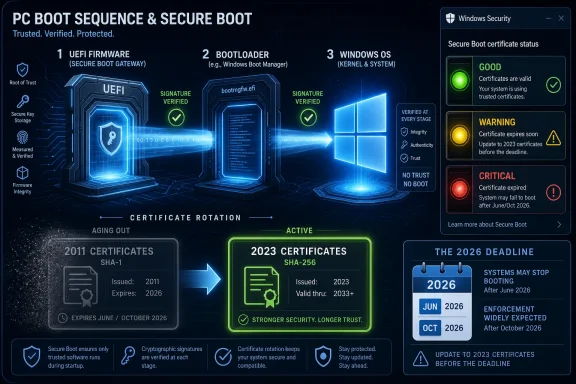
Microsoft’s 2026 Windows security story is no longer mainly about adding another Defender toggle or hiding another privacy switch; it is about renewing the trust chain beneath Windows 11 while tightening the consent model above it, as Secure Boot certificates from 2011 expire in June and October 2026. That makes “security” less a chapter in a Windows guide than a live operating condition. The practical consequence is blunt: supported, updated PCs should keep moving through the transition, while unmanaged, unsupported, or firmware-neglected systems become riskier by degrees. Windows 11 is entering the year when security stops being a promise printed on the box and becomes a test of whether the whole PC ecosystem can service its own foundations.
For years, Microsoft sold Windows security to consumers in familiar terms: antivirus, firewall, account protection, browser warnings, and the periodic nudge to stop reusing passwords. That layer still matters, but it is not where the most interesting 2026 work is happening. The real action is below the sign-in screen, in the boot path, firmware trust anchors, certificate databases, and the fragile choreography between Windows Update, OEM firmware, BitLocker, and enterprise management tools.
That shift is easy to miss because Windows still presents security as a set of reassuring surfaces. The Windows Security app tells users whether things are green, yellow, or red. Settings offers digestible categories. Microsoft’s public language leans on phrases like “secure by default,” “resiliency,” and “transparency.” But underneath the friendly UI is a much harder problem: Windows has to keep trusting PCs that were built across more than a decade of firmware practices, OEM customizations, and deployment assumptions.
The Secure Boot certificate rollover is the clearest example. Secure Boot was introduced in the Windows 8 era to ensure that only trusted code runs before the operating system loads. The certificates that helped establish that trust were never immortal. They were issued with a lifecycle, and 2026 is when that lifecycle becomes operational reality.
The expiration does not mean millions of PCs suddenly refuse to boot. That is the comforting part, and it is true as far as it goes. The uncomfortable part is that a device can keep starting while gradually losing its ability to receive new boot-level protections, revocation updates, and future trust improvements. In security terms, “still boots” is not the same as “still healthy.”
Microsoft’s newer guidance has been careful not to sensationalize the issue. Devices that do not receive the updated 2023 Secure Boot certificates may continue to boot and may continue installing regular Windows updates. But Microsoft is also clear that those devices can miss future protections for early boot components. That is where the story becomes less about a calendar deadline and more about security debt.
A boot chain is only as strong as the trust material it can use. If an organization allows devices to remain on old Secure Boot certificates, it is effectively deciding that yesterday’s trust store is good enough for tomorrow’s boot threats. That might not produce an outage in July 2026, but it creates exactly the kind of long-tail exposure that attackers love: boring, under-inventoried, unevenly patched, and easy to rationalize away.
The staggered expiration dates matter. Some certificates begin expiring in June 2026, while others run into October 2026. That gives Microsoft, OEMs, and administrators a window to manage the transition, but it also creates a trap. A fleet that survives the first deadline without visible breakage may look fine to a dashboard built around uptime rather than boot trust.
This is where home users and IT departments diverge. A supported consumer PC with Windows Update enabled may simply receive the right updates and move on, perhaps with a warning in Windows Security if action is needed. A corporate fleet, by contrast, has to answer harder questions: which devices have outdated firmware, which models need OEM packages, which systems are BitLocker-sensitive, which update rings should receive the change first, and which machines are old enough that their “supported” status is more ambiguous than the procurement database admits.
Microsoft’s position is consistent: supported Windows devices get the servicing path, unsupported ones do not. That is a defensible engineering boundary. It is also a messy social reality, because Windows has trained the world to expect old PCs to keep functioning long after official support has moved on.
The result is a two-tier Windows security world. On one side are devices inside the supported Windows 11 and eligible Windows 10 servicing ecosystem, including systems covered by extended security arrangements. On the other side are machines that will continue to power on, open browsers, run line-of-business apps, and look normal to their owners while slipping outside the security assumptions Microsoft is building for the next phase of Windows.
That matters because Secure Boot is not an enthusiast feature. It is not a niche enterprise setting that only hardened environments use. It is part of the baseline Windows security stack, tied to the premise that a PC should not hand control to untrusted code before the OS can defend itself. If that baseline gets uneven, the Windows ecosystem becomes harder to reason about.
This is also why the 2026 Field Guide framing is useful. A modern Windows security chapter cannot merely tell readers where the toggles are. It has to explain that Windows security is now a relationship among OS version, firmware readiness, hardware eligibility, account identity, recovery posture, and update discipline. The operating system is no longer the whole product; the serviced PC is.
That is not just a consumer-protection line. It is a recognition that Windows’ historic openness has become a security and trust liability. The same flexibility that made Windows the default home for every printer utility, VPN client, game launcher, device updater, shell extension, and productivity tool also made it easy for software to blur the line between “helpful integration” and “quiet takeover.”
Microsoft’s proposed answer includes concepts such as Windows Baseline Security Mode and User Transparency and Consent. The names are bureaucratic, but the direction is important. Windows is moving toward a model where apps and AI agents are expected to request clearer permission, operate within better-defined capabilities, and leave behind changes that users or administrators can understand.
The AI angle should not be overlooked. As Microsoft and its partners push agentic features into the desktop, the old permission model starts to look dangerously informal. A traditional app might modify file associations or add a startup service. An AI agent may be asked to act across apps, files, accounts, and settings. If Windows does not build a clearer consent framework before that behavior becomes normal, the platform will inherit a new class of ambiguity: not “what did this app install?” but “what did this agent do on my behalf?”
The tension is obvious. Windows users want control, but they also want old software to keep working. Developers want flexibility, but they also want users to trust the platform. Microsoft wants to harden Windows, but it cannot simply turn the operating system into iOS without breaking the thing that made Windows valuable. The 2026 security story is therefore not Microsoft choosing between openness and control. It is Microsoft trying to preserve openness by making control more explicit.
That is good design, but it also exposes the limits of consumer-facing security language. A green badge can reassure, a yellow badge can prompt, and a red badge can alarm. None of those badges can explain the full interaction among UEFI databases, key exchange keys, bootloaders, revocation lists, OEM firmware, Windows servicing, and BitLocker recovery behavior.
For home users, that abstraction is necessary. Most people should not need to understand the difference between a KEK and a DB certificate to keep their laptop safe. They should be able to install updates, follow a clear prompt, and move on.
For IT pros, however, the dashboard is only the front door. The real work sits in inventory and staged deployment. Administrators need to know which devices are already updated, which devices are eligible for automatic rollout, which ones require firmware first, and which ones are showing event log or registry signals that remediation did not complete. In large environments, the difference between “Windows says this feature exists” and “our fleet is safely through the transition” can be thousands of machines.
Microsoft’s phased rollout strategy reflects that reality. Certificate updates are not simply blasted to every machine at once. The company is using confidence signals and gradual targeting to reduce the chance of boot failures or BitLocker recovery surprises. That caution is welcome, but it also means administrators cannot treat the transition as a single patch Tuesday event. It is a campaign.
The Secure Boot certificate transition is therefore not just a cryptographic update. It is a user-experience risk. A small number of devices hitting unexpected BitLocker recovery loops can create a help desk firestorm even if the underlying security change is correct. For enterprises, that means recovery key hygiene is not optional. It is the difference between a manageable security maintenance window and a Monday morning outage narrative.
Microsoft’s guidance to pilot across representative hardware is not boilerplate. It is the central operational advice. Different OEMs, firmware versions, device ages, and security configurations can produce different outcomes. A clean test on a modern business laptop does not guarantee success on a five-year-old specialty workstation with a neglected BIOS.
The lesson here is broader than Secure Boot. Windows security increasingly depends on subsystems that users only notice when they fail. TPM, Secure Boot, virtualization-based security, memory integrity, BitLocker, certificate stores, driver policy, and update orchestration are all part of the same trust stack. Each component raises the security floor. Each also increases the consequences of sloppy servicing.
That is the bargain Microsoft has made with Windows 11. The platform is more secure because it assumes modern hardware and a more disciplined boot environment. But the cost is that maintenance is now part of the security model. You cannot freeze a Windows PC in place and expect it to remain trustworthy merely because it still starts.
The driver ecosystem is one of Windows’ great strengths and one of its chronic weaknesses. Hardware vendors, security products, anti-cheat systems, virtualization tools, and enterprise agents all want privileged access. Attackers want the same thing. Historically, Windows’ compatibility culture gave too much room to code that could run deep in the system because the alternative was breaking customers.
Microsoft’s newer posture is less forgiving. If code wants to live in the kernel, it needs to meet a higher bar. That will annoy some vendors and break some edge cases, but it is hard to argue against the direction. A desktop platform that treats kernel privilege as a compatibility courtesy is not sustainable in an era of ransomware, supply-chain attacks, and commercial exploit tooling.
The interesting part is how these changes reinforce one another. Secure Boot protects the path into Windows. Driver trust policies shape what can live inside the kernel after startup. User consent work governs what apps and agents can do in the user environment. Recovery features help restore the system when something goes wrong. Microsoft is not solving one security problem; it is trying to reduce the number of informal trust relationships Windows has accumulated over decades.
That effort will inevitably produce friction. Some users will call it paternalism. Some developers will call it lock-in. Some administrators will call it another deployment headache. They may all be partly right. But the alternative is pretending that the old Windows bargain still works: install anything, trust everything, recover somehow.
Security vendors have understood this for years. Prevention matters, but resilience determines damage. If a bad driver, failed update, broken security setting, or malware incident leaves a machine unbootable, the organization’s real exposure is measured in downtime, data loss, and operational confusion. Windows cannot merely prevent problems; it has to give users and administrators a way back.
This is especially relevant as Microsoft hardens the platform. Stronger boot rules and driver policies reduce risk, but they also raise the stakes of compatibility mistakes. A more secure Windows that strands users after a bad firmware interaction will lose trust quickly. Recovery is the political safety valve for hardening.
For consumers, the ideal is invisible. The PC detects a startup problem, enters a recovery path, repairs what can be repaired, and returns the user to a working desktop. For enterprises, the ideal is observable and controllable. IT wants logs, policy hooks, remote remediation, and predictable behavior across managed devices.
A Windows guide that treats recovery as separate from security is now out of date. In 2026, recovery is part of the security perimeter. The ability to restore trust after a failure is as important as the ability to establish trust at boot.
That is why Windows security advice increasingly sounds like identity advice. Use multifactor authentication. Keep recovery information current. Understand where BitLocker recovery keys are stored. Know whether the device is tied to a personal Microsoft account, a work account, or both. These are not optional extras; they are part of whether the PC remains usable after a failure or compromise.
This is also where Microsoft’s consumer and enterprise priorities collide. For home users, cloud account integration can be a rescue path. A lost recovery key, forgotten password, or device reset may be survivable because the account holds the thread. For administrators, the same integration can be a governance problem if ownership, enrollment, and recovery policies are unclear.
The broader point is that Windows security has shifted from protecting files on a box to protecting relationships among device, user, identity provider, firmware, cloud service, and update channel. That is more powerful than the old model, but it is harder to explain. It also makes documentation more important, not less.
The modern Windows threat model includes bootkits, vulnerable drivers, stolen tokens, malicious OAuth grants, firmware persistence, ransomware operators, fake update lures, supply-chain compromise, and apps that manipulate user settings under the cover of convenience. It also includes the mundane but devastating risk of losing access to recovery keys or failing to update firmware before a certificate transition.
This is why Microsoft keeps pushing security downward into hardware and upward into identity. The old application-layer defenses cannot carry the whole load. Defender can scan files, but it cannot fix an unserviceable trust anchor. A password reset can restore an account, but it cannot guarantee a compromised boot path. A browser warning can block a phishing site, but it cannot undo a driver that should never have loaded.
The challenge is that every improvement makes Windows feel less like the endlessly permissive platform many users grew up with. Memory integrity can block old drivers. Secure Boot can complicate alternative operating system setups. Consent prompts can irritate power users. Account recovery requirements can feel like nagging until the day they prevent a disaster.
Microsoft’s bet is that users will accept more guardrails if the alternative is insecurity. The risk is that Microsoft sometimes uses the language of security to justify product decisions that also advance its ecosystem control. Windows users are right to be skeptical. But skepticism should not become denial. Some of these guardrails exist because the threat model really did change.
That sounds obvious until one remembers how many Windows environments are built on exceptions. The old laptop assigned to a contractor. The lab machine that cannot be upgraded because the instrument software is certified only on a specific build. The kiosk with a vendor image. The branch-office PC outside normal management. The executive device deferred from updates because downtime is politically inconvenient. Security failures grow in these spaces.
The 2026 Secure Boot transition is valuable because it forces a reckoning. It gives administrators a concrete reason to look at firmware, boot configuration, device support status, and update channels together. Even if the certificate rollover completes smoothly, the exercise should expose weak points that matter beyond this one deadline.
For smaller businesses, the lesson is simpler but no less important. If a PC is old enough that it is outside supported Windows servicing, it should not be treated as a normal production machine. If firmware updates have never been applied, now is the time to check. If BitLocker is enabled but recovery keys are unknown, that is not security; it is a future lockout.
Home users do not need enterprise dashboards, but they do need habits. Keep Windows Update enabled. Install OEM firmware updates from the PC maker when offered through supported channels. Check Windows Security if it warns about Secure Boot. Make sure the Microsoft account tied to the PC has current recovery information. Those steps are boring, which is exactly why they work.
If the Secure Boot transition is quiet, well-documented, and minimally disruptive, Microsoft will have pulled off one of the more important maintenance operations in Windows history. If users see unexplained warnings, BitLocker surprises, firmware confusion, or OEM silence, the story will become another example of Windows complexity spilling onto customers.
The consent work carries similar stakes. Users want protection from apps that hijack settings or bury unwanted components in installers. They do not want a Windows experience where Microsoft’s own services get privileged treatment while competitors face new prompts and restrictions. A consent-first model has to apply credibly, or it becomes just another platform-control story with better branding.
For IT pros, the correct posture is cautious approval. Microsoft is right to harden the boot path, modernize certificate trust, reduce kernel-driver abuse, improve recovery, and make app behavior more transparent. But none of that absolves the company from explaining changes clearly, preserving legitimate manageability, and giving administrators enough time and tooling to deploy safely.
For enthusiasts, the lesson is more personal. The days when Windows security could be meaningfully judged by whether Defender was on are over. The interesting questions are now whether the firmware is current, whether Secure Boot trust is updated, whether the account can be recovered, whether drivers are trustworthy, whether recovery paths work, and whether apps are acting with consent rather than merely with permission inherited from the past.
Windows 11 in 2026 is not becoming secure because Microsoft found one magic switch. It is becoming more secure because Microsoft is slowly replacing old assumptions with serviced trust, explicit consent, and recoverable failure. That will make Windows less casual, sometimes less forgiving, and occasionally more annoying. But if Microsoft and its partners execute well, it will also make the PC a little less dependent on luck — and in Windows security, that would count as real progress.
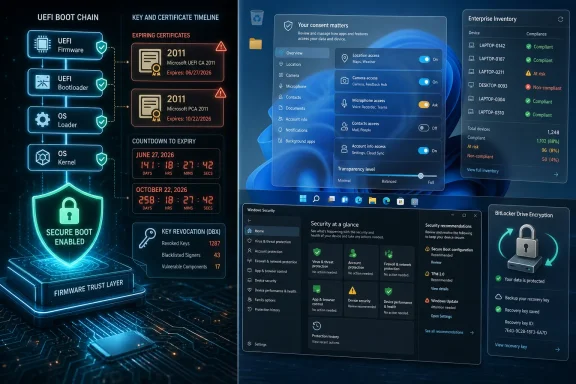 Microsoft’s Security Pitch Has Moved Below the Desktop
For years, Microsoft sold Windows security to consumers in familiar terms: antivirus, firewall, account protection, browser warnings, and the periodic nudge to stop reusing passwords. That layer still matters, but it is not where the most interesting 2026 work is happening. The real action is below the sign-in screen, in the boot path, firmware trust anchors, certificate databases, and the fragile choreography between Windows Update, OEM firmware, BitLocker, and enterprise management tools.That shift is easy to miss because Windows still presents security as a set of reassuring surfaces. The Windows Security app tells users whether things are green, yellow, or red. Settings offers digestible categories. Microsoft’s public language leans on phrases like “secure by default,” “resiliency,” and “transparency.” But underneath the friendly UI is a much harder problem: Windows has to keep trusting PCs that were built across more than a decade of firmware practices, OEM customizations, and deployment assumptions.
The Secure Boot certificate rollover is the clearest example. Secure Boot was introduced in the Windows 8 era to ensure that only trusted code runs before the operating system loads. The certificates that helped establish that trust were never immortal. They were issued with a lifecycle, and 2026 is when that lifecycle becomes operational reality.
The expiration does not mean millions of PCs suddenly refuse to boot. That is the comforting part, and it is true as far as it goes. The uncomfortable part is that a device can keep starting while gradually losing its ability to receive new boot-level protections, revocation updates, and future trust improvements. In security terms, “still boots” is not the same as “still healthy.”
Secure Boot’s 2026 Deadline Turns Maintenance Into a Security Boundary
The most important thing about the 2026 Secure Boot transition is that it is both routine and unprecedented. Routine, because certificates expire and get replaced all the time. Unprecedented, because this particular certificate set sits at the foundation of modern Windows startup integrity and spans a huge installed base of PCs.Microsoft’s newer guidance has been careful not to sensationalize the issue. Devices that do not receive the updated 2023 Secure Boot certificates may continue to boot and may continue installing regular Windows updates. But Microsoft is also clear that those devices can miss future protections for early boot components. That is where the story becomes less about a calendar deadline and more about security debt.
A boot chain is only as strong as the trust material it can use. If an organization allows devices to remain on old Secure Boot certificates, it is effectively deciding that yesterday’s trust store is good enough for tomorrow’s boot threats. That might not produce an outage in July 2026, but it creates exactly the kind of long-tail exposure that attackers love: boring, under-inventoried, unevenly patched, and easy to rationalize away.
The staggered expiration dates matter. Some certificates begin expiring in June 2026, while others run into October 2026. That gives Microsoft, OEMs, and administrators a window to manage the transition, but it also creates a trap. A fleet that survives the first deadline without visible breakage may look fine to a dashboard built around uptime rather than boot trust.
This is where home users and IT departments diverge. A supported consumer PC with Windows Update enabled may simply receive the right updates and move on, perhaps with a warning in Windows Security if action is needed. A corporate fleet, by contrast, has to answer harder questions: which devices have outdated firmware, which models need OEM packages, which systems are BitLocker-sensitive, which update rings should receive the change first, and which machines are old enough that their “supported” status is more ambiguous than the procurement database admits.
Windows 10’s Afterlife Makes the Security Story Messier
The Secure Boot rollover lands in the shadow of Windows 10’s end of mainstream support, and that timing is not accidental in its consequences. Many PCs that missed the Windows 11 hardware cutoff are precisely the sort of machines likely to live in homes, small businesses, classrooms, back offices, and dusty industrial corners where firmware updates are rare and asset management is aspirational.Microsoft’s position is consistent: supported Windows devices get the servicing path, unsupported ones do not. That is a defensible engineering boundary. It is also a messy social reality, because Windows has trained the world to expect old PCs to keep functioning long after official support has moved on.
The result is a two-tier Windows security world. On one side are devices inside the supported Windows 11 and eligible Windows 10 servicing ecosystem, including systems covered by extended security arrangements. On the other side are machines that will continue to power on, open browsers, run line-of-business apps, and look normal to their owners while slipping outside the security assumptions Microsoft is building for the next phase of Windows.
That matters because Secure Boot is not an enthusiast feature. It is not a niche enterprise setting that only hardened environments use. It is part of the baseline Windows security stack, tied to the premise that a PC should not hand control to untrusted code before the OS can defend itself. If that baseline gets uneven, the Windows ecosystem becomes harder to reason about.
This is also why the 2026 Field Guide framing is useful. A modern Windows security chapter cannot merely tell readers where the toggles are. It has to explain that Windows security is now a relationship among OS version, firmware readiness, hardware eligibility, account identity, recovery posture, and update discipline. The operating system is no longer the whole product; the serviced PC is.
The New Windows Security Model Is About Consent as Much as Malware
While the Secure Boot story runs below the OS, Microsoft is also pushing a parallel shift above it: a stronger emphasis on user transparency and consent. The company’s February 2026 Windows messaging made the argument plainly. Apps increasingly change settings, install additional components, or alter core experiences in ways users do not fully understand, and Microsoft wants Windows to take more responsibility for making those behaviors visible and reversible.That is not just a consumer-protection line. It is a recognition that Windows’ historic openness has become a security and trust liability. The same flexibility that made Windows the default home for every printer utility, VPN client, game launcher, device updater, shell extension, and productivity tool also made it easy for software to blur the line between “helpful integration” and “quiet takeover.”
Microsoft’s proposed answer includes concepts such as Windows Baseline Security Mode and User Transparency and Consent. The names are bureaucratic, but the direction is important. Windows is moving toward a model where apps and AI agents are expected to request clearer permission, operate within better-defined capabilities, and leave behind changes that users or administrators can understand.
The AI angle should not be overlooked. As Microsoft and its partners push agentic features into the desktop, the old permission model starts to look dangerously informal. A traditional app might modify file associations or add a startup service. An AI agent may be asked to act across apps, files, accounts, and settings. If Windows does not build a clearer consent framework before that behavior becomes normal, the platform will inherit a new class of ambiguity: not “what did this app install?” but “what did this agent do on my behalf?”
The tension is obvious. Windows users want control, but they also want old software to keep working. Developers want flexibility, but they also want users to trust the platform. Microsoft wants to harden Windows, but it cannot simply turn the operating system into iOS without breaking the thing that made Windows valuable. The 2026 security story is therefore not Microsoft choosing between openness and control. It is Microsoft trying to preserve openness by making control more explicit.
The Security App Becomes a Dashboard for Ecosystem Health
The Windows Security app has long been a place where Microsoft compresses complicated system state into simple judgments. That role becomes more consequential in 2026. When Secure Boot certificate status appears in the app, it turns a firmware and PKI transition into something a normal user might actually notice.That is good design, but it also exposes the limits of consumer-facing security language. A green badge can reassure, a yellow badge can prompt, and a red badge can alarm. None of those badges can explain the full interaction among UEFI databases, key exchange keys, bootloaders, revocation lists, OEM firmware, Windows servicing, and BitLocker recovery behavior.
For home users, that abstraction is necessary. Most people should not need to understand the difference between a KEK and a DB certificate to keep their laptop safe. They should be able to install updates, follow a clear prompt, and move on.
For IT pros, however, the dashboard is only the front door. The real work sits in inventory and staged deployment. Administrators need to know which devices are already updated, which devices are eligible for automatic rollout, which ones require firmware first, and which ones are showing event log or registry signals that remediation did not complete. In large environments, the difference between “Windows says this feature exists” and “our fleet is safely through the transition” can be thousands of machines.
Microsoft’s phased rollout strategy reflects that reality. Certificate updates are not simply blasted to every machine at once. The company is using confidence signals and gradual targeting to reduce the chance of boot failures or BitLocker recovery surprises. That caution is welcome, but it also means administrators cannot treat the transition as a single patch Tuesday event. It is a campaign.
BitLocker Is the Canary Microsoft Cannot Ignore
Any time Microsoft touches the boot path, BitLocker becomes part of the conversation. That is not because BitLocker is fragile by design, but because it is doing exactly what it is supposed to do: detecting meaningful changes in the environment that protects encrypted data. The problem is that meaningful changes sometimes happen for legitimate reasons, and users experience the result as a recovery prompt at the worst possible time.The Secure Boot certificate transition is therefore not just a cryptographic update. It is a user-experience risk. A small number of devices hitting unexpected BitLocker recovery loops can create a help desk firestorm even if the underlying security change is correct. For enterprises, that means recovery key hygiene is not optional. It is the difference between a manageable security maintenance window and a Monday morning outage narrative.
Microsoft’s guidance to pilot across representative hardware is not boilerplate. It is the central operational advice. Different OEMs, firmware versions, device ages, and security configurations can produce different outcomes. A clean test on a modern business laptop does not guarantee success on a five-year-old specialty workstation with a neglected BIOS.
The lesson here is broader than Secure Boot. Windows security increasingly depends on subsystems that users only notice when they fail. TPM, Secure Boot, virtualization-based security, memory integrity, BitLocker, certificate stores, driver policy, and update orchestration are all part of the same trust stack. Each component raises the security floor. Each also increases the consequences of sloppy servicing.
That is the bargain Microsoft has made with Windows 11. The platform is more secure because it assumes modern hardware and a more disciplined boot environment. But the cost is that maintenance is now part of the security model. You cannot freeze a Windows PC in place and expect it to remain trustworthy merely because it still starts.
Driver Trust Shows Microsoft Is Closing Old Escape Routes
Secure Boot is not the only place Microsoft is tightening old assumptions. The company has also been moving against legacy driver trust paths, including policies that restrict older cross-signed kernel drivers in favor of more controlled certification. This matters because Windows kernel drivers have long been a favored route for both legitimate low-level software and malicious abuse.The driver ecosystem is one of Windows’ great strengths and one of its chronic weaknesses. Hardware vendors, security products, anti-cheat systems, virtualization tools, and enterprise agents all want privileged access. Attackers want the same thing. Historically, Windows’ compatibility culture gave too much room to code that could run deep in the system because the alternative was breaking customers.
Microsoft’s newer posture is less forgiving. If code wants to live in the kernel, it needs to meet a higher bar. That will annoy some vendors and break some edge cases, but it is hard to argue against the direction. A desktop platform that treats kernel privilege as a compatibility courtesy is not sustainable in an era of ransomware, supply-chain attacks, and commercial exploit tooling.
The interesting part is how these changes reinforce one another. Secure Boot protects the path into Windows. Driver trust policies shape what can live inside the kernel after startup. User consent work governs what apps and agents can do in the user environment. Recovery features help restore the system when something goes wrong. Microsoft is not solving one security problem; it is trying to reduce the number of informal trust relationships Windows has accumulated over decades.
That effort will inevitably produce friction. Some users will call it paternalism. Some developers will call it lock-in. Some administrators will call it another deployment headache. They may all be partly right. But the alternative is pretending that the old Windows bargain still works: install anything, trust everything, recover somehow.
Recovery Is Becoming a First-Class Security Feature
The most underappreciated part of Microsoft’s recent Windows work is recovery. Quick Machine Recovery, point-in-time restore concepts, and improved update rollback mechanisms are often discussed as convenience features, but they belong in the security conversation. A system that cannot recover cleanly is not secure in any practical sense.Security vendors have understood this for years. Prevention matters, but resilience determines damage. If a bad driver, failed update, broken security setting, or malware incident leaves a machine unbootable, the organization’s real exposure is measured in downtime, data loss, and operational confusion. Windows cannot merely prevent problems; it has to give users and administrators a way back.
This is especially relevant as Microsoft hardens the platform. Stronger boot rules and driver policies reduce risk, but they also raise the stakes of compatibility mistakes. A more secure Windows that strands users after a bad firmware interaction will lose trust quickly. Recovery is the political safety valve for hardening.
For consumers, the ideal is invisible. The PC detects a startup problem, enters a recovery path, repairs what can be repaired, and returns the user to a working desktop. For enterprises, the ideal is observable and controllable. IT wants logs, policy hooks, remote remediation, and predictable behavior across managed devices.
A Windows guide that treats recovery as separate from security is now out of date. In 2026, recovery is part of the security perimeter. The ability to restore trust after a failure is as important as the ability to establish trust at boot.
The Account Is Now Part of the Machine
Microsoft’s emphasis on account security basics in Windows 11 documentation reflects another uncomfortable truth: the local PC is no longer local in the way users remember. A Windows sign-in is often tied to a Microsoft account, Entra identity, OneDrive recovery, passkeys, device encryption, Store licensing, browser sync, and cloud-based recovery flows. Lose the account, and the machine can become a locked room with the keys stored somewhere you no longer control.That is why Windows security advice increasingly sounds like identity advice. Use multifactor authentication. Keep recovery information current. Understand where BitLocker recovery keys are stored. Know whether the device is tied to a personal Microsoft account, a work account, or both. These are not optional extras; they are part of whether the PC remains usable after a failure or compromise.
This is also where Microsoft’s consumer and enterprise priorities collide. For home users, cloud account integration can be a rescue path. A lost recovery key, forgotten password, or device reset may be survivable because the account holds the thread. For administrators, the same integration can be a governance problem if ownership, enrollment, and recovery policies are unclear.
The broader point is that Windows security has shifted from protecting files on a box to protecting relationships among device, user, identity provider, firmware, cloud service, and update channel. That is more powerful than the old model, but it is harder to explain. It also makes documentation more important, not less.
The Old Windows Advice No Longer Fits the New Threat Model
A decade ago, practical Windows security advice could be reduced to a familiar routine: install updates, run antivirus, avoid suspicious downloads, use a standard account when possible, and keep backups. That advice is not wrong. It is just incomplete.The modern Windows threat model includes bootkits, vulnerable drivers, stolen tokens, malicious OAuth grants, firmware persistence, ransomware operators, fake update lures, supply-chain compromise, and apps that manipulate user settings under the cover of convenience. It also includes the mundane but devastating risk of losing access to recovery keys or failing to update firmware before a certificate transition.
This is why Microsoft keeps pushing security downward into hardware and upward into identity. The old application-layer defenses cannot carry the whole load. Defender can scan files, but it cannot fix an unserviceable trust anchor. A password reset can restore an account, but it cannot guarantee a compromised boot path. A browser warning can block a phishing site, but it cannot undo a driver that should never have loaded.
The challenge is that every improvement makes Windows feel less like the endlessly permissive platform many users grew up with. Memory integrity can block old drivers. Secure Boot can complicate alternative operating system setups. Consent prompts can irritate power users. Account recovery requirements can feel like nagging until the day they prevent a disaster.
Microsoft’s bet is that users will accept more guardrails if the alternative is insecurity. The risk is that Microsoft sometimes uses the language of security to justify product decisions that also advance its ecosystem control. Windows users are right to be skeptical. But skepticism should not become denial. Some of these guardrails exist because the threat model really did change.
Administrators Need Inventories, Not Vibes
The practical enterprise response to Windows security in 2026 is not panic. It is inventory. Organizations need to know what they own, what firmware it runs, what Windows build it is on, whether Secure Boot is enabled, whether updated certificates are present, whether BitLocker recovery keys are escrowed, and whether unsupported devices are being quietly normalized.That sounds obvious until one remembers how many Windows environments are built on exceptions. The old laptop assigned to a contractor. The lab machine that cannot be upgraded because the instrument software is certified only on a specific build. The kiosk with a vendor image. The branch-office PC outside normal management. The executive device deferred from updates because downtime is politically inconvenient. Security failures grow in these spaces.
The 2026 Secure Boot transition is valuable because it forces a reckoning. It gives administrators a concrete reason to look at firmware, boot configuration, device support status, and update channels together. Even if the certificate rollover completes smoothly, the exercise should expose weak points that matter beyond this one deadline.
For smaller businesses, the lesson is simpler but no less important. If a PC is old enough that it is outside supported Windows servicing, it should not be treated as a normal production machine. If firmware updates have never been applied, now is the time to check. If BitLocker is enabled but recovery keys are unknown, that is not security; it is a future lockout.
Home users do not need enterprise dashboards, but they do need habits. Keep Windows Update enabled. Install OEM firmware updates from the PC maker when offered through supported channels. Check Windows Security if it warns about Secure Boot. Make sure the Microsoft account tied to the PC has current recovery information. Those steps are boring, which is exactly why they work.
The 2026 Security Chapter Is Really a Maintenance Manual
The concrete lesson from this year’s Windows security changes is that Microsoft has turned maintenance into a condition of trust. That is the part users may resent, but it is also the part security professionals will recognize as overdue.- Windows PCs that remain supported and current should generally move through the Secure Boot certificate transition through Windows Update and OEM firmware servicing.
- Devices that stay on outdated Secure Boot certificates may continue to boot, but they risk missing future boot-level protections and revocation updates.
- Administrators should pilot certificate and firmware updates across representative hardware before broad deployment, especially where BitLocker is enabled.
- Windows Security is becoming a more important consumer-facing signal for firmware and boot trust, but enterprises still need deeper inventory and reporting.
- Microsoft’s consent and baseline-security work is part of the same trend as Secure Boot hardening: Windows is reducing the number of things software can quietly change.
- Unsupported Windows devices are not made safe by the fact that they still run, and 2026 will make that distinction harder to ignore.
Microsoft Still Has to Earn the Trust It Wants Users to Delegate
There is an irony at the center of Microsoft’s 2026 Windows security push. The company is asking users and administrators to trust Windows more deeply at the same time that it is admitting the old trust assumptions need repair. That is not hypocrisy. It is the nature of platform security. But it does mean Microsoft’s execution matters enormously.If the Secure Boot transition is quiet, well-documented, and minimally disruptive, Microsoft will have pulled off one of the more important maintenance operations in Windows history. If users see unexplained warnings, BitLocker surprises, firmware confusion, or OEM silence, the story will become another example of Windows complexity spilling onto customers.
The consent work carries similar stakes. Users want protection from apps that hijack settings or bury unwanted components in installers. They do not want a Windows experience where Microsoft’s own services get privileged treatment while competitors face new prompts and restrictions. A consent-first model has to apply credibly, or it becomes just another platform-control story with better branding.
For IT pros, the correct posture is cautious approval. Microsoft is right to harden the boot path, modernize certificate trust, reduce kernel-driver abuse, improve recovery, and make app behavior more transparent. But none of that absolves the company from explaining changes clearly, preserving legitimate manageability, and giving administrators enough time and tooling to deploy safely.
For enthusiasts, the lesson is more personal. The days when Windows security could be meaningfully judged by whether Defender was on are over. The interesting questions are now whether the firmware is current, whether Secure Boot trust is updated, whether the account can be recovered, whether drivers are trustworthy, whether recovery paths work, and whether apps are acting with consent rather than merely with permission inherited from the past.
Windows 11 in 2026 is not becoming secure because Microsoft found one magic switch. It is becoming more secure because Microsoft is slowly replacing old assumptions with serviced trust, explicit consent, and recoverable failure. That will make Windows less casual, sometimes less forgiving, and occasionally more annoying. But if Microsoft and its partners execute well, it will also make the PC a little less dependent on luck — and in Windows security, that would count as real progress.
References
- Primary source: thurrott.com
Published: 2026-07-02T03:10:13.190389
security-2026 - Thurrott.com
 www.thurrott.com
- Related coverage: windowscentral.com
Microsoft warns Secure Boot certificates will expire in 2026 | Windows Central
After 15 years, the original Secure Boot certificates that keep your PC secure during boot are expiring. Here's what you need to know.www.windowscentral.com - Official source: blogs.windows.com
Strengthening Windows trust and security through User Transparency and Consent
Today, Windows 11 powers over a billion devices and supports millions of apps across business, creativity, education, gaming and productivity. For decades, our commitment to openness and compatibility, in partnership with our global community of deveblogs.windows.com - Related coverage: windowsforum.com
Windows 11 Field Guide 2026: Year-Based Updates, Removed Apps, New Security Chapters | Windows Forum
Paul Thurrott has renamed and reworked his long-running Windows 11 Field Guide as the Windows 11 Field Guide 2026 edition, a June 2026 update that reframes...windowsforum.com - Related coverage: pureinfotech.com
Microsoft explains the security risks of Secure Boot certificates expiring in 2026 on Windows 11 - Pureinfotech
Secure Boot certificates expire in 2026. Microsoft is rolling out updates now. Here’s what it means for Windows 11 and Windows 10 PCs. pureinfotech.com
- Related coverage: computerworld.com
Windows 11: A guide to the updates – Computerworld
Here’s what you need to know about the latest updates to Windows 11 as they’re released from Microsoft. Now updated for KB5094126 (Windows 11 24H2 and 25H2) and KB5095051 (Windows 11 26H1), both released on June 9, 2026. www.computerworld.com
- Official source: learn.microsoft.com
- Related coverage: pcworld.com
Windows is finally fixing a years-old security hole in April | PCWorld
In April 2026, Microsoft is blocking old kernel drivers in Windows, closing a vulnerability that's been exploited for years. Here's what that means for you.www.pcworld.com - Official source: microsoft.com
- Official source: cdn-dynmedia-1.microsoft.com