

Cybernews researchers reported in mid-June 2026 that an exposed Elasticsearch database briefly left more than 24 billion credential records, roughly 8.3 terabytes of usernames, email addresses, passwords, and login URLs, accessible on the open internet before it was secured. The number is staggering, but the more important story is not that one company was hacked and 24 billion fresh accounts spilled out. It is that the password economy has become an industrial recycling plant, where old breaches, fresh malware logs, and Telegram trading channels are continuously repackaged into ready-made attack fuel.
For Windows users, sysadmins, and anyone responsible for a Microsoft 365 tenant, this leak is less a single disaster than a status report. It shows that the attacker no longer needs to breach your company to compromise your people. They can simply buy, scrape, or stumble into a credential collection built from years of human password reuse and malware infections.
The headline figure invites a familiar kind of panic: 24 billion records, nearly three times the population of Earth, apparently sitting in plaintext. That makes for a dramatic breach story, but it also obscures the most useful interpretation. This was almost certainly a compilation, not a clean list of unique, newly stolen accounts.
Credential dumps are messy by design. A single person may appear dozens of times across old website breaches, browser-stealer logs, duplicate “combo lists,” and repackaged underground collections. One password may be stale, another may still work, and a third may unlock something more valuable because the user reused it across work and personal accounts.
That distinction matters because it changes the threat model. The danger is not that 24 billion distinct humans were individually breached this week. The danger is that attackers have access to a searchable, structured, and apparently maintained corpus of credentials that can be fed directly into automated account-takeover campaigns.
The exposed database reportedly included usernames, email addresses, plaintext passwords, and the services those credentials were meant to access. That last field is what turns an ugly data dump into an operational tool. A password without context is a guess; a password paired with a login URL is an instruction.
According to the reporting around the discovery, the database drew from 36 sources. Some appeared to be old breach compilations, some were linked to Telegram channels used to trade stolen credentials, and a large portion was believed to come from infostealer logs. That mixture is important because each source reflects a different stage in the modern cybercrime supply chain.
Old breach compilations exploit human laziness. If you reused a password on a defunct forum in 2018 and never changed it on a current shopping site, the attacker does not need the shopping site to be breached. Credential stuffing software can simply try the old combination somewhere new.
Infostealer logs are more invasive. They come from malware running on a user’s device, often harvesting browser-saved passwords, session cookies, autofill data, crypto-wallet artifacts, screenshots, and system details. If old breach dumps are archaeology, infostealer logs are surveillance.
Telegram’s role in the story is also telling. The app is not the victim in the simple sense; it is reportedly one of the marketplaces and distribution channels where criminals exchange stolen data. That distinction was lost in some social-media reactions, but it is central to understanding how credentials now circulate.
That is why infostealers matter so much. A stealer running on a Windows PC does not need to defeat a company’s password hashing architecture. It can grab what the user or browser already has, often before the credential is transformed, protected, or hidden from the server side.
This is the uncomfortable part of the story for everyday users. You can do almost everything right with a particular account and still lose control if the device you use to access it is infected. A password manager helps enormously, but it is not magic armor against a machine that is actively hostile.
For administrators, the lesson is sharper. Endpoint security, browser hardening, privileged-access controls, and conditional access are not separate disciplines from identity security anymore. In 2026, the endpoint is often where identity is stolen first.
Cybercrime markets now behave like content markets. Names, channels, reputations, reposts, and “collections” all help package stolen material for buyers. The database owner’s labels may not map cleanly to original sources, but they do reveal how credential data is merchandised.
The largest bucket, reportedly 22.6 billion records, was simply labeled “collections.” That bland word does a lot of work. It could mean previously leaked infostealer archives, service-specific bundles, merged combo lists, or curated credential sets built for account takeover.
This is why the dataset being pulled offline does not make the problem go away. If a credential appears in one open Elasticsearch cluster, it may also exist in private shops, Telegram channels, malware operators’ panels, reseller databases, and other exposed systems not yet discovered. The leak is a window into a market, not necessarily the market itself.
That changes the story from “someone found a giant pile of old passwords” to “someone may have been maintaining a live credential-intelligence platform.” In legitimate security work, such a system could be used to warn customers, monitor exposed accounts, and reduce risk. In criminal hands, it could be used to prioritize targets, enrich stolen credentials, and exploit new vulnerabilities faster.
This is the gray zone security professionals increasingly inhabit. Threat-intelligence firms, breach-notification services, researchers, criminals, and data brokers may all handle material that looks similar at a database level. The difference is authorization, handling, retention, access control, and intent.
The uncomfortable implication is that even defensive collections can become dangerous if they are mishandled. A company gathering stolen passwords to protect customers must secure that trove with the paranoia of someone holding live explosives. If the database was indeed exposed without authentication, the operational purpose does not soften the risk.
The reason it works is depressingly human. People reuse passwords, slightly modify passwords, save passwords in browsers, ignore breach notices, and keep long-abandoned accounts tied to live email addresses. Attackers do not need everyone to be careless; they need a small percentage of a very large dataset to still work.
A structured credential database lowers the cost of that attack. If records include the target service, attackers can skip a lot of guessing. If the database includes recent stealer logs, they may also have session cookies or device details that help bypass basic defenses.
This is where multi-factor authentication earns its keep. MFA does not make credential theft harmless, especially if attackers can phish codes or steal sessions, but it raises the cost. For most consumer accounts and many business accounts, that extra step is the difference between a stolen password and a successful takeover.
Windows 10 and Windows 11 include Microsoft Defender Antivirus and the Windows Security app, and Microsoft Defender Offline can scan from outside the running Windows environment. That matters because some malware is harder to remove while the infected operating system is live. A full scan is a start; an offline scan is a better move when there is reason to suspect credential theft.
Users should also review browser extensions. Infostealers and malicious extensions both benefit from the same user habit: granting broad access and then forgetting the software exists. If an extension has not earned its place, remove it.
The same goes for cracked software, game cheats, shady installers, “free” productivity tools, and pirated activation utilities. Infostealer campaigns often ride on exactly the software people install while ignoring warnings. If a password reset is the cleanup crew, endpoint hygiene is the building code.
But password managers are sometimes sold as if they end the story. They do not. If malware is present on the endpoint, if the user approves a phishing prompt, or if the attacker steals an active session token, a password manager cannot fully save the day.
The better framing is layered defense. Use a password manager so every account has a unique password. Turn on MFA so a stolen password is not enough. Prefer passkeys where available so there is no reusable password for attackers to replay.
Microsoft has been pushing Windows toward this model through Windows Hello and passkey support in Windows 11. The passkey pitch can sound like another industry slogan, but the underlying idea is sound: replace shared secrets with cryptographic credentials bound to a device, account, or hardware authenticator. A secret that never gets typed into a random login box is much harder to steal with a traditional password dump.
A single exposed personal password can become a corporate foothold if the user reused it on VPN, email, remote desktop, SaaS, Git hosting, or an admin portal. Even when the exact work password is not present, attackers can use personal breach data for phishing, password-reset abuse, and social engineering. The credential is often just the opening paragraph of the attack.
Microsoft 365 administrators should be especially attentive to legacy authentication, weak MFA methods, risky sign-ins, impossible travel alerts, and accounts without conditional-access protection. The point is not to assume that every employee in the database is compromised. The point is to assume that some subset of your users’ historical passwords is already known to someone.
The response should be measured but firm. Forced password resets across an entire organization can create chaos if done reflexively, but targeted resets for exposed or high-risk accounts make sense. Better still, move high-value users toward phishing-resistant MFA and passkeys before the next dump becomes tomorrow’s attack list.
If your email address does not show up today, that does not prove you are safe. Not every stolen dataset is indexed by public services, and newly discovered collections may take time to verify, ingest, or exclude. A clean result is a data point, not a certificate of innocence.
Likewise, a positive result does not mean the newest 24 billion-record exposure contains your current working password. It may mean your address was in an old breach, a defunct service, or a duplicated compilation. The right response is not panic; it is account hygiene.
The strongest move is to behave as if at least one of your old passwords is already public. That assumption is not cynicism anymore. It is baseline internet survival.
Consumers still encounter sites that support weak passwords, SMS recovery, no MFA, or half-baked account security. Businesses still run legacy systems that assume passwords are the primary proof of identity. Even modern SaaS stacks can be undermined by poor recovery procedures or overprivileged accounts.
So the password era is not ending like a light switch. It is ending like a long migration, with the riskiest systems lagging behind and the best-protected users moving first. That creates an uneven security landscape in which attackers keep harvesting passwords because passwords still work somewhere.
For Windows users, this is where platform defaults matter. If Windows Hello, passkeys, Defender, SmartScreen, browser isolation, and account-protection nudges reduce the number of times a user types a reusable secret, they make credential dumps less valuable. The goal is not perfection; it is making yesterday’s attack automation less profitable tomorrow.
For Windows users, sysadmins, and anyone responsible for a Microsoft 365 tenant, this leak is less a single disaster than a status report. It shows that the attacker no longer needs to breach your company to compromise your people. They can simply buy, scrape, or stumble into a credential collection built from years of human password reuse and malware infections.
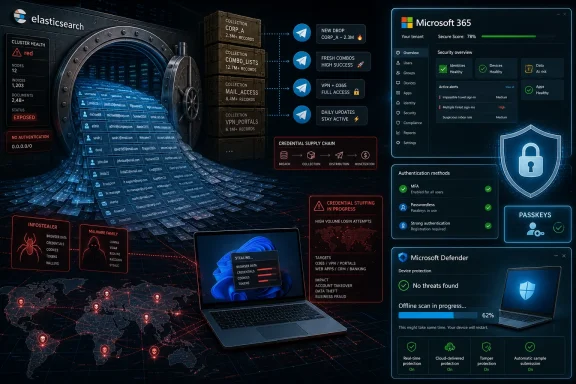 The 24 Billion Number Is Huge, but It Is Not the Same as 24 Billion Victims
The headline figure invites a familiar kind of panic: 24 billion records, nearly three times the population of Earth, apparently sitting in plaintext. That makes for a dramatic breach story, but it also obscures the most useful interpretation. This was almost certainly a compilation, not a clean list of unique, newly stolen accounts.Credential dumps are messy by design. A single person may appear dozens of times across old website breaches, browser-stealer logs, duplicate “combo lists,” and repackaged underground collections. One password may be stale, another may still work, and a third may unlock something more valuable because the user reused it across work and personal accounts.
That distinction matters because it changes the threat model. The danger is not that 24 billion distinct humans were individually breached this week. The danger is that attackers have access to a searchable, structured, and apparently maintained corpus of credentials that can be fed directly into automated account-takeover campaigns.
The exposed database reportedly included usernames, email addresses, plaintext passwords, and the services those credentials were meant to access. That last field is what turns an ugly data dump into an operational tool. A password without context is a guess; a password paired with a login URL is an instruction.
This Was a Credential Warehouse, Not a Traditional Breach
The most misleading phrase in the coverage is “massive leak,” because it nudges readers toward the wrong mental picture. There was no single company database here, no one victim organization with 24 billion users, and no simple notification email that can tell everyone affected exactly what happened. This was a warehouse assembled from other people’s compromises.According to the reporting around the discovery, the database drew from 36 sources. Some appeared to be old breach compilations, some were linked to Telegram channels used to trade stolen credentials, and a large portion was believed to come from infostealer logs. That mixture is important because each source reflects a different stage in the modern cybercrime supply chain.
Old breach compilations exploit human laziness. If you reused a password on a defunct forum in 2018 and never changed it on a current shopping site, the attacker does not need the shopping site to be breached. Credential stuffing software can simply try the old combination somewhere new.
Infostealer logs are more invasive. They come from malware running on a user’s device, often harvesting browser-saved passwords, session cookies, autofill data, crypto-wallet artifacts, screenshots, and system details. If old breach dumps are archaeology, infostealer logs are surveillance.
Telegram’s role in the story is also telling. The app is not the victim in the simple sense; it is reportedly one of the marketplaces and distribution channels where criminals exchange stolen data. That distinction was lost in some social-media reactions, but it is central to understanding how credentials now circulate.
Plaintext Passwords Are the Symptom of a Compromised Endpoint
A normal website should not be storing your password in plaintext. Properly built services store salted password hashes, which means a database breach should not immediately reveal the original password. When a leak contains large volumes of plaintext passwords, that often points away from a single server compromise and toward the user endpoint.That is why infostealers matter so much. A stealer running on a Windows PC does not need to defeat a company’s password hashing architecture. It can grab what the user or browser already has, often before the credential is transformed, protected, or hidden from the server side.
This is the uncomfortable part of the story for everyday users. You can do almost everything right with a particular account and still lose control if the device you use to access it is infected. A password manager helps enormously, but it is not magic armor against a machine that is actively hostile.
For administrators, the lesson is sharper. Endpoint security, browser hardening, privileged-access controls, and conditional access are not separate disciplines from identity security anymore. In 2026, the endpoint is often where identity is stolen first.
Telegram and “Collections” Show the Market Has Matured
The reporting says more than 1.7 billion records were traced to Telegram channels, many apparently centered on cybercrime and stolen credentials. Nearly 260 million records were reportedly associated with channels using the “Darkside” name, a reference that will ring loudly for anyone who remembers the Colonial Pipeline ransomware incident. Whether every such channel has a direct lineage to the original ransomware group is less important than the branding itself.Cybercrime markets now behave like content markets. Names, channels, reputations, reposts, and “collections” all help package stolen material for buyers. The database owner’s labels may not map cleanly to original sources, but they do reveal how credential data is merchandised.
The largest bucket, reportedly 22.6 billion records, was simply labeled “collections.” That bland word does a lot of work. It could mean previously leaked infostealer archives, service-specific bundles, merged combo lists, or curated credential sets built for account takeover.
This is why the dataset being pulled offline does not make the problem go away. If a credential appears in one open Elasticsearch cluster, it may also exist in private shops, Telegram channels, malware operators’ panels, reseller databases, and other exposed systems not yet discovered. The leak is a window into a market, not necessarily the market itself.
The Database Was Reportedly Alive, and That Is the Real Escalation
The most interesting detail is not the size, but the apparent freshness. Researchers reportedly found cybersecurity news, social-media chatter about recent hacks, and vulnerability-tracking material inside the exposed cluster. One compiled article in the dataset was said to be from February 2026, suggesting that the owner was updating the system rather than merely archiving old junk.That changes the story from “someone found a giant pile of old passwords” to “someone may have been maintaining a live credential-intelligence platform.” In legitimate security work, such a system could be used to warn customers, monitor exposed accounts, and reduce risk. In criminal hands, it could be used to prioritize targets, enrich stolen credentials, and exploit new vulnerabilities faster.
This is the gray zone security professionals increasingly inhabit. Threat-intelligence firms, breach-notification services, researchers, criminals, and data brokers may all handle material that looks similar at a database level. The difference is authorization, handling, retention, access control, and intent.
The uncomfortable implication is that even defensive collections can become dangerous if they are mishandled. A company gathering stolen passwords to protect customers must secure that trove with the paranoia of someone holding live explosives. If the database was indeed exposed without authentication, the operational purpose does not soften the risk.
Credential Stuffing Is Boring, Cheap, and Still Devastating
Credential stuffing remains one of the most effective attacks on the internet because it exploits scale rather than brilliance. Attackers take known email-password pairs, test them across popular services, and keep the hits. The process is noisy, automated, and often profitable enough even when most attempts fail.The reason it works is depressingly human. People reuse passwords, slightly modify passwords, save passwords in browsers, ignore breach notices, and keep long-abandoned accounts tied to live email addresses. Attackers do not need everyone to be careless; they need a small percentage of a very large dataset to still work.
A structured credential database lowers the cost of that attack. If records include the target service, attackers can skip a lot of guessing. If the database includes recent stealer logs, they may also have session cookies or device details that help bypass basic defenses.
This is where multi-factor authentication earns its keep. MFA does not make credential theft harmless, especially if attackers can phish codes or steal sessions, but it raises the cost. For most consumer accounts and many business accounts, that extra step is the difference between a stolen password and a successful takeover.
Windows Users Should Treat This as a Malware Story
For the WindowsForum crowd, the practical takeaway is not simply “change your passwords.” That advice is necessary, but incomplete. If a meaningful slice of this dataset came from infostealers, the first question is whether the machine generating your logins is clean.Windows 10 and Windows 11 include Microsoft Defender Antivirus and the Windows Security app, and Microsoft Defender Offline can scan from outside the running Windows environment. That matters because some malware is harder to remove while the infected operating system is live. A full scan is a start; an offline scan is a better move when there is reason to suspect credential theft.
Users should also review browser extensions. Infostealers and malicious extensions both benefit from the same user habit: granting broad access and then forgetting the software exists. If an extension has not earned its place, remove it.
The same goes for cracked software, game cheats, shady installers, “free” productivity tools, and pirated activation utilities. Infostealer campaigns often ride on exactly the software people install while ignoring warnings. If a password reset is the cleanup crew, endpoint hygiene is the building code.
Password Managers Are Necessary, but They Are Not the Finish Line
A good password manager remains one of the few consumer-security recommendations that is both realistic and transformative. It lets users create unique, random passwords for every service, which breaks the chain that makes credential stuffing so profitable. If one site leaks, the damage stays mostly contained.But password managers are sometimes sold as if they end the story. They do not. If malware is present on the endpoint, if the user approves a phishing prompt, or if the attacker steals an active session token, a password manager cannot fully save the day.
The better framing is layered defense. Use a password manager so every account has a unique password. Turn on MFA so a stolen password is not enough. Prefer passkeys where available so there is no reusable password for attackers to replay.
Microsoft has been pushing Windows toward this model through Windows Hello and passkey support in Windows 11. The passkey pitch can sound like another industry slogan, but the underlying idea is sound: replace shared secrets with cryptographic credentials bound to a device, account, or hardware authenticator. A secret that never gets typed into a random login box is much harder to steal with a traditional password dump.
The Enterprise Risk Is Hiding in Personal Accounts
Administrators should resist the temptation to classify this as a consumer problem. The boundary between personal and enterprise identity is porous. Employees reuse passwords between personal services and work systems, forward documents to personal email, sync browser profiles, install consumer apps, and enroll personal devices in work flows.A single exposed personal password can become a corporate foothold if the user reused it on VPN, email, remote desktop, SaaS, Git hosting, or an admin portal. Even when the exact work password is not present, attackers can use personal breach data for phishing, password-reset abuse, and social engineering. The credential is often just the opening paragraph of the attack.
Microsoft 365 administrators should be especially attentive to legacy authentication, weak MFA methods, risky sign-ins, impossible travel alerts, and accounts without conditional-access protection. The point is not to assume that every employee in the database is compromised. The point is to assume that some subset of your users’ historical passwords is already known to someone.
The response should be measured but firm. Forced password resets across an entire organization can create chaos if done reflexively, but targeted resets for exposed or high-risk accounts make sense. Better still, move high-value users toward phishing-resistant MFA and passkeys before the next dump becomes tomorrow’s attack list.
The “Check If You Were Pwned” Ritual Needs More Nuance
Have I Been Pwned remains a useful public tool, especially for checking whether an email address has appeared in known breaches. Its Pwned Passwords service is also valuable because it lets users check passwords against known compromised hashes without simply handing over the password in plaintext. But users should understand what a negative result means.If your email address does not show up today, that does not prove you are safe. Not every stolen dataset is indexed by public services, and newly discovered collections may take time to verify, ingest, or exclude. A clean result is a data point, not a certificate of innocence.
Likewise, a positive result does not mean the newest 24 billion-record exposure contains your current working password. It may mean your address was in an old breach, a defunct service, or a duplicated compilation. The right response is not panic; it is account hygiene.
The strongest move is to behave as if at least one of your old passwords is already public. That assumption is not cynicism anymore. It is baseline internet survival.
The Password Era Is Ending Unevenly
The industry has spent years declaring the death of the password, yet passwords keep showing up in larger and larger piles. The reason is simple: replacement is hard. Passkeys, hardware security keys, authenticator apps, password managers, enterprise identity policies, recovery flows, and user education all improve the situation, but they do not arrive everywhere at once.Consumers still encounter sites that support weak passwords, SMS recovery, no MFA, or half-baked account security. Businesses still run legacy systems that assume passwords are the primary proof of identity. Even modern SaaS stacks can be undermined by poor recovery procedures or overprivileged accounts.
So the password era is not ending like a light switch. It is ending like a long migration, with the riskiest systems lagging behind and the best-protected users moving first. That creates an uneven security landscape in which attackers keep harvesting passwords because passwords still work somewhere.
For Windows users, this is where platform defaults matter. If Windows Hello, passkeys, Defender, SmartScreen, browser isolation, and account-protection nudges reduce the number of times a user types a reusable secret, they make credential dumps less valuable. The goal is not perfection; it is making yesterday’s attack automation less profitable tomorrow.
The Useful Response Is Smaller Than the Breach and Faster Than the Attacker
The correct reaction to a 24 billion-record credential exposure is not to spend the week doomscrolling breach headlines. It is to make a handful of changes that reduce the odds that any one leaked password becomes an account takeover. The scale of the dataset is enormous, but the personal and administrative response is concrete.- Use a password manager to replace reused passwords with unique, random passwords for every important account.
- Turn on multi-factor authentication wherever it is available, prioritizing email, banking, Microsoft accounts, cloud storage, social media, and work services.
- Prefer passkeys or hardware security keys for high-value accounts when the service supports them.
- Run a full malware scan on Windows, and consider Microsoft Defender Offline if you suspect an infostealer infection.
- Review saved browser passwords, extensions, startup apps, and recently installed software for anything unnecessary or suspicious.
- Administrators should audit risky sign-ins, legacy authentication, MFA coverage, and exposed credentials for privileged and high-impact users.
References
- Primary source: geekspin
Published: Mon, 22 Jun 2026 11:02:53 GMT
24 billion passwords and emails exposed in massive leak
24 billion stolen logins found in exposed database. Experts warn of major cyber risk from reused passwords and infostealers.geekspin.co - Related coverage: techradar.com
'The credential data leak is dangerous simply because of its enormous size': Experts warn "colossal" breach exposes 24 billion records including personal info | TechRadar
Someone has been hoarding data leaks from across the webwww.techradar.com - Related coverage: cert-mu.govmu.org
Security Alert No the 16 billion credentials leak is not a new data breach
PDF documentcert-mu.govmu.org
- Related coverage: covidcalltohumanity.org
RAJACOLOK: Partner Resmi Situs Toto Slot Gacor & Bandar Togel Online Terpercaya Gampang JP
RAJACOLOK hadir sebagai partner resmi situs toto slot gacor dan bandar togel online terpercaya dengan akses lancar, pasaran lengkap, proses transaksi aman dan peluang kemenangan yang gampang JP. covidcalltohumanity.org
- Related coverage: tomsguide.com
1.3 billion leaked passwords exposed online in massive new collection — what to do now and how to check your passwords | Tom's Guide
Billions of exposed passwords and email addresses are now searchable on HaveIBeenPwned and you should check yours now.www.tomsguide.com
