Windows 11 in 2026 is less a single new version than a moving platform spanning versions 24H2, 25H2, and the Arm-only 26H1 release, with Microsoft pushing shared feature updates, AI hardware differentiation, performance work, and quieter servicing across supported PCs. That sounds tidy until you stare at what it really means. Microsoft has made Windows 11 both more continuous and more fragmented. The operating system is converging in daily experience while splintering around silicon, AI capability, and update eligibility.
For decades, Windows users learned to treat version numbers as landmarks. Windows 95, Windows XP, Windows 7, Windows 10, Windows 11: each name carried a mental model of what changed, what broke, and what administrators had to plan around. Even the semiannual and annual labels that followed, from 21H2 through 24H2, still implied that a version was a meaningful container.
That model is now less useful. The important shift in 2026 is that Microsoft is increasingly treating supported Windows 11 releases as parallel tracks that receive broadly the same user-facing features and fixes. Versions 24H2 and 25H2 are current and, for most practical purposes, functionally aligned.
This is not a minor bookkeeping change. It reframes Windows as a continually serviced client rather than an operating system that changes personality once a year. For home users, that means the “what version am I on?” question matters less than whether Windows Update, device eligibility, and hardware capability are lined up. For IT departments, it means the version number still matters for lifecycle policy, validation, and support dates, but less for explaining visible behavior to users.
The oddity is Windows 11 version 26H1. Microsoft introduced it as a targeted release for new Arm devices built around new Qualcomm Snapdragon X2-class silicon, not as a general upgrade for existing PCs. That makes 26H1 look less like a Windows feature update and more like a hardware enablement branch wearing a familiar Windows label.
In the Windows 10 era, Microsoft tried to impose a neat servicing rhythm on a sprawling PC ecosystem. In the Windows 11 era, the company is conceding that the ecosystem is too varied for a single clean cadence. Arm PCs, Copilot+ PCs, traditional x86 laptops, gaming handhelds, enterprise desktops, and unsupported-but-working older machines all sit under the same Windows 11 banner, but they no longer receive the same story at the same time.
That is both pragmatic and messy. It allows Microsoft and partners to ship new hardware without waiting for a broad second-half release. It also creates a communications problem, because normal users are not trained to parse a release like 26H1 as “not for you, unless you bought very specific hardware.”
For administrators, the good news is that 26H1 does not appear to be the next mandatory stop on the general Windows train. The bad news is that Windows versioning now requires more context than the label itself provides. A build number, servicing channel, hardware platform, and feature rollout state may all matter before anyone can answer the simple question: “Is this machine current?”
That distinction matters because it changes the meaning of Windows compatibility. A PC can be fully compatible with Windows 11 and still miss some of the features Microsoft talks about most loudly. The operating system runs; the marketing story does not.
This is a familiar pattern in Windows history. Microsoft has often used new hardware capabilities to define the “best” Windows experience, whether that meant graphics acceleration, touch, biometric sensors, TPMs, or SSDs. What is different now is the speed at which AI hardware has become part of the Windows hierarchy.
The result is a two-tier Windows 11 experience that Microsoft will rarely describe in such blunt terms. There is the baseline Windows 11 that remains the workhorse for ordinary PCs, and there is the AI-forward Windows 11 that assumes modern silicon, more memory, faster storage, and an NPU. The former keeps the installed base moving. The latter gives OEMs a reason to sell new machines.
The June 2026 Windows 11 update cycle has been described around performance work that improves app launch and core shell responsiveness. Reporting around the update has highlighted a Low Latency Profile intended to temporarily raise processor responsiveness during short interactive bursts, such as opening Start, launching apps, or invoking system UI. That kind of work is exactly where Windows often needs help: not in benchmark heroics, but in the half-second delays that make a PC feel old.
This is also where Microsoft’s interests align with users who are not buying new hardware. If Windows 11 is going to remain the supported mainstream Windows client after Windows 10’s consumer support ended in October 2025, Microsoft has to make it tolerable on the broad middle of the PC market. The company cannot only optimize for premium AI laptops.
There is an implicit admission here. Windows 11’s early hardware requirements were sold partly as a path to a more reliable, secure, modern platform. Yet in practice, many supported machines still felt burdened by the operating system’s interface layers, background services, cloud hooks, and update churn. Performance work in 2026 is Microsoft acknowledging that eligibility alone does not equal a good experience.
By 2026, that fight is less visible but not over. The published minimums for Windows 11 look modest on paper, and many enthusiasts know the workarounds. The practical divide is no longer simply “can this PC install Windows 11?” It is “which Windows 11 experience will this PC actually get, and how well will it run?”
That distinction is sharper because Copilot+ requirements sit above ordinary Windows requirements. A machine may satisfy Windows 11 but lack the NPU, memory profile, or storage baseline for Microsoft’s flagship AI experiences. Another machine may run Windows 11 unofficially but become a reliability gamble after cumulative updates or driver changes.
For WindowsForum readers, this is the more honest way to discuss upgrades. The question is not merely whether an installer can be coerced into continuing. It is whether the device has driver support, firmware maturity, security capability, and enough headroom to remain pleasant under Microsoft’s servicing model. Unsupported installs can be useful experiments; they are less attractive as long-term production endpoints.
That is why Windows 11’s interface evolution has been incremental. The centered taskbar, simplified context menus, Quick Settings panel, redesigned Settings app, and refreshed Start menu are all meaningful changes, but they live inside an old contract. Windows users tolerate modernization when the fundamentals remain accessible.
The problem is that Microsoft has sometimes mistaken simplification for improvement. The first generation of Windows 11 context menus hid too much. The original taskbar removed too many behaviors power users had relied on. The Settings app keeps improving, but Control Panel still lingers because Windows configuration is deeper and stranger than any clean modern settings hierarchy can absorb.
The 2026 version of Windows 11 is better because Microsoft has spent years filling in those gaps. Start has been revised. File Explorer has gained modern views and archive support. Task Manager has been refreshed. Right-click options and power-user settings have been slowly restored or relocated. Windows 11 is maturing less by invention than by backtracking intelligently from its own overcorrections.
The modernized File Explorer has become more capable over time, with refreshed visuals, Home and Gallery views, deeper OneDrive integration, and broader archive format support. For ordinary users, that integration can be useful. Files On Demand and folder backup solve real problems when a laptop dies, a user switches machines, or someone needs documents on multiple devices.
For administrators and privacy-conscious users, the same integration is a source of friction. OneDrive can blur the line between local and cloud storage in ways that confuse users and complicate support. Desktop, Documents, and Pictures redirection may be a safety net in one organization and an unwanted data governance risk in another.
Microsoft’s challenge is that Windows is both a consumer operating system and an enterprise endpoint. A feature that protects a family’s photos can create headaches in a regulated workplace. Windows 11 in 2026 still has not fully reconciled that tension; it has merely made the cloud defaults more polished.
Windows 11 users have seen years of prompts, defaults, banners, settings detours, and Edge-specific hooks that nudge them back toward Microsoft’s browser and services. Some of those behaviors have improved under regulatory pressure and user backlash, especially in markets where platform rules have tightened. But the underlying instinct remains: Microsoft sees the browser as too important to leave to user preference alone.
This matters because Edge is not just a browser. It is a delivery vehicle for Bing, Microsoft account sign-in, shopping tools, Copilot, Microsoft 365 hooks, synchronization, password management, and advertising surfaces. When Edge ignores or works around user intent, the issue is not browser competition in the abstract. It is whether Windows respects the owner of the PC.
Windows enthusiasts often respond with third-party tools, registry edits, policy settings, or alternative browsers. Enterprises respond with management baselines. Ordinary users mostly click through. That asymmetry is why Edge remains controversial: the people most able to fight Microsoft’s defaults are the least likely to be fooled by them.
The AI additions are more mixed. Generative features in creative and productivity apps can be convenient, but they also extend Microsoft’s cloud and subscription strategy into places that used to feel local and simple. A better Notepad is welcome. A Notepad that becomes another funnel into account-based AI services is a different proposition.
Phone Link is an example of Microsoft at its best when it focuses on utility. Its Android integration can make a Windows PC feel like part of a broader personal device system. But even here, the experience varies by phone maker, account state, permissions, and region.
The broader point is that Windows 11’s inbox apps are no longer just accessories. They are Microsoft’s way of shaping the default workflow on the PC. That gives users more capability on day one, but it also gives Microsoft more chances to steer behavior toward its services.
Microsoft’s gaming strategy on Windows is broader than the Xbox app. Game Bar, Game Pass, cloud gaming, Store purchases, driver models, Auto HDR, DirectStorage, and handheld-oriented interface work all sit inside a larger effort to keep Windows relevant as gaming hardware diversifies. Traditional towers, thin laptops, handheld PCs, and living-room devices all stretch the definition of “Windows gaming.”
The interesting development is Xbox Mode and related handheld work. Microsoft knows that Windows is powerful but awkward on small gaming devices. SteamOS succeeds not because it is more compatible with every game, but because it feels designed for the hardware. Windows has often felt like a desktop OS squeezed into a console shell.
If Microsoft can make Windows less intrusive on gaming handhelds, it protects one of the platform’s most important cultural advantages. If it cannot, the company risks ceding mindshare to Linux-based gaming appliances even while retaining raw compatibility.
That argument is not wrong. The threat landscape facing ordinary users and businesses is worse than it was when Windows 10 launched. Credential theft, ransomware, phishing, malicious drivers, firmware attacks, and supply-chain compromises make older assumptions look reckless.
But security is also the rationale Microsoft uses when it wants users to accept constraints. Mandatory accounts, cloud recovery flows, hardware cutoffs, update enforcement, and default service integration can all be defended as protection. Sometimes they are. Sometimes they also happen to strengthen Microsoft’s control over the endpoint.
The trick for IT pros is to separate the genuine security value from the platform politics. Windows Hello is a real improvement over weak passwords. Device encryption protects lost laptops. Passkeys reduce phishing exposure. But not every forced default deserves applause simply because it arrives in the same box as a security feature.
In 2026, Microsoft is trying to make updates feel less chaotic while still using cumulative updates to deliver new functionality. That is a difficult balance. The same mechanism that patches vulnerabilities may also alter the Start menu, add AI hooks, change defaults, or expose a staged rollout.
For enterprises, the solution is policy, rings, testing, and telemetry. For enthusiasts, it is backups, restore points, release notes, and occasionally waiting a week. For normal users, it is hope. That gap between managed and unmanaged Windows is still too wide.
The best version of Microsoft’s update strategy would make the secure path also the calm path. Users should not have to choose between being patched and being surprised. If Windows 11 in 2026 is becoming a continuously serviced system, then predictability is not a nice-to-have. It is the price of admission.
Terminal is now a first-class tool. Winget has matured into a practical package manager. Task Manager is better. Developer and advanced settings have become more visible. The optional ability to end tasks from taskbar app shortcuts is the kind of small feature that earns goodwill because it respects how people actually troubleshoot PCs.
This matters beyond enthusiasts. Power users are often the unofficial support layer for families, small businesses, classrooms, and offices. When Microsoft frustrates them, it increases the cost of Windows for everyone around them. When it gives them better tools, it improves the platform’s support ecosystem.
The key is restraint. Advanced features do not need to dominate the default experience, but they should not be buried as if expertise were a vice. Windows became dominant partly because it could serve beginners and experts on the same machine. Windows 11 is healthier when it remembers that.
That timing helps explain Microsoft’s 2026 posture. The company needs Windows 11 to feel mature enough for holdouts, modern enough for new PC buyers, secure enough for enterprises, and AI-forward enough for investors and OEM partners. Those goals do not always point in the same direction.
For a Windows 10 user moving now, Windows 11 is no longer the undercooked 2021 release. It has regained capabilities, improved core apps, expanded settings, matured update delivery, and added security and recovery tools. But it has also accumulated more Microsoft service integration, more AI branding, and more hardware-based feature segmentation.
The migration argument is therefore practical, not emotional. Windows 11 is the supported path for most consumers and mainstream businesses. That does not mean every design choice is better. It means the center of gravity has moved, and staying behind increasingly requires a plan rather than a preference.
That is not necessarily a failure. A universal operating system has to bend around hardware diversity. The danger is that Microsoft’s branding makes the diversity sound simpler than it is. Users hear “Windows 11” and expect one answer. Administrators know there may be five.
This hardware-first reality also changes buying advice. A cheap Windows 11 laptop that merely clears minimum requirements may be a poor long-term purchase. A Copilot+ PC may be overkill for some users but a safer bet for receiving Microsoft’s newest local AI features. An Arm PC may offer impressive battery life but still require application and driver scrutiny. A gaming handheld may run Windows but need a console-like shell to feel coherent.
The Windows logo used to imply a broad common denominator. In 2026, it increasingly implies a family resemblance. The exact experience depends on silicon, firmware, drivers, NPU capability, edition, management state, and rollout timing.
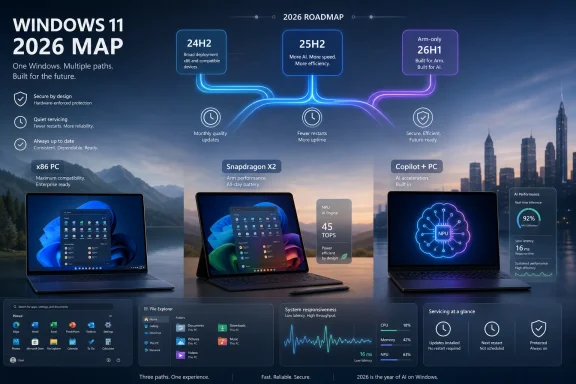 Microsoft Has Turned the Version Number Into a Footnote
For decades, Windows users learned to treat version numbers as landmarks. Windows 95, Windows XP, Windows 7, Windows 10, Windows 11: each name carried a mental model of what changed, what broke, and what administrators had to plan around. Even the semiannual and annual labels that followed, from 21H2 through 24H2, still implied that a version was a meaningful container.That model is now less useful. The important shift in 2026 is that Microsoft is increasingly treating supported Windows 11 releases as parallel tracks that receive broadly the same user-facing features and fixes. Versions 24H2 and 25H2 are current and, for most practical purposes, functionally aligned.
This is not a minor bookkeeping change. It reframes Windows as a continually serviced client rather than an operating system that changes personality once a year. For home users, that means the “what version am I on?” question matters less than whether Windows Update, device eligibility, and hardware capability are lined up. For IT departments, it means the version number still matters for lifecycle policy, validation, and support dates, but less for explaining visible behavior to users.
The oddity is Windows 11 version 26H1. Microsoft introduced it as a targeted release for new Arm devices built around new Qualcomm Snapdragon X2-class silicon, not as a general upgrade for existing PCs. That makes 26H1 look less like a Windows feature update and more like a hardware enablement branch wearing a familiar Windows label.
The Arm Detour Shows the Cost of Continuous Windows
The most revealing thing about 26H1 is not that most users will never install it. It is that Microsoft needed it at all. A targeted first-half Windows release for specific new hardware underlines how much the Windows roadmap now depends on silicon schedules, not just software readiness.In the Windows 10 era, Microsoft tried to impose a neat servicing rhythm on a sprawling PC ecosystem. In the Windows 11 era, the company is conceding that the ecosystem is too varied for a single clean cadence. Arm PCs, Copilot+ PCs, traditional x86 laptops, gaming handhelds, enterprise desktops, and unsupported-but-working older machines all sit under the same Windows 11 banner, but they no longer receive the same story at the same time.
That is both pragmatic and messy. It allows Microsoft and partners to ship new hardware without waiting for a broad second-half release. It also creates a communications problem, because normal users are not trained to parse a release like 26H1 as “not for you, unless you bought very specific hardware.”
For administrators, the good news is that 26H1 does not appear to be the next mandatory stop on the general Windows train. The bad news is that Windows versioning now requires more context than the label itself provides. A build number, servicing channel, hardware platform, and feature rollout state may all matter before anyone can answer the simple question: “Is this machine current?”
Copilot+ PCs Are Becoming Windows’ Real Premium Tier
Microsoft’s Copilot+ PC branding began as a hardware line in search of a reason. In 2026, that reason is clearer: Copilot+ is becoming the practical dividing line between Windows 11 as everyone gets it and Windows 11 as Microsoft wants to sell it. The minimums are no longer just about having enough RAM or storage to run the operating system. They are about whether the PC has an NPU powerful enough to run local AI experiences.That distinction matters because it changes the meaning of Windows compatibility. A PC can be fully compatible with Windows 11 and still miss some of the features Microsoft talks about most loudly. The operating system runs; the marketing story does not.
This is a familiar pattern in Windows history. Microsoft has often used new hardware capabilities to define the “best” Windows experience, whether that meant graphics acceleration, touch, biometric sensors, TPMs, or SSDs. What is different now is the speed at which AI hardware has become part of the Windows hierarchy.
The result is a two-tier Windows 11 experience that Microsoft will rarely describe in such blunt terms. There is the baseline Windows 11 that remains the workhorse for ordinary PCs, and there is the AI-forward Windows 11 that assumes modern silicon, more memory, faster storage, and an NPU. The former keeps the installed base moving. The latter gives OEMs a reason to sell new machines.
Microsoft Is Finally Talking About Performance Like It Matters
One of the more encouraging 2026 themes is Microsoft’s renewed focus on performance and reliability. That may sound less glamorous than Copilot, Recall, semantic search, or AI image tools, but it is probably more important to the average Windows user. A faster Start menu is worth more than another chatbot entry point if the machine feels less sluggish every day.The June 2026 Windows 11 update cycle has been described around performance work that improves app launch and core shell responsiveness. Reporting around the update has highlighted a Low Latency Profile intended to temporarily raise processor responsiveness during short interactive bursts, such as opening Start, launching apps, or invoking system UI. That kind of work is exactly where Windows often needs help: not in benchmark heroics, but in the half-second delays that make a PC feel old.
This is also where Microsoft’s interests align with users who are not buying new hardware. If Windows 11 is going to remain the supported mainstream Windows client after Windows 10’s consumer support ended in October 2025, Microsoft has to make it tolerable on the broad middle of the PC market. The company cannot only optimize for premium AI laptops.
There is an implicit admission here. Windows 11’s early hardware requirements were sold partly as a path to a more reliable, secure, modern platform. Yet in practice, many supported machines still felt burdened by the operating system’s interface layers, background services, cloud hooks, and update churn. Performance work in 2026 is Microsoft acknowledging that eligibility alone does not equal a good experience.
The Hardware Requirements Fight Has Quietly Changed Shape
When Windows 11 launched, the hardware controversy was about exclusion. TPM 2.0, supported CPUs, Secure Boot, and other requirements left many otherwise useful PCs outside the official upgrade path. Critics saw arbitrary cutoffs; Microsoft argued for a security baseline.By 2026, that fight is less visible but not over. The published minimums for Windows 11 look modest on paper, and many enthusiasts know the workarounds. The practical divide is no longer simply “can this PC install Windows 11?” It is “which Windows 11 experience will this PC actually get, and how well will it run?”
That distinction is sharper because Copilot+ requirements sit above ordinary Windows requirements. A machine may satisfy Windows 11 but lack the NPU, memory profile, or storage baseline for Microsoft’s flagship AI experiences. Another machine may run Windows 11 unofficially but become a reliability gamble after cumulative updates or driver changes.
For WindowsForum readers, this is the more honest way to discuss upgrades. The question is not merely whether an installer can be coerced into continuing. It is whether the device has driver support, firmware maturity, security capability, and enough headroom to remain pleasant under Microsoft’s servicing model. Unsupported installs can be useful experiments; they are less attractive as long-term production endpoints.
The Desktop Is Still Familiar Because Microsoft Cannot Afford to Replace It
For all the talk about AI and modern Windows, the daily user interface remains recognizably descended from 1995. There is a desktop, a taskbar, a Start menu, windows, context menus, File Explorer, system tray icons, and keyboard shortcuts that longtime users still expect to work. Microsoft can sand, center, blur, round, and recolor the shell, but it cannot casually replace the grammar of Windows.That is why Windows 11’s interface evolution has been incremental. The centered taskbar, simplified context menus, Quick Settings panel, redesigned Settings app, and refreshed Start menu are all meaningful changes, but they live inside an old contract. Windows users tolerate modernization when the fundamentals remain accessible.
The problem is that Microsoft has sometimes mistaken simplification for improvement. The first generation of Windows 11 context menus hid too much. The original taskbar removed too many behaviors power users had relied on. The Settings app keeps improving, but Control Panel still lingers because Windows configuration is deeper and stranger than any clean modern settings hierarchy can absorb.
The 2026 version of Windows 11 is better because Microsoft has spent years filling in those gaps. Start has been revised. File Explorer has gained modern views and archive support. Task Manager has been refreshed. Right-click options and power-user settings have been slowly restored or relocated. Windows 11 is maturing less by invention than by backtracking intelligently from its own overcorrections.
File Explorer and OneDrive Remain the Productivity Battleground
File Explorer is one of the places where Windows 11’s competing identities collide. It has to be a local file manager, a cloud sync surface, a photo browser, an archive utility, a sharing hub, and a familiar administrative tool. Every improvement risks irritating someone who wanted it to stay boring.The modernized File Explorer has become more capable over time, with refreshed visuals, Home and Gallery views, deeper OneDrive integration, and broader archive format support. For ordinary users, that integration can be useful. Files On Demand and folder backup solve real problems when a laptop dies, a user switches machines, or someone needs documents on multiple devices.
For administrators and privacy-conscious users, the same integration is a source of friction. OneDrive can blur the line between local and cloud storage in ways that confuse users and complicate support. Desktop, Documents, and Pictures redirection may be a safety net in one organization and an unwanted data governance risk in another.
Microsoft’s challenge is that Windows is both a consumer operating system and an enterprise endpoint. A feature that protects a family’s photos can create headaches in a regulated workplace. Windows 11 in 2026 still has not fully reconciled that tension; it has merely made the cloud defaults more polished.
Edge Is the Browser Microsoft Cannot Stop Weaponizing
Microsoft Edge is a good browser wrapped in a trust problem. Technically, it is fast, capable, secure, and deeply integrated with Windows. Strategically, it is also the place where Microsoft most visibly undermines its own user-choice rhetoric.Windows 11 users have seen years of prompts, defaults, banners, settings detours, and Edge-specific hooks that nudge them back toward Microsoft’s browser and services. Some of those behaviors have improved under regulatory pressure and user backlash, especially in markets where platform rules have tightened. But the underlying instinct remains: Microsoft sees the browser as too important to leave to user preference alone.
This matters because Edge is not just a browser. It is a delivery vehicle for Bing, Microsoft account sign-in, shopping tools, Copilot, Microsoft 365 hooks, synchronization, password management, and advertising surfaces. When Edge ignores or works around user intent, the issue is not browser competition in the abstract. It is whether Windows respects the owner of the PC.
Windows enthusiasts often respond with third-party tools, registry edits, policy settings, or alternative browsers. Enterprises respond with management baselines. Ordinary users mostly click through. That asymmetry is why Edge remains controversial: the people most able to fight Microsoft’s defaults are the least likely to be fooled by them.
The Inbox Apps Are Better, But They Also Carry Microsoft’s Agenda
Windows 11’s bundled apps are in a better state than they were several years ago. Notepad, Paint, Photos, Snipping Tool, Media Player, Clipchamp, Phone Link, Terminal, and the Microsoft Store have all received meaningful attention. Some of these updates are genuinely useful, especially for users who do not want to hunt for third-party utilities immediately after setup.The AI additions are more mixed. Generative features in creative and productivity apps can be convenient, but they also extend Microsoft’s cloud and subscription strategy into places that used to feel local and simple. A better Notepad is welcome. A Notepad that becomes another funnel into account-based AI services is a different proposition.
Phone Link is an example of Microsoft at its best when it focuses on utility. Its Android integration can make a Windows PC feel like part of a broader personal device system. But even here, the experience varies by phone maker, account state, permissions, and region.
The broader point is that Windows 11’s inbox apps are no longer just accessories. They are Microsoft’s way of shaping the default workflow on the PC. That gives users more capability on day one, but it also gives Microsoft more chances to steer behavior toward its services.
Gaming Is Windows’ Strongest Consumer Argument
If there is one consumer market where Windows remains difficult to dislodge, it is PC gaming. Windows 11 benefits from decades of game compatibility, driver investment, GPU vendor support, anti-cheat integration, storefront competition, and peripheral support. Linux gaming has improved dramatically, especially through SteamOS and Proton, but Windows remains the default target for most PC game developers.Microsoft’s gaming strategy on Windows is broader than the Xbox app. Game Bar, Game Pass, cloud gaming, Store purchases, driver models, Auto HDR, DirectStorage, and handheld-oriented interface work all sit inside a larger effort to keep Windows relevant as gaming hardware diversifies. Traditional towers, thin laptops, handheld PCs, and living-room devices all stretch the definition of “Windows gaming.”
The interesting development is Xbox Mode and related handheld work. Microsoft knows that Windows is powerful but awkward on small gaming devices. SteamOS succeeds not because it is more compatible with every game, but because it feels designed for the hardware. Windows has often felt like a desktop OS squeezed into a console shell.
If Microsoft can make Windows less intrusive on gaming handhelds, it protects one of the platform’s most important cultural advantages. If it cannot, the company risks ceding mindshare to Linux-based gaming appliances even while retaining raw compatibility.
Security Is the Justification That Keeps Returning
Microsoft’s strongest argument for Windows 11’s hardware baseline has always been security. TPM 2.0, virtualization-based security, Windows Hello, device encryption, Secure Boot, passkeys, Microsoft Defender, Smart App Control-style protections, and recovery improvements all fit the same story: modern Windows should assume modern defenses.That argument is not wrong. The threat landscape facing ordinary users and businesses is worse than it was when Windows 10 launched. Credential theft, ransomware, phishing, malicious drivers, firmware attacks, and supply-chain compromises make older assumptions look reckless.
But security is also the rationale Microsoft uses when it wants users to accept constraints. Mandatory accounts, cloud recovery flows, hardware cutoffs, update enforcement, and default service integration can all be defended as protection. Sometimes they are. Sometimes they also happen to strengthen Microsoft’s control over the endpoint.
The trick for IT pros is to separate the genuine security value from the platform politics. Windows Hello is a real improvement over weak passwords. Device encryption protects lost laptops. Passkeys reduce phishing exposure. But not every forced default deserves applause simply because it arrives in the same box as a security feature.
Better Updates Are Really About Trust
Microsoft’s promise of more predictable, less disruptive updates is crucial because Windows Update remains one of the platform’s deepest trust problems. Users understand that updates are necessary. They object to surprise restarts, broken drivers, failed installs, long reboots, and features appearing before they are wanted.In 2026, Microsoft is trying to make updates feel less chaotic while still using cumulative updates to deliver new functionality. That is a difficult balance. The same mechanism that patches vulnerabilities may also alter the Start menu, add AI hooks, change defaults, or expose a staged rollout.
For enterprises, the solution is policy, rings, testing, and telemetry. For enthusiasts, it is backups, restore points, release notes, and occasionally waiting a week. For normal users, it is hope. That gap between managed and unmanaged Windows is still too wide.
The best version of Microsoft’s update strategy would make the secure path also the calm path. Users should not have to choose between being patched and being surprised. If Windows 11 in 2026 is becoming a continuously serviced system, then predictability is not a nice-to-have. It is the price of admission.
Power Users Are Being Courted After Being Taken for Granted
Windows 11 launched with a strange hostility to some power-user habits. The simplified taskbar, reduced context menus, and relocated settings suggested that Microsoft wanted a cleaner Windows even if it meant hiding the controls that made Windows flexible. Over time, the company has softened that stance.Terminal is now a first-class tool. Winget has matured into a practical package manager. Task Manager is better. Developer and advanced settings have become more visible. The optional ability to end tasks from taskbar app shortcuts is the kind of small feature that earns goodwill because it respects how people actually troubleshoot PCs.
This matters beyond enthusiasts. Power users are often the unofficial support layer for families, small businesses, classrooms, and offices. When Microsoft frustrates them, it increases the cost of Windows for everyone around them. When it gives them better tools, it improves the platform’s support ecosystem.
The key is restraint. Advanced features do not need to dominate the default experience, but they should not be buried as if expertise were a vice. Windows became dominant partly because it could serve beginners and experts on the same machine. Windows 11 is healthier when it remembers that.
The Windows 10 Hangover Still Shapes Every Windows 11 Decision
Even in 2026, Windows 11 is still living in Windows 10’s shadow. Windows 10 was broadly liked, widely deployed, and supported an enormous range of hardware. Its end of mainstream consumer support in October 2025 forced many users and organizations to confront Windows 11 whether they were enthusiastic or not.That timing helps explain Microsoft’s 2026 posture. The company needs Windows 11 to feel mature enough for holdouts, modern enough for new PC buyers, secure enough for enterprises, and AI-forward enough for investors and OEM partners. Those goals do not always point in the same direction.
For a Windows 10 user moving now, Windows 11 is no longer the undercooked 2021 release. It has regained capabilities, improved core apps, expanded settings, matured update delivery, and added security and recovery tools. But it has also accumulated more Microsoft service integration, more AI branding, and more hardware-based feature segmentation.
The migration argument is therefore practical, not emotional. Windows 11 is the supported path for most consumers and mainstream businesses. That does not mean every design choice is better. It means the center of gravity has moved, and staying behind increasingly requires a plan rather than a preference.
The 2026 Windows Map Is Drawn Around Hardware, Not Just Software
The simplest way to understand Windows 11 in 2026 is to stop asking which version is newest and start asking which class of PC is in front of you. A supported x86 laptop on 24H2 or 25H2, a Snapdragon X2 Arm machine on 26H1, a Copilot+ PC with a qualifying NPU, an older unsupported desktop, and a gaming handheld may all be “Windows 11” devices. They are not the same platform in practice.That is not necessarily a failure. A universal operating system has to bend around hardware diversity. The danger is that Microsoft’s branding makes the diversity sound simpler than it is. Users hear “Windows 11” and expect one answer. Administrators know there may be five.
This hardware-first reality also changes buying advice. A cheap Windows 11 laptop that merely clears minimum requirements may be a poor long-term purchase. A Copilot+ PC may be overkill for some users but a safer bet for receiving Microsoft’s newest local AI features. An Arm PC may offer impressive battery life but still require application and driver scrutiny. A gaming handheld may run Windows but need a console-like shell to feel coherent.
The Windows logo used to imply a broad common denominator. In 2026, it increasingly implies a family resemblance. The exact experience depends on silicon, firmware, drivers, NPU capability, edition, management state, and rollout timing.
The Practical Shape of Windows 11 in Mid-2026
For WindowsForum readers, the lesson is not to chase every new label. It is to map the label to the machine, the support lifecycle, and the work the PC needs to do. Microsoft’s public story is about continuous improvement; the operational story is about sorting which improvements apply where.- Windows 11 versions 24H2 and 25H2 are the mainstream supported releases most users and administrators should treat as the practical baseline in mid-2026.
- Windows 11 version 26H1 is a targeted Arm hardware release, not a general upgrade path for existing Windows 11 PCs.
- Copilot+ PCs define Microsoft’s premium Windows feature tier because local AI experiences increasingly depend on NPU performance and newer hardware baselines.
- The most important everyday Windows 11 improvements in 2026 may be performance, reliability, recovery, and update predictability rather than headline AI features.
- Unsupported Windows 11 installs can still be useful for enthusiasts, but they carry greater risk when drivers, cumulative updates, and long-term reliability matter.
- Administrators should evaluate Windows 11 by device class and workload, not by assuming one version label tells the whole story.
References
- Primary source: thurrott.com
Published: Sun, 14 Jun 2026 20:21:09 GMT
win11-thumb - Thurrott.com
 www.thurrott.com
- Related coverage: techradar.com

Windows 11's June update is here — these are the 3 most important features, including a huge move to make apps and menus load much faster | TechRadar
Low Latency Profile, shared audio, and a boost for searchwww.techradar.com - Related coverage: windowscentral.com

Here are the 6 biggest features and improvements coming to Windows 11 in the June 2026 update on Tuesday | Windows Central
Microsoft's June 2026 Windows 11 update boosts responsiveness, adds Shared Audio, expands NPU metrics, and improves OOBE.www.windowscentral.com - Related coverage: windowslatest.com

I tested Windows 11 June 2026 Updates: Here's everything new, improved, and fixed
Windows 11 June 2026 Patch Tuesday update brings Low Latency Profile, Shared Audio, Multi-App Camera, NPU tracking, and Secure Boot updates. www.windowslatest.com
- Related coverage: computerworld.com

Windows 11: A guide to the updates – Computerworld
Here’s what you need to know about the latest updates to Windows 11 as they’re released from Microsoft. Now updated for KB5094126 (Windows 11 24H2 and 25H2) and KB5095051 (Windows 11 26H1), both released on June 9, 2026. www.computerworld.com
- Related coverage: windowsforum.com
Windows 11 Field Guide 2026: Year-Based Updates, Removed Apps, New Security Chapters | Windows Forum
Paul Thurrott has renamed and reworked his long-running Windows 11 Field Guide as the Windows 11 Field Guide 2026 edition, a June 2026 update that reframes...windowsforum.com
- Related coverage: tomsguide.com

The future of Windows 11 — what is Microsoft building next? | Tom's Guide
The latest Microsoft Build keynote pointed to a future for Windows 11 where the focus is on deeply baked in agentic systems that could transform the way you work.www.tomsguide.com - Related coverage: techrounder.com
windows 11 24h2 kb5058411 build 26100 4061 everything you need to know
PDF documentwww.techrounder.com
- Related coverage: lgs.ly
- Official source: learn.microsoft.com

Copilot+ PCs developer guide | Microsoft Learn
Developer guide for Windows Copilot+ PCs.learn.microsoft.com - Related coverage: pcworld.com

Uh oh! Not all Arm PCs are getting Windows 11 26H1 special update | PCWorld
Microsoft has quietly revealed in a support document which Arm PCs will actually receive the Windows 11 26H1 update.www.pcworld.com - Official source: support.microsoft.com
Windows 11,版本 26H1 - Microsoft 支援服務
 support.microsoft.com
- Official source: microsoft.com

Shop High-Performance Laptops, Computers, PCs, and Tablets | Microsoft Windows
Shop high-performance laptops, PCs, and tablets built for multitasking, advanced AI capabilities, powerful graphics, and all-day performance. Explore premium, high-spec Windows devices.www.microsoft.com - Related coverage: tomshardware.com

Microsoft confirms Windows 11 26H1 will be for Arm devices only at launch — Snapdragon X2-powered devices officially shipping with 26H1 | Tom's Hardware
It's 24H2 all over again, but with the caveat that 26H1 will only support specific hardware for its entire lifecycle. Devices running 26H1 will not be able to upgrade to 26H2.www.tomshardware.com - Related coverage: techgenyz.com

Microsoft’s Bold Windows 11 Version 26H1 Launch Elevates Snapdragon X2 PCs
Microsoft announces Windows 11 Version 26H1 for new Snapdragon X2 PCs. Not available for existing users; regular updates continue until 26H2 in 2026.techgenyz.com - Related coverage: computerbase.de

Exklusiv für Snapdragon X2: Microsoft schafft Klarheit bei Windows 11 26H1 - ComputerBase
Microsoft erklärt offiziell Details zum Frühjahrs-Update Windows 11 26H1. Es erscheint ausschließlich auf Modellen mit Snapdragon-X2-Chip.www.computerbase.de