

Google fixed CVE-2026-11628 on June 8, 2026, in Chrome’s Stable desktop channel, closing a critical use-after-free flaw in the Ozone platform layer affecting Chrome versions before 149.0.7827.103 on Windows, macOS, and Linux where physical device access could enable heap corruption. The oddity is not that Chrome had another memory-safety bug; that is now the background noise of modern browser security. The oddity is that a “critical” Chromium issue lands with a medium CVSS score, a physical-access attack vector, and a CPE configuration that reads more like a platform taxonomy than a clean vulnerability boundary. For Windows admins, the practical answer is simple: patch Chrome and Chromium-based browsers quickly, but do not misread this as a routine remote-drive-by emergency.
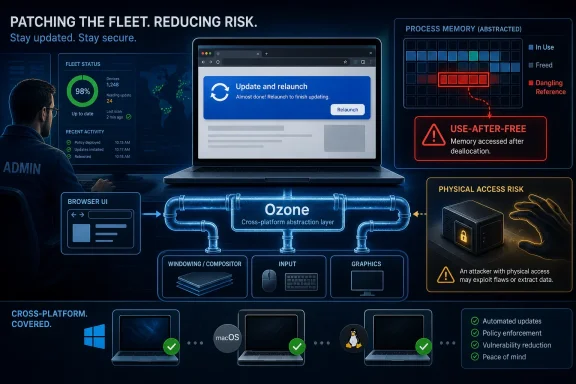
CVE-2026-11628 is a use-after-free vulnerability in Ozone, the Chromium abstraction layer that helps the browser talk to underlying windowing and graphics systems across platforms. In plain English, a component that helps Chrome render and interact with the operating system could be tricked into touching memory after it should have stopped using it. That class of bug, CWE-416, is one of the old warhorses of browser exploitation because stale memory references can become a route to heap corruption.
Google’s Chromium severity rating calls the bug critical. CISA’s ADP CVSS 3.1 vector, however, scores it 6.8 medium because the attack vector is physical rather than network-based. That is not a contradiction so much as a collision between two scoring philosophies: Chromium is judging the technical danger of memory corruption inside a privileged, complex browser component, while CVSS is heavily discounting the bug because an attacker needs hands-on access to the machine.
This is exactly where vulnerability management dashboards can mislead. A “critical” label implies urgency; a “medium” score invites deferral. The truth sits between them: CVE-2026-11628 is probably not the Chrome flaw that keeps a SOC awake over mass exploitation, but it is also not the kind of memory-corruption bug you want sitting unpatched on shared endpoints, kiosks, lab machines, classrooms, help-desk loaners, or any device that routinely leaves the owner’s direct control.
The local nature of the attack matters. The CVSS vector lists physical access, no privileges required, no user interaction required, unchanged scope, and high impact to confidentiality, integrity, and availability. That combination describes a narrow but potentially nasty scenario: if someone can get to the device, the browser may become part of the path from “I touched the keyboard” to “I corrupted memory in a high-value process.”
That makes it a useful place for Chromium’s portability story, but also a sensitive place for security. Browser UI, graphics, input, compositing, and window management sit near the seam where web content, user actions, and operating-system surfaces meet. Bugs in this layer are not automatically remotely exploitable, but they are rarely trivial.
Use-after-free vulnerabilities are especially concerning in this kind of code because they are timing and state bugs. An object is created, referenced, released, and then referenced again after its lifetime has ended. If an attacker can influence what memory occupies that freed space, the browser may behave as if attacker-controlled data is a legitimate object.
Modern Chrome has layers of sandboxing, partition allocators, memory hardening, and exploit mitigations designed to make that chain difficult. But “difficult” is not “impossible,” and Google does not use the critical label casually. Even when the disclosed path is physical access, the underlying bug class belongs to the same family that has powered browser exploits for years.
That context changes how the update should be read. CVE-2026-11628 may be a physical-access bug in isolation, but the patch train was broader and included a separate V8 issue, CVE-2026-11645, that Google said had an exploit in the wild. In operational terms, the update is not “the Ozone patch.” It is a high-priority Chrome security release with at least one actively exploited vulnerability elsewhere in the bundle.
This is why enterprise patching should rarely key off one CVE alone. Browser releases are aggregates. A single version number can retire dozens of memory-safety flaws, and the most famous CVE in the advisory is not always the only reason to accelerate deployment.
For WindowsForum readers, the version boundary is the useful part. Chrome builds before 149.0.7827.103 are vulnerable according to the CVE description, while Google’s release shipped 149.0.7827.102/.103 depending on platform. In practice, administrators should target the latest available Stable build rather than freeze their policy around the minimum fixed version in a CVE record, especially because Chrome often receives follow-up point releases within days.
That structure reflects an attempt to say: vulnerable Chrome, running on the major desktop operating systems. It does not necessarily mean Windows, Linux, or macOS themselves are vulnerable products. They are listed as part of the affected software configuration because the vulnerable application runs on those platforms.
Still, the configuration can feel awkward because Chrome’s own release advisory differentiates fixed builds by platform: 149.0.7827.102/.103 for Windows and Mac, and 149.0.7827.102 for Linux. The CVE description uses “prior to 149.0.7827.103,” which is a common shorthand but not always a perfect mirror of every platform-specific package number. That mismatch is exactly the kind of detail that causes scanners to report surprising results.
Could there be missing CPEs for Chromium derivatives? Possibly, but that depends on whether downstream vendors incorporated the vulnerable Chromium code and how they assign product CPEs. Microsoft Edge, Brave, Vivaldi, Opera, Electron-based apps, and embedded Chromium runtimes may all share Chromium code in broad architectural terms, but a CVE record for Google Chrome does not automatically enumerate every downstream product. Each vendor’s exposure depends on merge timing, compile options, platform code paths, and release cadence.
For Windows administrators, the safe interpretation is not “NVD failed to list every browser.” It is “the Chrome CPE tells you where the primary vendor fixed it; now check your Chromium-based fleet separately.” Vulnerability scanners are good at inventory correlation, but they are not a substitute for understanding that Chromium is a supply chain, not a single product.
But physical access is not a binary condition. A hotel business center PC, hospital workstation, classroom desktop, conference-room machine, retail kiosk, shared warehouse terminal, or unattended reception device lives in a world where brief access is plausible. The attacker may not have an admin password, may not be able to reboot, and may not have time to dismantle the machine. A browser bug that needs only local interaction can be useful in precisely those constrained windows.
Chrome is also a high-value local target because users leave so much state inside it. Session cookies, saved credentials, synced profiles, extension state, cached documents, enterprise single sign-on flows, and internal web apps all pass through the browser. Even when the operating system is hardened, the browser can be where the user’s working identity effectively lives.
That does not mean CVE-2026-11628 should be dramatized as a mass compromise event. There is no public indication from the provided CVE text that this particular Ozone bug is being exploited in the wild. The better reading is narrower and more useful: physical-access browser vulnerabilities matter most in environments where devices are shared, exposed, or temporarily unattended.
The awkward reality of browser patching is that downloading the update is only half the event. Chrome must relaunch to complete the upgrade. A fleet dashboard that reports the updated payload is present but does not confirm the running process version can create a false sense of closure.
The same scrutiny should apply to Microsoft Edge and other Chromium-based browsers, even though CVE-2026-11628 is listed as a Chrome issue. Edge has its own release process and advisories, but it rides the Chromium engine. A Chrome patch Tuesday is often an Edge, Brave, Opera, and Electron question by implication, even when the CVE page does not list those products.
Electron deserves particular attention in enterprises because it hides Chromium inside applications that users do not think of as browsers. Collaboration clients, developer tools, note-taking apps, admin consoles, and internal desktop wrappers may include Chromium runtime components. Not every Chromium CVE maps cleanly to every Electron app, but the dependency deserves inventory visibility.
This is one of the quiet failures of vulnerability management culture. Teams have been trained to worship a single severity field, then vendors, NVD, CISA, and scanners hand them different severity fields for the same issue. The result is not better prioritization; it is a meeting.
The fix is to privilege product reality over database neatness. Chrome shipped a stable security update. The bug is a memory-safety flaw in a browser component. The same release batch included a separately exploited V8 zero-day. Those facts are enough to justify rapid rollout even if this specific CVE’s physical attack vector keeps the numerical score in medium territory.
In other words, the business decision should be version-centric. Get Chrome and Chromium-derived browsers to the current Stable release. Confirm relaunch. Audit exposed devices. Then let the scanner metadata catch up.
That secrecy creates a familiar tension. Researchers and administrators want to know whether a bug is realistically exploitable, whether mitigations help, and whether their specific configurations are exposed. Vendors want to avoid turning a patch note into an exploit guide while millions of endpoints are still vulnerable.
The compromise is imperfect but defensible. Chrome advisories give enough information to identify the affected component, bug class, severity, reporter, and fixed version. They usually do not give enough detail to reproduce the flaw immediately. In the browser world, that is not evasiveness; it is part of the patch distribution model.
For defenders, the lesson is to stop waiting for exploit details before acting on browser memory-corruption updates. By the time the full technical write-up is public, the patch window should already be closed.
Kiosk mode can reduce attack surface, but it is not magic. Many kiosk deployments are really just locked-down Windows sessions with a browser front end, a few group policies, and a hope that users cannot break out of the intended workflow. If the browser itself has a local memory-corruption flaw, the boundary deserves renewed scrutiny.
The same goes for schools, libraries, labs, and front-desk terminals. These machines often run standardized images and lag behind because IT teams fear disrupting a specialized workflow. That is exactly where Chrome’s rapid update cadence can collide with local operational inertia.
There is also a subtler risk around shared profiles. If multiple users touch the same browser profile, the compromise of browser state can have consequences beyond the person physically present. Saved sessions and persistent authentication are convenient until a local attack turns them into a target.
That lane should include automatic updates where possible, forced relaunch windows where necessary, and telemetry that distinguishes installed version from running version. It should include separate reporting for Chrome, Edge, and any other Chromium-based browsers in the fleet. It should also include exception handling for kiosks and regulated workstations, because those are the machines most likely to be both exposed and slow to patch.
Windows gives administrators plenty of tools to do this, from enterprise update policies to endpoint management suites. The failure mode is rarely lack of tooling. It is the assumption that browser updates are too small to deserve process and too frequent to deserve attention.
That assumption has aged badly. Chrome security releases are now infrastructure events. They may not require the ceremony of an operating-system cumulative update, but they absolutely require verification.
CVE-2026-11628 exposes that limitation neatly. The vulnerable component is in Chromium’s Ozone layer. The named product is Google Chrome. The affected configurations list Chrome on major desktop operating systems. The broader ecosystem includes Chromium derivatives that may or may not be affected depending on code adoption and release timing.
Trying to solve that entirely inside one NVD CPE record is unrealistic. If NVD listed every downstream Chromium product speculatively, it would create noise and false positives. If it listed only Google Chrome, some organizations would miss dependency risk. The right answer is not perfect CPE omniscience; it is better asset intelligence on the defender side.
That means knowing which browsers are installed, which are actually used, which Electron applications bundle Chromium, and which endpoints are physically exposed. It also means treating vendor advisories as the first signal and CPE-enriched scanner results as a second signal, not the other way around.
At the same time, the bug lives in a component that touches sensitive browser platform plumbing, carries Chromium’s critical severity, and arrived in a release stuffed with other important fixes. The right operational posture is fast patching without panic. The right analytical posture is to understand why a medium CVSS score can still deserve near-term action.
For home users, the response is mundane: open Chrome’s About page, let it update, and relaunch. For IT teams, the response should be measured but firm: validate fixed versions, handle relaunch debt, check Chromium cousins, and pay special attention to shared systems.
This is also a useful case study in why security labels are not interchangeable. “Critical” tells you something about technical exploit impact. “Physical access” tells you something about attacker positioning. “Medium” tells you how CVSS weights those factors. None of those fields, alone, tells you how exposed your environment is.
 Chrome’s Critical Label Meets CVSS’s Awkward Reality
CVE-2026-11628 is a use-after-free vulnerability in Ozone, the Chromium abstraction layer that helps the browser talk to underlying windowing and graphics systems across platforms. In plain English, a component that helps Chrome render and interact with the operating system could be tricked into touching memory after it should have stopped using it. That class of bug, CWE-416, is one of the old warhorses of browser exploitation because stale memory references can become a route to heap corruption.Google’s Chromium severity rating calls the bug critical. CISA’s ADP CVSS 3.1 vector, however, scores it 6.8 medium because the attack vector is physical rather than network-based. That is not a contradiction so much as a collision between two scoring philosophies: Chromium is judging the technical danger of memory corruption inside a privileged, complex browser component, while CVSS is heavily discounting the bug because an attacker needs hands-on access to the machine.
This is exactly where vulnerability management dashboards can mislead. A “critical” label implies urgency; a “medium” score invites deferral. The truth sits between them: CVE-2026-11628 is probably not the Chrome flaw that keeps a SOC awake over mass exploitation, but it is also not the kind of memory-corruption bug you want sitting unpatched on shared endpoints, kiosks, lab machines, classrooms, help-desk loaners, or any device that routinely leaves the owner’s direct control.
The local nature of the attack matters. The CVSS vector lists physical access, no privileges required, no user interaction required, unchanged scope, and high impact to confidentiality, integrity, and availability. That combination describes a narrow but potentially nasty scenario: if someone can get to the device, the browser may become part of the path from “I touched the keyboard” to “I corrupted memory in a high-value process.”
Ozone Is the Kind of Plumbing Users Never See Until It Breaks
Ozone is not a feature users turn on, a toolbar they notice, or a permission dialog they can reason about. It is infrastructure. Chromium uses Ozone to smooth over differences among display servers, compositors, input systems, and graphics plumbing across Windows, macOS, Linux, and ChromeOS-adjacent environments.That makes it a useful place for Chromium’s portability story, but also a sensitive place for security. Browser UI, graphics, input, compositing, and window management sit near the seam where web content, user actions, and operating-system surfaces meet. Bugs in this layer are not automatically remotely exploitable, but they are rarely trivial.
Use-after-free vulnerabilities are especially concerning in this kind of code because they are timing and state bugs. An object is created, referenced, released, and then referenced again after its lifetime has ended. If an attacker can influence what memory occupies that freed space, the browser may behave as if attacker-controlled data is a legitimate object.
Modern Chrome has layers of sandboxing, partition allocators, memory hardening, and exploit mitigations designed to make that chain difficult. But “difficult” is not “impossible,” and Google does not use the critical label casually. Even when the disclosed path is physical access, the underlying bug class belongs to the same family that has powered browser exploits for years.
The Patch Was Part of a Much Larger Security Drop
CVE-2026-11628 did not arrive alone. Google’s June 8 Stable Channel update for desktop Chrome shipped 74 security fixes and moved Windows and Mac systems to 149.0.7827.102/.103, with Linux at 149.0.7827.102. The advisory listed a striking run of critical use-after-free issues across Ozone, File Input, Aura, TabStrip, Bluetooth, Gamepad, Autofill, Views, Printing, Compositing, Web Apps, Proxy, and other browser subsystems.That context changes how the update should be read. CVE-2026-11628 may be a physical-access bug in isolation, but the patch train was broader and included a separate V8 issue, CVE-2026-11645, that Google said had an exploit in the wild. In operational terms, the update is not “the Ozone patch.” It is a high-priority Chrome security release with at least one actively exploited vulnerability elsewhere in the bundle.
This is why enterprise patching should rarely key off one CVE alone. Browser releases are aggregates. A single version number can retire dozens of memory-safety flaws, and the most famous CVE in the advisory is not always the only reason to accelerate deployment.
For WindowsForum readers, the version boundary is the useful part. Chrome builds before 149.0.7827.103 are vulnerable according to the CVE description, while Google’s release shipped 149.0.7827.102/.103 depending on platform. In practice, administrators should target the latest available Stable build rather than freeze their policy around the minimum fixed version in a CVE record, especially because Chrome often receives follow-up point releases within days.
The CPE Entry Is Broad, but Not Necessarily Wrong
The user-facing question here is whether NVD is “missing a CPE.” Based on the current record, the more interesting issue is that the CPE configuration is broad and somewhat inelegant, not obviously incomplete. NVD’s initial analysis added Google Chrome versions up to, but excluding, 149.0.7827.103, in combination with operating-system CPEs for Windows, Linux kernel, and macOS.That structure reflects an attempt to say: vulnerable Chrome, running on the major desktop operating systems. It does not necessarily mean Windows, Linux, or macOS themselves are vulnerable products. They are listed as part of the affected software configuration because the vulnerable application runs on those platforms.
Still, the configuration can feel awkward because Chrome’s own release advisory differentiates fixed builds by platform: 149.0.7827.102/.103 for Windows and Mac, and 149.0.7827.102 for Linux. The CVE description uses “prior to 149.0.7827.103,” which is a common shorthand but not always a perfect mirror of every platform-specific package number. That mismatch is exactly the kind of detail that causes scanners to report surprising results.
Could there be missing CPEs for Chromium derivatives? Possibly, but that depends on whether downstream vendors incorporated the vulnerable Chromium code and how they assign product CPEs. Microsoft Edge, Brave, Vivaldi, Opera, Electron-based apps, and embedded Chromium runtimes may all share Chromium code in broad architectural terms, but a CVE record for Google Chrome does not automatically enumerate every downstream product. Each vendor’s exposure depends on merge timing, compile options, platform code paths, and release cadence.
For Windows administrators, the safe interpretation is not “NVD failed to list every browser.” It is “the Chrome CPE tells you where the primary vendor fixed it; now check your Chromium-based fleet separately.” Vulnerability scanners are good at inventory correlation, but they are not a substitute for understanding that Chromium is a supply chain, not a single product.
Physical Access Is Not a Comfort Blanket
Security teams often treat physical-access vulnerabilities as second-class risks. That instinct is understandable. If an attacker can sit at the device, many other controls may already be in trouble: removable media policy, lock-screen discipline, firmware settings, boot protections, disk encryption, and endpoint detection all come into play.But physical access is not a binary condition. A hotel business center PC, hospital workstation, classroom desktop, conference-room machine, retail kiosk, shared warehouse terminal, or unattended reception device lives in a world where brief access is plausible. The attacker may not have an admin password, may not be able to reboot, and may not have time to dismantle the machine. A browser bug that needs only local interaction can be useful in precisely those constrained windows.
Chrome is also a high-value local target because users leave so much state inside it. Session cookies, saved credentials, synced profiles, extension state, cached documents, enterprise single sign-on flows, and internal web apps all pass through the browser. Even when the operating system is hardened, the browser can be where the user’s working identity effectively lives.
That does not mean CVE-2026-11628 should be dramatized as a mass compromise event. There is no public indication from the provided CVE text that this particular Ozone bug is being exploited in the wild. The better reading is narrower and more useful: physical-access browser vulnerabilities matter most in environments where devices are shared, exposed, or temporarily unattended.
Windows Shops Should Think Beyond Chrome.exe
On Windows, Chrome’s updater is usually good enough for unmanaged consumer PCs. In enterprise environments, “usually” is not a control. Admins need to verify that managed endpoints actually moved to a fixed or later build, that update policies are not pinned to a stale channel, and that users who keep Chrome open for weeks are forced through a restart cycle.The awkward reality of browser patching is that downloading the update is only half the event. Chrome must relaunch to complete the upgrade. A fleet dashboard that reports the updated payload is present but does not confirm the running process version can create a false sense of closure.
The same scrutiny should apply to Microsoft Edge and other Chromium-based browsers, even though CVE-2026-11628 is listed as a Chrome issue. Edge has its own release process and advisories, but it rides the Chromium engine. A Chrome patch Tuesday is often an Edge, Brave, Opera, and Electron question by implication, even when the CVE page does not list those products.
Electron deserves particular attention in enterprises because it hides Chromium inside applications that users do not think of as browsers. Collaboration clients, developer tools, note-taking apps, admin consoles, and internal desktop wrappers may include Chromium runtime components. Not every Chromium CVE maps cleanly to every Electron app, but the dependency deserves inventory visibility.
The “Critical but Medium” Split Is a Scanner Problem Waiting to Happen
The CVE record’s severity split is tailor-made for ticket churn. One tool will prioritize Chromium’s critical label. Another will ingest CISA-ADP’s 6.8 medium CVSS score. A third may wait for NVD’s own enrichment and show “N/A” until a later sync. Meanwhile, the Chrome release version is already in the wild and the operational decision cannot wait for perfect metadata.This is one of the quiet failures of vulnerability management culture. Teams have been trained to worship a single severity field, then vendors, NVD, CISA, and scanners hand them different severity fields for the same issue. The result is not better prioritization; it is a meeting.
The fix is to privilege product reality over database neatness. Chrome shipped a stable security update. The bug is a memory-safety flaw in a browser component. The same release batch included a separately exploited V8 zero-day. Those facts are enough to justify rapid rollout even if this specific CVE’s physical attack vector keeps the numerical score in medium territory.
In other words, the business decision should be version-centric. Get Chrome and Chromium-derived browsers to the current Stable release. Confirm relaunch. Audit exposed devices. Then let the scanner metadata catch up.
Restricted Bug Details Are a Feature, Not a Cover-Up
The Chromium issue link for CVE-2026-11628 is permission-restricted, which is normal for fresh Chrome vulnerabilities. Google routinely withholds detailed bug information until most users have received the fix, and may keep restrictions longer if shared third-party code is involved. This frustrates defenders who want technical proof, but it also denies attackers a ready-made exploit recipe during the most dangerous patch window.That secrecy creates a familiar tension. Researchers and administrators want to know whether a bug is realistically exploitable, whether mitigations help, and whether their specific configurations are exposed. Vendors want to avoid turning a patch note into an exploit guide while millions of endpoints are still vulnerable.
The compromise is imperfect but defensible. Chrome advisories give enough information to identify the affected component, bug class, severity, reporter, and fixed version. They usually do not give enough detail to reproduce the flaw immediately. In the browser world, that is not evasiveness; it is part of the patch distribution model.
For defenders, the lesson is to stop waiting for exploit details before acting on browser memory-corruption updates. By the time the full technical write-up is public, the patch window should already be closed.
Shared Devices Are Where This Bug Has Teeth
The most exposed Windows systems are not necessarily the ones with the most valuable data. They are the ones where physical assumptions are weakest. A domain-joined workstation in a locked office may be less interesting for CVE-2026-11628 than a lightly supervised kiosk running a browser in a public area.Kiosk mode can reduce attack surface, but it is not magic. Many kiosk deployments are really just locked-down Windows sessions with a browser front end, a few group policies, and a hope that users cannot break out of the intended workflow. If the browser itself has a local memory-corruption flaw, the boundary deserves renewed scrutiny.
The same goes for schools, libraries, labs, and front-desk terminals. These machines often run standardized images and lag behind because IT teams fear disrupting a specialized workflow. That is exactly where Chrome’s rapid update cadence can collide with local operational inertia.
There is also a subtler risk around shared profiles. If multiple users touch the same browser profile, the compromise of browser state can have consequences beyond the person physically present. Saved sessions and persistent authentication are convenient until a local attack turns them into a target.
Patch Management Needs a Browser-Specific Muscle
The Chrome 149.0.7827.102/.103 release is another reminder that browser patching should not be treated like ordinary application maintenance. Browsers are exposed to hostile content, hold identity tokens, execute complex code, and update on a cadence faster than many enterprise change boards were designed to tolerate. They need their own operational lane.That lane should include automatic updates where possible, forced relaunch windows where necessary, and telemetry that distinguishes installed version from running version. It should include separate reporting for Chrome, Edge, and any other Chromium-based browsers in the fleet. It should also include exception handling for kiosks and regulated workstations, because those are the machines most likely to be both exposed and slow to patch.
Windows gives administrators plenty of tools to do this, from enterprise update policies to endpoint management suites. The failure mode is rarely lack of tooling. It is the assumption that browser updates are too small to deserve process and too frequent to deserve attention.
That assumption has aged badly. Chrome security releases are now infrastructure events. They may not require the ceremony of an operating-system cumulative update, but they absolutely require verification.
The CPE Debate Should Push Better Inventory, Not False Precision
CPEs are useful, but they are blunt instruments. They describe products and versions in a standardized way, which makes them indispensable for scanners and compliance systems. They do not perfectly model modern software supply chains, feature flags, platform-specific code paths, or embedded runtimes.CVE-2026-11628 exposes that limitation neatly. The vulnerable component is in Chromium’s Ozone layer. The named product is Google Chrome. The affected configurations list Chrome on major desktop operating systems. The broader ecosystem includes Chromium derivatives that may or may not be affected depending on code adoption and release timing.
Trying to solve that entirely inside one NVD CPE record is unrealistic. If NVD listed every downstream Chromium product speculatively, it would create noise and false positives. If it listed only Google Chrome, some organizations would miss dependency risk. The right answer is not perfect CPE omniscience; it is better asset intelligence on the defender side.
That means knowing which browsers are installed, which are actually used, which Electron applications bundle Chromium, and which endpoints are physically exposed. It also means treating vendor advisories as the first signal and CPE-enriched scanner results as a second signal, not the other way around.
The Useful Reading of CVE-2026-11628 Is Narrow but Urgent
The temptation with every Chrome CVE is to flatten it into “update now.” That advice is correct, but incomplete. CVE-2026-11628 is not the same kind of risk as a remotely exploitable V8 zero-day, and pretending otherwise only teaches users to ignore severity language. Its physical-access requirement is a real constraint.At the same time, the bug lives in a component that touches sensitive browser platform plumbing, carries Chromium’s critical severity, and arrived in a release stuffed with other important fixes. The right operational posture is fast patching without panic. The right analytical posture is to understand why a medium CVSS score can still deserve near-term action.
For home users, the response is mundane: open Chrome’s About page, let it update, and relaunch. For IT teams, the response should be measured but firm: validate fixed versions, handle relaunch debt, check Chromium cousins, and pay special attention to shared systems.
This is also a useful case study in why security labels are not interchangeable. “Critical” tells you something about technical exploit impact. “Physical access” tells you something about attacker positioning. “Medium” tells you how CVSS weights those factors. None of those fields, alone, tells you how exposed your environment is.
Chrome’s Ozone Bug Leaves Administrators With a Short Checklist
The practical work is not complicated, but it does need to be explicit. CVE-2026-11628 should be handled as part of the broader June 8 Chrome Stable security update, not as an isolated curiosity in a vulnerability database.- Chrome installations should be updated to the latest Stable build, with special attention to systems still below 149.0.7827.103 or the platform-equivalent fixed release.
- Administrators should confirm that Chrome has relaunched after update installation, because a patched package does not always mean a patched running browser process.
- Shared, kiosk, classroom, lab, and front-desk Windows devices should be prioritized because the disclosed attack vector requires physical access.
- Chromium-based browsers and Electron applications should be reviewed separately, since the Chrome CPE record does not automatically prove or disprove downstream exposure.
- Scanner findings should be interpreted alongside Google’s release notes and vendor advisories, especially while NVD scoring and CPE enrichment continue to settle.
- The presence of CVE-2026-11645 in the same Chrome release makes rapid rollout more important than CVE-2026-11628’s medium CVSS score might suggest on its own.
References
- Primary source: NVD / Chromium
Published: 2026-06-15T19:13:29-07:00
NVD - CVE-2026-11628
 nvd.nist.gov
- Security advisory: MSRC
Published: 2026-06-15T19:13:29-07:00
Original feed URL
Security Update Guide - Microsoft Security Response Center
 msrc.microsoft.com
- Related coverage: radar.offseq.com
CVE-2026-11628: Use after free in Google Chrome - Live Threat Intelligence - Threat Radar | OffSeq.com
Detailed information about CVE-2026-11628: Use after free in Google Chrome affecting Google Chrome. Get real-time updates, technical details, and mitigation strradar.offseq.com
