

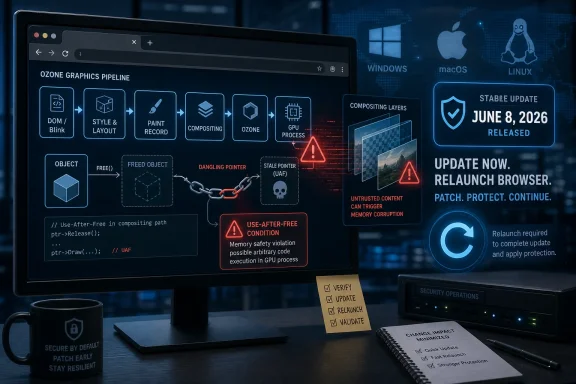
The Browser Patch Is the Perimeter Patch Now
There was a time when browser security could be mentally filed under “user apps,” downstream from the real business of operating-system hardening, endpoint controls, and network segmentation. That distinction has aged badly. Chrome is not just a web browser; it is a document viewer, authentication broker, SaaS runtime, password-adjacent workflow engine, and the thing users keep open all day while handling mail, line-of-business dashboards, admin portals, and procurement systems.
CVE-2026-11629 reinforces that uncomfortable reality. The vulnerability is not described as requiring local access, administrative privileges, or a complicated chain of user decisions. The published vector from CISA’s ADP scoring is network-accessible, low-complexity, unauthenticated, and triggered by user interaction. In plain English, a victim browsing to the wrong page is the meaningful precondition.
That does not mean every unpatched Chrome instance is moments from compromise. Public CVE language is deliberately compressed, and Chrome’s sandbox, site isolation, memory safety mitigations, and platform protections all still matter. But it does mean defenders should resist the instinct to treat a Chrome point release as ordinary software hygiene. When the browser patch closes a memory-corruption path reachable from web content, the browser patch is perimeter work.
Ozone Is Plumbing, Which Is Why This Bug Deserves Attention
Ozone is not a household name outside Chromium development circles, and that is part of the story. It is the abstraction layer Chromium uses to deal with platform windowing and graphics systems across environments. It helps Chrome bridge the gap between web content and operating-system display stacks, including the messy differences between Windows, Linux, Wayland, X11, macOS-adjacent rendering assumptions, and various hardware acceleration paths.
Security bugs in plumbing are easy to underestimate because the component is not user-facing. Nobody clicks an “Ozone” button. Nobody trains employees to avoid suspicious Ozone pop-ups. But browsers are vast machines made of precisely this kind of hidden infrastructure, and attackers do not care whether a component has a marketing name.
A use-after-free flaw is a classic memory-safety failure: software releases an object and later continues to use a stale reference to it. In benign cases, that produces a crash. In worse cases, carefully shaped memory conditions allow an attacker to corrupt the heap and potentially influence execution. Chrome’s CVE wording is cautious — “potentially exploit heap corruption” — but the severity label is not subtle. Chromium marked this one Critical.
The Ozone angle also matters because graphics and compositing paths are exposed to increasingly rich web content. Modern pages are not static documents; they are animated application shells full of canvas rendering, video, GPU-backed effects, multi-process coordination, and event-driven state changes. The more the browser behaves like an operating system for web apps, the more its rendering plumbing becomes a security boundary in practice.
The CVSS Number Tells Only Half the Story
CISA-ADP assigned CVE-2026-11629 a CVSS 3.1 base score of 8.8, which lands in High rather than Critical under CVSS scoring conventions. Chromium’s own security severity, however, calls it Critical. That gap is not a contradiction so much as a reminder that scoring systems and vendor severity labels answer different questions.
CVSS tries to standardize exploit characteristics: network reachability, attack complexity, privileges required, user interaction, scope, and impact. The published vector says the attack is remote, low-complexity, requires no privileges, does require user interaction, and can affect confidentiality, integrity, and availability at high levels. That is bad enough.
Chromium’s internal severity rating weighs the bug in the context of Chrome’s architecture, exploitability assumptions, and the component involved. A browser vendor looking at a memory-corruption flaw in a reachable rendering-adjacent path may reasonably call it Critical even if the standardized score lands just below the top band. For administrators, the practical reading should be simple: do not let the absence of a 9.x CVSS score lull you into delay.
The NVD record was still not fully enriched by NIST at the time reflected in the supplied data, which is normal for newly published CVEs. That lag can create awkward moments for vulnerability-management teams whose dashboards depend heavily on NVD scoring, CPE normalization, and automated severity ingestion. The fix is not to wait for the metadata to become prettier. The fix is to track the vendor advisory and deploy the patched browser build.
The CPE Entry Is Awkward, but the Exposure Is Not
The user’s question — “Are we missing a CPE here?” — points to a familiar weakness in vulnerability databases. The NVD change history shows a Chrome application CPE constrained to versions before 149.0.7827.103, combined with operating-system CPEs for Windows, Linux kernel, and macOS. That sort of configuration is meant to express that vulnerable Chrome builds run on those operating systems. It can also confuse scanners and humans alike.
The important product CPE is the Chrome application entry. The operating-system CPEs are not saying Windows itself, Linux itself, or macOS itself contains CVE-2026-11629. They are platform qualifiers for the vulnerable application. In real-world vulnerability management, this distinction matters because a poorly tuned scanner or asset inventory can turn a browser CVE into apparent OS exposure, or miss it entirely when Chrome is installed outside standard package-management paths.
For Windows shops, the CPE problem gets even messier because Chrome may arrive through several routes. It might be installed system-wide, per-user, through enterprise MSI, via Intune, through Configuration Manager, through a third-party patching tool, or as part of a golden image that has not been refreshed. Some organizations also have Chrome-based derivatives, embedded Chromium runtimes, Electron apps, and WebView2-based applications in the same environment, each with different update mechanics and different relevance to a given Chromium CVE.
That does not mean every Chromium-derived product automatically inherits this specific flaw. Ozone integration, build configuration, patch level, and exposed code paths matter. But it does mean defenders should avoid the narrow mental model that says “Chrome updated on my test machine, therefore Chromium risk is gone.” The enterprise browser estate is rarely that tidy.
The June 8 Update Was Bigger Than One CVE
CVE-2026-11629 was part of a larger Chrome Stable Channel update published June 8, 2026. Public reporting and advisory summaries around that release also highlighted CVE-2026-11645, a V8 out-of-bounds read/write issue for which Google said exploit code existed in the wild. That distinction is important: CVE-2026-11629 is severe, but the public active-exploitation spotlight appears to have fallen on a different CVE in the same update.
This is where security communications become treacherous. Users see “Chrome zero-day” headlines, administrators see a list of dozens of CVEs, and vulnerability tools may sort by score or exploit status. The result is a patching conversation that can become too focused on one sensational bug while overlooking the fact that the safest operational decision is identical for all of them: get to the fixed build.
The patched desktop builds were reported as 149.0.7827.102 or 149.0.7827.103 depending on platform. The CVE language for CVE-2026-11629 uses “prior to 149.0.7827.103,” while release summaries reference Windows and Linux builds at .102 and macOS at .103 in some contexts. That version-number wrinkle is exactly why admins should verify against Google’s own Chrome update channel and the browser’s self-reported version rather than relying on a single third-party table.
For managed Windows environments, the operational target should be clear: confirm Chrome has advanced to the fixed Stable Channel build for the platform, restart the browser to complete the update, and make sure policies are not allowing users to defer relaunches indefinitely. Chrome can download an update silently and still remain exposed until the running browser process exits. The relaunch is not a nicety; it is part of remediation.
User Interaction Is Not a Comfort Blanket
The CVSS vector includes user interaction, which sometimes causes risk committees to downgrade urgency. That is usually a mistake for browser vulnerabilities. “User interaction required” can mean nothing more exotic than opening a page, clicking a link in chat, visiting a compromised site, loading an ad, or being redirected through a chain the user barely perceives.
The web has industrialized user interaction. Phishing kits, malvertising, search poisoning, compromised legitimate sites, and SaaS collaboration spam all exist to move a target’s browser to attacker-chosen content. If the vulnerable component can be reached through crafted HTML, then the attacker’s job is not to persuade someone to install malware; it is to persuade or route someone into rendering content.
That is why browser memory-corruption bugs sit in a special category for enterprise defenders. They are not remote-code-execution bugs in the old “open port on a server” sense. They are client-side bugs in the application that users are required to expose to untrusted input all day. The web is the input channel.
Chrome’s sandbox may still contain the initial impact, depending on the exploit and the surrounding mitigations. But serious browser exploitation has long been about chains: renderer compromise, sandbox escape, credential theft, token abuse, or lateral movement through whatever the browser can reach. A single CVE does not have to do everything to be useful to an attacker.
Windows Administrators Have a Relaunch Problem, Not a Download Problem
Chrome’s auto-update system is one of the better consumer software update mechanisms in widespread use. In unmanaged environments, it quietly checks, downloads, and stages updates without demanding that users understand CVEs. That has materially improved internet-wide security.
Enterprise Windows environments, however, are not consumer environments. Admins care about maintenance windows, application compatibility, change-control rules, browser extensions, remote sessions, locked-down desktops, nonpersistent VDI pools, and users who keep browsers open for weeks. In those environments, the hard part is often not acquiring the update. It is getting the update to take effect everywhere that matters.
A sensible response to CVE-2026-11629 therefore starts with inventory. Which devices have Chrome installed? Which channel are they on? Which version is actually running? Which machines have the update staged but not relaunched? Which devices are off VPN, unmanaged, stale, or repeatedly failing update checks? These are boring questions, but they are the questions that separate policy from protection.
Administrators should also remember the identity layer. If Chrome is the main front end for Microsoft 365, Google Workspace, Okta, Entra ID-backed apps, Salesforce, ServiceNow, GitHub, internal admin panels, and privileged cloud consoles, a browser compromise can rapidly become an identity incident. Browser patching belongs in the same operational conversation as conditional access, token lifetime, endpoint compliance, and privileged-access workflows.
The Chromium Monoculture Raises the Stakes
Chrome’s dominance has a second-order effect: when Chromium has a serious bug, the blast radius may extend beyond Google Chrome. Microsoft Edge, Brave, Opera, Vivaldi, and many embedded products draw from Chromium, though they ship fixes on their own schedules and may not expose every component in the same way. The industry has gained security engineering scale from Chromium, but it has also concentrated a lot of web runtime risk in one codebase.
For WindowsForum readers, Edge deserves special mention. Microsoft Edge is Chromium-based, deeply integrated into Windows workflows, and often present even in organizations that standardize on Chrome. A Chrome CVE is not automatically an Edge CVE in public advisory terms, but Chromium fixes routinely flow into Edge updates. Security teams should check both browsers, not because the branding is similar, but because the underlying engine family is shared.
The same caution applies to Electron applications, although the relationship is more complicated. An Electron app may lag behind current Chromium, use a bundled runtime, and expose different web content paths. It may also be locked to internal content, which changes risk. Still, the broader lesson is that “we patched Chrome” is not the same as “we patched every Chromium-derived attack surface in the estate.”
This is where vulnerability management tooling often struggles. CPEs describe products, but modern software supply chains describe code reuse. Chromium is not merely an installed browser; it is a platform component inside a growing number of desktop applications. The scanner’s view and the attacker’s view may not line up.
Google’s Disclosure Pattern Is a Feature and a Frustration
Chrome security advisories often restrict bug details until most users have updated. That practice frustrates defenders who want technical depth immediately, and it frustrates researchers who want to validate impact. But it is defensible. Publishing exploit-friendly detail while hundreds of millions of browsers remain unpatched would be reckless.
The tradeoff is that administrators must often patch on trust. With CVE-2026-11629, the public record gives us the affected component, bug class, severity, broad attack precondition, and fixed version. It does not give us a proof of concept, commit-level exploit explanation, or reliable field telemetry about exploitation. That is enough to prioritize remediation, but not enough to build a bespoke detection strategy around the vulnerability itself.
In practice, that means defenders should look for surrounding signals rather than a neat CVE-specific indicator. Suspicious browser crashes, renderer instability, unusual child-process behavior, unexplained credential prompts, endpoint detection alerts following web activity, and identity anomalies after browsing sessions may matter. None of those prove exploitation of this CVE. They are the kind of weak signals that become more interesting when a critical browser memory bug has just been patched.
This is also a reminder that security teams should separate “known exploited” from “worth urgent patching.” CVE-2026-11645 may be the same-release bug with explicit in-the-wild attention. CVE-2026-11629, as supplied, is a critical memory-safety flaw without that same public exploitation statement. Both belong in the emergency browser-update lane because the cost of patching is low compared with the cost of being wrong.
The Fix Is Simple; Proving It Happened Is Not
For individual users, the advice is almost comically straightforward: open Chrome’s About page, let it check for updates, and relaunch. If the browser reports a fixed 149.0.7827.102 or 149.0.7827.103-era build according to the platform’s release channel, the immediate exposure described by the advisory should be addressed. Users who have not restarted Chrome since the update was offered should do so.
For administrators, the work is more procedural. Managed Chrome policies can control update cadence, relaunch notifications, target channels, and rollback behavior. Those controls are useful, but they can also become accidental brakes if configured too conservatively. A browser security update that sits staged for days because users keep postponing relaunch is a governance failure dressed up as user convenience.
Patch SLAs should treat critical browser memory-corruption vulnerabilities differently from ordinary application defects. A 30-day desktop patch cycle may be acceptable for some productivity software. It is hard to defend for a critical Chrome flaw reachable through crafted web content. The browser is too exposed, too privileged in user workflows, and too attractive to attackers.
Organizations should also verify third-party patching catalogs. Browser updates often move faster than enterprise content pipelines, and there can be a delay between Google’s release and availability in management products. If the patching tool says “not applicable” while Chrome itself says it is outdated, believe the browser and fix the pipeline.
The Practical Reading for WindowsForum Readers
The most useful way to read CVE-2026-11629 is not as an isolated Chrome defect, but as a case study in modern client risk. A bug in a graphics abstraction layer, triggered through web content, patched in a routine-looking Stable Channel update, can become an enterprise priority because the browser is now where work happens. The distance between a crafted HTML page and a business-impacting incident is shorter than many patch calendars admit.
- CVE-2026-11629 is a critical Chromium use-after-free flaw in Ozone affecting Google Chrome versions before the fixed 149.0.7827.103-era desktop update.
- The published attack description involves a crafted HTML page, no prior privileges, and user interaction that may be as ordinary as browsing to attacker-controlled content.
- The NVD CPE configuration should be read as Chrome-on-platform exposure, not as a native Windows, Linux, or macOS vulnerability.
- The June 8 Chrome update also included other important fixes, including a separately highlighted V8 issue reportedly exploited in the wild.
- Windows administrators should verify not only that Chrome downloaded the update, but that users actually relaunched into the patched version.
- Chromium-based browsers and embedded runtimes deserve separate inventory checks because shared code does not always mean synchronized patching.
The lesson is not that Chrome is uniquely unsafe; it is that the browser has become too central to treat as just another desktop app. CVE-2026-11629 will soon fade into scanner history, replaced by the next memory-safety flaw with a terse description and an urgent version number. The organizations that handle it well will be the ones that turn browser patching into a measured, verified, cross-platform discipline before the next crafted page tests whether policy and reality are the same thing.