

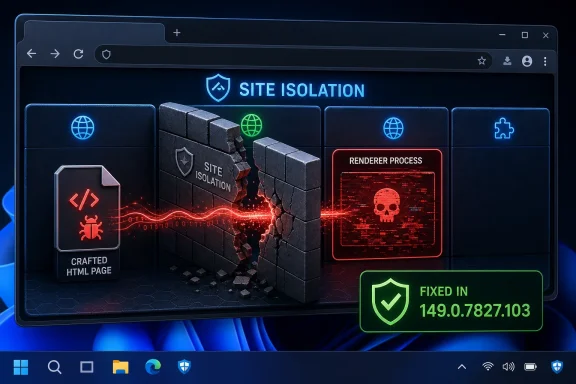
CVE-2026-11693 is a high-severity Google Chrome vulnerability, published by NVD on June 8, 2026 and fixed in Chrome 149.0.7827.103, that allowed a renderer-compromise attacker to bypass Site Isolation through a crafted HTML page on desktop platforms. The short version for WindowsForum readers is simple: this is not the loudest Chrome bug in June’s update, but it is one of the more architecturally interesting ones. It attacks the browser’s containment model after an attacker has already won a foothold in the renderer. That makes it a reminder that browser security is no longer about one sandbox, one exploit, or one patch line.
Most browser vulnerability write-ups still read as if the attacker’s job begins and ends with getting code to run. CVE-2026-11693 is different because the public description explicitly assumes a compromised renderer process before the meaningful damage begins. In plain English, the attacker has already found a way into the part of Chrome that parses and runs web content, and the bug then lets that attacker poke through a boundary Chrome created precisely to limit that situation.
That is why the phrase bypass Site Isolation matters more than the bland component label “Plugins.” Site Isolation is Chrome’s attempt to stop one compromised web renderer from becoming a passport to other sites’ data. It exists because the modern browser is a password manager, SSO front end, document viewer, enterprise app runtime, and video conferencing client all wearing the same icon.
The CVSS 3.1 score assigned by CISA-ADP is 8.1, with network attack vector, low complexity, no privileges required, and user interaction required. That combination maps neatly to the modern browser threat model: a user visits or is pushed toward a malicious page, the page does the work, and the browser’s internal architecture determines whether the blast radius is narrow or wide.
The available record does not say that CVE-2026-11693 is being exploited in the wild. Google’s June 8 stable-channel post did, however, say that another vulnerability in the same update, CVE-2026-11645 in V8, had an exploit in the wild. That distinction matters. CVE-2026-11693 should be treated as urgent because it is in the same shipped security update and affects a core boundary, not because public evidence currently says this specific CVE is under active attack.
Before Site Isolation became a default desktop expectation, the nightmare scenario was straightforward. If unrelated sites shared too much process space, then a renderer compromise or cross-origin bug could become a way to inspect data belonging to a different origin. The web’s Same Origin Policy says one site should not read another site’s secrets, but browser engineers learned long ago that policy checks alone are a brittle last line of defense.
Site Isolation hardens that model by putting sites into separate renderer processes and making the browser process enforce which data a renderer is allowed to receive. It is a defense-in-depth answer to a grim assumption: sooner or later, a renderer will be compromised. The system is designed so that when that happens, the attacker still should not be able to read your corporate email in one tab because you were tricked into loading hostile HTML in another.
That is why CVE-2026-11693 is not just “another Chrome high.” It is a bug in the machinery that tells administrators, users, and security teams they can survive the first compromise. A bypass does not necessarily mean full system takeover, and the public description does not claim a sandbox escape into Windows, macOS, or Linux. But it does mean the browser’s internal wall between web properties may not have held under a specific crafted scenario.
That makes this vulnerability awkward to explain and dangerous to dismiss. A user may reasonably ask, “I do not use plugins, so why should I care?” The answer is that Chromium’s internal component boundaries do not always map to the settings page mental model. If Chrome says a Plugins implementation flaw can be reached through crafted HTML after renderer compromise, the safe assumption is that the vulnerable path is reachable enough to justify a high-severity fix.
The weakness assigned by CISA-ADP, CWE-346, is an origin validation error. That is thematically consistent with a Site Isolation bypass. Origin validation failures are precisely the kind of mistake that can turn “this renderer may act for this site” into “this renderer can obtain or influence something it should not.”
The word inappropriate implementation is also typical Chromium understatement. It does not tell defenders whether the bug was a missing check, a lifecycle mismatch, an unexpected plugin-related navigation path, or a browser-process trust mistake. Google’s bug tracker entry remains access-restricted, which is normal until enough users have updated. The silence is not evidence of triviality; it is part of the disclosure choreography.
The practical reading is that Chrome 149.0.7827.102 and 149.0.7827.103 are the fixed desktop builds from Google’s June 8 update train, with platform-specific packaging differences. NVD often normalizes vulnerability ranges around the highest version number mentioned in a vendor advisory. That is useful for database matching, but it can be less precise than release-channel reality.
For Windows admins, the thing to verify is not whether an endpoint says exactly .102 or .103 in isolation. The thing to verify is whether the installed build is on the June 8 fixed stable channel or later. If your inventory system flags Windows machines on 149.0.7827.102 as vulnerable purely because NVD says “excluding 149.0.7827.103,” you may be seeing a scanner normalization problem rather than an actual missing Chrome patch.
This is where vulnerability management becomes less about reading a CVE page and more about reconciling vendor release notes, scanner logic, and installed build metadata. Chrome’s rapid release cadence frequently creates these small discontinuities. They are annoying, but they are not new.
The confusing part is what the CPE does not say. It does not enumerate every Chromium-derived browser. It does not list Microsoft Edge, Brave, Vivaldi, Opera, or Electron applications. It does not necessarily mean those products are unaffected; it means this CVE entry is scoped to Google Chrome as published by Chrome’s CVE assignment process and NVD’s enrichment.
That distinction is important for WindowsForum’s audience because many Windows fleets run both Edge and Chrome, and many desktop apps embed Chromium through frameworks. A Chrome CVE can indicate risk in the Chromium codebase without automatically producing a neat CPE row for every downstream product. Downstream vendors may ship their own advisories, assign their own version boundaries, or absorb the fix under a broader Chromium rollup.
So are we missing a CPE? If the question is “should NVD list Chrome on Windows, macOS, and Linux,” it already appears to do that. If the question is “should every Chromium-based browser and embedded runtime be listed,” that is not how the entry should be read without downstream confirmation. Treat it as a trigger for checking derivative-browser update status, not as proof that every derivative has the same vulnerable exposure under the same CVE mapping.
In a quieter update, administrators might argue over whether a Site Isolation bypass with no public exploitation claim can wait for the next maintenance window. In this update, that argument gets weaker. The same release also fixed CVE-2026-11645, a V8 memory access flaw that Google said had an exploit in the wild. Once a browser update contains a known exploited bug, the whole bundle becomes a priority.
This is one of the uncomfortable realities of Chrome patch management. You do not get to cherry-pick only the bug that matches your threat model. The browser is updated as a moving platform, and security fixes arrive as a batch. If one flaw in the batch is being exploited and another touches the isolation boundary, delay becomes harder to justify.
It also means CVE severity labels need interpretation. A “High” Site Isolation bypass may be a second-stage ingredient in an exploit chain, while a “Critical” memory safety bug may be the first-stage crash-to-code primitive. Attackers do not experience these as separate rows in a scanner report. They experience them as pieces of a path.
This is not a Chrome-only problem, but Chrome’s popularity makes it a persistent one. Browser updates land frequently enough that users tune out the relaunch prompt. Security teams then face the least glamorous control in endpoint defense: forcing restarts without causing a help-desk revolt.
The policy answer is not to panic users with vague warnings. It is to set clear relaunch deadlines for security updates, especially when a release contains an exploited vulnerability. Chrome Enterprise policies can manage update behavior, target versions, notifications, and relaunch windows. The right configuration depends on the environment, but the principle is the same: download without relaunch is not completion.
For WindowsForum readers running home systems, the check is simpler. Open Chrome’s About page, let it check for updates, and relaunch when prompted. If the browser is managed by an organization, the installed version and relaunch rules may be governed by policy. Either way, the fixed build must actually run, not merely sit staged on disk.
That does not make Edge irrelevant. It means Edge requires its own verification. When a Chromium security update fixes a core engine, browser process, or isolation bug, Edge administrators should check Microsoft’s stable channel status and enterprise deployment rings. The same general web threat model applies, even when the exact component exposure or version boundary differs.
The tricky part is timing. Chromium fixes move from upstream to downstream products on schedules that can be close but not identical. A Google stable-channel post is a strong signal that Chromium-derived browsers need attention, but it is not a substitute for checking the derivative vendor’s build.
For enterprises standardizing on Edge as the default Windows browser, the right play is not to ignore Chrome CVEs. It is to use them as early-warning radar. If a Chromium CVE describes a renderer compromise, Site Isolation bypass, V8 flaw, WebRTC issue, or GPU memory bug, assume it may become operationally relevant across your browser estate until your vendor says otherwise or ships the corresponding fix.
That should temper sensational readings. This is not described as “visit a page and instantly lose your machine.” It is described as “visit a crafted page, and an attacker who has already compromised the renderer can bypass Site Isolation.” The difference is meaningful.
But defenders should not overcorrect into complacency. Browser exploit chains are assembled precisely because no single bug has to do everything. A memory corruption bug in one component, a sandbox or isolation bypass in another, and a logic flaw in a privileged path can combine into an attack that is more serious than any one CVE summary suggests.
CVE-2026-11693 is therefore best understood as a boundary weakening bug. It may not be the spear tip. It may be the tool used after the spear tip lands. In modern browser security, that can be just as important.
For security teams, this creates a dangerous temptation to wait for database neatness. If the scanner has no NVD score, maybe the patch can wait. If the CPE logic looks odd, maybe the alert is a false positive. If the bug details are restricted, maybe the issue is not actionable.
That is the wrong instinct for browsers. Chrome, Edge, and other Chromium browsers sit directly in the user’s path to untrusted code every working day. A high-severity Chrome vulnerability fixed in a stable-channel security release deserves action even if enrichment is still catching up.
The better workflow is to use NVD as one input, not as the operational source of truth. Vendor release notes tell you what shipped. Endpoint inventory tells you what is installed. Browser relaunch telemetry tells you what is actually running. NVD helps normalize the record, but it should not be the reason a browser patch waits.
That makes this a useful test of how mature a patching program really is. Immature programs chase only critical CVEs or known exploited entries. Better programs understand that a high-severity isolation bypass in a browser can be a force multiplier for another exploit, especially when it ships alongside a known exploited V8 issue.
For individual users, the lesson is boring but reliable: keep Chrome updated and restart it. For admins, the lesson is operational: measure running browser versions, not just installed package versions. For vulnerability managers, the lesson is interpretive: do not mistake a missing or imperfect CPE for a complete risk assessment.
The larger story is that browser security is now an architecture war. Attackers try to turn one compromised process into access across sites, profiles, devices, and identities. Browser vendors respond with sandboxing, site-per-process models, brokered permissions, and restricted data delivery. CVE-2026-11693 is a small public window into that contest.
 The Chrome Bug That Starts After the First Compromise
Most browser vulnerability write-ups still read as if the attacker’s job begins and ends with getting code to run. CVE-2026-11693 is different because the public description explicitly assumes a compromised renderer process before the meaningful damage begins. In plain English, the attacker has already found a way into the part of Chrome that parses and runs web content, and the bug then lets that attacker poke through a boundary Chrome created precisely to limit that situation.That is why the phrase bypass Site Isolation matters more than the bland component label “Plugins.” Site Isolation is Chrome’s attempt to stop one compromised web renderer from becoming a passport to other sites’ data. It exists because the modern browser is a password manager, SSO front end, document viewer, enterprise app runtime, and video conferencing client all wearing the same icon.
The CVSS 3.1 score assigned by CISA-ADP is 8.1, with network attack vector, low complexity, no privileges required, and user interaction required. That combination maps neatly to the modern browser threat model: a user visits or is pushed toward a malicious page, the page does the work, and the browser’s internal architecture determines whether the blast radius is narrow or wide.
The available record does not say that CVE-2026-11693 is being exploited in the wild. Google’s June 8 stable-channel post did, however, say that another vulnerability in the same update, CVE-2026-11645 in V8, had an exploit in the wild. That distinction matters. CVE-2026-11693 should be treated as urgent because it is in the same shipped security update and affects a core boundary, not because public evidence currently says this specific CVE is under active attack.
Site Isolation Was Built for the Day the Renderer Loses
Chrome’s security model is often described as a sandbox, but that shorthand hides the more important design shift of the past decade. The browser does not merely try to keep a malicious page away from the operating system; it also tries to keep a malicious page away from other websites open in the same browser session. That is the premise of Site Isolation.Before Site Isolation became a default desktop expectation, the nightmare scenario was straightforward. If unrelated sites shared too much process space, then a renderer compromise or cross-origin bug could become a way to inspect data belonging to a different origin. The web’s Same Origin Policy says one site should not read another site’s secrets, but browser engineers learned long ago that policy checks alone are a brittle last line of defense.
Site Isolation hardens that model by putting sites into separate renderer processes and making the browser process enforce which data a renderer is allowed to receive. It is a defense-in-depth answer to a grim assumption: sooner or later, a renderer will be compromised. The system is designed so that when that happens, the attacker still should not be able to read your corporate email in one tab because you were tricked into loading hostile HTML in another.
That is why CVE-2026-11693 is not just “another Chrome high.” It is a bug in the machinery that tells administrators, users, and security teams they can survive the first compromise. A bypass does not necessarily mean full system takeover, and the public description does not claim a sandbox escape into Windows, macOS, or Linux. But it does mean the browser’s internal wall between web properties may not have held under a specific crafted scenario.
“Plugins” Is the Quietly Loaded Word
The component name attached to CVE-2026-11693 is “Plugins,” which sounds almost nostalgic in 2026. The old NPAPI era is long gone from mainstream Chrome, and most users no longer think of browser plugins as a routine part of the web. But component names in Chromium advisories are not product marketing labels; they are hints about internal subsystems and code paths.That makes this vulnerability awkward to explain and dangerous to dismiss. A user may reasonably ask, “I do not use plugins, so why should I care?” The answer is that Chromium’s internal component boundaries do not always map to the settings page mental model. If Chrome says a Plugins implementation flaw can be reached through crafted HTML after renderer compromise, the safe assumption is that the vulnerable path is reachable enough to justify a high-severity fix.
The weakness assigned by CISA-ADP, CWE-346, is an origin validation error. That is thematically consistent with a Site Isolation bypass. Origin validation failures are precisely the kind of mistake that can turn “this renderer may act for this site” into “this renderer can obtain or influence something it should not.”
The word inappropriate implementation is also typical Chromium understatement. It does not tell defenders whether the bug was a missing check, a lifecycle mismatch, an unexpected plugin-related navigation path, or a browser-process trust mistake. Google’s bug tracker entry remains access-restricted, which is normal until enough users have updated. The silence is not evidence of triviality; it is part of the disclosure choreography.
The Patch Number Is Messier Than the Security Boundary
The NVD entry says Chrome prior to 149.0.7827.103 is affected. Google’s stable-channel post says the desktop stable channel moved to 149.0.7827.102/.103 for Windows and Mac, and 149.0.7827.102 for Linux, rolling out over days and weeks. That apparent mismatch is the sort of detail that makes endpoint reporting unnecessarily tense for administrators.The practical reading is that Chrome 149.0.7827.102 and 149.0.7827.103 are the fixed desktop builds from Google’s June 8 update train, with platform-specific packaging differences. NVD often normalizes vulnerability ranges around the highest version number mentioned in a vendor advisory. That is useful for database matching, but it can be less precise than release-channel reality.
For Windows admins, the thing to verify is not whether an endpoint says exactly .102 or .103 in isolation. The thing to verify is whether the installed build is on the June 8 fixed stable channel or later. If your inventory system flags Windows machines on 149.0.7827.102 as vulnerable purely because NVD says “excluding 149.0.7827.103,” you may be seeing a scanner normalization problem rather than an actual missing Chrome patch.
This is where vulnerability management becomes less about reading a CVE page and more about reconciling vendor release notes, scanner logic, and installed build metadata. Chrome’s rapid release cadence frequently creates these small discontinuities. They are annoying, but they are not new.
The CPE Is Probably Not Missing What People Think It Is
The user-facing NVD prompt asks whether a CPE is missing, and in this case the better answer is: probably not for Google Chrome itself. NVD’s change history added a vulnerable application CPE for Google Chrome versions before 149.0.7827.103, combined with operating system CPEs for Windows, Linux, and macOS. That is a conventional way to represent a desktop Chrome vulnerability.The confusing part is what the CPE does not say. It does not enumerate every Chromium-derived browser. It does not list Microsoft Edge, Brave, Vivaldi, Opera, or Electron applications. It does not necessarily mean those products are unaffected; it means this CVE entry is scoped to Google Chrome as published by Chrome’s CVE assignment process and NVD’s enrichment.
That distinction is important for WindowsForum’s audience because many Windows fleets run both Edge and Chrome, and many desktop apps embed Chromium through frameworks. A Chrome CVE can indicate risk in the Chromium codebase without automatically producing a neat CPE row for every downstream product. Downstream vendors may ship their own advisories, assign their own version boundaries, or absorb the fix under a broader Chromium rollup.
So are we missing a CPE? If the question is “should NVD list Chrome on Windows, macOS, and Linux,” it already appears to do that. If the question is “should every Chromium-based browser and embedded runtime be listed,” that is not how the entry should be read without downstream confirmation. Treat it as a trigger for checking derivative-browser update status, not as proof that every derivative has the same vulnerable exposure under the same CVE mapping.
The June 8 Update Was Bigger Than One CVE
CVE-2026-11693 shipped in a crowded Chrome security update. Google’s June 8 stable-channel release included 74 security fixes and a long run of critical and high-severity Chromium issues, including use-after-free flaws across Ozone, Bluetooth, Views, Printing, Web Apps, Proxy, and other components. That volume matters because it changes the risk calculation for patch timing.In a quieter update, administrators might argue over whether a Site Isolation bypass with no public exploitation claim can wait for the next maintenance window. In this update, that argument gets weaker. The same release also fixed CVE-2026-11645, a V8 memory access flaw that Google said had an exploit in the wild. Once a browser update contains a known exploited bug, the whole bundle becomes a priority.
This is one of the uncomfortable realities of Chrome patch management. You do not get to cherry-pick only the bug that matches your threat model. The browser is updated as a moving platform, and security fixes arrive as a batch. If one flaw in the batch is being exploited and another touches the isolation boundary, delay becomes harder to justify.
It also means CVE severity labels need interpretation. A “High” Site Isolation bypass may be a second-stage ingredient in an exploit chain, while a “Critical” memory safety bug may be the first-stage crash-to-code primitive. Attackers do not experience these as separate rows in a scanner report. They experience them as pieces of a path.
Windows Fleets Have the Most Mundane Failure Mode: Restart Debt
On managed Windows machines, Chrome’s update engine can download a fixed version quickly, but the browser still needs to relaunch before the user is protected by the new binary. That gap is where enterprise browser patching often fails. The update is technically staged, the dashboard looks improved, and the vulnerable process keeps running because the user has thirty tabs open and no intention of closing them.This is not a Chrome-only problem, but Chrome’s popularity makes it a persistent one. Browser updates land frequently enough that users tune out the relaunch prompt. Security teams then face the least glamorous control in endpoint defense: forcing restarts without causing a help-desk revolt.
The policy answer is not to panic users with vague warnings. It is to set clear relaunch deadlines for security updates, especially when a release contains an exploited vulnerability. Chrome Enterprise policies can manage update behavior, target versions, notifications, and relaunch windows. The right configuration depends on the environment, but the principle is the same: download without relaunch is not completion.
For WindowsForum readers running home systems, the check is simpler. Open Chrome’s About page, let it check for updates, and relaunch when prompted. If the browser is managed by an organization, the installed version and relaunch rules may be governed by policy. Either way, the fixed build must actually run, not merely sit staged on disk.
Microsoft Edge Is Part of the Shadow Story
Because this is WindowsForum, we should say the quiet part plainly: many Windows users are exposed to Chromium security issues through Microsoft Edge even if they never install Chrome. Edge is Chromium-based, but it is patched through Microsoft’s release pipeline and advisory ecosystem, not Google Chrome’s version numbering. A Google Chrome CPE should not be treated as an Edge CPE.That does not make Edge irrelevant. It means Edge requires its own verification. When a Chromium security update fixes a core engine, browser process, or isolation bug, Edge administrators should check Microsoft’s stable channel status and enterprise deployment rings. The same general web threat model applies, even when the exact component exposure or version boundary differs.
The tricky part is timing. Chromium fixes move from upstream to downstream products on schedules that can be close but not identical. A Google stable-channel post is a strong signal that Chromium-derived browsers need attention, but it is not a substitute for checking the derivative vendor’s build.
For enterprises standardizing on Edge as the default Windows browser, the right play is not to ignore Chrome CVEs. It is to use them as early-warning radar. If a Chromium CVE describes a renderer compromise, Site Isolation bypass, V8 flaw, WebRTC issue, or GPU memory bug, assume it may become operationally relevant across your browser estate until your vendor says otherwise or ships the corresponding fix.
The Threat Model Is an Exploit Chain, Not a Single Web Page
The public description of CVE-2026-11693 includes an important precondition: the attacker has compromised the renderer process. That means the CVE does not, by itself, describe the whole attack. A crafted HTML page would need to participate in a chain where the renderer compromise exists first or is achieved alongside the bypass.That should temper sensational readings. This is not described as “visit a page and instantly lose your machine.” It is described as “visit a crafted page, and an attacker who has already compromised the renderer can bypass Site Isolation.” The difference is meaningful.
But defenders should not overcorrect into complacency. Browser exploit chains are assembled precisely because no single bug has to do everything. A memory corruption bug in one component, a sandbox or isolation bypass in another, and a logic flaw in a privileged path can combine into an attack that is more serious than any one CVE summary suggests.
CVE-2026-11693 is therefore best understood as a boundary weakening bug. It may not be the spear tip. It may be the tool used after the spear tip lands. In modern browser security, that can be just as important.
Why the NVD Lag Still Matters
NVD had not provided its own CVSS score at the time reflected in the supplied record, while CISA-ADP had assigned an 8.1 High score and CWE-346. That split is a familiar feature of the current vulnerability ecosystem. The CVE arrives, the vendor advisory lands, enrichment begins, and scoring or CPE data may be incomplete or later revised.For security teams, this creates a dangerous temptation to wait for database neatness. If the scanner has no NVD score, maybe the patch can wait. If the CPE logic looks odd, maybe the alert is a false positive. If the bug details are restricted, maybe the issue is not actionable.
That is the wrong instinct for browsers. Chrome, Edge, and other Chromium browsers sit directly in the user’s path to untrusted code every working day. A high-severity Chrome vulnerability fixed in a stable-channel security release deserves action even if enrichment is still catching up.
The better workflow is to use NVD as one input, not as the operational source of truth. Vendor release notes tell you what shipped. Endpoint inventory tells you what is installed. Browser relaunch telemetry tells you what is actually running. NVD helps normalize the record, but it should not be the reason a browser patch waits.
The Scanner Row Is Not the Risk
CVE-2026-11693 will show up in dashboards as a row: severity high, Chrome before 149.0.7827.103, user interaction required, no privileges required. That row is necessary, but it is also reductive. The actual risk is that a browser boundary designed for post-compromise containment had a hole.That makes this a useful test of how mature a patching program really is. Immature programs chase only critical CVEs or known exploited entries. Better programs understand that a high-severity isolation bypass in a browser can be a force multiplier for another exploit, especially when it ships alongside a known exploited V8 issue.
For individual users, the lesson is boring but reliable: keep Chrome updated and restart it. For admins, the lesson is operational: measure running browser versions, not just installed package versions. For vulnerability managers, the lesson is interpretive: do not mistake a missing or imperfect CPE for a complete risk assessment.
The larger story is that browser security is now an architecture war. Attackers try to turn one compromised process into access across sites, profiles, devices, and identities. Browser vendors respond with sandboxing, site-per-process models, brokered permissions, and restricted data delivery. CVE-2026-11693 is a small public window into that contest.
What This Chrome Isolation Bug Leaves on the Admin’s Desk
The practical response to CVE-2026-11693 is not exotic. It is the same disciplined browser hygiene that separates resilient fleets from fleets that merely own patch-management software. The difference is urgency, because this fix arrived in a Chrome update that also included a separately known exploited V8 vulnerability.- Chrome installations should be updated to the June 8, 2026 fixed stable-channel builds or later, with administrators reconciling platform-specific .102 and .103 version reporting against Google’s release notes.
- Windows endpoint teams should confirm that Chrome has actually relaunched into the fixed build, because a staged browser update does not protect users while old renderer processes remain alive.
- Vulnerability teams should treat the NVD CPE as scoped to Google Chrome on desktop operating systems, not as a definitive inventory of every Chromium-derived browser or embedded runtime.
- Microsoft Edge and other Chromium-based browsers should be checked through their own vendor channels, because upstream Chromium fixes often matter downstream even when the Google Chrome CVE row does not name those products.
- CVE-2026-11693 should be understood as a Site Isolation bypass after renderer compromise, which makes it most concerning as part of a chain rather than as a standalone all-in-one exploit.
- Security teams should not wait for perfect NVD enrichment before deploying browser fixes, especially when the vendor has already shipped a stable-channel security update.
References
- Primary source: NVD / Chromium
Published: 2026-06-15T19:14:58-07:00
NVD - CVE-2026-11693
 nvd.nist.gov
- Security advisory: MSRC
Published: 2026-06-15T19:14:58-07:00
Original feed URL
Security Update Guide - Microsoft Security Response Center
 msrc.microsoft.com
- Related coverage: vulnerability.circl.lu
Vulnerability-Lookup
Vulnerability-Lookup - Fast vulnerability lookup correlation from different sources.vulnerability.circl.lu - Related coverage: chromium.org
- Related coverage: chromium.googlesource.com
- Related coverage: developer.chrome.com
RenderingNG architecture | Chromium | Chrome for Developers
Learn the components of the RenderingNG architecture, and how the rendering pipeline flows through them. developer.chrome.com
- Related coverage: seclab.stanford.edu
