
 The Real Bug Is Not the Web Page, but the Boundary Behind It
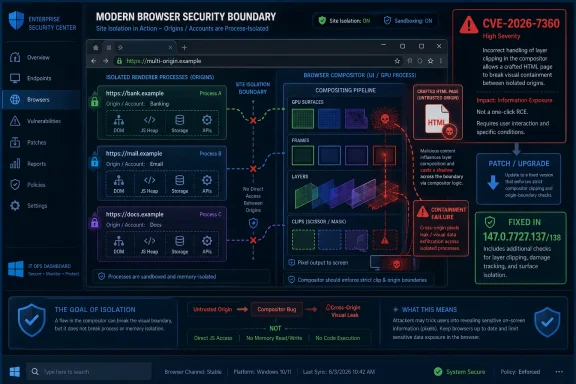
The short vulnerability description says “insufficient validation of untrusted input” in Chromium’s Compositing component. That sounds generic, almost bureaucratic, until you pair it with the impact: site isolation bypass after renderer compromise. In browser security terms, the attacker is already standing inside one locked room, and the bug is about whether the walls between rooms still mean anything.
Site isolation exists because the web is hostile by design. A single browsing session can include your bank, your Microsoft 365 tenant, an internal admin portal, a SAML identity provider, and some tab you opened from a search result five minutes ago. The browser’s job is to make all of that coexist without letting one origin casually inspect or influence another.
That is why CVE-2026-7360 deserves attention even though the CISA-ADP CVSS 3.1 score listed in the NVD entry is only 3.1, marked Low. The vector reflects a demanding chain: network attack, high complexity, no privileges, user interaction required, and only low confidentiality impact as scored there. But CVSS can understate the practical role of a bug that helps turn one compromised browser process into a broader cross-site problem.
Chrome’s own severity label is High, and that label is the better signal for patch triage. Google’s security team is not saying every user should panic. It is saying this sits in a class of flaw that matters because Chromium’s defense-in-depth assumptions are only as strong as the validation checks at their seams.
Compositing Has Become Part of the Security Perimeter
Compositing is supposed to be plumbing. It takes rendered layers, transforms, clips, surfaces, video frames, accelerated content, and UI effects, then assembles what the user actually sees. In the old mental model of browser security, the dangerous stuff lived in JavaScript engines, HTML parsers, image decoders, and font libraries. The compositor was performance machinery.
That model is obsolete. Modern compositing is deeply entangled with process isolation, cross-origin embedding, iframes, GPU acceleration, view transitions, video, canvas, and the rules that decide which pixel belongs to which origin. When those decisions involve untrusted input, validation becomes security policy, not mere correctness.
A crafted HTML page exploiting a compositing validation gap is plausible because web pages now exercise astonishingly complex rendering paths. CSS transforms, accelerated surfaces, embedded documents, canvas, video, clipping, opacity, scrolling, and animation can all interact. The user sees a web page; the browser sees a distributed graphics pipeline with trust boundaries threaded through it.
That is why a flaw in Compositing can become a site isolation issue. If the renderer is already compromised, the attacker’s next goal is not necessarily to execute more code. It may be to trick the browser into revealing, mixing, or misattributing data that should remain fenced off by origin and process boundaries.
The Renderer-Compromise Condition Is a Warning, Not a Reassurance
The most tempting dismissal of CVE-2026-7360 is that it requires the attacker to have already compromised the renderer process. That is a real limitation, and it matters. A standalone exploit would generally need another bug, such as a memory corruption flaw or logic error, to gain a foothold inside the renderer first.
But browser attacks have long been about chains. One bug gets execution in a constrained process. Another escapes a sandbox, bypasses a boundary, leaks data, or defeats a mitigation. The security architecture assumes that individual pieces will fail, then tries to make failure non-catastrophic.
A site isolation bypass is valuable precisely because it sits after the first failure. If a renderer compromise can be combined with a way to cross origin boundaries, the browser’s compartmentalization story becomes weaker. The exploit is no longer merely “run code in the renderer”; it becomes “run code in a place that can see more than it should.”
For defenders, that means the prerequisite should change the urgency calculus but not the patch decision. It may not demand an emergency bridge call at every small business. It does demand that managed Chrome and Chromium-based browser fleets move promptly to fixed builds rather than waiting for the next leisurely maintenance cycle.
Google’s Patch Lands Inside a Crowded Security Release
Google’s April 28 Chrome desktop update moved Stable to 147.0.7727.137/138 for Windows and macOS and 147.0.7727.137 for Linux, with rollout staged over days or weeks. The same release included 30 security fixes, including multiple Critical issues such as use-after-free bugs in Canvas, WebAudio, Media Stream, and Dawn. CVE-2026-7360 was one item in a much larger patch bundle.
That context cuts both ways. On one hand, CVE-2026-7360 is not the headliner in the way a critical use-after-free flaw is. On the other, patch bundles are how browser security actually arrives now: a dense cluster of memory-safety, validation, policy, and isolation fixes shipped as one fast-moving update.
The Chrome release cadence has trained many users to ignore the noise. Version numbers blur together, and the update button becomes background radiation. But the security content of these point releases is often substantial, and the public details are deliberately sparse until enough users have updated.
That delay in technical disclosure is not evasiveness; it is operational security. The Chromium issue tracker entry for this bug requires permissions, which is typical while fixes propagate. The public gets enough information to patch, not enough to hand exploit developers a recipe.
Microsoft’s Edge Problem Is Chromium’s Shared Reality
The user-facing source here is Microsoft’s Security Update Guide entry for CVE-2026-7360, and that matters for WindowsForum readers. Microsoft Edge is Chromium-based, so Chromium vulnerabilities routinely become Edge vulnerabilities unless the affected component or code path is absent, disabled, or otherwise not applicable. The MSRC entry is part of Microsoft’s job of translating upstream Chromium risk into the Windows ecosystem.
This shared-code reality is one of the great bargains of modern browsers. Microsoft gets the pace, compatibility, and security investment of Chromium. Enterprises get fewer rendering-engine differences to test. Web developers get less fragmentation than they had in the Internet Explorer era.
The cost is that browser monoculture concentrates certain classes of risk. When Chromium ships a security fix, Chrome is only the first obvious patch target. Edge, Brave, Opera, Vivaldi, Electron-based applications, embedded web views, and vendor-packaged Chromium runtimes all become part of the same follow-on question: who has absorbed the fix, and who is still carrying the vulnerable code?
For Windows administrators, that means the inventory problem is broader than “is Chrome updated?” Edge is usually managed through Microsoft’s update channels, but third-party Chromium derivatives and embedded runtimes may not follow the same schedule. The practical exposure can linger in applications that do not look like browsers but behave like them under the hood.
CVSS Says Low, Browser Engineers Say High
The scoring mismatch around CVE-2026-7360 is not an anomaly; it is a symptom of how hard browser bugs are to grade. The NVD entry had no NIST CVSS score at the time described, while CISA-ADP supplied a CVSS 3.1 base score of 3.1. Chrome labeled the vulnerability High.
Both can be defensible within their own systems. CVSS is designed to score an individual vulnerability based on formal attributes. It does not always capture how attractive a bug is as a link in a chained exploit or how important the violated invariant is to a platform’s security architecture.
Browser vendors, by contrast, grade with institutional memory. They know which components have historically formed exploit chains. They know which invariants, if broken, turn a contained renderer compromise into something more damaging. They also know that an attacker who has one renderer bug may well have several.
The result is a lesson for patch management teams: do not blindly sort browser vulnerabilities by CVSS alone. A Low score attached to a site isolation bypass should not outrank a Critical memory-corruption bug, but it should not disappear into the backlog either. The words “site isolation” should light up a different part of the defender’s brain.
Site Isolation Is the Browser’s Bet That Compromise Can Be Contained
Site isolation was born from a simple admission: browsers will keep finding bugs, and some of them will be exploitable. Rather than assume perfect parsing, perfect JIT compilation, and perfect rendering forever, Chrome and other modern browsers increasingly isolate sites into separate processes and enforce stricter boundaries between origins. The goal is to make compromise expensive and narrow.
That strategy is especially important in an age of web-based identity and administration. A browser tab can hold access to Azure, Entra ID, GitHub, internal dashboards, finance platforms, and privileged SaaS consoles. A renderer compromise that stays trapped is bad. A renderer compromise that can peer across boundaries is worse.
CVE-2026-7360 does not mean site isolation is broken in general. It means a specific validation failure in a specific component could undermine it under constrained conditions. That distinction matters, because mature security systems are not invalidated by one bug; they are measured by how quickly bugs are found, fixed, and shipped.
Still, this is the uncomfortable truth behind defense in depth: every extra layer becomes another implementation surface. Site isolation needs process models, browser-side enforcement, renderer restrictions, compositor correctness, and IPC validation to cooperate. The more complex the web platform becomes, the more places there are for trust assumptions to leak.
The Crafted HTML Page Is the Oldest Trick in the Newest Pipeline
The attack vector described for CVE-2026-7360 is a crafted HTML page. That phrase has appeared in vulnerability write-ups for decades, but it has evolved. Today’s crafted page is not merely malformed markup. It can be a carefully staged workload that drives timing, layout, GPU surfaces, iframe relationships, media paths, and browser process boundaries into an edge case.
That is one reason web exploitation remains durable. The browser exposes a vast, scriptable attack surface to any remote site the user visits. The attacker does not need a local account, a VPN foothold, or physical access. They need the user or an embedded workflow to load content that reaches the vulnerable code path.
The listed vector includes user interaction, which typically means the victim must visit or otherwise interact with attacker-controlled content. In consumer settings, that is ordinary phishing territory. In enterprise settings, it can be a link in chat, a compromised ad path, a poisoned helpdesk ticket, a malicious attachment that opens in the browser, or a page rendered inside a workflow tool.
The industry has spent years telling users not to click suspicious links. That advice remains useful but insufficient. Browser security exists because users will click links, preview files, and authenticate into web applications all day long. The right answer is not moral purity from the user; it is fast patching and layered controls when ordinary behavior meets hostile content.
The Windows Fleet Is Where Browser Theory Meets Maintenance Windows
On unmanaged home PCs, the advice is simple: open the browser menu, go to Help and About, and let Chrome install the update. Relaunch when prompted. For Edge, use the browser’s About page or rely on Microsoft’s update mechanism, then verify the installed version after rollout.
In enterprise Windows environments, the work is less glamorous. Admins need to know which channel they are on, whether update policies defer browser releases, whether relaunch notifications are effective, and whether users are allowed to keep vulnerable browser processes alive for days. A patched installer does not protect a session that never restarts.
The staged rollout language in Chrome’s release note is important here. Google says updates roll out over days or weeks, which is sensible at internet scale but awkward for risk owners. If your vulnerability management clock starts when the advisory appears, waiting passively for automatic rollout may not satisfy internal SLAs.
Managed environments can force the issue with enterprise update tooling, software distribution platforms, or browser management policies. The key is verification, not assumption. Version reporting from endpoint management, EDR inventory, or browser management consoles should confirm that Chrome is at least 147.0.7727.138 where that build applies, or at the fixed platform-specific build for the channel in use.
The CPE Footnote Reveals the Messiness of Vulnerability Plumbing
The NVD change history described a CPE configuration for Google Chrome versions up to, but excluding, 147.0.7727.138, with operating-system CPEs for Windows, Linux, and macOS. It also carried the familiar prompt asking whether a CPE is missing. That mundane database detail is more important than it looks.
CPE mappings power scanners, dashboards, compliance reports, and executive heat maps. If the mapping is late, incomplete, or too narrow, organizations can undercount exposure. If it is too broad, they can waste time chasing irrelevant alerts. Browser vulnerabilities are especially tricky because a single upstream codebase appears through many products and packaging systems.
There is also a version nuance in this case. Google’s release note lists 147.0.7727.137/138 for Windows and macOS, and 147.0.7727.137 for Linux, while the CVE wording says Chrome prior to 147.0.7727.138. That kind of asymmetry is normal in Chrome releases, but it can confuse scanner logic and human triage if the advisory text is read without platform context.
For WindowsForum’s audience, the operational answer is not to litigate CPE syntax in isolation. It is to treat the CPE as a starting point, then validate against vendor release notes and installed versions. If your scanner says a Linux machine is vulnerable because it is not on a Windows/macOS build number, that is a tooling problem. If it says an old Chrome build is fine because the CPE feed lagged, that is also a tooling problem.
The Bug Is Also a Reminder That GPU-Era Browsers Are Hard to Reason About
Compositing sits near the intersection of security and performance, and that intersection is where many modern tradeoffs live. Users demand smooth scrolling, efficient video, low-latency graphics, rich CSS effects, and battery-friendly rendering. Browser vendors answer with GPU acceleration, multiple processes, shared buffers, and increasingly elaborate pipelines.
Every optimization must preserve security invariants. A surface from one origin must not become readable by another. A clipped frame must not expose pixels outside its boundary. A renderer must not be able to trick a privileged browser process into accepting malformed state. The browser must treat performance hints from untrusted pages as hostile until proven otherwise.
That is easy to state and hard to implement. The web platform is not a clean-room academic exercise; it is a compatibility machine. It must render decades of content, support new APIs, run across GPUs and drivers, and do all of this while attackers study the seams.
CVE-2026-7360, described in a single sentence, is therefore a small window into a large engineering problem. The bug class is not exotic. “Insufficient validation of untrusted input” is one of the oldest software weaknesses. What is modern is the place where it matters: the graphics and compositing machinery that helps enforce the browser’s security compartments.
Patch Urgency Should Follow Exploitability, Exposure, and Blast Radius
There was no indication in the public Chrome release note that CVE-2026-7360 was being exploited in the wild. That differentiates it from true emergency Chrome zero-days, where Google explicitly warns that an exploit exists. But absence of public exploitation is not a reason to drift.
The release included several more severe vulnerabilities, including critical memory-safety issues. In real-world triage, that means the update should be deployed for the bundle, not just for CVE-2026-7360. If you need a business justification, do not argue that this one compositing flaw will surely be exploited tomorrow. Argue that the browser received a security-heavy update, and one of the fixes strengthens a core isolation boundary.
Consumer users should update as soon as practical. Enterprises should move according to policy, but policy should recognize that browsers are internet-facing applications with frequent high-impact security fixes. The days when browser patching could sit comfortably behind monthly OS patching are over.
For high-risk users, the calculation is stricter. Journalists, administrators, developers with production credentials, executives, activists, and anyone using the browser as a privileged control plane should treat browser restarts as security hygiene. A browser that has downloaded an update but not relaunched is a locked medicine cabinet with the pills still on the counter.
The Practical Test Is Whether Your Browser Actually Relaunched
The security industry loves advisories, but the endpoint only cares about state. Is the fixed browser installed? Is the running process the fixed version? Are managed devices reporting accurately? Are users being prompted forcefully enough to restart?
Those questions matter because Chrome and Edge often update in the background. That is good for scale, but it creates a gray zone between “update available,” “update installed,” and “update active.” A long-running browser session can preserve risk after the patch payload has arrived.
This is where administrators should be blunt. If the browser is central to identity, SaaS access, and privileged administration, then relaunch enforcement is not user inconvenience; it is part of the control. A gentle prompt that can be ignored forever is not a patching strategy.
Home users can take the simpler route. Check the About page, wait for the update to complete, and relaunch. If the browser reports a fixed version after restart, the most important mitigation is done.
Redmond, Mountain View, and the Shared Browser Supply Chain
The Microsoft angle in CVE-2026-7360 is not that Microsoft wrote the vulnerable Chromium code. It is that Microsoft ships a major Chromium browser as a core part of the Windows experience and documents Chromium CVEs through MSRC. That makes Edge part of the same security supply chain.
This is both a success and a dependency. When Chromium fixes a bug, Microsoft can incorporate the fix into Edge rather than independently discovering and repairing the same class of vulnerability in a separate engine. But Edge’s security posture is tied to the speed and correctness of that upstream integration.
The same logic applies to the broader Chromium ecosystem. Security teams should avoid thinking of Chrome as a single product and start thinking of Chromium as infrastructure. It is in browsers, app shells, developer tools, kiosks, collaboration apps, and embedded workflows.
That infrastructure quality is why vulnerabilities like CVE-2026-7360 ripple outward. A single compositing validation flaw is not merely a Chrome item. It is a signal to inventory Chromium dependencies wherever they sit.
The April 28 Build Is the Line Administrators Should Draw
The cleanest response to CVE-2026-7360 is version-based. Chrome on Windows and macOS should be on the April 28 fixed line, 147.0.7727.137/138, with the CVE text identifying exposure before 147.0.7727.138. Linux Chrome should be checked against the corresponding 147.0.7727.137 release noted by Google. Edge administrators should follow Microsoft’s Security Update Guide and Edge release channels for the Chromium fixes in their environment.
The nuance matters because version numbers are not always identical across platforms. A scanner that expects one build everywhere may produce noise. A human who assumes “137 is always vulnerable because 138 is named in the CVE” may also overstate risk on platforms where Google shipped the fixed Linux build as 137.
The better control is to align vendor advisory, platform, channel, and installed version. Stable, Extended Stable, Beta, and enterprise-managed channels can differ. That is not a reason to delay patching; it is a reason to make browser inventory more precise.
The same discipline should apply to derivative browsers. If a Chromium-based browser has not issued a corresponding update, the risk question remains open. If it has, the fixed version should be verified, not assumed from marketing copy.
The Narrow Details Point to a Wider Browser Security Truth
CVE-2026-7360 is not the scariest Chrome bug of 2026, and it does not need to be. Its importance is architectural. It reminds us that the browser’s promise is not simply to render pages correctly, but to contain hostile computation inside boundaries users never see.
That promise is strained by the very features that make the modern web feel native. Accelerated graphics, rich layout, embedded applications, and process-per-site isolation all interact. The attack surface is no longer just script execution; it is the coordination layer that decides what each process may know, draw, and touch.
For Windows users, the practical lesson is familiar but sharper: update the browser, relaunch it, and do not treat Chromium advisories as someone else’s problem just because the source entry appears first under Chrome. For administrators, the lesson is to build browser patching into the same seriousness as endpoint protection and identity security.
The April Compositor Fix Belongs on This Week’s Patch Board
CVE-2026-7360 is a contained, chain-dependent flaw, but the update that fixes it is not optional hygiene. It sits inside a security-heavy Chrome release and touches the browser boundary that keeps one compromised site from becoming everyone else’s problem.
- Chrome users on Windows and macOS should verify they are on the fixed 147.0.7727.137/138 release line and relaunch the browser after updating.
- Linux Chrome users should verify the corresponding 147.0.7727.137 build rather than assuming the Windows/macOS build number applies directly.
- Microsoft Edge administrators should track the MSRC entry and Edge security release notes because Chromium fixes flow into Edge on Microsoft’s schedule.
- Vulnerability teams should not let the Low CISA-ADP CVSS score bury a Chrome High issue involving site isolation.
- Inventory should include Chromium-based browsers and embedded runtimes, not just Google Chrome.
- Patch compliance should measure the running browser version after restart, not merely whether an update package was delivered.
CVE-2026-7360 will likely disappear into the churn of browser point releases, and that is exactly why it is worth pausing over. The modern browser has become the operating system’s most exposed application layer, the front door to enterprise identity, and a rendering engine for half the software stack. The next meaningful security boundary may not fail in a dramatic kernel exploit or a flashy JavaScript bug; it may fail in the quiet machinery that decides which pixels, processes, and origins are allowed to meet.
