
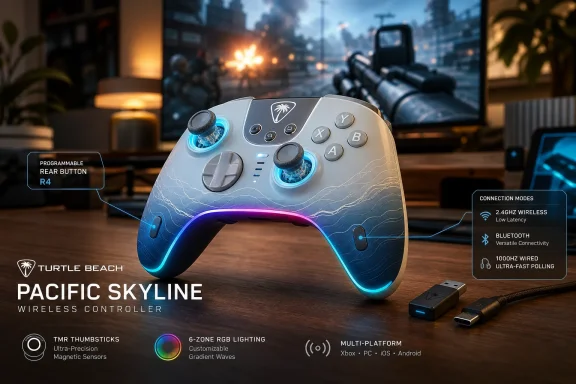
Turtle Beach launched the Pacific Skyline Wireless Controller in May 2026 as an officially licensed Xbox, Windows, and Android gamepad with TMR sticks, two remappable rear buttons, 2.4GHz wireless, Bluetooth, USB-C wired play, RGB lighting, and integrated headset controls. That makes it less a radical new controller than a revealing one: the “premium” controller feature set is rapidly moving down-market. For Windows and Xbox players, the real story is not that Turtle Beach has found one killer gimmick, but that it has assembled enough useful extras to make Microsoft’s standard pad look increasingly bare. The Pacific Skyline is a mid-range controller built for a market where “good enough” now has back buttons, firmware updates, and a dongle.
The Pacific Skyline arrives at a moment when the controller market is more crowded, more specialized, and more confusing than it was during the early Xbox Series X|S cycle. Microsoft’s own Xbox Wireless Controller remains the baseline: familiar shape, excellent platform integration, replaceable AA batteries, and native Xbox Wireless support. But the baseline has stopped feeling generous.
Turtle Beach is exploiting that gap. The Pacific Skyline does not try to be an Elite Series 2 replacement, nor does it chase the modular maximalism of a Victrix Pro BFG Reloaded or the screen-and-settings showmanship of the Stealth Ultra. Instead, it takes the features many players now associate with expensive pads and repackages them in a controller that feels aimed at the broad middle: the shooter player who wants rear buttons, the PC player who cares about polling rate, the couch player who wants easy audio controls, and the setup-conscious buyer who wants RGB without buying into a whole desktop ecosystem.
That combination matters because the Xbox controller category has historically been oddly conservative. On PC, users have long tolerated a simple Microsoft pad because XInput compatibility made everything painless. On Xbox, Microsoft’s certification and wireless stack kept the third-party market narrower than the wild west around Switch and PC accessories. The Pacific Skyline shows how that world is changing: officially licensed does not have to mean boring, and third-party no longer has to mean wired-only compromise.
The controller’s pitch is therefore not subtle. Turtle Beach wants the Pacific Skyline to feel like a standard Xbox controller that has been brought up to date for 2026 expectations. Its two rear buttons, TMR thumbsticks, rechargeable battery, six-zone lighting, headset controls, and three connection modes are not individually shocking. Together, they make the conventional Xbox pad feel increasingly like the economy trim.
For shooters, the appeal is obvious. Mapping jump, crouch, melee, reload, or interact to a rear button lets the player keep both thumbs on the analog sticks during moments that would otherwise require shifting grip. That is not a magic path to higher rankings, but it is a real ergonomic advantage, especially in games built around sliding, mantling, bunny-hopping, quick looting, or rapid camera control.
Turtle Beach’s decision to allow on-controller remapping is the right one. A rear button system that requires a companion app for every small change quickly becomes a chore, especially on a shared console or a living-room setup. The Function-button mapping flow described by Turtle Beach is simple enough to remember and quick enough to use mid-session.
The limitation is equally important: the rear buttons can mirror front-facing controller inputs, but they are not a deep macro system. You are not mapping keyboard commands, creating multi-step sequences, or assigning analog trigger behavior. That boundary is not surprising for an officially licensed Xbox controller, but it matters for PC users who may be accustomed to more ambitious customization from enthusiast devices.
In practice, that makes the Pacific Skyline better understood as a comfort and control upgrade than as a programmable weapon. It gives mainstream players the two extra inputs they are most likely to use without burying them in a software suite. For many people, that is exactly the right trade.
That does not mean every TMR implementation is automatically excellent. Stick feel depends on the entire assembly: tension, caps, dead zones, firmware filtering, calibration, and the way the controller reports movement to the host device. A great sensor can still sit inside a mediocre stick module, just as a high-DPI mouse sensor can be ruined by bad shape or firmware.
Still, Turtle Beach’s adoption of TMR in a controller like the Pacific Skyline tells us something about the direction of the category. Magnetic sticks are no longer exotic. They are becoming table stakes for any controller that wants to sound modern, especially in a market where stick drift has become one of the most common consumer complaints about gamepads.
For WindowsForum readers, the PC angle is especially relevant. Windows users are more likely to keep a controller through multiple console generations, use it across Steam, Xbox app titles, emulators, cloud gaming, and Android streaming, and notice calibration quirks. The inclusion of both app-based and on-board calibration gives the Pacific Skyline a practical advantage over controllers that treat analog behavior as fixed.
The bigger question is durability, and that cannot be settled by a launch spec sheet. Magnetic sensing should reduce one major source of stick wear, but controller longevity also depends on buttons, bumpers, triggers, battery health, USB-C port wear, firmware support, and quality control. TMR is a strong selling point, but it is not a lifetime warranty disguised as a technology.
That arrangement is both sensible and slightly inelegant. The dedicated 2.4GHz link is the performance-oriented choice, and it avoids the latency and compatibility variability that can come with Bluetooth on Windows PCs. For players who sit near a console or desktop and leave the dongle plugged in permanently, the experience should be straightforward.
But dongles impose their own tax. They occupy a USB port, they can be lost, and they are one more small object to move between console and PC. On Xbox Series X, where front-facing USB access is easy, that may be a minor irritation. On a living-room console tucked into furniture, or a gaming laptop with limited ports, it becomes more noticeable.
This is where Microsoft’s own controller retains a real platform advantage. The standard Xbox Wireless Controller is less feature-rich, but its console pairing experience is clean. Press the pairing buttons, connect, and forget about it. Turtle Beach answers with features and performance modes, not with equal simplicity.
For Windows users, the equation tilts back toward Turtle Beach. PC gaming already lives with USB receivers for mice, keyboards, headsets, and controllers. A reliable 2.4GHz dongle is often preferable to the inconsistent Bluetooth stack of a particular motherboard, laptop, or adapter. The Pacific Skyline’s wireless design therefore feels less like a compromise on PC than it does on Xbox.
In practice, the significance depends on the player, platform, game engine, display latency, frame rate, and whether the rest of the input pipeline is equally fast. A 1000Hz controller plugged into a PC running a high-refresh monitor and a responsive shooter is a different proposition from the same controller connected to a console game capped at 60fps on a living-room TV with heavy image processing. Specs matter, but latency is a chain, not a single number.
That is why the Pacific Skyline’s 1000Hz mode should be read as a PC-forward feature. It gives Windows players a reason to use the included three-meter USB-C cable when they care about every millisecond, while still allowing convenient 2.4GHz wireless play for ordinary sessions. The cable length matters here; a short charging cable would have made wired play feel like a lab condition rather than a real option.
The more interesting comparison is with Microsoft’s standard controller, which is not marketed around ultra-high polling. The official pad wins on native ecosystem integration, but Turtle Beach is speaking to the audience that has absorbed years of mouse, keyboard, and monitor marketing. Those players expect numbers. The Pacific Skyline gives them one.
Still, it would be foolish to pretend that 1000Hz wired polling alone makes this a tournament controller. Competitive controller design is now a bundle of choices: trigger throw, rear-button placement, stick tension, grip texture, weight, reliability, and software profiles all matter. The Pacific Skyline checks the polling box, but it does not include hair triggers or physical trigger stops. That distinction keeps it in the enhanced mainstream tier rather than the uncompromising esports one.
This is an area where Microsoft’s stock controller feels dated. The Xbox Guide menu is serviceable, but diving into system UI to adjust chat balance or volume mid-match is never ideal. Hardware shortcuts let players react in the moment: lower a loud party, bring up game audio, mute a mic during a real-world interruption, and return to play without opening an overlay.
The feature is especially useful because wired 3.5mm headsets remain common despite the rise of wireless gaming audio. Plenty of players still prefer a simple wired headset for reliability, cost, zero charging, and reduced audio delay. For them, the Pacific Skyline turns the controller into a more capable audio hub.
There is also a practical separation worth noting. The controller’s 3.5mm controls help wired headsets connected through the pad; they do not magically make a wireless headset route through the controller. If you use a separate wireless headset connected directly to an Xbox or PC, the Pacific Skyline still gives you controller features, but audio management shifts back to the headset, console, or app ecosystem.
That distinction matters because accessory marketing often blurs setups together. A controller with audio controls, a wireless headset, and a console’s own audio menus may all coexist, but they do not all control the same signal path. The Pacific Skyline is strongest for the player with a wired headset plugged straight into the controller.
Both reactions are valid. RGB on a controller is not functionally necessary, and in a living room it can feel more like retail shelf theater than a gaming advantage. But in 2026, visual identity has become part of the accessory market. Controllers are no longer expected merely to disappear into the hands; they are expected to match setups, streams, desks, shelves, and limited-edition collections.
Turtle Beach at least gives users sensible control. The lighting can be cycled through preset modes, brightness can be adjusted, colors can be changed, and the LEDs shut off automatically when battery drops low. That last detail is small but important. A controller that preserves decorative lighting while its battery collapses would feel unserious.
The Pacific Skyline’s design also shows how limited-edition aesthetics have changed. The old model was a new shell color and maybe a themed faceplate. The new model is a themed shell, lighting zones, software customization, and a sense that the accessory is part of a broader visual environment. Whether that is delightful or exhausting depends on your tolerance for gaming hardware’s ongoing transformation into lifestyle hardware.
For IT pros and Windows enthusiasts, there is a familiar dynamic here. RGB began as enthusiast PC decoration, then became a mainstream shorthand for “gaming.” The Pacific Skyline brings that same logic to the controller: not because it needs to, but because the market now expects even mid-range gear to signal identity.
Battery expectations vary sharply by platform. Xbox players accustomed to AA batteries may see an integrated rechargeable pack as a convenience or a liability depending on their habits. Swapping AAs or a charged battery pack can be faster than tethering a controller, but it also creates an ongoing battery-management routine. A built-in pack simplifies ownership until the pack ages.
PC players may be more comfortable with integrated batteries because mice, keyboards, and headsets have already normalized USB-C charging. For that audience, the key question is whether the controller can reliably play and charge over the included cable. Turtle Beach’s package appears designed for that reality: play wirelessly most of the time, plug in for low-latency sessions or charging.
The 10 percent low-battery behavior is more thoughtful than flashy. Blinking the LED and disabling RGB gives the user a clear warning while cutting nonessential power draw. That is the kind of mundane design decision that affects whether a product feels well considered after the novelty wears off.
The long-term unknown is battery serviceability. Integrated packs make controllers cleaner and more modern, but they also turn battery degradation into a product-life issue. A controller that still has good sticks and buttons after several years can become frustrating if its battery no longer holds useful charge. This is not a Pacific Skyline-specific flaw; it is the trade-off most rechargeable gamepads now make.
The good news is that the Pacific Skyline does not appear to require the app for its most basic rear-button remapping or on-board calibration. That matters. A controller that becomes dumb without an app is a controller waiting to become landfill when software support fades, storefront availability changes, or a future OS update breaks something.
Firmware updates are more complicated. Turtle Beach recommends updating firmware before first use, which is increasingly standard for gaming peripherals but still faintly absurd for a device whose historical job was to press A and move a stick. The benefit is real: firmware can fix connectivity, dead-zone behavior, calibration oddities, and compatibility bugs. The cost is that even controllers now ship with a small IT maintenance burden.
For WindowsForum’s audience, this is probably less alarming than it would be for a purely casual buyer. Sysadmins, enthusiasts, and PC gamers already live in a world of firmware updates for docks, SSDs, BIOS revisions, monitors, and input devices. Still, the spread of app-dependent peripherals is worth watching. Every accessory vendor wants its own control hub; every control hub wants startup privileges, update checks, telemetry policies, and account-adjacent behaviors.
The ideal controller software is powerful when wanted and invisible when not. The Pacific Skyline seems to understand that balance better than some premium rivals. Its on-board controls keep the basics close to the hands, while the app handles calibration and diagnostics. That is the right hierarchy.
But the Pacific Skyline exposes how much Microsoft leaves on the table. No rear buttons. No RGB. No built-in rechargeable battery by default. No dedicated on-controller chat mix shortcuts. No premium magnetic sticks. No performance-marketed wired polling mode. No themed lighting zones or quick rear-button remapping.
Some of those omissions are deliberate. Microsoft’s mass-market controller has to hit price, durability, accessibility, and global supply-chain targets across tens of millions of units. It also has to avoid confusing casual users. A controller that ships in the box or sits on every retail shelf cannot behave like an enthusiast peripheral by default.
Yet the market around it is changing. Once players experience rear buttons, they are hard to give up. Once stick drift becomes a personal annoyance, magnetic sensors become more persuasive. Once a player uses hardware chat mix, menu diving feels clumsy. The Pacific Skyline does not invalidate Microsoft’s controller, but it makes the official pad look increasingly conservative.
That should pressure Microsoft in the next hardware cycle. The company does not need to turn the base Xbox controller into an Elite model, but it may need to reconsider what “standard” means. In 2026, two rear buttons and improved stick technology no longer feel wildly premium. They feel like the new middle.
Hair triggers and trigger stops matter in competitive shooters because reducing trigger travel can shave time off repeated shots or aiming actions. Modular components matter for players who want different stick heights, D-pad styles, or fighting-game layouts. Extensive profile systems matter for people who move across genres and want each game to have its own physical feel.
The Pacific Skyline is not built for that user first. It is built for the player who wants meaningful upgrades without becoming a controller hobbyist. That is a large audience. Most players do not want to tune actuation curves for an evening; they want to map jump to a rear button, plug in a headset, and play.
This distinction also protects buyers from overbuying. The premium controller market can encourage people to spend heavily on features they will admire in a spec table and never use. A controller with a screen, modular fightpad, or elaborate trigger system may be the right tool for a serious competitor, but it can be unnecessary complexity for a Game Pass generalist.
The Pacific Skyline’s value, then, depends on its price relative to Microsoft’s standard pad and true premium controllers. If it stays comfortably in the mid-range, the compromises look sensible. If discounts push first-party or premium competitors into the same bracket, the case becomes more situational.
Windows also gives the Control Hub app a natural home. Calibration, diagnostics, remapping, and firmware updates are less disruptive on a PC than on a console, where every app layer feels like an interruption from the main UI. The controller becomes one more configurable peripheral in a desk ecosystem rather than an odd software appendage hanging off a living-room box.
The controller’s 3.5mm audio features also fit PC use, though the benefits vary. Many PC players already use USB headsets, wireless headsets, audio interfaces, or desktop DACs, bypassing the controller jack entirely. But for laptop gamers, couch PC setups, handheld docking stations, and quick voice-chat sessions, the integrated audio shortcuts can be genuinely convenient.
The Android Bluetooth support broadens the story further. It positions the Pacific Skyline as a cloud-gaming and remote-play accessory, useful for Xbox Cloud Gaming, Steam Link-style streaming, or native Android games with controller support. Bluetooth will not be the low-latency option for every scenario, but it makes the controller more portable.
That multi-platform reach is where the Pacific Skyline feels most modern. It assumes players no longer live on one box. They move between Xbox, desktop, laptop, phone, and maybe a handheld PC. A controller that follows them across those contexts has a stronger argument than one that merely works well in front of a single console.
That matters because controllers are no longer isolated devices. They sit inside ecosystems of headsets, companion apps, firmware tools, lighting customization, and platform licensing. Turtle Beach is naturally interested in that convergence. A controller with audio controls is not just a controller; it is a bridge back to the company’s headset identity.
The Pacific Skyline’s branding is also notably lifestyle-driven. It is not just “black controller with features.” It is a coastal design, a skyline theme, a summer launch, and a visually distinct shelf object. That approach mirrors how headset and keyboard makers have long sold colorways and limited editions, but it feels newer in the officially licensed Xbox space.
The risk is that style can outpace substance. Turtle Beach has to prove that the Pacific Skyline is not merely a handsome spec sheet, and that requires durability, stable firmware, reliable wireless behavior, and responsive support. Controller buyers have become more skeptical because almost every brand now promises drift resistance, low latency, and pro-grade feel.
If Turtle Beach gets the fundamentals right, the Pacific Skyline could become a template. Not necessarily this exact colorway, but this product shape: an officially licensed, mid-range, multi-platform Xbox controller with magnetic sticks, rear buttons, audio shortcuts, and enough customization to feel current. That is a repeatable formula.
Microsoft’s Elite Series 2 Core, Turtle Beach’s own Stealth Ultra, Victrix’s modular controllers, 8BitDo’s newer Xbox-licensed options, GameSir’s aggressive PC-and-console pads, and ASUS ROG’s controller entries all complicate the picture. Some offer more rear inputs, stronger trigger customization, charging docks, modular layouts, or deeper software. Some are more expensive at launch but become tempting during sales.
The Pacific Skyline’s defense is focus. It offers the features most mainstream players will actually use and avoids the cost of features they may not. Two back buttons are enough for many players. TMR sticks address a common pain point. Audio shortcuts are practical. 2.4GHz wireless and USB-C wired play cover the most important performance modes.
But buyers should be honest about their genres. A fighting-game player may care more about D-pad feel, microswitch buttons, or fightpad modules than RGB lighting. A hardcore FPS player may want four rear buttons and trigger stops. A sim or racing player may not care about any of this because they use a wheel, flight stick, or keyboard-heavy setup.
This is why the Pacific Skyline is best framed as a strong generalist rather than a universal recommendation. It is a controller for the player who wants one pad to cover Call of Duty, Halo, Fortnite, Forza, Elden Ring, Game Pass indies, cloud streaming, and couch PC play. The more specialized the user, the more likely they should shop above or beside it.
Those caveats do not sink the product. They define it. A good mid-range controller is not supposed to do everything. It is supposed to make smart compromises that are obvious before purchase rather than disappointing after unboxing.
The most important unknowns are the ones no launch page can fully answer. How consistent is the 2.4GHz connection in congested wireless environments? How do the TMR sticks feel after months of use? Are the bumpers and rear buttons crisp and durable? Does the Control Hub app stay reliable across Windows updates? Is firmware support active after the launch window?
Those are review-cycle questions, not spec-sheet questions. They also explain why the safest recommendation is conditional. On paper, the Pacific Skyline is one of the more complete mid-range Xbox-compatible controllers of summer 2026. In the hand, it will live or die by build quality and long-term reliability.
For many buyers, the official Microsoft license will provide some reassurance. It signals platform compatibility and a baseline of compliance. But licensing is not magic. It does not guarantee perfect ergonomics, premium plastics, or future-proof software. It simply means the controller is playing inside Microsoft’s approved accessory framework.
It says that rear buttons should be normal. It says magnetic stick sensing should not be reserved for premium flagships. It says wired latency modes matter to PC players. It says headset controls belong under the thumbs, not buried in menus. It says visual customization is now expected even in products that used to be purely functional.
That message lands at an awkward time for Microsoft. The Xbox platform is increasingly distributed across console, PC, cloud, handhelds, and smart-device apps, yet its default controller remains largely anchored to an older idea of straightforward console input. The standard pad is still good. It is just no longer the obvious ceiling for mainstream users.
Turtle Beach is not alone in seeing the opportunity. The controller market in 2026 is full of companies trying to outflank the first-party default with better sensors, more buttons, stronger PC support, and more aggressive styling. The Pacific Skyline’s significance is that it packages those pressures in an accessible, officially licensed Xbox form.
If the hardware holds up, the controller could become the kind of accessory that makes users wonder why they waited so long to move beyond the stock pad. If it stumbles on reliability or wireless behavior, it will become another reminder that feature density is not the same as quality. Either way, it is a useful snapshot of where the market has arrived.
 Turtle Beach Turns the Mid-Range Controller Into a Feature Checklist
The Pacific Skyline arrives at a moment when the controller market is more crowded, more specialized, and more confusing than it was during the early Xbox Series X|S cycle. Microsoft’s own Xbox Wireless Controller remains the baseline: familiar shape, excellent platform integration, replaceable AA batteries, and native Xbox Wireless support. But the baseline has stopped feeling generous.Turtle Beach is exploiting that gap. The Pacific Skyline does not try to be an Elite Series 2 replacement, nor does it chase the modular maximalism of a Victrix Pro BFG Reloaded or the screen-and-settings showmanship of the Stealth Ultra. Instead, it takes the features many players now associate with expensive pads and repackages them in a controller that feels aimed at the broad middle: the shooter player who wants rear buttons, the PC player who cares about polling rate, the couch player who wants easy audio controls, and the setup-conscious buyer who wants RGB without buying into a whole desktop ecosystem.
That combination matters because the Xbox controller category has historically been oddly conservative. On PC, users have long tolerated a simple Microsoft pad because XInput compatibility made everything painless. On Xbox, Microsoft’s certification and wireless stack kept the third-party market narrower than the wild west around Switch and PC accessories. The Pacific Skyline shows how that world is changing: officially licensed does not have to mean boring, and third-party no longer has to mean wired-only compromise.
The controller’s pitch is therefore not subtle. Turtle Beach wants the Pacific Skyline to feel like a standard Xbox controller that has been brought up to date for 2026 expectations. Its two rear buttons, TMR thumbsticks, rechargeable battery, six-zone lighting, headset controls, and three connection modes are not individually shocking. Together, they make the conventional Xbox pad feel increasingly like the economy trim.
The Back Buttons Are the Product’s Most Honest Upgrade
The Pacific Skyline’s two programmable back buttons are the most important feature because they change how the controller is used, not merely how it looks. Rear inputs are no longer a niche “pro” indulgence. They are the quickest way to make a standard dual-stick layout less physically awkward in modern games.For shooters, the appeal is obvious. Mapping jump, crouch, melee, reload, or interact to a rear button lets the player keep both thumbs on the analog sticks during moments that would otherwise require shifting grip. That is not a magic path to higher rankings, but it is a real ergonomic advantage, especially in games built around sliding, mantling, bunny-hopping, quick looting, or rapid camera control.
Turtle Beach’s decision to allow on-controller remapping is the right one. A rear button system that requires a companion app for every small change quickly becomes a chore, especially on a shared console or a living-room setup. The Function-button mapping flow described by Turtle Beach is simple enough to remember and quick enough to use mid-session.
The limitation is equally important: the rear buttons can mirror front-facing controller inputs, but they are not a deep macro system. You are not mapping keyboard commands, creating multi-step sequences, or assigning analog trigger behavior. That boundary is not surprising for an officially licensed Xbox controller, but it matters for PC users who may be accustomed to more ambitious customization from enthusiast devices.
In practice, that makes the Pacific Skyline better understood as a comfort and control upgrade than as a programmable weapon. It gives mainstream players the two extra inputs they are most likely to use without burying them in a software suite. For many people, that is exactly the right trade.
TMR Sticks Signal Where the Market Is Going
The Pacific Skyline uses TMR thumbsticks, short for tunnel magnetoresistance, a magnetic sensing approach that is becoming one of the controller market’s new prestige terms. Like Hall effect sticks, TMR sticks are attractive because they avoid the traditional potentiometer contact surfaces associated with wear and drift. The marketing promise is smoother, more accurate, longer-lasting stick input.That does not mean every TMR implementation is automatically excellent. Stick feel depends on the entire assembly: tension, caps, dead zones, firmware filtering, calibration, and the way the controller reports movement to the host device. A great sensor can still sit inside a mediocre stick module, just as a high-DPI mouse sensor can be ruined by bad shape or firmware.
Still, Turtle Beach’s adoption of TMR in a controller like the Pacific Skyline tells us something about the direction of the category. Magnetic sticks are no longer exotic. They are becoming table stakes for any controller that wants to sound modern, especially in a market where stick drift has become one of the most common consumer complaints about gamepads.
For WindowsForum readers, the PC angle is especially relevant. Windows users are more likely to keep a controller through multiple console generations, use it across Steam, Xbox app titles, emulators, cloud gaming, and Android streaming, and notice calibration quirks. The inclusion of both app-based and on-board calibration gives the Pacific Skyline a practical advantage over controllers that treat analog behavior as fixed.
The bigger question is durability, and that cannot be settled by a launch spec sheet. Magnetic sensing should reduce one major source of stick wear, but controller longevity also depends on buttons, bumpers, triggers, battery health, USB-C port wear, firmware support, and quality control. TMR is a strong selling point, but it is not a lifetime warranty disguised as a technology.
The Dongle Is Both the Advantage and the Annoyance
The Pacific Skyline’s wireless story is more complicated than the phrase “wireless Xbox controller” suggests. Microsoft’s own controller uses Xbox Wireless on console without a USB dongle, while the Pacific Skyline relies on an included 2.4GHz USB transmitter for low-latency wireless play on Xbox and Windows. Bluetooth is available for Android devices and compatible PCs, while USB-C wired mode provides the fastest polling.That arrangement is both sensible and slightly inelegant. The dedicated 2.4GHz link is the performance-oriented choice, and it avoids the latency and compatibility variability that can come with Bluetooth on Windows PCs. For players who sit near a console or desktop and leave the dongle plugged in permanently, the experience should be straightforward.
But dongles impose their own tax. They occupy a USB port, they can be lost, and they are one more small object to move between console and PC. On Xbox Series X, where front-facing USB access is easy, that may be a minor irritation. On a living-room console tucked into furniture, or a gaming laptop with limited ports, it becomes more noticeable.
This is where Microsoft’s own controller retains a real platform advantage. The standard Xbox Wireless Controller is less feature-rich, but its console pairing experience is clean. Press the pairing buttons, connect, and forget about it. Turtle Beach answers with features and performance modes, not with equal simplicity.
For Windows users, the equation tilts back toward Turtle Beach. PC gaming already lives with USB receivers for mice, keyboards, headsets, and controllers. A reliable 2.4GHz dongle is often preferable to the inconsistent Bluetooth stack of a particular motherboard, laptop, or adapter. The Pacific Skyline’s wireless design therefore feels less like a compromise on PC than it does on Xbox.
The 1000Hz Wired Mode Is a PC Feature Wearing an Xbox Badge
The Pacific Skyline’s 1000Hz wired polling mode is the kind of number that accessory makers love because it sounds objective and competitive. Higher polling means the controller can report input more frequently to the host, reducing the time between physical movement and system recognition. In theory, that can make input feel more immediate.In practice, the significance depends on the player, platform, game engine, display latency, frame rate, and whether the rest of the input pipeline is equally fast. A 1000Hz controller plugged into a PC running a high-refresh monitor and a responsive shooter is a different proposition from the same controller connected to a console game capped at 60fps on a living-room TV with heavy image processing. Specs matter, but latency is a chain, not a single number.
That is why the Pacific Skyline’s 1000Hz mode should be read as a PC-forward feature. It gives Windows players a reason to use the included three-meter USB-C cable when they care about every millisecond, while still allowing convenient 2.4GHz wireless play for ordinary sessions. The cable length matters here; a short charging cable would have made wired play feel like a lab condition rather than a real option.
The more interesting comparison is with Microsoft’s standard controller, which is not marketed around ultra-high polling. The official pad wins on native ecosystem integration, but Turtle Beach is speaking to the audience that has absorbed years of mouse, keyboard, and monitor marketing. Those players expect numbers. The Pacific Skyline gives them one.
Still, it would be foolish to pretend that 1000Hz wired polling alone makes this a tournament controller. Competitive controller design is now a bundle of choices: trigger throw, rear-button placement, stick tension, grip texture, weight, reliability, and software profiles all matter. The Pacific Skyline checks the polling box, but it does not include hair triggers or physical trigger stops. That distinction keeps it in the enhanced mainstream tier rather than the uncompromising esports one.
Audio Controls Are the Sleeper Feature Console Players Will Actually Use
The Pacific Skyline’s on-controller audio controls may sound less glamorous than TMR sticks or RGB lighting, but they could be the feature that most improves daily use. Turtle Beach has a long history in gaming headsets, and that shows in the controller’s Function-button combinations for volume, chat mix, and mic mute through a 3.5mm headset connection.This is an area where Microsoft’s stock controller feels dated. The Xbox Guide menu is serviceable, but diving into system UI to adjust chat balance or volume mid-match is never ideal. Hardware shortcuts let players react in the moment: lower a loud party, bring up game audio, mute a mic during a real-world interruption, and return to play without opening an overlay.
The feature is especially useful because wired 3.5mm headsets remain common despite the rise of wireless gaming audio. Plenty of players still prefer a simple wired headset for reliability, cost, zero charging, and reduced audio delay. For them, the Pacific Skyline turns the controller into a more capable audio hub.
There is also a practical separation worth noting. The controller’s 3.5mm controls help wired headsets connected through the pad; they do not magically make a wireless headset route through the controller. If you use a separate wireless headset connected directly to an Xbox or PC, the Pacific Skyline still gives you controller features, but audio management shifts back to the headset, console, or app ecosystem.
That distinction matters because accessory marketing often blurs setups together. A controller with audio controls, a wireless headset, and a console’s own audio menus may all coexist, but they do not all control the same signal path. The Pacific Skyline is strongest for the player with a wired headset plugged straight into the controller.
RGB Is the Least Necessary Feature and the Most 2026 One
Six-zone RGB lighting is the feature most likely to divide the audience. Some players will see the Pacific Skyline’s lighting as a fun extension of a desk setup, especially with the ocean-gradient colorway and coastal theme. Others will immediately turn it off to preserve battery and avoid visual noise.Both reactions are valid. RGB on a controller is not functionally necessary, and in a living room it can feel more like retail shelf theater than a gaming advantage. But in 2026, visual identity has become part of the accessory market. Controllers are no longer expected merely to disappear into the hands; they are expected to match setups, streams, desks, shelves, and limited-edition collections.
Turtle Beach at least gives users sensible control. The lighting can be cycled through preset modes, brightness can be adjusted, colors can be changed, and the LEDs shut off automatically when battery drops low. That last detail is small but important. A controller that preserves decorative lighting while its battery collapses would feel unserious.
The Pacific Skyline’s design also shows how limited-edition aesthetics have changed. The old model was a new shell color and maybe a themed faceplate. The new model is a themed shell, lighting zones, software customization, and a sense that the accessory is part of a broader visual environment. Whether that is delightful or exhausting depends on your tolerance for gaming hardware’s ongoing transformation into lifestyle hardware.
For IT pros and Windows enthusiasts, there is a familiar dynamic here. RGB began as enthusiast PC decoration, then became a mainstream shorthand for “gaming.” The Pacific Skyline brings that same logic to the controller: not because it needs to, but because the market now expects even mid-range gear to signal identity.
Battery Life Looks Sensible, Not Spectacular
Turtle Beach rates the Pacific Skyline for more than 20 hours of battery life from a 900mAh lithium-ion polymer battery, with USB-C charging estimated around one to two hours. That is a reasonable claim for a rechargeable controller with lighting, wireless connectivity, rumble, and audio features. It is not a class-leading number, and it does not need to be.Battery expectations vary sharply by platform. Xbox players accustomed to AA batteries may see an integrated rechargeable pack as a convenience or a liability depending on their habits. Swapping AAs or a charged battery pack can be faster than tethering a controller, but it also creates an ongoing battery-management routine. A built-in pack simplifies ownership until the pack ages.
PC players may be more comfortable with integrated batteries because mice, keyboards, and headsets have already normalized USB-C charging. For that audience, the key question is whether the controller can reliably play and charge over the included cable. Turtle Beach’s package appears designed for that reality: play wirelessly most of the time, plug in for low-latency sessions or charging.
The 10 percent low-battery behavior is more thoughtful than flashy. Blinking the LED and disabling RGB gives the user a clear warning while cutting nonessential power draw. That is the kind of mundane design decision that affects whether a product feels well considered after the novelty wears off.
The long-term unknown is battery serviceability. Integrated packs make controllers cleaner and more modern, but they also turn battery degradation into a product-life issue. A controller that still has good sticks and buttons after several years can become frustrating if its battery no longer holds useful charge. This is not a Pacific Skyline-specific flaw; it is the trade-off most rechargeable gamepads now make.
The Companion App Is Useful, but the Controller Should Not Depend on It
The Turtle Beach-PDP Control Hub gives the Pacific Skyline its deeper customization layer, including remapping, diagnostics, and calibration. That is where modern controllers increasingly live: the hardware is only half the product, while the app becomes the place for firmware, tuning, and troubleshooting. For Windows users, that is familiar territory.The good news is that the Pacific Skyline does not appear to require the app for its most basic rear-button remapping or on-board calibration. That matters. A controller that becomes dumb without an app is a controller waiting to become landfill when software support fades, storefront availability changes, or a future OS update breaks something.
Firmware updates are more complicated. Turtle Beach recommends updating firmware before first use, which is increasingly standard for gaming peripherals but still faintly absurd for a device whose historical job was to press A and move a stick. The benefit is real: firmware can fix connectivity, dead-zone behavior, calibration oddities, and compatibility bugs. The cost is that even controllers now ship with a small IT maintenance burden.
For WindowsForum’s audience, this is probably less alarming than it would be for a purely casual buyer. Sysadmins, enthusiasts, and PC gamers already live in a world of firmware updates for docks, SSDs, BIOS revisions, monitors, and input devices. Still, the spread of app-dependent peripherals is worth watching. Every accessory vendor wants its own control hub; every control hub wants startup privileges, update checks, telemetry policies, and account-adjacent behaviors.
The ideal controller software is powerful when wanted and invisible when not. The Pacific Skyline seems to understand that balance better than some premium rivals. Its on-board controls keep the basics close to the hands, while the app handles calibration and diagnostics. That is the right hierarchy.
Microsoft’s Standard Controller Is Still Simpler, but Simpler Is No Longer Enough
The comparison with the standard Xbox Wireless Controller is unavoidable because that device defines expectations for console and PC gamepads. Microsoft’s controller remains excellent at being boring. It connects cleanly, works almost everywhere, has broad game support, uses a familiar layout, and benefits from years of muscle memory.But the Pacific Skyline exposes how much Microsoft leaves on the table. No rear buttons. No RGB. No built-in rechargeable battery by default. No dedicated on-controller chat mix shortcuts. No premium magnetic sticks. No performance-marketed wired polling mode. No themed lighting zones or quick rear-button remapping.
Some of those omissions are deliberate. Microsoft’s mass-market controller has to hit price, durability, accessibility, and global supply-chain targets across tens of millions of units. It also has to avoid confusing casual users. A controller that ships in the box or sits on every retail shelf cannot behave like an enthusiast peripheral by default.
Yet the market around it is changing. Once players experience rear buttons, they are hard to give up. Once stick drift becomes a personal annoyance, magnetic sensors become more persuasive. Once a player uses hardware chat mix, menu diving feels clumsy. The Pacific Skyline does not invalidate Microsoft’s controller, but it makes the official pad look increasingly conservative.
That should pressure Microsoft in the next hardware cycle. The company does not need to turn the base Xbox controller into an Elite model, but it may need to reconsider what “standard” means. In 2026, two rear buttons and improved stick technology no longer feel wildly premium. They feel like the new middle.
The Missing Pro Features Keep the Price Tier Honest
The Pacific Skyline’s restraint is as important as its feature list. It does not include hair-trigger modes, adjustable trigger stops, swappable stick modules, mechanical face buttons, a built-in display, or a deeply layered profile system. For some buyers, those omissions will be disqualifying. For most, they are the reason the controller makes sense.Hair triggers and trigger stops matter in competitive shooters because reducing trigger travel can shave time off repeated shots or aiming actions. Modular components matter for players who want different stick heights, D-pad styles, or fighting-game layouts. Extensive profile systems matter for people who move across genres and want each game to have its own physical feel.
The Pacific Skyline is not built for that user first. It is built for the player who wants meaningful upgrades without becoming a controller hobbyist. That is a large audience. Most players do not want to tune actuation curves for an evening; they want to map jump to a rear button, plug in a headset, and play.
This distinction also protects buyers from overbuying. The premium controller market can encourage people to spend heavily on features they will admire in a spec table and never use. A controller with a screen, modular fightpad, or elaborate trigger system may be the right tool for a serious competitor, but it can be unnecessary complexity for a Game Pass generalist.
The Pacific Skyline’s value, then, depends on its price relative to Microsoft’s standard pad and true premium controllers. If it stays comfortably in the mid-range, the compromises look sensible. If discounts push first-party or premium competitors into the same bracket, the case becomes more situational.
Windows Users Get the Best Version of the Pitch
Although the Pacific Skyline is officially licensed for Xbox, Windows users may be the audience most likely to appreciate its full flexibility. A PC setup can use the controller three ways: wired USB-C for the lowest-latency mode, 2.4GHz wireless through the transmitter for conventional play, or Bluetooth when convenience matters more than peak performance. That makes it more adaptable than a console-only accessory.Windows also gives the Control Hub app a natural home. Calibration, diagnostics, remapping, and firmware updates are less disruptive on a PC than on a console, where every app layer feels like an interruption from the main UI. The controller becomes one more configurable peripheral in a desk ecosystem rather than an odd software appendage hanging off a living-room box.
The controller’s 3.5mm audio features also fit PC use, though the benefits vary. Many PC players already use USB headsets, wireless headsets, audio interfaces, or desktop DACs, bypassing the controller jack entirely. But for laptop gamers, couch PC setups, handheld docking stations, and quick voice-chat sessions, the integrated audio shortcuts can be genuinely convenient.
The Android Bluetooth support broadens the story further. It positions the Pacific Skyline as a cloud-gaming and remote-play accessory, useful for Xbox Cloud Gaming, Steam Link-style streaming, or native Android games with controller support. Bluetooth will not be the low-latency option for every scenario, but it makes the controller more portable.
That multi-platform reach is where the Pacific Skyline feels most modern. It assumes players no longer live on one box. They move between Xbox, desktop, laptop, phone, and maybe a handheld PC. A controller that follows them across those contexts has a stronger argument than one that merely works well in front of a single console.
The Pacific Skyline Is Also a Test of Turtle Beach’s Post-PDP Ambition
Turtle Beach completed its acquisition of PDP in 2024, and the Pacific Skyline reflects the kind of controller strategy that combination makes possible. Turtle Beach brings the gaming-audio brand recognition and retail presence; PDP brings years of controller licensing and accessory manufacturing. The result is a product that feels less like a one-off and more like part of a broader attempt to own more of the living-room and PC accessory stack.That matters because controllers are no longer isolated devices. They sit inside ecosystems of headsets, companion apps, firmware tools, lighting customization, and platform licensing. Turtle Beach is naturally interested in that convergence. A controller with audio controls is not just a controller; it is a bridge back to the company’s headset identity.
The Pacific Skyline’s branding is also notably lifestyle-driven. It is not just “black controller with features.” It is a coastal design, a skyline theme, a summer launch, and a visually distinct shelf object. That approach mirrors how headset and keyboard makers have long sold colorways and limited editions, but it feels newer in the officially licensed Xbox space.
The risk is that style can outpace substance. Turtle Beach has to prove that the Pacific Skyline is not merely a handsome spec sheet, and that requires durability, stable firmware, reliable wireless behavior, and responsive support. Controller buyers have become more skeptical because almost every brand now promises drift resistance, low latency, and pro-grade feel.
If Turtle Beach gets the fundamentals right, the Pacific Skyline could become a template. Not necessarily this exact colorway, but this product shape: an officially licensed, mid-range, multi-platform Xbox controller with magnetic sticks, rear buttons, audio shortcuts, and enough customization to feel current. That is a repeatable formula.
The Controller’s Real Rival Is Discounted Premium Hardware
A mid-range controller rarely competes only with other mid-range controllers. It competes with sale prices, bundles, and older premium devices that drift into the same shopping range. That is where the Pacific Skyline’s value will be tested.Microsoft’s Elite Series 2 Core, Turtle Beach’s own Stealth Ultra, Victrix’s modular controllers, 8BitDo’s newer Xbox-licensed options, GameSir’s aggressive PC-and-console pads, and ASUS ROG’s controller entries all complicate the picture. Some offer more rear inputs, stronger trigger customization, charging docks, modular layouts, or deeper software. Some are more expensive at launch but become tempting during sales.
The Pacific Skyline’s defense is focus. It offers the features most mainstream players will actually use and avoids the cost of features they may not. Two back buttons are enough for many players. TMR sticks address a common pain point. Audio shortcuts are practical. 2.4GHz wireless and USB-C wired play cover the most important performance modes.
But buyers should be honest about their genres. A fighting-game player may care more about D-pad feel, microswitch buttons, or fightpad modules than RGB lighting. A hardcore FPS player may want four rear buttons and trigger stops. A sim or racing player may not care about any of this because they use a wheel, flight stick, or keyboard-heavy setup.
This is why the Pacific Skyline is best framed as a strong generalist rather than a universal recommendation. It is a controller for the player who wants one pad to cover Call of Duty, Halo, Fortnite, Forza, Elden Ring, Game Pass indies, cloud streaming, and couch PC play. The more specialized the user, the more likely they should shop above or beside it.
The Fine Print Is Where Buyers Should Slow Down
The Pacific Skyline’s spec sheet is attractive, but buyers should pay attention to the boundaries. The low-latency wireless mode requires the USB transmitter. Bluetooth is mainly the convenience mode for Android and compatible PCs, not the performance headline. The rear buttons are remappable, but not into arbitrary macros or keyboard inputs. The controller has impulse triggers, but not trigger stops or hair-trigger actuation.Those caveats do not sink the product. They define it. A good mid-range controller is not supposed to do everything. It is supposed to make smart compromises that are obvious before purchase rather than disappointing after unboxing.
The most important unknowns are the ones no launch page can fully answer. How consistent is the 2.4GHz connection in congested wireless environments? How do the TMR sticks feel after months of use? Are the bumpers and rear buttons crisp and durable? Does the Control Hub app stay reliable across Windows updates? Is firmware support active after the launch window?
Those are review-cycle questions, not spec-sheet questions. They also explain why the safest recommendation is conditional. On paper, the Pacific Skyline is one of the more complete mid-range Xbox-compatible controllers of summer 2026. In the hand, it will live or die by build quality and long-term reliability.
For many buyers, the official Microsoft license will provide some reassurance. It signals platform compatibility and a baseline of compliance. But licensing is not magic. It does not guarantee perfect ergonomics, premium plastics, or future-proof software. It simply means the controller is playing inside Microsoft’s approved accessory framework.
The Summer Controller Drop That Makes the Stock Pad Feel Older
The Pacific Skyline is not revolutionary, and that is precisely why it is interesting. Revolutionary products are easy to dismiss as niche experiments. This controller is harder to dismiss because its upgrades are so understandable.It says that rear buttons should be normal. It says magnetic stick sensing should not be reserved for premium flagships. It says wired latency modes matter to PC players. It says headset controls belong under the thumbs, not buried in menus. It says visual customization is now expected even in products that used to be purely functional.
That message lands at an awkward time for Microsoft. The Xbox platform is increasingly distributed across console, PC, cloud, handhelds, and smart-device apps, yet its default controller remains largely anchored to an older idea of straightforward console input. The standard pad is still good. It is just no longer the obvious ceiling for mainstream users.
Turtle Beach is not alone in seeing the opportunity. The controller market in 2026 is full of companies trying to outflank the first-party default with better sensors, more buttons, stronger PC support, and more aggressive styling. The Pacific Skyline’s significance is that it packages those pressures in an accessible, officially licensed Xbox form.
If the hardware holds up, the controller could become the kind of accessory that makes users wonder why they waited so long to move beyond the stock pad. If it stumbles on reliability or wireless behavior, it will become another reminder that feature density is not the same as quality. Either way, it is a useful snapshot of where the market has arrived.
The Pacific Skyline Buyer Should Care About These Specific Trade-Offs
The Pacific Skyline is easiest to understand as a controller for players who want modern convenience without entering the high-end controller arms race. Its strongest case is practical, not exotic: it adds the features many Xbox and Windows players will notice every session while skipping the specialized hardware that drives up price.- The Pacific Skyline is most compelling for Xbox and Windows players who want rear buttons, magnetic-stick technology, headset shortcuts, and flexible connectivity in one officially licensed controller.
- The included 2.4GHz transmitter is the right choice for low-latency wireless play, but it is less seamless than Microsoft’s dongle-free Xbox Wireless pairing.
- The 1000Hz wired polling mode is mainly a PC-oriented advantage, and its real-world value depends on the game, display, frame rate, and player sensitivity.
- The two rear buttons are useful for mainstream competitive play, but the lack of trigger stops, hair triggers, and deeper macro support keeps this below the true esports tier.
- The TMR sticks are a welcome durability and precision signal, but long-term reliability still depends on the entire controller, not just the stick sensor technology.
- The built-in audio controls may be one of the most useful everyday upgrades for players who still use a wired 3.5mm headset through the controller.
References
- Primary source: Turtle Beach
Published: 2026-06-16T17:20:12.466297
Loading…
uk.turtlebeach.com - Related coverage: turtlebeach.com
Loading…
www.turtlebeach.com - Related coverage: enostech.com
Turtle Beach Launches Pacific Skyline Wireless Controller - EnosTech.com
Turtle Beach launches the Pacific Skyline Wireless Controller with RGB lighting, wireless support, and custom controls for Xbox, PC, and Android.www.enostech.com - Related coverage: xboxdynasty.de
Turtle Beach Pacific Skyline Controller: Neuer Controller ziert auffälliges Küsten-Design
Mit dem Pacific Skyline Wireless Controller bringt Turtle Beach ein neues Xbox- und PC-Gamepad im auffälligen Küsten-Design auf den Markt.www.xboxdynasty.de - Related coverage: mondoxbox.com
Turtle Beach takes us to the West Coast with the XBOX Pacific Skyline Wireless Controller - MondoXbox
Turtle Beach has announced the enhancement of its XBOX peripheral offering with Pacific Skyline, a wireless controller that blends West Coast aesthetics and level performance, available today at a price of € 89.99 exclusively on the manufacturer's official website.www.mondoxbox.com
- Related coverage: windowscentral.com
Loading…
www.windowscentral.com
- Related coverage: de.turtlebeach.com
Kabelloser Controller Pacific Skyline | Turtle Beach
Der Pacific Skyline Wireless Controller kombiniert San-Diego-inspiriertes Design, RGB-Beleuchtung, TMR-Sticks, Bluetooth® und kabelloses Xbox-/PC-Gaming.de.turtlebeach.com - Related coverage: xbox.com
Loading…
www.xbox.com - Related coverage: mynewsdesk.com
Loading…
www.mynewsdesk.com - Related coverage: zonammorpg.com
Loading…
www.zonammorpg.com
