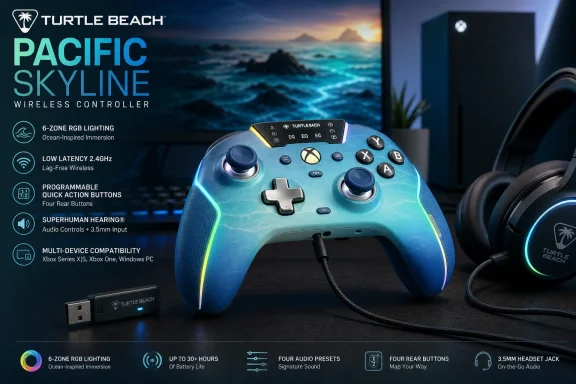
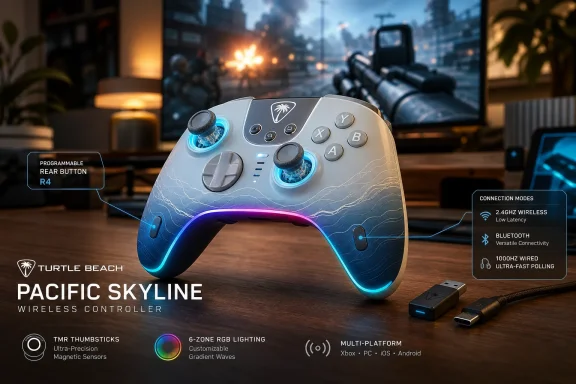
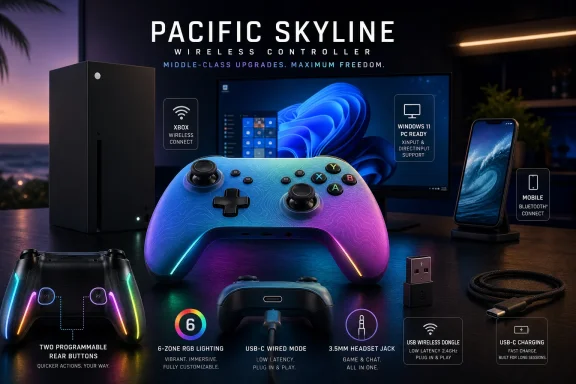
Turtle Beach launched the Pacific Skyline Wireless Controller in May 2026 as an officially licensed Xbox, Windows, and Android gamepad with 2.4GHz wireless, USB-C wired play, Bluetooth, two programmable rear buttons, six-zone RGB lighting, headset controls, and a rechargeable 20-plus-hour battery. The pitch is not that it beats every “pro” controller on the market. It is that the middle of the controller market has moved upward, and Turtle Beach is trying to make yesterday’s enthusiast features feel normal. For Windows and Xbox players, that shift matters more than the palm-tree shell suggests.
The Pacific Skyline arrives at a strange moment for Xbox accessories. Microsoft’s standard Xbox Wireless Controller remains the default because it is familiar, widely supported, and uses Xbox Wireless without a USB dongle on console. But the third-party controller market has spent the last few years turning once-premium ideas into baseline expectations: rear buttons, magnetic sticks, app calibration, faster polling, built-in audio shortcuts, and aggressive cosmetic customization.
That is the context in which the Pacific Skyline makes sense. It is not trying to be an Elite Series 2 replacement in the old sense of metal paddles, interchangeable sticks, and trigger stops. Instead, it packages the most visible and immediately useful upgrades into a controller that feels designed for the player who has outgrown the standard pad but does not want to enter the $200-and-up hobbyist bracket.
The result is a controller that says a lot about where Xbox-compatible hardware is headed in 2026. The winning spec is no longer a single killer feature. It is the bundle: enough connectivity options to move between console, PC, and mobile; enough rear control to change how shooters feel; enough lighting to look distinct on a desk; and enough firmware tooling to reassure buyers that the controller is not frozen on day one.
That makes the Pacific Skyline less interesting as a fashion accessory than as a marker of market pressure. Turtle Beach is betting that the mainstream Xbox player now expects a controller to behave more like a PC peripheral: configurable, rechargeable, firmware-updatable, and visibly personal.
Turtle Beach keeps the implementation simple. The controller supports on-device remapping through a Function-button sequence, meaning users do not need to open a companion app just to assign a common face button to the rear controls. That matters because controller customization often fails at the point of friction; if remapping feels like an administrative chore, most players never build the habit.
There are limits. The back buttons can mirror front-facing controller inputs, but they are not a full macro system, and they do not replace keyboard bindings on Windows. Triggers also sit outside the basic remapping model described for the pad, which keeps the Pacific Skyline from becoming a true competitive-tuning device.
That tradeoff is revealing. Turtle Beach is not trying to turn the Pacific Skyline into a controller for players who spend an hour building profiles before launching a match. It is targeting the much larger audience that wants one or two practical changes and wants them to stick.
A player might use an Xbox Series X in the living room, a Windows 11 desktop for Game Pass or Steam, a handheld PC on the couch, and an Android phone for remote play or cloud sessions. The old model of one controller per box is increasingly wasteful. Turtle Beach’s decision to support a dongle, cable, and Bluetooth gives users a practical hierarchy: use 2.4GHz when latency and reliability matter, use USB-C when response is the priority, and use Bluetooth when convenience beats perfection.
The 1000Hz wired polling claim is especially aimed at PC sensibilities. Console players are generally less likely to obsess over polling-rate numbers, partly because the platform stack imposes its own practical limits. Windows players, by contrast, have been trained by mice, keyboards, and monitors to see input frequency as part of the performance equation.
That does not mean 1000Hz wired polling will magically make every player better. It means the Pacific Skyline is speaking the language of PC gaming without abandoning Xbox licensing. That is a useful bridge, and one Microsoft’s ecosystem increasingly needs.
That is not automatically worse. Dedicated dongles can offer predictable pairing and performance, and they avoid some of the weirdness that can appear when Bluetooth is treated as the universal answer to every controller problem. For PC players, a USB receiver is familiar territory. For Xbox players, it is one more piece of plastic to occupy a port, lose in a backpack, or forget behind a console.
This is the kind of compromise that separates “feature-rich” from “frictionless.” Microsoft’s first-party controller remains the cleanest option for the player who just wants to turn on the console and play. Turtle Beach’s controller asks for a little more setup and gives back more control, more lighting, more audio access, and more cross-device flexibility.
That distinction should guide buying decisions more than any marketing phrase. The Pacific Skyline is not the simpler controller. It is the more configurable one.
This is also where Turtle Beach’s headset heritage shows. A controller can be a surprisingly good place to manage audio because it is already in the player’s hands, and audio adjustments are often made under pressure. Being able to nudge chat mix or mute a microphone without leaving gameplay makes the controller feel less like a passive input device and more like a small hardware dashboard.
There is an important distinction here. The 3.5mm jack is for wired headsets connected to the controller. Wireless gaming headsets still connect through the console, PC, or their own dongle depending on model. The controller’s onboard mute and chat controls do not magically turn every wireless headset into a controller-attached accessory.
Even with that caveat, the feature is practical. It acknowledges that communication is now part of the input loop. Movement, aim, and chat are all happening at once, and the best accessories reduce the number of times a player has to break focus.
The important part is that Turtle Beach includes hardware-level lighting control. Users can cycle effects, adjust brightness, and tune color directly from the controller. That makes RGB feel like a device feature rather than a hostage situation inside yet another always-running desktop app.
The battery behavior is also sensible. When the controller drops below 10 percent, decorative lighting shuts off to conserve power. That is exactly the kind of hierarchy accessory makers should follow: performance and playtime first, visual flourish second.
Still, no buyer should confuse lighting with substance. The Pacific Skyline’s design may be the first thing people notice, but the rear buttons, connectivity, audio controls, and calibration story are what make it more than a seasonal shell.
The rechargeable design also positions it differently from Microsoft’s standard Xbox controller, which still ships around AA batteries unless buyers add a rechargeable pack. Some users like AA flexibility because disposable or rechargeable cells can be swapped instantly. Others see built-in USB-C charging as the modern baseline.
The Pacific Skyline chooses the latter philosophy. That is the right call for a controller with RGB lighting, a wireless receiver, and a more peripheral-like identity. It behaves less like a simple console accessory and more like a rechargeable part of a desk setup.
The risk, as always with sealed rechargeable devices, is long-term degradation. A controller that feels economical in 2026 depends partly on how its battery behaves in 2028. Turtle Beach can win the first impression with runtime; the longer test will be durability.
Hall effect sticks became the buzzword of the previous controller cycle, but TMR is now part of the same broader shift toward magnetic sensing. The details vary by implementation, and no stick technology makes a controller indestructible. Buttons, bumpers, triggers, shells, batteries, and firmware can still be failure points.
But the direction of travel is clear. Once buyers understand that drift is not an unavoidable law of nature, they begin to expect manufacturers to do something about it. A mid-range controller with magnetic stick sensing puts pressure on everyone still shipping conventional stick modules in premium-priced products.
For Windows players, this matters because PC controller use is often heavier and more varied than console-only use. One controller might be used for shooters, racers, emulators, platformers, and handheld docking setups. Durability is not just a warranty issue; it is a total-cost-of-ownership issue.
This is now normal, but it is worth pausing on what “normal” means. Controllers used to be mostly fixed hardware. In 2026, a controller is increasingly a small firmware platform, with calibration routines, receiver updates, profile logic, and app-based diagnostics.
That is good when it lets a manufacturer fix bugs, improve compatibility, and rescue devices that would otherwise be returned. It is less good when day-one firmware becomes a requirement for “proper performance,” because that turns setup into a chore and creates another support dependency.
The Pacific Skyline appears to land on the acceptable side of that line. Its most important everyday customization does not require software, and the app is there for deeper maintenance. But buyers should understand the bargain: more features generally means more firmware, and more firmware means another layer that must be maintained.
That is the baseline the Pacific Skyline must beat, and the answer depends on what the user values. If the goal is the cleanest console experience, Microsoft’s controller remains hard to dislodge. It connects natively, feels familiar, and avoids the dongle issue entirely.
If the goal is a controller that does more out of the box, Turtle Beach has the stronger feature set. Rear buttons, 1000Hz wired polling, RGB zones, onboard audio shortcuts, rechargeable power, and calibration tools are all meaningful additions. None is individually revolutionary, but together they create a visibly more modern package.
This is why the Pacific Skyline should not be judged as a replacement for every Xbox controller. It is better understood as an upgrade path for users who already know what annoys them about the stock pad.
For many players, that will not matter. Rear buttons and a fast wired mode provide the biggest everyday gains, especially in shooters where jump and crouch mapping can immediately improve control. Most players are not losing matches because they lack adjustable trigger actuation.
At the high end, though, trigger behavior becomes a real differentiator. Competitive shooter players often want the shortest possible digital trigger action. Racing players may want analog travel. Modular controllers and premium pro pads increasingly try to satisfy both by switching trigger modes.
The Pacific Skyline does not chase that complexity. That restraint helps keep the controller approachable, but it also defines its ceiling. It is not pretending to be the final controller a serious esports player will ever buy.
But the Pacific Skyline’s Windows appeal goes beyond the badge. Wired 1000Hz polling, USB transmitter support, Bluetooth fallback, app calibration, and Android compatibility make it attractive to players whose gaming life is not confined to a console. It fits the modern PC reality in which Game Pass, Steam, cloud saves, handheld PCs, and living-room docks all blur together.
That is where Microsoft’s broader strategy quietly helps third-party hardware makers. The more Xbox becomes a service layer across devices, the more useful a controller becomes when it travels well. A controller that can sit by the console one night and plug into a Windows desktop the next is no longer a niche accessory.
The Pacific Skyline is therefore part of a bigger story: Xbox hardware identity spreading into PC peripheral culture. The Xbox button is still there, but the expectations around it are increasingly shaped by Windows users.
That positioning matters because the controller market has become crowded with false extremes. At one end are basic pads that feel increasingly under-equipped. At the other are expensive devices that promise elite customization but ask buyers to pay for features they may never use. The Pacific Skyline sits between them and makes the case that the middle is where most users actually live.
Its compromises are easy to name. The USB transmitter is less elegant than Xbox Wireless. The rear buttons are useful but limited. The lack of trigger stops will bother some competitive players. The RGB is attractive but not essential.
Yet those limitations do not sink the product. They clarify it. Turtle Beach has built a controller for the player who wants practical gains, not a spec-sheet trophy.
That does not mean Microsoft’s pad is bad. It means the definition of “standard” is changing around it. Features that once signaled an enthusiast accessory are becoming the expected answer to ordinary annoyances.
This is how accessory markets evolve. First, high-end products introduce a capability. Then cheaper products imitate it unevenly. Eventually, buyers stop treating it as special and start asking why it is missing.
The Pacific Skyline is not alone in pushing that process, but it is a clear example of it. In 2026, a controller can be officially licensed, visually loud, PC-aware, and still aimed at mainstream buyers. That combination would have sounded less obvious a few years ago.
 Turtle Beach Is Selling the New Middle Class of Xbox Controllers
The Pacific Skyline arrives at a strange moment for Xbox accessories. Microsoft’s standard Xbox Wireless Controller remains the default because it is familiar, widely supported, and uses Xbox Wireless without a USB dongle on console. But the third-party controller market has spent the last few years turning once-premium ideas into baseline expectations: rear buttons, magnetic sticks, app calibration, faster polling, built-in audio shortcuts, and aggressive cosmetic customization.That is the context in which the Pacific Skyline makes sense. It is not trying to be an Elite Series 2 replacement in the old sense of metal paddles, interchangeable sticks, and trigger stops. Instead, it packages the most visible and immediately useful upgrades into a controller that feels designed for the player who has outgrown the standard pad but does not want to enter the $200-and-up hobbyist bracket.
The result is a controller that says a lot about where Xbox-compatible hardware is headed in 2026. The winning spec is no longer a single killer feature. It is the bundle: enough connectivity options to move between console, PC, and mobile; enough rear control to change how shooters feel; enough lighting to look distinct on a desk; and enough firmware tooling to reassure buyers that the controller is not frozen on day one.
That makes the Pacific Skyline less interesting as a fashion accessory than as a marker of market pressure. Turtle Beach is betting that the mainstream Xbox player now expects a controller to behave more like a PC peripheral: configurable, rechargeable, firmware-updatable, and visibly personal.
The Rear Buttons Are the Real Upgrade, Not the RGB
The Pacific Skyline’s six-zone RGB lighting will sell screenshots, but the two programmable back buttons are the more consequential feature. Rear inputs change how a controller plays because they reduce the number of times a player has to lift a thumb off the right stick. In a shooter, mapping jump, crouch, reload, or melee to the back of the controller can make movement and aim feel less like competing priorities.Turtle Beach keeps the implementation simple. The controller supports on-device remapping through a Function-button sequence, meaning users do not need to open a companion app just to assign a common face button to the rear controls. That matters because controller customization often fails at the point of friction; if remapping feels like an administrative chore, most players never build the habit.
There are limits. The back buttons can mirror front-facing controller inputs, but they are not a full macro system, and they do not replace keyboard bindings on Windows. Triggers also sit outside the basic remapping model described for the pad, which keeps the Pacific Skyline from becoming a true competitive-tuning device.
That tradeoff is revealing. Turtle Beach is not trying to turn the Pacific Skyline into a controller for players who spend an hour building profiles before launching a match. It is targeting the much larger audience that wants one or two practical changes and wants them to stick.
Triple Connectivity Is a Windows Feature in Disguise
On paper, the controller’s three connection modes are straightforward: 2.4GHz wireless through the included USB transmitter, wired USB-C, and Bluetooth. In practice, this is where the Pacific Skyline makes its strongest argument to WindowsForum readers. A controller that works across Xbox, Windows 10, Windows 11, and Android is not merely “multi-platform”; it reflects how gaming setups actually look in 2026.A player might use an Xbox Series X in the living room, a Windows 11 desktop for Game Pass or Steam, a handheld PC on the couch, and an Android phone for remote play or cloud sessions. The old model of one controller per box is increasingly wasteful. Turtle Beach’s decision to support a dongle, cable, and Bluetooth gives users a practical hierarchy: use 2.4GHz when latency and reliability matter, use USB-C when response is the priority, and use Bluetooth when convenience beats perfection.
The 1000Hz wired polling claim is especially aimed at PC sensibilities. Console players are generally less likely to obsess over polling-rate numbers, partly because the platform stack imposes its own practical limits. Windows players, by contrast, have been trained by mice, keyboards, and monitors to see input frequency as part of the performance equation.
That does not mean 1000Hz wired polling will magically make every player better. It means the Pacific Skyline is speaking the language of PC gaming without abandoning Xbox licensing. That is a useful bridge, and one Microsoft’s ecosystem increasingly needs.
The Dongle Tradeoff Is Still a Real Tradeoff
The biggest practical difference between the Pacific Skyline and Microsoft’s standard Xbox controller is the wireless path. Microsoft’s own controller connects to Xbox consoles through Xbox Wireless without needing a front-port receiver. The Pacific Skyline relies on an included 2.4GHz USB transmitter for its low-latency wireless mode.That is not automatically worse. Dedicated dongles can offer predictable pairing and performance, and they avoid some of the weirdness that can appear when Bluetooth is treated as the universal answer to every controller problem. For PC players, a USB receiver is familiar territory. For Xbox players, it is one more piece of plastic to occupy a port, lose in a backpack, or forget behind a console.
This is the kind of compromise that separates “feature-rich” from “frictionless.” Microsoft’s first-party controller remains the cleanest option for the player who just wants to turn on the console and play. Turtle Beach’s controller asks for a little more setup and gives back more control, more lighting, more audio access, and more cross-device flexibility.
That distinction should guide buying decisions more than any marketing phrase. The Pacific Skyline is not the simpler controller. It is the more configurable one.
Audio Controls Make the Controller Feel More Like a Console Dashboard
One of the Pacific Skyline’s smarter features is not visual at all. The controller builds volume, chat mix, and mic mute controls into Function-button combinations, alongside a standard 3.5mm CTIA headset jack. For anyone who has fumbled through Xbox guide menus mid-match to adjust party balance, that is not a luxury feature; it is a quality-of-life correction.This is also where Turtle Beach’s headset heritage shows. A controller can be a surprisingly good place to manage audio because it is already in the player’s hands, and audio adjustments are often made under pressure. Being able to nudge chat mix or mute a microphone without leaving gameplay makes the controller feel less like a passive input device and more like a small hardware dashboard.
There is an important distinction here. The 3.5mm jack is for wired headsets connected to the controller. Wireless gaming headsets still connect through the console, PC, or their own dongle depending on model. The controller’s onboard mute and chat controls do not magically turn every wireless headset into a controller-attached accessory.
Even with that caveat, the feature is practical. It acknowledges that communication is now part of the input loop. Movement, aim, and chat are all happening at once, and the best accessories reduce the number of times a player has to break focus.
RGB Is Decoration, but Decoration Has Become Part of the Product
The Pacific Skyline’s coastal gradient and lighting zones are easy to dismiss as gamer décor, and to some extent they are. Six customizable RGB zones and preset modes such as static, wave, breathing, and off do not change the way a controller performs. But the aesthetics are not irrelevant, because controllers have become visible desk objects in the same way mechanical keyboards and mice did years ago.The important part is that Turtle Beach includes hardware-level lighting control. Users can cycle effects, adjust brightness, and tune color directly from the controller. That makes RGB feel like a device feature rather than a hostage situation inside yet another always-running desktop app.
The battery behavior is also sensible. When the controller drops below 10 percent, decorative lighting shuts off to conserve power. That is exactly the kind of hierarchy accessory makers should follow: performance and playtime first, visual flourish second.
Still, no buyer should confuse lighting with substance. The Pacific Skyline’s design may be the first thing people notice, but the rear buttons, connectivity, audio controls, and calibration story are what make it more than a seasonal shell.
The Battery Story Is Good Enough Because the Controller Is Rechargeable
Turtle Beach rates the Pacific Skyline for more than 20 hours of use from a 900mAh lithium-ion polymer battery, with charging over USB-C in roughly one to two hours. That puts it in the practical zone for most players. It is not a battery-life monster, but it is long enough to avoid becoming a nightly anxiety ritual.The rechargeable design also positions it differently from Microsoft’s standard Xbox controller, which still ships around AA batteries unless buyers add a rechargeable pack. Some users like AA flexibility because disposable or rechargeable cells can be swapped instantly. Others see built-in USB-C charging as the modern baseline.
The Pacific Skyline chooses the latter philosophy. That is the right call for a controller with RGB lighting, a wireless receiver, and a more peripheral-like identity. It behaves less like a simple console accessory and more like a rechargeable part of a desk setup.
The risk, as always with sealed rechargeable devices, is long-term degradation. A controller that feels economical in 2026 depends partly on how its battery behaves in 2028. Turtle Beach can win the first impression with runtime; the longer test will be durability.
TMR Sticks Show How Fast Anti-Drift Tech Has Become Table Stakes
The Pacific Skyline’s use of TMR thumbstick technology is one of its most important signals. TMR, or tunnel magnetoresistance, reads stick position magnetically rather than relying on traditional potentiometer contact in the same way older analog stick designs do. The practical promise is more precise tracking and better resistance to the wear patterns associated with stick drift.Hall effect sticks became the buzzword of the previous controller cycle, but TMR is now part of the same broader shift toward magnetic sensing. The details vary by implementation, and no stick technology makes a controller indestructible. Buttons, bumpers, triggers, shells, batteries, and firmware can still be failure points.
But the direction of travel is clear. Once buyers understand that drift is not an unavoidable law of nature, they begin to expect manufacturers to do something about it. A mid-range controller with magnetic stick sensing puts pressure on everyone still shipping conventional stick modules in premium-priced products.
For Windows players, this matters because PC controller use is often heavier and more varied than console-only use. One controller might be used for shooters, racers, emulators, platformers, and handheld docking setups. Durability is not just a warranty issue; it is a total-cost-of-ownership issue.
The Companion App Is Useful, but It Also Shows the Firmware Era Has Arrived
The Pacific Skyline works without an app for basic rear-button remapping, but deeper configuration runs through Turtle Beach’s PDP Control Hub on Xbox and Windows. That app supports remapping, diagnostics, and recalibration for sticks and triggers. Turtle Beach also points users toward firmware updates as part of the setup process.This is now normal, but it is worth pausing on what “normal” means. Controllers used to be mostly fixed hardware. In 2026, a controller is increasingly a small firmware platform, with calibration routines, receiver updates, profile logic, and app-based diagnostics.
That is good when it lets a manufacturer fix bugs, improve compatibility, and rescue devices that would otherwise be returned. It is less good when day-one firmware becomes a requirement for “proper performance,” because that turns setup into a chore and creates another support dependency.
The Pacific Skyline appears to land on the acceptable side of that line. Its most important everyday customization does not require software, and the app is there for deeper maintenance. But buyers should understand the bargain: more features generally means more firmware, and more firmware means another layer that must be maintained.
The Standard Xbox Controller Still Wins on Elegance
The standard Xbox Wireless Controller is easy to underestimate because it is everywhere. It has no rear buttons, no RGB lighting, no magnetic-stick marketing hook, and no built-in rechargeable battery. It also remains one of the most broadly supported, ergonomically safe, and low-friction controllers available for Xbox and Windows.That is the baseline the Pacific Skyline must beat, and the answer depends on what the user values. If the goal is the cleanest console experience, Microsoft’s controller remains hard to dislodge. It connects natively, feels familiar, and avoids the dongle issue entirely.
If the goal is a controller that does more out of the box, Turtle Beach has the stronger feature set. Rear buttons, 1000Hz wired polling, RGB zones, onboard audio shortcuts, rechargeable power, and calibration tools are all meaningful additions. None is individually revolutionary, but together they create a visibly more modern package.
This is why the Pacific Skyline should not be judged as a replacement for every Xbox controller. It is better understood as an upgrade path for users who already know what annoys them about the stock pad.
Competitive Players Will Notice What Turtle Beach Left Out
The Pacific Skyline has enough performance features for casual and mid-level competitive play, but it stops short of the tournament-controller category. The missing features are not obscure. There are no hair triggers, no trigger stops, and no deeper pro-profile system comparable to more expensive enthusiast pads.For many players, that will not matter. Rear buttons and a fast wired mode provide the biggest everyday gains, especially in shooters where jump and crouch mapping can immediately improve control. Most players are not losing matches because they lack adjustable trigger actuation.
At the high end, though, trigger behavior becomes a real differentiator. Competitive shooter players often want the shortest possible digital trigger action. Racing players may want analog travel. Modular controllers and premium pro pads increasingly try to satisfy both by switching trigger modes.
The Pacific Skyline does not chase that complexity. That restraint helps keep the controller approachable, but it also defines its ceiling. It is not pretending to be the final controller a serious esports player will ever buy.
The Windows Angle Is Bigger Than the Xbox Branding
The official Xbox license matters because compatibility anxiety is real. Windows users know the pain of controllers that technically work but misbehave across launchers, input APIs, firmware versions, or games with narrow assumptions about Xbox input. An officially licensed Xbox controller has an immediate advantage because the ecosystem is built around that layout and identity.But the Pacific Skyline’s Windows appeal goes beyond the badge. Wired 1000Hz polling, USB transmitter support, Bluetooth fallback, app calibration, and Android compatibility make it attractive to players whose gaming life is not confined to a console. It fits the modern PC reality in which Game Pass, Steam, cloud saves, handheld PCs, and living-room docks all blur together.
That is where Microsoft’s broader strategy quietly helps third-party hardware makers. The more Xbox becomes a service layer across devices, the more useful a controller becomes when it travels well. A controller that can sit by the console one night and plug into a Windows desktop the next is no longer a niche accessory.
The Pacific Skyline is therefore part of a bigger story: Xbox hardware identity spreading into PC peripheral culture. The Xbox button is still there, but the expectations around it are increasingly shaped by Windows users.
The Pacific Skyline’s Best Trick Is Knowing Its Place
The most convincing thing about the Pacific Skyline is that it does not seem confused about what it is. It is not the cheapest controller. It is not the most advanced. It is not the cleanest first-party experience. It is a feature-rich middle option for players who want meaningful upgrades without buying into the full pro-controller economy.That positioning matters because the controller market has become crowded with false extremes. At one end are basic pads that feel increasingly under-equipped. At the other are expensive devices that promise elite customization but ask buyers to pay for features they may never use. The Pacific Skyline sits between them and makes the case that the middle is where most users actually live.
Its compromises are easy to name. The USB transmitter is less elegant than Xbox Wireless. The rear buttons are useful but limited. The lack of trigger stops will bother some competitive players. The RGB is attractive but not essential.
Yet those limitations do not sink the product. They clarify it. Turtle Beach has built a controller for the player who wants practical gains, not a spec-sheet trophy.
The Pacific Skyline Makes the Stock Pad Look Older Than It Feels
The controller’s broader effect may be reputational rather than revolutionary. Once a mid-range licensed Xbox controller includes rear buttons, magnetic sticks, a rechargeable battery, lighting zones, audio shortcuts, and multiple connection modes, the standard Xbox controller starts to look conservative by comparison.That does not mean Microsoft’s pad is bad. It means the definition of “standard” is changing around it. Features that once signaled an enthusiast accessory are becoming the expected answer to ordinary annoyances.
This is how accessory markets evolve. First, high-end products introduce a capability. Then cheaper products imitate it unevenly. Eventually, buyers stop treating it as special and start asking why it is missing.
The Pacific Skyline is not alone in pushing that process, but it is a clear example of it. In 2026, a controller can be officially licensed, visually loud, PC-aware, and still aimed at mainstream buyers. That combination would have sounded less obvious a few years ago.
The Practical Read for WindowsForum Buyers
The Pacific Skyline is easiest to evaluate if you ignore the summer styling for a moment and focus on what changes during actual play. Its strongest case is practical convenience layered over familiar Xbox ergonomics. Its weakest case is that players seeking elite trigger customization will quickly find its limits.- The Pacific Skyline is best suited to Xbox and Windows players who want rear buttons, rechargeable power, and flexible connectivity without paying for a full pro controller.
- The included 2.4GHz transmitter improves the controller’s cross-platform story but makes the Xbox console experience less seamless than Microsoft’s first-party wireless pad.
- The 1000Hz wired mode is most relevant to Windows players who care about input responsiveness and are willing to use a cable for the fastest connection.
- The two rear buttons are the controller’s most meaningful gameplay upgrade, even though they are not a full macro or keyboard-mapping system.
- The lack of hair triggers and trigger stops keeps the Pacific Skyline out of the top competitive tier, despite its otherwise strong feature package.
- The RGB lighting and Pacific colorway give the controller personality, but the real value is in the connectivity, audio controls, stick technology, and calibration support.
References
- Primary source: Turtle Beach
Published: 2026-06-16T13:30:25.628694
Pacific Skyline Wireless Controller: 2026 Review | Turtle Beach
Your guide to the Pacific Skyline wireless Xbox controller with back buttons, RGB lighting, triple connectivity, and 20+ hour battery for summer 2026.www.turtlebeach.com - Related coverage: enostech.com
Turtle Beach Launches Pacific Skyline Wireless Controller - EnosTech.com
Turtle Beach launches the Pacific Skyline Wireless Controller with RGB lighting, wireless support, and custom controls for Xbox, PC, and Android.www.enostech.com - Related coverage: windowscentral.com
ASUS ROG Raikiri II Xbox controller revealed | Windows Central
Revealed at Gamescom 2025, the ROG Raikiri II is Xbox-certified and PC-ready, offering four programmable back buttons, dual-mode triggers, and micro-switch buttons.www.windowscentral.com - Related coverage: funlabswitch.com

- Related coverage: mondoxbox.com
Turtle Beach takes us to the West Coast with the XBOX Pacific Skyline Wireless Controller - MondoXbox
Turtle Beach has announced the enhancement of its XBOX peripheral offering with Pacific Skyline, a wireless controller that blends West Coast aesthetics and level performance, available today at a price of € 89.99 exclusively on the manufacturer's official website.www.mondoxbox.com
- Related coverage: xboxdynasty.de
Turtle Beach Pacific Skyline Controller: Neuer Controller ziert auffälliges Küsten-Design
Mit dem Pacific Skyline Wireless Controller bringt Turtle Beach ein neues Xbox- und PC-Gamepad im auffälligen Küsten-Design auf den Markt.www.xboxdynasty.de
- Related coverage: de.turtlebeach.com
Kabelloser Controller Pacific Skyline | Turtle Beach
Der Pacific Skyline Wireless Controller kombiniert San-Diego-inspiriertes Design, RGB-Beleuchtung, TMR-Sticks, Bluetooth® und kabelloses Xbox-/PC-Gaming.de.turtlebeach.com - Related coverage: cogconnected.com
Turtle Beach Pacific Skyline Wireless Controller Review - Neon-Drenched Head Turner - COGconnected
The Turtle Beach Pacific Skyline Wireless Controller pairs eye-catching aesthetics and a slick RGB skyline effect with excellent comfort. cogconnected.com
- Related coverage: b2b.diskus.cz
- Related coverage: cdn.turtlebeach.com