
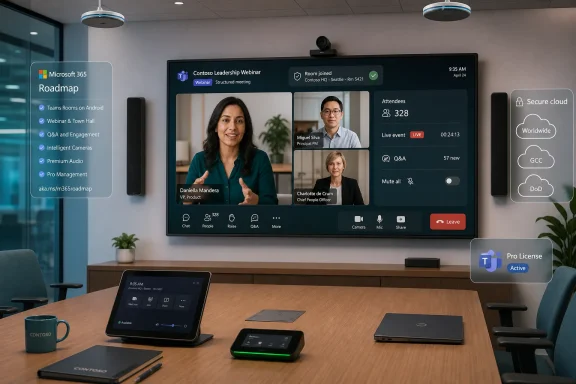
Microsoft began rolling out Roadmap ID 547824 in June 2026, enabling Microsoft Teams Rooms on Android devices with Teams Rooms Pro licenses to join Microsoft webinars and structured meetings across commercial and government cloud environments. The change looks narrow on paper, but it fixes a very practical gap in Microsoft’s room strategy. If Teams is supposed to be the front door for hybrid work, then the conference room cannot behave like a second-class citizen the moment a meeting becomes more formal than a calendar invite.
The new capability lets a Teams Room on Android join a Microsoft webinar or structured meeting and participate from the room console. Microsoft lists the feature as rolling out for General Availability in June 2026, with availability across Worldwide standard multi-tenant, GCC, GCC High, and DoD clouds. It is not a free-for-all upgrade: Microsoft is tying it to Teams Rooms Pro.
That licensing detail is the hinge of the whole story. Teams Rooms on Android has long been the cheaper, simpler, appliance-like sibling to Teams Rooms on Windows, favored for smaller rooms, huddle spaces, and spaces where IT wants a purpose-built endpoint rather than another managed PC. But the line between “meeting room” and “broadcast studio” has been blurring for years, and Microsoft is now acknowledging that formal event formats need to reach the Android room fleet too.
The phrase structured meeting is doing a lot of work here. Microsoft has been steering Teams beyond ad hoc collaboration into more choreographed formats: webinars, town halls, meetings with controlled attendee behavior, and events where presenters, organizers, and participants do not all have the same capabilities. The room device, once just a camera-and-speaker appliance, now has to understand those roles.
For WindowsForum readers, the important part is not that another checkbox appeared on the Microsoft 365 Roadmap. It is that Microsoft is continuing to collapse the distinction between Teams as a desktop app and Teams as an estate of managed physical spaces. The Android room is being pulled deeper into that architecture, but only if the organization has paid for the Pro management and feature tier.
That simplicity came with tradeoffs. Teams Rooms on Windows has historically received certain advanced meeting, event, and peripheral capabilities first, partly because Windows gives Microsoft and hardware vendors a more flexible base for drivers, multi-camera setups, and custom room control. Android Rooms, by contrast, have tended to move in a more curated cadence, with Microsoft adding features as the Teams client, OEM firmware, and device certification matrix line up.
The new webinar and structured meeting support narrows that gap, but it does not erase it. The Android platform still has its own limits, and Microsoft’s own feature comparisons have often shown a staggered pattern where Windows and Android do not reach parity at the same time. That is not necessarily a failure; it is the consequence of trying to make a meeting appliance behave like a cloud-managed endpoint, AV bridge, policy surface, and user interface all at once.
Still, for IT departments that standardized on Android Rooms because they were “good enough” for normal Teams calls, this rollout matters. Formal internal webinars, executive briefings, training sessions, and regulated communications often happen from actual rooms, not just from a presenter’s desk. If the room device cannot join properly, the workaround is familiar and ugly: someone brings a laptop, joins separately, fights audio feedback, and turns a managed room into an improvised AV stack.
That boundary has become more important as Teams Rooms stops being just a convenience endpoint and becomes part of an organization’s communications infrastructure. Webinars and structured meetings are not just another call type; they often involve larger audiences, organizer controls, registration workflows, attendee limitations, moderated interaction, and compliance expectations. Microsoft appears to be treating that as Pro territory.
Administrators may grumble, and not without reason. A room that can join a normal Teams meeting feels, to an end user, like it should be able to join a Teams webinar. The calendar tile looks similar, the join button looks similar, and the distinction between “meeting” and “event” often lives in Microsoft’s service model rather than in the user’s mental model.
But Microsoft’s commercial logic is clear. The more a room participates in high-visibility, high-stakes meetings, the more Microsoft can argue that advanced management and supportability are part of the required package. A failed huddle-room call is annoying. A failed all-hands webinar from a boardroom is a helpdesk incident with executives watching.
Those details matter because a Teams Room is not a single user. It is a shared resource account, a physical room, a camera view, one or more displays, and often a table full of people who may not all have the same relationship to the event. In a standard meeting, the room can mostly behave as a participant. In a webinar, the difference between attendee and presenter can determine whether the room is visible, audible, or able to interact.
The promise of “interact seamlessly” suggests Microsoft is trying to make the room console expose the right controls without requiring an operator to understand the underlying Teams event plumbing. That is exactly what a room system should do. The danger is that seamlessness in Teams often depends on the meeting organizer configuring options correctly before anyone enters the room.
Expect the real-world experience to hinge on three things: the room’s license, the Teams Rooms on Android app version delivered to the device, and the meeting role assigned to the room resource. If any one of those is wrong, users will not care that the roadmap says the feature is rolling out. They will see another Teams join scenario that works on one endpoint and fails on another.
For agencies and contractors, structured meetings are not cosmetic. Controlled briefings, training sessions, program reviews, and leadership communications often require more predictable meeting roles and interaction patterns than a normal Teams call. If Android Rooms are already installed in those environments, the inability to use them cleanly for formal Teams events creates pressure either to keep legacy AV workflows alive or to overbuild rooms around Windows endpoints.
The DoD and GCC High inclusion does not mean every tenant will see the feature at the same time. Microsoft rollouts can be staggered by cloud, tenant, device type, app build, and OEM validation. But including those clouds on the roadmap is still a meaningful statement of intent.
It also hints at why Microsoft is moving carefully. A webinar join experience is not just a UI affordance; it touches identity, meeting policy, cloud boundary behavior, and in-room media controls. The more regulated the tenant, the less tolerance there is for a room endpoint that joins in the wrong role or exposes the wrong interaction surface.
A modern Teams Room may need to join an executive webinar, show a presenter view, handle reactions, respect attendee restrictions, display moderated content, run transcription, support intelligent camera framing, and remain manageable by IT without someone physically touching the device. That is a long way from the old speakerphone in the middle of the table.
Microsoft’s platform strategy depends on making those rooms feel like native Teams participants rather than AV islands attached to Teams by HDMI and hope. This Android rollout is another brick in that wall. The more event formats a room can join natively, the less likely users are to bypass the room system with a laptop or a browser session.
That matters for security and manageability. A managed Teams Room has a known account, known policies, known device state, and a known update channel. A presenter’s laptop patched on an unknown schedule, plugged into room audio, and juggling a second Teams session may get the job done, but it is not the architecture IT would choose if given the choice.
That is the uncomfortable truth of Teams Rooms administration. The platform’s most important interactions are often the least glamorous. Calendar processing, resource accounts, license assignment, device app versions, meeting policy, and organizer settings do not make for exciting marketing copy, but they decide whether a room works at 8:59 a.m. before a 9:00 a.m. leadership broadcast.
For structured meetings, the role question is especially important. A room invited as an attendee may have a different experience from a room intended to serve as a presenter location. Organizers and admins need to understand that a room is not just a location field; it is an endpoint with capabilities and restrictions.
This is where Microsoft’s “seamless” language will meet reality. The better the room console abstracts the event complexity, the more likely users are to trust it. But if the setup requires tribal knowledge about which event types support which room roles on which platform, the burden shifts back to IT documentation and pre-event testing.
This is especially relevant for organizations with mixed hardware. A Logitech room and a Yealink room may both be “Teams Rooms on Android,” but their update timing and firmware dependencies can differ. Microsoft’s release notes often warn that there can be a delay between when a feature is released and when it becomes available on a given make and model.
That delay is not merely inconvenient. If an organization announces that rooms can now join webinars, but only half the fleet has the right app build, support tickets will follow. The operationally sane approach is to test the feature on a representative set of rooms before communicating it broadly to event organizers.
Teams Rooms Pro gives Microsoft a stronger argument for centralized management because features like this are exactly where unmanaged rooms become risky. You want to know which devices are eligible, which are updated, which are healthy, and which rooms are likely to be used for formal events. The more Microsoft pushes advanced meeting experiences into rooms, the more device management becomes part of meeting reliability.
This rollout attacks that workaround directly. If the room can join the webinar or structured meeting natively, the presenter can use the certified camera, microphones, speakers, and displays already installed in the space. The room account can appear as the room. The front-of-room display can show the event experience instead of a laptop screen that may include notifications, wrong windows, or a frantic hunt for the right audio device.
That is not just polish. It changes who owns the meeting. A laptop-led room is owned by the individual presenter in that moment. A Teams Room-led event is owned by the organization’s managed collaboration environment.
There will still be cases where a production team wants broadcast gear, a capture card, or a dedicated event operator. Teams Rooms on Android is not suddenly a replacement for a studio control room. But for the vast middle of corporate webinars and structured internal meetings, native room support reduces the gap between “formal event” and “normal room workflow.”
Android’s strength is different. It is the appliance model: simpler deployment, often lower cost, and a more constrained environment that can be easier to support at scale. For many rooms, that is exactly the right trade. The danger comes when procurement treats all Teams Rooms as interchangeable.
This webinar feature narrows one important gap, but it should not be read as a blank check to use Android in every event space. IT and AV teams still need to map room requirements to platform capabilities. A room used only for ordinary meetings and occasional webinars may be a good Android candidate. A room expected to handle multi-camera productions, complex audio routing, and high-touch event operations may still justify Windows or a dedicated production workflow.
Microsoft benefits either way, because both paths keep the customer inside Teams Rooms. The company does not need Android and Windows rooms to be identical. It needs each to cover enough scenarios that customers stop looking elsewhere for meeting-room infrastructure.
Who is allowed to invite a room to a webinar? Should certain rooms be eligible for formal events while others are not? How should room accounts be governed in tenants where external webinars or cross-cloud meetings are common? What happens when a room joins an event with recording, transcription, chat, or attendee interaction enabled?
These are not reasons to avoid the feature. They are reasons to treat it as a managed capability rather than a novelty. Teams Rooms already live at the intersection of identity, device compliance, physical access, and meeting policy. Structured events add another layer because the meeting format itself encodes permissions and behavior.
For regulated organizations, this is where the Pro requirement may be easier to defend. Advanced room capabilities without advanced management would be a recipe for inconsistent behavior. The more a room participates in formal communications, the more IT needs inventory, health signals, update controls, and policy alignment.
It also fits a broader pattern. Microsoft has been adding capabilities to Teams Rooms that once felt reserved for the desktop client or premium meeting scenarios: better views, transcription controls, intelligent framing, room analytics, digital signage, and richer event participation. The meeting room is no longer trailing the Teams client by design; it is being developed as its own product surface.
That matters because Teams Rooms deployments are infrastructure decisions. Companies do not replace room hardware as casually as they update a desktop app. A roadmap feature like this influences purchasing, licensing, room standards, and AV design, especially for organizations planning refresh cycles across dozens or hundreds of spaces.
The risk for Microsoft is expectation management. Every time a new feature lands on one room platform but not another, administrators have to explain the matrix. The more Microsoft markets Teams as a unified experience, the more painful those platform differences become.
That does not make the feature revolutionary. It makes it useful. Enterprise collaboration is full of tiny mismatches between what users assume should work and what the platform actually supports. Each mismatch produces a workaround, and each workaround becomes part of the organization’s hidden operational cost.
For Teams Rooms on Android, webinar and structured meeting support reduces one of those mismatches. It lets the room estate participate in a more complete slice of Teams’ meeting universe. It also gives IT a cleaner answer when event organizers ask which rooms can be used for formal sessions.
The catch is that “eligible” must be understood. This is a Teams Rooms Pro capability, not a general Android-room entitlement. Organizations that rely heavily on Basic licensing should expect the same awkward conversation they have had with other Pro-gated features: the hardware can physically do more, but the license determines whether Microsoft will let it.
Microsoft’s latest Teams Rooms on Android rollout is not about webinars alone; it is about making the physical meeting room a more complete citizen of the Teams platform. The companies that benefit most will be the ones that see the feature for what it is: a small roadmap item attached to a larger shift in how collaboration spaces are licensed, managed, and trusted. As Teams continues absorbing more of the enterprise event stack, the rooms that used to merely join meetings will increasingly be expected to host them — and IT will need to design, license, and govern them accordingly.
 Microsoft Moves the Webinar Out of the Laptop Huddle
The new capability lets a Teams Room on Android join a Microsoft webinar or structured meeting and participate from the room console. Microsoft lists the feature as rolling out for General Availability in June 2026, with availability across Worldwide standard multi-tenant, GCC, GCC High, and DoD clouds. It is not a free-for-all upgrade: Microsoft is tying it to Teams Rooms Pro.That licensing detail is the hinge of the whole story. Teams Rooms on Android has long been the cheaper, simpler, appliance-like sibling to Teams Rooms on Windows, favored for smaller rooms, huddle spaces, and spaces where IT wants a purpose-built endpoint rather than another managed PC. But the line between “meeting room” and “broadcast studio” has been blurring for years, and Microsoft is now acknowledging that formal event formats need to reach the Android room fleet too.
The phrase structured meeting is doing a lot of work here. Microsoft has been steering Teams beyond ad hoc collaboration into more choreographed formats: webinars, town halls, meetings with controlled attendee behavior, and events where presenters, organizers, and participants do not all have the same capabilities. The room device, once just a camera-and-speaker appliance, now has to understand those roles.
For WindowsForum readers, the important part is not that another checkbox appeared on the Microsoft 365 Roadmap. It is that Microsoft is continuing to collapse the distinction between Teams as a desktop app and Teams as an estate of managed physical spaces. The Android room is being pulled deeper into that architecture, but only if the organization has paid for the Pro management and feature tier.
Android Rooms Were Never Just the Budget Option
Teams Rooms on Android exists because not every meeting room needs a Windows compute module, separate console, and the operational baggage of another Windows endpoint. For many organizations, Android-based appliances from vendors such as Logitech, Poly, Yealink, Neat, and others have been attractive precisely because they promise less friction. They boot into the room experience, receive vendor-approved updates, and reduce the temptation for users to treat the conference-room system like a general-purpose PC.That simplicity came with tradeoffs. Teams Rooms on Windows has historically received certain advanced meeting, event, and peripheral capabilities first, partly because Windows gives Microsoft and hardware vendors a more flexible base for drivers, multi-camera setups, and custom room control. Android Rooms, by contrast, have tended to move in a more curated cadence, with Microsoft adding features as the Teams client, OEM firmware, and device certification matrix line up.
The new webinar and structured meeting support narrows that gap, but it does not erase it. The Android platform still has its own limits, and Microsoft’s own feature comparisons have often shown a staggered pattern where Windows and Android do not reach parity at the same time. That is not necessarily a failure; it is the consequence of trying to make a meeting appliance behave like a cloud-managed endpoint, AV bridge, policy surface, and user interface all at once.
Still, for IT departments that standardized on Android Rooms because they were “good enough” for normal Teams calls, this rollout matters. Formal internal webinars, executive briefings, training sessions, and regulated communications often happen from actual rooms, not just from a presenter’s desk. If the room device cannot join properly, the workaround is familiar and ugly: someone brings a laptop, joins separately, fights audio feedback, and turns a managed room into an improvised AV stack.
The Pro License Is the Product Boundary
Microsoft says the feature is available for Teams Rooms Pro, and that is not a footnote. Teams Rooms Basic remains positioned around core meeting experiences: joining meetings, sharing content, and handling the simpler end of room collaboration. Teams Rooms Pro is where Microsoft places the advanced in-room experiences, richer management, analytics, and enterprise-grade controls.That boundary has become more important as Teams Rooms stops being just a convenience endpoint and becomes part of an organization’s communications infrastructure. Webinars and structured meetings are not just another call type; they often involve larger audiences, organizer controls, registration workflows, attendee limitations, moderated interaction, and compliance expectations. Microsoft appears to be treating that as Pro territory.
Administrators may grumble, and not without reason. A room that can join a normal Teams meeting feels, to an end user, like it should be able to join a Teams webinar. The calendar tile looks similar, the join button looks similar, and the distinction between “meeting” and “event” often lives in Microsoft’s service model rather than in the user’s mental model.
But Microsoft’s commercial logic is clear. The more a room participates in high-visibility, high-stakes meetings, the more Microsoft can argue that advanced management and supportability are part of the required package. A failed huddle-room call is annoying. A failed all-hands webinar from a boardroom is a helpdesk incident with executives watching.
The Roadmap Item Is Small Because the Workflow Is Big
The feature description is almost comically brief: join a Microsoft webinar and structured meeting from a Teams Room on Android and interact seamlessly during the event. But the workflow behind that sentence is messy, because structured meetings are defined by constraints. Who can speak? Who can present? Who sees chat? What controls appear on the room console? What happens if the room is an attendee rather than a presenter?Those details matter because a Teams Room is not a single user. It is a shared resource account, a physical room, a camera view, one or more displays, and often a table full of people who may not all have the same relationship to the event. In a standard meeting, the room can mostly behave as a participant. In a webinar, the difference between attendee and presenter can determine whether the room is visible, audible, or able to interact.
The promise of “interact seamlessly” suggests Microsoft is trying to make the room console expose the right controls without requiring an operator to understand the underlying Teams event plumbing. That is exactly what a room system should do. The danger is that seamlessness in Teams often depends on the meeting organizer configuring options correctly before anyone enters the room.
Expect the real-world experience to hinge on three things: the room’s license, the Teams Rooms on Android app version delivered to the device, and the meeting role assigned to the room resource. If any one of those is wrong, users will not care that the roadmap says the feature is rolling out. They will see another Teams join scenario that works on one endpoint and fails on another.
Government Clouds Are Not an Afterthought This Time
The roadmap listing includes Worldwide, GCC, GCC High, and DoD. That is significant because government cloud support often lags commercial availability, especially for collaboration features involving events, external participation, analytics, or compliance-sensitive workloads. Here, Microsoft is at least signaling that the rollout is meant to cover the full cloud spread.For agencies and contractors, structured meetings are not cosmetic. Controlled briefings, training sessions, program reviews, and leadership communications often require more predictable meeting roles and interaction patterns than a normal Teams call. If Android Rooms are already installed in those environments, the inability to use them cleanly for formal Teams events creates pressure either to keep legacy AV workflows alive or to overbuild rooms around Windows endpoints.
The DoD and GCC High inclusion does not mean every tenant will see the feature at the same time. Microsoft rollouts can be staggered by cloud, tenant, device type, app build, and OEM validation. But including those clouds on the roadmap is still a meaningful statement of intent.
It also hints at why Microsoft is moving carefully. A webinar join experience is not just a UI affordance; it touches identity, meeting policy, cloud boundary behavior, and in-room media controls. The more regulated the tenant, the less tolerance there is for a room endpoint that joins in the wrong role or exposes the wrong interaction surface.
The Conference Room Is Becoming an Event Endpoint
The most interesting part of this rollout is what it says about the future of the conference room. For years, meeting-room systems were built around a simple model: join the call, show the people, show the content, and get out of the way. That model is no longer enough.A modern Teams Room may need to join an executive webinar, show a presenter view, handle reactions, respect attendee restrictions, display moderated content, run transcription, support intelligent camera framing, and remain manageable by IT without someone physically touching the device. That is a long way from the old speakerphone in the middle of the table.
Microsoft’s platform strategy depends on making those rooms feel like native Teams participants rather than AV islands attached to Teams by HDMI and hope. This Android rollout is another brick in that wall. The more event formats a room can join natively, the less likely users are to bypass the room system with a laptop or a browser session.
That matters for security and manageability. A managed Teams Room has a known account, known policies, known device state, and a known update channel. A presenter’s laptop patched on an unknown schedule, plugged into room audio, and juggling a second Teams session may get the job done, but it is not the architecture IT would choose if given the choice.
The User Experience Will Still Be Judged by the Join Button
Microsoft can describe the feature in terms of webinars and structured meetings, but most users will judge it by a simpler test: does the Join button work when the room is invited? If the room calendar shows the event and the console puts the room into the correct experience, the feature will disappear into the background. If not, it will become another Teams superstition.That is the uncomfortable truth of Teams Rooms administration. The platform’s most important interactions are often the least glamorous. Calendar processing, resource accounts, license assignment, device app versions, meeting policy, and organizer settings do not make for exciting marketing copy, but they decide whether a room works at 8:59 a.m. before a 9:00 a.m. leadership broadcast.
For structured meetings, the role question is especially important. A room invited as an attendee may have a different experience from a room intended to serve as a presenter location. Organizers and admins need to understand that a room is not just a location field; it is an endpoint with capabilities and restrictions.
This is where Microsoft’s “seamless” language will meet reality. The better the room console abstracts the event complexity, the more likely users are to trust it. But if the setup requires tribal knowledge about which event types support which room roles on which platform, the burden shifts back to IT documentation and pre-event testing.
The Android Fleet Now Needs More Deliberate Update Discipline
Because the feature is rolling out in June 2026, administrators should assume availability will depend on both the Microsoft service and device-side updates. Teams Rooms on Android devices receive Teams app and firmware updates through a chain that includes Microsoft, the OEM, and the device’s management configuration. That chain is more controlled than a random Android tablet, but it is still not instantaneous.This is especially relevant for organizations with mixed hardware. A Logitech room and a Yealink room may both be “Teams Rooms on Android,” but their update timing and firmware dependencies can differ. Microsoft’s release notes often warn that there can be a delay between when a feature is released and when it becomes available on a given make and model.
That delay is not merely inconvenient. If an organization announces that rooms can now join webinars, but only half the fleet has the right app build, support tickets will follow. The operationally sane approach is to test the feature on a representative set of rooms before communicating it broadly to event organizers.
Teams Rooms Pro gives Microsoft a stronger argument for centralized management because features like this are exactly where unmanaged rooms become risky. You want to know which devices are eligible, which are updated, which are healthy, and which rooms are likely to be used for formal events. The more Microsoft pushes advanced meeting experiences into rooms, the more device management becomes part of meeting reliability.
Microsoft Is Quietly Retiring the Laptop-on-the-Table Workaround
Every IT pro knows the fallback pattern. The room system cannot join the event properly, so a presenter connects a laptop to HDMI, joins Teams from the laptop, mutes one microphone, unmutes another, and hopes the echo cancellation gods are merciful. Sometimes it works. Often it works just badly enough that nobody wants to admit the room system failed.This rollout attacks that workaround directly. If the room can join the webinar or structured meeting natively, the presenter can use the certified camera, microphones, speakers, and displays already installed in the space. The room account can appear as the room. The front-of-room display can show the event experience instead of a laptop screen that may include notifications, wrong windows, or a frantic hunt for the right audio device.
That is not just polish. It changes who owns the meeting. A laptop-led room is owned by the individual presenter in that moment. A Teams Room-led event is owned by the organization’s managed collaboration environment.
There will still be cases where a production team wants broadcast gear, a capture card, or a dedicated event operator. Teams Rooms on Android is not suddenly a replacement for a studio control room. But for the vast middle of corporate webinars and structured internal meetings, native room support reduces the gap between “formal event” and “normal room workflow.”
Windows Rooms Still Have the Headroom Advantage
None of this means Android Rooms have caught up with Windows Rooms across the board. Windows-based Teams Rooms still tend to be the place Microsoft and hardware partners can support more complex setups: multiple cameras, richer peripheral integration, advanced room control, and some features that depend on Windows drivers or more flexible compute. In large rooms, divisible spaces, training centers, and executive briefing rooms, that headroom still matters.Android’s strength is different. It is the appliance model: simpler deployment, often lower cost, and a more constrained environment that can be easier to support at scale. For many rooms, that is exactly the right trade. The danger comes when procurement treats all Teams Rooms as interchangeable.
This webinar feature narrows one important gap, but it should not be read as a blank check to use Android in every event space. IT and AV teams still need to map room requirements to platform capabilities. A room used only for ordinary meetings and occasional webinars may be a good Android candidate. A room expected to handle multi-camera productions, complex audio routing, and high-touch event operations may still justify Windows or a dedicated production workflow.
Microsoft benefits either way, because both paths keep the customer inside Teams Rooms. The company does not need Android and Windows rooms to be identical. It needs each to cover enough scenarios that customers stop looking elsewhere for meeting-room infrastructure.
Event Support Is Also a Policy Surface
The security implications are easy to miss because the feature sounds like a convenience. But joining webinars and structured meetings from a shared room endpoint raises policy questions that administrators should settle before the first executive event.Who is allowed to invite a room to a webinar? Should certain rooms be eligible for formal events while others are not? How should room accounts be governed in tenants where external webinars or cross-cloud meetings are common? What happens when a room joins an event with recording, transcription, chat, or attendee interaction enabled?
These are not reasons to avoid the feature. They are reasons to treat it as a managed capability rather than a novelty. Teams Rooms already live at the intersection of identity, device compliance, physical access, and meeting policy. Structured events add another layer because the meeting format itself encodes permissions and behavior.
For regulated organizations, this is where the Pro requirement may be easier to defend. Advanced room capabilities without advanced management would be a recipe for inconsistent behavior. The more a room participates in formal communications, the more IT needs inventory, health signals, update controls, and policy alignment.
The Roadmap Timing Shows Teams Rooms Becoming a First-Class Product Line
The feature was created on the roadmap in February 2026 and last updated on June 23, 2026, just as the listed June 2026 general availability window arrived. That cadence suggests this is not a speculative placeholder. It is part of Microsoft’s active Teams Rooms delivery stream.It also fits a broader pattern. Microsoft has been adding capabilities to Teams Rooms that once felt reserved for the desktop client or premium meeting scenarios: better views, transcription controls, intelligent framing, room analytics, digital signage, and richer event participation. The meeting room is no longer trailing the Teams client by design; it is being developed as its own product surface.
That matters because Teams Rooms deployments are infrastructure decisions. Companies do not replace room hardware as casually as they update a desktop app. A roadmap feature like this influences purchasing, licensing, room standards, and AV design, especially for organizations planning refresh cycles across dozens or hundreds of spaces.
The risk for Microsoft is expectation management. Every time a new feature lands on one room platform but not another, administrators have to explain the matrix. The more Microsoft markets Teams as a unified experience, the more painful those platform differences become.
The Real Win Is Fewer Special Cases
The best enterprise technology improvements are often the ones that remove a special case. Before this rollout, a Teams webinar from a room could require extra validation, alternate join methods, a Windows room, or a presenter laptop. After the rollout reaches eligible Android Rooms, the intended path should be more ordinary: invite the room, join from the console, participate in the event.That does not make the feature revolutionary. It makes it useful. Enterprise collaboration is full of tiny mismatches between what users assume should work and what the platform actually supports. Each mismatch produces a workaround, and each workaround becomes part of the organization’s hidden operational cost.
For Teams Rooms on Android, webinar and structured meeting support reduces one of those mismatches. It lets the room estate participate in a more complete slice of Teams’ meeting universe. It also gives IT a cleaner answer when event organizers ask which rooms can be used for formal sessions.
The catch is that “eligible” must be understood. This is a Teams Rooms Pro capability, not a general Android-room entitlement. Organizations that rely heavily on Basic licensing should expect the same awkward conversation they have had with other Pro-gated features: the hardware can physically do more, but the license determines whether Microsoft will let it.
The Rooms That Host the All-Hands Need a Readiness Check
Before admins treat this as broadly available, they should translate the roadmap item into a short operational checklist. The feature is simple for users only if IT has already done the boring work.- Organizations should confirm that any Android room expected to join webinars or structured meetings is assigned a Microsoft Teams Rooms Pro license.
- Administrators should verify that representative room devices have received the required Teams Rooms on Android app and OEM firmware updates before announcing support to users.
- Event organizers should test whether the room joins in the intended role, especially when the room is meant to present rather than simply watch.
- Support teams should document any differences between Android and Windows room behavior so helpdesk staff do not promise platform parity that does not exist.
- Government and regulated tenants should validate the feature in their own cloud environment before using it for high-visibility or compliance-sensitive events.
- AV and collaboration teams should decide which rooms are approved for structured events instead of assuming every room with a Join button is production-ready.
Microsoft’s latest Teams Rooms on Android rollout is not about webinars alone; it is about making the physical meeting room a more complete citizen of the Teams platform. The companies that benefit most will be the ones that see the feature for what it is: a small roadmap item attached to a larger shift in how collaboration spaces are licensed, managed, and trusted. As Teams continues absorbing more of the enterprise event stack, the rooms that used to merely join meetings will increasingly be expected to host them — and IT will need to design, license, and govern them accordingly.
References
- Primary source: Microsoft 365 Roadmap
Published: 2026-06-23T23:15:39.6678540Z
Microsoft 365 Roadmap | Microsoft 365
The Microsoft 365 Roadmap lists updates that are currently planned for applicable subscribers. Check here for more information on the status of new features and updates.www.microsoft.com
- Official source: learn.microsoft.com
Release notes for Microsoft Teams Rooms - Microsoft Teams | Microsoft Learn
Admin can read the release notes for Microsoft Teams Rooms, which list cumulative improvements in Microsoft Teams Rooms.learn.microsoft.com - Related coverage: m365admin.handsontek.net
Microsoft Teams: Attend Microsoft webinars from Teams Rooms on Android - M365 Admin
You can join a Microsoft webinar from a Teams Room on Android and interact seamlessly during the event. Available for Teams Rooms Pro. Product Microsoft Teams Release phase General Availability Release date April CY2026 Platform Android Cloud Instance Worldwide (Standard Multi-Tenant) Created...m365admin.handsontek.net - Related coverage: voip.review
Microsoft Teams Android Rooms Get SIP Cross-Platform Upgrade | VoIP Review
Microsoft is enhancing its Microsoft Teams Rooms on Android by rolling out SIP-based cross-platform meeting interoperability.voip.review - Official source: directionsonmicrosoft.com
Teams Meetings and Events - Directions on Microsoft
Microsoft Teams is commonly used for audio and video meetings and large-scale broadcast events. Although meetings and 1:1 calls are often the first capabilities leveraged by organizations, the product also supports hosting webinars and streaming video broadcasts called town halls, which can...www.directionsonmicrosoft.com - Related coverage: scansource.com
- Related coverage: futureisnow.logitech.com
