
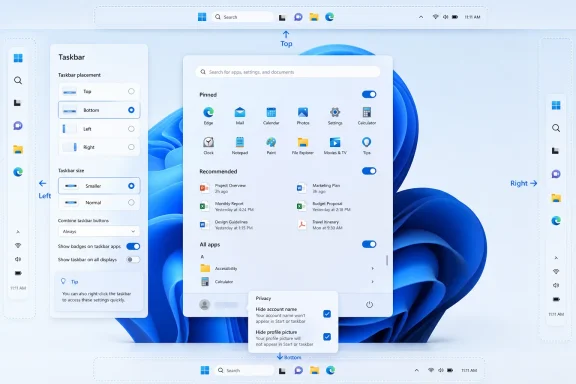
Microsoft is preparing 2026 Windows 11 updates that restore long-requested Start menu and Taskbar customization, including taskbar placement on any screen edge, a smaller taskbar option, adjustable Start layouts, section-level Start controls, and new privacy settings for the account area. The move is less a nostalgic return to Windows 10 than a tacit admission that Windows 11’s original minimalism went too far. After years of treating restraint as a design virtue, Microsoft is rediscovering that Windows users often define polish as control. The question now is whether this recalibration arrives soon enough to change minds hardened by five years of muscle-memory disruption.
The Windows 11 Taskbar has always been more than a strip of icons. For many users, it is the cockpit: the place where windows are tracked, workloads are separated, and habits built over decades become almost invisible. That is why Microsoft’s 2021 decision to lock it to the bottom of the screen landed so poorly with power users, multi-monitor obsessives, developers, and anyone who had spent years tuning Windows around their own desk rather than Microsoft’s marketing screenshots.
The coming restoration of top, left, right, and bottom positioning is therefore not a small cosmetic change. It is Microsoft reversing one of the most symbolic removals of the Windows 11 era. Users who prefer vertical taskbars for widescreen monitors, top-mounted taskbars for accessibility or macOS-like ergonomics, or simply non-default layouts will once again have a sanctioned way to build Windows around their own workflow.
But this is not the old unlocked taskbar coming back wholesale. Microsoft is reportedly routing position changes through Settings, specifically the Taskbar behaviors area, rather than reviving the drag-and-drop edge-snapping behavior of earlier Windows releases. That distinction matters because it shows the company’s new bargain: Windows 11 will offer more flexibility, but through controlled surfaces that preserve its design system and avoid accidental movement.
That tradeoff will annoy some veterans. It also makes a certain engineering sense. The Windows 11 shell was rebuilt around a more constrained Taskbar model, and simply bringing back every Windows 10-era affordance would mean reopening the complexity Microsoft tried to escape. The more interesting shift is that Microsoft now appears willing to pay the complexity tax again where user frustration has become impossible to ignore.
The revised “Show smaller taskbar buttons” behavior is notable because it reportedly shrinks both the icons and the Taskbar itself. That is the part users actually wanted. Earlier attempts to make buttons smaller without meaningfully reducing the bar’s footprint missed the practical point: people were not asking for a different icon aesthetic, they were asking for more usable screen space.
Still, this is not a full restoration of the Windows 10 model. Manual resizing, multi-row taskbars, and the old unlocked Taskbar behavior are not part of the reported package. Microsoft is giving users a smaller predefined shell, not a freely resizable one.
That limitation will be a recurring theme. The 2026 Taskbar looks like a course correction, not a surrender. Microsoft is no longer insisting that one size fits everyone, but it is also not returning to the wild-west customizability that made older Windows both beloved and brittle.
Support for different Start menu sizes directly addresses that mismatch. A single Start layout was always a compromise pretending to be a principle. Some users want a compact launcher. Others want a dense app dashboard. Still others want recent files, recommendations, and pinned apps to coexist without feeling like Microsoft is reserving half the real estate for its own priorities.
The new controls to show or hide Pinned, Recommended, and All apps sections are especially revealing. Since Windows 11 launched, the Recommended area has been one of the most disliked pieces of the Start experience, not necessarily because recommendations are always bad, but because users felt they lacked meaningful control over the space. When a Start menu feels like a billboard for files you did not ask to see, the problem is not merely aesthetic; it is ownership.
Separating recommendation settings from recent files and activity history is another small but important correction. Windows settings have too often forced users into blunt privacy-or-convenience choices. More granular controls mean a user can tune Start without unexpectedly changing behavior elsewhere in the OS.
The option to hide the account name and profile picture from Start is a similar quality-of-life improvement. It will matter most in shared spaces, screen recordings, classrooms, conference rooms, and support sessions. It is not a headline feature, but it is exactly the kind of polish Windows needs more of: an acknowledgment that real PCs are often used in public, semi-public, or professionally sensitive contexts.
That distinction is important for admins and enthusiasts because it sets expectations. The 2026 updates do not appear to be a museum restoration of classic Windows behavior. They are a modernized reimplementation of selected capabilities that survived years of feedback, telemetry, and public complaint.
This is how Microsoft often moves when it has misjudged the Windows audience. It rarely says, “We were wrong.” It ships a new setting, reframes the change as responsiveness, and lets the product absorb the apology. The return of Taskbar positioning fits that pattern perfectly.
There is also a strategic reason Microsoft would avoid simply cloning Windows 10. Windows 11’s centered shell, rounded visual language, redesigned Settings app, and newer component model are the foundation on which Microsoft is layering AI features, Copilot integrations, cloud account nudges, and device-specific experiences. The company wants a more adaptable shell, but not one that turns every PC into a divergent fossil.
That is the tension at the heart of modern Windows. Microsoft wants consistency because it lowers support costs, simplifies development, and strengthens brand identity. Windows users want customization because the platform’s historic promise was that a PC could be made to fit the person, the job, or the organization.
That is politically useful inside Microsoft. A movable Taskbar can sound like a niche feature if it is pitched as nostalgia. It sounds more defensible when attached to usability, accessibility, and productivity. The same is true of Start menu controls: hiding Recommended is not merely appeasing forum threads; it is reducing friction in a core Windows surface.
The company has spent the last several years pushing new layers into Windows 11: Widgets, Copilot, richer search, account integrations, phone connectivity, cloud prompts, and security requirements. Some of those additions are useful. Others have made the operating system feel busier, more promotional, or less locally owned.
The 2026 shell changes read as a corrective to that accumulation. Microsoft seems to have realized that adding intelligence and services to Windows only works if users still trust the basic surfaces. If Start and Taskbar feel imposed rather than personal, every new feature layered on top inherits the resentment.
Taskbar placement, Start layout, and recommendation behavior all touch areas organizations commonly standardize. A school, call center, hospital, or managed desktop fleet may not want every user freely relocating the Taskbar. Conversely, a development team or accessibility-conscious organization may want to enable alternate layouts deliberately.
The policy layer will determine whether these changes become manageable improvements or another batch of per-user preferences that complicate support. Microsoft has historically offered Start and Taskbar layout controls through policy, provisioning, and management tooling, but Windows 11’s evolving shell has not always made transitions painless. The more customizable Start becomes, the more admins will ask whether those choices can be exported, enforced, reset, or roamed.
There is also the upgrade timing problem. If these features arrive through staged rollout, enablement packages, Insider channels, or annual feature updates, organizations will face the usual fragmentation. The user who saw a screenshot online may not understand why their managed PC lacks the setting. The help desk will.
That is why Microsoft needs to communicate the rollout cleanly. The company can win goodwill by restoring features, but it can lose some of it again if availability is opaque, regionally inconsistent, or hidden behind controlled feature rollout switches that make two supposedly identical Windows 11 machines behave differently.
The 2026 changes soften that signal. They suggest Microsoft still cares about the feedback loop from Insiders, power users, and the broader Windows community. That does not mean the company will implement every request, but it does mean the shell is no longer frozen in its original Windows 11 posture.
There is a caution here, though. Enthusiasts should not mistake restored options for a philosophical revolution. Microsoft remains committed to a curated Windows experience. Defaults will still matter more than edge-case configurability, and the company will still prefer Settings toggles over uncontrolled shell manipulation.
That may be frustrating, but it is also the modern Windows bargain. The platform must serve consumers, enterprises, touch devices, handhelds, accessibility needs, cloud services, AI features, and legacy Win32 workflows. Total freedom in one layer can become fragility in another.
The better test is whether Microsoft keeps listening after the first wave. If Taskbar positioning returns but drag-and-drop movement never does, if small Taskbar works but multi-row remains gone, if Start controls improve but promotional content keeps creeping back, users will judge the direction as partial. If Microsoft continues iterating, 2026 may mark the year Windows 11 stopped feeling like a locked design demo and started feeling like a living desktop again.
This is where the customization controls matter more than the feature itself. Recommendations are not inherently hostile. Forced recommendations are. A section that can be hidden, tuned, or separated from broader activity history becomes a feature; one that stubbornly occupies space becomes a grievance.
Microsoft’s challenge is that users have become more skeptical of anything in Windows that looks remotely like promotion. Search ads, Edge prompts, Microsoft account nudges, OneDrive reminders, and Copilot placements have trained people to scrutinize the shell. Even useful discovery features now arrive under suspicion.
Granular Start controls can rebuild some trust because they make the user the final editor. That is the deeper significance of hiding Pinned, Recommended, or All apps. Microsoft is not just changing layout; it is conceding that Start should not have a single editorial model.
That context makes shell goodwill more valuable. Users who resisted Windows 11 because it felt less flexible now have fewer excuses to stay put, but Microsoft still needs to reduce the emotional tax of migration. Bringing back familiar capabilities helps, even if they arrive in redesigned form.
The PC market has also changed. Handheld gaming PCs, ultrawide monitors, foldables, ARM laptops, compact productivity machines, and multi-monitor home offices all create different demands on the shell. A fixed bottom Taskbar is the simplest design, but it is not always the best design.
In that sense, Microsoft’s original simplification aged badly. The company made the Taskbar less adaptable just as Windows devices were becoming more varied. Restoring positioning and sizing is not only about appeasing Windows 10 holdouts; it is about making Windows 11 more credible across the hardware Microsoft says it wants to support.
That is why these changes should be understood as necessary but not sufficient. They improve the shell’s ergonomics, but they do not automatically solve the broader trust problem around Windows as a platform. A customizable Start menu is welcome; a Start menu that respects the user by default would be better.
Microsoft’s best version of Windows 11 would combine modern design with old-school deference. It would offer a clean default for casual users, richer controls for enthusiasts, predictable management for enterprises, and fewer moments where the OS feels like it is negotiating on behalf of Microsoft’s cloud strategy. The 2026 Start and Taskbar work moves in that direction, but the destination is still contested.
There is also a support burden to consider. Every new option creates more permutations, more bugs, more documentation, and more edge cases. Microsoft’s reluctance to restore old shell flexibility was not irrational. It was just overapplied.
The lesson should not be that every removed feature must return. The lesson is that removing mature workflows from Windows carries a cost that cannot be measured only in telemetry. Some features are used by a minority but valued intensely, and those users often influence the broader reputation of the platform.
That is not inherently bad. The old Windows model was powerful but inconsistent. Some options lived in Control Panel, some in shell context menus, some in registry keys, and some in undocumented behavior that only power users knew. Settings-based control can make features more approachable for ordinary users and easier to explain in support documentation.
The risk is that Settings becomes a museum of toggles without the immediacy people liked about classic Windows. Dragging the Taskbar to another edge was intuitive in a tactile way. Opening Settings, navigating Personalization, selecting Taskbar, expanding behaviors, and choosing a position is more deliberate, but also more bureaucratic.
Microsoft appears to prefer deliberate. That tells us it is optimizing for stability, predictability, and preventing accidental changes. For managed environments and less technical users, that is defensible. For enthusiasts, it will feel like the difference between owning a tool and being allowed to configure an appliance.
 Microsoft Finally Concedes That the Taskbar Was Not Just Decoration
The Windows 11 Taskbar has always been more than a strip of icons. For many users, it is the cockpit: the place where windows are tracked, workloads are separated, and habits built over decades become almost invisible. That is why Microsoft’s 2021 decision to lock it to the bottom of the screen landed so poorly with power users, multi-monitor obsessives, developers, and anyone who had spent years tuning Windows around their own desk rather than Microsoft’s marketing screenshots.The coming restoration of top, left, right, and bottom positioning is therefore not a small cosmetic change. It is Microsoft reversing one of the most symbolic removals of the Windows 11 era. Users who prefer vertical taskbars for widescreen monitors, top-mounted taskbars for accessibility or macOS-like ergonomics, or simply non-default layouts will once again have a sanctioned way to build Windows around their own workflow.
But this is not the old unlocked taskbar coming back wholesale. Microsoft is reportedly routing position changes through Settings, specifically the Taskbar behaviors area, rather than reviving the drag-and-drop edge-snapping behavior of earlier Windows releases. That distinction matters because it shows the company’s new bargain: Windows 11 will offer more flexibility, but through controlled surfaces that preserve its design system and avoid accidental movement.
That tradeoff will annoy some veterans. It also makes a certain engineering sense. The Windows 11 shell was rebuilt around a more constrained Taskbar model, and simply bringing back every Windows 10-era affordance would mean reopening the complexity Microsoft tried to escape. The more interesting shift is that Microsoft now appears willing to pay the complexity tax again where user frustration has become impossible to ignore.
The Smaller Taskbar Is a Pixel-Level Apology
The smaller taskbar option may sound like the least dramatic feature in the set, but it hits one of Windows 11’s quiet irritants. Microsoft made the Taskbar roomier in the name of touch targets, modern spacing, and visual consistency. On a 32-inch monitor, that can feel harmless; on a compact laptop, tablet, handheld PC, or remote desktop session, it can feel like rent being collected on every pixel.The revised “Show smaller taskbar buttons” behavior is notable because it reportedly shrinks both the icons and the Taskbar itself. That is the part users actually wanted. Earlier attempts to make buttons smaller without meaningfully reducing the bar’s footprint missed the practical point: people were not asking for a different icon aesthetic, they were asking for more usable screen space.
Still, this is not a full restoration of the Windows 10 model. Manual resizing, multi-row taskbars, and the old unlocked Taskbar behavior are not part of the reported package. Microsoft is giving users a smaller predefined shell, not a freely resizable one.
That limitation will be a recurring theme. The 2026 Taskbar looks like a course correction, not a surrender. Microsoft is no longer insisting that one size fits everyone, but it is also not returning to the wild-west customizability that made older Windows both beloved and brittle.
Start Menu Minimalism Meets the Reality of Daily Use
The Start menu changes may prove even more important because Start is where Windows 11’s design ideology was most visible. The original Windows 11 Start menu was centered, simplified, and heavily curated. It also felt strangely underpowered for an operating system that serves everyone from casual laptop users to sysadmins juggling administrative tools, remote consoles, scripts, and line-of-business apps.Support for different Start menu sizes directly addresses that mismatch. A single Start layout was always a compromise pretending to be a principle. Some users want a compact launcher. Others want a dense app dashboard. Still others want recent files, recommendations, and pinned apps to coexist without feeling like Microsoft is reserving half the real estate for its own priorities.
The new controls to show or hide Pinned, Recommended, and All apps sections are especially revealing. Since Windows 11 launched, the Recommended area has been one of the most disliked pieces of the Start experience, not necessarily because recommendations are always bad, but because users felt they lacked meaningful control over the space. When a Start menu feels like a billboard for files you did not ask to see, the problem is not merely aesthetic; it is ownership.
Separating recommendation settings from recent files and activity history is another small but important correction. Windows settings have too often forced users into blunt privacy-or-convenience choices. More granular controls mean a user can tune Start without unexpectedly changing behavior elsewhere in the OS.
The option to hide the account name and profile picture from Start is a similar quality-of-life improvement. It will matter most in shared spaces, screen recordings, classrooms, conference rooms, and support sessions. It is not a headline feature, but it is exactly the kind of polish Windows needs more of: an acknowledgment that real PCs are often used in public, semi-public, or professionally sensitive contexts.
Windows 11 Is Not Becoming Windows 10, and That Is the Point
The easiest reading of these changes is that Microsoft is backtracking. That is partly true, but it is incomplete. A full backtrack would mean reviving the Windows 10 Taskbar model, restoring every removed affordance, and treating Windows 11’s original shell rewrite as a mistake. Microsoft is doing something more cautious and more corporate: it is rebuilding old freedoms inside new guardrails.That distinction is important for admins and enthusiasts because it sets expectations. The 2026 updates do not appear to be a museum restoration of classic Windows behavior. They are a modernized reimplementation of selected capabilities that survived years of feedback, telemetry, and public complaint.
This is how Microsoft often moves when it has misjudged the Windows audience. It rarely says, “We were wrong.” It ships a new setting, reframes the change as responsiveness, and lets the product absorb the apology. The return of Taskbar positioning fits that pattern perfectly.
There is also a strategic reason Microsoft would avoid simply cloning Windows 10. Windows 11’s centered shell, rounded visual language, redesigned Settings app, and newer component model are the foundation on which Microsoft is layering AI features, Copilot integrations, cloud account nudges, and device-specific experiences. The company wants a more adaptable shell, but not one that turns every PC into a divergent fossil.
That is the tension at the heart of modern Windows. Microsoft wants consistency because it lowers support costs, simplifies development, and strengthens brand identity. Windows users want customization because the platform’s historic promise was that a PC could be made to fit the person, the job, or the organization.
The Windows K2 Framing Turns User Complaints Into Product Strategy
The Start and Taskbar work sits inside Microsoft’s broader Windows quality push, including what has been described as the Windows K2 initiative. That framing matters because Microsoft is not presenting these as isolated enthusiast treats. It is folding them into a larger campaign around performance, reliability, usability, and day-to-day satisfaction.That is politically useful inside Microsoft. A movable Taskbar can sound like a niche feature if it is pitched as nostalgia. It sounds more defensible when attached to usability, accessibility, and productivity. The same is true of Start menu controls: hiding Recommended is not merely appeasing forum threads; it is reducing friction in a core Windows surface.
The company has spent the last several years pushing new layers into Windows 11: Widgets, Copilot, richer search, account integrations, phone connectivity, cloud prompts, and security requirements. Some of those additions are useful. Others have made the operating system feel busier, more promotional, or less locally owned.
The 2026 shell changes read as a corrective to that accumulation. Microsoft seems to have realized that adding intelligence and services to Windows only works if users still trust the basic surfaces. If Start and Taskbar feel imposed rather than personal, every new feature layered on top inherits the resentment.
Enterprise IT Will Welcome the Direction but Wait for the Policy Details
For IT departments, the return of visible customization is both welcome and incomplete. Admins do not merely want users to have settings; they want predictable deployment, policy control, documentation, and a clean understanding of which features arrive in which Windows 11 release. Preview builds are useful signals, but enterprise planning runs on supportability.Taskbar placement, Start layout, and recommendation behavior all touch areas organizations commonly standardize. A school, call center, hospital, or managed desktop fleet may not want every user freely relocating the Taskbar. Conversely, a development team or accessibility-conscious organization may want to enable alternate layouts deliberately.
The policy layer will determine whether these changes become manageable improvements or another batch of per-user preferences that complicate support. Microsoft has historically offered Start and Taskbar layout controls through policy, provisioning, and management tooling, but Windows 11’s evolving shell has not always made transitions painless. The more customizable Start becomes, the more admins will ask whether those choices can be exported, enforced, reset, or roamed.
There is also the upgrade timing problem. If these features arrive through staged rollout, enablement packages, Insider channels, or annual feature updates, organizations will face the usual fragmentation. The user who saw a screenshot online may not understand why their managed PC lacks the setting. The help desk will.
That is why Microsoft needs to communicate the rollout cleanly. The company can win goodwill by restoring features, but it can lose some of it again if availability is opaque, regionally inconsistent, or hidden behind controlled feature rollout switches that make two supposedly identical Windows 11 machines behave differently.
Enthusiasts Are Being Invited Back, Not Handed the Keys
For Windows enthusiasts, these changes are emotionally loaded because they touch a long-running grievance: Windows 11 often felt like it treated expert users as edge cases. The removal of Taskbar positioning, labels, and other shell behaviors was not just an inconvenience. It was a signal that Microsoft was optimizing for a cleaner default at the expense of the people most likely to notice the loss.The 2026 changes soften that signal. They suggest Microsoft still cares about the feedback loop from Insiders, power users, and the broader Windows community. That does not mean the company will implement every request, but it does mean the shell is no longer frozen in its original Windows 11 posture.
There is a caution here, though. Enthusiasts should not mistake restored options for a philosophical revolution. Microsoft remains committed to a curated Windows experience. Defaults will still matter more than edge-case configurability, and the company will still prefer Settings toggles over uncontrolled shell manipulation.
That may be frustrating, but it is also the modern Windows bargain. The platform must serve consumers, enterprises, touch devices, handhelds, accessibility needs, cloud services, AI features, and legacy Win32 workflows. Total freedom in one layer can become fragility in another.
The better test is whether Microsoft keeps listening after the first wave. If Taskbar positioning returns but drag-and-drop movement never does, if small Taskbar works but multi-row remains gone, if Start controls improve but promotional content keeps creeping back, users will judge the direction as partial. If Microsoft continues iterating, 2026 may mark the year Windows 11 stopped feeling like a locked design demo and started feeling like a living desktop again.
The Recommended Section Was Always a Trust Problem
The Recommended section deserves special attention because it became a proxy war over Microsoft’s intentions. In theory, a smart Start menu that surfaces recent documents and useful items is sensible. In practice, users often saw wasted space, unclear logic, and a sense that Microsoft had reserved premium territory inside Start for something other than the user’s own priorities.This is where the customization controls matter more than the feature itself. Recommendations are not inherently hostile. Forced recommendations are. A section that can be hidden, tuned, or separated from broader activity history becomes a feature; one that stubbornly occupies space becomes a grievance.
Microsoft’s challenge is that users have become more skeptical of anything in Windows that looks remotely like promotion. Search ads, Edge prompts, Microsoft account nudges, OneDrive reminders, and Copilot placements have trained people to scrutinize the shell. Even useful discovery features now arrive under suspicion.
Granular Start controls can rebuild some trust because they make the user the final editor. That is the deeper significance of hiding Pinned, Recommended, or All apps. Microsoft is not just changing layout; it is conceding that Start should not have a single editorial model.
The Timing Is Not Accidental
These changes are arriving in a very different Windows landscape than the one Microsoft faced in 2021. Windows 10 has passed from mainstream comfort into end-of-support reality for many users, hardware requirements remain a migration blocker for some older PCs, and Windows 11 adoption has been shaped as much by replacement cycles as by enthusiasm.That context makes shell goodwill more valuable. Users who resisted Windows 11 because it felt less flexible now have fewer excuses to stay put, but Microsoft still needs to reduce the emotional tax of migration. Bringing back familiar capabilities helps, even if they arrive in redesigned form.
The PC market has also changed. Handheld gaming PCs, ultrawide monitors, foldables, ARM laptops, compact productivity machines, and multi-monitor home offices all create different demands on the shell. A fixed bottom Taskbar is the simplest design, but it is not always the best design.
In that sense, Microsoft’s original simplification aged badly. The company made the Taskbar less adaptable just as Windows devices were becoming more varied. Restoring positioning and sizing is not only about appeasing Windows 10 holdouts; it is about making Windows 11 more credible across the hardware Microsoft says it wants to support.
A Better Default Still Needs Better Restraint
The danger for Microsoft is that customization becomes a pressure valve while the company continues adding irritants elsewhere. Users may appreciate a movable Taskbar and still resent account prompts. They may hide Recommended and still dislike web-heavy search results. They may shrink the Taskbar and still feel that Windows 11 is too eager to advertise Microsoft services.That is why these changes should be understood as necessary but not sufficient. They improve the shell’s ergonomics, but they do not automatically solve the broader trust problem around Windows as a platform. A customizable Start menu is welcome; a Start menu that respects the user by default would be better.
Microsoft’s best version of Windows 11 would combine modern design with old-school deference. It would offer a clean default for casual users, richer controls for enthusiasts, predictable management for enterprises, and fewer moments where the OS feels like it is negotiating on behalf of Microsoft’s cloud strategy. The 2026 Start and Taskbar work moves in that direction, but the destination is still contested.
There is also a support burden to consider. Every new option creates more permutations, more bugs, more documentation, and more edge cases. Microsoft’s reluctance to restore old shell flexibility was not irrational. It was just overapplied.
The lesson should not be that every removed feature must return. The lesson is that removing mature workflows from Windows carries a cost that cannot be measured only in telemetry. Some features are used by a minority but valued intensely, and those users often influence the broader reputation of the platform.
The Settings App Becomes the New Control Room
Routing these changes through Settings also tells us something about Microsoft’s long-term shell philosophy. The company wants customization to be discoverable, searchable, and structured. The age of right-clicking obscure surfaces, unlocking UI chrome, and dragging system components around by accident is fading.That is not inherently bad. The old Windows model was powerful but inconsistent. Some options lived in Control Panel, some in shell context menus, some in registry keys, and some in undocumented behavior that only power users knew. Settings-based control can make features more approachable for ordinary users and easier to explain in support documentation.
The risk is that Settings becomes a museum of toggles without the immediacy people liked about classic Windows. Dragging the Taskbar to another edge was intuitive in a tactile way. Opening Settings, navigating Personalization, selecting Taskbar, expanding behaviors, and choosing a position is more deliberate, but also more bureaucratic.
Microsoft appears to prefer deliberate. That tells us it is optimizing for stability, predictability, and preventing accidental changes. For managed environments and less technical users, that is defensible. For enthusiasts, it will feel like the difference between owning a tool and being allowed to configure an appliance.
The 2026 Shell Reset in Plain English
Microsoft’s latest Start and Taskbar work is not a revolution, but it is the clearest sign yet that Windows 11’s first design settlement was too strict. The company is preserving the Windows 11 look while restoring enough flexibility to blunt some of the most persistent criticism.- Windows 11 is expected to regain Taskbar placement on the top, bottom, left, and right edges of the screen through the Settings app rather than the old drag-to-move model.
- The smaller Taskbar option is becoming more meaningful because it reduces the Taskbar itself, not merely the buttons inside it.
- The Start menu is gaining layout and size controls that should make it work better for both minimal launcher users and people who want denser app access.
- Users will reportedly be able to show or hide major Start sections such as Pinned, Recommended, and All apps independently.
- Microsoft is adding privacy-minded Start controls, including the ability to hide the account name and profile picture from the menu.
- The broader message is that Microsoft is no longer treating Windows 11 simplicity as an excuse to remove mature workflows without replacement.
References
- Primary source: Windows Central
Published: Wed, 24 Jun 2026 19:43:59 GMT
Windows 11 is finally rethinking the Start menu and Taskbar, and it might win back people who gave up on it | Windows Central
Microsoft rebalances Windows 11, adding more flexibility to the Taskbar and Start menu.www.windowscentral.com - Official source: blogs.windows.com
Improving Windows quality: Making Taskbar and Start more personal
In our commitment to Windows quality, we outlined our plans to deliver improvements in performance, reliability, and craft. We are also committed toblogs.windows.com
