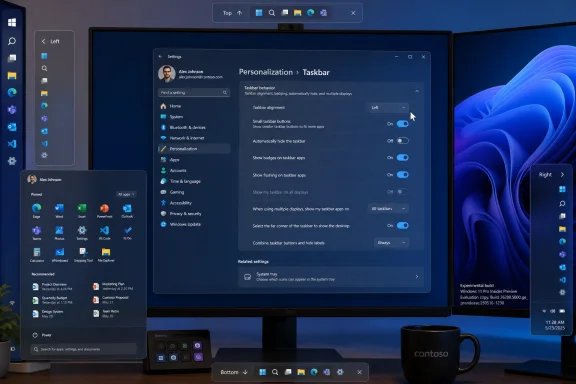
Microsoft is testing Windows 11 changes that would let users place the taskbar differently on each monitor, move it with drag and drop, resize taskbar elements, and gain new Start menu controls, according to Windows Latest reporting published on May 18, 2026. That is not a cosmetic footnote; it is Microsoft revisiting one of Windows 11’s original sins. Five years after Windows 11 traded flexibility for visual discipline, the company is now trying to prove that a modern Windows shell can be both cleaner and less bossy. The real story is not that old features are coming back, but that Microsoft has finally accepted that desktop users do not all inhabit the same desktop.
When Windows 11 arrived in 2021, Microsoft framed its new shell as calmer, centered, and more intentional. The Start button moved toward the middle, the taskbar became visually simplified, and long-standing knobs disappeared in the name of coherence. For casual users, the result was often fine; for power users, multi-monitor workers, and administrators who had spent years tuning Windows around muscle memory, it felt like a downgrade wearing rounded corners.
The taskbar was the clearest example. Windows 10 allowed users to move the taskbar to the top, left, right, or bottom of the screen, and it supported a smaller taskbar mode. Windows 11 launched without that flexibility, and the missing options became a shorthand for a broader complaint: Microsoft had rebuilt a core desktop surface and shipped it before it could match the practical utility of the old one.
That complaint was never merely nostalgia. A bottom taskbar works well on a laptop panel, but it is not sacred on an ultrawide monitor, a vertical coding display, or a three-screen desk where one display acts as a status board. In those environments, the taskbar is not decoration; it is navigation infrastructure. Taking away placement options forced users to adapt their workspace to Windows rather than the other way around.
Microsoft has been slowly walking that decision back. The company has already restored or reworked pieces of taskbar behavior through Windows 11’s update cycle, including better multi-monitor behavior, taskbar label and grouping controls, and richer customization. The new testing described by Windows Latest suggests the retreat is becoming more explicit: Windows 11’s shell is being taught, piece by piece, to respect the layouts that Windows users already built.
That matters because multi-monitor computing is not one use case. A sysadmin may keep dashboards on a portrait monitor, documentation on a side display, and a remote session on the main screen. A developer may use a vertical monitor for code, a horizontal one for testing, and a laptop panel for chat. A content creator may want the taskbar out of the way on the canvas display but visible on a control monitor. A single global taskbar position is an administrative shortcut masquerading as a design decision.
Per-monitor positioning would acknowledge that each screen has a different job. A bottom taskbar may still make sense on the main display, while a left-side taskbar on a vertical monitor can preserve precious vertical space. On an ultrawide, a side taskbar may reduce pointer travel. On a presentation display, hiding or relocating the taskbar may be less about taste and more about reducing accidental exposure.
The other reported piece, drag-and-drop repositioning, is a small but revealing concession. Windows 10 users could grab the taskbar and move it, a behavior so old and plain that it barely felt like a feature. Windows 11’s current approach routes taskbar placement through Settings, which is more deliberate but less immediate. Microsoft’s design director Diego Baca reportedly framed drag-and-drop as something the company is evaluating while trying to avoid accidental taskbar movement. That tension captures the whole Windows 11 shell debate: Microsoft wants predictability, but desktop users often want direct manipulation.
The challenge will be implementation quality. Moving the taskbar is not just drawing a strip of icons on another edge of the screen. Flyouts, Search, Widgets, Quick Settings, notification toasts, context menus, system tray behavior, animations, and touch targets all need to make sense from the new anchor point. Windows 11’s taskbar is more integrated with the operating system’s visual and input model than the old one, which helps explain why Microsoft did not simply flip the old switch back on.
That explanation, however, has always been unsatisfying to users because third-party tools rushed into the gap. StartAllBack, Start11, Windhawk mods, and registry hacks became part of the Windows 11 enthusiast ecosystem precisely because Microsoft’s cleaner design removed everyday freedoms. When the platform vendor eventually restores those controls, it is not innovating so much as reclaiming ground that the aftermarket had already occupied.
The reported “small” and “large” Start menu size options are therefore less exciting than they are overdue. Windows 10 allowed a kind of manual Start menu resizing that made the menu feel like a desktop object rather than a tablet-era panel. Windows 11’s approach has been more curated, with the system deciding how much space Start should occupy. Giving users explicit size choices restores a measure of agency, even if it still falls short of the more fluid resizing many Windows veterans remember.
The distinction matters. A small-versus-large toggle is easier to support, easier to test, and less likely to create strange layout states than freeform resizing. It also fits Microsoft’s modern Windows philosophy: constrained customization, not unbounded tinkering. But for users who have spent years asking why the Start menu occupies so much screen real estate, even a binary control is a meaningful shift.
More consequential is the reported move away from the “Recommended” feed toward a “Recent” section. The name change may sound like semantics, but it signals a different contract with the user. “Recommended” is a vendor word. It suggests ranking, promotion, and a system that knows what should be surfaced. “Recent” is a user word. It suggests recency, continuity, and a straightforward record of what the user actually did.
That distinction became especially important because Windows 11’s Recommended area has often been a source of irritation. It mixed recent files, newly installed apps, suggestions, and in some cases promotional entries in a place users expected to be personal. Windows Latest notes that the Recommended feed has previously been used to promote third-party apps such as WhatsApp and that some users spotted Opera browser promotions in earlier periods. Whether Microsoft calls those suggestions, recommendations, or ads, the effect is the same: the Start menu starts to feel like rented space.
A properly executed Recent section would be more defensible. If it reliably shows recently installed apps, frequently opened files, and work that users are likely to resume, it becomes a productivity surface rather than a promotional one. The operating system has enough signals to make that useful without becoming creepy. The trick is restraint: recent means recent, not “recently profitable to promote.”
The old linkage made privacy and usability fight each other. A user might want Start to stop showing recent documents during screen sharing but still want File Explorer’s recent files to work. An administrator might want a cleaner Start menu for shared workstations while preserving jump list usefulness for productivity apps. A presenter might want to keep personal filenames off the Start panel without erasing the convenience of local history everywhere else.
Separating those controls is not just tidier; it reflects a more mature understanding of contextual privacy. The same data can be appropriate in one surface and inappropriate in another. A recent document list inside File Explorer is expected. The same filename appearing in the Start menu during a Teams call can be a disclosure problem. Windows should not force users to choose between privacy theater and workflow continuity.
This is where Windows 11’s Start menu has often felt less like a professional tool and more like a consumer portal. The operating system assumed that what it surfaced was useful because it was algorithmically selected or recently touched. But professional environments are full of exceptions: confidential filenames, client names, legal documents, HR materials, medical records, unreleased product plans. The issue is not whether the user has something to hide; it is whether the OS understands presentation context.
Microsoft’s reported option to hide the user’s name and profile picture from the Start menu lands in the same category. The company reportedly positions it as useful for live streams, screen shares, and presentations. That is accurate, but the broader point is that Windows is increasingly used in environments where every visible pixel can become public. A Start menu that shows identity information by default is not always harmless.
The best version of these controls would be granular and predictable. Users should not have to memorize which toggle affects which surface. Administrators should be able to deploy sane defaults. And Microsoft should resist the urge to treat every Start menu surface as a canvas for engagement. The Start menu is not a homepage; it is a launch mechanism, a recall surface, and a trust boundary.
Some users live in pinned apps. They want Start to be a curated launcher with no history and no app drawer noise. Others want All apps because they treat Start as a complete index of the machine. Still others care mostly about recent work because they use search or taskbar pins for launching. A single layout can accommodate those modes only by compromising all of them.
This is also where Microsoft’s design language and Microsoft’s business incentives can collide. A clean Start menu with user-controlled sections is good software. A Start menu that reserves space for recommendations, account prompts, Microsoft 365 nudges, Copilot entry points, and Store suggestions is good distribution. Windows 11 has too often seemed unsure which mission comes first.
The reported controls suggest Microsoft is, at least for now, giving ground to the software side. If users can turn off entire sections, Start becomes less of a feed and more of a configurable desktop component. That may reduce the number of surfaces where Microsoft can promote services, but it increases the likelihood that users will stop fighting the menu altogether.
There is a lesson here for the broader Windows shell. Power users do not object to modern design because it is modern. They object when modern design becomes a justification for removing affordances, hiding state, or collapsing distinct workflows into a single “clean” path. A Windows 11 Start menu that can be smaller, less promotional, more private, and section-configurable is still modern. It is just less paternalistic.
The company’s own language reportedly stresses simplicity, predictability, and avoiding accidental movement. Those are legitimate goals. But simplicity is not the same thing as scarcity. Predictability is not the same thing as immobility. The desktop’s strength has always been that it can support wildly different working styles without requiring the vendor to approve each one.
Microsoft rebuilt the taskbar and Start menu for Windows 11 with a different architecture and a different visual model. That gave the company a cleaner foundation for animations, alignment, theming, touch behavior, and future shell work. It also meant that features users considered basic were no longer basic from an engineering standpoint. The old affordances were not always portable into the new shell.
That reality deserves some sympathy. Shell work is notoriously fragile because small changes can break accessibility, input methods, multi-monitor behavior, localization, enterprise policy, and app compatibility. A taskbar is not a widget; it is one of the most frequently touched surfaces in the operating system. Reintroducing edge placement while making flyouts behave properly on every DPI scale and monitor layout is not trivial.
But engineering difficulty does not erase product responsibility. Microsoft chose to ship Windows 11 without parity in several areas that mattered to its most loyal users. It then spent years telling those users, implicitly or explicitly, to wait. The result was a credibility gap: every time Microsoft added a promotional surface faster than it restored a missing customization option, users concluded that their priorities and Microsoft’s priorities were not aligned.
That credibility gap is why these changes will be judged harshly if they arrive half-finished. A top taskbar whose flyouts feel awkward will not satisfy the people who waited five years. A small taskbar that breaks tray density or touch usability will be dismissed as tokenism. A Start menu size toggle that still leaves the menu bloated on common laptop configurations will be viewed as another compromise made for Microsoft’s convenience.
The burden is higher because Windows 10 support has ended for mainstream users unless they are covered by extended options, enterprise arrangements, or special programs. Microsoft is no longer merely pitching Windows 11 to enthusiasts who chose to upgrade early. It is shepherding the remaining Windows 10 base into an operating system that many users still regard as less configurable. Restoring old freedoms is now part of migration politics.
The same is true for Start menu section toggles and identity hiding. If Microsoft exposes these as user-only toggles with limited management hooks, enterprises will treat them as convenience features. If they arrive with Group Policy, configuration service provider support, or Intune-friendly controls, they become part of the managed Windows experience. That difference matters for schools, call centers, healthcare environments, shared labs, and regulated workplaces.
Multi-monitor taskbar placement is especially interesting for specialized deployments. Trading desks, control rooms, development labs, broadcast environments, and security operations centers often use fixed monitor roles. A per-monitor taskbar model could make those setups cleaner, but only if Windows remembers arrangements reliably and handles monitor disconnects gracefully. Anyone who has administered docks, hot desks, and mixed-DPI displays knows that persistence is the hard part.
There is also a training dimension. A fleet where some users place the taskbar on the left, others at the top, and others at the bottom may complicate help desk scripts and remote support. That does not mean Microsoft should withhold customization; it means the defaults and controls need to be intelligible. Administrators should be able to set a baseline while allowing exceptions where they improve productivity.
The privacy controls may be easier for IT to justify. Hiding profile details during presentations, separating Start recommendations from File Explorer recents, and reducing unexpected document exposure all align with real workplace risk. These are not only enthusiast features. They are small mitigations for the messy fact that people share screens constantly and Windows often displays more ambient personal information than users realize.
The important question is whether Microsoft treats these features as shell polish or as administrative surfaces. Windows 11 has matured through a model of continuous updates, but that model can frustrate IT when UI behavior shifts without sufficient lead time. If the company wants these changes to rebuild trust, it should explain not only what users can click, but what administrators can control.
That matters because customization controls can be undermined by trust failures. A Recent section that occasionally promotes apps will not be read as Recent. A Start menu that hides a recommendation engine behind productivity language will not earn back goodwill. Users are perfectly capable of distinguishing between “here is the file you opened yesterday” and “here is an app Microsoft would like you to install.”
The name change therefore creates an obligation. If Microsoft calls the section Recent, it should be recent. If it includes newly installed apps, frequently opened files, or work continuity items, those should be explainable and controllable. If promotions remain, Microsoft should label them plainly rather than laundering them through personalization language.
This is not just a consumer annoyance. In business environments, unexpected promotions can create procurement confusion, compliance concerns, and support tickets. In education, they can be distractions. In secure environments, they can be unacceptable. The more Windows tries to monetize attention inside system surfaces, the more administrators will lock those surfaces down.
A cleaner Start menu could be a strategic win for Microsoft precisely because it would be less ambitious. Launch apps. Resume work. Search reliably. Respect privacy. Stay out of the way. That formula may not produce engagement metrics worthy of a services dashboard, but it produces something more valuable: users who stop installing third-party Start menu replacements on day one.
A shell that assumes one global layout preference increasingly feels primitive. Users do not merely have more pixels; they assign meaning to displays. The left monitor may be communication. The center monitor may be production. The right monitor may be monitoring. A vertical monitor may be text. A drawing tablet may be canvas. A TV may be presentation output. Treating all those screens as interchangeable rectangles leaves productivity on the table.
Per-monitor taskbar positioning would be a modest but symbolically powerful step toward a topology-aware shell. It would say that Windows understands the difference between screens, not just their coordinates. It could also open the door to future per-monitor shell behaviors: different taskbar visibility, different pinned sets, different tray exposure, or presentation-aware layouts. Microsoft need not build all of that now, but the design direction matters.
The risk is complexity. Every per-monitor option creates state that can be lost when docks disconnect, GPU drivers reset, RDP sessions attach, or displays reorder themselves after sleep. Windows has improved at remembering window positions across monitor changes, but anyone with a docked laptop knows the experience is not flawless. A per-monitor taskbar must survive the real world of USB-C hubs, KVMs, hotel TVs, and meeting-room displays.
That is why Microsoft’s caution about accidental taskbar movement is reasonable. Drag-and-drop feels natural until a user unintentionally relocates the taskbar during a support call or while using touch. The answer is not to avoid drag-and-drop but to implement it with guardrails: clear affordances, undo behavior, confirmations where appropriate, and Settings controls for people who prefer explicit configuration.
Windows has always lived between discoverability and configurability. The best shell features make direct manipulation feel obvious while still giving administrators and cautious users a stable control panel. If Microsoft can thread that needle here, the Windows 11 taskbar may finally become something other than a symbol of what was lost.
They will also ask when these features arrive outside experimental or preview channels. Windows Insider testing is not a shipping guarantee, and Microsoft often stages shell changes gradually, runs A/B experiments, or pulls features back when reliability problems surface. A feature being evaluated in May 2026 is not the same thing as a stable release date for every Windows 11 PC.
Still, the direction is unmistakable. Microsoft has spent much of Windows 11’s life trying to square a polished, simplified interface with a user base that prizes control. The company now appears to be admitting that simplification went too far in some of the most visible places. That admission is more important than any single toggle.
The broader context is competitive, too. macOS has its own rigidities, but it benefits from tight hardware integration and a user base trained around Apple’s design choices. Linux desktops remain fragmented but often excel at customization. Windows occupies the middle: it must serve consumers, gamers, developers, regulated enterprises, schools, governments, kiosk deployments, and people with eccentric but deeply optimized setups. Removing flexibility from that ecosystem was always going to hurt.
If Microsoft wants Windows 11 to feel like the natural successor to Windows 10 rather than a forced migration target, the shell has to become generous again. Not chaotic, not endlessly tweakable for its own sake, but generous enough to let the desktop reflect the job being done. These reported taskbar and Start menu changes are promising because they move in that direction.
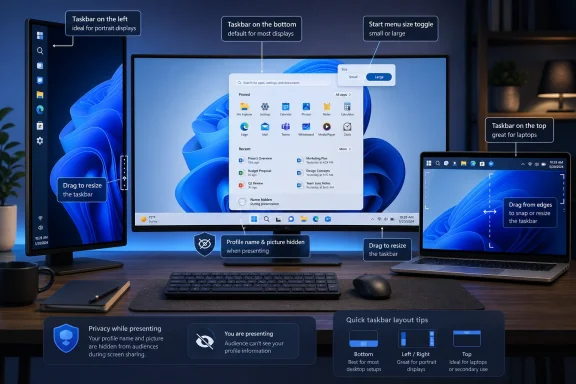 Windows 11’s Minimalism Bill Comes Due
When Windows 11 arrived in 2021, Microsoft framed its new shell as calmer, centered, and more intentional. The Start button moved toward the middle, the taskbar became visually simplified, and long-standing knobs disappeared in the name of coherence. For casual users, the result was often fine; for power users, multi-monitor workers, and administrators who had spent years tuning Windows around muscle memory, it felt like a downgrade wearing rounded corners.The taskbar was the clearest example. Windows 10 allowed users to move the taskbar to the top, left, right, or bottom of the screen, and it supported a smaller taskbar mode. Windows 11 launched without that flexibility, and the missing options became a shorthand for a broader complaint: Microsoft had rebuilt a core desktop surface and shipped it before it could match the practical utility of the old one.
That complaint was never merely nostalgia. A bottom taskbar works well on a laptop panel, but it is not sacred on an ultrawide monitor, a vertical coding display, or a three-screen desk where one display acts as a status board. In those environments, the taskbar is not decoration; it is navigation infrastructure. Taking away placement options forced users to adapt their workspace to Windows rather than the other way around.
Microsoft has been slowly walking that decision back. The company has already restored or reworked pieces of taskbar behavior through Windows 11’s update cycle, including better multi-monitor behavior, taskbar label and grouping controls, and richer customization. The new testing described by Windows Latest suggests the retreat is becoming more explicit: Windows 11’s shell is being taught, piece by piece, to respect the layouts that Windows users already built.
The Taskbar Is Becoming a Workspace Object Again
The most interesting part of the reported testing is not simply that the taskbar can move. Microsoft has already been previewing alternate taskbar positions, and other reporting has indicated that top, left, and right placement is in the works alongside a smaller taskbar mode. The sharper development is the possibility of different taskbar positions per monitor, which would go beyond what Windows 10 officially offered.That matters because multi-monitor computing is not one use case. A sysadmin may keep dashboards on a portrait monitor, documentation on a side display, and a remote session on the main screen. A developer may use a vertical monitor for code, a horizontal one for testing, and a laptop panel for chat. A content creator may want the taskbar out of the way on the canvas display but visible on a control monitor. A single global taskbar position is an administrative shortcut masquerading as a design decision.
Per-monitor positioning would acknowledge that each screen has a different job. A bottom taskbar may still make sense on the main display, while a left-side taskbar on a vertical monitor can preserve precious vertical space. On an ultrawide, a side taskbar may reduce pointer travel. On a presentation display, hiding or relocating the taskbar may be less about taste and more about reducing accidental exposure.
The other reported piece, drag-and-drop repositioning, is a small but revealing concession. Windows 10 users could grab the taskbar and move it, a behavior so old and plain that it barely felt like a feature. Windows 11’s current approach routes taskbar placement through Settings, which is more deliberate but less immediate. Microsoft’s design director Diego Baca reportedly framed drag-and-drop as something the company is evaluating while trying to avoid accidental taskbar movement. That tension captures the whole Windows 11 shell debate: Microsoft wants predictability, but desktop users often want direct manipulation.
The challenge will be implementation quality. Moving the taskbar is not just drawing a strip of icons on another edge of the screen. Flyouts, Search, Widgets, Quick Settings, notification toasts, context menus, system tray behavior, animations, and touch targets all need to make sense from the new anchor point. Windows 11’s taskbar is more integrated with the operating system’s visual and input model than the old one, which helps explain why Microsoft did not simply flip the old switch back on.
That explanation, however, has always been unsatisfying to users because third-party tools rushed into the gap. StartAllBack, Start11, Windhawk mods, and registry hacks became part of the Windows 11 enthusiast ecosystem precisely because Microsoft’s cleaner design removed everyday freedoms. When the platform vendor eventually restores those controls, it is not innovating so much as reclaiming ground that the aftermarket had already occupied.
The Start Menu Is Getting Less Presumptuous
The Start menu changes point in the same direction. Windows 11’s newer Start experience has been moving toward a larger, more adaptive layout that changes based on display characteristics. In theory, adaptive design is good. In practice, users have complained that the Start menu can feel oversized on smaller or lower-resolution screens, with too few meaningful controls to rein it in.The reported “small” and “large” Start menu size options are therefore less exciting than they are overdue. Windows 10 allowed a kind of manual Start menu resizing that made the menu feel like a desktop object rather than a tablet-era panel. Windows 11’s approach has been more curated, with the system deciding how much space Start should occupy. Giving users explicit size choices restores a measure of agency, even if it still falls short of the more fluid resizing many Windows veterans remember.
The distinction matters. A small-versus-large toggle is easier to support, easier to test, and less likely to create strange layout states than freeform resizing. It also fits Microsoft’s modern Windows philosophy: constrained customization, not unbounded tinkering. But for users who have spent years asking why the Start menu occupies so much screen real estate, even a binary control is a meaningful shift.
More consequential is the reported move away from the “Recommended” feed toward a “Recent” section. The name change may sound like semantics, but it signals a different contract with the user. “Recommended” is a vendor word. It suggests ranking, promotion, and a system that knows what should be surfaced. “Recent” is a user word. It suggests recency, continuity, and a straightforward record of what the user actually did.
That distinction became especially important because Windows 11’s Recommended area has often been a source of irritation. It mixed recent files, newly installed apps, suggestions, and in some cases promotional entries in a place users expected to be personal. Windows Latest notes that the Recommended feed has previously been used to promote third-party apps such as WhatsApp and that some users spotted Opera browser promotions in earlier periods. Whether Microsoft calls those suggestions, recommendations, or ads, the effect is the same: the Start menu starts to feel like rented space.
A properly executed Recent section would be more defensible. If it reliably shows recently installed apps, frequently opened files, and work that users are likely to resume, it becomes a productivity surface rather than a promotional one. The operating system has enough signals to make that useful without becoming creepy. The trick is restraint: recent means recent, not “recently profitable to promote.”
Microsoft Finally Separates Start From File Explorer’s Memory
One of the more practical reported changes is easy to miss: disabling file recommendations in Start will no longer turn off recent files in File Explorer and taskbar jump lists. That is the sort of plumbing detail that matters enormously to people who actually configure PCs. Windows users have long had to live with settings whose scope is wider than the label implies, and this appears to be Microsoft narrowing the blast radius.The old linkage made privacy and usability fight each other. A user might want Start to stop showing recent documents during screen sharing but still want File Explorer’s recent files to work. An administrator might want a cleaner Start menu for shared workstations while preserving jump list usefulness for productivity apps. A presenter might want to keep personal filenames off the Start panel without erasing the convenience of local history everywhere else.
Separating those controls is not just tidier; it reflects a more mature understanding of contextual privacy. The same data can be appropriate in one surface and inappropriate in another. A recent document list inside File Explorer is expected. The same filename appearing in the Start menu during a Teams call can be a disclosure problem. Windows should not force users to choose between privacy theater and workflow continuity.
This is where Windows 11’s Start menu has often felt less like a professional tool and more like a consumer portal. The operating system assumed that what it surfaced was useful because it was algorithmically selected or recently touched. But professional environments are full of exceptions: confidential filenames, client names, legal documents, HR materials, medical records, unreleased product plans. The issue is not whether the user has something to hide; it is whether the OS understands presentation context.
Microsoft’s reported option to hide the user’s name and profile picture from the Start menu lands in the same category. The company reportedly positions it as useful for live streams, screen shares, and presentations. That is accurate, but the broader point is that Windows is increasingly used in environments where every visible pixel can become public. A Start menu that shows identity information by default is not always harmless.
The best version of these controls would be granular and predictable. Users should not have to memorize which toggle affects which surface. Administrators should be able to deploy sane defaults. And Microsoft should resist the urge to treat every Start menu surface as a canvas for engagement. The Start menu is not a homepage; it is a launch mechanism, a recall surface, and a trust boundary.
Section Toggles Are a Quiet Rebellion Against the One-True-Start Menu
The reported “section-level toggles” may become the sleeper feature of this wave. The idea is simple: users could turn off Pinned, Recent, or All apps sections and shape Start around what they actually use. That sounds almost boring, which is exactly why it is important. The Start menu has spent years being redesigned as if Microsoft needed to pick the correct universal hierarchy. Section toggles admit that there may not be one.Some users live in pinned apps. They want Start to be a curated launcher with no history and no app drawer noise. Others want All apps because they treat Start as a complete index of the machine. Still others care mostly about recent work because they use search or taskbar pins for launching. A single layout can accommodate those modes only by compromising all of them.
This is also where Microsoft’s design language and Microsoft’s business incentives can collide. A clean Start menu with user-controlled sections is good software. A Start menu that reserves space for recommendations, account prompts, Microsoft 365 nudges, Copilot entry points, and Store suggestions is good distribution. Windows 11 has too often seemed unsure which mission comes first.
The reported controls suggest Microsoft is, at least for now, giving ground to the software side. If users can turn off entire sections, Start becomes less of a feed and more of a configurable desktop component. That may reduce the number of surfaces where Microsoft can promote services, but it increases the likelihood that users will stop fighting the menu altogether.
There is a lesson here for the broader Windows shell. Power users do not object to modern design because it is modern. They object when modern design becomes a justification for removing affordances, hiding state, or collapsing distinct workflows into a single “clean” path. A Windows 11 Start menu that can be smaller, less promotional, more private, and section-configurable is still modern. It is just less paternalistic.
The company’s own language reportedly stresses simplicity, predictability, and avoiding accidental movement. Those are legitimate goals. But simplicity is not the same thing as scarcity. Predictability is not the same thing as immobility. The desktop’s strength has always been that it can support wildly different working styles without requiring the vendor to approve each one.
The Five-Year Wait Was an Engineering Story and a Trust Story
It is tempting to frame all of this as Microsoft finally “bringing back Windows 10 features,” and that is partly true. The movable taskbar, smaller taskbar, Start menu sizing, and more granular Start controls all echo capabilities or expectations from earlier Windows eras. But the longer delay reveals something more structural about Windows 11’s development priorities.Microsoft rebuilt the taskbar and Start menu for Windows 11 with a different architecture and a different visual model. That gave the company a cleaner foundation for animations, alignment, theming, touch behavior, and future shell work. It also meant that features users considered basic were no longer basic from an engineering standpoint. The old affordances were not always portable into the new shell.
That reality deserves some sympathy. Shell work is notoriously fragile because small changes can break accessibility, input methods, multi-monitor behavior, localization, enterprise policy, and app compatibility. A taskbar is not a widget; it is one of the most frequently touched surfaces in the operating system. Reintroducing edge placement while making flyouts behave properly on every DPI scale and monitor layout is not trivial.
But engineering difficulty does not erase product responsibility. Microsoft chose to ship Windows 11 without parity in several areas that mattered to its most loyal users. It then spent years telling those users, implicitly or explicitly, to wait. The result was a credibility gap: every time Microsoft added a promotional surface faster than it restored a missing customization option, users concluded that their priorities and Microsoft’s priorities were not aligned.
That credibility gap is why these changes will be judged harshly if they arrive half-finished. A top taskbar whose flyouts feel awkward will not satisfy the people who waited five years. A small taskbar that breaks tray density or touch usability will be dismissed as tokenism. A Start menu size toggle that still leaves the menu bloated on common laptop configurations will be viewed as another compromise made for Microsoft’s convenience.
The burden is higher because Windows 10 support has ended for mainstream users unless they are covered by extended options, enterprise arrangements, or special programs. Microsoft is no longer merely pitching Windows 11 to enthusiasts who chose to upgrade early. It is shepherding the remaining Windows 10 base into an operating system that many users still regard as less configurable. Restoring old freedoms is now part of migration politics.
Enterprise IT Will Care Less About Nostalgia Than Policy
For administrators, the emotional story of Windows 10 feature restoration is secondary. What matters is whether these controls can be managed, deployed, and kept stable. A movable taskbar is delightful on a personal workstation. In a managed environment, it can become a support variable unless policy, provisioning, and documentation keep pace.The same is true for Start menu section toggles and identity hiding. If Microsoft exposes these as user-only toggles with limited management hooks, enterprises will treat them as convenience features. If they arrive with Group Policy, configuration service provider support, or Intune-friendly controls, they become part of the managed Windows experience. That difference matters for schools, call centers, healthcare environments, shared labs, and regulated workplaces.
Multi-monitor taskbar placement is especially interesting for specialized deployments. Trading desks, control rooms, development labs, broadcast environments, and security operations centers often use fixed monitor roles. A per-monitor taskbar model could make those setups cleaner, but only if Windows remembers arrangements reliably and handles monitor disconnects gracefully. Anyone who has administered docks, hot desks, and mixed-DPI displays knows that persistence is the hard part.
There is also a training dimension. A fleet where some users place the taskbar on the left, others at the top, and others at the bottom may complicate help desk scripts and remote support. That does not mean Microsoft should withhold customization; it means the defaults and controls need to be intelligible. Administrators should be able to set a baseline while allowing exceptions where they improve productivity.
The privacy controls may be easier for IT to justify. Hiding profile details during presentations, separating Start recommendations from File Explorer recents, and reducing unexpected document exposure all align with real workplace risk. These are not only enthusiast features. They are small mitigations for the messy fact that people share screens constantly and Windows often displays more ambient personal information than users realize.
The important question is whether Microsoft treats these features as shell polish or as administrative surfaces. Windows 11 has matured through a model of continuous updates, but that model can frustrate IT when UI behavior shifts without sufficient lead time. If the company wants these changes to rebuild trust, it should explain not only what users can click, but what administrators can control.
The Ad Problem Still Hangs Over Start
The reported renaming of Recommended to Recent will be welcomed if it means Start becomes less promotional. But Microsoft’s recent history gives users reason to be skeptical. Windows 11 has repeatedly blurred the line between useful suggestion, service integration, and advertisement. The Start menu, Settings app, lock screen, Widgets board, Edge prompts, OneDrive nudges, and Microsoft account reminders have all contributed to a feeling that Windows is no longer just an operating system but a distribution channel.That matters because customization controls can be undermined by trust failures. A Recent section that occasionally promotes apps will not be read as Recent. A Start menu that hides a recommendation engine behind productivity language will not earn back goodwill. Users are perfectly capable of distinguishing between “here is the file you opened yesterday” and “here is an app Microsoft would like you to install.”
The name change therefore creates an obligation. If Microsoft calls the section Recent, it should be recent. If it includes newly installed apps, frequently opened files, or work continuity items, those should be explainable and controllable. If promotions remain, Microsoft should label them plainly rather than laundering them through personalization language.
This is not just a consumer annoyance. In business environments, unexpected promotions can create procurement confusion, compliance concerns, and support tickets. In education, they can be distractions. In secure environments, they can be unacceptable. The more Windows tries to monetize attention inside system surfaces, the more administrators will lock those surfaces down.
A cleaner Start menu could be a strategic win for Microsoft precisely because it would be less ambitious. Launch apps. Resume work. Search reliably. Respect privacy. Stay out of the way. That formula may not produce engagement metrics worthy of a services dashboard, but it produces something more valuable: users who stop installing third-party Start menu replacements on day one.
The Shell Is Learning That Displays Are Not Interchangeable
The per-monitor angle deserves special emphasis because it reflects a larger shift in desktop computing. Windows grew up when a PC usually meant one monitor, one keyboard, one mouse, and one user sitting directly in front of a beige box. The modern Windows desk is often a topology: laptop panel, docked external monitors, portrait side screens, ultrawides, remote sessions, virtual desktops, touch displays, HDR panels, and mixed scaling.A shell that assumes one global layout preference increasingly feels primitive. Users do not merely have more pixels; they assign meaning to displays. The left monitor may be communication. The center monitor may be production. The right monitor may be monitoring. A vertical monitor may be text. A drawing tablet may be canvas. A TV may be presentation output. Treating all those screens as interchangeable rectangles leaves productivity on the table.
Per-monitor taskbar positioning would be a modest but symbolically powerful step toward a topology-aware shell. It would say that Windows understands the difference between screens, not just their coordinates. It could also open the door to future per-monitor shell behaviors: different taskbar visibility, different pinned sets, different tray exposure, or presentation-aware layouts. Microsoft need not build all of that now, but the design direction matters.
The risk is complexity. Every per-monitor option creates state that can be lost when docks disconnect, GPU drivers reset, RDP sessions attach, or displays reorder themselves after sleep. Windows has improved at remembering window positions across monitor changes, but anyone with a docked laptop knows the experience is not flawless. A per-monitor taskbar must survive the real world of USB-C hubs, KVMs, hotel TVs, and meeting-room displays.
That is why Microsoft’s caution about accidental taskbar movement is reasonable. Drag-and-drop feels natural until a user unintentionally relocates the taskbar during a support call or while using touch. The answer is not to avoid drag-and-drop but to implement it with guardrails: clear affordances, undo behavior, confirmations where appropriate, and Settings controls for people who prefer explicit configuration.
Windows has always lived between discoverability and configurability. The best shell features make direct manipulation feel obvious while still giving administrators and cautious users a stable control panel. If Microsoft can thread that needle here, the Windows 11 taskbar may finally become something other than a symbol of what was lost.
Microsoft’s Course Correction Is Real, but It Is Not Finished
The concrete changes reportedly in testing point to a more flexible Windows 11, but they do not yet amount to a full restoration of the old desktop bargain. Users are likely to ask for manual Start resizing rather than small and large presets. They will ask whether every taskbar flyout behaves correctly from every screen edge. They will ask whether per-monitor taskbar placement survives docking and undocking. They will ask whether the Recent section is truly free of promotions.They will also ask when these features arrive outside experimental or preview channels. Windows Insider testing is not a shipping guarantee, and Microsoft often stages shell changes gradually, runs A/B experiments, or pulls features back when reliability problems surface. A feature being evaluated in May 2026 is not the same thing as a stable release date for every Windows 11 PC.
Still, the direction is unmistakable. Microsoft has spent much of Windows 11’s life trying to square a polished, simplified interface with a user base that prizes control. The company now appears to be admitting that simplification went too far in some of the most visible places. That admission is more important than any single toggle.
The broader context is competitive, too. macOS has its own rigidities, but it benefits from tight hardware integration and a user base trained around Apple’s design choices. Linux desktops remain fragmented but often excel at customization. Windows occupies the middle: it must serve consumers, gamers, developers, regulated enterprises, schools, governments, kiosk deployments, and people with eccentric but deeply optimized setups. Removing flexibility from that ecosystem was always going to hurt.
If Microsoft wants Windows 11 to feel like the natural successor to Windows 10 rather than a forced migration target, the shell has to become generous again. Not chaotic, not endlessly tweakable for its own sake, but generous enough to let the desktop reflect the job being done. These reported taskbar and Start menu changes are promising because they move in that direction.
The Windows 10 Ghost in the Windows 11 Machine
The most useful way to read this update is not as nostalgia, but as a practical map of what Windows users still value. The features returning from the Windows 10 era are not beloved because they are old. They are beloved because they made the desktop adaptable.- Microsoft is reportedly testing different taskbar positions per monitor, which would give multi-display users more flexibility than Windows 10 officially provided.
- The company is also evaluating drag-and-drop taskbar repositioning, a direct-manipulation behavior that many users still associate with older Windows versions.
- Windows 11’s Start menu is expected to gain small and large size choices, giving users an explicit control where the current adaptive layout can feel oversized.
- The Recommended area is reportedly being reframed as Recent, with Microsoft working to improve file relevance and reduce irrelevant surfaced items.
- Start menu recommendation controls are being separated from File Explorer recents and taskbar jump lists, reducing the privacy-versus-convenience tradeoff.
- Section-level toggles and the option to hide the user’s name and profile picture would make Start more configurable for screen sharing, presentations, and personal preference.
References
- Primary source: Windows Latest - Microsoft is testing different Windows 11 taskbar positions per monitor and new Start menu controls - Windows Latest
Published: Sun, 17 May 2026 23:40:09 GMT
Microsoft is testing different Windows 11 taskbar positions per monitor and new Start menu controls
Windows 11 plans to let you configure different taskbar positions per monitor and add multiple new features to the Start menu. www.windowslatest.com
- Context: windowslatest.com - windowslatest.com
Microsoft is making Windows 11's Start menu resizable after years of complaints, adds Small and Large options
Microsoft says it's finally killing Windows 11's one-size-fits-all Start menu, adding resize options after years of complaints.
www.windowslatest.com
- Context: windowscentral.com - windowscentral.com
Microsoft finally begins testing movable and resizable Taskbar on Windows 11, restoring key customization features many users missed | Windows Central
Microsoft is now testing the option to move the Taskbar to the side of your screen on Windows 11.www.windowscentral.com - Context: moneycontrol.com - moneycontrol.com
Microsoft finally brings movable taskbar and resizable Start menu: Here's how to do it
Microsoft has introduced movable taskbar support and a resizable Start menu in Windows 11 Experimental builds, giving users more customization options including taskbar positioning, layout changes, and improved Start menu controls.www.moneycontrol.com - Context: pureinfotech.com - pureinfotech.com
Windows 11 finally lets you resize the Start menu as part of Windows K2 (coming soon) - Pureinfotech
Windows 11 will soon let users resize the Start menu, hide sections, and separate recommendations from recent files. pureinfotech.com
- Context: notebookcheck.net - notebookcheck.net
Microsoft brings back Windows 10 taskbar customizations to Windows 11 - Notebookcheck News
Microsoft is finally giving Windows 11 users more control over the taskbar again, including full screen-edge placement and a smaller, more compact mode. The update also improves how menus and window labels behave depending on the taskbar position. www.notebookcheck.net
- Context: timesofindia.indiatimes.com - timesofindia.indiatimes.com
Windows 11 finally lets you move the taskbar, and resize the Start menu
Laptops & PC News: Microsoft is rolling out one of Windows 11's most-requested changes: a movable taskbar. Starting this week, Windows Insiders in the Experimental chann.timesofindia.indiatimes.com - Context: howtogeek.com - howtogeek.com
Why Can't I Resize the Start Menu or Taskbar in Windows 11?
It's really frustrating---and there is a partial workaround. www.howtogeek.com
- Context: abit.ee - abit.ee
Windows 11 Will Finally Let You Move the Taskbar and Resize the Start Menu
Microsoft is testing taskbar repositioning and Start menu resizing in Windows 11, currently available in the Windows Insider Experimental channel.abit.ee
- Official source: learn.microsoft.com - learn.microsoft.com
Customize the Windows 11 Taskbar | Microsoft Learn
Customize the Windows 11 Taskbarlearn.microsoft.com - Context: windowslatest.com - windowslatest.com
Microsoft admits customization is in Windows' DNA, promises new Windows 11 controls
Microsoft says Windows has personalization and customization in its DNA, and it plans to roll out new features over the coming months.
www.windowslatest.com
- Context: windowscentral.com - windowscentral.com
Microsoft plans major Start menu upgrades for Windows 11 with better customization and performance: Users will soon be able to resize it and toggle off entire areas of Start | Windows Central
Microsoft is rebuilding the Start menu from the ground up, and is adding some much needed customization and performance improvements along the way.www.windowscentral.com - Context: tweaktown.com - tweaktown.com
You can finally change the size and position of the taskbar in Windows 11
Microsoft is finally bringing back the movable taskbar, along with the ability to change its size, while the Start Menu also gets new tweaks. www.tweaktown.com
- Context: windowscentral.com - windowscentral.com
Microsoft revamps the Start menu in Windows 11 — scrollable layout, new views, and fewer clicks | Windows Central
The new Start menu in Windows 11 25H2 and 24H2 brings category and grid views, Phone Link integration, and the ability to hide the Recommended section.www.windowscentral.com - Context: windowscentral.com - windowscentral.com
Everything you need to know about Windows 11's new customizable Taskbar — resizable and movable options from Windows 10 coming soon | Windows Central
Movable and resizable Taskbar is confirmed to be making its way to Windows 11 this year. Here's everything you need to know about how it will work!www.windowscentral.com - Context: techradar.com - techradar.com
Windows 11 could finally get one of the most-requested features from Windows 10, as Microsoft gets serious about winning over the haters | TechRadar
Rumored taskbar move is likely all part of repairing the reputation of the OSwww.techradar.com - Context: techradar.com - techradar.com
Microsoft finally gets its act together to make Windows 11's taskbar work fully across multiple monitors | TechRadar
Notification center and calendar panels can now be accessed on secondary monitorwww.techradar.com - Context: en.wikipedia.org - en.wikipedia.org
Windows 11 - Wikipedia
en.wikipedia.org
- Context: reddit.com - reddit.com
Reddit - Please wait for verification
 www.reddit.com
- Context: reddit.com - reddit.com
Reddit - Please wait for verification
www.reddit.com
- Context: reddit.com - reddit.com
Reddit - Please wait for verification
www.reddit.com
- Official source: microsoft.com - microsoft.com
- Context: reddit.com - reddit.com
Reddit - Please wait for verification
www.reddit.com
- Context: reddit.com - reddit.com
Reddit - Please wait for verification
www.reddit.com