
Microsoft plans to add private Event Group and attendee chat switching to Teams Rooms on Windows for organizers, co-organizers and presenters in structured meetings and webinars in August 2026, across standard commercial and US government clouds, with access limited to Teams Rooms Pro-licensed rooms. The feature sounds small because it is, in the same way a headset mute button is small: invisible until the moment it fails. For organizations that run executive briefings, webinars, training sessions, and tightly managed hybrid events from conference rooms, this is Microsoft closing a conspicuous gap between the Teams desktop client and the room system that increasingly fronts the actual event.
The modern Teams Room is no longer just a camera, a microphone, and a join button. Microsoft has spent the last several years nudging these systems toward a more active role in meetings: better camera framing, richer layouts, presenter participation, webinar support, and management features that assume the room is part of the event workflow rather than a passive endpoint.
This roadmap item continues that trajectory. When a Teams Rooms on Windows device joins a structured meeting or webinar as an organizer, co-organizer, or presenter, it will be able to use the private Event Group chat used by the event team. It will also be able to switch into a separate attendee chat, allowing the room operator or presenter to see and participate in the public-facing conversation.
That distinction matters. In a webinar or structured meeting, the chat is not just chatter; it is production infrastructure. Organizers coordinate handoffs, presenters warn one another about timing, moderators flag questions, and someone inevitably types the digital equivalent of “your mic is still hot.”
Until room systems can participate cleanly in that backchannel, the polished hybrid event depends on a messier reality: someone in the room keeps a laptop open, another person watches chat on a phone, and the Teams Room itself remains oddly detached from the event it is hosting. Microsoft’s change attacks that awkward split.
That is why the Event Group chat has become a meaningful part of the Teams event stack. It creates a private lane for organizers, co-organizers, and presenters, separate from attendee-facing discussion. In practice, it is where the event is actually run.
Bringing that capability to Teams Rooms on Windows acknowledges a basic operational truth: many important events are not hosted from a single user’s laptop. They are hosted from rooms. The camera is mounted, the microphones are tuned, the display is shared, and the room account is the stable endpoint that everyone trusts more than a presenter’s battery life or Wi-Fi connection.
The missing piece has been role-aware communication. If the room is acting as a presenter or organizer, it needs the controls and communications that belong to that role. Otherwise, the organization is pretending the room is in charge while quietly relying on a human operator’s side device to do the real work.
Private Event Group chat on the room device reduces the need for a parallel control surface. That does not eliminate laptops from the production workflow, and it should not. But it makes the Teams Room less dependent on them for basic event coordination.
The attendee chat switch is just as important because event teams need to see what the audience sees. A private backchannel without an attendee view can become a bubble. The ability to move between the internal and external conversation gives presenters a better chance of responding to the actual room, not merely the run of show.
There is also a psychological effect. When the room device itself exposes the right chats, the event feels less like a workaround and more like a supported Teams experience. That is exactly the kind of polish organizations expect when they buy dedicated Teams Rooms hardware and assign it a Pro license.
This roadmap item fits that licensing logic. A room that merely joins meetings does not necessarily need event-team chat. A room that acts as a presenter endpoint for webinars and structured meetings does.
The licensing boundary will still irritate some smaller organizations. A school, nonprofit, or lean business may run polished webinars from a single conference room and still discover that a seemingly straightforward chat feature sits behind the Pro tier. Microsoft can argue that structured event production is a premium room workload; customers can fairly respond that chat is not exactly exotic technology.
But the broader pattern is clear. Microsoft wants Teams Rooms Pro to be the default for organizations that treat meeting rooms as managed collaboration infrastructure. Every feature like this makes Basic feel less like “Teams Rooms, but cheaper” and more like “Teams Rooms for rooms that should not be asked to do too much.”
That is especially relevant for structured meetings and webinars. Government agencies, contractors, public universities, and regulated organizations run public briefings, internal all-hands meetings, training sessions, incident reviews, and stakeholder webinars where role separation is not cosmetic. The wrong chat in the wrong place can be embarrassing at best and a compliance concern at worst.
Private event-team chat on a shared room device also raises predictable governance questions. Room accounts are not personal accounts. They are shared endpoints, often configured for convenience and reliability. If the room can access private organizer chat, administrators will want to understand who can place that room into an organizer, co-organizer, or presenter role and what audit trail exists around messages seen or sent from the room.
Microsoft’s inclusion of government clouds does not answer all those questions, but it frames the feature as part of the managed Teams platform rather than a consumer-style convenience. For IT departments, that means the conversation should begin now, before the August 2026 rollout arrives.
That does not make the feature unsafe. It makes role assignment and room procedure more important. A Teams Room should not casually become an organizer or presenter in a sensitive webinar simply because it is convenient.
The more subtle risk is confusion. Event teams will need to know which chat they are viewing and where their message will land. Switching between private and attendee chats is powerful, but any dual-channel interface carries the possibility of a message being sent to the wrong audience. Anyone who has watched a presenter accidentally share the wrong screen knows that production errors rarely come from missing features; they come from moments of divided attention.
For administrators, the practical response is not panic. It is policy. Decide which rooms are allowed to host structured meetings and webinars, which people can assign room roles, and whether high-sensitivity events require a dedicated operator rather than a presenter juggling console controls during a live session.
That is a significant change from the early hybrid meeting era, when the room often functioned as a shared camera pointed at the “real” meeting happening on individual laptops. In the newer model, the room is the meeting identity, the production camera, the stage, and now part of the event communications layer.
This is the right direction, but it also raises the bar. If Teams Rooms on Windows can act as a presenter endpoint, show intelligent camera views, participate in structured events, and access event-team chat, then customers will expect consistency. They will expect the room to behave predictably across ordinary meetings, webinars, and structured meetings. They will expect fewer “this works on desktop but not in the room” caveats.
That expectation is healthy. Dedicated room systems should reduce friction, not create a second-class Teams experience mounted to the wall.
Still, the timing is useful. Organizations that run major events from Teams Rooms have a window to review room licensing, event procedures, and training materials before the feature appears.
The first planning question is licensing. If a room is expected to host webinars or structured meetings as an organizer, co-organizer, or presenter, it should be checked for Teams Rooms Pro eligibility. The second question is operational: who watches the Event Group chat, who watches attendee chat, and who is allowed to send messages from the room?
The third question is physical. A private event chat on a room display is only as private as the room itself. For executive events, legal briefings, or regulated discussions, that may mean treating the Teams Room more like a production booth than a general-purpose conference space.
A good runbook will spell out how the room joins, what role it uses, which chats are monitored, and what happens if the presenter needs help mid-event. The new chat capability reduces improvisation, but only if the organization uses it deliberately.
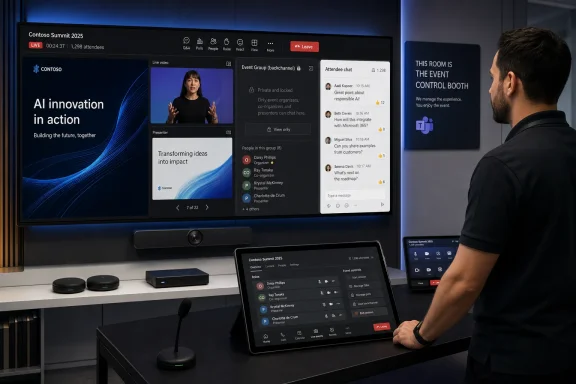 Microsoft Is Turning the Conference Room Into a Control Booth
The modern Teams Room is no longer just a camera, a microphone, and a join button. Microsoft has spent the last several years nudging these systems toward a more active role in meetings: better camera framing, richer layouts, presenter participation, webinar support, and management features that assume the room is part of the event workflow rather than a passive endpoint.This roadmap item continues that trajectory. When a Teams Rooms on Windows device joins a structured meeting or webinar as an organizer, co-organizer, or presenter, it will be able to use the private Event Group chat used by the event team. It will also be able to switch into a separate attendee chat, allowing the room operator or presenter to see and participate in the public-facing conversation.
That distinction matters. In a webinar or structured meeting, the chat is not just chatter; it is production infrastructure. Organizers coordinate handoffs, presenters warn one another about timing, moderators flag questions, and someone inevitably types the digital equivalent of “your mic is still hot.”
Until room systems can participate cleanly in that backchannel, the polished hybrid event depends on a messier reality: someone in the room keeps a laptop open, another person watches chat on a phone, and the Teams Room itself remains oddly detached from the event it is hosting. Microsoft’s change attacks that awkward split.
The Backchannel Was Always Part of the Meeting
Teams’ structured meeting model exists because not every meeting is a meeting. Some are broadcasts with controlled interaction. Some are webinars where attendee engagement is real but staged. Some are internal events where executives, moderators, and producers need to coordinate without letting the audience see the wiring.That is why the Event Group chat has become a meaningful part of the Teams event stack. It creates a private lane for organizers, co-organizers, and presenters, separate from attendee-facing discussion. In practice, it is where the event is actually run.
Bringing that capability to Teams Rooms on Windows acknowledges a basic operational truth: many important events are not hosted from a single user’s laptop. They are hosted from rooms. The camera is mounted, the microphones are tuned, the display is shared, and the room account is the stable endpoint that everyone trusts more than a presenter’s battery life or Wi-Fi connection.
The missing piece has been role-aware communication. If the room is acting as a presenter or organizer, it needs the controls and communications that belong to that role. Otherwise, the organization is pretending the room is in charge while quietly relying on a human operator’s side device to do the real work.
A Small Feature With Large-Event Consequences
The most immediate beneficiary is the person running the event from the room console. In a webinar, that may be an AV operator. In an executive town-hall-style meeting, it may be an assistant or communications lead. In a training session, it may be the presenter alone, trying to teach while watching for moderator cues.Private Event Group chat on the room device reduces the need for a parallel control surface. That does not eliminate laptops from the production workflow, and it should not. But it makes the Teams Room less dependent on them for basic event coordination.
The attendee chat switch is just as important because event teams need to see what the audience sees. A private backchannel without an attendee view can become a bubble. The ability to move between the internal and external conversation gives presenters a better chance of responding to the actual room, not merely the run of show.
There is also a psychological effect. When the room device itself exposes the right chats, the event feels less like a workaround and more like a supported Teams experience. That is exactly the kind of polish organizations expect when they buy dedicated Teams Rooms hardware and assign it a Pro license.
Teams Rooms Pro Becomes the Line Between Join and Produce
Microsoft is limiting the feature to Teams Rooms Pro-licensed rooms, and that is not an incidental detail. Teams Rooms Basic remains aimed at core meeting functions: join, share, collaborate, and manage at a simpler level. Teams Rooms Pro is where Microsoft places the richer meeting experience, advanced management, intelligent audio and video, and room features intended for larger or more demanding deployments.This roadmap item fits that licensing logic. A room that merely joins meetings does not necessarily need event-team chat. A room that acts as a presenter endpoint for webinars and structured meetings does.
The licensing boundary will still irritate some smaller organizations. A school, nonprofit, or lean business may run polished webinars from a single conference room and still discover that a seemingly straightforward chat feature sits behind the Pro tier. Microsoft can argue that structured event production is a premium room workload; customers can fairly respond that chat is not exactly exotic technology.
But the broader pattern is clear. Microsoft wants Teams Rooms Pro to be the default for organizations that treat meeting rooms as managed collaboration infrastructure. Every feature like this makes Basic feel less like “Teams Rooms, but cheaper” and more like “Teams Rooms for rooms that should not be asked to do too much.”
Government Clouds Are Not an Afterthought This Time
The roadmap lists Worldwide, GCC, GCC High, and DoD for general availability. That matters because collaboration features often arrive first in commercial tenants and later, sometimes much later, in government environments. Here, Microsoft is signaling that the capability is intended for regulated and public-sector deployments from the start.That is especially relevant for structured meetings and webinars. Government agencies, contractors, public universities, and regulated organizations run public briefings, internal all-hands meetings, training sessions, incident reviews, and stakeholder webinars where role separation is not cosmetic. The wrong chat in the wrong place can be embarrassing at best and a compliance concern at worst.
Private event-team chat on a shared room device also raises predictable governance questions. Room accounts are not personal accounts. They are shared endpoints, often configured for convenience and reliability. If the room can access private organizer chat, administrators will want to understand who can place that room into an organizer, co-organizer, or presenter role and what audit trail exists around messages seen or sent from the room.
Microsoft’s inclusion of government clouds does not answer all those questions, but it frames the feature as part of the managed Teams platform rather than a consumer-style convenience. For IT departments, that means the conversation should begin now, before the August 2026 rollout arrives.
The Security Story Is About Roles, Not Just Rooms
The obvious risk is that a room device is a shared object. People walk in and out. Displays are visible. Consoles are touched by whoever is physically present. A private Event Group chat shown on a room interface is only private if the room is being used like a controlled production space.That does not make the feature unsafe. It makes role assignment and room procedure more important. A Teams Room should not casually become an organizer or presenter in a sensitive webinar simply because it is convenient.
The more subtle risk is confusion. Event teams will need to know which chat they are viewing and where their message will land. Switching between private and attendee chats is powerful, but any dual-channel interface carries the possibility of a message being sent to the wrong audience. Anyone who has watched a presenter accidentally share the wrong screen knows that production errors rarely come from missing features; they come from moments of divided attention.
For administrators, the practical response is not panic. It is policy. Decide which rooms are allowed to host structured meetings and webinars, which people can assign room roles, and whether high-sensitivity events require a dedicated operator rather than a presenter juggling console controls during a live session.
Microsoft Is Quietly Rebuilding the Webinar Stack Around Rooms
The feature also reflects a broader shift in Teams: the webinar and structured-meeting experience is becoming less desktop-centric. Microsoft has been adding room-facing capabilities that make sense only if the room itself is expected to participate as a first-class event endpoint.That is a significant change from the early hybrid meeting era, when the room often functioned as a shared camera pointed at the “real” meeting happening on individual laptops. In the newer model, the room is the meeting identity, the production camera, the stage, and now part of the event communications layer.
This is the right direction, but it also raises the bar. If Teams Rooms on Windows can act as a presenter endpoint, show intelligent camera views, participate in structured events, and access event-team chat, then customers will expect consistency. They will expect the room to behave predictably across ordinary meetings, webinars, and structured meetings. They will expect fewer “this works on desktop but not in the room” caveats.
That expectation is healthy. Dedicated room systems should reduce friction, not create a second-class Teams experience mounted to the wall.
August 2026 Is Close Enough for Planning, Far Enough for Change
The roadmap target is general availability in August 2026, with the item currently marked as in development and last updated on June 24, 2026. As always with Microsoft 365 Roadmap dates, administrators should treat the month as a planning signal rather than a contractual delivery date. Features can slip, scope can change, and tenant-level availability may arrive in waves.Still, the timing is useful. Organizations that run major events from Teams Rooms have a window to review room licensing, event procedures, and training materials before the feature appears.
The first planning question is licensing. If a room is expected to host webinars or structured meetings as an organizer, co-organizer, or presenter, it should be checked for Teams Rooms Pro eligibility. The second question is operational: who watches the Event Group chat, who watches attendee chat, and who is allowed to send messages from the room?
The third question is physical. A private event chat on a room display is only as private as the room itself. For executive events, legal briefings, or regulated discussions, that may mean treating the Teams Room more like a production booth than a general-purpose conference space.
The Rooms That Host the Show Need a Runbook
The practical takeaway is not that every Teams Room suddenly becomes a broadcast studio. It is that organizations already using Teams Rooms for webinars and structured meetings should stop treating the room console as a dumb endpoint.A good runbook will spell out how the room joins, what role it uses, which chats are monitored, and what happens if the presenter needs help mid-event. The new chat capability reduces improvisation, but only if the organization uses it deliberately.
- Teams Rooms on Windows will gain access to private Event Group chat when the room joins a structured meeting or webinar as an organizer, co-organizer, or presenter.
- The feature will also let eligible rooms switch to attendee chat, giving event teams visibility into the public-facing conversation.
- Microsoft currently targets August 2026 general availability across Worldwide, GCC, GCC High, and DoD cloud environments.
- The capability is limited to Teams Rooms Pro-licensed rooms, reinforcing Pro as the tier for advanced room-based event production.
- Administrators should review room role assignment, physical room privacy, and event runbooks before relying on the feature for sensitive sessions.
- Presenters should be trained to distinguish clearly between private Event Group messages and attendee-facing chat before using the feature live.
References
- Primary source: Microsoft 365 Roadmap
Published: 2026-06-24T23:15:55.6812517Z
Microsoft 365 Roadmap | Microsoft 365
The Microsoft 365 Roadmap lists updates that are currently planned for applicable subscribers. Check here for more information on the status of new features and updates.www.microsoft.com
- Official source: support.microsoft.com
Microsoft Teams Rooms (Windows) | Microsoft Support
Microsoft Teams Rooms for Windows (formerly Skype Room Systems version 2) brings HD video, audio, and content sharing to Microsoft Teams or Skype for Business calls and meetings of all sizes, from small huddle areas to large conference rooms.support.microsoft.com - Official source: learn.microsoft.com
Facilitator in Teams Rooms - Microsoft Teams | Microsoft Learn
This user guide provides comprehensive setup instructions and information on using the Facilitator agent within Teams Rooms. The AI-powered Facilitator agent or app lets meeting participants hold unscheduled meetings and use Facilitator to transcribe the entire meeting conversation and create...learn.microsoft.com - Related coverage: heise.de
Microsoft Teams: Private chat for organizers from April 2026 | heise online
Microsoft will introduce a separate private chat for organizers, co-organizers, and presenters in structured meetings starting April 2026. www.heise.de
- Related coverage: pupuweb.com
- Related coverage: techradar.com
'Goodbye Together mode, hello simplified meeting layouts': Microsoft Teams is finally ditching its virtual room views in a farewell to a proper relic of the lockdown days | TechRadar
Microsoft is retiring Teams Together Modewww.techradar.com
- Related coverage: windowscentral.com
8 targeted Microsoft Teams updates close out 2025 | Windows Central
Microsoft caps 2025 with a modest set of Teams updates, finally addressing long-standing administrative headaches and security gaps.www.windowscentral.com - Official source: cdn-dynmedia-1.microsoft.com
