
CVE-2026-13034 is a high-severity Google Chrome vulnerability disclosed on June 24, 2026, affecting Chrome versions before 149.0.7827.197, where an attacker who had already compromised the renderer process could use a crafted HTML page to bypass site isolation. The short version is simple: this is not “just” a password-manager bug, and it is not a standalone one-click takeover. It is a reminder that modern browser security is a layered bargain, and the layers only work when administrators treat Chrome updates as security infrastructure rather than desktop housekeeping.
The component name is what first grabs attention. “Passwords” sounds like saved credentials, autofill prompts, sync state, and the uncomfortable possibility that a malicious site could reach into Chrome’s password vault. But the public description points somewhere more structural: a renderer compromise followed by a site isolation bypass.
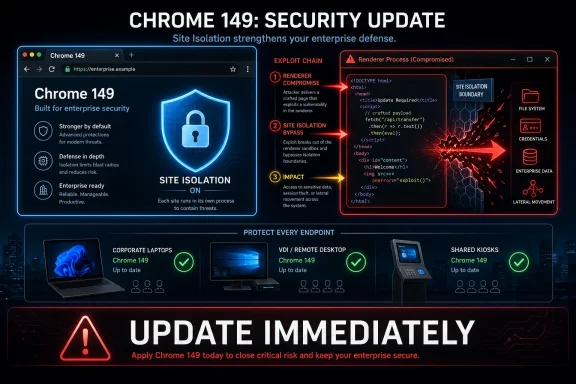
That sequence matters. Chrome’s renderer processes are where web content runs, and site isolation is one of the browser’s most important containment designs. If a malicious page can first get code execution or meaningful control inside a renderer, the next question is whether it can cross boundaries that are supposed to keep one site’s data away from another’s.
CVE-2026-13034 lives in that second stage of the story. It assumes the attacker has already compromised the renderer process, then describes a path to bypass site isolation using a crafted HTML page. That is why the CISA-ADP CVSS score lands at a medium 4.7 even while Chromium labels the issue High: the vulnerability is serious, but it is part of an exploit chain rather than the whole chain by itself.
For Windows users and IT shops, the practical takeaway is not to downgrade the issue because it needs a prior compromise. Browser attacks are routinely chained. A memory corruption bug, a JavaScript engine flaw, a GPU issue, or a sandbox escape-adjacent primitive can become much more valuable when paired with a second bug that weakens site isolation.
That surrounding context is important because enterprise patching is often driven by the headline CVE. A critical WebGL use-after-free will naturally draw attention faster than an “inappropriate implementation” issue in Passwords. But the June update was a cluster of browser-hardening work across WebGL, Blink, Autofill, GPU, Web Authentication, Bluetooth, FileSystem, WebView, and password handling.
That spread tells its own story. Chrome is no longer a single application in the old desktop sense; it is a platform containing graphics stacks, identity flows, authentication APIs, storage systems, credential brokers, and web app runtimes. Every one of those pieces has enough privilege, parsing complexity, or cross-origin exposure to matter.
The version number also deserves precision. NVD identifies Chrome before 149.0.7827.197 as affected for this CVE, while Google’s desktop advisory lists 149.0.7827.196/197 for Windows and Mac and 149.0.7827.196 for Linux. That apparent split is normal in Chrome release practice, but it can complicate vulnerability management dashboards that expect one neat fixed version across every operating system.
The web’s same-origin policy has always been a conceptual foundation, but modern browser isolation makes it an operating reality. When a renderer is compromised, the browser should still prevent that renderer from freely reading cross-site documents, cookies, tokens, or sensitive content that belongs elsewhere. Site isolation turns a renderer bug from a potentially sprawling data breach into a more contained incident.
That is why a bypass sounds bureaucratic but matters operationally. A site isolation bypass does not need to be flashy to be valuable. If an exploit chain can move from “I control this renderer” to “I can observe or influence data across boundaries,” the attacker has moved closer to the assets users and companies actually care about.
This is also where the Passwords component name becomes more interesting. Credential features sit at the junction of identity, origin, UI trust, and user intent. Even if the public description does not say saved passwords can be dumped, a flaw in that area that contributes to origin confusion or site isolation bypass naturally sits in a sensitive part of the browser.
But browser vulnerabilities often work less like isolated server bugs and more like Lego bricks. A single issue may not execute arbitrary code, escape the sandbox, steal secrets, or persist on the machine. Put it beside another bug, however, and it may become the missing step that turns a crash into a compromise or a renderer foothold into a cross-site data exposure.
The SSVC data currently says there is no known exploitation, the issue is not automatable, and the technical impact is partial. Those are all reassuring signals, but they are not an invitation to wait out the patch. “No known exploitation” is not the same as “not exploitable,” especially when bug details remain restricted until enough users have updated.
Google’s standard restriction language exists for a reason. Browser vendors often withhold technical details because disclosure itself can shorten the path from patch diff to working exploit. The moment a fix ships, attackers can compare old and new code, infer the vulnerable path, and try to reproduce the bug before patch adoption is complete.
The user-facing question — “are we missing a CPE here?” — is the kind of thing vulnerability managers see every week. CPEs are necessary plumbing for automated exposure management, but they are blunt instruments when a product ships different fixed builds across channels, platforms, and staged rollouts. Chrome’s update naming does not always align neatly with a single vulnerability database row.
For WindowsForum’s audience, the important point is that Windows itself is not vulnerable to CVE-2026-13034 merely because Windows appears in the CPE configuration. The vulnerable software is Chrome. Windows is listed as an affected operating environment, meaning Chrome running on Windows before the fixed build is in scope.
That distinction matters in patch prioritization meetings. A security team should not open a Windows OS remediation item for this CVE. It should verify Chrome version compliance across managed endpoints, including systems where users installed Chrome outside the standard software deployment path, machines pinned to Extended Stable, kiosk devices, VDI images, and servers where Chrome exists for testing or automation.
Chrome’s sandbox model assumes renderers are dangerous places. They parse untrusted HTML, CSS, JavaScript, images, fonts, WebAssembly, video, graphics commands, and endless API surface. The security architecture tries to make renderer compromise survivable by limiting what the renderer can touch and forcing sensitive operations through brokered, better-defended browser processes.
A bug that weakens post-renderer boundaries is therefore not an academic concern. It attacks the browser’s damage-control system. If the first exploit gets the attacker into the room, a site isolation bypass may help them open doors that were supposed to remain locked.
The crafted HTML page detail reinforces the familiar delivery model. This is not a local privilege escalation requiring hands-on-keyboard access. It is a web content bug class, meaning phishing, malvertising, compromised legitimate sites, and watering-hole attacks remain plausible delivery contexts for the chain that would make this vulnerability useful.
The modern browser knows when a field looks like a username, when a site matches a saved credential, when a passkey ceremony should be offered, when a password may be compromised, and when an enterprise policy should suppress or require certain behavior. Each of those decisions depends on origin correctness. If the browser becomes confused about which site is which, security promises start to erode.
CVE-2026-13034 is classified under CWE-346, an origin validation error. That classification fits the broader concern: not that passwords are magically exposed, but that origin boundaries may be mishandled in a way that contributes to site isolation failure. In browser security, origin is not a label. It is the basis for deciding who gets access to what.
Enterprises that disable Chrome’s built-in password manager may still be affected because the vulnerable code path is in Chrome, not in an optional third-party extension. Conversely, organizations that rely on Chrome’s password and passkey features should avoid panic. The available description does not establish credential theft by itself; it establishes a boundary bypass after renderer compromise.
For Windows users, Microsoft Edge is the obvious question. Edge is not automatically vulnerable to every Chrome CVE in the same way or on the same schedule, because Microsoft carries its own integration work, release cadence, and mitigations. But Edge’s Chromium base means administrators should watch Microsoft’s security release notes and version baselines whenever a Chrome update fixes high-severity renderer, Blink, Autofill, WebAuthn, or site isolation issues.
The practical problem is lag. Google patches Chrome, then downstream Chromium-based browsers pull, test, package, and ship. Sometimes that happens quickly. Sometimes enterprise channels, app stores, vendor QA, or platform-specific integration delay the fix. During that interval, vulnerability managers are stuck mapping a Chrome CVE to products that may not yet have clean advisory language.
This is why “we only use Edge” or “we mostly use Brave” is not a complete answer. The right question is whether the deployed browser build contains the relevant Chromium fix. In managed Windows environments, that means tracking browser version drift with the same seriousness applied to Office, Teams, VPN clients, remote management agents, and endpoint security tools.
Those machines are where a “rolls out over the coming days/weeks” advisory becomes a security operations problem. Google can publish the fix, but it cannot force a reboot of every Windows endpoint, close every lingering browser process, or update every offline laptop. In practice, there is often a gap between installed update and active protection.
Chrome’s version page remains the simplest local verification path for individual users, but fleet management needs something better. Admins should be querying installed browser versions through endpoint management, EDR inventory, software asset tools, or PowerShell-based checks. The goal is not merely to see whether the update package arrived; it is to confirm the running version is no longer vulnerable.
There is a special risk around alternate Chrome installs. A user-installed copy under a profile path, a portable browser used by a developer, a test VM, or a bundled Chromium runtime inside a third-party application may escape normal patch reporting. Security teams that only check the standard Chrome enterprise install path can end up with a false sense of coverage.
The right response is controlled urgency. Move Chrome to the fixed build or later, verify update completion, restart the browser where needed, and check whether Chromium-based alternatives have published corresponding updates. If your environment has browser update deferrals, this is a good moment to ask whether those deferrals are buying meaningful compatibility assurance or merely extending exposure.
Security teams should also resist the temptation to overfit their response to the “Passwords” label. There is no public evidence in the CVE description that attackers can simply steal stored passwords from an unpatched browser. The risk is subtler and arguably more important: a compromised renderer may be able to bypass a boundary that protects cross-site data.
That nuance is worth communicating to help desks and executives. Overstating the bug as “Chrome passwords exposed” creates panic and later distrust. Understating it as “medium score, no action” ignores how browser exploit chains actually work. The honest message is that Chrome fixed a high-severity boundary issue and users should be on the fixed release.
That is why site isolation bugs should be discussed alongside identity protections, not just browser patch SLAs. Conditional access, phishing-resistant MFA, passkeys, device compliance, session controls, and browser hardening are part of the same defensive mesh. If one layer fails, the others determine whether the incident becomes a nuisance or a breach.
Chrome’s password and authentication-adjacent components will keep receiving scrutiny because they sit at the intersection of user convenience and account security. Autofill must be helpful without being gullible. Password prompts must recognize sites without leaking secrets. Passkey flows must preserve origin guarantees. Device-bound credentials must resist theft without breaking legitimate roaming and recovery scenarios.
CVE-2026-13034 is a small public window into that complexity. The visible facts are limited, but the architectural lesson is broad: the browser’s identity features are only as trustworthy as the origin and isolation machinery beneath them.
 The Passwords Bug Is Really a Boundary Bug
The component name is what first grabs attention. “Passwords” sounds like saved credentials, autofill prompts, sync state, and the uncomfortable possibility that a malicious site could reach into Chrome’s password vault. But the public description points somewhere more structural: a renderer compromise followed by a site isolation bypass.That sequence matters. Chrome’s renderer processes are where web content runs, and site isolation is one of the browser’s most important containment designs. If a malicious page can first get code execution or meaningful control inside a renderer, the next question is whether it can cross boundaries that are supposed to keep one site’s data away from another’s.
CVE-2026-13034 lives in that second stage of the story. It assumes the attacker has already compromised the renderer process, then describes a path to bypass site isolation using a crafted HTML page. That is why the CISA-ADP CVSS score lands at a medium 4.7 even while Chromium labels the issue High: the vulnerability is serious, but it is part of an exploit chain rather than the whole chain by itself.
For Windows users and IT shops, the practical takeaway is not to downgrade the issue because it needs a prior compromise. Browser attacks are routinely chained. A memory corruption bug, a JavaScript engine flaw, a GPU issue, or a sandbox escape-adjacent primitive can become much more valuable when paired with a second bug that weakens site isolation.
Chrome 149’s June Patch Cadence Was Not Quiet
Google’s June 23 Stable Channel update moved Chrome to 149.0.7827.196/197 for Windows and macOS and 149.0.7827.196 for Linux, with the rollout staged over the usual coming days and weeks. The update included 18 security fixes, several of them rated Critical or High, and CVE-2026-13034 sat in the latter group.That surrounding context is important because enterprise patching is often driven by the headline CVE. A critical WebGL use-after-free will naturally draw attention faster than an “inappropriate implementation” issue in Passwords. But the June update was a cluster of browser-hardening work across WebGL, Blink, Autofill, GPU, Web Authentication, Bluetooth, FileSystem, WebView, and password handling.
That spread tells its own story. Chrome is no longer a single application in the old desktop sense; it is a platform containing graphics stacks, identity flows, authentication APIs, storage systems, credential brokers, and web app runtimes. Every one of those pieces has enough privilege, parsing complexity, or cross-origin exposure to matter.
The version number also deserves precision. NVD identifies Chrome before 149.0.7827.197 as affected for this CVE, while Google’s desktop advisory lists 149.0.7827.196/197 for Windows and Mac and 149.0.7827.196 for Linux. That apparent split is normal in Chrome release practice, but it can complicate vulnerability management dashboards that expect one neat fixed version across every operating system.
Site Isolation Is the Browser’s Blast Door
Site isolation is one of those technologies most users never see and most administrators only notice when a compatibility issue appears. Its purpose is straightforward: keep pages from different sites in separate processes so a compromise in one renderer does not automatically expose data from another origin. In a world where users keep email, SSO dashboards, cloud consoles, admin portals, HR systems, and banking tabs open simultaneously, that boundary is not optional.The web’s same-origin policy has always been a conceptual foundation, but modern browser isolation makes it an operating reality. When a renderer is compromised, the browser should still prevent that renderer from freely reading cross-site documents, cookies, tokens, or sensitive content that belongs elsewhere. Site isolation turns a renderer bug from a potentially sprawling data breach into a more contained incident.
That is why a bypass sounds bureaucratic but matters operationally. A site isolation bypass does not need to be flashy to be valuable. If an exploit chain can move from “I control this renderer” to “I can observe or influence data across boundaries,” the attacker has moved closer to the assets users and companies actually care about.
This is also where the Passwords component name becomes more interesting. Credential features sit at the junction of identity, origin, UI trust, and user intent. Even if the public description does not say saved passwords can be dumped, a flaw in that area that contributes to origin confusion or site isolation bypass naturally sits in a sensitive part of the browser.
The Medium Score Hides a High-Value Exploit Role
CVSS is useful, but it can flatten browser risk into misleading simplicity. CVE-2026-13034’s CISA-ADP vector requires network access, low attack complexity, no privileges, and user interaction, with changed scope and low confidentiality impact. That produces a medium score, and from a strict scoring perspective, that is defensible.But browser vulnerabilities often work less like isolated server bugs and more like Lego bricks. A single issue may not execute arbitrary code, escape the sandbox, steal secrets, or persist on the machine. Put it beside another bug, however, and it may become the missing step that turns a crash into a compromise or a renderer foothold into a cross-site data exposure.
The SSVC data currently says there is no known exploitation, the issue is not automatable, and the technical impact is partial. Those are all reassuring signals, but they are not an invitation to wait out the patch. “No known exploitation” is not the same as “not exploitable,” especially when bug details remain restricted until enough users have updated.
Google’s standard restriction language exists for a reason. Browser vendors often withhold technical details because disclosure itself can shorten the path from patch diff to working exploit. The moment a fix ships, attackers can compare old and new code, infer the vulnerable path, and try to reproduce the bug before patch adoption is complete.
Windows Administrators Have a CPE Problem, Not Just a Chrome Problem
The NVD entry’s CPE configuration is likely to make vulnerability scanners noisy before it makes them smart. NVD lists Chrome versions up to but excluding 149.0.7827.197 and then ties that application condition to operating systems including Microsoft Windows, Linux, and Apple macOS. That helps describe affected platforms, but it can also produce confusing inventory output if a scanner or asset system treats the OS condition too literally or fails to map Chrome’s installed version cleanly.The user-facing question — “are we missing a CPE here?” — is the kind of thing vulnerability managers see every week. CPEs are necessary plumbing for automated exposure management, but they are blunt instruments when a product ships different fixed builds across channels, platforms, and staged rollouts. Chrome’s update naming does not always align neatly with a single vulnerability database row.
For WindowsForum’s audience, the important point is that Windows itself is not vulnerable to CVE-2026-13034 merely because Windows appears in the CPE configuration. The vulnerable software is Chrome. Windows is listed as an affected operating environment, meaning Chrome running on Windows before the fixed build is in scope.
That distinction matters in patch prioritization meetings. A security team should not open a Windows OS remediation item for this CVE. It should verify Chrome version compliance across managed endpoints, including systems where users installed Chrome outside the standard software deployment path, machines pinned to Extended Stable, kiosk devices, VDI images, and servers where Chrome exists for testing or automation.
The Renderer Compromise Assumption Is Not Comforting
Some readers will see “attacker who had compromised the renderer process” and mentally file CVE-2026-13034 under secondary risk. That is understandable, but it is also how browser compromises get underestimated. The renderer is the part of the browser most directly exposed to hostile web content, and compromising it is precisely the first milestone many browser exploit chains are built to achieve.Chrome’s sandbox model assumes renderers are dangerous places. They parse untrusted HTML, CSS, JavaScript, images, fonts, WebAssembly, video, graphics commands, and endless API surface. The security architecture tries to make renderer compromise survivable by limiting what the renderer can touch and forcing sensitive operations through brokered, better-defended browser processes.
A bug that weakens post-renderer boundaries is therefore not an academic concern. It attacks the browser’s damage-control system. If the first exploit gets the attacker into the room, a site isolation bypass may help them open doors that were supposed to remain locked.
The crafted HTML page detail reinforces the familiar delivery model. This is not a local privilege escalation requiring hands-on-keyboard access. It is a web content bug class, meaning phishing, malvertising, compromised legitimate sites, and watering-hole attacks remain plausible delivery contexts for the chain that would make this vulnerability useful.
Password Managers Are Now Browser Security Infrastructure
Chrome’s password manager used to feel like a convenience feature. Today it is part of a much broader identity surface that includes autofill, passkeys, device-bound session credentials, WebAuthn, sync, account state, enterprise policies, and increasingly aggressive anti-phishing protections. That makes password-related browser bugs more significant than their old “form filler” reputation suggests.The modern browser knows when a field looks like a username, when a site matches a saved credential, when a passkey ceremony should be offered, when a password may be compromised, and when an enterprise policy should suppress or require certain behavior. Each of those decisions depends on origin correctness. If the browser becomes confused about which site is which, security promises start to erode.
CVE-2026-13034 is classified under CWE-346, an origin validation error. That classification fits the broader concern: not that passwords are magically exposed, but that origin boundaries may be mishandled in a way that contributes to site isolation failure. In browser security, origin is not a label. It is the basis for deciding who gets access to what.
Enterprises that disable Chrome’s built-in password manager may still be affected because the vulnerable code path is in Chrome, not in an optional third-party extension. Conversely, organizations that rely on Chrome’s password and passkey features should avoid panic. The available description does not establish credential theft by itself; it establishes a boundary bypass after renderer compromise.
Edge, Chromium, and the Patch Lag Nobody Likes to Discuss
Chrome’s CVE disclosures often matter beyond Chrome because Chromium is the foundation for Microsoft Edge, Brave, Vivaldi, Opera, and a long tail of embedded browsers and application webviews. The NVD entry names Google Chrome, and the Google advisory is for Chrome. But the underlying issue sits in Chromium code, which means downstream consumers need to evaluate whether they inherited the vulnerable component and whether their patched builds have landed.For Windows users, Microsoft Edge is the obvious question. Edge is not automatically vulnerable to every Chrome CVE in the same way or on the same schedule, because Microsoft carries its own integration work, release cadence, and mitigations. But Edge’s Chromium base means administrators should watch Microsoft’s security release notes and version baselines whenever a Chrome update fixes high-severity renderer, Blink, Autofill, WebAuthn, or site isolation issues.
The practical problem is lag. Google patches Chrome, then downstream Chromium-based browsers pull, test, package, and ship. Sometimes that happens quickly. Sometimes enterprise channels, app stores, vendor QA, or platform-specific integration delay the fix. During that interval, vulnerability managers are stuck mapping a Chrome CVE to products that may not yet have clean advisory language.
This is why “we only use Edge” or “we mostly use Brave” is not a complete answer. The right question is whether the deployed browser build contains the relevant Chromium fix. In managed Windows environments, that means tracking browser version drift with the same seriousness applied to Office, Teams, VPN clients, remote management agents, and endpoint security tools.
The Quiet Machines Are Usually the Ones Still Exposed
Consumer Chrome updates are famously aggressive, but enterprise reality is messier. Some users keep browsers open for weeks. Some managed environments defer updates for compatibility testing. Some VDI pools refresh from stale gold images. Some kiosks run in locked-down shells where update services are disabled by accident or design. Some application owners freeze browser versions because a business-critical portal breaks on newer builds.Those machines are where a “rolls out over the coming days/weeks” advisory becomes a security operations problem. Google can publish the fix, but it cannot force a reboot of every Windows endpoint, close every lingering browser process, or update every offline laptop. In practice, there is often a gap between installed update and active protection.
Chrome’s version page remains the simplest local verification path for individual users, but fleet management needs something better. Admins should be querying installed browser versions through endpoint management, EDR inventory, software asset tools, or PowerShell-based checks. The goal is not merely to see whether the update package arrived; it is to confirm the running version is no longer vulnerable.
There is a special risk around alternate Chrome installs. A user-installed copy under a profile path, a portable browser used by a developer, a test VM, or a bundled Chromium runtime inside a third-party application may escape normal patch reporting. Security teams that only check the standard Chrome enterprise install path can end up with a false sense of coverage.
The Best Response Is Boring, Which Is Why It Works
There is no public exploit code in the available mainstream advisory trail, and the CISA-ADP enrichment does not indicate known exploitation. That argues against emergency theatrics. It does not argue against prompt patching.The right response is controlled urgency. Move Chrome to the fixed build or later, verify update completion, restart the browser where needed, and check whether Chromium-based alternatives have published corresponding updates. If your environment has browser update deferrals, this is a good moment to ask whether those deferrals are buying meaningful compatibility assurance or merely extending exposure.
Security teams should also resist the temptation to overfit their response to the “Passwords” label. There is no public evidence in the CVE description that attackers can simply steal stored passwords from an unpatched browser. The risk is subtler and arguably more important: a compromised renderer may be able to bypass a boundary that protects cross-site data.
That nuance is worth communicating to help desks and executives. Overstating the bug as “Chrome passwords exposed” creates panic and later distrust. Understating it as “medium score, no action” ignores how browser exploit chains actually work. The honest message is that Chrome fixed a high-severity boundary issue and users should be on the fixed release.
This Patch Belongs in the Identity Risk Conversation
The browser has become the front door to corporate identity. Users authenticate to Microsoft 365, Google Workspace, Okta, GitHub, Salesforce, Azure, AWS, internal dashboards, and privileged admin consoles through web sessions that often live far longer than the login moment. Attackers do not always need the password if they can steal the session, abuse token-bearing pages, or trick the browser into crossing origin boundaries.That is why site isolation bugs should be discussed alongside identity protections, not just browser patch SLAs. Conditional access, phishing-resistant MFA, passkeys, device compliance, session controls, and browser hardening are part of the same defensive mesh. If one layer fails, the others determine whether the incident becomes a nuisance or a breach.
Chrome’s password and authentication-adjacent components will keep receiving scrutiny because they sit at the intersection of user convenience and account security. Autofill must be helpful without being gullible. Password prompts must recognize sites without leaking secrets. Passkey flows must preserve origin guarantees. Device-bound credentials must resist theft without breaking legitimate roaming and recovery scenarios.
CVE-2026-13034 is a small public window into that complexity. The visible facts are limited, but the architectural lesson is broad: the browser’s identity features are only as trustworthy as the origin and isolation machinery beneath them.
The June 24 Entry Leaves Administrators With a Practical Checklist
The cleanest reading of CVE-2026-13034 is that it is a high-severity Chrome issue with medium standalone scoring, meaningful exploit-chain value, and a straightforward mitigation: update. The awkward part is not deciding whether to patch. The awkward part is proving every endpoint, every browser channel, and every Chromium-derived deployment has actually crossed the fixed-version line.- Chrome installations older than 149.0.7827.197 should be treated as exposed for CVE-2026-13034 on Windows and macOS according to the NVD affected-version language.
- Google’s June 23 desktop update shipped 18 security fixes and moved Stable to 149.0.7827.196/197 on Windows and Mac and 149.0.7827.196 on Linux.
- The bug requires a prior renderer compromise, so it is best understood as an exploit-chain component rather than a standalone drive-by compromise.
- The public description does not prove saved-password theft, but it does point to an origin and site-isolation boundary problem in a sensitive browser area.
- Vulnerability teams should map the Chrome CPE carefully and avoid treating the Windows operating system itself as the vulnerable product.
- Administrators should check Chromium-based browsers and embedded Chromium runtimes separately instead of assuming Chrome’s patch status covers the whole fleet.
References
- Primary source: NVD / Chromium
Published: 2026-06-26T17:46:41-07:00
NVD - CVE-2026-13034
 nvd.nist.gov
- Security advisory: MSRC
Published: 2026-06-26T17:46:41-07:00
Original feed URL
Security Update Guide - Microsoft Security Response Center
 msrc.microsoft.com
