

Microsoft’s CVE-2026-50521 advisory for Microsoft Edge, published in late June and updated around July 1, 2026, describes a high-severity Chromium-based remote code execution flaw and tells customers to install every update package offered for the Edge software present on their systems. That small “yes” in the advisory is doing more work than it first appears. It is Microsoft’s way of saying that Edge is no longer a single browser binary to be patched once, but a managed software surface spread across channels, installers, components, and enterprise deployment paths. For administrators, the correct response is not to hunt for the one “real” package; it is to close every Edge-shaped gap the update table exposes.
CVE-2026-50521 is the kind of vulnerability that looks routine until you ask what “routine” now means. The public description identifies it as a use-after-free issue in Microsoft Edge, Chromium-based, with the potential for code execution over a network by an authorized attacker. Its CVSS score, reported as 8.3 and rated high, puts it below the panic tier of wormable Windows server bugs but well above the noise floor of ordinary browser housekeeping.
The important word is not just remote. It is browser. Edge sits at the boundary between trusted enterprise identity and hostile web content, between signed-in Microsoft 365 sessions and arbitrary JavaScript, between endpoint management policy and whatever link a user clicks at 4:55 p.m. on a Friday. A memory safety bug in that space does not need to become the next global incident to deserve urgency.
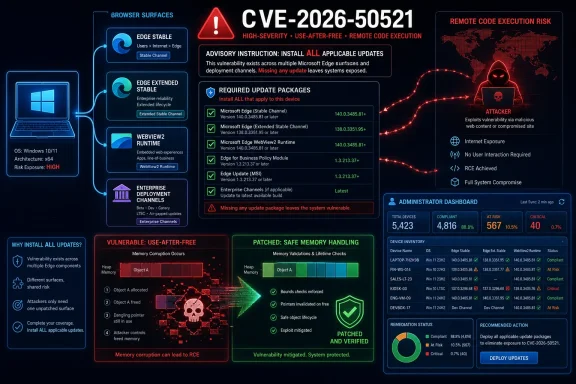
Microsoft’s advisory answer to the update-package question is blunt: install all updates offered for the affected software installed on the system. That answer exists because the Security Updates table can show more than one package for the same named product, and because modern Edge deployments are not uniform. A home PC, an enterprise image, a server used for admin portals, and a kiosk running a locked-down browser shell may all say “Microsoft Edge,” while receiving, staging, and validating updates differently.
The lazy reading is that Microsoft is covering itself. The more useful reading is that the advisory is forcing administrators back to first principles: patch what is actually installed, not what you assume is installed.
That distinction matters in the real world because Edge is often present in more places than asset owners remember. Windows 10 and Windows 11 systems ship with Edge. Administrators may also install Edge WebView2 Runtime for applications that embed web content. Test machines may carry Beta, Dev, or Canary channels. Servers may have Edge present for management workflows even if nobody thinks of them as browsing machines.
The advisory’s wording is also a quiet warning against a common enterprise habit: treating the first successfully installed update as proof of remediation. That approach works poorly when one product family has several independently serviced pieces. If the Security Updates table says multiple packages apply to software you actually have, installing one and ignoring the rest can leave a vulnerable component behind.
This is why vulnerability scanners sometimes appear to “disagree” with patch tools after a browser update. The patch tool may have deployed the package it knew about, while the scanner is still seeing an older Edge channel, an unused runtime, or a side-by-side install. In that case, the scanner is not being pedantic. It may be finding the very fragmentation Microsoft’s advisory is trying to make visible.
That cadence is good for security but awkward for governance. Enterprises built years of muscle memory around monthly operating-system patch windows, pilot rings, and cumulative updates. Browsers did not wait for that world to be comfortable. They became high-frequency application platforms with their own urgent release cycles, and Edge inherited that tempo.
CVE-2026-50521 illustrates the operational consequence. A Windows machine can be fully patched by the standards of the monthly OS rollup and still require a browser-specific update. Conversely, an Edge update can ship in the middle of a month, with the browser becoming the most urgent software on the endpoint even while Windows itself looks calm.
This is where Microsoft’s “all updates” answer should be read as an administrative instruction, not a footnote. Edge is not merely a Windows feature anymore. It is a Chromium-based application with Microsoft integration, Windows distribution, enterprise policy hooks, and its own security release stream. Treating it as a passive accessory to Windows Update is how organizations end up surprised.
The public description for CVE-2026-50521 is sparse, as vulnerability advisories often are before broad patch adoption. That sparseness should not be mistaken for insignificance. Browser vendors routinely limit technical detail early in a patch cycle because exploit developers read advisories too, and a concise description can still be enough to signal where defenders should focus.
A “remote code execution” label does not automatically mean drive-by compromise of every unpatched machine under every condition. The advisory’s phrasing includes an authorized attacker, and exploitation details may depend on Edge’s sandboxing, user interaction, renderer process constraints, or additional bug chains. But defenders do not get paid to assume the best possible interpretation of a memory corruption flaw in a browser.
The right mental model is simple: a browser memory bug is valuable because the browser is exposed. Even when sandboxing limits the initial blast radius, attackers have repeatedly combined browser bugs with escape techniques, credential theft, malicious extensions, or social engineering. The patch is not just closing a theoretical code path; it is reducing the number of opportunities an attacker can chain.
That variety is useful. Enterprises can test policy changes before they hit production, developers can target modern web capabilities, and line-of-business apps can rely on a consistent embedded web runtime. But every additional channel or runtime becomes another place where version drift can hide.
This is especially relevant for WindowsForum readers who maintain mixed fleets. A small business may have Windows 11 laptops, Windows 10 holdouts, RDS hosts, Intune-managed devices, and unmanaged contractor machines. Each can carry a different Edge servicing story. The advisory’s “install all” answer is a reminder that the fleet is the unit of security, not the neat product name in the CVE headline.
For admins, that means inventory must answer more than “is Edge installed?” It must answer which Edge channels are installed, which versions are running, whether WebView2 is present, whether update services are healthy, whether policy has disabled automatic updates, and whether security tooling is looking at the same evidence as patch management.
Enterprise reality is messier. Update policies may defer browser updates. Network controls may block update endpoints. Golden images may carry stale versions. Non-persistent VDI environments may revert updates after reboot. Users may keep browser sessions open for days, preventing the final restart that actually places the patched code in service.
That last point is more than an annoyance. Browser patching often has a two-step character: the update downloads, then the running process must be replaced. If a user never restarts Edge, the installed version reported on disk may not fully reflect what is executing in memory. Security teams that measure only package deployment can miss that gap.
This is why administrators should pair deployment with enforcement. Policies can force a relaunch after an update grace period. Endpoint management tools can report browser versions. Vulnerability scanners can verify the runtime state after patch windows. None of those steps is glamorous, but browser security has become a discipline of boring completion.
A server with Edge installed “just in case” may not be used for casual browsing, but it may be used to open vendor portals, cloud consoles, firewall dashboards, or internal admin tools. Those are precisely the sessions attackers would love to reach. The browser on that box may carry privileged cookies, certificate trust, saved credentials, or access to management networks.
Kiosks and locked-down devices present a different risk. They may run a constrained Edge shell with assigned access or custom policy, but they still depend on the underlying browser engine. A kiosk that cannot navigate freely is not automatically immune to content-rendering bugs, especially if it loads remote pages, signage dashboards, identity flows, or third-party widgets.
Then there is WebView2. Many users never launch Edge directly but still run applications that embed web content through Microsoft’s runtime. If defenders focus only on the visible browser, they may miss the embedded browser surface sitting inside business applications. Microsoft’s “all applicable updates” language is especially relevant in that world.
That mismatch shows up in patch timing. A high-severity browser RCE should not wait behind a quarterly desktop refresh process. It should move through an accelerated ring model: test quickly, deploy broadly, verify aggressively, and force relaunch where necessary. The acceptable delay for a browser memory bug is measured in days, not in “next maintenance cycle” abstractions.
It also shows up in ownership. Desktop engineering may own the installer. Security may own the vulnerability. Identity may own browser sign-in policy. Application teams may own WebView2 dependencies. If nobody owns the full chain, a CVE like this becomes a meeting rather than a patch.
Microsoft’s advisory answer cuts through that bureaucracy. If the affected software is installed and the update is offered, install it. The rest of the organization can argue about process improvements after the vulnerable code is gone.
That means paying attention to version, channel, architecture, and servicing source. A 64-bit Edge Stable deployment is not the same operational object as an Extended Stable deployment. A WebView2 runtime maintained by one application installer may not update the way a system-level runtime does. A machine managed by Intune may behave differently from one managed by Configuration Manager, WSUS, or a third-party patching tool.
The table also matters for exceptions. If a scanner flags CVE-2026-50521 on a device after the main Edge update, the answer is not necessarily “false positive.” It may be that another Edge component remains behind. Before suppressing the finding, administrators should confirm the installed channels and runtimes, check the reported file versions, and verify that the machine has restarted the relevant browser processes.
This is unglamorous work, but it is where security outcomes are won. Attackers do not need the average endpoint to be unpatched. They need the forgotten subset, the stale channel, the application runtime nobody inventoried, or the machine whose update service has been broken since an image was captured.
That integration has benefits. A managed Edge deployment can enforce phishing protections, isolate risky sessions, synchronize enterprise settings, respect data-loss prevention controls, and provide policy surfaces Chrome does not expose in the same Microsoft-native way. For organizations already invested in Microsoft’s management stack, Edge can be the browser of least resistance.
But integration also increases the cost of neglect. A vulnerable browser tied into identity and productivity workflows is not an isolated consumer app. It is a route into the workday. When a CVE lands, the question is not whether users “browse the web”; it is whether the browser engine touches the services and data the organization cares about.
This is why CVE-2026-50521 should not be dismissed as just another browser CVE in a long sequence of browser CVEs. The repetition is the point. Browser memory safety bugs are a permanent tax on modern computing, and the only winning strategy is to make patch application fast enough that each individual bug has less time to matter.
Verification should start with Edge’s reported version but not end there. Administrators should examine installed applications, browser channels, WebView2 runtime versions, update service health, and running processes. They should reconcile endpoint management data with vulnerability scanner results and investigate mismatches instead of assuming one tool is authoritative.
The uncomfortable truth is that browser updates can be both easy and slippery. They are easy because vendors have built mature auto-update systems. They are slippery because users keep sessions alive, enterprise policies interfere, and shadow deployments accumulate. A single “success” count in a deployment dashboard can hide those edge cases.
For regulated environments, this matters beyond technical risk. Auditors increasingly expect evidence that vulnerabilities were remediated, not merely that a patch was approved. CVE-2026-50521 gives administrators a clean example of why evidence must include applicability. If multiple update packages were listed and only one was deployed, the organization needs to explain why the others did not apply.
 Microsoft Turns a Browser Patch Into an Inventory Test
CVE-2026-50521 is the kind of vulnerability that looks routine until you ask what “routine” now means. The public description identifies it as a use-after-free issue in Microsoft Edge, Chromium-based, with the potential for code execution over a network by an authorized attacker. Its CVSS score, reported as 8.3 and rated high, puts it below the panic tier of wormable Windows server bugs but well above the noise floor of ordinary browser housekeeping.The important word is not just remote. It is browser. Edge sits at the boundary between trusted enterprise identity and hostile web content, between signed-in Microsoft 365 sessions and arbitrary JavaScript, between endpoint management policy and whatever link a user clicks at 4:55 p.m. on a Friday. A memory safety bug in that space does not need to become the next global incident to deserve urgency.
Microsoft’s advisory answer to the update-package question is blunt: install all updates offered for the affected software installed on the system. That answer exists because the Security Updates table can show more than one package for the same named product, and because modern Edge deployments are not uniform. A home PC, an enterprise image, a server used for admin portals, and a kiosk running a locked-down browser shell may all say “Microsoft Edge,” while receiving, staging, and validating updates differently.
The lazy reading is that Microsoft is covering itself. The more useful reading is that the advisory is forcing administrators back to first principles: patch what is actually installed, not what you assume is installed.
The “All Updates” Instruction Is About Coverage, Not Redundancy
When Microsoft says to apply all applicable updates, it is not usually asking customers to install duplicate fixes for sport. It is acknowledging that the update catalog is a map of affected servicing paths. One entry may apply to Stable Channel, another to Extended Stable, another to a platform-specific package, and another to an enterprise deployment mechanism that does not move in lockstep with consumer auto-update.That distinction matters in the real world because Edge is often present in more places than asset owners remember. Windows 10 and Windows 11 systems ship with Edge. Administrators may also install Edge WebView2 Runtime for applications that embed web content. Test machines may carry Beta, Dev, or Canary channels. Servers may have Edge present for management workflows even if nobody thinks of them as browsing machines.
The advisory’s wording is also a quiet warning against a common enterprise habit: treating the first successfully installed update as proof of remediation. That approach works poorly when one product family has several independently serviced pieces. If the Security Updates table says multiple packages apply to software you actually have, installing one and ignoring the rest can leave a vulnerable component behind.
This is why vulnerability scanners sometimes appear to “disagree” with patch tools after a browser update. The patch tool may have deployed the package it knew about, while the scanner is still seeing an older Edge channel, an unused runtime, or a side-by-side install. In that case, the scanner is not being pedantic. It may be finding the very fragmentation Microsoft’s advisory is trying to make visible.
Chromium Made Edge Faster to Patch and Harder to Reason About
The Chromium move gave Microsoft a browser that could keep pace with the dominant engine of the modern web. It also moved Edge into a release culture where security fixes often arrive outside the old Patch Tuesday rhythm. Microsoft’s Edge security release notes have repeatedly shown Stable and Extended Stable updates landing as separate events, often incorporating upstream Chromium fixes and sometimes addressing Edge-specific vulnerabilities.That cadence is good for security but awkward for governance. Enterprises built years of muscle memory around monthly operating-system patch windows, pilot rings, and cumulative updates. Browsers did not wait for that world to be comfortable. They became high-frequency application platforms with their own urgent release cycles, and Edge inherited that tempo.
CVE-2026-50521 illustrates the operational consequence. A Windows machine can be fully patched by the standards of the monthly OS rollup and still require a browser-specific update. Conversely, an Edge update can ship in the middle of a month, with the browser becoming the most urgent software on the endpoint even while Windows itself looks calm.
This is where Microsoft’s “all updates” answer should be read as an administrative instruction, not a footnote. Edge is not merely a Windows feature anymore. It is a Chromium-based application with Microsoft integration, Windows distribution, enterprise policy hooks, and its own security release stream. Treating it as a passive accessory to Windows Update is how organizations end up surprised.
Use-After-Free Bugs Are the Browser World’s Old Enemy
A use-after-free vulnerability is a memory-management failure in which software continues to use a pointer to memory after that memory has been released. In browser engines, that class of bug has a long and uncomfortable history because browsers constantly create, destroy, and rearrange objects while parsing pages, running scripts, decoding media, and rendering complex interfaces.The public description for CVE-2026-50521 is sparse, as vulnerability advisories often are before broad patch adoption. That sparseness should not be mistaken for insignificance. Browser vendors routinely limit technical detail early in a patch cycle because exploit developers read advisories too, and a concise description can still be enough to signal where defenders should focus.
A “remote code execution” label does not automatically mean drive-by compromise of every unpatched machine under every condition. The advisory’s phrasing includes an authorized attacker, and exploitation details may depend on Edge’s sandboxing, user interaction, renderer process constraints, or additional bug chains. But defenders do not get paid to assume the best possible interpretation of a memory corruption flaw in a browser.
The right mental model is simple: a browser memory bug is valuable because the browser is exposed. Even when sandboxing limits the initial blast radius, attackers have repeatedly combined browser bugs with escape techniques, credential theft, malicious extensions, or social engineering. The patch is not just closing a theoretical code path; it is reducing the number of opportunities an attacker can chain.
The Endpoint Is Now a Stack of Browsers Wearing Different Badges
One reason the update table can feel confusing is that “Edge” no longer means only the icon on the taskbar. Edge Stable is the user-facing browser most people recognize. Edge Extended Stable exists for organizations that want a slower feature cadence. Edge WebView2 Runtime underpins desktop apps that render web content through Microsoft’s browser engine. Preview channels may exist for developers or IT validation.That variety is useful. Enterprises can test policy changes before they hit production, developers can target modern web capabilities, and line-of-business apps can rely on a consistent embedded web runtime. But every additional channel or runtime becomes another place where version drift can hide.
This is especially relevant for WindowsForum readers who maintain mixed fleets. A small business may have Windows 11 laptops, Windows 10 holdouts, RDS hosts, Intune-managed devices, and unmanaged contractor machines. Each can carry a different Edge servicing story. The advisory’s “install all” answer is a reminder that the fleet is the unit of security, not the neat product name in the CVE headline.
For admins, that means inventory must answer more than “is Edge installed?” It must answer which Edge channels are installed, which versions are running, whether WebView2 is present, whether update services are healthy, whether policy has disabled automatic updates, and whether security tooling is looking at the same evidence as patch management.
Auto-Update Is a Safety Net, Not a Compliance Strategy
For consumers, Edge’s built-in update mechanism often does the right thing quietly. The browser checks for updates, stages them, and applies them when Edge restarts. In a home environment, the practical advice is usually to open Edge’s About page, let the update complete, and restart the browser.Enterprise reality is messier. Update policies may defer browser updates. Network controls may block update endpoints. Golden images may carry stale versions. Non-persistent VDI environments may revert updates after reboot. Users may keep browser sessions open for days, preventing the final restart that actually places the patched code in service.
That last point is more than an annoyance. Browser patching often has a two-step character: the update downloads, then the running process must be replaced. If a user never restarts Edge, the installed version reported on disk may not fully reflect what is executing in memory. Security teams that measure only package deployment can miss that gap.
This is why administrators should pair deployment with enforcement. Policies can force a relaunch after an update grace period. Endpoint management tools can report browser versions. Vulnerability scanners can verify the runtime state after patch windows. None of those steps is glamorous, but browser security has become a discipline of boring completion.
The Risk Is Highest Where Edge Is Invisible
The most exposed systems are not always the ones with the most browsing. They are often the systems where Edge exists but nobody owns it. Shared admin workstations, help-desk jump boxes, kiosk devices, conference-room PCs, and lightly managed servers can all become patching blind spots.A server with Edge installed “just in case” may not be used for casual browsing, but it may be used to open vendor portals, cloud consoles, firewall dashboards, or internal admin tools. Those are precisely the sessions attackers would love to reach. The browser on that box may carry privileged cookies, certificate trust, saved credentials, or access to management networks.
Kiosks and locked-down devices present a different risk. They may run a constrained Edge shell with assigned access or custom policy, but they still depend on the underlying browser engine. A kiosk that cannot navigate freely is not automatically immune to content-rendering bugs, especially if it loads remote pages, signage dashboards, identity flows, or third-party widgets.
Then there is WebView2. Many users never launch Edge directly but still run applications that embed web content through Microsoft’s runtime. If defenders focus only on the visible browser, they may miss the embedded browser surface sitting inside business applications. Microsoft’s “all applicable updates” language is especially relevant in that world.
Patch Management Needs to Stop Treating Browsers as Desktop Apps
The browser is now closer to an operating-system subsystem than an ordinary productivity app. It handles authentication, renders documents, mediates cloud workflows, stores secrets, executes untrusted code, and exposes enterprise data to the web. Yet many organizations still manage it with the assumptions they use for PDF readers or compression tools.That mismatch shows up in patch timing. A high-severity browser RCE should not wait behind a quarterly desktop refresh process. It should move through an accelerated ring model: test quickly, deploy broadly, verify aggressively, and force relaunch where necessary. The acceptable delay for a browser memory bug is measured in days, not in “next maintenance cycle” abstractions.
It also shows up in ownership. Desktop engineering may own the installer. Security may own the vulnerability. Identity may own browser sign-in policy. Application teams may own WebView2 dependencies. If nobody owns the full chain, a CVE like this becomes a meeting rather than a patch.
Microsoft’s advisory answer cuts through that bureaucracy. If the affected software is installed and the update is offered, install it. The rest of the organization can argue about process improvements after the vulnerable code is gone.
The Security Table Is a Contract With Your Actual Environment
Security Updates tables are easy to skim and surprisingly easy to misuse. They are not merely lists of downloads; they are statements about affected configurations. The administrator’s job is to compare that table against real inventory, not against a mental model of the fleet.That means paying attention to version, channel, architecture, and servicing source. A 64-bit Edge Stable deployment is not the same operational object as an Extended Stable deployment. A WebView2 runtime maintained by one application installer may not update the way a system-level runtime does. A machine managed by Intune may behave differently from one managed by Configuration Manager, WSUS, or a third-party patching tool.
The table also matters for exceptions. If a scanner flags CVE-2026-50521 on a device after the main Edge update, the answer is not necessarily “false positive.” It may be that another Edge component remains behind. Before suppressing the finding, administrators should confirm the installed channels and runtimes, check the reported file versions, and verify that the machine has restarted the relevant browser processes.
This is unglamorous work, but it is where security outcomes are won. Attackers do not need the average endpoint to be unpatched. They need the forgotten subset, the stale channel, the application runtime nobody inventoried, or the machine whose update service has been broken since an image was captured.
Microsoft’s Browser Strategy Raises the Stakes for Windows Shops
Edge is no longer just Microsoft’s answer to Chrome. It is the front end for Microsoft 365, Copilot experiences, enterprise search, cloud management, identity prompts, and increasingly AI-adjacent workflows. Microsoft has every incentive to make Edge a deeper part of the Windows and productivity stack, and that makes Edge security a Windows security issue by another name.That integration has benefits. A managed Edge deployment can enforce phishing protections, isolate risky sessions, synchronize enterprise settings, respect data-loss prevention controls, and provide policy surfaces Chrome does not expose in the same Microsoft-native way. For organizations already invested in Microsoft’s management stack, Edge can be the browser of least resistance.
But integration also increases the cost of neglect. A vulnerable browser tied into identity and productivity workflows is not an isolated consumer app. It is a route into the workday. When a CVE lands, the question is not whether users “browse the web”; it is whether the browser engine touches the services and data the organization cares about.
This is why CVE-2026-50521 should not be dismissed as just another browser CVE in a long sequence of browser CVEs. The repetition is the point. Browser memory safety bugs are a permanent tax on modern computing, and the only winning strategy is to make patch application fast enough that each individual bug has less time to matter.
The Real Test Is Verification After Deployment
Installing the updates is the baseline. Verifying them is the differentiator. Many organizations can push packages; fewer can prove, quickly and at scale, that the vulnerable versions are gone from every relevant place.Verification should start with Edge’s reported version but not end there. Administrators should examine installed applications, browser channels, WebView2 runtime versions, update service health, and running processes. They should reconcile endpoint management data with vulnerability scanner results and investigate mismatches instead of assuming one tool is authoritative.
The uncomfortable truth is that browser updates can be both easy and slippery. They are easy because vendors have built mature auto-update systems. They are slippery because users keep sessions alive, enterprise policies interfere, and shadow deployments accumulate. A single “success” count in a deployment dashboard can hide those edge cases.
For regulated environments, this matters beyond technical risk. Auditors increasingly expect evidence that vulnerabilities were remediated, not merely that a patch was approved. CVE-2026-50521 gives administrators a clean example of why evidence must include applicability. If multiple update packages were listed and only one was deployed, the organization needs to explain why the others did not apply.
The Practical Answer Is Smaller Than the Operational Lesson
The immediate answer to the advisory’s question is simple: yes, install every update package offered for the affected Edge software actually installed on your systems. The broader lesson is that Edge patching needs to be treated as continuous browser-risk management, not as an occasional Windows housekeeping task.- Organizations should inventory every installed Edge channel and WebView2 runtime before declaring CVE-2026-50521 remediated.
- Administrators should deploy all applicable packages from Microsoft’s Security Updates table rather than choosing a single package that appears to match the product name.
- Endpoint teams should verify that Edge has restarted into the patched version, because downloaded updates do not protect users while vulnerable browser processes continue running.
- Vulnerability findings after deployment should be investigated for stale channels, embedded runtimes, blocked update services, or non-persistent images before being marked as false positives.
- Enterprises should move high-severity browser RCE fixes through an accelerated update process, even when the monthly Windows patch cycle is otherwise quiet.
References
- Primary source: MSRC
Published: 2026-07-02T07:00:00-07:00
Security Update Guide - Microsoft Security Response Center
 msrc.microsoft.com
- Related coverage: stack.watch
- Related coverage: mondoo.com
MICROSOFT-CVE-2026-50521 | Mondoo Vulnerability Intelligence
MICROSOFT-CVE-2026-50521 - HIGH severity: Microsoft Edge (Chromium-based) Remote Code Execution Vulnerabilitymondoo.com - Related coverage: hkcert.org
Microsoft Edge Remote Code Execution Vulnerability
A vulnerability was identified in Microsoft Edge. A remote attacker could exploit this vulnerability to trigger remote code execution on the targeted system.www.hkcert.org - Official source: learn.microsoft.com
Release notes for Microsoft Edge Security Updates | Microsoft Learn
Release notes for Microsoft Edge Security Updateslearn.microsoft.com - Related coverage: radar.offseq.com
CVE-2026-50521: CWE-416: Use After Free in Microsoft Microsoft Edge (Chromium-based) - Live Threat Intelligence - Threat Radar | OffSeq.com
Detailed information about CVE-2026-50521: CWE-416: Use After Free in Microsoft Microsoft Edge (Chromium-based) affecting Microsoft Microsoft Edge (Chromium-basradar.offseq.com

- Related coverage: threats.kaspersky.com
Kaspersky Threats — KLA91012
threats.kaspersky.com
- Related coverage: cve.circl.lu
Vulnerability-Lookup
Vulnerability-Lookup - Fast vulnerability lookup correlation from different sources.cve.circl.lu - Related coverage: www2.gov.bc.ca
- Related coverage: hivepro.com
