

Microsoft is reportedly preparing to merge its consumer and enterprise Copilot applications into a single app by August 2026, while cutting underused features and adding paid AI agents, according to reporting from PYMNTS and The Information on July 2. The move is not just a product cleanup. It is Microsoft admitting that Copilot’s problem is no longer visibility; it is conviction. The assistant is everywhere in Windows, Edge, Office, GitHub, and Microsoft 365, but ubiquity has not yet become loyalty.
For years, Microsoft’s AI strategy has carried a strange contradiction. The company branded nearly everything as Copilot, then forced users to learn which Copilot they were actually using. There was consumer Copilot in Edge and Windows, Microsoft 365 Copilot inside work apps, GitHub Copilot for developers, Copilot Chat, Copilot Studio, and an expanding menu of agentic tools layered across business subscriptions.
That sprawl was not accidental. Microsoft moved quickly because the generative AI market rewarded speed, and because OpenAI’s early lead gave Redmond a rare chance to reframe productivity software before competitors could react. But the result was a familiar Microsoft problem: a powerful platform presented as a maze.
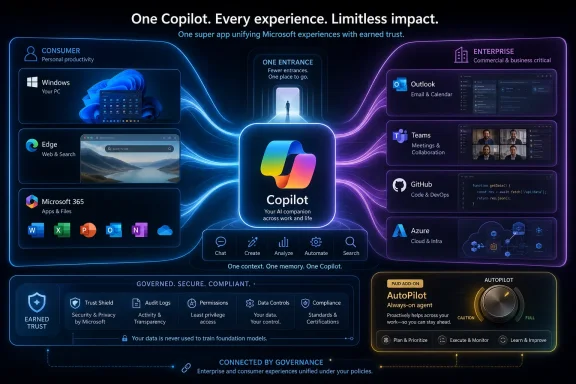
The reported app merger tries to solve that by making Copilot feel less like a set of branded entry points and more like a single assistant that follows the user across contexts. That is the right direction. It is also overdue.
As PYMNTS summarized from The Information’s reporting, Jacob Andreou, the executive now overseeing Copilot, told employees that Microsoft has “stripped out what wasn’t working” and needs Copilot to “earn the right to exist” with customers. That phrase matters because it cuts through the usual AI triumphalism. It suggests Microsoft understands that corporate deployment, desktop placement, and executive demos are not the same as daily usefulness.
Microsoft has every structural advantage an AI productivity vendor could want. It owns the operating system on hundreds of millions of PCs. It owns the dominant office suite. It owns Teams, Outlook, SharePoint, OneDrive, Azure, and GitHub. It has a deep commercial relationship with OpenAI and increasingly its own model ambitions. If any company should be able to turn an assistant into a habit, it is Microsoft.
And yet Copilot has often felt less like one coherent assistant than a set of overlapping invitations. Click here to summarize. Click there to rewrite. Open a sidebar. Use a separate app. Try a new chat pane. Ask a meeting bot. Launch an agent. The user’s experience has been less “one AI that knows my work” than “many AI surfaces that may or may not know what I meant.”
The merger is therefore a strategic retreat from branding abundance. Microsoft is not abandoning Copilot; it is pruning the idea back to something customers might actually understand. That is a subtle but important distinction.
For Windows users, this could mean fewer Copilot fragments scattered across the desktop and more continuity between personal and work sessions. For IT administrators, it raises harder questions: which identity governs the app, which data boundary applies, which tenant policies win, and what happens when a user’s personal AI habits collide with enterprise compliance rules?
A person who uses Copilot to summarize Teams meetings at work is the same person who may use it to plan a weekend trip, rewrite a complaint email, or understand a medical bill at home. PYMNTS Intelligence has argued that workplace AI exposure can spill into personal adoption, and that workers who become familiar with a platform in the office are more likely to use the same assistant outside it. That logic is sound, even if the long-term numbers remain unsettled.
The reverse is also true. A user who prefers ChatGPT, Claude, Gemini, or Perplexity at home will bring those expectations into the office. If Copilot feels slower, more constrained, less capable, or less delightful, Microsoft’s enterprise lock-in can only carry it so far. Employees may comply with corporate AI policy during official work, then route around Copilot whenever the stakes are personal or the workflow is ambiguous.
That is why a unified Copilot app is not merely a convenience feature. It is Microsoft’s attempt to make the assistant itself portable as a habit. The company wants Copilot to become the default interface between a person and their digital life, not just a premium button inside Word.
But portability is dangerous territory. Enterprise customers pay Microsoft partly because it promises control: identity boundaries, audit logs, retention policies, data-loss prevention, eDiscovery, sensitivity labels, and compliance hooks. Consumer users want convenience, memory, personalization, and fewer visible guardrails. A merged app has to reconcile both cultures without making either feel like an afterthought.
Copilot is the company’s next default fight. The difference is that AI assistants are not passive utilities. They answer questions, manipulate documents, inspect calendars, generate code, search files, summarize meetings, and increasingly act on behalf of the user. The default assistant is not just a search box; it is a broker of attention and authority.
That makes the unified app far more consequential than a normal software consolidation. If Microsoft gets it right, Copilot becomes the common front end for Windows, Microsoft 365, GitHub, and Azure-backed automation. If it gets it wrong, users will experience the merger as another layer of Microsoft account confusion, licensing complexity, and intrusive AI furniture.
The company has already learned that presence does not equal affection. Many Windows users have reacted coolly to Copilot buttons, taskbar placements, and AI branding inside apps that once had simpler purposes. Enterprise users are not immune to the same fatigue. A sidebar that produces a useful summary can be welcome; a sidebar that appears because a vendor needs to justify an AI investment is clutter.
This is why feature cuts matter. Removing underused features is the unglamorous part of product discipline, and it is often where platform companies struggle. Microsoft’s instinct is usually to preserve optionality. Copilot now needs taste.
According to PYMNTS’ account of The Information’s reporting, the merged Copilot app would include AI coding tools and new paid agents called AutoPilot, described in the memo as “always-on” agents intended to “automate the mundane.” Those words place Microsoft squarely in the industry’s current agent race, where every major AI company is trying to move from chat responses to delegated work.
The economic logic is obvious. Chatbots are expensive to run and hard to monetize at consumer scale. Enterprise subscriptions are better, but customers eventually ask whether the assistant is saving enough time to justify the license. Agents offer a cleaner upsell: pay more, and the software will not merely answer questions but complete tasks.
That is also where risk rises. A chatbot that drafts a bad paragraph wastes time. An agent that sends the wrong email, edits the wrong file, books the wrong meeting, opens the wrong pull request, or touches regulated data can create operational damage. The more Copilot becomes an actor rather than an adviser, the more Microsoft must prove its governance story.
The name AutoPilot is clever, perhaps too clever. In aviation, autopilot is not autonomy without supervision; it is automation inside a disciplined control system. Microsoft will need the same framing. Always-on agents cannot mean always-unsupervised agents, especially in environments where a Teams message, a SharePoint file, or a CRM update may carry legal and financial consequences.
That framing is important because it shows the future Copilot Microsoft wants to sell. The assistant is no longer a writing helper. It is a work coordinator, a project aide, a research analyst, a spreadsheet operator, a meeting planner, and eventually a lightweight digital colleague.
The involvement of Anthropic in parts of Microsoft’s Cowork strategy also tells us something about the market. Microsoft may be building its own frontier models and deepening its Copilot platform, but it is not pretending that one model provider will satisfy every customer or use case. The enterprise AI market is moving toward orchestration: different models, different agents, different permissions, one governed experience.
That is where Microsoft has a credible advantage. OpenAI has the consumer mindshare. Anthropic has strong enterprise credibility around safety and coding. Google has Workspace and Gemini. Amazon has the cloud and Bedrock. But Microsoft has the most complete map of office work: email, documents, meetings, calendars, files, identity, devices, endpoint management, and developer workflows.
The unified Copilot app is a way of turning that map into a product. The question is whether users experience it as a helpful guide or as another corporate overlay on work that was already too complex.
If AI productivity software were self-evidently transformative, customers would buy licenses, flip switches, and watch the savings appear. Instead, the industry has discovered that adoption is messy. Companies need process redesign, data cleanup, security review, employee training, change management, and executive patience. The hard part is rarely typing a prompt; it is deciding which work should change.
Microsoft Frontier Company appears designed to bridge that gap. It is a services wrapper around a software bet, and it mirrors a broader industry trend. Amazon, OpenAI, Anthropic, Accenture, Deloitte, and others are all circling the same enterprise reality: customers want AI outcomes, not just AI access.
For Microsoft, this is both an opportunity and a warning. The opportunity is that consulting can pull Copilot deeper into enterprise workflows, making the product stickier and more tailored. The warning is that if a customer needs a small army of consultants to extract value from Copilot, the product has not yet become simple enough.
The best enterprise software eventually hides its implementation scars. Copilot is not there yet. A unified app may reduce visible fragmentation, but the deeper challenge is organizational: turning AI from a novelty into a repeatable business process.
That makes coding a strategic bridge between consumer assistant behavior and enterprise automation. A developer who trusts Copilot to complete code, explain errors, generate tests, or navigate a repository is already comfortable with AI embedded in the flow of work. Microsoft wants to extend that trust from code to documents, meetings, spreadsheets, and business processes.
But developers are also unusually sensitive to quality. They compare tools constantly. They notice latency, context limits, model regressions, hallucinated APIs, poor repository understanding, and awkward authentication flows. If Microsoft folds coding capabilities into a larger Copilot app, it must avoid diluting what made GitHub Copilot useful in the first place.
There is also a governance issue here. Coding agents can touch source code, infrastructure scripts, secrets, test environments, and deployment pipelines. In many companies, the line between “help me write this function” and “change production behavior” is thinner than executives assume. A unified Copilot identity spanning Microsoft 365 and developer tools could be powerful, but it also concentrates risk.
Microsoft’s advantage is that it can connect GitHub, Entra ID, Defender, Purview, Azure, and Microsoft 365 into a governed AI fabric. Its burden is that customers will expect all of those pieces to work together cleanly. The bigger the promise, the less tolerance there will be for hand-waving.
A merged consumer-enterprise experience immediately raises questions about account separation. Can the same app cleanly switch between personal Microsoft accounts and work Entra identities? Will prompts, memories, plugins, agents, and files remain isolated by tenant? How will admins disable consumer features without breaking enterprise ones? What telemetry will be collected, and where will it land?
These are not abstract anxieties. Microsoft 365 environments are already full of edge cases involving guest accounts, multiple tenants, personal OneDrive, shared devices, browser profiles, Teams identities, and unmanaged endpoints. Copilot adds a layer of natural-language access on top of that complexity. A user does not need to know where data lives if the assistant can find it; that is precisely why governance has to be airtight.
The company will likely argue that enterprise data protections follow the user’s work identity and that Microsoft 365 compliance controls remain in force. That may be true in principle. In practice, admins will still need clear defaults, auditable settings, licensing transparency, and a way to explain to executives why one AI button behaves differently depending on context.
Microsoft has a long history of giving admins powerful controls after first giving users exciting features. Copilot cannot afford that sequence indefinitely. Agentic AI must ship with administrative trust from day one, not as a cleanup sprint after adoption pressure builds.
Microsoft 365 Copilot already asks organizations to justify a premium on top of existing subscriptions. The company has also been moving toward broader AI bundles and higher-value enterprise tiers, including its Frontier-oriented packaging. That may make sense for customers going all in on AI transformation, but it can frustrate organizations still trying to measure basic productivity gains.
The danger is that Copilot becomes a staircase where every genuinely useful capability lives one step above the license a customer already bought. Summaries are included here, actions cost more there, agents require another plan, advanced governance sits in a higher tier, and usage limits appear just as employees begin to depend on the tool.
That model can work if the value is obvious. It can backfire if customers feel they are paying to beta-test an expensive platform whose best features remain perpetually upsold.
Microsoft’s memo language suggests the company knows it cannot price Copilot purely on inevitability. The product has to earn time, trust, and budget. In enterprise software, those three currencies are related but not identical. A tool can be widely deployed and rarely loved. It can be loved by power users and blocked by compliance. It can be compliant and still fail the CFO’s renewal test.
But the app merger points to a deeper Windows issue: the boundary between local computing and cloud-mediated assistance. Copilot on the PC is not just another application. It is a potential command layer over files, settings, apps, web content, and work data. The more capable it becomes, the more Windows itself becomes a client for an AI service.
That transition will be uneven. Some users will welcome an assistant that can explain settings, troubleshoot errors, summarize documents, and automate repetitive desktop tasks. Others will see it as another step away from user control, especially if AI features appear in places where they were not requested.
Microsoft’s best move would be restraint. Make Copilot powerful for users who opt in deeply, manageable for organizations that deploy it broadly, and removable or ignorable for users who do not want it. The company’s worst move would be to confuse distribution with consent.
Windows remains the place where Microsoft’s consumer and enterprise ambitions physically meet. A single Copilot app could make that meeting smoother. It could also make every boundary dispute more visible.
A unified app is therefore necessary but insufficient. The real test is judgment: knowing when Copilot should appear, when it should stay quiet, when it should ask permission, when it should explain its reasoning, and when it should refuse to act. AI assistants fail not only when they are wrong, but when they are presumptuous.
Microsoft also has to solve memory carefully. Users want assistants that remember preferences, projects, and context. Enterprises want assistants that respect retention, deletion, access control, and regulatory boundaries. A merged Copilot must not treat memory as a consumer convenience bolted onto enterprise data. It has to treat memory as governed infrastructure.
The company has the pieces to do this well. Entra can govern identity. Purview can manage data and compliance. Defender can monitor risk. Microsoft 365 can supply context. GitHub can anchor developer workflows. Azure can provide deployment muscle. But integration is not the same as coherence.
That is why Andreou’s reported purge of unwanted features may be more important than the new app itself. Microsoft does not need more Copilot surfaces. It needs fewer, better moments where the assistant is clearly worth invoking.
 Microsoft Turns One Copilot Into the Only Copilot
For years, Microsoft’s AI strategy has carried a strange contradiction. The company branded nearly everything as Copilot, then forced users to learn which Copilot they were actually using. There was consumer Copilot in Edge and Windows, Microsoft 365 Copilot inside work apps, GitHub Copilot for developers, Copilot Chat, Copilot Studio, and an expanding menu of agentic tools layered across business subscriptions.That sprawl was not accidental. Microsoft moved quickly because the generative AI market rewarded speed, and because OpenAI’s early lead gave Redmond a rare chance to reframe productivity software before competitors could react. But the result was a familiar Microsoft problem: a powerful platform presented as a maze.
The reported app merger tries to solve that by making Copilot feel less like a set of branded entry points and more like a single assistant that follows the user across contexts. That is the right direction. It is also overdue.
As PYMNTS summarized from The Information’s reporting, Jacob Andreou, the executive now overseeing Copilot, told employees that Microsoft has “stripped out what wasn’t working” and needs Copilot to “earn the right to exist” with customers. That phrase matters because it cuts through the usual AI triumphalism. It suggests Microsoft understands that corporate deployment, desktop placement, and executive demos are not the same as daily usefulness.
The Memo Says the Quiet Part Out Loud
The most striking part of the reported memo is not the merger. It is the tone. “Earn the right to exist” is not how companies usually describe products that are comfortably winning.Microsoft has every structural advantage an AI productivity vendor could want. It owns the operating system on hundreds of millions of PCs. It owns the dominant office suite. It owns Teams, Outlook, SharePoint, OneDrive, Azure, and GitHub. It has a deep commercial relationship with OpenAI and increasingly its own model ambitions. If any company should be able to turn an assistant into a habit, it is Microsoft.
And yet Copilot has often felt less like one coherent assistant than a set of overlapping invitations. Click here to summarize. Click there to rewrite. Open a sidebar. Use a separate app. Try a new chat pane. Ask a meeting bot. Launch an agent. The user’s experience has been less “one AI that knows my work” than “many AI surfaces that may or may not know what I meant.”
The merger is therefore a strategic retreat from branding abundance. Microsoft is not abandoning Copilot; it is pruning the idea back to something customers might actually understand. That is a subtle but important distinction.
For Windows users, this could mean fewer Copilot fragments scattered across the desktop and more continuity between personal and work sessions. For IT administrators, it raises harder questions: which identity governs the app, which data boundary applies, which tenant policies win, and what happens when a user’s personal AI habits collide with enterprise compliance rules?
The Consumer-Enterprise Wall Was Always Artificial
Microsoft’s split between consumer Copilot and enterprise Copilot made sense on an org chart. It made less sense in real life.A person who uses Copilot to summarize Teams meetings at work is the same person who may use it to plan a weekend trip, rewrite a complaint email, or understand a medical bill at home. PYMNTS Intelligence has argued that workplace AI exposure can spill into personal adoption, and that workers who become familiar with a platform in the office are more likely to use the same assistant outside it. That logic is sound, even if the long-term numbers remain unsettled.
The reverse is also true. A user who prefers ChatGPT, Claude, Gemini, or Perplexity at home will bring those expectations into the office. If Copilot feels slower, more constrained, less capable, or less delightful, Microsoft’s enterprise lock-in can only carry it so far. Employees may comply with corporate AI policy during official work, then route around Copilot whenever the stakes are personal or the workflow is ambiguous.
That is why a unified Copilot app is not merely a convenience feature. It is Microsoft’s attempt to make the assistant itself portable as a habit. The company wants Copilot to become the default interface between a person and their digital life, not just a premium button inside Word.
But portability is dangerous territory. Enterprise customers pay Microsoft partly because it promises control: identity boundaries, audit logs, retention policies, data-loss prevention, eDiscovery, sensitivity labels, and compliance hooks. Consumer users want convenience, memory, personalization, and fewer visible guardrails. A merged app has to reconcile both cultures without making either feel like an afterthought.
The App Merger Is Really a Fight Over Defaults
Microsoft’s greatest product victories have often been battles over defaults. Internet Explorer, Office file formats, Teams bundling, OneDrive sync, Edge prompts, Bing integration, and Windows account flows all show the same instinct: make the Microsoft path the path of least resistance.Copilot is the company’s next default fight. The difference is that AI assistants are not passive utilities. They answer questions, manipulate documents, inspect calendars, generate code, search files, summarize meetings, and increasingly act on behalf of the user. The default assistant is not just a search box; it is a broker of attention and authority.
That makes the unified app far more consequential than a normal software consolidation. If Microsoft gets it right, Copilot becomes the common front end for Windows, Microsoft 365, GitHub, and Azure-backed automation. If it gets it wrong, users will experience the merger as another layer of Microsoft account confusion, licensing complexity, and intrusive AI furniture.
The company has already learned that presence does not equal affection. Many Windows users have reacted coolly to Copilot buttons, taskbar placements, and AI branding inside apps that once had simpler purposes. Enterprise users are not immune to the same fatigue. A sidebar that produces a useful summary can be welcome; a sidebar that appears because a vendor needs to justify an AI investment is clutter.
This is why feature cuts matter. Removing underused features is the unglamorous part of product discipline, and it is often where platform companies struggle. Microsoft’s instinct is usually to preserve optionality. Copilot now needs taste.
AutoPilot Is the Paid-Agent Bet Hiding Inside the Cleanup
The reported unified app is not only about removing confusion. It is also about creating a storefront for more expensive AI work.According to PYMNTS’ account of The Information’s reporting, the merged Copilot app would include AI coding tools and new paid agents called AutoPilot, described in the memo as “always-on” agents intended to “automate the mundane.” Those words place Microsoft squarely in the industry’s current agent race, where every major AI company is trying to move from chat responses to delegated work.
The economic logic is obvious. Chatbots are expensive to run and hard to monetize at consumer scale. Enterprise subscriptions are better, but customers eventually ask whether the assistant is saving enough time to justify the license. Agents offer a cleaner upsell: pay more, and the software will not merely answer questions but complete tasks.
That is also where risk rises. A chatbot that drafts a bad paragraph wastes time. An agent that sends the wrong email, edits the wrong file, books the wrong meeting, opens the wrong pull request, or touches regulated data can create operational damage. The more Copilot becomes an actor rather than an adviser, the more Microsoft must prove its governance story.
The name AutoPilot is clever, perhaps too clever. In aviation, autopilot is not autonomy without supervision; it is automation inside a disciplined control system. Microsoft will need the same framing. Always-on agents cannot mean always-unsupervised agents, especially in environments where a Teams message, a SharePoint file, or a CRM update may carry legal and financial consequences.
Copilot Cowork Shows the Shape of the Future
Microsoft has already been preparing customers for this shift. Copilot Cowork, announced as part of the company’s broader enterprise AI push and later expanded toward general availability, is built around long-running, multi-step work rather than one-shot chat. Microsoft has positioned Cowork as a way for Copilot to take action across Microsoft 365 while remaining inside enterprise security and governance boundaries.That framing is important because it shows the future Copilot Microsoft wants to sell. The assistant is no longer a writing helper. It is a work coordinator, a project aide, a research analyst, a spreadsheet operator, a meeting planner, and eventually a lightweight digital colleague.
The involvement of Anthropic in parts of Microsoft’s Cowork strategy also tells us something about the market. Microsoft may be building its own frontier models and deepening its Copilot platform, but it is not pretending that one model provider will satisfy every customer or use case. The enterprise AI market is moving toward orchestration: different models, different agents, different permissions, one governed experience.
That is where Microsoft has a credible advantage. OpenAI has the consumer mindshare. Anthropic has strong enterprise credibility around safety and coding. Google has Workspace and Gemini. Amazon has the cloud and Bedrock. But Microsoft has the most complete map of office work: email, documents, meetings, calendars, files, identity, devices, endpoint management, and developer workflows.
The unified Copilot app is a way of turning that map into a product. The question is whether users experience it as a helpful guide or as another corporate overlay on work that was already too complex.
The Frontier Company Is Microsoft’s Admission That Software Alone Is Not Enough
The reported Copilot overhaul arrives alongside Microsoft’s announcement of a $2.5 billion AI consultancy effort called Microsoft Frontier Company, which PYMNTS says will place 6,000 industry and engineering experts with customers to co-design and deploy AI systems. That is a revealing move.If AI productivity software were self-evidently transformative, customers would buy licenses, flip switches, and watch the savings appear. Instead, the industry has discovered that adoption is messy. Companies need process redesign, data cleanup, security review, employee training, change management, and executive patience. The hard part is rarely typing a prompt; it is deciding which work should change.
Microsoft Frontier Company appears designed to bridge that gap. It is a services wrapper around a software bet, and it mirrors a broader industry trend. Amazon, OpenAI, Anthropic, Accenture, Deloitte, and others are all circling the same enterprise reality: customers want AI outcomes, not just AI access.
For Microsoft, this is both an opportunity and a warning. The opportunity is that consulting can pull Copilot deeper into enterprise workflows, making the product stickier and more tailored. The warning is that if a customer needs a small army of consultants to extract value from Copilot, the product has not yet become simple enough.
The best enterprise software eventually hides its implementation scars. Copilot is not there yet. A unified app may reduce visible fragmentation, but the deeper challenge is organizational: turning AI from a novelty into a repeatable business process.
Developers Are the Bridge Microsoft Cannot Afford to Lose
The reported inclusion of AI coding tools in the combined app is not incidental. Developers are one of the few user groups where AI assistance has already become a daily habit for many teams, and GitHub Copilot remains one of Microsoft’s strongest AI proof points.That makes coding a strategic bridge between consumer assistant behavior and enterprise automation. A developer who trusts Copilot to complete code, explain errors, generate tests, or navigate a repository is already comfortable with AI embedded in the flow of work. Microsoft wants to extend that trust from code to documents, meetings, spreadsheets, and business processes.
But developers are also unusually sensitive to quality. They compare tools constantly. They notice latency, context limits, model regressions, hallucinated APIs, poor repository understanding, and awkward authentication flows. If Microsoft folds coding capabilities into a larger Copilot app, it must avoid diluting what made GitHub Copilot useful in the first place.
There is also a governance issue here. Coding agents can touch source code, infrastructure scripts, secrets, test environments, and deployment pipelines. In many companies, the line between “help me write this function” and “change production behavior” is thinner than executives assume. A unified Copilot identity spanning Microsoft 365 and developer tools could be powerful, but it also concentrates risk.
Microsoft’s advantage is that it can connect GitHub, Entra ID, Defender, Purview, Azure, and Microsoft 365 into a governed AI fabric. Its burden is that customers will expect all of those pieces to work together cleanly. The bigger the promise, the less tolerance there will be for hand-waving.
IT Departments Will Read “Unified” as “New Control Plane”
Consumers may hear “one Copilot app” and think convenience. IT departments will hear “one Copilot app” and think policy.A merged consumer-enterprise experience immediately raises questions about account separation. Can the same app cleanly switch between personal Microsoft accounts and work Entra identities? Will prompts, memories, plugins, agents, and files remain isolated by tenant? How will admins disable consumer features without breaking enterprise ones? What telemetry will be collected, and where will it land?
These are not abstract anxieties. Microsoft 365 environments are already full of edge cases involving guest accounts, multiple tenants, personal OneDrive, shared devices, browser profiles, Teams identities, and unmanaged endpoints. Copilot adds a layer of natural-language access on top of that complexity. A user does not need to know where data lives if the assistant can find it; that is precisely why governance has to be airtight.
The company will likely argue that enterprise data protections follow the user’s work identity and that Microsoft 365 compliance controls remain in force. That may be true in principle. In practice, admins will still need clear defaults, auditable settings, licensing transparency, and a way to explain to executives why one AI button behaves differently depending on context.
Microsoft has a long history of giving admins powerful controls after first giving users exciting features. Copilot cannot afford that sequence indefinitely. Agentic AI must ship with administrative trust from day one, not as a cleanup sprint after adoption pressure builds.
The Pricing Story Is the Product Story
The reported plan to charge extra for AutoPilot agents and other add-ons underlines a central tension in Microsoft’s AI strategy. Copilot has to feel indispensable before customers will tolerate another layer of paid capability.Microsoft 365 Copilot already asks organizations to justify a premium on top of existing subscriptions. The company has also been moving toward broader AI bundles and higher-value enterprise tiers, including its Frontier-oriented packaging. That may make sense for customers going all in on AI transformation, but it can frustrate organizations still trying to measure basic productivity gains.
The danger is that Copilot becomes a staircase where every genuinely useful capability lives one step above the license a customer already bought. Summaries are included here, actions cost more there, agents require another plan, advanced governance sits in a higher tier, and usage limits appear just as employees begin to depend on the tool.
That model can work if the value is obvious. It can backfire if customers feel they are paying to beta-test an expensive platform whose best features remain perpetually upsold.
Microsoft’s memo language suggests the company knows it cannot price Copilot purely on inevitability. The product has to earn time, trust, and budget. In enterprise software, those three currencies are related but not identical. A tool can be widely deployed and rarely loved. It can be loved by power users and blocked by compliance. It can be compliant and still fail the CFO’s renewal test.
The Windows Angle Is Less About the Button Than the Boundary
For Windows enthusiasts, the Copilot story has often centered on where Microsoft puts the button. That is understandable. Windows users notice when the taskbar changes, when system apps gain AI features, and when familiar utilities become vehicles for Microsoft’s broader strategy.But the app merger points to a deeper Windows issue: the boundary between local computing and cloud-mediated assistance. Copilot on the PC is not just another application. It is a potential command layer over files, settings, apps, web content, and work data. The more capable it becomes, the more Windows itself becomes a client for an AI service.
That transition will be uneven. Some users will welcome an assistant that can explain settings, troubleshoot errors, summarize documents, and automate repetitive desktop tasks. Others will see it as another step away from user control, especially if AI features appear in places where they were not requested.
Microsoft’s best move would be restraint. Make Copilot powerful for users who opt in deeply, manageable for organizations that deploy it broadly, and removable or ignorable for users who do not want it. The company’s worst move would be to confuse distribution with consent.
Windows remains the place where Microsoft’s consumer and enterprise ambitions physically meet. A single Copilot app could make that meeting smoother. It could also make every boundary dispute more visible.
Microsoft’s AI Super App Needs Fewer Entrances and Better Judgment
The phrase “super app” is often overused, but it fits Microsoft’s apparent direction. Copilot is being shaped into a front door for chat, search, work automation, coding, agents, files, meetings, and eventually business processes. That is a large ambition, and it cannot survive as a collection of disconnected sidebars.A unified app is therefore necessary but insufficient. The real test is judgment: knowing when Copilot should appear, when it should stay quiet, when it should ask permission, when it should explain its reasoning, and when it should refuse to act. AI assistants fail not only when they are wrong, but when they are presumptuous.
Microsoft also has to solve memory carefully. Users want assistants that remember preferences, projects, and context. Enterprises want assistants that respect retention, deletion, access control, and regulatory boundaries. A merged Copilot must not treat memory as a consumer convenience bolted onto enterprise data. It has to treat memory as governed infrastructure.
The company has the pieces to do this well. Entra can govern identity. Purview can manage data and compliance. Defender can monitor risk. Microsoft 365 can supply context. GitHub can anchor developer workflows. Azure can provide deployment muscle. But integration is not the same as coherence.
That is why Andreou’s reported purge of unwanted features may be more important than the new app itself. Microsoft does not need more Copilot surfaces. It needs fewer, better moments where the assistant is clearly worth invoking.
Redmond’s August Bet Comes With Receipts Due
The practical implications of Microsoft’s reported Copilot merger are concrete, even before the company publicly confirms every detail. Customers should expect Copilot to become more unified, more agentic, more expensive at the high end, and more deeply tied to Microsoft’s identity and productivity stack.- Microsoft is reportedly aiming to combine consumer and enterprise Copilot experiences into one app by August 2026.
- The merged app is expected to cut underused features rather than simply add another layer on top of the current Copilot sprawl.
- Paid agents such as AutoPilot appear to be central to Microsoft’s next Copilot revenue push.
- IT administrators should watch account separation, tenant controls, data boundaries, auditability, and licensing changes closely.
- Windows users should expect Copilot’s future to be less about a single taskbar button and more about an AI layer spanning personal and work contexts.
- Microsoft’s biggest challenge is no longer making Copilot visible; it is making Copilot routinely useful enough that users choose it without being nudged.
References
- Primary source: pymnts.com
Published: Mon, 06 Jul 2026 01:22:57 GMT
Loading…
www.pymnts.com - Official source: blogs.microsoft.com
Announcing Copilot leadership update - The Official Microsoft Blog
Satya Nadella, Chairman and CEO, and Mustafa Suleyman, Executive Vice President and CEO of Microsoft AI, shared the below communications with Microsoft employees this morning. SATYA NADELLA MESSAGE I want to share two org changes we’re making to our Copilot org and superintelligence effort. It’s...blogs.microsoft.com - Related coverage: techtimes.com
Loading…
www.techtimes.com - Related coverage: techradar.com
Microsoft is mixing up its Copilot AI leadership, so Suleyman can 'build enterprise tuned lineages' | TechRadar
Microsoft brings consumer and enterprise Copilot into closer alignmentwww.techradar.com - Related coverage: deadsimplecomputing.co.uk
Loading…
deadsimplecomputing.co.uk - Related coverage: computerworld.com
Loading…
www.computerworld.com
- Related coverage: theaicareerlab.com
Loading…
theaicareerlab.com - Official source: news.microsoft.com
Introducing the Frontier Suite - Source EMEA
 news.microsoft.com
- Official source: microsoft.com
Loading…
www.microsoft.com - Related coverage: winbuzzer.com
Loading…
winbuzzer.com - Related coverage: redmondmag.com
Loading…
redmondmag.com - Related coverage: geekwire.com
Microsoft revamps Copilot structure, elevating former Snap exec as Suleyman shifts to AI models – GeekWire
Microsoft is reorganizing its Copilot organization, unifying its consumer and commercial AI efforts under former Snap executive Jacob Andreou while narrowing the role of Microsoft AI leader Mustafa Suleyman to focus on superintelligence and frontier models.www.geekwire.com - Related coverage: windowscentral.com
Microsoft Copilot Changes: Moving Away From OpenAI? | Windows Central
Ex-SnapChat exec takes over Copilot AI experiences as Microsoft AI CEO doubles down on in-house modelswww.windowscentral.com - Related coverage: itpro.com
Copilot Cowork is now generally available: Everything you need to know, including pricing, usage limits, and new features | IT Pro
Microsoft has announced that Copilot Cowork is now generally available for users globally, following a beta period via the tech giant’s Frontier program.www.itpro.com - Official source: fpc.microsoft.com
Loading…
fpc.microsoft.com
