Microsoft is accelerating its use of artificial intelligence to discover Windows vulnerabilities before attackers exploit them, with a new cloud-based system already finding 16 flaws—including four rated Critical—that Microsoft patched in the same month’s security update across its vast Windows ecosystem. This is not another security assistant producing suggestions for human researchers; it is an attempt to industrialize vulnerability discovery across more than 1.5 billion PCs and servers. The immediate benefit is earlier protection. The operational price is a Windows servicing pipeline expected to deliver more security fixes—and therefore more change—during every release cycle.
That trade-off will define whether Microsoft’s AI security strategy succeeds. Finding more vulnerabilities is unquestionably better than leaving them undiscovered, but each additional fix creates another opportunity for a compatibility regression, installation failure, application conflict, or emergency rollback. Microsoft is effectively asking its own engineers and every enterprise Windows administrator to make patch management move at machine speed without surrendering the judgment that keeps complex production environments running.
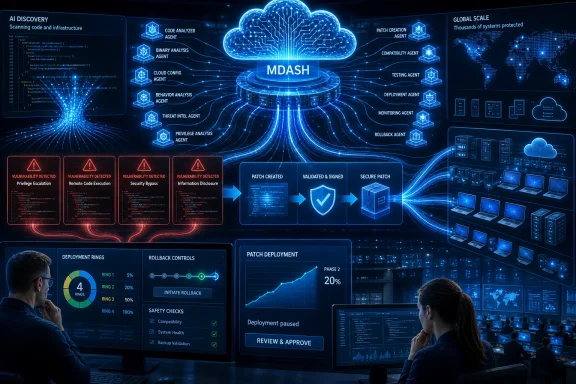
The central technology is MDASH, short for multi-model agentic scanning harness. Developed by Microsoft’s Autonomous Code Security team, it uses dedicated cloud-based scanning and validation pipelines to examine Windows at a scale conventional human-led security testing cannot easily match.
Microsoft says the harness coordinates more than 100 specialized AI agents using an ensemble of frontier and distilled models. Those agents do not merely flag suspicious code and produce a long list of speculative warnings. They are designed to discover potential defects, debate the findings, validate exploitability, and move high-confidence issues to engineers with fewer false positives.
That distinction matters. Static analysis and automated security testing are hardly new, and developers have spent decades dealing with tools that can identify thousands of technically suspicious patterns while providing little guidance about which ones represent practical vulnerabilities. A scanner that increases finding volume without improving confidence merely relocates the bottleneck from discovery to triage.
MDASH is meant to attack both sides of that problem. It increases the number of code paths Microsoft can examine while using multiple agents and models to challenge, refine, and attempt to prove one another’s findings. In theory, that turns a raw alert into something closer to an initial security case: a suspected weakness, supporting reasoning, an assessment of exploitability, and enough evidence for an engineer to begin validation.
Microsoft introduced the technology in May and credited it with finding 16 Windows vulnerabilities. Four were rated Critical, and all 16 were addressed in that month’s security update. As ZDNET emphasized in its reporting, these were not hypothetical benchmark victories or flaws waiting indefinitely in an internal backlog; fixes resulting from the new routines had already reached customers.
That is the threshold separating an AI demonstration from an operational security system. Plenty of models can find familiar bug patterns in carefully selected test cases. A system that can inspect production Windows code, produce findings Microsoft’s engineers accept, survive the company’s validation process, and influence a shipping security release is doing consequential engineering work.
The result does not prove that MDASH will maintain the same effectiveness as its scope grows. It does show that Microsoft has moved beyond discussing AI-assisted vulnerability research as a future capability. The process is already connected to the machinery that patches Windows.
That architecture reflects the reality of vulnerability research. Finding a security flaw may require source-code analysis, control-flow reasoning, input generation, environmental setup, crash interpretation, exploitability testing, duplicate detection, and an understanding of security boundaries. A model that performs well at one of those tasks may be unreliable at another.
An agentic harness can divide that work. One agent may identify a questionable memory operation, another can argue that existing validation makes it unreachable, and another may attempt to construct the conditions needed to prove exploitation. A separate stage can compare the result with known issues, estimate severity, and prepare evidence for human review.
The “debate” between agents should not be confused with proof in the mathematical sense. Models can reinforce one another’s errors as easily as they can expose them, especially when their reasoning depends on incomplete context or shared assumptions. But a structured adversarial process is still more useful than accepting the first model’s output at face value.
The mixture of frontier and distilled models is similarly pragmatic. The most capable model may be reserved for complex reasoning, while smaller or more specialized models can perform repetitive classification and validation work more economically. At Windows scale, the cost and latency of analysis matter almost as much as raw model capability.
Microsoft’s strategic bet is therefore not tied entirely to whichever individual model happens to lead the market. The company is building a system around models: task routing, code context, validation, prioritization, evidence collection, and integration with engineering workflows. Models can be replaced or improved without discarding the wider vulnerability-management pipeline.
That gives Microsoft a potential advantage over attackers relying on a single general-purpose model or a loose collection of scripts. But it also means the security of the process depends on far more than model accuracy. The quality of the code context, test environments, agent instructions, validation rules, severity decisions, and human escalation paths will determine whether MDASH finds meaningful vulnerabilities or simply generates sophisticated noise.
A vulnerability in a widely exposed Windows component can therefore have consequences far beyond the original programming mistake. The same flaw can exist across enormous numbers of systems, many of which cannot be patched immediately because of operational, regulatory, or compatibility constraints. Every day between vulnerability discovery and customer protection becomes part of the attacker’s opportunity.
Pavan Davuluri, executive vice president of Microsoft’s Windows + Devices division, framed the strategy in a blog post titled “Evolving Windows vulnerability management to meet the speed of AI-powered discovery.” His argument is that Microsoft needs to find issues earlier, accelerate the engineering work required to fix them, strengthen validation, and reduce the delay between discovery and protection.
The logic is compelling because attackers can use many of the same technical advances. AI can help adversaries navigate unfamiliar code, adapt proof-of-concept exploits, identify attack surfaces, translate technical write-ups into working techniques, or run larger numbers of experiments. Defenders do not retain an exclusive right to automated reasoning.
Attackers also operate under asymmetric incentives. They can tolerate thousands of failed probes if one uncovers a useful weakness. Microsoft, by contrast, must make a fix that closes the vulnerability without disrupting the huge range of hardware, software, and configurations Windows supports.
AI can reduce part of that asymmetry by allowing defenders to perform more experiments before attackers do. It can search code paths that human teams might never have time to inspect and revisit areas after code changes. It can also keep testing after the most obvious defects have been found, rather than moving on because a manual audit budget has expired.
Yet Windows scale magnifies mistakes on the defensive side too. A flawed exploitability judgment can waste engineering time, while a defective fix distributed broadly can interrupt businesses across continents. A security pipeline that operates faster but feeds insufficiently tested changes into Windows Update could exchange one type of exposure for another.
That is why discovery speed cannot be the only success metric. Microsoft also has to measure whether AI-generated findings are valid, whether fixes are correctly scoped, whether validation catches regressions, and whether customers can deploy the resulting updates safely.
That represents a more important shift than simply giving the security team a faster scanner. A late-stage security review often encounters architecture and compatibility decisions that are already difficult to reverse. Developers may be able to patch an immediate weakness without correcting the design conditions that produced it.
Earlier testing changes the economics. A risky data flow or privilege boundary discovered while code is still under active development is usually cheaper to redesign than one discovered after it has shipped across the Windows installed base. It can also be tested alongside the feature’s intended behavior rather than reconstructed later by an incident-response team.
Microsoft is updating its Secure Development Lifecycle best practices to account explicitly for AI-enabled attack techniques and exploit paths. The company says AI will help surface potential issues earlier while human experts evaluate findings, make risk-based decisions, and determine whether fixes meet the required quality standard.
That human role is not ceremonial. Security severity depends on context that an automated system may misunderstand: whether an attacker can reach the code, whether a security boundary is crossed, whether existing mitigations apply, and whether the proposed fix creates a more damaging failure elsewhere. Windows compatibility work also draws on years of accumulated knowledge about applications and hardware that behave in ways their documentation never predicted.
Integrating AI into the Secure Development Lifecycle should allow Microsoft to test continuously rather than rely on occasional concentrated reviews. New code can be examined as it is written, while changes elsewhere in Windows can trigger renewed analysis of older assumptions. Vulnerability hunting becomes a property of the development pipeline rather than an event on the release calendar.
The risk is that teams begin treating a clean automated result as evidence of security. No system can inspect every meaningful state of software as large and historically layered as Windows. MDASH may substantially extend Microsoft’s reach, but it cannot make unexamined attack surfaces disappear.
Microsoft’s strongest claim is therefore not that AI replaces traditional security engineering. It is that AI expands what those engineers can see. Whether that remains true in practice will depend on preserving the authority—and staffing—to challenge the machines.
This sounds unambiguously positive when phrased as “more vulnerabilities fixed.” For an unpatched machine exposed to attack, it is. For an enterprise responsible for tens of thousands of endpoints and servers, however, every additional fix expands the amount of code changed during a release and the number of interactions that must be trusted.
Windows security updates are cumulative packages, not isolated repairs administered one by one in a vacuum. A larger set of fixes may touch more components, services, drivers, protocols, authentication paths, and application dependencies. Even when each individual correction has passed Microsoft’s tests, their combined effect must survive the diversity of real enterprise environments.
The burden will not fall equally across Windows systems.
Consumer PCs will generally receive the update through Windows Update and rely on Microsoft’s telemetry and recovery mechanisms. Managed organizations must make explicit decisions about deployment pace, test populations, exception handling, and incident response.
Servers make the calculation harder. A workstation reboot may inconvenience an employee; a server outage can disrupt authentication, manufacturing, medical services, transaction processing, or a public-facing application. The prospect of more fixes per release places greater value on technologies that can apply some security changes without requiring every system to restart.
Hotpatching reduces disruption, but it does not eliminate the need for validation. A rebootless update can still alter runtime behavior, expose an application dependency, or affect performance. The absence of a restart makes deployment easier; it does not make the underlying change harmless.
Nor should administrators assume that a larger patch automatically indicates weaker software quality. The visible number of fixes can rise because Microsoft is finding defects that were previously present but undetected. Better discovery can make the vulnerability count look worse precisely because the security process is becoming more effective.
The more useful enterprise metric will be exposure time: how long serious vulnerabilities exist before Microsoft finds them, how long engineering takes to produce a reliable correction, and how quickly customers can deploy it. A higher monthly count paired with shorter exposure could represent a major improvement. A higher count paired with widespread regressions and delayed deployments would not.
Many organizations still treat patching as a compressed monthly event. Updates are released, a small IT group tests a representative sample, application owners sign off where necessary, and deployment proceeds through increasingly broad rings. Problems are investigated while the next cycle is already approaching.
That model assumes a manageable rate of change. If AI allows Microsoft to surface significantly more high-confidence findings, organizations may have to test more changes without receiving more time, staff, laboratory capacity, or cooperation from application vendors. The bottleneck moves from Microsoft’s ability to discover vulnerabilities to the customer’s ability to absorb their fixes.
The obvious response is automation, but “automate patching” is not a complete strategy. Enterprises need accurate device inventories, representative deployment rings, health signals that reveal subtle failures, and policies capable of pausing or accelerating updates based on risk. Automation without visibility only makes mistakes travel faster.
Windows Autopatch in Microsoft Intune is Microsoft’s preferred answer for modern managed estates. It can orchestrate update deployment and includes the ability to deliver supported hotpatch updates without a reboot. That reduces the scheduling friction that often delays security changes, especially when users postpone restarts or when maintenance windows are scarce.
The same pressure applies to Windows Server environments, where rebootless security-update capabilities can preserve availability. For organizations operating both clients and servers, these tools also offer the possibility of coordinating deployment around service dependencies rather than treating every device as an independent patch target.
But not every organization is ready for that model. Some have incomplete Intune adoption, fragmented ownership, unsupported applications, air-gapped systems, or regulatory change-control procedures that cannot accelerate simply because Microsoft’s AI has found more flaws. Others rely on manual practices built around older infrastructure and institutional knowledge held by a few senior administrators.
Those organizations should not respond by deploying every release immediately to every machine. They should respond by making the testing pipeline more efficient and risk-based: automate routine health checks, identify genuinely critical workflows, maintain smaller but more representative rings, and predefine the conditions under which a security fix should bypass the normal schedule.
A higher patch volume makes uniform treatment less sustainable. A Critical vulnerability affecting an exposed service deserves a different deployment decision from a lower-risk issue behind multiple controls. The enterprise patching system must be able to express that difference.
That is exactly the sort of granular recovery mechanism a faster servicing model needs. Uninstalling a complete update to escape one defective change can reopen every vulnerability addressed by the package. It can also make troubleshooting harder by moving the system back across numerous unrelated code changes.
KIR narrows that blast radius. When available for the affected change, it allows Windows to restore the earlier behavior of the problematic component without discarding the rest of the security release. In a world of larger update payloads, targeted reversal becomes much more valuable.
But KIR should not be mistaken for a universal undo command. Administrators still need to recognize that a regression exists, isolate the responsible update behavior, determine whether rollback guidance applies, and deploy the mitigation correctly. Some failures can also occur at installation, boot, or firmware boundaries where a targeted behavioral rollback may not address the immediate outage.
The technology is most effective when paired with staged deployment. A representative test ring encounters the problem first, monitoring detects it, administrators pause broader deployment, and the affected change is rolled back before the entire estate experiences the failure.
Without that discipline, KIR becomes an emergency response after widespread disruption rather than a controlled safety mechanism. Faster vulnerability discovery makes early-warning rings more important, not less.
Microsoft’s message that customers should not have to choose between speed and stability is the right goal. Yet the two are not reconciled by a single feature. They are reconciled by overlapping controls: better pre-release validation at Microsoft, representative testing by customers, deployment rings, health telemetry, selective rollback, hotpatching, and administrators empowered to stop automation when the evidence changes.
Microsoft watchers Todd Bishop and Kurt Schlosser have warned of the institutional knowledge that may leave as longtime employees depart. That risk is particularly acute in Windows, where compatibility and security decisions often depend on history that does not fit neatly into source comments, design documents, or model context.
A veteran engineer may remember that a strange-looking branch exists because a major customer’s application depended on undocumented behavior many years earlier. A security reviewer may know why an apparently simple correction was previously rejected, or which internal team understands the component’s least visible dependencies. AI can reconstruct some relationships from code and records, but it cannot retrieve knowledge that was never written down.
More automated findings could intensify this problem. If MDASH delivers a growing stream of credible issues, human reviewers must determine severity, reproduce the behavior, design fixes, assess compatibility, test changes, and shepherd them through release. Finding defects more quickly does not automatically create the engineering capacity required to resolve them safely.
Microsoft can use AI to assist with parts of that work, but each additional layer of automation requires its own oversight. A plausible exploit explanation may be wrong. A generated test may demonstrate a crash without proving a security boundary violation. A proposed fix may suppress the observed symptom while leaving the deeper vulnerability intact.
The danger is not that Microsoft will deliberately remove humans from the process. It is that organizational pressure will gradually make human review shallower: fewer experienced engineers examining more findings under tighter deadlines, with machine-generated confidence scores encouraging decisions that once required deeper investigation.
This is where the quality of the Secure Development Lifecycle becomes decisive. Human review cannot exist merely as an approval box at the end of an automated pipeline. It needs authority to reject findings, demand additional evidence, redesign fixes, delay shipment, and challenge the assumptions encoded into MDASH itself.
Microsoft also needs to capture expertise before it walks out the door. That means documenting security boundaries, historical compatibility decisions, known testing traps, component ownership, and the reasoning behind unusual code. AI systems are only as context-aware as the material and tools made available to them.
Institutional memory is part of the Windows security boundary. If Microsoft expands machine discovery while allowing irreplaceable engineering context to disappear, the company could become better at finding suspicious code and worse at understanding the consequences of changing it.
Yet false positives are not the only risk. False negatives—real vulnerabilities the system fails to identify—remain more dangerous, particularly if the existence of advanced AI scanning creates unjustified confidence. The hardest weaknesses may be those requiring unusual states, environmental dependencies, protocol interactions, or business-logic knowledge that is absent from the scanning context.
There is also the risk of false prioritization. MDASH might correctly identify a defect but overestimate or underestimate its practical importance. Severity is not only a property of faulty code; it depends on reachability, privileges, mitigations, deployment patterns, and what an attacker gains by exploiting it.
A third failure mode is incomplete remediation. The system may prove one exploit path and help engineers close it while a related path remains available. At the scale of Windows, fixing a symptom rather than the underlying class of weakness can produce recurring vulnerabilities in adjacent code.
Then there is validation failure. A security fix may correctly block exploitation but cause a regression in networking, authentication, storage, printing, device management, or an application workflow. From a narrow security perspective, the patch works. From the customer’s perspective, the machine or service no longer works.
These failure modes explain why multiple models and agents are useful but insufficient. Diversity within the harness can challenge findings, yet the agents may still operate from similar data, tools, or assumptions. Independent human reasoning and real-world deployment telemetry remain necessary checks.
The strongest version of Microsoft’s strategy would treat MDASH as one participant in a broader evidence system. Automated agents find and challenge bugs, engineers validate them, test infrastructure measures compatibility, limited deployment rings expose environmental problems, and telemetry informs whether rollout should continue.
The weakest version would turn a high model-confidence score into an accelerated patch with reduced scrutiny. Microsoft’s public commitments point toward the former. Customers will judge the strategy by the updates they receive, not by the architecture diagram behind them.
But discovery is only the beginning of that race. Microsoft must reproduce the issue, assess its impact, develop a correction, validate compatibility, package the update, and deliver it. Customers must then test, approve, download, install, and confirm the fix across their environments.
Any delay along that chain preserves attacker opportunity. A vulnerability found rapidly but stuck in engineering for months does not provide the same protection as one found and fixed within a release cycle. Likewise, a patch available from Microsoft but delayed across enterprise systems leaves those machines exposed.
That is why MDASH, Windows Autopatch, hotpatching, KIR, and Secure Development Lifecycle changes belong to the same story. They address different constraints in a single vulnerability-management pipeline.
MDASH increases discovery capacity. Earlier development integration should reduce the cost of fixing problems. Human review is meant to preserve judgment. Autopatch and hotpatching reduce deployment friction. KIR helps contain the damage if a change proves defective.
The strategy succeeds only if those capabilities advance together. Improving discovery alone could flood engineers and administrators. Accelerating deployment without improving validation could produce more outages. Expanding rollback without improving monitoring could leave organizations unaware that they need it.
Enterprise administrators should therefore interpret Microsoft’s announcement as a servicing forecast, not merely a security-research milestone. The company is warning that higher discovery volume will show up in customer-facing releases. Patch-management capacity must become part of security planning.
For some organizations, that means investment in Intune and Autopatch. For others, it means modernizing test laboratories, improving application inventories, reducing unsupported software, or expanding server hotpatch eligibility. For nearly all of them, it means measuring patch success by more than an installation-complete status.
A machine can install an update successfully and still lose access to a business service. A server can remain online while an authentication path fails. Effective monitoring must evaluate the workloads Windows exists to support.
The most concrete implications are these:
Microsoft’s most consequential AI product may not be the assistant users see on the desktop, but the invisible collection of agents probing Windows before hostile researchers and criminal groups can do the same. If MDASH consistently finds exploitable defects, human engineers turn those findings into durable fixes, and modern servicing tools let customers deploy them without destabilizing production, Microsoft will have shortened one of the most dangerous gaps in computing. If validation, staffing, or enterprise patch capacity cannot keep pace, the bottleneck will simply move downstream—and the next era of Windows security will be defined not by how quickly AI finds vulnerabilities, but by how safely the human system around it can respond.
That trade-off will define whether Microsoft’s AI security strategy succeeds. Finding more vulnerabilities is unquestionably better than leaving them undiscovered, but each additional fix creates another opportunity for a compatibility regression, installation failure, application conflict, or emergency rollback. Microsoft is effectively asking its own engineers and every enterprise Windows administrator to make patch management move at machine speed without surrendering the judgment that keeps complex production environments running.
 Microsoft Is Turning Vulnerability Hunting Into a Production System
The central technology is MDASH, short for multi-model agentic scanning harness. Developed by Microsoft’s Autonomous Code Security team, it uses dedicated cloud-based scanning and validation pipelines to examine Windows at a scale conventional human-led security testing cannot easily match.Microsoft says the harness coordinates more than 100 specialized AI agents using an ensemble of frontier and distilled models. Those agents do not merely flag suspicious code and produce a long list of speculative warnings. They are designed to discover potential defects, debate the findings, validate exploitability, and move high-confidence issues to engineers with fewer false positives.
That distinction matters. Static analysis and automated security testing are hardly new, and developers have spent decades dealing with tools that can identify thousands of technically suspicious patterns while providing little guidance about which ones represent practical vulnerabilities. A scanner that increases finding volume without improving confidence merely relocates the bottleneck from discovery to triage.
MDASH is meant to attack both sides of that problem. It increases the number of code paths Microsoft can examine while using multiple agents and models to challenge, refine, and attempt to prove one another’s findings. In theory, that turns a raw alert into something closer to an initial security case: a suspected weakness, supporting reasoning, an assessment of exploitability, and enough evidence for an engineer to begin validation.
Microsoft introduced the technology in May and credited it with finding 16 Windows vulnerabilities. Four were rated Critical, and all 16 were addressed in that month’s security update. As ZDNET emphasized in its reporting, these were not hypothetical benchmark victories or flaws waiting indefinitely in an internal backlog; fixes resulting from the new routines had already reached customers.
That is the threshold separating an AI demonstration from an operational security system. Plenty of models can find familiar bug patterns in carefully selected test cases. A system that can inspect production Windows code, produce findings Microsoft’s engineers accept, survive the company’s validation process, and influence a shipping security release is doing consequential engineering work.
The result does not prove that MDASH will maintain the same effectiveness as its scope grows. It does show that Microsoft has moved beyond discussing AI-assisted vulnerability research as a future capability. The process is already connected to the machinery that patches Windows.
The Real Breakthrough Is the Harness, Not a Smarter Chatbot
Microsoft’s choice of the word harness reveals more about the strategy than the use of AI itself. MDASH is not presented as one omniscient model trained to understand every layer of Windows. It is an orchestration system that assigns specialized work to many agents and draws on different classes of models.That architecture reflects the reality of vulnerability research. Finding a security flaw may require source-code analysis, control-flow reasoning, input generation, environmental setup, crash interpretation, exploitability testing, duplicate detection, and an understanding of security boundaries. A model that performs well at one of those tasks may be unreliable at another.
An agentic harness can divide that work. One agent may identify a questionable memory operation, another can argue that existing validation makes it unreachable, and another may attempt to construct the conditions needed to prove exploitation. A separate stage can compare the result with known issues, estimate severity, and prepare evidence for human review.
The “debate” between agents should not be confused with proof in the mathematical sense. Models can reinforce one another’s errors as easily as they can expose them, especially when their reasoning depends on incomplete context or shared assumptions. But a structured adversarial process is still more useful than accepting the first model’s output at face value.
The mixture of frontier and distilled models is similarly pragmatic. The most capable model may be reserved for complex reasoning, while smaller or more specialized models can perform repetitive classification and validation work more economically. At Windows scale, the cost and latency of analysis matter almost as much as raw model capability.
Microsoft’s strategic bet is therefore not tied entirely to whichever individual model happens to lead the market. The company is building a system around models: task routing, code context, validation, prioritization, evidence collection, and integration with engineering workflows. Models can be replaced or improved without discarding the wider vulnerability-management pipeline.
That gives Microsoft a potential advantage over attackers relying on a single general-purpose model or a loose collection of scripts. But it also means the security of the process depends on far more than model accuracy. The quality of the code context, test environments, agent instructions, validation rules, severity decisions, and human escalation paths will determine whether MDASH finds meaningful vulnerabilities or simply generates sophisticated noise.
Windows Scale Makes Earlier Discovery More Valuable—and More Dangerous
Windows runs on more than 1.5 billion PCs and servers worldwide, according to the scale cited by ZDNET. That installed base includes consumer laptops, point-of-sale systems, engineering workstations, domain infrastructure, industrial equipment, cloud workloads, hospital systems, and machines running decades of accumulated business software.A vulnerability in a widely exposed Windows component can therefore have consequences far beyond the original programming mistake. The same flaw can exist across enormous numbers of systems, many of which cannot be patched immediately because of operational, regulatory, or compatibility constraints. Every day between vulnerability discovery and customer protection becomes part of the attacker’s opportunity.
Pavan Davuluri, executive vice president of Microsoft’s Windows + Devices division, framed the strategy in a blog post titled “Evolving Windows vulnerability management to meet the speed of AI-powered discovery.” His argument is that Microsoft needs to find issues earlier, accelerate the engineering work required to fix them, strengthen validation, and reduce the delay between discovery and protection.
The logic is compelling because attackers can use many of the same technical advances. AI can help adversaries navigate unfamiliar code, adapt proof-of-concept exploits, identify attack surfaces, translate technical write-ups into working techniques, or run larger numbers of experiments. Defenders do not retain an exclusive right to automated reasoning.
Attackers also operate under asymmetric incentives. They can tolerate thousands of failed probes if one uncovers a useful weakness. Microsoft, by contrast, must make a fix that closes the vulnerability without disrupting the huge range of hardware, software, and configurations Windows supports.
AI can reduce part of that asymmetry by allowing defenders to perform more experiments before attackers do. It can search code paths that human teams might never have time to inspect and revisit areas after code changes. It can also keep testing after the most obvious defects have been found, rather than moving on because a manual audit budget has expired.
Yet Windows scale magnifies mistakes on the defensive side too. A flawed exploitability judgment can waste engineering time, while a defective fix distributed broadly can interrupt businesses across continents. A security pipeline that operates faster but feeds insufficiently tested changes into Windows Update could exchange one type of exposure for another.
That is why discovery speed cannot be the only success metric. Microsoft also has to measure whether AI-generated findings are valid, whether fixes are correctly scoped, whether validation catches regressions, and whether customers can deploy the resulting updates safely.
Security Testing Is Moving Inside the Windows Development Loop
Microsoft says vulnerability discovery will no longer be treated as a separate activity performed after most development decisions have already been made. AI-assisted analysis is being moved earlier into the way Windows is built, reviewed, and improved before features or updates are released.That represents a more important shift than simply giving the security team a faster scanner. A late-stage security review often encounters architecture and compatibility decisions that are already difficult to reverse. Developers may be able to patch an immediate weakness without correcting the design conditions that produced it.
Earlier testing changes the economics. A risky data flow or privilege boundary discovered while code is still under active development is usually cheaper to redesign than one discovered after it has shipped across the Windows installed base. It can also be tested alongside the feature’s intended behavior rather than reconstructed later by an incident-response team.
Microsoft is updating its Secure Development Lifecycle best practices to account explicitly for AI-enabled attack techniques and exploit paths. The company says AI will help surface potential issues earlier while human experts evaluate findings, make risk-based decisions, and determine whether fixes meet the required quality standard.
That human role is not ceremonial. Security severity depends on context that an automated system may misunderstand: whether an attacker can reach the code, whether a security boundary is crossed, whether existing mitigations apply, and whether the proposed fix creates a more damaging failure elsewhere. Windows compatibility work also draws on years of accumulated knowledge about applications and hardware that behave in ways their documentation never predicted.
Integrating AI into the Secure Development Lifecycle should allow Microsoft to test continuously rather than rely on occasional concentrated reviews. New code can be examined as it is written, while changes elsewhere in Windows can trigger renewed analysis of older assumptions. Vulnerability hunting becomes a property of the development pipeline rather than an event on the release calendar.
The risk is that teams begin treating a clean automated result as evidence of security. No system can inspect every meaningful state of software as large and historically layered as Windows. MDASH may substantially extend Microsoft’s reach, but it cannot make unexamined attack surfaces disappear.
Microsoft’s strongest claim is therefore not that AI replaces traditional security engineering. It is that AI expands what those engineers can see. Whether that remains true in practice will depend on preserving the authority—and staffing—to challenge the machines.
More Vulnerabilities Found Means More Changes Shipped
For customers, the most concrete consequence is not the number of agents in Microsoft’s cloud. It is Microsoft’s acknowledgment that security releases will contain a higher volume of updates.This sounds unambiguously positive when phrased as “more vulnerabilities fixed.” For an unpatched machine exposed to attack, it is. For an enterprise responsible for tens of thousands of endpoints and servers, however, every additional fix expands the amount of code changed during a release and the number of interactions that must be trusted.
Windows security updates are cumulative packages, not isolated repairs administered one by one in a vacuum. A larger set of fixes may touch more components, services, drivers, protocols, authentication paths, and application dependencies. Even when each individual correction has passed Microsoft’s tests, their combined effect must survive the diversity of real enterprise environments.
The burden will not fall equally across Windows systems.
| Environment | AI-discovery consequence | Primary operational risk | Microsoft capability cited |
|---|---|---|---|
| Windows PCs | More security fixes can arrive in each release | Application, driver, policy, and user-workflow regressions | Windows Autopatch in Microsoft Intune, including hotpatch delivery without a reboot |
| Windows Servers | More fixes may affect business-critical and continuously available workloads | Service interruption, compatibility failures, and constrained maintenance windows | Security updates that can be applied without requiring a reboot |
| Mixed estates | Client and server changes must be validated together | Cross-system failures involving identity, networking, management, or line-of-business applications | Deployment rings, monitoring, and targeted rollback practices |
Servers make the calculation harder. A workstation reboot may inconvenience an employee; a server outage can disrupt authentication, manufacturing, medical services, transaction processing, or a public-facing application. The prospect of more fixes per release places greater value on technologies that can apply some security changes without requiring every system to restart.
Hotpatching reduces disruption, but it does not eliminate the need for validation. A rebootless update can still alter runtime behavior, expose an application dependency, or affect performance. The absence of a restart makes deployment easier; it does not make the underlying change harmless.
Nor should administrators assume that a larger patch automatically indicates weaker software quality. The visible number of fixes can rise because Microsoft is finding defects that were previously present but undetected. Better discovery can make the vulnerability count look worse precisely because the security process is becoming more effective.
The more useful enterprise metric will be exposure time: how long serious vulnerabilities exist before Microsoft finds them, how long engineering takes to produce a reliable correction, and how quickly customers can deploy it. A higher monthly count paired with shorter exposure could represent a major improvement. A higher count paired with widespread regressions and delayed deployments would not.
Patch Tuesday Becomes a Capacity-Planning Problem
Monthly patching has always required balancing security urgency against operational stability. AI-driven discovery raises the possibility that the volume of validated vulnerabilities will increase faster than enterprise testing capacity.Many organizations still treat patching as a compressed monthly event. Updates are released, a small IT group tests a representative sample, application owners sign off where necessary, and deployment proceeds through increasingly broad rings. Problems are investigated while the next cycle is already approaching.
That model assumes a manageable rate of change. If AI allows Microsoft to surface significantly more high-confidence findings, organizations may have to test more changes without receiving more time, staff, laboratory capacity, or cooperation from application vendors. The bottleneck moves from Microsoft’s ability to discover vulnerabilities to the customer’s ability to absorb their fixes.
The obvious response is automation, but “automate patching” is not a complete strategy. Enterprises need accurate device inventories, representative deployment rings, health signals that reveal subtle failures, and policies capable of pausing or accelerating updates based on risk. Automation without visibility only makes mistakes travel faster.
Windows Autopatch in Microsoft Intune is Microsoft’s preferred answer for modern managed estates. It can orchestrate update deployment and includes the ability to deliver supported hotpatch updates without a reboot. That reduces the scheduling friction that often delays security changes, especially when users postpone restarts or when maintenance windows are scarce.
The same pressure applies to Windows Server environments, where rebootless security-update capabilities can preserve availability. For organizations operating both clients and servers, these tools also offer the possibility of coordinating deployment around service dependencies rather than treating every device as an independent patch target.
But not every organization is ready for that model. Some have incomplete Intune adoption, fragmented ownership, unsupported applications, air-gapped systems, or regulatory change-control procedures that cannot accelerate simply because Microsoft’s AI has found more flaws. Others rely on manual practices built around older infrastructure and institutional knowledge held by a few senior administrators.
Those organizations should not respond by deploying every release immediately to every machine. They should respond by making the testing pipeline more efficient and risk-based: automate routine health checks, identify genuinely critical workflows, maintain smaller but more representative rings, and predefine the conditions under which a security fix should bypass the normal schedule.
A higher patch volume makes uniform treatment less sustainable. A Critical vulnerability affecting an exposed service deserves a different deployment decision from a lower-risk issue behind multiple controls. The enterprise patching system must be able to express that difference.
Known Issue Rollback Is a Safety Valve, Not a Substitute for Testing
Microsoft points to Known Issue Rollback, or KIR, as one mechanism administrators can use if a problem appears during initial testing. Instead of uninstalling an entire cumulative update, KIR can revert the specific change responsible for the regression while leaving the remaining fixes installed.That is exactly the sort of granular recovery mechanism a faster servicing model needs. Uninstalling a complete update to escape one defective change can reopen every vulnerability addressed by the package. It can also make troubleshooting harder by moving the system back across numerous unrelated code changes.
KIR narrows that blast radius. When available for the affected change, it allows Windows to restore the earlier behavior of the problematic component without discarding the rest of the security release. In a world of larger update payloads, targeted reversal becomes much more valuable.
But KIR should not be mistaken for a universal undo command. Administrators still need to recognize that a regression exists, isolate the responsible update behavior, determine whether rollback guidance applies, and deploy the mitigation correctly. Some failures can also occur at installation, boot, or firmware boundaries where a targeted behavioral rollback may not address the immediate outage.
The technology is most effective when paired with staged deployment. A representative test ring encounters the problem first, monitoring detects it, administrators pause broader deployment, and the affected change is rolled back before the entire estate experiences the failure.
Without that discipline, KIR becomes an emergency response after widespread disruption rather than a controlled safety mechanism. Faster vulnerability discovery makes early-warning rings more important, not less.
Microsoft’s message that customers should not have to choose between speed and stability is the right goal. Yet the two are not reconciled by a single feature. They are reconciled by overlapping controls: better pre-release validation at Microsoft, representative testing by customers, deployment rings, health telemetry, selective rollback, hotpatching, and administrators empowered to stop automation when the evidence changes.
Action checklist for admins
- Review whether current pilot rings accurately represent critical hardware, drivers, security products, policies, languages, and business applications.
- Prepare for larger security releases by automating installation, boot, service-health, networking, authentication, and application checks.
- Confirm how Known Issue Rollback guidance and policies will be evaluated and deployed in the organization.
- Assess Windows Autopatch in Microsoft Intune for managed PCs, including eligibility and operational readiness for hotpatch updates.
- Identify Windows Server workloads that can use rebootless security-update capabilities and those that still require conventional maintenance windows.
- Define escalation rules for fast-tracking urgent fixes, pausing deployment, and isolating failures before the next security release arrives.
- Preserve logs, test results, rollback decisions, and application-owner approvals so knowledge survives staff turnover.
Microsoft’s Human-Expertise Promise Arrives at an Awkward Moment
Microsoft repeatedly emphasizes that humans will remain responsible for evaluating AI findings, making risk decisions, and approving fixes. That reassurance is essential, but ZDNET identified an uncomfortable organizational backdrop: Microsoft is targeting about 7% of its US-based workforce with a voluntary retirement program.Microsoft watchers Todd Bishop and Kurt Schlosser have warned of the institutional knowledge that may leave as longtime employees depart. That risk is particularly acute in Windows, where compatibility and security decisions often depend on history that does not fit neatly into source comments, design documents, or model context.
A veteran engineer may remember that a strange-looking branch exists because a major customer’s application depended on undocumented behavior many years earlier. A security reviewer may know why an apparently simple correction was previously rejected, or which internal team understands the component’s least visible dependencies. AI can reconstruct some relationships from code and records, but it cannot retrieve knowledge that was never written down.
More automated findings could intensify this problem. If MDASH delivers a growing stream of credible issues, human reviewers must determine severity, reproduce the behavior, design fixes, assess compatibility, test changes, and shepherd them through release. Finding defects more quickly does not automatically create the engineering capacity required to resolve them safely.
Microsoft can use AI to assist with parts of that work, but each additional layer of automation requires its own oversight. A plausible exploit explanation may be wrong. A generated test may demonstrate a crash without proving a security boundary violation. A proposed fix may suppress the observed symptom while leaving the deeper vulnerability intact.
The danger is not that Microsoft will deliberately remove humans from the process. It is that organizational pressure will gradually make human review shallower: fewer experienced engineers examining more findings under tighter deadlines, with machine-generated confidence scores encouraging decisions that once required deeper investigation.
This is where the quality of the Secure Development Lifecycle becomes decisive. Human review cannot exist merely as an approval box at the end of an automated pipeline. It needs authority to reject findings, demand additional evidence, redesign fixes, delay shipment, and challenge the assumptions encoded into MDASH itself.
Microsoft also needs to capture expertise before it walks out the door. That means documenting security boundaries, historical compatibility decisions, known testing traps, component ownership, and the reasoning behind unusual code. AI systems are only as context-aware as the material and tools made available to them.
Institutional memory is part of the Windows security boundary. If Microsoft expands machine discovery while allowing irreplaceable engineering context to disappear, the company could become better at finding suspicious code and worse at understanding the consequences of changing it.
False Positives Are Only One Form of Failure
Microsoft highlights MDASH’s goal of reducing false positives and sending high-confidence issues to engineers. That is necessary because a vulnerability system that overwhelms teams with invalid findings will eventually be ignored.Yet false positives are not the only risk. False negatives—real vulnerabilities the system fails to identify—remain more dangerous, particularly if the existence of advanced AI scanning creates unjustified confidence. The hardest weaknesses may be those requiring unusual states, environmental dependencies, protocol interactions, or business-logic knowledge that is absent from the scanning context.
There is also the risk of false prioritization. MDASH might correctly identify a defect but overestimate or underestimate its practical importance. Severity is not only a property of faulty code; it depends on reachability, privileges, mitigations, deployment patterns, and what an attacker gains by exploiting it.
A third failure mode is incomplete remediation. The system may prove one exploit path and help engineers close it while a related path remains available. At the scale of Windows, fixing a symptom rather than the underlying class of weakness can produce recurring vulnerabilities in adjacent code.
Then there is validation failure. A security fix may correctly block exploitation but cause a regression in networking, authentication, storage, printing, device management, or an application workflow. From a narrow security perspective, the patch works. From the customer’s perspective, the machine or service no longer works.
These failure modes explain why multiple models and agents are useful but insufficient. Diversity within the harness can challenge findings, yet the agents may still operate from similar data, tools, or assumptions. Independent human reasoning and real-world deployment telemetry remain necessary checks.
The strongest version of Microsoft’s strategy would treat MDASH as one participant in a broader evidence system. Automated agents find and challenge bugs, engineers validate them, test infrastructure measures compatibility, limited deployment rings expose environmental problems, and telemetry informs whether rollout should continue.
The weakest version would turn a high model-confidence score into an accelerated patch with reduced scrutiny. Microsoft’s public commitments point toward the former. Customers will judge the strategy by the updates they receive, not by the architecture diagram behind them.
AI Gives Defenders a Lead Only If Patching Can Keep Up
The security argument for MDASH rests on reducing the period during which vulnerabilities are available to attackers but unknown to Microsoft. Earlier discovery can let the defender produce a fix before a weakness becomes a zero-day used in the wild.But discovery is only the beginning of that race. Microsoft must reproduce the issue, assess its impact, develop a correction, validate compatibility, package the update, and deliver it. Customers must then test, approve, download, install, and confirm the fix across their environments.
Any delay along that chain preserves attacker opportunity. A vulnerability found rapidly but stuck in engineering for months does not provide the same protection as one found and fixed within a release cycle. Likewise, a patch available from Microsoft but delayed across enterprise systems leaves those machines exposed.
That is why MDASH, Windows Autopatch, hotpatching, KIR, and Secure Development Lifecycle changes belong to the same story. They address different constraints in a single vulnerability-management pipeline.
MDASH increases discovery capacity. Earlier development integration should reduce the cost of fixing problems. Human review is meant to preserve judgment. Autopatch and hotpatching reduce deployment friction. KIR helps contain the damage if a change proves defective.
The strategy succeeds only if those capabilities advance together. Improving discovery alone could flood engineers and administrators. Accelerating deployment without improving validation could produce more outages. Expanding rollback without improving monitoring could leave organizations unaware that they need it.
Enterprise administrators should therefore interpret Microsoft’s announcement as a servicing forecast, not merely a security-research milestone. The company is warning that higher discovery volume will show up in customer-facing releases. Patch-management capacity must become part of security planning.
For some organizations, that means investment in Intune and Autopatch. For others, it means modernizing test laboratories, improving application inventories, reducing unsupported software, or expanding server hotpatch eligibility. For nearly all of them, it means measuring patch success by more than an installation-complete status.
A machine can install an update successfully and still lose access to a business service. A server can remain online while an authentication path fails. Effective monitoring must evaluate the workloads Windows exists to support.
The New Windows Security Contract Is Faster and Less Forgiving
Microsoft’s AI strategy offers a straightforward security gain, but it changes the operational contract between Windows and its customers. More vulnerabilities found should mean fewer weaknesses waiting for attackers; more fixes shipped means administrators must become better at absorbing change.The most concrete implications are these:
- MDASH has already found 16 Windows vulnerabilities, including four rated Critical, and Microsoft patched all 16 in that month’s security release.
- The system uses more than 100 specialized AI agents and multiple model types to discover, challenge, and validate potential flaws.
- Microsoft is integrating AI-assisted vulnerability discovery into Windows development and updating its Secure Development Lifecycle practices.
- Customers should expect a higher volume of security fixes in future security releases.
- Windows Autopatch, hotpatching, staged deployment, monitoring, and Known Issue Rollback will become more important as update volume grows.
- Human engineering judgment remains the critical control, particularly as Microsoft risks losing institutional knowledge through workforce departures.
Microsoft’s most consequential AI product may not be the assistant users see on the desktop, but the invisible collection of agents probing Windows before hostile researchers and criminal groups can do the same. If MDASH consistently finds exploitable defects, human engineers turn those findings into durable fixes, and modern servicing tools let customers deploy them without destabilizing production, Microsoft will have shortened one of the most dangerous gaps in computing. If validation, staffing, or enterprise patch capacity cannot keep pace, the bottleneck will simply move downstream—and the next era of Windows security will be defined not by how quickly AI finds vulnerabilities, but by how safely the human system around it can respond.
References
- Primary source: ZDNET
Published: Thu, 09 Jul 2026 17:00:00 GMT
Microsoft goes all in on new AI-powered Windows security strategy - what it means for you
An elite security team at Microsoft has built an AI-powered pipeline to find vulnerabilities in Windows and get them to engineers to build fixes.www.zdnet.com - Official source: microsoft.com
Defense at AI speed: Microsoft’s new multi-model agentic security system tops leading industry benchmark | Microsoft Security Blog
Today Microsoft is announcing a major step forward in AI-powered cyber defense: a new multi-model agentic scanning harness (codenamed MDASH).www.microsoft.com - Official source: learn.microsoft.com
Known Issue Rollback - Windows Server | Microsoft Learn
Learn how Known Issue Rollback technology improves the Windows update experience and makes it even more reliable for organizations.learn.microsoft.com - Official source: news.microsoft.com
- Official source: techcommunity.microsoft.com
- Related coverage: aintelligencehub.com
Microsoft's 100-Agent AI System Just Found 16 Windows Vulnerabilities | AIntelligenceHub
Microsoft's MDASH runs more than 100 AI agents in parallel to scan Windows code. In May 2026 it found 16 real CVEs, including 4 Critical RCEs, and scored 88.45% on the CyberGym security benchmark. aintelligencehub.com

- Related coverage: geekwire.com
Microsoft will offer voluntary retirement to thousands of employees in a first for tech giant – GeekWire
Microsoft is offering a one-time voluntary retirement program for the first time in its 51-year history, giving thousands of long-serving U.S. employees a chance to leave with a financial payout and extended healthcare as it works to control costs amid a massive buildup in AI infrastructure.www.geekwire.com - Official source: download.microsoft.com
- Related coverage: assets.beyondtrust.com
- Related coverage: techradar.com
Microsoft unveils MDASH, its AI agent-driven security platform — and it's already spotted a host of new Windows flaws | TechRadar
100 AI agents worked in unison to discover 16 flawswww.techradar.com - Related coverage: tomshardware.com
Windows 11 August 2025 security update is causing unintended UAC prompts to appear for non-admin users — some apps are crashing | Tom's Hardware
Windows 11's latest security update can wreak some havoc, but there are workarounds.www.tomshardware.com - Related coverage: itpro.com
Microsoft’s botched August updates wiped SSDs, now it’s breaking PC resets and recoveries on Windows | IT Pro
Microsoft has admitted yet another problem with its August update, this time in reset and recovery operations – serious enough to spark an out-of-band update.www.itpro.com