

Microsoft published CVE-2026-56170, titled “ASP.NET Core Denial of Service Vulnerability,” at 2026-07-14 07:00 PDT. The supplied record does not yet identify affected versions, severity, attack prerequisites, exploitability, or a fix. Administrators should treat the publication as a prompt for targeted monitoring and deployment discovery—not as enough evidence to change runtimes, rebuild images, or apply an unspecified update.
The authoritative starting point is Microsoft’s Security Update Guide entry at Security Update Guide - Microsoft Security Response Center. Before making production changes, check that page for populated affected-product and remediation fields, along with any prerequisites, mitigations, or revision notes Microsoft may add. No exact Windows Settings path, KB number, .NET package version, command, runtime build, container tag, or application build number can be responsibly supplied from the current record.
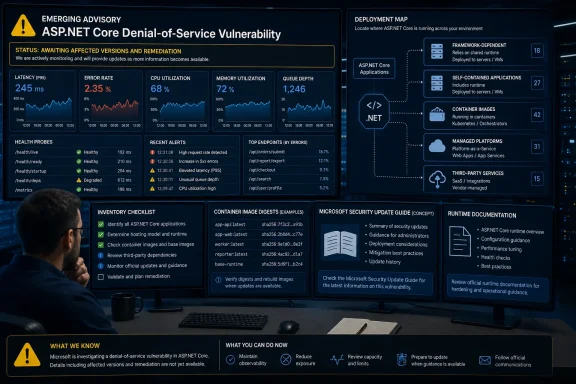
That distinction matters because ASP.NET Core can be deployed in several ways: against a runtime installed on a host, within a self-contained application, in a container image, or through a managed platform. If Microsoft identifies a serviced .NET runtime update, administrators will need to verify whether each application is framework-dependent, self-contained, or containerized before deciding what must be updated, rebuilt, restarted, or redeployed.
Microsoft’s title places CVE-2026-56170 in the denial-of-service category. Beyond that classification, the supplied record does not support more specific conclusions about how the issue can be triggered, who can trigger it, or what resource becomes unavailable.
That means operators should avoid converting a short title into an assumed exploit narrative. It is not currently responsible to state that the vulnerability is unauthenticated, network-accessible, remotely exploitable, or caused by resource allocation without limits or throttling. It is equally premature to prescribe request-body limits, connection caps, reverse-proxy signatures, or endpoint-specific filters as if Microsoft had identified the vulnerable request pattern.
The title nevertheless gives defenders a useful monitoring direction. Teams responsible for ASP.NET Core workloads can review availability telemetry for unusual degradation while waiting for technical details. Relevant signals include application health, latency, failed requests, process restarts, memory and processor pressure, queue depth, connection pressure, and failed health probes. These are general service-health indicators, not evidence that CVE-2026-56170 has been exploited.
Administrators should also resist the opposite error: assuming that every slowdown affecting an ASP.NET Core service is related to this CVE. Capacity shortages, application regressions, database contention, upstream failures, legitimate traffic changes, deployment errors, and infrastructure faults can produce similar symptoms. Until Microsoft provides detection guidance or technical indicators, CVE-2026-56170 should be one hypothesis in an investigation rather than a default diagnosis.
That diversity makes deployment inventory the most useful immediate task. The objective is not to declare systems vulnerable based solely on the presence of .NET. It is to identify where potentially relevant ASP.NET Core workloads run so that Microsoft’s eventual affected-product guidance can be mapped to real applications quickly and accurately.
A host-level software list may not tell the whole story. Some applications use a runtime installed on the host. Others carry runtime components as part of their published files. Containers have their own image layers, and managed platforms can divide servicing responsibility between the provider and the customer. Build servers, package manifests, deployment pipelines, registries, and runtime process information can each reveal a different part of the estate.
The following table is a forward-looking readiness map, not confirmed remediation for CVE-2026-56170:
This separation of deployment patterns prevents a common category error: treating every ASP.NET Core application as if it consumes the same host runtime. It also avoids the reverse mistake of assuming that every application must be rebuilt. Neither conclusion is supported until Microsoft identifies the affected products and remediation.
A reliable inventory should connect each running workload to an owner, an artifact, and a deployment method. For higher-priority services, teams should also document the rollback path, maintenance window, testing contact, and business dependency. Those details reduce delay if Microsoft later publishes a serviced runtime, application update, platform action, or configuration mitigation.
Without confirmed attack prerequisites or a request pattern, administrators cannot know whether a generic request-rate threshold measures the relevant workload. A rule that is too permissive may provide no meaningful protection, while one that is too restrictive can disrupt legitimate users. The same caution applies to emergency blocking rules based on guessed paths, methods, headers, payload sizes, or client behavior.
Organizations should therefore review existing controls rather than rushing to deploy speculative ones. Confirm that gateways and proxies have reasonable, tested limits for the application’s normal traffic profile. Check that monitoring can distinguish rejected requests from application failures. Ensure that emergency rules can be deployed, observed, and rolled back safely if Microsoft later publishes actionable technical details.
Exposure reduction can also be reviewed as a general precaution. Services that are intended only for internal or administrative use should not be publicly reachable merely because an old firewall rule, load-balancer listener, or temporary test configuration was never removed. Access restrictions should be based on documented business requirements and tested architecture—not on an unsupported assumption about this CVE’s attack vector.
Any mitigation Microsoft eventually lists should take precedence over generic recommendations. Until then, traffic controls are best described as resilience measures. They must not be presented as proof that the vulnerability has been removed or that an application is unaffected.
Administrators can prepare by capturing the image digest actually running in each environment and connecting it to the relevant Dockerfile or other build definition, base-image reference, registry location, software bill of materials where available, and deployment pipeline. This creates an evidence chain that can be checked against Microsoft or image-provider guidance later.
Pinned tags, cached layers, private registries, rollback images, and secondary environments can complicate an eventual rollout. Those are general container-servicing considerations, not evidence that current images contain the vulnerability. The readiness goal is to make it possible to answer, quickly and accurately, which running workloads contain a component Microsoft identifies as affected.
Self-contained applications present a related inventory challenge. Their published directories may carry runtime components rather than relying exclusively on a machine-wide installation. If Microsoft identifies a serviced .NET runtime update, verify whether the application is framework-dependent, self-contained, or containerized. Then follow Microsoft’s affected-product and remediation guidance to determine whether a host update, rebuild, republish, image replacement, restart, or another action is necessary.
This conditional wording is important. The supplied record does not identify affected runtime packages, so it cannot support a CVE-specific conclusion that host updates will or will not repair a given application. Deployment architecture determines how a future update may need to flow, but Microsoft’s technical guidance must first establish what is affected.
Managed platforms and third-party products add another layer. A cloud or hosting provider may service part of the stack while the customer remains responsible for the application artifact. A software vendor may bundle ASP.NET Core components and require its own tested installer. Administrators should determine those responsibility boundaries now and avoid manually replacing bundled files unless the responsible vendor directs them to do so.
Exposure and business criticality still provide sensible readiness priorities. Public services, identity components, API gateways, customer portals, payment-related applications, and shared internal middleware may deserve earlier inventory and monitoring because an outage would have greater consequences. This prioritization reflects operational impact, not a confirmed CVE attack path.
Teams should map dependencies around important ASP.NET Core workloads. Identify upstream gateways, downstream databases and APIs, identity providers, queues, caches, and automated health-management systems. The purpose is to support incident response and change planning if Microsoft later confirms affected versions—not to claim that CVE-2026-56170 will produce a particular cascade.
Monitoring should likewise be calibrated as service-health preparation. Average latency alone can hide endpoint-specific degradation, while process-up checks can miss an application that is technically running but unable to serve requests normally. Useful dashboards may include percentile latency, error rates, rejected requests, resource use, queue depth, restart frequency, health-probe status, and dependency timing.
None of these metrics is a CVE-specific indicator under the current record. Their value is that they establish a baseline and help teams evaluate unexpected behavior or the effects of future remediation.
If Microsoft adds affected versions, compare those versions with the components actually used by running workloads. If Microsoft adds remediation, follow the stated prerequisites and deployment instructions. If a third-party product or managed platform is involved, check the responsible vendor’s support guidance before replacing bundled components.
No exact Settings path, KB, package version, runtime command, container tag, or build number can be responsibly supplied from the current record. Providing one would risk directing administrators to an unrelated update or creating false confidence that an application has been remediated.
The correct immediate response is therefore disciplined preparation:
The authoritative starting point is Microsoft’s Security Update Guide entry at Security Update Guide - Microsoft Security Response Center. Before making production changes, check that page for populated affected-product and remediation fields, along with any prerequisites, mitigations, or revision notes Microsoft may add. No exact Windows Settings path, KB number, .NET package version, command, runtime build, container tag, or application build number can be responsibly supplied from the current record.
That distinction matters because ASP.NET Core can be deployed in several ways: against a runtime installed on a host, within a self-contained application, in a container image, or through a managed platform. If Microsoft identifies a serviced .NET runtime update, administrators will need to verify whether each application is framework-dependent, self-contained, or containerized before deciding what must be updated, rebuilt, restarted, or redeployed.
Known / not yet confirmed
Known
Not yet confirmed by the supplied record
- Microsoft published CVE-2026-56170 at 2026-07-14 07:00 PDT.
- Microsoft titled the entry “ASP.NET Core Denial of Service Vulnerability.”
- The entry concerns ASP.NET Core and characterizes the vulnerability as denial of service.
- Affected ASP.NET Core, .NET, Windows, Linux, container, or managed-platform versions.
- Severity, CVSS details, attack vector, authentication requirements, user interaction, or other prerequisites.
- Whether the issue is remotely reachable, internet-exploitable, or limited to a particular configuration or request path.
- The underlying resource, request pattern, code path, or root cause.
- Whether exploitation has been observed or proof-of-concept code is public.
- Affected runtime packages, fixed package versions, KB numbers, builds, container tags, or release branches.
- Microsoft’s required remediation, any application-level workaround, or the effectiveness of generic rate limiting and proxy controls.
 The Title Points to Availability, but the Boundaries Are Unknown
Microsoft’s title places CVE-2026-56170 in the denial-of-service category. Beyond that classification, the supplied record does not support more specific conclusions about how the issue can be triggered, who can trigger it, or what resource becomes unavailable.That means operators should avoid converting a short title into an assumed exploit narrative. It is not currently responsible to state that the vulnerability is unauthenticated, network-accessible, remotely exploitable, or caused by resource allocation without limits or throttling. It is equally premature to prescribe request-body limits, connection caps, reverse-proxy signatures, or endpoint-specific filters as if Microsoft had identified the vulnerable request pattern.
The title nevertheless gives defenders a useful monitoring direction. Teams responsible for ASP.NET Core workloads can review availability telemetry for unusual degradation while waiting for technical details. Relevant signals include application health, latency, failed requests, process restarts, memory and processor pressure, queue depth, connection pressure, and failed health probes. These are general service-health indicators, not evidence that CVE-2026-56170 has been exploited.
Administrators should also resist the opposite error: assuming that every slowdown affecting an ASP.NET Core service is related to this CVE. Capacity shortages, application regressions, database contention, upstream failures, legitimate traffic changes, deployment errors, and infrastructure faults can produce similar symptoms. Until Microsoft provides detection guidance or technical indicators, CVE-2026-56170 should be one hypothesis in an investigation rather than a default diagnosis.
A Small Record Creates a Large Discovery Problem
The lack of affected-product and remediation information limits what administrators can safely change today, but it does not prevent them from improving readiness. ASP.NET Core can sit behind IIS on Windows, run directly as a service, execute on Linux, ship inside a self-contained application, or operate in a container or managed application platform. Ownership may be divided among server administrators, developers, platform teams, security teams, and third-party vendors.That diversity makes deployment inventory the most useful immediate task. The objective is not to declare systems vulnerable based solely on the presence of .NET. It is to identify where potentially relevant ASP.NET Core workloads run so that Microsoft’s eventual affected-product guidance can be mapped to real applications quickly and accurately.
A host-level software list may not tell the whole story. Some applications use a runtime installed on the host. Others carry runtime components as part of their published files. Containers have their own image layers, and managed platforms can divide servicing responsibility between the provider and the customer. Build servers, package manifests, deployment pipelines, registries, and runtime process information can each reveal a different part of the estate.
The following table is a forward-looking readiness map, not confirmed remediation for CVE-2026-56170:
| Deployment pattern | Where relevant components may reside | What to establish now | Conditional next step if Microsoft identifies a serviced runtime update |
|---|---|---|---|
| Framework-dependent application | Runtime installed on the host or supplied by the platform | Record the active runtime, host, service owner, and restart procedure | Compare the active runtime with Microsoft’s affected-product and remediation fields; update and restart only as directed |
| Self-contained application | Runtime components published with the application files | Record the deployed artifact, source project, build pipeline, and application owner | Rebuild and republish if Microsoft’s guidance says the bundled components are affected |
| Containerized application | Base image and application-image layers | Record the base image reference, running digest, registry, deployment, and rebuild owner | Rebuild and redeploy if Microsoft identifies an affected image or runtime component |
| Managed application platform | Provider platform image, customer package, or both | Determine the provider/customer servicing boundary and support channel | Follow provider and Microsoft guidance, then verify the instance state |
| Third-party ASP.NET Core product | Vendor installer, appliance, service bundle, or container | Identify the vendor, product version, support status, and deployment owner | Use the vendor’s validated update path rather than substituting an unrelated runtime change |
A reliable inventory should connect each running workload to an owner, an artifact, and a deployment method. For higher-priority services, teams should also document the rollback path, maintenance window, testing contact, and business dependency. Those details reduce delay if Microsoft later publishes a serviced runtime, application update, platform action, or configuration mitigation.
Rate Limiting Is General Resilience Guidance, Not a Confirmed Fix
ASP.NET Core, web servers, application gateways, content-delivery networks, and reverse proxies can provide rate limiting and other traffic-management controls. Those controls are useful for general availability engineering, but the supplied CVE record does not establish that a particular rate limit, request-size restriction, timeout, authentication rule, or connection cap mitigates CVE-2026-56170.Without confirmed attack prerequisites or a request pattern, administrators cannot know whether a generic request-rate threshold measures the relevant workload. A rule that is too permissive may provide no meaningful protection, while one that is too restrictive can disrupt legitimate users. The same caution applies to emergency blocking rules based on guessed paths, methods, headers, payload sizes, or client behavior.
Organizations should therefore review existing controls rather than rushing to deploy speculative ones. Confirm that gateways and proxies have reasonable, tested limits for the application’s normal traffic profile. Check that monitoring can distinguish rejected requests from application failures. Ensure that emergency rules can be deployed, observed, and rolled back safely if Microsoft later publishes actionable technical details.
Exposure reduction can also be reviewed as a general precaution. Services that are intended only for internal or administrative use should not be publicly reachable merely because an old firewall rule, load-balancer listener, or temporary test configuration was never removed. Access restrictions should be based on documented business requirements and tested architecture—not on an unsupported assumption about this CVE’s attack vector.
Any mitigation Microsoft eventually lists should take precedence over generic recommendations. Until then, traffic controls are best described as resilience measures. They must not be presented as proof that the vulnerability has been removed or that an application is unaffected.
Containers and Self-Contained Apps Require Deployment Visibility
Containers deserve special attention during inventory because the operating system, host runtime, base image, application image, and running workload are separate layers. Recording only the host’s patch state does not identify what is inside a running application image. At the same time, the current CVE record does not establish that any particular image, tag, or runtime package is affected.Administrators can prepare by capturing the image digest actually running in each environment and connecting it to the relevant Dockerfile or other build definition, base-image reference, registry location, software bill of materials where available, and deployment pipeline. This creates an evidence chain that can be checked against Microsoft or image-provider guidance later.
Pinned tags, cached layers, private registries, rollback images, and secondary environments can complicate an eventual rollout. Those are general container-servicing considerations, not evidence that current images contain the vulnerability. The readiness goal is to make it possible to answer, quickly and accurately, which running workloads contain a component Microsoft identifies as affected.
Self-contained applications present a related inventory challenge. Their published directories may carry runtime components rather than relying exclusively on a machine-wide installation. If Microsoft identifies a serviced .NET runtime update, verify whether the application is framework-dependent, self-contained, or containerized. Then follow Microsoft’s affected-product and remediation guidance to determine whether a host update, rebuild, republish, image replacement, restart, or another action is necessary.
This conditional wording is important. The supplied record does not identify affected runtime packages, so it cannot support a CVE-specific conclusion that host updates will or will not repair a given application. Deployment architecture determines how a future update may need to flow, but Microsoft’s technical guidance must first establish what is affected.
Managed platforms and third-party products add another layer. A cloud or hosting provider may service part of the stack while the customer remains responsible for the application artifact. A software vendor may bundle ASP.NET Core components and require its own tested installer. Administrators should determine those responsibility boundaries now and avoid manually replacing bundled files unless the responsible vendor directs them to do so.
Prioritize by Exposure and Business Role—Without Assuming Exploitability
The supplied record does not confirm whether CVE-2026-56170 is remotely reachable, requires authentication, depends on a specific configuration, or can be triggered through an internet-facing endpoint. Administrators should not describe external applications as exploitable on that basis alone.Exposure and business criticality still provide sensible readiness priorities. Public services, identity components, API gateways, customer portals, payment-related applications, and shared internal middleware may deserve earlier inventory and monitoring because an outage would have greater consequences. This prioritization reflects operational impact, not a confirmed CVE attack path.
Teams should map dependencies around important ASP.NET Core workloads. Identify upstream gateways, downstream databases and APIs, identity providers, queues, caches, and automated health-management systems. The purpose is to support incident response and change planning if Microsoft later confirms affected versions—not to claim that CVE-2026-56170 will produce a particular cascade.
Monitoring should likewise be calibrated as service-health preparation. Average latency alone can hide endpoint-specific degradation, while process-up checks can miss an application that is technically running but unable to serve requests normally. Useful dashboards may include percentile latency, error rates, rejected requests, resource use, queue depth, restart frequency, health-probe status, and dependency timing.
None of these metrics is a CVE-specific indicator under the current record. Their value is that they establish a baseline and help teams evaluate unexpected behavior or the effects of future remediation.
What Administrators Can Responsibly Do Now
The first operational step is to open Microsoft’s Security Update Guide entry at Security Update Guide - Microsoft Security Response Center and inspect the affected-product and remediation fields. If those fields remain incomplete, record that fact and monitor the entry for revisions. Do not infer a package, build, KB, command, or update path from the publication date or from unrelated .NET servicing material.If Microsoft adds affected versions, compare those versions with the components actually used by running workloads. If Microsoft adds remediation, follow the stated prerequisites and deployment instructions. If a third-party product or managed platform is involved, check the responsible vendor’s support guidance before replacing bundled components.
No exact Settings path, KB, package version, runtime command, container tag, or build number can be responsibly supplied from the current record. Providing one would risk directing administrators to an unrelated update or creating false confidence that an application has been remediated.
Forward-looking readiness checklist for admins
This checklist supports preparation and inventory. It is not confirmed remediation for CVE-2026-56170.- Open Microsoft’s CVE entry and check the affected-product and remediation fields before changing runtimes or rebuilding images.
- Record whether Microsoft has added severity, prerequisites, mitigations, fixed versions, or revision notes.
- Inventory internet-facing and internally critical ASP.NET Core applications without assuming that all are affected.
- Identify whether each workload is framework-dependent, self-contained, containerized, platform-managed, or supplied by a third-party vendor.
- Record the application owner, business owner, service location, environment, and maintenance contact.
- Capture the runtime or application version actually used by the running process where that can be done safely.
- For framework-dependent applications, document the host or platform runtime source and the restart procedure.
- For self-contained applications, document the deployed artifact, project source, build pipeline, and republishing process.
- For containers, capture the running image digest, base-image reference, registry, deployment manifest, and rebuild pipeline.
- For managed services, determine which layers the provider services and which remain the customer’s responsibility.
- For third-party products, identify the vendor-supported update mechanism and avoid unsupported file replacement.
- Establish baseline health telemetry for latency, errors, resource use, queue depth, restarts, and failed health checks.
- Review existing gateway, proxy, firewall, and rate-limit configurations as general resilience controls, not as proven CVE mitigation.
- Confirm that emergency traffic rules can be deployed and rolled back without unnecessary business disruption.
- Identify secondary regions, disaster-recovery systems, staging environments, scheduled jobs, canary deployments, and rollback artifacts.
- If Microsoft identifies a serviced .NET runtime update, verify whether each app is framework-dependent, self-contained, or containerized before selecting a deployment action.
- After any future Microsoft-directed change, verify the running process, deployed artifact, image digest, or platform instance rather than relying only on a completed ticket.
- Retain change and deployment evidence so security, operations, and application teams can demonstrate which workloads were evaluated.
Conditional response timeline
| Stage | Administrator action | Decision boundary |
|---|---|---|
| Current record only | Review Microsoft’s entry, inventory deployments, establish owners, and monitor service health | Do not invent an affected version or remediation |
| Microsoft lists affected products | Compare the listed products and versions with running workloads and deployed artifacts | Presence of ASP.NET Core alone does not prove an affected version |
| Microsoft publishes remediation | Follow Microsoft’s instructions and any applicable platform or product-vendor guidance | Select host update, rebuild, redeployment, or another action only when supported |
| Deployment occurs | Restart, recycle, rebuild, or redeploy as required by the validated remediation path | Pipeline completion alone does not prove the new artifact is running |
| Verification | Confirm the active runtime, artifact, image digest, or managed-platform state | Verify production, secondary regions, recovery environments, and rollback assets |
| Post-change monitoring | Watch availability and performance telemetry and document exceptions | Operational symptoms alone do not establish exploitation |
What Defenders Should Carry Into the Response Window
CVE-2026-56170 currently presents a clear publication fact and an incomplete operational picture. Microsoft published the entry at 2026-07-14 07:00 PDT and titled it “ASP.NET Core Denial of Service Vulnerability.” The supplied record does not yet establish affected versions, severity, attack prerequisites, exploitation status, technical cause, or a fix.The correct immediate response is therefore disciplined preparation:
- Treat Microsoft’s Security Update Guide entry as the authoritative source for affected products and remediation.
- Do not assign unsupported characteristics such as unauthenticated access, network reachability, unrestricted resource allocation, or a particular request trigger.
- Do not associate the CVE with a servicing cycle, KB, package, runtime branch, build, or container image unless Microsoft explicitly does so.
- Do not change production runtimes or rebuild images merely because the CVE title mentions ASP.NET Core.
- Preserve the deployment-inventory work needed to act quickly once supported guidance is available.
- If Microsoft identifies a serviced .NET runtime update, determine whether each application is framework-dependent, self-contained, containerized, platform-managed, or vendor-packaged before applying the stated remediation.
- Verify the component and artifact actually running after any future change.
References
- Primary source: MSRC
Published: 2026-07-14T07:00:00-07:00
Security Update Guide - Microsoft Security Response Center
 msrc.microsoft.com
