

Windows 11 can display Microsoft recommendations, service prompts and personalized offers across Start, Settings, notifications and the lock screen—even on a PC whose Windows license and hardware have already been paid for. The controls exist, but they are scattered across multiple Settings pages, and disabling the advertising ID alone does not stop the promotions.
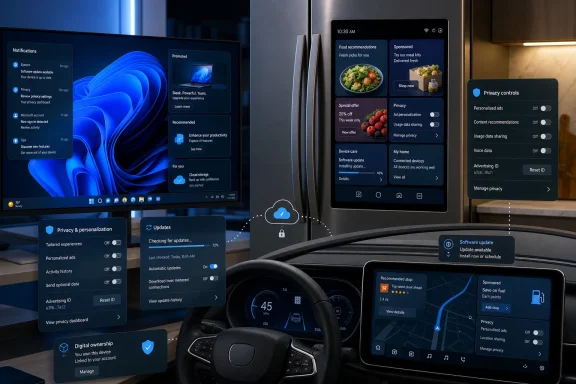
A July 15 report from Fox News’ CyberGuy highlighted Windows alongside Samsung Family Hub refrigerators and Stellantis vehicles as examples of connected products gaining promotional content after purchase. The common mechanism is the software update: the same channel that delivers security fixes can also change how manufacturers monetize screens in the kitchen, office and car.
Microsoft declined to comment for the Fox News report. Its support documentation, however, explicitly describes “tips, ads, and recommendations” generated by Windows 11’s Device usage settings, as well as suggested content in Settings and advertising identifiers available to apps.
Calling every recommendation an “ad” can obscure how Windows 11 actually delivers this material. Microsoft uses several mechanisms, each with its own control and purpose, rather than one operating-system-wide advertising switch.
Windows Spotlight can place rotating photography, tips, tricks and notifications on the lock screen. Start can surface recommendations and account-related messages, while Settings can suggest Microsoft features, apps or services. Windows notifications may also encourage users to complete setup, back up files to OneDrive or try other Microsoft products.
Device usage settings add another layer. Under Settings > Personalization > Device usage, users can tell Windows that a PC is intended for gaming, development, creativity, school, entertainment, family or business. Microsoft says those choices may produce Xbox Game Pass trials, OneDrive suggestions, Microsoft 365 Business offers and recommended apps or websites.
That distinction matters because turning off one category does not necessarily affect the others. Disabling Windows Spotlight will not suppress a Start recommendation, and turning off personalized advertising will not remove every promotional message.
Microsoft is unusually direct about the limitation of its advertising ID control. Its Windows 11 privacy documentation says switching off the identifier does not reduce the number of ads; it instead makes them less personalized. The setting applies to Windows apps using that identifier, not every form of interest-based advertising from Microsoft, websites or third-party software.
For users who want a quieter installation, these are the principal places to inspect:
For managed PCs, administrators should also remember that a consumer-facing toggle is not the whole policy story. Group Policy, mobile device management profiles, Microsoft account state, Windows edition and organizational defaults can all influence what appears. A freshly imaged Windows 11 Enterprise endpoint may therefore behave differently from an unmanaged Windows 11 Home laptop.
According to the statement Samsung supplied to Fox News, the company piloted a Cover Screen widget in the United States beginning in October 2025, concluded the pilot in March 2026 and then launched it more broadly. The widget rotates weather, news, calendar events and curated advertising while the Family Hub display is idle.
Samsung says users can disable the feature without losing unrelated refrigerator functions. On supported models, the path is Settings > Advertisements > Cover screen Ads. Individual advertisements can also be dismissed, while switching the Cover Screen to an Art or Album theme prevents the widget from appearing.
The opt-out is important, but it does not settle the underlying ownership issue. A buyer may have selected a connected refrigerator for calendars, recipes, cameras or SmartThings integration without agreeing in any meaningful sense that its kitchen display would later become advertising inventory.
Samsung told Fox News that only a low-single-digit percentage of users had disabled the widget. That figure does not necessarily demonstrate enthusiasm: some owners may accept it, while others may never find the setting, notice the change or understand that the ads are optional.
This is the problem with default-on monetization. Manufacturers can measure how many people actively opt out, but that number does not reveal how many would have knowingly opted in before the feature appeared.
Stellantis told the outlet that the promotional in-vehicle messages described in earlier reports had not run since mid-fall 2025 and that no future promotional messages of that type were planned. When those messages were active, owners reportedly could opt out through customer service or account message settings.
That statement needs to be separated from Stellantis’ wider connected-services strategy. In July 2025, the automaker announced a partnership with 4screen to place location-aware businesses, services, special offers and promotions within the navigation experience of selected Fiat, Jeep and Ram vehicles using Uconnect 4 or Uconnect 5. Stellantis said the service would arrive progressively through over-the-air updates.
A pop-up sales pitch and a sponsored point of interest on a navigation map are not the same interface. Both, however, turn the dashboard into a commercial channel that can change after delivery.
Vehicle screens also occupy a category that refrigerators and PCs do not. Drivers depend on them for navigation, cameras, climate controls, media and vehicle status, often while the vehicle is moving. Stellantis describes the 4screen integration as contextual and designed not to distract, but the practical standard should be higher than merely making an offer dismissible.
Recall notices, fault warnings and maintenance alerts have an obvious ownership benefit. Commercial messages compete with those alerts for attention and may condition drivers to dismiss dashboard notifications more quickly.
The more useful distinction is between an update that maintains the purchased product and one that changes its commercial terms. A patch for Windows Defender, refrigerator reliability or Uconnect stability preserves the device. A new advertising surface extracts additional value from attention that was not necessarily part of the original sale.
This tension will grow as more hardware becomes a software platform. Screens provide manufacturers with an ongoing relationship after checkout, while accounts, telemetry and over-the-air delivery make that relationship measurable and adjustable. The sale is no longer necessarily the end of the business model.
Windows users can respond immediately by auditing the recommendation, notification, lock-screen and privacy controls rather than relying on the advertising ID alone. IT departments should incorporate those settings into provisioning baselines and recheck them after feature updates, especially when Microsoft changes Settings labels or introduces new setup experiences.
Consumers considering connected appliances and vehicles have fewer standardized controls. Before purchase, the useful questions are whether promotions can be introduced remotely, whether the opt-out disables other functionality, and whether factory-reset or account changes restore the promotional defaults.
Samsung at least documents a direct Cover Screen switch. Stellantis says the earlier Uconnect promotional messages ended, although its map-integrated offers strategy shows that commercial content has not disappeared from the connected-car model. Windows 11 provides several controls, but leaves users to assemble them into something resembling a promotion-free desktop.
The next test will not be whether manufacturers can put advertising on paid hardware; Samsung, Microsoft and automakers have already demonstrated that they can. It will be whether buyers and administrators receive a durable, clearly labeled opt-out that survives the next software update.
A July 15 report from Fox News’ CyberGuy highlighted Windows alongside Samsung Family Hub refrigerators and Stellantis vehicles as examples of connected products gaining promotional content after purchase. The common mechanism is the software update: the same channel that delivers security fixes can also change how manufacturers monetize screens in the kitchen, office and car.
Microsoft declined to comment for the Fox News report. Its support documentation, however, explicitly describes “tips, ads, and recommendations” generated by Windows 11’s Device usage settings, as well as suggested content in Settings and advertising identifiers available to apps.
 Windows 11 Has More Than One Advertising Switch
Calling every recommendation an “ad” can obscure how Windows 11 actually delivers this material. Microsoft uses several mechanisms, each with its own control and purpose, rather than one operating-system-wide advertising switch.Windows Spotlight can place rotating photography, tips, tricks and notifications on the lock screen. Start can surface recommendations and account-related messages, while Settings can suggest Microsoft features, apps or services. Windows notifications may also encourage users to complete setup, back up files to OneDrive or try other Microsoft products.
Device usage settings add another layer. Under Settings > Personalization > Device usage, users can tell Windows that a PC is intended for gaming, development, creativity, school, entertainment, family or business. Microsoft says those choices may produce Xbox Game Pass trials, OneDrive suggestions, Microsoft 365 Business offers and recommended apps or websites.
That distinction matters because turning off one category does not necessarily affect the others. Disabling Windows Spotlight will not suppress a Start recommendation, and turning off personalized advertising will not remove every promotional message.
Microsoft is unusually direct about the limitation of its advertising ID control. Its Windows 11 privacy documentation says switching off the identifier does not reduce the number of ads; it instead makes them less personalized. The setting applies to Windows apps using that identifier, not every form of interest-based advertising from Microsoft, websites or third-party software.
For users who want a quieter installation, these are the principal places to inspect:
- Settings > Privacy & security > General contains controls for the advertising ID, app-launch tracking and suggested content in Settings.
- Settings > Personalization > Start contains the available recommendation and account-notification controls for the current Windows build.
- Settings > Personalization > Lock screen allows Windows Spotlight to be replaced with a picture or slideshow and provides controls for additional lock-screen content.
- Settings > Personalization > Device usage determines whether Windows tailors tips, recommendations and offers around selected activities.
- Settings > System > Notifications > Additional settings contains several Windows setup, suggestion and welcome-experience options on supported builds.
For managed PCs, administrators should also remember that a consumer-facing toggle is not the whole policy story. Group Policy, mobile device management profiles, Microsoft account state, Windows edition and organizational defaults can all influence what appears. A freshly imaged Windows 11 Enterprise endpoint may therefore behave differently from an unmanaged Windows 11 Home laptop.
Samsung Put the Billboard on the Refrigerator
Samsung’s Family Hub provides the clearest example of a purchased display being repurposed after installation. Samsung confirms in its current support documentation that recent Family Hub software can show advertisements on the refrigerator’s Cover Screen.According to the statement Samsung supplied to Fox News, the company piloted a Cover Screen widget in the United States beginning in October 2025, concluded the pilot in March 2026 and then launched it more broadly. The widget rotates weather, news, calendar events and curated advertising while the Family Hub display is idle.
Samsung says users can disable the feature without losing unrelated refrigerator functions. On supported models, the path is Settings > Advertisements > Cover screen Ads. Individual advertisements can also be dismissed, while switching the Cover Screen to an Art or Album theme prevents the widget from appearing.
The opt-out is important, but it does not settle the underlying ownership issue. A buyer may have selected a connected refrigerator for calendars, recipes, cameras or SmartThings integration without agreeing in any meaningful sense that its kitchen display would later become advertising inventory.
Samsung told Fox News that only a low-single-digit percentage of users had disabled the widget. That figure does not necessarily demonstrate enthusiasm: some owners may accept it, while others may never find the setting, notice the change or understand that the ads are optional.
This is the problem with default-on monetization. Manufacturers can measure how many people actively opt out, but that number does not reveal how many would have knowingly opted in before the feature appeared.
The Dashboard Raises a Different Safety Question
Promotional content becomes more sensitive when the display is part of a vehicle. Fox News reported that owners of some Jeep, Ram and Chrysler vehicles previously received promotional messages through Stellantis’ Uconnect system.Stellantis told the outlet that the promotional in-vehicle messages described in earlier reports had not run since mid-fall 2025 and that no future promotional messages of that type were planned. When those messages were active, owners reportedly could opt out through customer service or account message settings.
That statement needs to be separated from Stellantis’ wider connected-services strategy. In July 2025, the automaker announced a partnership with 4screen to place location-aware businesses, services, special offers and promotions within the navigation experience of selected Fiat, Jeep and Ram vehicles using Uconnect 4 or Uconnect 5. Stellantis said the service would arrive progressively through over-the-air updates.
A pop-up sales pitch and a sponsored point of interest on a navigation map are not the same interface. Both, however, turn the dashboard into a commercial channel that can change after delivery.
Vehicle screens also occupy a category that refrigerators and PCs do not. Drivers depend on them for navigation, cameras, climate controls, media and vehicle status, often while the vehicle is moving. Stellantis describes the 4screen integration as contextual and designed not to distract, but the practical standard should be higher than merely making an offer dismissible.
Recall notices, fault warnings and maintenance alerts have an obvious ownership benefit. Commercial messages compete with those alerts for attention and may condition drivers to dismiss dashboard notifications more quickly.
Software Updates Have Rewritten the Meaning of Ownership
Security updates remain essential. Disconnecting every smart appliance, refusing Windows servicing or blocking vehicle updates indiscriminately would trade irritation for vulnerabilities, unfixed defects and potentially missing safety improvements.The more useful distinction is between an update that maintains the purchased product and one that changes its commercial terms. A patch for Windows Defender, refrigerator reliability or Uconnect stability preserves the device. A new advertising surface extracts additional value from attention that was not necessarily part of the original sale.
This tension will grow as more hardware becomes a software platform. Screens provide manufacturers with an ongoing relationship after checkout, while accounts, telemetry and over-the-air delivery make that relationship measurable and adjustable. The sale is no longer necessarily the end of the business model.
Windows users can respond immediately by auditing the recommendation, notification, lock-screen and privacy controls rather than relying on the advertising ID alone. IT departments should incorporate those settings into provisioning baselines and recheck them after feature updates, especially when Microsoft changes Settings labels or introduces new setup experiences.
Consumers considering connected appliances and vehicles have fewer standardized controls. Before purchase, the useful questions are whether promotions can be introduced remotely, whether the opt-out disables other functionality, and whether factory-reset or account changes restore the promotional defaults.
Samsung at least documents a direct Cover Screen switch. Stellantis says the earlier Uconnect promotional messages ended, although its map-integrated offers strategy shows that commercial content has not disappeared from the connected-car model. Windows 11 provides several controls, but leaves users to assemble them into something resembling a promotion-free desktop.
The next test will not be whether manufacturers can put advertising on paid hardware; Samsung, Microsoft and automakers have already demonstrated that they can. It will be whether buyers and administrators receive a durable, clearly labeled opt-out that survives the next software update.
References
- Primary source: Fox News
Published: 2026-07-15T10:02:00+00:00
How to limit ads on smart devices, Windows 11 computers, tablets | Fox News
Kurt "CyberGuy" Knutsson explains why ads appear on smart device ads like refrigerators, Jeep and vehicle dashboards and Windows 11 lock screens, and how to turn them off.noticias.foxnews.com - Official source: support.microsoft.com
Personalize Your Windows Experience With Device Usage Settings | Microsoft Support
Discover how to personalize your Windows 11 experience with device usage settings. Learn how to optimize your device based on your usage preferences.support.microsoft.com
