

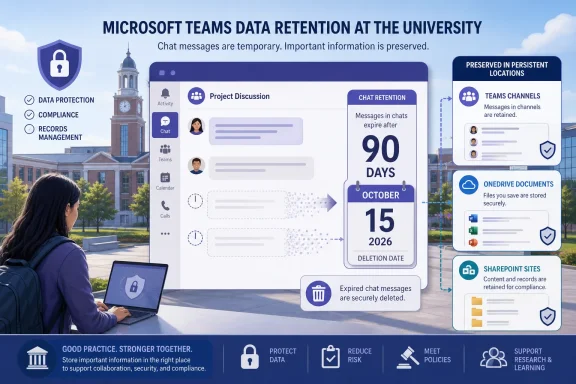
Johns Hopkins University will begin automatically deleting Microsoft Teams chat messages after 90 days on October 15, 2026, under a new retention policy announced by the university’s Hub.
The initial cleanup is substantial: chats sent before July 17, 2026, will be permanently removed on or within a few days of October 15. Teams meeting recordings and transcripts will follow a separate 180-day clock; material older than April 18, 2026, is slated for deletion when the policy begins.
The policy covers one-to-one chats, group chats, and chats attached to unscheduled Teams meetings. It does not affect Teams channels, where message history remains available to the relevant team or, for private channels, its defined membership.
Johns Hopkins IT developed the change with the university’s General Counsel offices. The university describes direct and small-group chats as informal, transitional communications that ordinarily are not official records. Regulatory retention requirements and legal preservation duties override the deletion policy automatically, according to the announcement.
The distinction matters for workflows built around Teams. A chat is a private conversation outside a team, while a channel is a shared, topic-based workspace with persistent history. Moving operational discussions to a channel is therefore the university’s preferred way to retain decisions, project context, and other material that must outlast a 90-day window.
Before October 15, users should:
For Windows users, the immediate concern is less about the Teams client than the data location: chat history should no longer be treated as a durable archive at Johns Hopkins after October 15.
The initial cleanup is substantial: chats sent before July 17, 2026, will be permanently removed on or within a few days of October 15. Teams meeting recordings and transcripts will follow a separate 180-day clock; material older than April 18, 2026, is slated for deletion when the policy begins.
 What is affected
The policy covers one-to-one chats, group chats, and chats attached to unscheduled Teams meetings. It does not affect Teams channels, where message history remains available to the relevant team or, for private channels, its defined membership.Johns Hopkins IT developed the change with the university’s General Counsel offices. The university describes direct and small-group chats as informal, transitional communications that ordinarily are not official records. Regulatory retention requirements and legal preservation duties override the deletion policy automatically, according to the announcement.
The distinction matters for workflows built around Teams. A chat is a private conversation outside a team, while a channel is a shared, topic-based workspace with persistent history. Moving operational discussions to a channel is therefore the university’s preferred way to retain decisions, project context, and other material that must outlast a 90-day window.
What users need to do
Johns Hopkins says documents shared in Teams chats are already saved to OneDrive, so those files do not need to be manually rescued. Chat text, decisions, notes, and other context are another matter.Before October 15, users should:
- Copy important chat content into a Teams channel or OneDrive document.
- Move faculty course agreements, decisions, and records into a channel.
- Shift staff workflows that rely on chat history for business processes, compliance, or records management to Teams channels or SharePoint.
- Copy student notes or significant conversations saved in chat into OneDrive.
For Windows users, the immediate concern is less about the Teams client than the data location: chat history should no longer be treated as a durable archive at Johns Hopkins after October 15.
References
- Primary source: Johns Hopkins University
Published: 2026-07-15T13:15:54+00:00
Microsoft Teams chats at Johns Hopkins to be deleted after 90 days
Here's what members of the JHU community need to know—and do—before the policy goes into effect Oct. 15hub.jhu.edu
