

Microsoft will retire Meeting Insights in Outlook beginning in mid-August 2026, replacing the automatic meeting-related email and file suggestions with a Copilot-driven “Prepare for this meeting” experience that requires a Microsoft 365 Copilot license. The practical result is blunt: organizations that used the existing no-extra-license feature but have not bought Copilot may lose the capability entirely by early September.
The change was disclosed in Microsoft 365 Message Center notice MC1430531 and first reported by Neowin. Meeting Insights has been enabled by default on eligible meeting invitations for years, surfacing recent files and messages deemed relevant to a scheduled conversation. Those suggestions were private to the individual viewing the invite and did not alter what other attendees could see.
Microsoft’s replacement does more than show a set of likely related items. “Prepare for this meeting” uses Copilot to summarize accessible material, provide meeting context, and suggest prompts or possible action items. But it also turns a familiar Outlook convenience into another capability tied to the company’s premium AI licensing strategy.
Meeting Insights was relatively restrained by today’s Microsoft 365 standards. It did not generate prose, infer tasks through a large language model, or ask users to trust an AI-written brief. It looked for signals in the Microsoft 365 data a user could already access—such as recently modified documents, email exchanges, and prior interactions associated with meeting participants.
That made it useful precisely because it did not demand a change in workflow. A user opening an Outlook invitation could see likely relevant material without running a search, opening Copilot Chat, or issuing a prompt. It was an assistive feature embedded in the calendar form rather than a new product surface demanding adoption.
The Copilot replacement is more ambitious. Microsoft’s support documentation says the new experience can pull together relevant content that the viewer has permission to access, and it can produce different results for different attendees based on those permissions. The company also warns that a summary may be thin or generic if there are no shared files, useful email history, or related chat activity.
That is a reasonable limitation for an AI summary. It also underscores why this is not a one-for-one replacement. Meeting Insights could still be valuable when it simply surfaced one important recent attachment or email. Copilot’s richer briefing is most effective when Microsoft 365 already has enough connected context to synthesize.
Microsoft’s “Prepare for your meeting with Copilot” documentation identifies Outlook on the web and new Outlook for Windows as places where users can open a calendar event and view the experience. The same documentation makes clear that Copilot only summarizes content the individual user can access, preserving the underlying Microsoft 365 permissions model. That is important for compliance, but it does not soften the commercial change for customers without licenses.
For IT teams, this creates three distinct populations:
Microsoft’s public feature-comparison material continues to acknowledge that new Outlook and classic Outlook do not have identical capability sets. Removing a broadly available cloud-backed feature while introducing its successor most visibly in new Outlook adds another small but meaningful incentive to move users toward Microsoft’s preferred client—and toward Copilot.
For a manager preparing for a one-on-one, or a project lead stepping into a meeting after an inbox-heavy week, that can be more valuable than manually reviewing several Outlook items. Microsoft says Copilot can also offer suggested prompts, allowing a user to ask for specifics rather than accept the first generated summary.
But the new model introduces uncertainty where the old one was easier to understand. Users will need to judge whether a generated summary is complete and accurate, particularly when emails, Teams chats, SharePoint documents, and changing permissions produce an incomplete record. Microsoft explicitly advises users to check the generated material.
That makes “Prepare for this meeting” a productivity aid, not a meeting record. It should not be treated as the authoritative source for commitments, security decisions, customer status, or compliance-sensitive discussions. For those use cases, the original documents, messages, and approved meeting notes remain the evidence.
The replacement also changes the user experience from passive discovery to AI-assisted interpretation. Some employees will prefer that. Others may have valued Meeting Insights because it gave them source materials without adding an AI layer between the calendar and the information.
The immediate work is less technical than operational. Help desks and Microsoft 365 owners should identify teams that rely on Outlook invitations as a meeting-preparation hub, especially executives, project managers, sales teams, and employees who spend much of the day in scheduled calls. Those users are the most likely to notice the disappearance of related-content suggestions.
Organizations that already license Copilot should test the replacement in real meeting scenarios before the retirement completes. The important questions are whether preparation summaries appear where expected, whether the supporting content is actually relevant, and whether users understand that the output is tailored to their permissions rather than shared identically with every participant.
Organizations without Copilot should communicate the change plainly. Calling it an enhancement will not match the experience of users who lose Meeting Insights and receive no alternative. Microsoft’s rollout begins in mid-August 2026 and is expected to finish in early September, leaving a short window to decide whether the feature is important enough to justify Copilot licensing—or whether users should return to manual search, pinned reference documents, and meeting agendas.
For Outlook users, the key consequence is simple: a quiet, automatic meeting-prep feature is being replaced by a more capable AI tool that many tenants will have to pay to use.
The change was disclosed in Microsoft 365 Message Center notice MC1430531 and first reported by Neowin. Meeting Insights has been enabled by default on eligible meeting invitations for years, surfacing recent files and messages deemed relevant to a scheduled conversation. Those suggestions were private to the individual viewing the invite and did not alter what other attendees could see.
Microsoft’s replacement does more than show a set of likely related items. “Prepare for this meeting” uses Copilot to summarize accessible material, provide meeting context, and suggest prompts or possible action items. But it also turns a familiar Outlook convenience into another capability tied to the company’s premium AI licensing strategy.
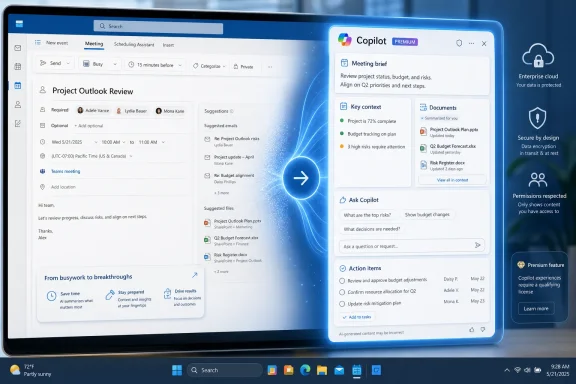 A Useful Calendar Feature Becomes a Licensed AI Experience
Meeting Insights was relatively restrained by today’s Microsoft 365 standards. It did not generate prose, infer tasks through a large language model, or ask users to trust an AI-written brief. It looked for signals in the Microsoft 365 data a user could already access—such as recently modified documents, email exchanges, and prior interactions associated with meeting participants.That made it useful precisely because it did not demand a change in workflow. A user opening an Outlook invitation could see likely relevant material without running a search, opening Copilot Chat, or issuing a prompt. It was an assistive feature embedded in the calendar form rather than a new product surface demanding adoption.
The Copilot replacement is more ambitious. Microsoft’s support documentation says the new experience can pull together relevant content that the viewer has permission to access, and it can produce different results for different attendees based on those permissions. The company also warns that a summary may be thin or generic if there are no shared files, useful email history, or related chat activity.
That is a reasonable limitation for an AI summary. It also underscores why this is not a one-for-one replacement. Meeting Insights could still be valuable when it simply surfaced one important recent attachment or email. Copilot’s richer briefing is most effective when Microsoft 365 already has enough connected context to synthesize.
The Licensing Gap Is the Real Change
The retirement is likely to attract more frustration than an ordinary Outlook feature removal because Microsoft is not merely modernizing the interface. It is moving a broadly available calendar aid behind the Microsoft 365 Copilot entitlement.Microsoft’s “Prepare for your meeting with Copilot” documentation identifies Outlook on the web and new Outlook for Windows as places where users can open a calendar event and view the experience. The same documentation makes clear that Copilot only summarizes content the individual user can access, preserving the underlying Microsoft 365 permissions model. That is important for compliance, but it does not soften the commercial change for customers without licenses.
For IT teams, this creates three distinct populations:
- Users with Microsoft 365 Copilot licenses should receive a more expansive meeting-preparation tool, provided their meetings have enough relevant Microsoft 365 content.
- Users without Copilot licenses may go from lightweight automatic insights to no comparable meeting-context experience in Outlook.
- Organizations still centered on classic Outlook for Windows need to validate their actual user experience, because Microsoft’s current Copilot preparation documentation emphasizes new Outlook for Windows and Outlook on the web.
Microsoft’s public feature-comparison material continues to acknowledge that new Outlook and classic Outlook do not have identical capability sets. Removing a broadly available cloud-backed feature while introducing its successor most visibly in new Outlook adds another small but meaningful incentive to move users toward Microsoft’s preferred client—and toward Copilot.
Better Briefings, but Less Predictable Results
There is a legitimate product case for Copilot’s approach. A good meeting brief should not be limited to a list of files. It should tell the attendee what has changed since the last discussion, identify unresolved decisions, summarize related correspondence, and help frame questions before the call begins.For a manager preparing for a one-on-one, or a project lead stepping into a meeting after an inbox-heavy week, that can be more valuable than manually reviewing several Outlook items. Microsoft says Copilot can also offer suggested prompts, allowing a user to ask for specifics rather than accept the first generated summary.
But the new model introduces uncertainty where the old one was easier to understand. Users will need to judge whether a generated summary is complete and accurate, particularly when emails, Teams chats, SharePoint documents, and changing permissions produce an incomplete record. Microsoft explicitly advises users to check the generated material.
That makes “Prepare for this meeting” a productivity aid, not a meeting record. It should not be treated as the authoritative source for commitments, security decisions, customer status, or compliance-sensitive discussions. For those use cases, the original documents, messages, and approved meeting notes remain the evidence.
The replacement also changes the user experience from passive discovery to AI-assisted interpretation. Some employees will prefer that. Others may have valued Meeting Insights because it gave them source materials without adding an AI layer between the calendar and the information.
Administrators Should Audit Usage Before September
There is no migration setting that converts Meeting Insights into Copilot for tenants that have not licensed Microsoft 365 Copilot. Administrators should therefore treat this as a feature retirement with a potential service gap, rather than assuming users will receive an automatic upgrade.The immediate work is less technical than operational. Help desks and Microsoft 365 owners should identify teams that rely on Outlook invitations as a meeting-preparation hub, especially executives, project managers, sales teams, and employees who spend much of the day in scheduled calls. Those users are the most likely to notice the disappearance of related-content suggestions.
Organizations that already license Copilot should test the replacement in real meeting scenarios before the retirement completes. The important questions are whether preparation summaries appear where expected, whether the supporting content is actually relevant, and whether users understand that the output is tailored to their permissions rather than shared identically with every participant.
Organizations without Copilot should communicate the change plainly. Calling it an enhancement will not match the experience of users who lose Meeting Insights and receive no alternative. Microsoft’s rollout begins in mid-August 2026 and is expected to finish in early September, leaving a short window to decide whether the feature is important enough to justify Copilot licensing—or whether users should return to manual search, pinned reference documents, and meeting agendas.
For Outlook users, the key consequence is simple: a quiet, automatic meeting-prep feature is being replaced by a more capable AI tool that many tenants will have to pay to use.
References
- Primary source: Neowin
Published: 2026-07-18T06:30:01+00:00
Microsoft is killing an Outlook feature and replacing it with Copilot | Neowin
Another familiar Outlook feature is disappearing soon, but its replacement comes with a catch that not every Microsoft 365 user may like. www.neowin.net
- Official source: support.microsoft.com
Prepare for your meeting with Copilot | Microsoft Support
Learn how Copilot in Outlook can help you arrive prepared for your meeting by summarizing key information such as summaries of meeting-related emails and documents, your tasks, and a recap of the previous meeting.support.microsoft.com - Official source: learn.microsoft.com
Microsoft 365 Roadmap | Microsoft 365
The Microsoft 365 Roadmap lists updates that are currently planned for applicable subscribers. Check here for more information on the status of new features and updates.learn.microsoft.com
- Related coverage: windowscentral.com
Microsoft Edge may open Copilot automatically from Outlook links | Windows Central
Clicking links in Outlook could soon open Copilot in Edge automatically.www.windowscentral.com - Related coverage: techradar.com
Microsoft's planned new AI trick for Edge will 'automatically open the Copilot side pane' with Outlook email links — and I can feel the hate already | TechRadar
New feature is on the roadmap for May 2026www.techradar.com