

Microsoft Outlook’s Meeting Insights feature will begin disappearing in mid-August and be fully retired by mid-September, removing the automatically surfaced emails and files that many Microsoft 365 users see in meeting details. Microsoft’s stated replacement is a Copilot-powered meeting-preparation experience—but, as first reported by XDA, it requires a Microsoft 365 Copilot license.
The change is detailed in Microsoft 365 Message Center post MC1430531, published July 17. Microsoft says it is retiring Meeting Insights across Outlook and directing licensed Copilot users to a more “intelligent and context-aware” preparation experience that can summarize relevant content, tasks, and context a user can access.
For users who relied on Outlook to quietly assemble the latest email thread, document, and related material before a call, the immediate consequence is straightforward: the built-in, no-extra-charge feature is going away. The more capable successor sits behind Microsoft’s paid work-focused Copilot offering.
Meeting Insights was not a meeting transcript, a Teams recap, or a full AI assistant. It was a practical Outlook feature that collected relevant emails and files inside an upcoming meeting’s details, reducing the amount of inbox hunting required before a status call, customer discussion, or project review.
That distinction matters. The feature’s value came from its passive behavior: users did not have to formulate a prompt, know which files to attach, or manually search their mailbox and OneDrive. Outlook supplied its best guess at the material related to the meeting and made it available in the calendar event.
Microsoft’s announced successor changes that model. Rather than simply surfacing matching material in the invitation, the company is positioning Copilot meeting preparation as an AI-generated briefing that can incorporate summaries, tasks, and context from across the user’s work data.
That may be more useful for some workers. A well-grounded briefing can potentially identify open commitments, extract decisions from a long email chain, and give a user a condensed view of what matters before the meeting starts. But the change is not a like-for-like feature refresh if the original Meeting Insights experience was included with the customer’s existing Microsoft 365 subscription and the replacement is not.
Microsoft 365 Copilot Chat is available at no extra cost to eligible work and school users and can appear within Outlook. Microsoft’s own documentation says that Copilot Chat in Outlook can use a user’s emails, calendar, meetings, chats, and a limited set of relevant OneDrive and SharePoint files. That gives organizations a free, protected AI chat option in Outlook, subject to their tenant configuration and policies.
But Microsoft also draws a licensing line around deeper access to organizational content. Its documentation says that full work-data access through Work IQ and semantic indexing is available to users with the Microsoft 365 Copilot license. The new meeting-preparation experience Microsoft points to in its retirement notice is expressly a Microsoft 365 Copilot experience, not a promise that the free Copilot Chat tier will retain Meeting Insights’ automatic calendar-card behavior.
In other words, a user may still be able to open Copilot Chat in Outlook and ask for help preparing for a meeting. That is not the same as keeping Meeting Insights, and it does not establish that the same automated, meeting-detail integration will remain available without the add-on license.
That nuance will matter to IT departments trying to answer the inevitable question: “Did Microsoft remove a feature we already paid for?” The practical answer appears to be yes, if the organization counted Meeting Insights as part of Outlook or its baseline Microsoft 365 plan. Whether Copilot delivers a better result is a separate question from whether it carries an additional cost.
The potential upside is real. Meeting Insights primarily helped users locate information. Copilot can be asked to interpret it. A project manager could request a briefing on pending decisions ahead of a steering meeting; a sales representative could ask for a concise summary of the last customer discussion; an engineer could request the unresolved action items across related messages and files.
Yet AI preparation introduces tradeoffs that Meeting Insights largely avoided. A linked email or file lets a user judge relevance directly. A generated summary needs verification, particularly where dates, commitments, technical details, or customer-facing promises are involved. Copilot’s answer will depend on available permissions, indexing, the quality of the prompt, and its ability to identify the correct body of work.
For some users, the old feature’s blunt simplicity was the point. It provided an at-a-glance launch pad inside a meeting invitation, not an interpretive layer requiring a prompt and review.
Microsoft’s rollout also intensifies the divide between organizations that have broadly assigned Microsoft 365 Copilot licenses and those that have limited them to selected roles. The former may see an upgrade in preparation capabilities. The latter could find that a widely available Outlook convenience has been replaced by a capability reserved for executives, sales teams, or other licensed cohorts.
There is also no indication in the notice that Microsoft is providing a direct setting to keep the legacy feature enabled. Organizations should plan around replacement workflows rather than hunt for an Outlook policy that restores it.
A sensible response before the rollout completes includes the following:
But the key change is commercial as well as technical. Meeting Insights was an integrated Outlook convenience available without a separate Copilot purchase. Microsoft is retiring it and directing users toward a licensed AI replacement.
That will leave a gap for users and organizations that want lightweight, automatic meeting context but do not want to assign Microsoft 365 Copilot licenses simply to restore it. By mid-September, the question for those customers will no longer be where Meeting Insights went—it will be whether that everyday Outlook workflow is worth paying Copilot pricing to get back.
The change is detailed in Microsoft 365 Message Center post MC1430531, published July 17. Microsoft says it is retiring Meeting Insights across Outlook and directing licensed Copilot users to a more “intelligent and context-aware” preparation experience that can summarize relevant content, tasks, and context a user can access.
For users who relied on Outlook to quietly assemble the latest email thread, document, and related material before a call, the immediate consequence is straightforward: the built-in, no-extra-charge feature is going away. The more capable successor sits behind Microsoft’s paid work-focused Copilot offering.
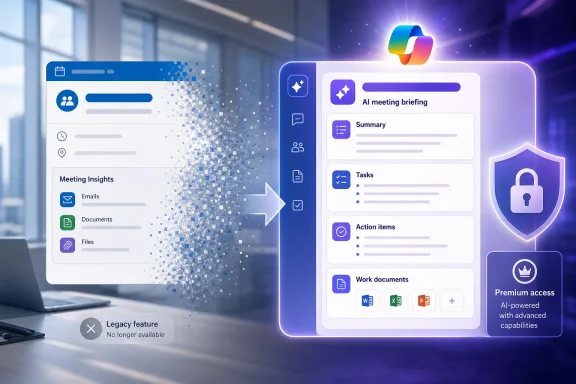 A Small Outlook Card With a Useful Job
Meeting Insights was not a meeting transcript, a Teams recap, or a full AI assistant. It was a practical Outlook feature that collected relevant emails and files inside an upcoming meeting’s details, reducing the amount of inbox hunting required before a status call, customer discussion, or project review.That distinction matters. The feature’s value came from its passive behavior: users did not have to formulate a prompt, know which files to attach, or manually search their mailbox and OneDrive. Outlook supplied its best guess at the material related to the meeting and made it available in the calendar event.
Microsoft’s announced successor changes that model. Rather than simply surfacing matching material in the invitation, the company is positioning Copilot meeting preparation as an AI-generated briefing that can incorporate summaries, tasks, and context from across the user’s work data.
That may be more useful for some workers. A well-grounded briefing can potentially identify open commitments, extract decisions from a long email chain, and give a user a condensed view of what matters before the meeting starts. But the change is not a like-for-like feature refresh if the original Meeting Insights experience was included with the customer’s existing Microsoft 365 subscription and the replacement is not.
Copilot Chat Is Not the Same Entitlement
Microsoft’s product lineup makes this especially confusing because “Copilot” now covers several substantially different products and license levels.Microsoft 365 Copilot Chat is available at no extra cost to eligible work and school users and can appear within Outlook. Microsoft’s own documentation says that Copilot Chat in Outlook can use a user’s emails, calendar, meetings, chats, and a limited set of relevant OneDrive and SharePoint files. That gives organizations a free, protected AI chat option in Outlook, subject to their tenant configuration and policies.
But Microsoft also draws a licensing line around deeper access to organizational content. Its documentation says that full work-data access through Work IQ and semantic indexing is available to users with the Microsoft 365 Copilot license. The new meeting-preparation experience Microsoft points to in its retirement notice is expressly a Microsoft 365 Copilot experience, not a promise that the free Copilot Chat tier will retain Meeting Insights’ automatic calendar-card behavior.
In other words, a user may still be able to open Copilot Chat in Outlook and ask for help preparing for a meeting. That is not the same as keeping Meeting Insights, and it does not establish that the same automated, meeting-detail integration will remain available without the add-on license.
That nuance will matter to IT departments trying to answer the inevitable question: “Did Microsoft remove a feature we already paid for?” The practical answer appears to be yes, if the organization counted Meeting Insights as part of Outlook or its baseline Microsoft 365 plan. Whether Copilot delivers a better result is a separate question from whether it carries an additional cost.
Microsoft Is Trading Automation for a Broader Briefing
Microsoft’s case for the retirement is that Copilot can offer more intelligent preparation than a static list of related content. Its broader Copilot documentation supports that product direction: licensed users can search across Outlook email and SharePoint documents, generate summaries, prepare meeting agendas, and use work-grounded chat within Microsoft 365 apps.The potential upside is real. Meeting Insights primarily helped users locate information. Copilot can be asked to interpret it. A project manager could request a briefing on pending decisions ahead of a steering meeting; a sales representative could ask for a concise summary of the last customer discussion; an engineer could request the unresolved action items across related messages and files.
Yet AI preparation introduces tradeoffs that Meeting Insights largely avoided. A linked email or file lets a user judge relevance directly. A generated summary needs verification, particularly where dates, commitments, technical details, or customer-facing promises are involved. Copilot’s answer will depend on available permissions, indexing, the quality of the prompt, and its ability to identify the correct body of work.
For some users, the old feature’s blunt simplicity was the point. It provided an at-a-glance launch pad inside a meeting invitation, not an interpretive layer requiring a prompt and review.
Microsoft’s rollout also intensifies the divide between organizations that have broadly assigned Microsoft 365 Copilot licenses and those that have limited them to selected roles. The former may see an upgrade in preparation capabilities. The latter could find that a widely available Outlook convenience has been replaced by a capability reserved for executives, sales teams, or other licensed cohorts.
Admins Need to Treat This as a Change-Management Event
The retirement window begins in mid-August 2026 and runs through mid-September 2026, according to Microsoft’s Message Center notice. Because it is a service-side Outlook change, administrators should not expect a Windows update, Office build number, or client rollback to preserve Meeting Insights once Microsoft completes the retirement.There is also no indication in the notice that Microsoft is providing a direct setting to keep the legacy feature enabled. Organizations should plan around replacement workflows rather than hunt for an Outlook policy that restores it.
A sensible response before the rollout completes includes the following:
- Administrators should identify teams that use shared Outlook calendars and high-volume recurring meetings, where automatic pre-meeting context is most likely to have become routine.
- Help desk and training teams should distinguish Meeting Insights from Teams meeting recaps, Copilot Chat in Outlook, and the licensed Microsoft 365 Copilot meeting-preparation experience.
- Copilot license owners should be shown the new preparation workflow and encouraged to verify generated meeting briefs against source emails and documents.
- Organizations that are not expanding Copilot licensing should update user guidance around calendar search, Outlook search folders, pinned email threads, OneDrive shortcuts, and meeting agendas with direct document links.
- Security and compliance teams should revisit Copilot readiness work, especially SharePoint and OneDrive permissions, because a richer work-grounded briefing is only as safe as the data access controls behind it.
The Paid Boundary Is the Real Story
Microsoft can reasonably argue that a Copilot meeting briefing is more advanced than Meeting Insights. It can summarize rather than merely retrieve, consider tasks as well as files, and bring more context into a meeting-preparation workflow. Users with a Microsoft 365 Copilot license may ultimately prefer it.But the key change is commercial as well as technical. Meeting Insights was an integrated Outlook convenience available without a separate Copilot purchase. Microsoft is retiring it and directing users toward a licensed AI replacement.
That will leave a gap for users and organizations that want lightweight, automatic meeting context but do not want to assign Microsoft 365 Copilot licenses simply to restore it. By mid-September, the question for those customers will no longer be where Meeting Insights went—it will be whether that everyday Outlook workflow is worth paying Copilot pricing to get back.
References
- Primary source: XDA
Published: 2026-07-18T07:14:24+00:00
Meeting Insights is leaving Outlook in August, but only Copilot subscribers get the replacement
You'll need to pay up for more. www.xda-developers.com
- Official source: learn.microsoft.com
View a meeting preparation card | Microsoft Learn
Learn how to view a meeting preparation card in Teams to get AI-powered pre-meeting insights.learn.microsoft.com
