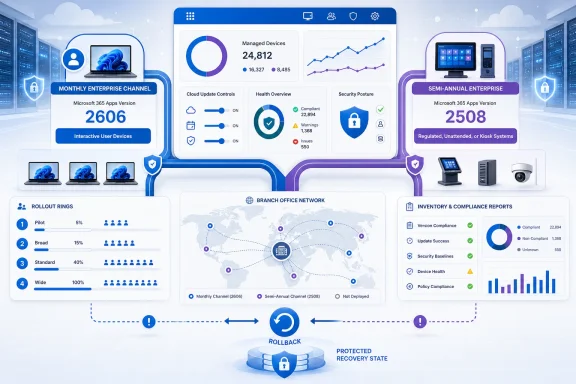
Microsoft 365 Apps administrators should move deliberately to Monthly Enterprise Channel when they already own their update process, have a representative validation ring, and can absorb a monthly operational rhythm. Organizations with specialized, regulated, or unattended Office workloads should instead hold Semi-Annual Enterprise Channel Version 2508 temporarily—through September 8, 2026—while they build that discipline; everyone else should let Version 2606 arrive under existing policy, but treat the first update as a managed deployment rather than an invisible servicing event.
Microsoft’s July 2026 channel unification changes the decision more than the mechanism. As Microsoft documents in its Microsoft 365 Apps update-channel guidance, devices already on Semi-Annual Enterprise Channel do not require a channel migration, reinstallation, or policy migration for Version 2606 to reach them. That is operationally convenient, but it can also disguise a major change in release expectations: a formerly slow-moving estate can become a monthly validation responsibility without an administrator touching the deployment configuration.
The practical fork is not “which channel is best?” It is who owns compatibility evidence, who owns the update path, and whether the organization can detect a bad Office update before a business process does.
There are three defensible choices, and each maps to a different level of IT readiness.
Move now to Monthly Enterprise Channel if your desktop engineering team already manages Office updates as a recurring service. This is the best fit when application owners can test every month, when critical add-ins and document workflows are known, and when the organization has a clear person empowered to stop or roll back a rollout. It is also the cleanest long-term model for enterprises that want predictable monthly servicing rather than a special exception for Office.
Hold Version 2508 if Office is embedded in a business-critical or unattended workflow and nobody can yet certify a monthly release cadence. Version 2508 remains supported through September 8, 2026, but holding it is an active choice: update controls must prevent Version 2606 from installing. That makes this a short runway for building a test program, not a reason to defer ownership indefinitely.
Let Version 2606 land under existing policy if the estate is already broadly standardized, Office is not tied to specialized integrations, and support can tolerate the changed cadence. This is a reasonable default for ordinary information-worker devices, particularly where the organization has little evidence that Excel add-ins, Word templates, Outlook integrations, or desktop automation are unusually fragile. It is not a safe default for every device merely because Microsoft makes the transition automatic.
The essential distinction is between devices that consume Office and devices that operate through Office. A sales laptop using Outlook, Teams, Excel, and PowerPoint has a different risk profile from a finance workstation using COM automation, a shared mailbox workstation with an Outlook add-in, or a virtual machine opening scheduled reports without a human present.
Start by assigning devices and owners to four practical rings:
This is where older channel-planning advice can become misleading. In 2025, a semiannual posture could be understood primarily as a slower feature-consumption choice. In July 2026, the issue is no longer just feature timing. For devices that have been allowed to remain relatively untouched, the organization must determine whether they are truly eligible for regular change—or whether they are controlled exceptions with a testable, documented reason to remain on Version 2508 for now.
WindowsForum’s earlier coverage of the Microsoft 365 Apps channel rewrite correctly framed the simplification pressure. The new operational question is narrower and more urgent: which devices have enough evidence behind them to enter a monthly release train?
For each critical persona, test the actual beginning-to-end task: open the source material, create or modify the Office file, use the integration, save it to its real destination, and validate the result with the consuming system. That catches failures a simple launch test will miss.
The first Version 2606 test matrix should cover:
Plan the first wave as a capacity exercise. Identify where devices receive updates, how many may download during the same window, and whether help desk teams can distinguish a long download from a stalled installation. It is also worth separating the first transition from later monthly servicing in reporting; otherwise, a one-time download spike can make the steady-state model appear worse than it is.
Cloud Update requires an equally careful ownership conversation. Microsoft says that eligible former Semi-Annual Enterprise Channel devices can automatically onboard to Cloud Update for Monthly Enterprise Channel after the transition, and may receive a second July notification to complete the channel change. Once eligible devices onboard, Cloud Update takes precedence over other Microsoft 365 Apps management tools.
That precedence is the real governance issue. An endpoint team that believes Configuration Manager, Intune, policy, or another Office management process remains authoritative can end up diagnosing the wrong control plane. Before allowing automatic onboarding, document which team owns Cloud Update, which devices are eligible, how exclusions are handled, and who is authorized to halt or reverse a rollout decision.
Cloud Update is not inherently a reason to delay. It is a reason to ensure that the organization has one authoritative update owner rather than several tools attempting to express different intentions.
Before moving a ring forward, require evidence that the update installed successfully across the intended group, that named critical workflows passed, that support cases are categorized, and that no unresolved issue affects a workflow without an approved workaround. The dashboard does not need elaborate analytics to be useful, but it should show update state, download or installation failures, validation status by application persona, reported incident themes, and the decision owner for each exception.
Set an explicit rollback trigger before deployment begins. For example, the rollout owner should know which combination of failed installations, repeatable application failures, or business-process impact requires a pause. The exact threshold will vary by organization, but the decision authority should not vary: desktop engineering can recommend action, while the business owner for the affected workflow must participate in accepting continued risk.
This model also prevents the common failure mode of treating the help desk as the monitoring system. By the time a support queue notices a pattern, a widely deployed update may already be interrupting billing, reporting, or document production.
The July transition should be treated as the beginning of an Office servicing program, not the end of one. Organizations that use Version 2508’s remaining support window to identify dependencies, prove workflows, and establish a single update owner will be positioned to adopt Monthly Enterprise Channel on their own terms rather than discovering their exceptions after Version 2606 has already changed the cadence.
Microsoft’s July 2026 channel unification changes the decision more than the mechanism. As Microsoft documents in its Microsoft 365 Apps update-channel guidance, devices already on Semi-Annual Enterprise Channel do not require a channel migration, reinstallation, or policy migration for Version 2606 to reach them. That is operationally convenient, but it can also disguise a major change in release expectations: a formerly slow-moving estate can become a monthly validation responsibility without an administrator touching the deployment configuration.
The practical fork is not “which channel is best?” It is who owns compatibility evidence, who owns the update path, and whether the organization can detect a bad Office update before a business process does.
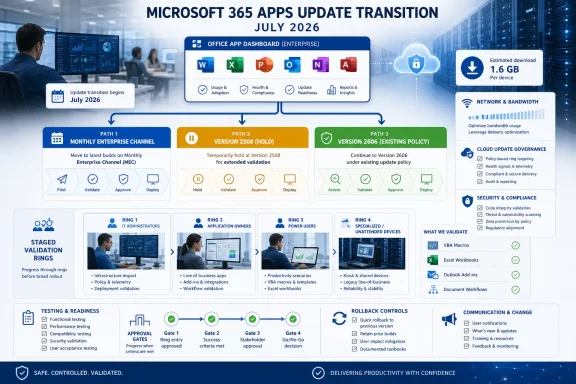 Choose the operating model before the software chooses it for you
There are three defensible choices, and each maps to a different level of IT readiness.Move now to Monthly Enterprise Channel if your desktop engineering team already manages Office updates as a recurring service. This is the best fit when application owners can test every month, when critical add-ins and document workflows are known, and when the organization has a clear person empowered to stop or roll back a rollout. It is also the cleanest long-term model for enterprises that want predictable monthly servicing rather than a special exception for Office.
Hold Version 2508 if Office is embedded in a business-critical or unattended workflow and nobody can yet certify a monthly release cadence. Version 2508 remains supported through September 8, 2026, but holding it is an active choice: update controls must prevent Version 2606 from installing. That makes this a short runway for building a test program, not a reason to defer ownership indefinitely.
Let Version 2606 land under existing policy if the estate is already broadly standardized, Office is not tied to specialized integrations, and support can tolerate the changed cadence. This is a reasonable default for ordinary information-worker devices, particularly where the organization has little evidence that Excel add-ins, Word templates, Outlook integrations, or desktop automation are unusually fragile. It is not a safe default for every device merely because Microsoft makes the transition automatic.
The essential distinction is between devices that consume Office and devices that operate through Office. A sales laptop using Outlook, Teams, Excel, and PowerPoint has a different risk profile from a finance workstation using COM automation, a shared mailbox workstation with an Outlook add-in, or a virtual machine opening scheduled reports without a human present.
Build rings around workflows, not job titles
A ring plan should not begin with “IT, then pilot users, then everyone.” That familiar model is useful only if the pilot population represents the integrations that matter. In this transition, the first ring must be a compatibility lab disguised as a user group.Start by assigning devices and owners to four practical rings:
- The validation ring should include IT staff, application owners, and power users who can reproduce critical Office tasks on demand. Include the people who own macros, templates, add-ins, document-management plug-ins, reporting workbooks, and shared-mailbox processes.
- The integration ring should include representative users of every known dependency. A single workstation running a finance macro is more valuable here than fifty generic Office users, because it tests the business path that could actually block operations.
- The broad productivity ring should cover normal information workers across departments, locations, and network conditions. Its purpose is to reveal scale problems: update download behavior, sign-in friction, document performance complaints, and support volume.
- The exception ring should isolate unattended, specialized, regulated, and hard-to-reach devices. These are not simply “late adopters.” They require named business ownership and an explicit decision to move, hold, or retire the dependency.
This is where older channel-planning advice can become misleading. In 2025, a semiannual posture could be understood primarily as a slower feature-consumption choice. In July 2026, the issue is no longer just feature timing. For devices that have been allowed to remain relatively untouched, the organization must determine whether they are truly eligible for regular change—or whether they are controlled exceptions with a testable, documented reason to remain on Version 2508 for now.
WindowsForum’s earlier coverage of the Microsoft 365 Apps channel rewrite correctly framed the simplification pressure. The new operational question is narrower and more urgent: which devices have enough evidence behind them to enter a monthly release train?
A minimum test matrix for Version 2606
Do not approve a ring after users have merely opened Word and Excel. A useful validation plan confirms that Office works with the systems attached to it.For each critical persona, test the actual beginning-to-end task: open the source material, create or modify the Office file, use the integration, save it to its real destination, and validate the result with the consuming system. That catches failures a simple launch test will miss.
The first Version 2606 test matrix should cover:
- Macros and VBA workflows, including trusted locations, digitally signed code where used, workbook-open behavior, and the output produced by scheduled or operator-run processes.
- COM automation and desktop integrations, especially line-of-business applications that create, read, print, or manipulate Word, Excel, Outlook, Project, or Visio content.
- Office add-ins, separating modern web add-ins from older COM add-ins and documenting who owns each dependency.
- Outlook workflows, including shared mailboxes, mail-enabled business processes, calendar integrations, forms, and any plug-in used by legal, sales, service, or records teams.
- Document and spreadsheet flows, including templates, protected files, external data connections, PDF generation, printing, and document-management system check-in or check-out.
- Unattended or semi-attended tasks, where an account, virtual machine, kiosk-like device, or automation process uses Office with no employee immediately available to notice a failure.
Watch the network and management-plane collision
The Version 2508-to-2606 update can require an approximately 1.6 GB first download, larger than a routine monthly Office update. That turns the initial transition into a bandwidth event, especially for branch offices, remote users on metered connections, and devices that rarely connect to the corporate network.Plan the first wave as a capacity exercise. Identify where devices receive updates, how many may download during the same window, and whether help desk teams can distinguish a long download from a stalled installation. It is also worth separating the first transition from later monthly servicing in reporting; otherwise, a one-time download spike can make the steady-state model appear worse than it is.
Cloud Update requires an equally careful ownership conversation. Microsoft says that eligible former Semi-Annual Enterprise Channel devices can automatically onboard to Cloud Update for Monthly Enterprise Channel after the transition, and may receive a second July notification to complete the channel change. Once eligible devices onboard, Cloud Update takes precedence over other Microsoft 365 Apps management tools.
That precedence is the real governance issue. An endpoint team that believes Configuration Manager, Intune, policy, or another Office management process remains authoritative can end up diagnosing the wrong control plane. Before allowing automatic onboarding, document which team owns Cloud Update, which devices are eligible, how exclusions are handled, and who is authorized to halt or reverse a rollout decision.
Cloud Update is not inherently a reason to delay. It is a reason to ensure that the organization has one authoritative update owner rather than several tools attempting to express different intentions.
Promotion gates should be measurable and owned
The strongest ring plans use promotion gates that business and IT teams can both understand. Avoid a vague “no major issues reported” standard; it rewards silence, not confidence.Before moving a ring forward, require evidence that the update installed successfully across the intended group, that named critical workflows passed, that support cases are categorized, and that no unresolved issue affects a workflow without an approved workaround. The dashboard does not need elaborate analytics to be useful, but it should show update state, download or installation failures, validation status by application persona, reported incident themes, and the decision owner for each exception.
Set an explicit rollback trigger before deployment begins. For example, the rollout owner should know which combination of failed installations, repeatable application failures, or business-process impact requires a pause. The exact threshold will vary by organization, but the decision authority should not vary: desktop engineering can recommend action, while the business owner for the affected workflow must participate in accepting continued risk.
This model also prevents the common failure mode of treating the help desk as the monitoring system. By the time a support queue notices a pattern, a widely deployed update may already be interrupting billing, reporting, or document production.
Frequently Asked Questions
Should every Semi-Annual Enterprise Channel device move to Monthly Enterprise Channel now?
No. Move devices when their application owners and endpoint team can validate and support monthly change. Hold Version 2508 temporarily where specialized or unattended workloads need more preparation.Does Version 2606 require reinstalling Microsoft 365 Apps?
No. Microsoft says devices already on Semi-Annual Enterprise Channel do not need a channel migration, reinstallation, or policy migration for the July 2026 Version 2606 update to arrive.Why is Version 2508 still important after Version 2606?
Version 2508 provides a supported temporary hold through September 8, 2026. It gives organizations time to build rings, document dependencies, and assign ownership—but only if update controls prevent Version 2606 from installing.What is the biggest Cloud Update risk?
The operational risk is assuming another Microsoft 365 Apps tool remains in control after an eligible device is onboarded. Microsoft says Cloud Update takes precedence for eligible devices after onboarding.The July transition should be treated as the beginning of an Office servicing program, not the end of one. Organizations that use Version 2508’s remaining support window to identify dependencies, prove workflows, and establish a single update owner will be positioned to adopt Monthly Enterprise Channel on their own terms rather than discovering their exceptions after Version 2606 has already changed the cadence.
References
- Primary source: learn.microsoft.com
Overview of update channels for Microsoft 365 Apps - Microsoft 365 Apps | Microsoft Learn
Provides IT Pros with an overview of the update channels for Microsoft 365 Apps, including Current Channel, Monthly Enterprise Channel, and Semi-Annual Enterprise Channellearn.microsoft.com - Primary source: WindowsForum
Microsoft 365 Apps Update Channels Rewrite: What IT Admins Need to Know 2025 | Windows Forum
Microsoft is set to implement significant changes to the update channels for Microsoft 365 Apps, aiming to streamline the update process and better cater to...windowsforum.com