

Microsoft 365 Apps Version 2608 is a reason to accelerate Windows 11 migration for users who need new Office features or eligible Copilot capabilities, but it is not a universal August 2026 cliff. August applies to Current Channel; organizations using enterprise channels have a later published timetable, although the July 2026 consolidation of Semi-Annual Enterprise Channel into Monthly Enterprise Channel means administrators must verify each device’s effective update configuration before treating any date as a safe grace period.
Microsoft’s policy is straightforward at the product level: Windows 10 devices reaching Microsoft 365 Apps Version 2608 stop receiving new features and eligible Copilot support, then remain on Version 2608 with security updates through October 10, 2028. But the operational question is more complicated. The deadline is determined by the Microsoft 365 Apps update channel, the device’s actual build and management policy, and whether a supposedly Semi-Annual device has already entered the new Monthly Enterprise experience.
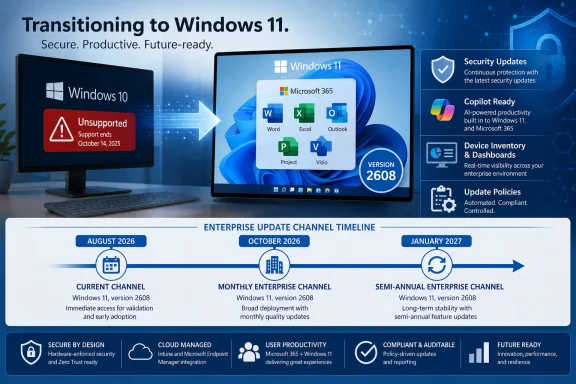
Microsoft Learn’s current channel guidance puts Version 2608 on Current Channel in August 2026, Monthly Enterprise Channel on October 13, 2026, and Semi-Annual Enterprise Channel on January 12, 2027. That creates a real planning window for some estates—but only if IT knows which endpoints are actually on which servicing path.
A Windows 10 machine on Version 2608 will not suddenly lose Word, Excel, PowerPoint, Outlook, Project, or Visio. Microsoft says those Microsoft 365 Apps installations can continue receiving security updates until October 10, 2028. The change is a feature freeze: Windows 10 becomes a fixed-function Office client at Version 2608.
That distinction makes a controlled exception population viable. A kiosk, an isolated line-of-business workstation, or a machine tied to an older peripheral may be a reasonable candidate to remain on Windows 10 and Version 2608 temporarily—provided the organization accepts the operating-system risk and has controls around it.
It does not make Windows 10 newly supported. Windows 10 reached end of support on October 14, 2025, and Microsoft has said support for Microsoft 365 Apps incidents isolated to Windows 10 is limited, including for customers using Windows 10 Extended Security Updates. Office security servicing and Windows operating-system servicing are separate promises. Microsoft 365 Apps security updates do not repair the unsupported Windows 10 foundation beneath them.
For a user population that depends on feature velocity, collaboration changes, or Copilot eligibility, the practical answer is different: migrate to Windows 11 rather than treating the Version 2608 cutoff as an Office update-management problem. WindowsForum readers have already been tracking the wider Microsoft 365 feature freeze; the important refinement now is that channel policy determines how much time each managed device actually has.
Create one row per device, rather than one row per user or software title, and capture these fields:
The channel and build columns deserve special attention. After Version 2606, Microsoft says devices previously on Semi-Annual Enterprise Channel begin receiving the Monthly Enterprise Channel experience. Depending on the management tool, a device can be displayed as Semi-Annual Enterprise Channel in one report and Monthly Enterprise Channel in another. Microsoft 365 Apps itself shows the affected device as Monthly Enterprise Channel after Version 2606 or later is installed.
That means a dashboard query that simply searches for the string “Semi-Annual Enterprise Channel” can become unreliable at exactly the moment administrators need it most. Review reporting logic, automation, compliance baselines, and help desk documentation now. If a report cannot identify the effective channel, build, and update-management source together, it cannot reliably forecast Version 2608 exposure.
Start by grouping the inventory into three operational cohorts:
Microsoft notes that no policy migration is required for the Version 2606 transition itself. That does not mean no administrative work is required. The change can alter how devices appear in reports, and it can expose Semi-Annual populations to Monthly Enterprise processes such as Cloud Update unless exclusions and rollout settings have been reviewed.
Current Channel Windows 10 devices belong at the front of that queue. Their August 2026 arrival date makes them the clearest signal that the migration plan is too slow if hardware review, application testing, and user communication have not already begun.
Do not use it as a promise that a device will remain unchanged until January 2027. The July consolidation changes the meaning of “Semi-Annual” in practice. The organization needs a device-level answer grounded in its effective configuration, not a calendar answer copied from an older deployment standard.
A credible exception record includes the reason Windows 11 cannot yet be deployed, the user or business service affected, the channel and Version 2608 timing, the security controls in place, and a named retirement or remediation milestone. It should also state plainly that Windows 10 Extended Security Updates, where used, address Windows security coverage; they do not restore normal support for Windows 10-specific Microsoft 365 Apps incidents.
Channel pinning can be part of the control plan, but it is not a migration strategy. Pinning only delays feature freeze exposure according to the channel’s applicable schedule, and it can complicate reporting as Microsoft’s enterprise-channel consolidation proceeds.
Treat the first Version 2608 cohort as a test list. Validate the core Office apps, the Project and Visio components actually installed, sign-in behavior, templates, macros, integrations, printing, and line-of-business add-ins. The goal is not to prove that Word opens; it is to find the small number of workflows that can delay a migration if discovered only after the feature freeze.
No. Microsoft says Windows 10 devices that reach Version 2608 remain on that version and continue receiving Microsoft 365 Apps security updates through October 10, 2028.
Is August 2026 the deadline for every Windows 10 PC running Microsoft 365 Apps?
No. August 2026 is Microsoft’s published timing for Current Channel. The published dates are October 13, 2026 for Monthly Enterprise Channel and January 12, 2027 for Semi-Annual Enterprise Channel, subject to the organization’s actual update configuration and the July 2026 channel consolidation.
Can Windows 10 Extended Security Updates make Microsoft 365 Apps fully supported again?
No. Microsoft has said support for Microsoft 365 Apps issues isolated to Windows 10 is limited even where Windows 10 Extended Security Updates are in use.
Should organizations pin devices to Semi-Annual Enterprise Channel for more time?
Only as a documented, temporary exception. Version 2606 begins the move of Semi-Annual Enterprise devices into the Monthly Enterprise experience, so administrators must confirm the effective servicing behavior instead of relying on the legacy channel name.
Version 2608 should be treated as a disciplined inventory deadline, not a single doomsday date. By mapping every Windows 10 Microsoft 365 Apps device to its real channel, build, management path, architecture, and Project or Visio footprint now, IT can reserve the remaining servicing runway for migration work—and avoid discovering in August that its “enterprise grace period” existed only in an outdated report.
Microsoft’s policy is straightforward at the product level: Windows 10 devices reaching Microsoft 365 Apps Version 2608 stop receiving new features and eligible Copilot support, then remain on Version 2608 with security updates through October 10, 2028. But the operational question is more complicated. The deadline is determined by the Microsoft 365 Apps update channel, the device’s actual build and management policy, and whether a supposedly Semi-Annual device has already entered the new Monthly Enterprise experience.
Microsoft Learn’s current channel guidance puts Version 2608 on Current Channel in August 2026, Monthly Enterprise Channel on October 13, 2026, and Semi-Annual Enterprise Channel on January 12, 2027. That creates a real planning window for some estates—but only if IT knows which endpoints are actually on which servicing path.
 The first task is to separate feature urgency from security urgency
A Windows 10 machine on Version 2608 will not suddenly lose Word, Excel, PowerPoint, Outlook, Project, or Visio. Microsoft says those Microsoft 365 Apps installations can continue receiving security updates until October 10, 2028. The change is a feature freeze: Windows 10 becomes a fixed-function Office client at Version 2608.That distinction makes a controlled exception population viable. A kiosk, an isolated line-of-business workstation, or a machine tied to an older peripheral may be a reasonable candidate to remain on Windows 10 and Version 2608 temporarily—provided the organization accepts the operating-system risk and has controls around it.
It does not make Windows 10 newly supported. Windows 10 reached end of support on October 14, 2025, and Microsoft has said support for Microsoft 365 Apps incidents isolated to Windows 10 is limited, including for customers using Windows 10 Extended Security Updates. Office security servicing and Windows operating-system servicing are separate promises. Microsoft 365 Apps security updates do not repair the unsupported Windows 10 foundation beneath them.
For a user population that depends on feature velocity, collaboration changes, or Copilot eligibility, the practical answer is different: migrate to Windows 11 rather than treating the Version 2608 cutoff as an Office update-management problem. WindowsForum readers have already been tracking the wider Microsoft 365 feature freeze; the important refinement now is that channel policy determines how much time each managed device actually has.
Build an inventory that can answer the Version 2608 question
Most endpoint inventories can tell an administrator whether Office is installed. That is insufficient. The useful inventory identifies which Windows 10 devices will receive Version 2608 first, which will reach it later, and which reporting records may be misleading after July’s channel change.Create one row per device, rather than one row per user or software title, and capture these fields:
| Inventory field | Why it matters |
|---|---|
| Device name and primary user | Establishes ownership, business impact, and migration accountability. |
| Windows edition, version, and support status | Separates Windows 10 exception candidates from Windows 11-ready endpoints. |
| Microsoft 365 Apps update channel | Determines the published Version 2608 arrival date. |
| Installed Microsoft 365 Apps version and build | Shows whether the device is progressing normally through servicing. |
| Update-management method | Identifies whether updates are controlled through Intune, Configuration Manager, Group Policy, Cloud Update, an on-premises source, or another process. |
| Microsoft 365 Apps architecture | Prevents packaging and add-in compatibility work from being hidden inside a generic Office record. |
| Project and Visio installation status | These subscription desktop applications need to be included in testing and migration planning, not treated as an afterthought. |
| Hardware disposition | Records whether Windows 11 migration is planned, blocked by hardware, or awaiting validation. |
| Business role and application dependencies | Distinguishes an ordinary productivity endpoint from a specialized or regulated workload. |
| Exception owner and exit date | Turns a temporary Windows 10 hold into a managed decision rather than a forgotten device. |
That means a dashboard query that simply searches for the string “Semi-Annual Enterprise Channel” can become unreliable at exactly the moment administrators need it most. Review reporting logic, automation, compliance baselines, and help desk documentation now. If a report cannot identify the effective channel, build, and update-management source together, it cannot reliably forecast Version 2608 exposure.
Identify the devices that will hit the freeze first
The fastest way to miss the August deadline is to assume all Windows 10 devices use the same Office servicing cadence. They do not.Start by grouping the inventory into three operational cohorts:
- Current Channel on Windows 10 should be treated as the immediate migration cohort. Microsoft’s published Version 2608 timing is August 2026, leaving little room for discovery, application testing, procurement decisions, and user scheduling.
- Monthly Enterprise Channel on Windows 10 has a published Version 2608 date of October 13, 2026. That is a useful validation and deployment window, not a reason to defer planning until autumn.
- Semi-Annual Enterprise Channel on Windows 10 has a published Version 2608 date of January 12, 2027, but it requires the closest inspection. Beginning with Version 2606 in July 2026, those devices move into the Monthly Enterprise Channel experience. A label alone is no longer a dependable planning control.
Microsoft notes that no policy migration is required for the Version 2606 transition itself. That does not mean no administrative work is required. The change can alter how devices appear in reports, and it can expose Semi-Annual populations to Monthly Enterprise processes such as Cloud Update unless exclusions and rollout settings have been reviewed.
Use the servicing runway deliberately, not emotionally
There are three defensible responses to Version 2608, and each should be tied to an endpoint cohort rather than a blanket company policy.Accelerate Windows 11 for feature-dependent users
Prioritize users who need the newest Microsoft 365 Apps capabilities, users expected to receive eligible Copilot support, and teams whose workflows change frequently. These groups have the least value in remaining on a frozen Version 2608 client, even though that client will still receive Office security updates.Current Channel Windows 10 devices belong at the front of that queue. Their August 2026 arrival date makes them the clearest signal that the migration plan is too slow if hardware review, application testing, and user communication have not already begun.
Spend the enterprise-channel window on validation
Monthly Enterprise and the legacy Semi-Annual population can provide a short, controlled runway. Use it to validate Windows 11 images, test Office add-ins, identify Project and Visio dependencies, and correct update-management inconsistencies.Do not use it as a promise that a device will remain unchanged until January 2027. The July consolidation changes the meaning of “Semi-Annual” in practice. The organization needs a device-level answer grounded in its effective configuration, not a calendar answer copied from an older deployment standard.
Establish a tightly governed Windows 10 exception population
Some machines cannot migrate on the desired timeline. Unsupported hardware, specialized applications, dependent devices, or limited operational windows can all create legitimate exceptions. Those exceptions should be explicit, small, and owned.A credible exception record includes the reason Windows 11 cannot yet be deployed, the user or business service affected, the channel and Version 2608 timing, the security controls in place, and a named retirement or remediation milestone. It should also state plainly that Windows 10 Extended Security Updates, where used, address Windows security coverage; they do not restore normal support for Windows 10-specific Microsoft 365 Apps incidents.
Channel pinning can be part of the control plan, but it is not a migration strategy. Pinning only delays feature freeze exposure according to the channel’s applicable schedule, and it can complicate reporting as Microsoft’s enterprise-channel consolidation proceeds.
Project, Visio, and add-ins can turn a simple Office decision into an application project
Microsoft’s update history applies the channel and version framework to subscription desktop versions of Project and Visio as well as Microsoft 365 Apps. Inventory them separately. A workstation that appears to have only “Office” may have a Project schedule, Visio diagram workflow, or specialized Office add-in that was never included in Windows 11 acceptance testing.Treat the first Version 2608 cohort as a test list. Validate the core Office apps, the Project and Visio components actually installed, sign-in behavior, templates, macros, integrations, printing, and line-of-business add-ins. The goal is not to prove that Word opens; it is to find the small number of workflows that can delay a migration if discovered only after the feature freeze.
Frequently Asked Questions
Does Version 2608 end Microsoft 365 Apps security updates on Windows 10?No. Microsoft says Windows 10 devices that reach Version 2608 remain on that version and continue receiving Microsoft 365 Apps security updates through October 10, 2028.
Is August 2026 the deadline for every Windows 10 PC running Microsoft 365 Apps?
No. August 2026 is Microsoft’s published timing for Current Channel. The published dates are October 13, 2026 for Monthly Enterprise Channel and January 12, 2027 for Semi-Annual Enterprise Channel, subject to the organization’s actual update configuration and the July 2026 channel consolidation.
Can Windows 10 Extended Security Updates make Microsoft 365 Apps fully supported again?
No. Microsoft has said support for Microsoft 365 Apps issues isolated to Windows 10 is limited even where Windows 10 Extended Security Updates are in use.
Should organizations pin devices to Semi-Annual Enterprise Channel for more time?
Only as a documented, temporary exception. Version 2606 begins the move of Semi-Annual Enterprise devices into the Monthly Enterprise experience, so administrators must confirm the effective servicing behavior instead of relying on the legacy channel name.
Version 2608 should be treated as a disciplined inventory deadline, not a single doomsday date. By mapping every Windows 10 Microsoft 365 Apps device to its real channel, build, management path, architecture, and Project or Visio footprint now, IT can reserve the remaining servicing runway for migration work—and avoid discovering in August that its “enterprise grace period” existed only in an outdated report.
References
- Primary source: learn.microsoft.com
Download sizes for updates to Microsoft 365 Apps - Office release notes | Microsoft Learn
Provides IT Pros with information about approximate download sizes for updates to Microsoft 365 Apps for each update channel.learn.microsoft.com - Primary source: WindowsForum
Microsoft 365 on Windows 10: The Coming Feature Freeze and Windows 11 Transition | Windows Forum
Microsoft’s decision to freeze new Microsoft 365 features on Windows 10, starting in August 2026, marks a game-changing moment for the global base of Office...windowsforum.com
