

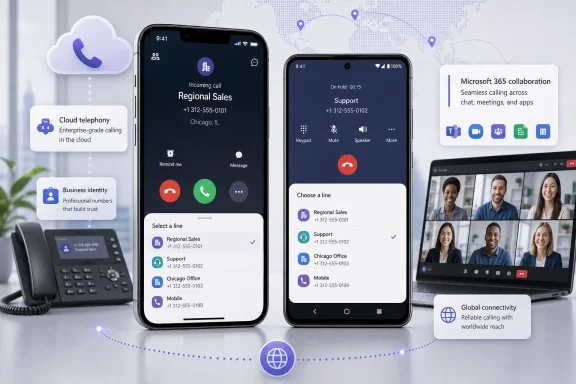
Microsoft is extending Teams Phone’s multi-line calling experience to iOS and Android, giving mobile workers the ability to make and receive calls through multiple assigned business numbers without changing accounts, carrying separate devices, or losing track of which identity handled a conversation. Roadmap item 565131 entered rollout for worldwide standard multi-tenant customers in July 2026, completing an important mobility gap in Microsoft’s broader user multi-line strategy with line selection, line-aware incoming call notifications, unified call history, filtering, and seamless switching across assigned numbers.
Microsoft Teams has spent years evolving from a collaboration application into a cloud-based communications platform capable of replacing conventional private branch exchange systems. Teams Phone supplies the call-control layer, while Microsoft Calling Plans, Operator Connect, Teams Phone Mobile, and Direct Routing provide different ways to connect users to the public switched telephone network.
That architecture has allowed organizations to consolidate meetings, internal calls, external telephone calls, voicemail, auto attendants, call queues, and presence into Microsoft 365. It has also introduced a persistent challenge: real people do not always map neatly to one telephone number.
Historically, organizations often solved those requirements with separate accounts, shared devices, call queues, caller ID substitution, forwarding rules, or third-party contact-center products. Those methods can work, but they add administrative overhead and may obscure the relationship between the person, the number used, and the resulting call records.
Microsoft introduced Teams Phone user multi-line to simplify that model. The service allows administrators to assign multiple phone numbers to one Teams Phone user, with Microsoft documenting support for up to 10 assigned numbers per account.
The distinction matters because mobile access is not merely a smaller copy of the desktop interface. On a phone, the client must clearly expose the active calling identity, identify the destination line of an incoming call, preserve line information in a compact history view, and reduce the risk of users selecting the wrong number while moving between tasks.
The roadmap entry was created on June 4, 2026, updated on July 20, 2026, and scheduled for general availability during July 2026. Its status is Rolling out, which means availability may vary between tenants, users, client versions, and deployment waves even though the general release window has begun.
The capability also depends on the organization having a functioning Teams Phone deployment and suitable numbers assigned to the user. Installing the latest Teams mobile app cannot create additional lines by itself; telephone number inventory, licensing, PSTN connectivity, emergency location configuration, and administrative assignment remain tenant responsibilities.
That sequence is important. It encourages the user to think about the business context before initiating the call rather than discovering afterward that the wrong number was presented.
That context can change how the call is handled. It may determine the greeting, language, legal disclosure, business unit, support procedure, or customer record that should be opened.
The action also helps maintain continuity. If an inbound inquiry arrived through a regional number, the employee can return the call through that same regional identity rather than presenting an unfamiliar corporate headquarters number.
This is a stronger model than maintaining isolated histories under separate accounts. It gives the employee one chronological view of communications while retaining enough metadata to distinguish business contexts.
The design addresses a common weakness in improvised multi-number setups. When forwarding and caller ID substitution are layered on top of one another, users may see the external caller’s number but lose clarity about which business number the caller originally dialed.
That can be useful at the start of a shift, during regional coverage hours, or when reconciling communications for a particular business function. A manager covering three storefronts, for instance, could inspect missed calls for one location without scrolling through unrelated activity from the other two.
Administrators should therefore avoid treating the user-facing Recents screen as the sole system of record. Multi-line metadata may be operationally valuable, but governance requirements must be addressed at the service, compliance, PSTN, and application-integration layers.
User multi-line gives one licensed user multiple directly assigned phone numbers. Delegation, shared line appearance, shared calling, call queues, and caller ID policies follow different administrative and routing models.
Multi-line calling does not necessarily involve delegation. The numbers belong to the same user experience, and that person chooses among their own assigned lines.
The distinction affects permissions, accountability, call handling, and expectations. An assistant acting for an executive is not the same scenario as an employee representing three regional offices through three numbers.
User multi-line instead concentrates several numbers on one person. It may complement call queues, but it should not replace queue-based routing where resilience, availability, overflow, routing methods, or agent reporting are required.
Multi-line provides more explicit user control over the line selected for a call. Caller ID policies remain relevant, however, because PSTN presentation, calling party name, privacy settings, carrier behavior, and organizational policy can still influence what the recipient ultimately sees.
Multi-line calling on the Teams mobile app refers to using multiple assigned Teams Phone numbers inside the iOS or Android client. The two concepts can intersect in a broader voice strategy, but they should not be treated as interchangeable products.
This can reduce the need for secondary accounts and miscellaneous voice applications. It may also simplify onboarding when an employee inherits responsibility for an additional market or business function.
A user serving several territories can select the corresponding line for each outbound call. Incoming line identification then helps that user recognize the intended market before speaking.
This capability should not be interpreted as bypassing telecommunications regulation. Number assignment, authorized use, local presence requirements, emergency calling, and outbound identity rules vary across countries and operators.
The user experience is simpler, but brand separation still requires careful design. Administrators should apply recognizable line labels, and business leaders should define when each identity may be used.
Bringing multi-line controls to Android and iOS narrows the functional difference between mobile and desktop Teams. A worker can leave the office without leaving one of their assigned business identities behind.
An owner might handle sales, customer service, and supplier relations through different published numbers. A small professional practice could use separate numbers for locations or service categories without issuing another handset to the same employee.
That can lower device-management burden and reduce confusion about where calls and history reside. It also decreases the temptation to give customers a personal mobile number when the correct business line is temporarily inconvenient to access.
However, separation depends on user behavior and organizational configuration. Employees need to understand when to use the Teams dial pad, when the native phone app is appropriate, and how emergency calls should be placed.
Small organizations should compare those costs with the alternatives they currently use. The strongest business case will usually appear where multiple numbers already exist and administrative fragmentation is the larger problem.
Assigning every available number directly to individual users would create complexity rather than remove it. The design should begin with business workflows, not the novelty of a new line picker.
Better labels connect the number to a role, region, location, or brand, such as “Seattle Sales,” “Aftercare,” or “Northwind Legal.” Administrators should test how much of each label remains visible on supported mobile devices.
Training should emphasize that the Teams account remains unified even though telephone identities differ. It should also establish a simple rule: check the selected line before every external call whose identity matters.
Organizations should evaluate the feature through the same security framework used for other Microsoft 365 mobile access. Entra ID controls, multifactor authentication, Conditional Access, application protection policies, compliant-device requirements, and remote data removal all remain relevant.
Access reviews are particularly useful where numbers represent sensitive functions or valuable regional identities. A dormant line attached to an active account may continue receiving customer calls without the business realizing that ownership has changed.
A financial-services call may require controls that do not apply to a general corporate inquiry. Healthcare, legal, public-sector, and cross-border scenarios can introduce additional obligations.
Mobile users must know whether an emergency call should be placed through Teams or the device’s native cellular dialer in a given situation. Organizations should provide explicit instructions rather than relying on users to infer the correct path during an emergency.
That approach preserves simplicity, but it also concentrates responsibility on a few interface cues. If a user overlooks the active line or an operating-system notification truncates important information, the wrong identity may be used.
A staged service rollout can create mixed experiences within the same organization. Help-desk documentation should therefore avoid assuming that every employee sees identical controls on July 20, 2026.
The addition of multiple lines does not change the fundamentals of real-time media. Organizations should continue measuring latency, packet loss, jitter, and user-reported quality instead of attributing every problem to the line-selection feature.
Calling party name presentation can be particularly inconsistent between networks. Pilot testing should include calls to multiple mobile and fixed-line carriers rather than one internal test destination.
That puts pressure on traditional PBX vendors, unified communications providers, mobile-first business phone services, and specialist applications that sell convenience around multiple numbers. Microsoft can offer the feature inside an identity, management, compliance, and productivity ecosystem that many enterprises already operate.
The advantage is strongest for organizations already committed to Microsoft 365. For businesses with mixed collaboration environments or sophisticated contact-center requirements, integration depth and operational fit may matter more than consolidation.
Microsoft’s feature is best understood as an improvement to personal enterprise telephony. It reduces the number of cases where multiple phone identities automatically require separate accounts, devices, or a more complex application.
One area is default-line control. Users may want a preferred number for routine calls while retaining a quick selector for exceptions, particularly when click-to-call links or contact actions launch the dialer from another screen.
The quality of the experience will depend on whether Teams consistently prompts for a line, respects a defined default, or remembers the most appropriate identity. Ambiguous behavior could undermine the certainty that multi-line calling is intended to provide.
Microsoft’s user-facing unified history solves the immediate navigation problem, but administrators may seek richer analytics and automated lifecycle management. PowerShell and Microsoft Graph coverage will be important for organizations assigning numbers at scale.
Organizations operating across multiple Microsoft clouds should avoid designing one global process around a capability that is not yet listed for every environment. Mixed availability can require temporary fallback workflows.
Microsoft may refine defaults, line ordering, favorite identities, search, filters, and deep-link behavior after observing usage. The difference between a technically available feature and a routinely trusted one will be measured in how rarely users choose the wrong line.
Microsoft Teams multi-line calling on mobile is a modest-looking interface change with significant implications for organizations replacing legacy telephony. By bringing multiple assigned business numbers, line-aware notifications, selectable outbound identity, filtered activity, and unified history to Android and iOS, Microsoft is making Teams Phone more credible for employees whose work cannot be represented by one number or confined to one desk. The opportunity is substantial, but the best results will come from disciplined number assignment, careful caller ID and emergency testing, clear mobile training, and a firm understanding that user multi-line complements rather than replaces queues, delegation, contact centers, and compliance controls.
 Background
Microsoft Teams has spent years evolving from a collaboration application into a cloud-based communications platform capable of replacing conventional private branch exchange systems. Teams Phone supplies the call-control layer, while Microsoft Calling Plans, Operator Connect, Teams Phone Mobile, and Direct Routing provide different ways to connect users to the public switched telephone network.That architecture has allowed organizations to consolidate meetings, internal calls, external telephone calls, voicemail, auto attendants, call queues, and presence into Microsoft 365. It has also introduced a persistent challenge: real people do not always map neatly to one telephone number.
Why one user may need several numbers
An employee might represent multiple offices, brands, departments, or geographic markets. A regional salesperson may need numbers in several cities, an attorney may serve multiple practices, and an IT technician may handle both an internal support line and a customer-facing service number.Historically, organizations often solved those requirements with separate accounts, shared devices, call queues, caller ID substitution, forwarding rules, or third-party contact-center products. Those methods can work, but they add administrative overhead and may obscure the relationship between the person, the number used, and the resulting call records.
Microsoft introduced Teams Phone user multi-line to simplify that model. The service allows administrators to assign multiple phone numbers to one Teams Phone user, with Microsoft documenting support for up to 10 assigned numbers per account.
From desktop capability to mobile parity
Microsoft announced general availability of the wider Teams Phone user multi-line experience in April 2026, initially emphasizing Teams desktop clients and Teams-certified phone devices. The new mobile rollout brings that model to the Teams apps on Android and iOS.The distinction matters because mobile access is not merely a smaller copy of the desktop interface. On a phone, the client must clearly expose the active calling identity, identify the destination line of an incoming call, preserve line information in a compact history view, and reduce the risk of users selecting the wrong number while moving between tasks.
What Microsoft Is Rolling Out
Roadmap item 565131 is listed as a General Availability release for Microsoft Teams on Android and iOS. Microsoft describes the feature as the ability to make and receive calls using multiple assigned phone numbers directly from a mobile device, with a unified call history and switching across lines.The roadmap entry was created on June 4, 2026, updated on July 20, 2026, and scheduled for general availability during July 2026. Its status is Rolling out, which means availability may vary between tenants, users, client versions, and deployment waves even though the general release window has begun.
Core mobile functions
The mobile experience centers on four practical capabilities:- Users can choose an assigned line before making an outbound call. The selected number becomes the business identity presented for that call, subject to the organization’s PSTN configuration and caller ID behavior.
- Incoming calls identify the number that was dialed. This gives the recipient context before answering and makes it easier to use the appropriate greeting.
- Recent activity is brought together in one calling history. Users do not need to move between accounts or independent applications to review activity for each assigned number.
- History can be examined by line. Mobile users can filter recent calls to focus on one or more assigned numbers rather than scanning an undifferentiated list.
Availability boundaries
Microsoft lists the rollout for worldwide standard multi-tenant cloud environments. The roadmap entry does not list specialized government or sovereign cloud environments, so administrators should not assume that the same July 2026 schedule applies outside the specified cloud instance.The capability also depends on the organization having a functioning Teams Phone deployment and suitable numbers assigned to the user. Installing the latest Teams mobile app cannot create additional lines by itself; telephone number inventory, licensing, PSTN connectivity, emergency location configuration, and administrative assignment remain tenant responsibilities.
How Multi-Line Calling Works on Mobile
The operational model is designed to keep line selection visible without forcing the user through repeated account changes. Microsoft’s mobile instructions place the line picker beneath the dial pad, allowing a user to select an identity and then enter the destination number.That sequence is important. It encourages the user to think about the business context before initiating the call rather than discovering afterward that the wrong number was presented.
Placing an outbound call
A typical multi-line mobile call follows this sequence:- The user opens Calls in the Teams mobile app and opens the dial pad.
- The user taps the line picker displayed below the dial pad.
- The user selects the assigned phone number appropriate for the customer, department, brand, or region.
- The user enters the destination number or selects an available contact.
- Teams places the call using the selected line as the relevant calling identity.
Receiving calls on different lines
For an incoming call, Teams displays which assigned line the caller reached. A salesperson with numbers for Chicago and Dallas, for example, can see which market the caller intended to contact before answering.That context can change how the call is handled. It may determine the greeting, language, legal disclosure, business unit, support procedure, or customer record that should be opened.
Returning a call
Mobile users can initiate a callback from the recent-calls list and choose which assigned number to use. This is more reliable than blindly redialing through a default line, particularly when a customer expects the callback to come from the number originally contacted.The action also helps maintain continuity. If an inbound inquiry arrived through a regional number, the employee can return the call through that same regional identity rather than presenting an unfamiliar corporate headquarters number.
Unified History Becomes the Operational Center
A multi-line system is useful only if users can understand what happened on each line. Microsoft’s unified history approach combines activity while preserving tags that identify which number was involved.This is a stronger model than maintaining isolated histories under separate accounts. It gives the employee one chronological view of communications while retaining enough metadata to distinguish business contexts.
Line-aware recent calls
Each relevant history entry can indicate the assigned phone number used to make or receive the call. On mobile, the actions menu exposes that line information, helping users review activity without opening multiple profiles or applications.The design addresses a common weakness in improvised multi-number setups. When forwarding and caller ID substitution are layered on top of one another, users may see the external caller’s number but lose clarity about which business number the caller originally dialed.
Filtering by assigned number
The mobile client also supports filtering recent activity by line. A user can open the recent-calls filter, choose one or more lines, and narrow the view to activity involving those numbers.That can be useful at the start of a shift, during regional coverage hours, or when reconciling communications for a particular business function. A manager covering three storefronts, for instance, could inspect missed calls for one location without scrolling through unrelated activity from the other two.
What unified history does not replace
Teams call history is not automatically a complete customer relationship management record, a regulatory archive, or a contact-center reporting platform. It supports day-to-day calling continuity, but organizations with formal retention, quality assurance, recording, analytics, or case-management requirements still need the appropriate Microsoft services or integrated business systems.Administrators should therefore avoid treating the user-facing Recents screen as the sole system of record. Multi-line metadata may be operationally valuable, but governance requirements must be addressed at the service, compliance, PSTN, and application-integration layers.
The Difference Between User Multi-Line and Other Teams Calling Models
Microsoft Teams contains several features involving additional numbers or calling identities. Their names and behaviors can sound similar, but they solve different problems.User multi-line gives one licensed user multiple directly assigned phone numbers. Delegation, shared line appearance, shared calling, call queues, and caller ID policies follow different administrative and routing models.
Multi-line versus shared line appearance
Shared line appearance generally allows a delegate to make or receive calls on behalf of another user. The classic example is an executive whose assistant handles calls using the executive’s identity.Multi-line calling does not necessarily involve delegation. The numbers belong to the same user experience, and that person chooses among their own assigned lines.
The distinction affects permissions, accountability, call handling, and expectations. An assistant acting for an executive is not the same scenario as an employee representing three regional offices through three numbers.
Multi-line versus call queues
A call queue distributes incoming calls among multiple agents. It is suited to service desks, sales teams, reception groups, and other environments where any qualified member may answer.User multi-line instead concentrates several numbers on one person. It may complement call queues, but it should not replace queue-based routing where resilience, availability, overflow, routing methods, or agent reporting are required.
Multi-line versus caller ID replacement
Teams caller ID policies can replace a user’s outbound identity with a resource account number, such as the main number associated with an auto attendant or call queue. That is a policy-driven presentation choice, not the same as assigning several selectable numbers directly to the user.Multi-line provides more explicit user control over the line selected for a call. Caller ID policies remain relevant, however, because PSTN presentation, calling party name, privacy settings, carrier behavior, and organizational policy can still influence what the recipient ultimately sees.
Multi-line versus Teams Phone Mobile
The naming is potentially confusing. Teams Phone Mobile is Microsoft’s operator-integrated service in which an eligible business-provided SIM number also functions as the user’s Teams number, enabling native cellular and Teams experiences to work together.Multi-line calling on the Teams mobile app refers to using multiple assigned Teams Phone numbers inside the iOS or Android client. The two concepts can intersect in a broader voice strategy, but they should not be treated as interchangeable products.
Enterprise Impact
For enterprises, the value of mobile multi-line calling lies less in the dial pad and more in identity consolidation. It offers a cleaner way to align a person with several public telephone identities while keeping authentication, policy, and daily work inside one Microsoft 365 account.This can reduce the need for secondary accounts and miscellaneous voice applications. It may also simplify onboarding when an employee inherits responsibility for an additional market or business function.
Regional and multinational operations
Localized numbers can help organizations maintain a presence in different markets. Customers may be more willing to answer a recognizable local or regional number than an unfamiliar international or distant number, although caller ID reputation and carrier treatment remain important.A user serving several territories can select the corresponding line for each outbound call. Incoming line identification then helps that user recognize the intended market before speaking.
This capability should not be interpreted as bypassing telecommunications regulation. Number assignment, authorized use, local presence requirements, emergency calling, and outbound identity rules vary across countries and operators.
Multiple brands and business units
A parent company may operate several brands while employing shared specialists in finance, legal services, account management, or technical support. Multi-line calling allows those specialists to present the number associated with the correct brand without signing into multiple Teams tenants or user accounts.The user experience is simpler, but brand separation still requires careful design. Administrators should apply recognizable line labels, and business leaders should define when each identity may be used.
Frontline and mobile employees
Field engineers, property managers, healthcare coordinators, mobile sales staff, and travelling executives are among the clearest beneficiaries. Their work often happens away from a desk, yet they still need business-grade caller identity and access to recent call activity.Bringing multi-line controls to Android and iOS narrows the functional difference between mobile and desktop Teams. A worker can leave the office without leaving one of their assigned business identities behind.
Consumer and Small-Business Impact
The feature is enterprise-oriented, but smaller organizations may experience an equally visible improvement. Small businesses often have employees wearing several hats, making the one-user, multiple-number model particularly relevant.An owner might handle sales, customer service, and supplier relations through different published numbers. A small professional practice could use separate numbers for locations or service categories without issuing another handset to the same employee.
Fewer devices and accounts
The immediate benefit is consolidation. Instead of carrying two business phones or signing into multiple calling accounts, an eligible user can work through one Teams mobile identity.That can lower device-management burden and reduce confusion about where calls and history reside. It also decreases the temptation to give customers a personal mobile number when the correct business line is temporarily inconvenient to access.
Better separation from personal calling
Using Teams for assigned business numbers can preserve a clearer boundary between corporate and personal communications. The employee can call through an approved business identity rather than exposing the mobile device’s personal carrier number.However, separation depends on user behavior and organizational configuration. Employees need to understand when to use the Teams dial pad, when the native phone app is appropriate, and how emergency calls should be placed.
Licensing remains a consideration
Multi-line access should not be mistaken for a free consumer calling feature. Teams Phone licensing and PSTN connectivity remain part of the deployment, and acquiring or maintaining several numbers may create operator or service costs.Small organizations should compare those costs with the alternatives they currently use. The strongest business case will usually appear where multiple numbers already exist and administrative fragmentation is the larger problem.
Administration and Deployment Planning
Microsoft’s rollout adds the client experience, but successful adoption starts in the Teams Phone configuration. Administrators must know which users genuinely require extra numbers and which scenarios are better addressed through queues, delegation, auto attendants, or contact-center routing.Assigning every available number directly to individual users would create complexity rather than remove it. The design should begin with business workflows, not the novelty of a new line picker.
Recommended deployment sequence
A controlled implementation can follow these steps:- Inventory the existing numbers and calling workflows. Document which numbers are published, who currently answers them, how outbound identity is presented, and whether calls are forwarded or queued.
- Classify each use case. Decide whether it requires a user-owned line, a delegated identity, a shared queue, an auto attendant, or a policy-based caller ID.
- Verify licensing and PSTN compatibility. Confirm that the intended users, number types, connectivity model, operators, and countries support the required configuration.
- Review emergency calling design. Ensure that each user, device, network location, and assigned number is handled consistently with organizational and legal requirements.
- Assign a small number of pilot lines. Test with users who understand the workflow and can report ambiguity in labels, history, incoming notifications, and callbacks.
- Validate Android and iOS behavior separately. Client release timing, operating-system permissions, notification settings, and background restrictions may produce different results.
- Train users before broad deployment. Explain line selection, incoming-call identification, filtered history, caller ID expectations, and escalation procedures.
- Monitor usage and support cases. Look for wrong-line calls, missed notifications, inconsistent caller ID presentation, and confusion between Teams and native cellular calling.
Naming and labeling strategy
Numbers should be labeled in a way that is meaningful on a small screen. Labels such as “Line 2” or a bare sequence of digits force the user to memorize organizational context.Better labels connect the number to a role, region, location, or brand, such as “Seattle Sales,” “Aftercare,” or “Northwind Legal.” Administrators should test how much of each label remains visible on supported mobile devices.
Change management
The technical assignment may be easier than the behavioral change. Employees accustomed to one default number may forget to choose a line, while users coming from multiple physical phones may look for completely separate histories.Training should emphasize that the Teams account remains unified even though telephone identities differ. It should also establish a simple rule: check the selected line before every external call whose identity matters.
Security, Compliance, and Emergency Calling
Multi-line calling increases convenience, but it also expands the number of identities available from a mobile endpoint. A lost, compromised, or poorly managed device may expose several business lines rather than one.Organizations should evaluate the feature through the same security framework used for other Microsoft 365 mobile access. Entra ID controls, multifactor authentication, Conditional Access, application protection policies, compliant-device requirements, and remote data removal all remain relevant.
Identity and access control
Additional numbers should be assigned according to least-privilege principles. A user should receive only the lines required for current responsibilities, and obsolete assignments should be removed promptly after a role change.Access reviews are particularly useful where numbers represent sensitive functions or valuable regional identities. A dormant line attached to an active account may continue receiving customer calls without the business realizing that ownership has changed.
Compliance and recording
Organizations in regulated industries must determine how calls placed through each line interact with recording, retention, consent, supervision, and data residency obligations. The fact that all lines appear in one client does not mean every call has the same legal context.A financial-services call may require controls that do not apply to a general corporate inquiry. Healthcare, legal, public-sector, and cross-border scenarios can introduce additional obligations.
Emergency calling
Emergency calling deserves separate testing because normal business caller identity and emergency identity are not always treated in the same way. Microsoft’s Teams Phone model associates emergency behavior with policies, addresses, network locations, users, numbers, and PSTN connectivity.Mobile users must know whether an emergency call should be placed through Teams or the device’s native cellular dialer in a given situation. Organizations should provide explicit instructions rather than relying on users to infer the correct path during an emergency.
User Experience and Technical Considerations
The mobile interface has limited space, so clarity matters more than visual richness. Microsoft’s design uses a line picker, history tags, incoming-call context, and filtering instead of presenting multiple fully independent workspaces.That approach preserves simplicity, but it also concentrates responsibility on a few interface cues. If a user overlooks the active line or an operating-system notification truncates important information, the wrong identity may be used.
Client updates and staged availability
Administrators should ensure that managed Android and iOS devices receive supported Teams versions. App-store release propagation, mobile application management policies, deferred updates, and user-controlled installations can all delay access after the tenant-side capability becomes available.A staged service rollout can create mixed experiences within the same organization. Help-desk documentation should therefore avoid assuming that every employee sees identical controls on July 20, 2026.
Network quality
Teams mobile calling depends on usable data connectivity unless a specific operator-integrated or cellular handoff scenario applies. Wi-Fi transitions, weak mobile data, battery optimization, background execution restrictions, virtual private networks, and local firewall rules can affect call reliability.The addition of multiple lines does not change the fundamentals of real-time media. Organizations should continue measuring latency, packet loss, jitter, and user-reported quality instead of attributing every problem to the line-selection feature.
Caller ID delivery
The number selected in Teams is only one part of outbound caller identity. Policies, resource accounts, Direct Routing configuration, Session Border Controllers, operators, national numbering rules, and terminating carriers may influence what appears to the recipient.Calling party name presentation can be particularly inconsistent between networks. Pilot testing should include calls to multiple mobile and fixed-line carriers rather than one internal test destination.
Competitive Implications
Mobile multi-line support strengthens Microsoft’s attempt to position Teams as a complete business telephony endpoint rather than a desktop collaboration client with calling added. The closer mobile functionality comes to desktop and desk-phone parity, the easier it becomes for organizations to standardize on Teams Phone.That puts pressure on traditional PBX vendors, unified communications providers, mobile-first business phone services, and specialist applications that sell convenience around multiple numbers. Microsoft can offer the feature inside an identity, management, compliance, and productivity ecosystem that many enterprises already operate.
Microsoft’s platform advantage
Teams Phone connects calling to presence, meetings, chat, directory information, Microsoft 365 administration, and enterprise security. Multi-line calling benefits from that platform because the user does not need another identity system merely to gain another telephone number.The advantage is strongest for organizations already committed to Microsoft 365. For businesses with mixed collaboration environments or sophisticated contact-center requirements, integration depth and operational fit may matter more than consolidation.
Where specialists still compete
Specialist voice and contact-center platforms can offer deeper queue management, campaign controls, customer records, workforce optimization, recording, analytics, and omnichannel routing. Teams user multi-line does not erase the distinction between a business phone user and a contact-center agent.Microsoft’s feature is best understood as an improvement to personal enterprise telephony. It reduces the number of cases where multiple phone identities automatically require separate accounts, devices, or a more complex application.
Strengths and Opportunities
The mobile rollout turns Teams Phone user multi-line into a more practical end-to-end capability. Its most significant strengths are operational rather than cosmetic.- It gives mobile workers access to the same business identities they need at a desk. That supports consistent calling behavior across locations and devices.
- It reduces account and device sprawl. One Teams identity can accommodate several directly assigned business numbers.
- It preserves context for incoming calls. Line identification lets users understand which role, region, or brand the caller intended to reach.
- It improves callback continuity. Users can return a call through the appropriate assigned number instead of an arbitrary default.
- It creates a unified but line-aware history. Consolidation does not require abandoning the metadata needed to distinguish activity.
- It supports localized engagement. Regional numbers can help employees present a relevant business identity to customers.
- It may simplify role expansion. Administrators can add an appropriate line when a user assumes another responsibility without provisioning a separate Teams account.
- It strengthens Teams Phone as a mobile PBX replacement. Multi-line access addresses a long-standing requirement associated with traditional business handsets.
Risks and Concerns
The feature also creates new opportunities for confusion and misconfiguration. Organizations should not assume that consolidating lines automatically simplifies every underlying process.- Users may place calls from the wrong identity. A missed line-selection step could expose an unintended number or create brand and customer confusion.
- Incoming calls may still overwhelm one person. Assigning more numbers does not create additional availability, queue capacity, or operational resilience.
- Caller ID may not appear consistently. PSTN operators and downstream carriers influence number and calling-name presentation.
- Emergency calling requires explicit validation. Multiple numbers and mobile usage can complicate assumptions about location and routing.
- Compliance requirements may differ by line. A unified client can conceal important legal differences between business functions or jurisdictions.
- Rollout timing may be uneven. Some users may receive the controls before others because of service deployment and mobile client versions.
- Mobile notifications can be affected by device settings. Battery restrictions, focus modes, permissions, and background controls may cause missed calls.
- The terminology may confuse administrators. User multi-line, shared line appearance, shared calling, caller ID replacement, and Teams Phone Mobile are related but distinct.
- Ten assigned numbers can create cognitive overload. More capacity is not always better, particularly on a small mobile display.
- History is not a substitute for formal reporting. Organizations still need appropriate analytics, recording, retention, and customer-management systems.
What to Watch Next
The July 2026 release establishes core mobile parity, but several practical questions will determine how valuable it becomes at scale. Administrators should watch Microsoft’s service documentation, Teams client release notes, and tenant behavior as the rollout progresses.One area is default-line control. Users may want a preferred number for routine calls while retaining a quick selector for exceptions, particularly when click-to-call links or contact actions launch the dialer from another screen.
Integration with click-to-call workflows
Many mobile calls begin outside the Teams Calls tab. A user may tap a telephone link in Outlook, Dynamics 365, a browser, a line-of-business application, or a customer record.The quality of the experience will depend on whether Teams consistently prompts for a line, respects a defined default, or remembers the most appropriate identity. Ambiguous behavior could undermine the certainty that multi-line calling is intended to provide.
Reporting and administration
Enterprises will also want clear reporting by assigned line. Operational teams may need to distinguish call volume, missed calls, quality problems, and adoption across several numbers attached to one user.Microsoft’s user-facing unified history solves the immediate navigation problem, but administrators may seek richer analytics and automated lifecycle management. PowerShell and Microsoft Graph coverage will be important for organizations assigning numbers at scale.
Expansion across cloud environments
The roadmap item specifically targets worldwide standard multi-tenant customers. Future availability for government, sovereign, or other specialized environments will depend on Microsoft’s separate release plans and compliance work.Organizations operating across multiple Microsoft clouds should avoid designing one global process around a capability that is not yet listed for every environment. Mixed availability can require temporary fallback workflows.
Mobile usability refinements
Real-world feedback will reveal whether line labels remain sufficiently visible, whether incoming notifications provide enough context, and whether the number picker adds too much friction to frequent calling. Accessibility, one-handed operation, screen-reader behavior, and consistency between Android and iOS will also matter.Microsoft may refine defaults, line ordering, favorite identities, search, filters, and deep-link behavior after observing usage. The difference between a technically available feature and a routinely trusted one will be measured in how rarely users choose the wrong line.
Microsoft Teams multi-line calling on mobile is a modest-looking interface change with significant implications for organizations replacing legacy telephony. By bringing multiple assigned business numbers, line-aware notifications, selectable outbound identity, filtered activity, and unified history to Android and iOS, Microsoft is making Teams Phone more credible for employees whose work cannot be represented by one number or confined to one desk. The opportunity is substantial, but the best results will come from disciplined number assignment, careful caller ID and emergency testing, clear mobile training, and a firm understanding that user multi-line complements rather than replaces queues, delegation, contact centers, and compliance controls.
References
- Primary source: Microsoft 365 Roadmap
Published: 2026-07-20T22:37:15.9046041Z
Microsoft 365 Roadmap | Microsoft 365
The Microsoft 365 Roadmap lists updates that are currently planned for applicable subscribers. Check here for more information on the status of new features and updates.www.microsoft.com
- Official source: support.microsoft.com
Getting started with Microsoft Teams Phone Mobile | Microsoft Support
Teams Phone Mobile enables you to stay connected no matter where you are. Your SIM-enabled phone number is also your Teams phone number, allowing you to answer and move calls seamlessly between devices. Learn how to manage, uplift, and transfer your calls on your business-provided phone number.support.microsoft.com - Official source: techcommunity.microsoft.com
- Official source: learn.microsoft.com
Tutorial - Teams Shared Line Appearance | Microsoft Learn
Use Microsoft Teams Shared Line Appearance with Azure Communication Services Calling SDK.learn.microsoft.com - Official source: adoption.microsoft.com
