

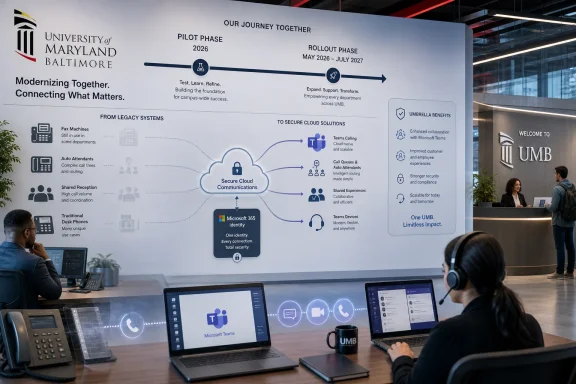
The University of Maryland, Baltimore’s Center for Information Technology Services announced on June 30, 2026, that it is launching training for a yearlong campus telecommunications migration from Cisco Webex Unified Calling to Microsoft Teams Calling, with the broader rollout scheduled from May 2026 through July 2027. The move is framed as modernization, but it is really a consolidation project: fewer communications platforms, fewer licenses, fewer desk phones, and more daily work routed through Microsoft 365. For UMB users, the phone is no longer a separate appliance on the corner of the desk. It is becoming another workload inside Teams.
UMB’s announcement is short, but the project behind it is not. CITS says the university is moving voice calling into Microsoft Teams so chat, video, meetings, and traditional phone service live in a single application already used by faculty, staff, and students. That is the cleanest possible version of the pitch, and it is the one Microsoft has been making to enterprises for years.
The more revealing detail is that UMB is not simply adding a feature. It is retiring a standalone telephone environment based on Cisco Webex Calling and replacing it with Teams Calling as a core campus communications layer. That changes the center of gravity for support, training, procurement, device planning, emergency calling workflows, and departmental call handling.
This is why the university is treating the migration as a yearlong initiative rather than a weekend cutover. Phones are deceptively simple until an organization has to account for every extension, shared line, fax machine, call queue, receptionist workflow, auto attendant, emergency location, and person who still expects a physical handset to behave exactly as it did yesterday.
In other words, the interesting part is not that UMB is adopting Teams Calling. The interesting part is that a major university is treating telephony as another cloud productivity workload, subject to the same consolidation logic that already swallowed email, file storage, meetings, and collaboration.
UMB’s own project page makes the financial argument explicit: the move creates savings opportunities by leveraging existing Microsoft investments and eliminating Cisco licenses. That is the sentence every university CIO, procurement office, and school-level budget manager understands immediately. If Teams is already licensed, supported, deployed, authenticated, and trained as part of Microsoft 365, then paying for a parallel calling platform starts to look less like resilience and more like duplication.
That does not mean the old phone system was useless. It means its value proposition has narrowed. A standalone calling platform can still be excellent at voice, but the modern workplace has shifted toward presence, chat escalation, mobile work, voicemail-to-email expectations, and calls that move between laptops and phones without users thinking about the underlying network.
The uncomfortable truth is that many desk phones became status symbols, habit objects, or emergency fallback devices rather than primary communication tools. UMB’s guidance nudges employees toward using the Teams app as the primary calling solution and says physical phones will remain available where specific job duties or shared spaces require them. That is a practical compromise, but it also marks a cultural line: the handset is now the exception that must be justified.
That has real benefits. Calling from a laptop, smartphone, or tablet is more natural for hybrid work than assigning voice service to a plastic device bolted to a desk. Voicemail, call history, contacts, meetings, chat, and presence can live in the same workflow. For users who already spend much of the day inside Teams, the marginal cost of learning another button in the same app is lower than learning a separate phone system.
But consolidation also increases dependency. When Teams is the meeting room, chat client, softphone, notification hub, and internal calling layer, Teams outages or identity problems become more operationally significant. The old world had fragmentation; the new world has blast radius.
That tradeoff is familiar to Windows administrators. Centralization simplifies management until the central system misbehaves. The productivity suite becomes infrastructure, and infrastructure requires a different level of operational discipline than “install the app and tell users where the dial pad is.”
A person who uses Teams daily for meetings may still have no idea how to transfer a live call, set forwarding, manage voicemail, distinguish an internal Teams call from a PSTN call, or place an external call from a mobile device without exposing personal habits. Administrative assistants, front-desk staff, clinical support teams, public safety-adjacent offices, and academic departments all have calling rituals that rarely appear in a clean architecture diagram.
This is where CITS appears to be moving carefully. The project page says an extended pilot has been underway since early 2026, including testers from each school, and that early adopters can move ahead if they do not need a physical phone but want their UMB extension available anywhere. That is a sensible sequencing strategy: migrate the least physically dependent users first, learn from them, then tackle the offices where the phone system is entangled with daily operations.
The training database matters because it turns the migration from an IT decree into a scheduled behavioral change. Users do not just need to know that Teams Calling exists. They need to build muscle memory before the Cisco phone disappears from the normal workflow.
UMB’s project page identifies several categories that deserve special attention: users with desk telephones, fax services, physical fax machines or multifunction copiers, auto attendants, and call handlers. Those are exactly the items that tend to turn a clean migration timeline into a discovery exercise. Every organization has a closet, counter, reception desk, lab, shared office, or copier room with a phone-adjacent dependency nobody documented recently.
Fax is the classic example. In higher education and health-adjacent environments, fax survives because outside workflows still demand it, regulatory habits persist, and certain counterparties are slower to modernize than internal IT teams would like. UMB points to secure electronic fax for users with university email addresses, but also notes that physical fax machines and copiers will need to be located and reconfigured.
Auto attendants are another deceptively sensitive area. A call tree is not just a recording; it is a public interface to an institution. When CITS says call handlers will need to be rerecorded in Teams and that departments can use the moment to rethink the message, it is making a quiet but important point. A telephony migration is also an information architecture cleanup.
There will be departments that discover their call flows reflect old organizational charts, outdated office names, retired services, or routing assumptions that no longer match how people work. That is not a Teams problem. It is the kind of institutional sediment that a phone migration finally exposes.
Microsoft Teams Phone supports multiple PSTN connectivity models, including Microsoft Calling Plans, Operator Connect, Teams Phone Mobile, and Direct Routing. Each model has different administrative and carrier implications, and universities often care deeply about cost control, number portability, emergency routing, and interoperability with existing systems. UMB’s public page does not spell out every back-end choice, but the operational responsibilities remain regardless of the carrier path.
Emergency calling is especially important because traditional desk phones had a comforting physical assumption: a phone jack mapped to a location. Softphones break that assumption. A Teams user may place a call from a laptop in an office, at home, on Wi-Fi, or from a mobile device, and the organization must understand how location information is handled in each case.
That does not make Teams Calling unsafe. It means the migration must include the unglamorous work of policy, testing, user education, and exception handling. The more flexible the endpoint becomes, the more intentional the emergency-calling design must be.
There is also the question of account security. A compromised Microsoft 365 account that can access email and files is already bad. If that same identity also has calling privileges, voicemail, contact access, and possibly delegated call handling, the account becomes more operationally valuable to attackers. Voice fraud is not the dominant Teams security story, but it is part of the risk model.
Cisco has deep enterprise voice credibility and long experience in calling hardware, contact center patterns, and network-aware communications. Webex Calling exists because Cisco understands that telephony has already moved to cloud service models. The problem is that Microsoft owns the productivity desktop for many institutions, and Teams sits where users already live.
That creates a brutally efficient bundling dynamic. If an organization has standardized on Microsoft 365, then every adjacent communications function faces the same question: why not put it in Teams? Meetings went through this. Chat went through this. Phone service is going through it now.
The answer is not always “yes.” Contact centers, complex attendant consoles, specialized devices, analog dependencies, compliance needs, and regional carrier requirements can all complicate Teams-only thinking. But the default conversation has changed. Teams is no longer the challenger that has to justify its place; the separate platform increasingly has to justify why it should remain separate.
UMB’s phased approach suggests it understands that distinction. The university is not pretending every use case is identical. It says CITS will work with each school to accommodate needs and timing, which is precisely the posture a migration of this kind requires.
UMB’s affected groups include schools and departments such as Medicine, Nursing, Social Work, Dentistry, Law, Public Safety-related administrative functions, and other supported units. That breadth matters. A phone migration that works for a back-office department may still need adaptation for a clinic-facing workflow, a front desk, a dean’s office, or a shared administrative area.
Universities also contain a wide range of technical comfort levels. Some users will welcome the ability to answer their work number from anywhere. Others will see the disappearance of a desk phone as yet another example of digital systems absorbing simple physical tools. Both reactions are rational.
The job of CITS is not to win a philosophical debate over softphones. It is to make the new system boring enough that users stop thinking about it. In telephony, success often looks like silence: calls connect, voicemail works, numbers route correctly, reception desks know what to do, and nobody has to open a ticket to perform yesterday’s routine task.
For IT leaders, the appeal is obvious. Fewer platforms mean fewer contracts, fewer support matrices, fewer client applications, and potentially cleaner security and compliance tooling. Standardization also helps training, because a university can teach one collaboration environment rather than maintaining parallel cultures around different systems.
For users, the experience is more ambiguous. Having everything in one app can be convenient until the app becomes crowded, noisy, or fragile. Teams has improved substantially since its early years, but it still carries the weight of being many products under one icon. Adding the campus phone reinforces that dual identity: Teams is both a collaboration tool and a work infrastructure portal.
For administrators, the move raises the stakes for Teams governance. Naming conventions, lifecycle policies, retention settings, guest access, mobile policies, update rings, device certification, and help desk scripts all matter more when the phone system is part of the same environment. A casual Teams deployment can survive as a chat-and-meetings layer. A calling deployment requires discipline.
The promise of Teams Calling is “your work phone anywhere.” The danger is “your work phone everywhere.” If calls ring simultaneously on a laptop, phone, tablet, and headset with confusing defaults, users may quickly decide the old desk phone was simpler. Training needs to cover not just how to place calls, but how to control presence, forwarding, quiet hours, device selection, and notifications.
Shared spaces are another subtle challenge. A personal Teams softphone maps neatly to an individual identity. Common areas do not. Reception phones, lab phones, classroom phones, emergency phones, and shared departmental numbers require a different design philosophy. UMB’s statement that physical phones will remain available when required is important because not every calling scenario should be forced into a personal laptop model.
The best migrations preserve what users relied on while removing what the organization no longer needs. That requires listening to departments before cutover, not merely surveying them afterward.
A migration calendar is not just a project management artifact. It is a governance tool. It tells schools when they must inventory devices, identify special cases, schedule training, update call trees, communicate with staff, and prepare for support changes.
The danger in any long migration is drift. Early adopters receive attention, documentation is fresh, and the project team is energized. Later waves can suffer if lessons learned are not folded back into training and implementation playbooks. CITS will need a feedback loop that treats each school’s migration as both execution and research.
The public training site helps here because it creates a single source of truth. Users can find documentation, town hall material, FAQs, and training sessions without relying on forwarded emails. In a university environment, that matters. Information spreads unevenly, and a public project page reduces the cost of rediscovery.
The danger is that organizations sometimes count savings before they complete discovery. Fax lines, analog devices, elevator phones, alarm lines, specialty endpoints, and departmental exceptions have a way of surviving modernization plans. Each exception may be legitimate, but together they can erode the simplicity promised by consolidation.
UMB’s project language suggests a pragmatic approach. It does not say every physical device disappears. It says physical phones will be available where required, fax machines must be located and reconfigured, and each school’s timing will be planned in consultation. That is less flashy than a hard cutover mandate, but more credible.
The best outcome is not a campus with no phones. It is a campus where phone service is deliberately assigned: softphones for mobile knowledge work, physical devices for shared or specialized duties, electronic fax where appropriate, and documented exceptions where legacy patterns must remain.
This is not necessarily worse than supporting legacy telephony, but it is different. Telecom and desktop support boundaries blur. Network teams need visibility into call quality and packet behavior. Identity teams need to understand licensing and policy assignment. Endpoint teams need to care about certified devices and driver stability. Security teams need to consider voice as part of the Microsoft 365 threat surface.
Training for end users should be matched by training for support staff. A good Teams Calling rollout needs help desk scripts for common failures: missing dial pad, calls ringing on the wrong device, voicemail confusion, headset selection, forwarding mistakes, poor call quality, and number assignment problems. The support organization must be ready before users are told the system is ready.
The upside is that Microsoft 365 offers a more unified administrative world than the old split between productivity apps and telephony appliances. The downside is that when everything converges, nobody can say “that’s not my system” quite as easily.
The concrete lessons are already visible:
 UMB Is Turning the Campus Phone Into a Microsoft 365 Feature
UMB’s announcement is short, but the project behind it is not. CITS says the university is moving voice calling into Microsoft Teams so chat, video, meetings, and traditional phone service live in a single application already used by faculty, staff, and students. That is the cleanest possible version of the pitch, and it is the one Microsoft has been making to enterprises for years.The more revealing detail is that UMB is not simply adding a feature. It is retiring a standalone telephone environment based on Cisco Webex Calling and replacing it with Teams Calling as a core campus communications layer. That changes the center of gravity for support, training, procurement, device planning, emergency calling workflows, and departmental call handling.
This is why the university is treating the migration as a yearlong initiative rather than a weekend cutover. Phones are deceptively simple until an organization has to account for every extension, shared line, fax machine, call queue, receptionist workflow, auto attendant, emergency location, and person who still expects a physical handset to behave exactly as it did yesterday.
In other words, the interesting part is not that UMB is adopting Teams Calling. The interesting part is that a major university is treating telephony as another cloud productivity workload, subject to the same consolidation logic that already swallowed email, file storage, meetings, and collaboration.
The Desk Phone Was Always the Weakest Link in the Modernization Story
Legacy campus telephony has long survived because it was reliable, familiar, and politically invisible. The phone on the desk did one thing, and for many departments that was enough. But the economics around that model have been deteriorating for years.UMB’s own project page makes the financial argument explicit: the move creates savings opportunities by leveraging existing Microsoft investments and eliminating Cisco licenses. That is the sentence every university CIO, procurement office, and school-level budget manager understands immediately. If Teams is already licensed, supported, deployed, authenticated, and trained as part of Microsoft 365, then paying for a parallel calling platform starts to look less like resilience and more like duplication.
That does not mean the old phone system was useless. It means its value proposition has narrowed. A standalone calling platform can still be excellent at voice, but the modern workplace has shifted toward presence, chat escalation, mobile work, voicemail-to-email expectations, and calls that move between laptops and phones without users thinking about the underlying network.
The uncomfortable truth is that many desk phones became status symbols, habit objects, or emergency fallback devices rather than primary communication tools. UMB’s guidance nudges employees toward using the Teams app as the primary calling solution and says physical phones will remain available where specific job duties or shared spaces require them. That is a practical compromise, but it also marks a cultural line: the handset is now the exception that must be justified.
Microsoft Wins When the Phone Becomes Just Another Tab
Microsoft’s strategic victory with Teams Phone is not merely that organizations can make calls through Teams. It is that the concept of a work phone is being absorbed into the Microsoft 365 identity and app model. A user signs into Teams, and the phone number follows.That has real benefits. Calling from a laptop, smartphone, or tablet is more natural for hybrid work than assigning voice service to a plastic device bolted to a desk. Voicemail, call history, contacts, meetings, chat, and presence can live in the same workflow. For users who already spend much of the day inside Teams, the marginal cost of learning another button in the same app is lower than learning a separate phone system.
But consolidation also increases dependency. When Teams is the meeting room, chat client, softphone, notification hub, and internal calling layer, Teams outages or identity problems become more operationally significant. The old world had fragmentation; the new world has blast radius.
That tradeoff is familiar to Windows administrators. Centralization simplifies management until the central system misbehaves. The productivity suite becomes infrastructure, and infrastructure requires a different level of operational discipline than “install the app and tell users where the dial pad is.”
Training Is the Soft Launch of the Real Migration
UMB’s announcement focuses on live virtual training sessions, training documentation, a town hall recording, and frequently asked questions. That may sound like a standard change-management package, but it is actually the project’s pressure valve. Calling migrations fail less often because the technology cannot route a call and more often because users do not understand what changed.A person who uses Teams daily for meetings may still have no idea how to transfer a live call, set forwarding, manage voicemail, distinguish an internal Teams call from a PSTN call, or place an external call from a mobile device without exposing personal habits. Administrative assistants, front-desk staff, clinical support teams, public safety-adjacent offices, and academic departments all have calling rituals that rarely appear in a clean architecture diagram.
This is where CITS appears to be moving carefully. The project page says an extended pilot has been underway since early 2026, including testers from each school, and that early adopters can move ahead if they do not need a physical phone but want their UMB extension available anywhere. That is a sensible sequencing strategy: migrate the least physically dependent users first, learn from them, then tackle the offices where the phone system is entangled with daily operations.
The training database matters because it turns the migration from an IT decree into a scheduled behavioral change. Users do not just need to know that Teams Calling exists. They need to build muscle memory before the Cisco phone disappears from the normal workflow.
The Campus Edge Cases Will Decide Whether This Feels Modern or Messy
The real test for UMB will not be the average knowledge worker making a call from a laptop. That scenario is mature, well understood, and squarely in Microsoft’s comfort zone. The harder work lives at the edges.UMB’s project page identifies several categories that deserve special attention: users with desk telephones, fax services, physical fax machines or multifunction copiers, auto attendants, and call handlers. Those are exactly the items that tend to turn a clean migration timeline into a discovery exercise. Every organization has a closet, counter, reception desk, lab, shared office, or copier room with a phone-adjacent dependency nobody documented recently.
Fax is the classic example. In higher education and health-adjacent environments, fax survives because outside workflows still demand it, regulatory habits persist, and certain counterparties are slower to modernize than internal IT teams would like. UMB points to secure electronic fax for users with university email addresses, but also notes that physical fax machines and copiers will need to be located and reconfigured.
Auto attendants are another deceptively sensitive area. A call tree is not just a recording; it is a public interface to an institution. When CITS says call handlers will need to be rerecorded in Teams and that departments can use the moment to rethink the message, it is making a quiet but important point. A telephony migration is also an information architecture cleanup.
There will be departments that discover their call flows reflect old organizational charts, outdated office names, retired services, or routing assumptions that no longer match how people work. That is not a Teams problem. It is the kind of institutional sediment that a phone migration finally exposes.
The Security and Emergency Calling Details Cannot Be Treated as Footnotes
For WindowsForum’s sysadmin audience, the Teams Calling story has another layer: voice is not just collaboration. It is regulated, audited, location-sensitive infrastructure. Moving calls into Teams puts more pressure on identity, endpoint health, conditional access, device policy, and emergency location configuration.Microsoft Teams Phone supports multiple PSTN connectivity models, including Microsoft Calling Plans, Operator Connect, Teams Phone Mobile, and Direct Routing. Each model has different administrative and carrier implications, and universities often care deeply about cost control, number portability, emergency routing, and interoperability with existing systems. UMB’s public page does not spell out every back-end choice, but the operational responsibilities remain regardless of the carrier path.
Emergency calling is especially important because traditional desk phones had a comforting physical assumption: a phone jack mapped to a location. Softphones break that assumption. A Teams user may place a call from a laptop in an office, at home, on Wi-Fi, or from a mobile device, and the organization must understand how location information is handled in each case.
That does not make Teams Calling unsafe. It means the migration must include the unglamorous work of policy, testing, user education, and exception handling. The more flexible the endpoint becomes, the more intentional the emergency-calling design must be.
There is also the question of account security. A compromised Microsoft 365 account that can access email and files is already bad. If that same identity also has calling privileges, voicemail, contact access, and possibly delegated call handling, the account becomes more operationally valuable to attackers. Voice fraud is not the dominant Teams security story, but it is part of the risk model.
Cisco Loses the Seat, but Not Necessarily the Argument
It would be easy to frame UMB’s move as Microsoft beating Cisco. In procurement terms, that may be fair: the university says it is eliminating Cisco licenses as part of the savings opportunity. But the larger industry shift is less about one vendor’s product being inadequate and more about platform gravity.Cisco has deep enterprise voice credibility and long experience in calling hardware, contact center patterns, and network-aware communications. Webex Calling exists because Cisco understands that telephony has already moved to cloud service models. The problem is that Microsoft owns the productivity desktop for many institutions, and Teams sits where users already live.
That creates a brutally efficient bundling dynamic. If an organization has standardized on Microsoft 365, then every adjacent communications function faces the same question: why not put it in Teams? Meetings went through this. Chat went through this. Phone service is going through it now.
The answer is not always “yes.” Contact centers, complex attendant consoles, specialized devices, analog dependencies, compliance needs, and regional carrier requirements can all complicate Teams-only thinking. But the default conversation has changed. Teams is no longer the challenger that has to justify its place; the separate platform increasingly has to justify why it should remain separate.
UMB’s phased approach suggests it understands that distinction. The university is not pretending every use case is identical. It says CITS will work with each school to accommodate needs and timing, which is precisely the posture a migration of this kind requires.
Universities Are Where Unified Communications Gets Stress-Tested
Higher education is a particularly revealing environment for a Teams Calling migration because universities are not single-purpose corporations. They are office complexes, research organizations, teaching institutions, clinics, public-facing service providers, event spaces, libraries, labs, residence-adjacent communities, and bureaucracies all at once. Their phone systems reflect that complexity.UMB’s affected groups include schools and departments such as Medicine, Nursing, Social Work, Dentistry, Law, Public Safety-related administrative functions, and other supported units. That breadth matters. A phone migration that works for a back-office department may still need adaptation for a clinic-facing workflow, a front desk, a dean’s office, or a shared administrative area.
Universities also contain a wide range of technical comfort levels. Some users will welcome the ability to answer their work number from anywhere. Others will see the disappearance of a desk phone as yet another example of digital systems absorbing simple physical tools. Both reactions are rational.
The job of CITS is not to win a philosophical debate over softphones. It is to make the new system boring enough that users stop thinking about it. In telephony, success often looks like silence: calls connect, voicemail works, numbers route correctly, reception desks know what to do, and nobody has to open a ticket to perform yesterday’s routine task.
The Microsoft 365 Campus Is Becoming the Default Campus
UMB’s move fits a broader pattern in institutional IT: Microsoft 365 is no longer just a suite of productivity applications. It is becoming the operating environment for administrative work. Outlook handles mail and calendar, OneDrive and SharePoint handle files, Teams handles meetings and chat, Entra ID underpins identity, and now Teams Phone increasingly handles calling.For IT leaders, the appeal is obvious. Fewer platforms mean fewer contracts, fewer support matrices, fewer client applications, and potentially cleaner security and compliance tooling. Standardization also helps training, because a university can teach one collaboration environment rather than maintaining parallel cultures around different systems.
For users, the experience is more ambiguous. Having everything in one app can be convenient until the app becomes crowded, noisy, or fragile. Teams has improved substantially since its early years, but it still carries the weight of being many products under one icon. Adding the campus phone reinforces that dual identity: Teams is both a collaboration tool and a work infrastructure portal.
For administrators, the move raises the stakes for Teams governance. Naming conventions, lifecycle policies, retention settings, guest access, mobile policies, update rings, device certification, and help desk scripts all matter more when the phone system is part of the same environment. A casual Teams deployment can survive as a chat-and-meetings layer. A calling deployment requires discipline.
The User Experience Will Rise or Fall on Small Details
Most users will not judge this migration by architectural elegance or license optimization. They will judge it by whether the dial pad appears, whether their number works, whether voicemail is easy to find, whether calls ring on the right device, and whether the headset behaves. That is where cloud telephony projects either earn trust or burn it.The promise of Teams Calling is “your work phone anywhere.” The danger is “your work phone everywhere.” If calls ring simultaneously on a laptop, phone, tablet, and headset with confusing defaults, users may quickly decide the old desk phone was simpler. Training needs to cover not just how to place calls, but how to control presence, forwarding, quiet hours, device selection, and notifications.
Shared spaces are another subtle challenge. A personal Teams softphone maps neatly to an individual identity. Common areas do not. Reception phones, lab phones, classroom phones, emergency phones, and shared departmental numbers require a different design philosophy. UMB’s statement that physical phones will remain available when required is important because not every calling scenario should be forced into a personal laptop model.
The best migrations preserve what users relied on while removing what the organization no longer needs. That requires listening to departments before cutover, not merely surveying them afterward.
The Migration Calendar Is a Governance Tool, Not Just a Schedule
UMB’s timeline is unusually important because it sets expectations without pretending the university can move all at once. The pilot began in March 2026, early adopters are already being considered, and the broader campus transition is expected between May 2026 and July 2027. That gives CITS more than a year to sequence schools and departments based on readiness.A migration calendar is not just a project management artifact. It is a governance tool. It tells schools when they must inventory devices, identify special cases, schedule training, update call trees, communicate with staff, and prepare for support changes.
The danger in any long migration is drift. Early adopters receive attention, documentation is fresh, and the project team is energized. Later waves can suffer if lessons learned are not folded back into training and implementation playbooks. CITS will need a feedback loop that treats each school’s migration as both execution and research.
The public training site helps here because it creates a single source of truth. Users can find documentation, town hall material, FAQs, and training sessions without relying on forwarded emails. In a university environment, that matters. Information spreads unevenly, and a public project page reduces the cost of rediscovery.
The Real Savings Come After the Cleanup
License consolidation is the visible savings story, but the deeper savings may come from operational cleanup. Retiring unused extensions, reducing physical phone hardware, simplifying support paths, standardizing voicemail, and replacing old call handlers can all reduce friction long after the cutover.The danger is that organizations sometimes count savings before they complete discovery. Fax lines, analog devices, elevator phones, alarm lines, specialty endpoints, and departmental exceptions have a way of surviving modernization plans. Each exception may be legitimate, but together they can erode the simplicity promised by consolidation.
UMB’s project language suggests a pragmatic approach. It does not say every physical device disappears. It says physical phones will be available where required, fax machines must be located and reconfigured, and each school’s timing will be planned in consultation. That is less flashy than a hard cutover mandate, but more credible.
The best outcome is not a campus with no phones. It is a campus where phone service is deliberately assigned: softphones for mobile knowledge work, physical devices for shared or specialized duties, electronic fax where appropriate, and documented exceptions where legacy patterns must remain.
The Windows Admin Angle Is Identity, Devices, and Support
For Windows administrators, Teams Calling turns the endpoint into part of the phone system. That means the user’s PC, headset, Teams client, network connection, sign-in state, and policy assignment can all become call-quality factors. The help desk ticket that used to say “phone not working” may now involve Windows audio settings, Bluetooth drivers, Teams updates, conditional access, or a stale license assignment.This is not necessarily worse than supporting legacy telephony, but it is different. Telecom and desktop support boundaries blur. Network teams need visibility into call quality and packet behavior. Identity teams need to understand licensing and policy assignment. Endpoint teams need to care about certified devices and driver stability. Security teams need to consider voice as part of the Microsoft 365 threat surface.
Training for end users should be matched by training for support staff. A good Teams Calling rollout needs help desk scripts for common failures: missing dial pad, calls ringing on the wrong device, voicemail confusion, headset selection, forwarding mistakes, poor call quality, and number assignment problems. The support organization must be ready before users are told the system is ready.
The upside is that Microsoft 365 offers a more unified administrative world than the old split between productivity apps and telephony appliances. The downside is that when everything converges, nobody can say “that’s not my system” quite as easily.
The Campus Phone Is Now a Change-Management Project
UMB’s Teams Calling project is not just a local IT announcement. It is a case study in what happens when a mature Microsoft 365 environment absorbs one of the last highly visible pieces of standalone office infrastructure. The phone system is becoming software, policy, identity, and training.The concrete lessons are already visible:
- UMB is moving from Cisco Webex Unified Calling to Microsoft Teams Calling through a phased campus rollout that began with a pilot in early 2026 and is expected to continue through July 2027.
- The strongest business case is consolidation, because Teams Calling lets the university leverage existing Microsoft investments while reducing separate telecom licensing and hardware dependence.
- The most difficult migration work will involve shared phones, fax services, auto attendants, call handlers, and departments with specialized calling workflows.
- The user experience will depend on training for everyday actions such as call forwarding, voicemail, device selection, mobile use, and transferring calls.
- The administrative risk shifts toward Microsoft 365 governance, endpoint support, identity security, call-quality monitoring, and emergency calling configuration.
- The project will succeed if Teams Calling becomes boring infrastructure rather than a daily reminder that the old desk phone used to be simpler.
References
- Primary source: The University of Maryland, Baltimore
Published: 2026-07-01T02:42:08.593660
MS Teams Calling Training and More - The Elm
The Elm is a publication of the University of Maryland, Baltimore (UMB).elm.umaryland.edu - Official source: learn.microsoft.com
UPDATE: Retirement of Skype for Business Online - Microsoft Lifecycle | Microsoft Learn
Announcing the retirement of Skype for Business Online.learn.microsoft.com - Official source: support.microsoft.com
Getting started with Microsoft Teams Phone Mobile | Microsoft Support
Teams Phone Mobile enables you to stay connected no matter where you are. Your SIM-enabled phone number is also your Teams phone number, allowing you to answer and move calls seamlessly between devices. Learn how to manage, uplift, and transfer your calls on your business-provided phone number.support.microsoft.com - Related coverage: ciodive.com
Microsoft will shutter Skype for Business Online in 2021, making Teams its heir | CIO Dive
The company will spend the next two years adding integration capabilities to Teams as it looks to convince existing users to migrate.www.ciodive.com
- Official source: adoption.microsoft.com
