

Microsoft has cancelled its planned Teams frontline bring-your-own-device onboarding wizard, abandoning a feature intended to help shift-based employees install and configure Teams on personal Android and iOS devices with less intervention from managers or IT staff. Microsoft 365 Roadmap item 523213 was marked Cancelled on July 20, 2026, despite having entered public preview and being listed for general availability in August 2026, leaving organizations to rely on existing documentation, mobile application management controls, and locally developed onboarding processes.
Frontline technology deployments have always presented a different challenge from conventional knowledge-worker rollouts. Office employees typically receive a configured laptop, an established corporate identity, and time during their first days to complete authentication and security setup, while frontline workers may begin a shift with little more than a username, a temporary password, and access to a shared back-office computer.
The abandoned Teams wizard attempted to bridge that gap. Instead of expecting a store associate, warehouse worker, healthcare employee, or field technician to interpret technical prompts independently, the experience provided a guided setup journey that adapted to the organization’s Microsoft 365 security policies.
The roadmap described a relatively straightforward objective: make it easier for frontline workers to download Teams and begin using it on their own phones while remaining subject to organizational security policies. Microsoft expected the experience to reduce manager involvement, lower support demand, and eliminate some of the confusion created by multifactor authentication, Microsoft Authenticator, Company Portal, Conditional Access, and Intune app protection prompts.
On July 20, 2026, Microsoft updated the item to say that it had decided not to move forward with the change. No detailed technical or commercial explanation accompanied the cancellation.
A worker may need to complete several interdependent tasks:
That distinction matters. Teams, Intune mobile application management, Conditional Access, Authenticator, and Company Portal remain available. Microsoft has cancelled the streamlined journey that attempted to connect those services for a specific frontline scenario.
The experience could direct the worker to:
Organizations may consequently have tested the wizard, incorporated it into pilot programs, or referenced it in deployment documentation. Any customer doing so must now treat the experience as transitional rather than as a permanent part of the Teams frontline platform.
Microsoft has also communicated plans to retire the preview onboarding guide by late August 2026. That means the practical effect is not merely the absence of further development: access to the existing preview workflow is expected to disappear.
This environment changes the economics of support. A ten-minute setup problem multiplied across 20,000 workers becomes a substantial operational expense, particularly when assistance must come from store managers, shift supervisors, or regional support teams rather than a centralized IT desk.
Password resets are only the beginning. Employees may also encounter account registration prompts, app-store restrictions, unsupported operating-system versions, privacy concerns, conflicting personal Microsoft accounts, or a Conditional Access message that does not explain which requirement failed.
That arrangement can be expensive even when it does not appear on an IT budget. Every minute spent troubleshooting Teams is a minute not spent coordinating staffing, serving customers, managing safety, or overseeing operations.
The cancelled wizard targeted this hidden cost. Its loss will be felt most by organizations that wanted self-service onboarding but did not have the resources to build a custom equivalent.
Administrators think in terms of identities, policy assignments, device states, application protection, token claims, and access decisions. Workers see a sequence of prompts that may appear to ask for control of their personal phone. A successful onboarding process must translate one perspective into the other without weakening security.
A policy can require an application PIN, encrypt work data, restrict copying and pasting, prevent work files from being saved to unmanaged storage, and control whether business links open in a managed browser. It can also selectively remove organizational data from managed applications when an employee leaves.
This model addresses one of the biggest objections to BYOD enrollment: employees may accept safeguards around work data but resist giving an employer broader management authority over a personally purchased phone.
The result is a layered decision. The identity must be valid, the authentication method must be acceptable, the application must support the required controls, and the session must satisfy the organization’s access policy.
This is powerful but creates dependency chains. If the user has not registered Authenticator, if the app has not received policy, or if an account belongs to the wrong assignment group, Teams may deny access even though the password is correct.
Employees often interpret the app’s name as evidence that the employer intends to control the entire device. Clear communication is therefore essential. Organizations should explain whether they are using MAM without enrollment, what data administrators can see, which controls apply, and what happens when access is removed.
On iOS and iPadOS, the workflow can differ because the underlying operating system and Intune integration do not always require the same visible supporting application. This platform variation was one reason a dynamically tailored wizard had practical value.
A typical deployment places devices in a charging area. An employee signs in at the beginning of a shift, uses Teams and other supported business applications, then signs out before returning the device. The next worker receives a clean session rather than inheriting cached chats, files, notifications, or account tokens.
This model is especially relevant in healthcare, retail, manufacturing, logistics, and hospitality. It can provide a more predictable security posture because the organization owns the hardware, selects operating-system versions, controls application deployment, and defines the replacement cycle.
Shared-device sign-out must be dependable. A failure to clear application state is not merely an inconvenience; it can expose employee, customer, patient, or operational information to the next user.
BYOD avoids some capital expense and gives each employee a familiar device, but it transfers complexity into policy, labor relations, reimbursement, privacy, and support. The correct model depends on the organization rather than on a universal Microsoft recommendation.
Static instructions age quickly. If IT adds an app PIN requirement, changes the approved authentication method, or introduces an Android-specific dependency, onboarding material must be updated across every location and language.
A mismatch between instructions and reality damages trust. Workers may assume their phone is incompatible, their account is broken, or the organization is attempting to enroll the device unexpectedly.
MAM without enrollment is designed to protect the corporate application context rather than administer the entire device. Nevertheless, organizations should not rely on employees to infer that distinction from a Microsoft prompt.
Effective onboarding should state, in plain language:
Accessibility must also remain part of the deployment plan. Instructions should account for screen readers, limited vision, language differences, motor impairments, and workers who cannot use QR codes easily.
A self-service process is only successful if it works for the employee population that actually needs it. Reducing calls by making unsupported workers give up would not represent meaningful improvement.
A controlled replacement should be ready before the preview experience is retired. Otherwise, newly hired workers could encounter a dead link or instructions that lead to an unsupported service.
Administrators should follow a structured response:
Organizations should examine service-desk data for authentication registration failures, Company Portal confusion, unsupported operating systems, and app protection delays. These categories can help determine whether the organization needs better documentation, more automation, revised policy, or a different device model.
Large enterprises may choose to build their own policy-aware portal using Microsoft identity and management APIs. Smaller organizations are more likely to use static guidance and targeted support, which may be less elegant but easier to maintain.
Such changes can create disproportionate risk because frontline accounts often access schedules, customer information, operational communications, files, and workflow applications. Shared passwords, high turnover, seasonal hiring, and physically exposed work environments can compound that risk.
The better response is to simplify the path to compliance, not to eliminate compliance. Microsoft’s cancellation makes that task harder, but it does not change the threat model.
The wizard also had to guide users between a desktop browser and a mobile phone while maintaining a coherent state. QR codes, private browsing, password resets, app installation, Authenticator registration, and Teams sign-in all introduce points where the workflow can be interrupted.
Supporting a limited set of tested scenarios may be feasible. Guaranteeing a dependable experience across diverse enterprise environments is much harder, especially when the wizard does not control every screen the user sees.
If an organization required full device management rather than MAM without enrollment, users still had to follow enrollment steps on the phone. A tool promoted broadly as a BYOD onboarding experience could therefore create expectations it could not satisfy.
The wizard was best suited to a narrower configuration: Teams on Android or iOS, potentially with Authenticator, Company Portal, app protection, app configuration, and Conditional Access. Customers with certificate deployment, third-party identity tools, non-Microsoft mobile management, custom applications, or unusual enrollment requirements might still need bespoke instructions.
The late cancellation may indicate that Microsoft concluded the standalone experience would be difficult to maintain or that adoption during preview did not justify general availability. It could also reflect a decision to incorporate portions of the concept into other management or deployment experiences.
Until Microsoft explains the decision or announces a replacement, organizations should avoid assuming that the capability will return under a different name.
That integration is valuable for regulated enterprises and organizations already standardized on Microsoft 365. A competitor offering an easier initial sign-in may not provide equivalent controls across identity, applications, compliance, and endpoint management.
However, integration only creates value when administrators and workers can navigate it. Every additional dependency introduces another opportunity for configuration drift or user confusion.
A security-rich platform that takes repeated assistance to activate may lose credibility with operations teams. This is particularly true when employees need only a limited set of functions such as announcements, chat, scheduling, task updates, or push-to-talk communication.
Microsoft’s decision does not substantially weaken Teams as a collaboration platform, but it removes a visible attempt to address one of the gaps between enterprise capability and frontline usability.
Microsoft can standardize parts of the experience inside its applications, but it cannot completely control system prompts or installation behavior. Any future replacement will need to acknowledge those limits rather than presenting mobile onboarding as a single universal process.
Simplification does not necessarily mean weaker security. Consolidating policies, standardizing supported authentication methods, and choosing a clear BYOD model can improve both security and usability.
The most effective replacement for the wizard may not be another wizard. It may be a combination of cleaner identity provisioning, fewer policy branches, clear employee communication, and telemetry that identifies where onboarding fails.
Microsoft 365 roadmap entries are plans rather than contractual commitments, but customers use them to allocate resources and design adoption programs. Reversals close to release can make organizations more reluctant to build processes around preview capabilities.
IT leaders should treat roadmap dates as directional until a feature reaches general availability and demonstrates operational stability. Preview testing remains valuable, but production processes should always include an exit plan.
Administrators should also monitor the Microsoft 365 Message Center for tenant-specific retirement details. The roadmap provides the high-level product status, while Message Center posts typically contain more actionable timing and preparation guidance.
Future announcements worth watching include:
These figures reveal whether the problem is documentation, identity provisioning, device compatibility, privacy concerns, or policy design. They also make it easier to compare BYOD with shared-device economics.
A pilot should represent real operating conditions. Tests conducted by experienced IT employees on current flagship phones will not predict how a diverse frontline workforce experiences the process.
Longer term, organizations should decide whether personal devices are truly the right foundation for frontline access. BYOD can reduce hardware costs and let workers use familiar phones, but those benefits must be balanced against privacy, reimbursement, accessibility, security, labor policy, and support complexity.
The cancelled Teams frontline BYOD onboarding wizard represented an attempt to solve a genuine and costly problem: converting an enterprise security architecture into a sequence that a busy worker could complete without expert assistance. Microsoft may have withdrawn the feature, but the demand for that simplicity has not disappeared, and the vendors and IT teams that solve the last mile of frontline onboarding will hold a meaningful advantage in the next phase of workplace technology.
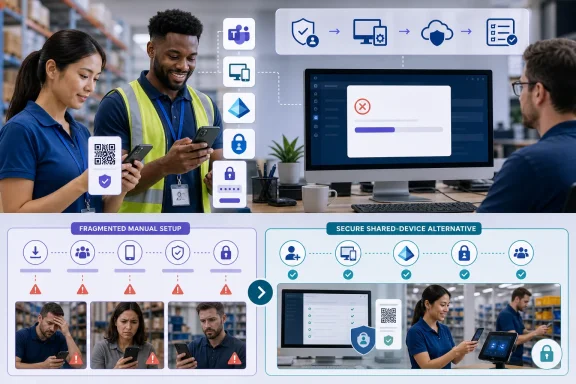 Background
Frontline technology deployments have always presented a different challenge from conventional knowledge-worker rollouts. Office employees typically receive a configured laptop, an established corporate identity, and time during their first days to complete authentication and security setup, while frontline workers may begin a shift with little more than a username, a temporary password, and access to a shared back-office computer.The abandoned Teams wizard attempted to bridge that gap. Instead of expecting a store associate, warehouse worker, healthcare employee, or field technician to interpret technical prompts independently, the experience provided a guided setup journey that adapted to the organization’s Microsoft 365 security policies.
The original roadmap commitment
Microsoft created Roadmap ID 523213 on November 4, 2025. The feature was listed for Microsoft Teams in the worldwide standard multi-tenant cloud, with preview availability beginning in November 2025 and general availability planned for August 2026.The roadmap described a relatively straightforward objective: make it easier for frontline workers to download Teams and begin using it on their own phones while remaining subject to organizational security policies. Microsoft expected the experience to reduce manager involvement, lower support demand, and eliminate some of the confusion created by multifactor authentication, Microsoft Authenticator, Company Portal, Conditional Access, and Intune app protection prompts.
On July 20, 2026, Microsoft updated the item to say that it had decided not to move forward with the change. No detailed technical or commercial explanation accompanied the cancellation.
Why personal-device onboarding is difficult
Installing Teams from an app store is easy. Establishing a secure and supportable business identity inside Teams can be considerably more complicated.A worker may need to complete several interdependent tasks:
- The worker must sign in with a corporate username and temporary or permanent password.
- The account may require registration for multifactor authentication.
- Microsoft Authenticator may need to be installed and configured.
- An Android device may require Company Portal to act as a policy broker, even when full device enrollment is not required.
- Teams must receive the correct Intune app protection and app configuration policies.
- Microsoft Entra Conditional Access must recognize that the session satisfies organizational requirements.
- The worker must understand which prompts grant access to corporate data and which requests affect the personal device.
What Microsoft Has Cancelled
The cancelled capability was not a redesigned Teams mobile client or a new device-management platform. It was an onboarding layer designed to guide workers through the components that Microsoft already provides.That distinction matters. Teams, Intune mobile application management, Conditional Access, Authenticator, and Company Portal remain available. Microsoft has cancelled the streamlined journey that attempted to connect those services for a specific frontline scenario.
A policy-aware web experience
Microsoft’s published setup guidance described the onboarding experience as a web-based workflow intended to run on a desktop kiosk, shared PC, or back-office computer. A worker would open the onboarding site, choose Android or iOS, sign in with work credentials, and follow instructions tailored to the tenant’s policies.The experience could direct the worker to:
- Reset a temporary password when required.
- Install Microsoft Authenticator.
- Register Authenticator push notifications as the primary multifactor authentication method.
- Install Company Portal on Android when required by the organization’s app management configuration.
- Download Teams through a QR code.
- Sign in to Teams and confirm that access worked.
- Close the private browser session so that the next employee would not inherit account information.
Cancellation after public preview
The timing makes the decision more significant than the cancellation of an early concept. Microsoft’s documentation identified the feature as being in public preview, and the roadmap had carried it toward an August 2026 general-availability target.Organizations may consequently have tested the wizard, incorporated it into pilot programs, or referenced it in deployment documentation. Any customer doing so must now treat the experience as transitional rather than as a permanent part of the Teams frontline platform.
Microsoft has also communicated plans to retire the preview onboarding guide by late August 2026. That means the practical effect is not merely the absence of further development: access to the existing preview workflow is expected to disappear.
The Frontline Deployment Problem Remains
Cancelling a wizard does not remove the operational conditions that made it useful. Frontline organizations still need a scalable way to connect potentially thousands of employees to Teams without turning every first sign-in into a service-desk interaction.Workers often lack traditional IT touchpoints
Many frontline employees do not have corporate email open throughout the day, assigned Windows PCs, or recurring contact with an IT department. Their digital workplace may consist of a personal phone, a shared tablet, a ruggedized scanner, or a terminal used by an entire location.This environment changes the economics of support. A ten-minute setup problem multiplied across 20,000 workers becomes a substantial operational expense, particularly when assistance must come from store managers, shift supervisors, or regional support teams rather than a centralized IT desk.
Password resets are only the beginning. Employees may also encounter account registration prompts, app-store restrictions, unsupported operating-system versions, privacy concerns, conflicting personal Microsoft accounts, or a Conditional Access message that does not explain which requirement failed.
Managers become unofficial technical support
Frontline managers frequently absorb the burden created by fragmented onboarding. They distribute usernames, explain QR codes, help install apps, verify that Authenticator works, and contact IT when a phone fails to satisfy policy.That arrangement can be expensive even when it does not appear on an IT budget. Every minute spent troubleshooting Teams is a minute not spent coordinating staffing, serving customers, managing safety, or overseeing operations.
The cancelled wizard targeted this hidden cost. Its loss will be felt most by organizations that wanted self-service onboarding but did not have the resources to build a custom equivalent.
The last mile is the hardest part
Microsoft already offers sophisticated controls for protecting corporate information on personal devices. The persistent problem is translating those controls into a reliable employee experience.Administrators think in terms of identities, policy assignments, device states, application protection, token claims, and access decisions. Workers see a sequence of prompts that may appear to ask for control of their personal phone. A successful onboarding process must translate one perspective into the other without weakening security.
How BYOD Security Works Without the Wizard
Organizations can continue to provide Teams access on personal devices, but they must assemble the experience from existing Microsoft 365 components. For many deployments, the central technology will remain Microsoft Intune mobile application management without device enrollment, commonly called MAM.App-level protection instead of full control
Intune app protection policies can secure corporate data inside supported applications without requiring the organization to manage the entire personal device. This approach is attractive in BYOD environments because it separates business information from the user’s photos, messages, consumer apps, and other personal content.A policy can require an application PIN, encrypt work data, restrict copying and pasting, prevent work files from being saved to unmanaged storage, and control whether business links open in a managed browser. It can also selectively remove organizational data from managed applications when an employee leaves.
This model addresses one of the biggest objections to BYOD enrollment: employees may accept safeguards around work data but resist giving an employer broader management authority over a personally purchased phone.
Conditional Access provides the enforcement point
App protection policies describe how Teams should handle organizational information, but Microsoft Entra Conditional Access determines whether a sign-in can proceed under defined conditions. An organization can require multifactor authentication, an approved client application, or an app protection policy before allowing Teams to access corporate resources.The result is a layered decision. The identity must be valid, the authentication method must be acceptable, the application must support the required controls, and the session must satisfy the organization’s access policy.
This is powerful but creates dependency chains. If the user has not registered Authenticator, if the app has not received policy, or if an account belongs to the wrong assignment group, Teams may deny access even though the password is correct.
Company Portal can still appear without enrollment
Android users may be asked to install Company Portal as part of an app protection deployment, even when the organization does not require full mobile-device enrollment. Company Portal can serve as part of the infrastructure that allows Intune to identify and manage the work context.Employees often interpret the app’s name as evidence that the employer intends to control the entire device. Clear communication is therefore essential. Organizations should explain whether they are using MAM without enrollment, what data administrators can see, which controls apply, and what happens when access is removed.
On iOS and iPadOS, the workflow can differ because the underlying operating system and Intune integration do not always require the same visible supporting application. This platform variation was one reason a dynamically tailored wizard had practical value.
Shared Devices Are the Main Alternative
BYOD is not the only way to deliver Teams to frontline employees. Microsoft continues to recommend shared-device approaches for many frontline scenarios, particularly where the organization wants stronger control or where local working practices make personal-device use inappropriate.Microsoft Entra shared device mode
Shared device mode allows an organization-owned Android, iOS, or iPadOS device to be used by multiple employees. Supported applications can participate in coordinated sign-in and sign-out so that one worker’s data does not remain available after the device changes hands.A typical deployment places devices in a charging area. An employee signs in at the beginning of a shift, uses Teams and other supported business applications, then signs out before returning the device. The next worker receives a clean session rather than inheriting cached chats, files, notifications, or account tokens.
This model is especially relevant in healthcare, retail, manufacturing, logistics, and hospitality. It can provide a more predictable security posture because the organization owns the hardware, selects operating-system versions, controls application deployment, and defines the replacement cycle.
Shared devices carry their own costs
Organization-owned devices require procurement, charging stations, asset tracking, repairs, replacements, sanitation procedures, network capacity, and physical security. They can also create availability problems if too few devices are assigned to a location or if workers forget to return them.Shared-device sign-out must be dependable. A failure to clear application state is not merely an inconvenience; it can expose employee, customer, patient, or operational information to the next user.
BYOD avoids some capital expense and gives each employee a familiar device, but it transfers complexity into policy, labor relations, reimbursement, privacy, and support. The correct model depends on the organization rather than on a universal Microsoft recommendation.
Consumer and Employee Impact
The immediate technical impact falls on administrators, but frontline workers will experience the consequences directly. A less coherent setup process can make Teams feel inaccessible before the employee has sent a first message or viewed a first schedule.More fragmented first-day setup
Without the wizard, organizations may return to emailed instructions, printed cards, manager-led demonstrations, internal portals, or generic Microsoft documentation. These resources can work, but they do not automatically adjust to a tenant’s current Conditional Access and Intune policies.Static instructions age quickly. If IT adds an app PIN requirement, changes the approved authentication method, or introduces an Android-specific dependency, onboarding material must be updated across every location and language.
A mismatch between instructions and reality damages trust. Workers may assume their phone is incompatible, their account is broken, or the organization is attempting to enroll the device unexpectedly.
Privacy messaging becomes more important
Personal-device access always raises questions about employer visibility. Workers may want to know whether the organization can inspect text messages, view personal photos, track location, erase the phone, or see which consumer apps are installed.MAM without enrollment is designed to protect the corporate application context rather than administer the entire device. Nevertheless, organizations should not rely on employees to infer that distinction from a Microsoft prompt.
Effective onboarding should state, in plain language:
- Which applications contain managed work data.
- What the organization can and cannot see.
- Whether device enrollment is required.
- Whether work data can be selectively removed.
- Whether the employee may opt for an organization-owned alternative.
- What support is available if the employee changes or loses the phone.
Personal cost and accessibility concerns
BYOD may shift data usage, battery wear, storage requirements, and hardware costs onto employees. Some workers may have older phones, limited mobile data, restricted app-store access, or devices shared with family members.Accessibility must also remain part of the deployment plan. Instructions should account for screen readers, limited vision, language differences, motor impairments, and workers who cannot use QR codes easily.
A self-service process is only successful if it works for the employee population that actually needs it. Reducing calls by making unsupported workers give up would not represent meaningful improvement.
Enterprise and IT Impact
For enterprise administrators, the cancellation is primarily a planning and operational-readiness issue. The core security architecture survives, but Microsoft will no longer provide the anticipated standardized front end.Pilot programs need immediate review
Organizations that tested the preview should identify every place where the onboarding URL or workflow appears. That includes knowledge bases, QR-code posters, manager playbooks, learning-management systems, new-hire checklists, help-desk scripts, and automated communications.A controlled replacement should be ready before the preview experience is retired. Otherwise, newly hired workers could encounter a dead link or instructions that lead to an unsupported service.
Administrators should follow a structured response:
- Inventory all references to the frontline onboarding wizard.
- Record the exact security paths currently presented to Android and iOS users.
- Reproduce those paths using supported Microsoft 365 interfaces and internal documentation.
- Test with new accounts rather than previously registered administrators or pilot users.
- Validate the process against every relevant Conditional Access and Intune policy.
- Train managers and support staff on the replacement workflow.
- Remove the obsolete wizard link before Microsoft retires the preview.
Support demand may increase
The original roadmap item explicitly framed reduced manager assistance and IT support as benefits. Its cancellation implies that customers should not count on those savings.Organizations should examine service-desk data for authentication registration failures, Company Portal confusion, unsupported operating systems, and app protection delays. These categories can help determine whether the organization needs better documentation, more automation, revised policy, or a different device model.
Large enterprises may choose to build their own policy-aware portal using Microsoft identity and management APIs. Smaller organizations are more likely to use static guidance and targeted support, which may be less elegant but easier to maintain.
Security teams should resist shortcuts
When onboarding becomes difficult, operational teams may ask security administrators to remove the control causing the most visible friction. That could mean weakening multifactor authentication, excluding frontline accounts from Conditional Access, or allowing unmanaged apps to handle work data.Such changes can create disproportionate risk because frontline accounts often access schedules, customer information, operational communications, files, and workflow applications. Shared passwords, high turnover, seasonal hiring, and physically exposed work environments can compound that risk.
The better response is to simplify the path to compliance, not to eliminate compliance. Microsoft’s cancellation makes that task harder, but it does not change the threat model.
Why Microsoft May Have Reconsidered
Microsoft has not provided a detailed public explanation for cancelling Roadmap ID 523213. Any assessment of its reasoning therefore remains informed speculation rather than confirmed fact.Complexity across policy combinations
A wizard that adapts to tenant security settings must interpret a broad range of configurations. Conditional Access policies can overlap, users can belong to multiple groups, exclusions can alter results, authentication methods vary, and Intune app protection settings differ by platform.The wizard also had to guide users between a desktop browser and a mobile phone while maintaining a coherent state. QR codes, private browsing, password resets, app installation, Authenticator registration, and Teams sign-in all introduce points where the workflow can be interrupted.
Supporting a limited set of tested scenarios may be feasible. Guaranteeing a dependable experience across diverse enterprise environments is much harder, especially when the wizard does not control every screen the user sees.
The experience did not perform device enrollment
Microsoft’s documentation made clear that the preview did not guide users through Intune device enrollment. That boundary limited the wizard’s reach.If an organization required full device management rather than MAM without enrollment, users still had to follow enrollment steps on the phone. A tool promoted broadly as a BYOD onboarding experience could therefore create expectations it could not satisfy.
The wizard was best suited to a narrower configuration: Teams on Android or iOS, potentially with Authenticator, Company Portal, app protection, app configuration, and Conditional Access. Customers with certificate deployment, third-party identity tools, non-Microsoft mobile management, custom applications, or unusual enrollment requirements might still need bespoke instructions.
Product overlap and maintenance cost
Microsoft already maintains documentation, Intune enrollment experiences, Authenticator registration flows, Teams sign-in screens, Company Portal, and broader frontline deployment tooling. A separate web wizard risked duplicating logic and becoming another surface that had to track changes across all those products.The late cancellation may indicate that Microsoft concluded the standalone experience would be difficult to maintain or that adoption during preview did not justify general availability. It could also reflect a decision to incorporate portions of the concept into other management or deployment experiences.
Until Microsoft explains the decision or announces a replacement, organizations should avoid assuming that the capability will return under a different name.
Competitive and Platform Implications
The cancellation highlights a broader competitive issue in enterprise collaboration: feature depth does not guarantee deployment simplicity. Microsoft has a strong portfolio of identity, endpoint management, collaboration, and security services, but customers must often integrate those components themselves.Integration remains Microsoft’s advantage
Teams, Intune, Entra ID, Authenticator, and Microsoft 365 data protection can form a unified stack. Administrators can apply identity-aware controls, protect application data, revoke access, and coordinate policies across services.That integration is valuable for regulated enterprises and organizations already standardized on Microsoft 365. A competitor offering an easier initial sign-in may not provide equivalent controls across identity, applications, compliance, and endpoint management.
However, integration only creates value when administrators and workers can navigate it. Every additional dependency introduces another opportunity for configuration drift or user confusion.
Simpler rivals can exploit onboarding friction
Collaboration and workforce-management competitors can position simpler mobile activation as a business advantage. Frontline leaders often evaluate technology by practical metrics: deployment time, adoption rate, manager workload, and support incidents.A security-rich platform that takes repeated assistance to activate may lose credibility with operations teams. This is particularly true when employees need only a limited set of functions such as announcements, chat, scheduling, task updates, or push-to-talk communication.
Microsoft’s decision does not substantially weaken Teams as a collaboration platform, but it removes a visible attempt to address one of the gaps between enterprise capability and frontline usability.
Cross-platform consistency remains difficult
Android and iOS differ in application management, background processing, account integration, app-store behavior, and privacy controls. Device vendors and operating-system versions add further variation.Microsoft can standardize parts of the experience inside its applications, but it cannot completely control system prompts or installation behavior. Any future replacement will need to acknowledge those limits rather than presenting mobile onboarding as a single universal process.
Strengths and Opportunities
The cancellation is a setback, but organizations can use it as an opportunity to examine whether their frontline access design is genuinely appropriate rather than relying on a wizard to conceal unnecessary complexity.Existing controls remain capable
The underlying Microsoft platform still offers substantial strengths:- Intune MAM can protect Teams data without managing the entire personal device, supporting a more privacy-conscious BYOD model.
- Conditional Access can enforce authentication and application requirements based on organizational risk decisions.
- Selective wipe can remove business data without performing a full factory reset in supported app-protection scenarios.
- Shared device mode offers an alternative for organization-owned hardware used by multiple employees.
- Teams remains integrated with scheduling, communication, meetings, files, tasks, and other Microsoft 365 services.
- Organizations can tailor onboarding to their workforce, including local languages, internal policies, support contacts, and industry-specific requirements.
A chance to simplify policy architecture
If a deployment requires a long guide to explain why access fails, administrators should review whether policy layering has become unnecessarily complex. Duplicate Conditional Access rules, inconsistent group assignments, obsolete exclusions, and platform-specific exceptions can produce an unpredictable user journey.Simplification does not necessarily mean weaker security. Consolidating policies, standardizing supported authentication methods, and choosing a clear BYOD model can improve both security and usability.
Better automation is still possible
Enterprises can automate account preparation, license assignment, group membership, policy targeting, and onboarding communications. They can also use identity governance and lifecycle workflows to ensure that workers receive access at the right time and lose it promptly after departure.The most effective replacement for the wizard may not be another wizard. It may be a combination of cleaner identity provisioning, fewer policy branches, clear employee communication, and telemetry that identifies where onboarding fails.
Risks and Concerns
Microsoft’s cancellation creates several immediate and longer-term risks for customers that expected the feature to become generally available.Operational risks
- Preview users may lose access to a workflow already included in deployment plans. Organizations must remove dependencies before retirement.
- Managers may face renewed support demand. Local leaders are likely to become the first escalation point when workers cannot complete mobile setup.
- Static instructions may diverge from tenant policy. Security changes can invalidate printed or cached onboarding material.
- Android and iOS experiences may become inconsistent. A single generic guide may fail to account for platform-specific requirements.
- First-day productivity may decline. Workers who cannot access Teams may miss schedules, announcements, tasks, or emergency communications.
Security and governance risks
- Administrators may weaken policies to reduce friction. Broad exclusions can leave frontline accounts less protected than other identities.
- Workers may misunderstand Company Portal. Confusion over enrollment and privacy can reduce adoption or trigger labor concerns.
- Unsupported devices may continue accessing services if minimum operating-system requirements are unclear.
- Offboarding gaps may leave corporate data in managed applications. Selective wipe and account revocation procedures must be tested.
- Shared credentials may emerge as an informal workaround. This undermines auditing, accountability, and user-based security controls.
Product-planning risk
The late timing is itself a concern. A feature created in November 2025, previewed for months, and scheduled for August 2026 general availability was cancelled only weeks before that target.Microsoft 365 roadmap entries are plans rather than contractual commitments, but customers use them to allocate resources and design adoption programs. Reversals close to release can make organizations more reluctant to build processes around preview capabilities.
IT leaders should treat roadmap dates as directional until a feature reaches general availability and demonstrates operational stability. Preview testing remains valuable, but production processes should always include an exit plan.
What to Watch Next
The most important question is whether Microsoft is ending only this implementation or stepping back from guided BYOD onboarding as a product category. The current cancellation notice does not answer that question.Documentation and service retirement
Organizations should watch for changes to Microsoft’s frontline personal-device setup documentation and any associated onboarding endpoint. If the preview service is retired in late August 2026 as communicated, existing QR codes and internal links could stop working.Administrators should also monitor the Microsoft 365 Message Center for tenant-specific retirement details. The roadmap provides the high-level product status, while Message Center posts typically contain more actionable timing and preparation guidance.
Replacement capabilities
Microsoft may eventually move parts of the workflow into Teams, Company Portal, Intune, the Microsoft 365 admin center, or a broader frontline deployment portal. A native mobile setup assistant could avoid some of the complexity of coordinating a shared desktop browser with a personal phone, although it would still need to handle authentication before the user has established access.Future announcements worth watching include:
- Policy-aware onboarding built directly into Teams mobile.
- Improved Authenticator registration for frontline identities.
- Simplified MAM activation without confusing enrollment terminology.
- Better reporting on where first-time mobile sign-ins fail.
- Frontline deployment pilots managed through the Teams admin center.
- Expanded passwordless or QR-based authentication methods.
- Lifecycle automation connecting human-resources systems to Teams and Entra ID.
Internal readiness metrics
Organizations should establish their own measures rather than waiting for another roadmap item. Useful metrics include setup completion time, percentage of workers who succeed without assistance, number of authentication-related tickets, policy failure rate by platform, and the share of employees who decline BYOD participation.These figures reveal whether the problem is documentation, identity provisioning, device compatibility, privacy concerns, or policy design. They also make it easier to compare BYOD with shared-device economics.
A pilot should represent real operating conditions. Tests conducted by experienced IT employees on current flagship phones will not predict how a diverse frontline workforce experiences the process.
Looking Ahead
Microsoft’s decision leaves customers with capable security components but no standardized frontline journey connecting them. The immediate priority is to replace preview-dependent instructions, verify Android and iOS onboarding from a clean account, and ensure that support teams understand the difference between app protection and full device enrollment.Longer term, organizations should decide whether personal devices are truly the right foundation for frontline access. BYOD can reduce hardware costs and let workers use familiar phones, but those benefits must be balanced against privacy, reimbursement, accessibility, security, labor policy, and support complexity.
The cancelled Teams frontline BYOD onboarding wizard represented an attempt to solve a genuine and costly problem: converting an enterprise security architecture into a sequence that a busy worker could complete without expert assistance. Microsoft may have withdrawn the feature, but the demand for that simplicity has not disappeared, and the vendors and IT teams that solve the last mile of frontline onboarding will hold a meaningful advantage in the next phase of workplace technology.
References
- Primary source: Microsoft 365 Roadmap
Published: 2026-07-20T22:37:15.9046041Z
Microsoft 365 Roadmap | Microsoft 365
The Microsoft 365 Roadmap lists updates that are currently planned for applicable subscribers. Check here for more information on the status of new features and updates.www.microsoft.com
- Official source: learn.microsoft.com
Manage shared devices for frontline workers - Microsoft 365 for frontline workers | Microsoft Learn
Get an overview of managing shared devices for frontline workers in your organization.learn.microsoft.com - Official source: adoption.microsoft.com
- Related coverage: scansource.com
