

Five operating systems still actively used or developed outside the Windows, macOS, and Linux mainstream are FreeBSD, Haiku, ReactOS, OpenIndiana, and SerenityOS, each carrying a different answer to what a personal computer can be in 2026. That list is not a shopping guide for your next work laptop. It is a map of roads the PC industry did not take, or took quietly in places most users never see. The interesting story is not that these systems can replace Windows; it is that they reveal how narrow our definition of “the PC” has become.
Ask most people to name an operating system and the answers arrive in descending order of market share: Windows, macOS, Linux, perhaps ChromeOS if someone is feeling generous. That is understandable. Those are the systems on store shelves, office desks, developer workstations, and gaming rigs.
But personal computing has never been only about the visible desktop. It has always had side corridors: research systems, workstation Unixes, hobbyist kernels, embedded variants, server platforms, and compatibility projects kept alive by people who think “because it exists” is a perfectly rational reason to keep building.
The five systems here matter because they are not merely obscure skins over Linux. They come from different technical traditions. FreeBSD descends from Berkeley Unix and still powers serious infrastructure. Haiku resurrects BeOS, one of the great almost-winners of the 1990s. ReactOS tries to rebuild Windows NT without Microsoft’s code. OpenIndiana keeps the OpenSolaris lineage alive after Oracle closed the door. SerenityOS is a modern hobby operating system written almost entirely from scratch.
None of them should be romanticized into something they are not. Hardware support is uneven. Browser support can be fragile. Security models vary from mature to unfinished. But the mainstream desktop has become so standardized that these projects now feel more radical than they probably intended to be.
If you have streamed Netflix, used a PlayStation 4 or PlayStation 5, or passed traffic through enterprise networking gear, you may have benefited from FreeBSD without ever seeing its installer. The system’s reputation for networking performance, storage reliability, and conservative engineering made it attractive in precisely the places where flashy desktop polish matters less than predictable behavior under load.
The licensing story matters here. FreeBSD’s permissive BSD license allows companies to incorporate the code into proprietary products without the same reciprocal obligations imposed by the GPL. That choice has shaped its history. Linux became the emblem of collaborative open-source scale; FreeBSD became a quiet foundation stone for appliances, consoles, storage products, routers, and content-delivery infrastructure.
On the desktop, FreeBSD is more complicated. The system can run graphical environments, browsers, development tools, and familiar Unix software, but it does not have Linux’s gravity. Consumer Wi-Fi chipsets, bleeding-edge GPUs, laptop power management, and desktop convenience layers often arrive later or require more effort. For a sysadmin, network engineer, storage enthusiast, or Unix purist, that tradeoff may be acceptable. For someone who just wants a laptop to wake from sleep reliably and join every hotel Wi-Fi network, it may not be.
That tension is precisely why FreeBSD remains important. It reminds us that an operating system can optimize for correctness, documentation, networking, and administrative coherence rather than chasing consumer desktop ubiquity. In a PC world obsessed with app stores and AI assistants, FreeBSD still feels like an operating system for people who want to know what the machine is doing.
BeOS did not survive as a commercial desktop platform. Apple chose NeXT instead of Be as the foundation for what became Mac OS X. Be Inc. eventually sold to Palm in 2001, and the original desktop line faded out. In most industries, that would have been the end: a few screenshots, some wistful forum posts, and a reputation as the operating system that might have been.
Haiku is the community’s refusal to let that happen. It is not an emulator and not a theme pack. It is a clean-room open-source reimplementation inspired by BeOS, with its own kernel, desktop, application kit, file manager, and development model. The point is not to imitate modern Windows or macOS. The point is to preserve and extend a very specific idea of personal computing: fast, integrated, responsive, and built around a coherent desktop architecture.
That coherence is what makes Haiku fascinating even when it is not practical. The interface feels from another timeline, but not simply because it is old-fashioned. It feels like the product of a platform whose designers believed the desktop itself still mattered as a single, understandable environment. Windows and macOS have spent years absorbing cloud accounts, notification systems, mobile metaphors, and service layers. Haiku still feels like a computer.
The limitations are real. Haiku remains beta software, and its security model is not where a modern general-purpose desktop needs to be. In particular, the lack of mature user privilege separation means everyday applications can run with a level of authority that would make a security engineer wince. That alone makes it hard to recommend outside a virtual machine or a spare experimental box.
Still, Haiku’s value is not measured only by whether it can survive as someone’s daily driver. It is a living critique of modern desktop bloat. It asks why simple operations cannot feel instant, why desktop APIs cannot be elegant, and why an operating system has to behave like a pile of services instead of a designed environment.
That distinction matters. Wine translates Windows application calls on Unix-like systems. ReactOS wants to supply the underlying world those applications expect: the registry, driver model, kernel interfaces, Win32 behavior, and enough of the operating system’s assumptions to make software believe it is at home. It is less like building a bridge to Windows and more like rebuilding the city from public maps, observed behavior, and stubbornness.
The project has been around for decades, and its pace can look glacial to outsiders. But that criticism often misses the scale of the undertaking. Windows NT is not a toy architecture. Recreating enough of it to boot, draw a desktop, load drivers, run applications, and avoid destroying user data is a monumental engineering project, especially for a volunteer community operating in the shadow of the most commercially successful desktop OS family in history.
ReactOS 0.4.15, released in 2025, was an unusually large milestone, bringing years of accumulated changes after a long gap between numbered releases. The work included memory management improvements, Plug and Play fixes, audio updates, registry repair behavior, shell improvements, and broader low-level cleanup. None of that turns ReactOS into a drop-in Windows 11 replacement. It does show that the project is still alive and grinding through the unglamorous layers that compatibility depends on.
The caution label should be printed in large type. ReactOS remains alpha software. The project itself has long warned about instability and the possibility of data loss. Its compatibility target has historically sat closer to the Windows Server 2003 and XP-era world than to modern Windows 10 or Windows 11 APIs. That makes it far more interesting for retro software, driver experiments, and operating-system study than for everyday productivity.
But ReactOS is valuable because it preserves an uncomfortable idea: Windows compatibility does not have to belong exclusively to Microsoft. Whether ReactOS ever becomes broadly practical is almost secondary. Its existence turns Windows from a product into a specification to be studied, challenged, and partially reconstructed.
Sun Microsystems built operating-system technology that shaped the industry well beyond Solaris itself. ZFS made storage administrators rethink filesystems as end-to-end integrity systems rather than passive places to put files. DTrace gave engineers a way to observe live systems with startling depth. Zones brought OS-level virtualization into serious production use long before containers became the default language of cloud infrastructure.
Then Oracle acquired Sun, and OpenSolaris effectively ended as an open community project. The illumos community carried forward the open codebase, and OpenIndiana became one of the most accessible ways to run that lineage as a general-purpose operating system. It is not Solaris in name, but it is unmistakably part of that family.
For WindowsForum readers, OpenIndiana is particularly interesting because it demonstrates that “Unix-like” does not automatically mean “Linux.” The Linux ecosystem now dominates so thoroughly that many users treat it as the canonical open-source Unix experience. OpenIndiana pushes back. Its package management, administration model, filesystem assumptions, and historical inheritance come from a different world.
On paper, OpenIndiana can be a desktop system. The Hipster branch provides installable snapshots, a MATE desktop, familiar applications, and support for x86-64 systems, with ongoing work around SPARC as well. In practice, it remains most compelling to people who care about storage, systems programming, Unix history, and the native feel of illumos technologies.
The rough edges are the point and the problem. Modern consumer laptop support can be patchy. Application availability is thinner than on Linux. Hardware enablement is not driven by the same vast commercial and community machinery that pushes Linux forward. OpenIndiana is therefore not the easiest way to get a browser and office suite onto a random laptop.
Yet it is one of the best reminders that some of the best ideas in operating systems did not originate in the platforms that won the desktop. ZFS, DTrace, and Zones were not side quests. They were serious answers to serious systems problems. OpenIndiana keeps that tradition bootable.
The backstory is compelling, but it should not overshadow the technical audacity. SerenityOS is not a Linux distribution. It is a from-scratch Unix-like system with its own kernel and userland. Its desktop borrows the visual language of late-1990s computing, but the project is not merely nostalgic. It is an attempt to build a complete, understandable, hackable computing environment from first principles.
That is a radical posture in 2026. Modern operating systems are so large that even professionals rarely understand more than their own slice of the stack. SerenityOS pushes in the opposite direction. It treats the operating system as something a determined community can read, modify, and reason about without first climbing a mountain of inherited industrial complexity.
The project also produced something with consequences beyond the OS itself: Ladybird, a browser effort that grew out of SerenityOS’s LibWeb and LibJS components before becoming an independent project. That split says something important about where alternative operating systems can still influence the broader world. Even if SerenityOS never becomes a mainstream desktop, pieces of its ambition can escape the lab.
As a daily operating system, SerenityOS remains firmly in hobbyist territory. It is primarily for developers, experimenters, and people who want to watch a complete computing environment being assembled in public. Its charm is inseparable from its impracticality. This is not the operating system you install because you need a stable workstation by Monday morning.
But SerenityOS may be the most philosophically important system here. It rejects the idea that operating systems are finished infrastructure owned only by trillion-dollar companies or giant kernel communities. It says a personal computer can still be personal all the way down.
But that is the wrong test. Windows itself is not merely an operating system; it is an ecosystem of OEM deals, driver programs, enterprise contracts, backward compatibility obligations, developer assumptions, and user habits. macOS is tied to Apple’s hardware and services strategy. Linux succeeds not as a single desktop product but as a vast, distributed infrastructure commons. Asking a volunteer OS to compete with those machines on their own terms is like asking a handmade radio to beat a cellular network.
A better test is whether a system preserves, proves, or explores an idea that would otherwise disappear. FreeBSD proves that a carefully engineered, permissively licensed Unix can remain essential without dominating consumer desktops. Haiku preserves the BeOS argument for responsiveness and desktop coherence. ReactOS tests the boundaries of Windows compatibility outside Microsoft. OpenIndiana keeps the Solaris engineering tradition available to the public. SerenityOS shows that one person’s recovery project can become a community-built operating-system laboratory.
This is not sentimentality. Computing benefits from weird edges. Monocultures make life easier for software vendors and IT departments, but they also narrow the imagination. When every desktop converges on the same window controls, browser engines, telemetry models, cloud sign-ins, and update mechanisms, it becomes harder to remember that computers can be organized differently.
Alternative operating systems provide that memory. They are living counterexamples. They may not win market share, but they keep alive technical paths that commercial platforms abandoned, absorbed, or never considered worth funding.
Today’s fringe system can look absurd until some part of its logic becomes mainstream. Containers were once an operating-system feature most desktop users never discussed. Filesystem snapshots moved from enterprise storage conversations into ordinary backup workflows. Sandboxing, privilege separation, package management, and reproducible builds all spent time as specialist concerns before becoming mainstream expectations.
That does not mean Haiku or SerenityOS will suddenly conquer Best Buy. It means the boundary between “toy,” “research,” “hobby,” and “infrastructure” is more porous than market-share charts suggest. The PC world has always been built by people trying things that sounded unreasonable.
For IT professionals, these systems also offer a useful antidote to platform fatalism. Administrators spend their days inside vendor constraints: Microsoft’s update cadence, Apple’s hardware model, Linux distribution politics, browser-engine consolidation, cloud identity requirements. Alternative OSes do not remove those constraints, but they make them visible. They show which assumptions belong to computing itself and which belong only to the platforms that currently dominate it.
That distinction matters more as mainstream operating systems become service delivery vehicles. Windows is increasingly an endpoint for Microsoft accounts, cloud management, Defender, Copilot, telemetry, and subscription-adjacent features. macOS is inseparable from Apple ID, iCloud, notarization, and Apple silicon. Linux remains more plural, but even there, systemd, Wayland, Flatpak, Snap, and distribution consolidation shape the experience in ways that can feel inevitable.
These smaller operating systems puncture that inevitability. They may be incomplete, inconvenient, or fragile, but they are also proof that the desktop metaphor, the kernel model, the update system, the driver stack, and the userland are all choices.
For Windows enthusiasts in particular, ReactOS will be the most emotionally charged because it mirrors familiar territory. FreeBSD and OpenIndiana will appeal more to those who think in terms of networks, filesystems, shells, and infrastructure. Haiku is the desktop romantic’s choice. SerenityOS is for people who want to see the machine being built while they stand inside it.
This is also where the daily-driver obsession becomes counterproductive. A platform does not need to replace your main system to be worth your time. Nobody says a network switch is a failure because it cannot run Photoshop. Nobody says a microscope is useless because it is a poor television. Operating systems can be instruments, not just appliances.
The best way to understand them is to ask what each one is trying to protect. FreeBSD protects a tradition of disciplined Unix engineering. Haiku protects a lost desktop design language. ReactOS protects the idea of Windows compatibility as a public technical target. OpenIndiana protects the Solaris branch of systems knowledge. SerenityOS protects the joy of building the whole stack yourself.
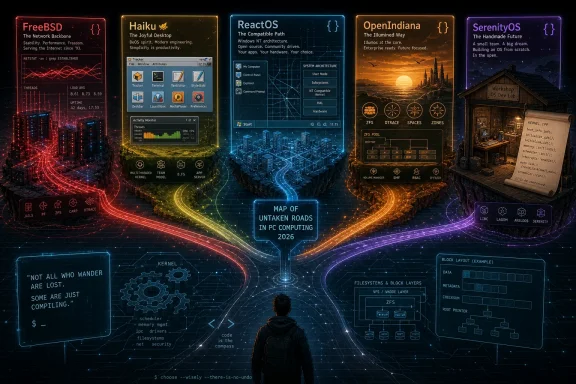 The Desktop Monoculture Was Never the Whole PC Story
Ask most people to name an operating system and the answers arrive in descending order of market share: Windows, macOS, Linux, perhaps ChromeOS if someone is feeling generous. That is understandable. Those are the systems on store shelves, office desks, developer workstations, and gaming rigs.But personal computing has never been only about the visible desktop. It has always had side corridors: research systems, workstation Unixes, hobbyist kernels, embedded variants, server platforms, and compatibility projects kept alive by people who think “because it exists” is a perfectly rational reason to keep building.
The five systems here matter because they are not merely obscure skins over Linux. They come from different technical traditions. FreeBSD descends from Berkeley Unix and still powers serious infrastructure. Haiku resurrects BeOS, one of the great almost-winners of the 1990s. ReactOS tries to rebuild Windows NT without Microsoft’s code. OpenIndiana keeps the OpenSolaris lineage alive after Oracle closed the door. SerenityOS is a modern hobby operating system written almost entirely from scratch.
None of them should be romanticized into something they are not. Hardware support is uneven. Browser support can be fragile. Security models vary from mature to unfinished. But the mainstream desktop has become so standardized that these projects now feel more radical than they probably intended to be.
FreeBSD Is the Alternative OS Hiding in Plain Sight
FreeBSD is the least exotic system on this list and, paradoxically, the easiest to underestimate. It is not a retro curiosity or a desktop art project. It is a production-grade Unix-like operating system with decades of engineering behind it, and it has spent much of its life doing important work while ordinary users never learned its name.If you have streamed Netflix, used a PlayStation 4 or PlayStation 5, or passed traffic through enterprise networking gear, you may have benefited from FreeBSD without ever seeing its installer. The system’s reputation for networking performance, storage reliability, and conservative engineering made it attractive in precisely the places where flashy desktop polish matters less than predictable behavior under load.
The licensing story matters here. FreeBSD’s permissive BSD license allows companies to incorporate the code into proprietary products without the same reciprocal obligations imposed by the GPL. That choice has shaped its history. Linux became the emblem of collaborative open-source scale; FreeBSD became a quiet foundation stone for appliances, consoles, storage products, routers, and content-delivery infrastructure.
On the desktop, FreeBSD is more complicated. The system can run graphical environments, browsers, development tools, and familiar Unix software, but it does not have Linux’s gravity. Consumer Wi-Fi chipsets, bleeding-edge GPUs, laptop power management, and desktop convenience layers often arrive later or require more effort. For a sysadmin, network engineer, storage enthusiast, or Unix purist, that tradeoff may be acceptable. For someone who just wants a laptop to wake from sleep reliably and join every hotel Wi-Fi network, it may not be.
That tension is precisely why FreeBSD remains important. It reminds us that an operating system can optimize for correctness, documentation, networking, and administrative coherence rather than chasing consumer desktop ubiquity. In a PC world obsessed with app stores and AI assistants, FreeBSD still feels like an operating system for people who want to know what the machine is doing.
Haiku Keeps the BeOS Dream From Becoming Museum Glass
Haiku is what happens when an operating system loses the market but keeps winning arguments in the minds of people who used it. Its ancestor, BeOS, arrived in the 1990s with a design that seemed almost rude compared with the sluggish desktops of the era. It was fast, heavily multithreaded, media-oriented, and oddly joyful.BeOS did not survive as a commercial desktop platform. Apple chose NeXT instead of Be as the foundation for what became Mac OS X. Be Inc. eventually sold to Palm in 2001, and the original desktop line faded out. In most industries, that would have been the end: a few screenshots, some wistful forum posts, and a reputation as the operating system that might have been.
Haiku is the community’s refusal to let that happen. It is not an emulator and not a theme pack. It is a clean-room open-source reimplementation inspired by BeOS, with its own kernel, desktop, application kit, file manager, and development model. The point is not to imitate modern Windows or macOS. The point is to preserve and extend a very specific idea of personal computing: fast, integrated, responsive, and built around a coherent desktop architecture.
That coherence is what makes Haiku fascinating even when it is not practical. The interface feels from another timeline, but not simply because it is old-fashioned. It feels like the product of a platform whose designers believed the desktop itself still mattered as a single, understandable environment. Windows and macOS have spent years absorbing cloud accounts, notification systems, mobile metaphors, and service layers. Haiku still feels like a computer.
The limitations are real. Haiku remains beta software, and its security model is not where a modern general-purpose desktop needs to be. In particular, the lack of mature user privilege separation means everyday applications can run with a level of authority that would make a security engineer wince. That alone makes it hard to recommend outside a virtual machine or a spare experimental box.
Still, Haiku’s value is not measured only by whether it can survive as someone’s daily driver. It is a living critique of modern desktop bloat. It asks why simple operations cannot feel instant, why desktop APIs cannot be elegant, and why an operating system has to behave like a pile of services instead of a designed environment.
ReactOS Is the Most Audacious Windows Project That Is Not Windows
ReactOS sounds impossible because, in a practical sense, it almost is. The project’s goal is not to look like Windows. It is to reimplement the Windows NT architecture closely enough to run Windows applications and drivers without using Microsoft’s source code.That distinction matters. Wine translates Windows application calls on Unix-like systems. ReactOS wants to supply the underlying world those applications expect: the registry, driver model, kernel interfaces, Win32 behavior, and enough of the operating system’s assumptions to make software believe it is at home. It is less like building a bridge to Windows and more like rebuilding the city from public maps, observed behavior, and stubbornness.
The project has been around for decades, and its pace can look glacial to outsiders. But that criticism often misses the scale of the undertaking. Windows NT is not a toy architecture. Recreating enough of it to boot, draw a desktop, load drivers, run applications, and avoid destroying user data is a monumental engineering project, especially for a volunteer community operating in the shadow of the most commercially successful desktop OS family in history.
ReactOS 0.4.15, released in 2025, was an unusually large milestone, bringing years of accumulated changes after a long gap between numbered releases. The work included memory management improvements, Plug and Play fixes, audio updates, registry repair behavior, shell improvements, and broader low-level cleanup. None of that turns ReactOS into a drop-in Windows 11 replacement. It does show that the project is still alive and grinding through the unglamorous layers that compatibility depends on.
The caution label should be printed in large type. ReactOS remains alpha software. The project itself has long warned about instability and the possibility of data loss. Its compatibility target has historically sat closer to the Windows Server 2003 and XP-era world than to modern Windows 10 or Windows 11 APIs. That makes it far more interesting for retro software, driver experiments, and operating-system study than for everyday productivity.
But ReactOS is valuable because it preserves an uncomfortable idea: Windows compatibility does not have to belong exclusively to Microsoft. Whether ReactOS ever becomes broadly practical is almost secondary. Its existence turns Windows from a product into a specification to be studied, challenged, and partially reconstructed.
OpenIndiana Is the Solaris Branch That Refused to Die
OpenIndiana occupies a different emotional register from Haiku or ReactOS. It is not trying to resurrect a consumer desktop fantasy or clone a dominant commercial platform. It is keeping alive one of the most technically influential Unix lineages after its corporate steward changed course.Sun Microsystems built operating-system technology that shaped the industry well beyond Solaris itself. ZFS made storage administrators rethink filesystems as end-to-end integrity systems rather than passive places to put files. DTrace gave engineers a way to observe live systems with startling depth. Zones brought OS-level virtualization into serious production use long before containers became the default language of cloud infrastructure.
Then Oracle acquired Sun, and OpenSolaris effectively ended as an open community project. The illumos community carried forward the open codebase, and OpenIndiana became one of the most accessible ways to run that lineage as a general-purpose operating system. It is not Solaris in name, but it is unmistakably part of that family.
For WindowsForum readers, OpenIndiana is particularly interesting because it demonstrates that “Unix-like” does not automatically mean “Linux.” The Linux ecosystem now dominates so thoroughly that many users treat it as the canonical open-source Unix experience. OpenIndiana pushes back. Its package management, administration model, filesystem assumptions, and historical inheritance come from a different world.
On paper, OpenIndiana can be a desktop system. The Hipster branch provides installable snapshots, a MATE desktop, familiar applications, and support for x86-64 systems, with ongoing work around SPARC as well. In practice, it remains most compelling to people who care about storage, systems programming, Unix history, and the native feel of illumos technologies.
The rough edges are the point and the problem. Modern consumer laptop support can be patchy. Application availability is thinner than on Linux. Hardware enablement is not driven by the same vast commercial and community machinery that pushes Linux forward. OpenIndiana is therefore not the easiest way to get a browser and office suite onto a random laptop.
Yet it is one of the best reminders that some of the best ideas in operating systems did not originate in the platforms that won the desktop. ZFS, DTrace, and Zones were not side quests. They were serious answers to serious systems problems. OpenIndiana keeps that tradition bootable.
SerenityOS Turns the Hobby OS Into a Full-Stack Rebellion
SerenityOS is the youngest and strangest system in this group, and perhaps the purest expression of operating-system authorship as an art form. It began in 2018 as Andreas Kling’s personal project after a rehabilitation program in Sweden. What started as small pieces of low-level programming grew into a full operating system with a kernel, desktop environment, application suite, libraries, and browser engine.The backstory is compelling, but it should not overshadow the technical audacity. SerenityOS is not a Linux distribution. It is a from-scratch Unix-like system with its own kernel and userland. Its desktop borrows the visual language of late-1990s computing, but the project is not merely nostalgic. It is an attempt to build a complete, understandable, hackable computing environment from first principles.
That is a radical posture in 2026. Modern operating systems are so large that even professionals rarely understand more than their own slice of the stack. SerenityOS pushes in the opposite direction. It treats the operating system as something a determined community can read, modify, and reason about without first climbing a mountain of inherited industrial complexity.
The project also produced something with consequences beyond the OS itself: Ladybird, a browser effort that grew out of SerenityOS’s LibWeb and LibJS components before becoming an independent project. That split says something important about where alternative operating systems can still influence the broader world. Even if SerenityOS never becomes a mainstream desktop, pieces of its ambition can escape the lab.
As a daily operating system, SerenityOS remains firmly in hobbyist territory. It is primarily for developers, experimenters, and people who want to watch a complete computing environment being assembled in public. Its charm is inseparable from its impracticality. This is not the operating system you install because you need a stable workstation by Monday morning.
But SerenityOS may be the most philosophically important system here. It rejects the idea that operating systems are finished infrastructure owned only by trillion-dollar companies or giant kernel communities. It says a personal computer can still be personal all the way down.
These Systems Survive Because “Useful” Has More Than One Meaning
The lazy way to assess alternative operating systems is to ask whether they can replace Windows. By that standard, most of them fail quickly. They do not have the same driver coverage, software catalogs, commercial support, gaming ecosystem, security maturity, or hardware certification pipeline.But that is the wrong test. Windows itself is not merely an operating system; it is an ecosystem of OEM deals, driver programs, enterprise contracts, backward compatibility obligations, developer assumptions, and user habits. macOS is tied to Apple’s hardware and services strategy. Linux succeeds not as a single desktop product but as a vast, distributed infrastructure commons. Asking a volunteer OS to compete with those machines on their own terms is like asking a handmade radio to beat a cellular network.
A better test is whether a system preserves, proves, or explores an idea that would otherwise disappear. FreeBSD proves that a carefully engineered, permissively licensed Unix can remain essential without dominating consumer desktops. Haiku preserves the BeOS argument for responsiveness and desktop coherence. ReactOS tests the boundaries of Windows compatibility outside Microsoft. OpenIndiana keeps the Solaris engineering tradition available to the public. SerenityOS shows that one person’s recovery project can become a community-built operating-system laboratory.
This is not sentimentality. Computing benefits from weird edges. Monocultures make life easier for software vendors and IT departments, but they also narrow the imagination. When every desktop converges on the same window controls, browser engines, telemetry models, cloud sign-ins, and update mechanisms, it becomes harder to remember that computers can be organized differently.
Alternative operating systems provide that memory. They are living counterexamples. They may not win market share, but they keep alive technical paths that commercial platforms abandoned, absorbed, or never considered worth funding.
The Real Risk Is Forgetting That Windows Was Once the Alternative
There is a historical irony in treating Windows, macOS, and Linux as the natural order of things. None of them was inevitable. Windows became dominant through a mixture of technical evolution, aggressive licensing, developer momentum, backward compatibility, and the IBM-compatible PC explosion. macOS survived near-death corporate years before becoming the polished front end of Apple’s vertically integrated empire. Linux began as a hobby kernel and became the substrate of servers, phones, clouds, and embedded devices.Today’s fringe system can look absurd until some part of its logic becomes mainstream. Containers were once an operating-system feature most desktop users never discussed. Filesystem snapshots moved from enterprise storage conversations into ordinary backup workflows. Sandboxing, privilege separation, package management, and reproducible builds all spent time as specialist concerns before becoming mainstream expectations.
That does not mean Haiku or SerenityOS will suddenly conquer Best Buy. It means the boundary between “toy,” “research,” “hobby,” and “infrastructure” is more porous than market-share charts suggest. The PC world has always been built by people trying things that sounded unreasonable.
For IT professionals, these systems also offer a useful antidote to platform fatalism. Administrators spend their days inside vendor constraints: Microsoft’s update cadence, Apple’s hardware model, Linux distribution politics, browser-engine consolidation, cloud identity requirements. Alternative OSes do not remove those constraints, but they make them visible. They show which assumptions belong to computing itself and which belong only to the platforms that currently dominate it.
That distinction matters more as mainstream operating systems become service delivery vehicles. Windows is increasingly an endpoint for Microsoft accounts, cloud management, Defender, Copilot, telemetry, and subscription-adjacent features. macOS is inseparable from Apple ID, iCloud, notarization, and Apple silicon. Linux remains more plural, but even there, systemd, Wayland, Flatpak, Snap, and distribution consolidation shape the experience in ways that can feel inevitable.
These smaller operating systems puncture that inevitability. They may be incomplete, inconvenient, or fragile, but they are also proof that the desktop metaphor, the kernel model, the update system, the driver stack, and the userland are all choices.
A Small Map for Leaving the Big Three Without Getting Lost
Nobody should read this as a dare to wipe a production laptop. The better approach is to treat these systems as laboratories. Put them in virtual machines. Install them on spare hardware. Read their documentation. Watch what they make easy, what they make hard, and what assumptions you carry over from Windows without noticing.For Windows enthusiasts in particular, ReactOS will be the most emotionally charged because it mirrors familiar territory. FreeBSD and OpenIndiana will appeal more to those who think in terms of networks, filesystems, shells, and infrastructure. Haiku is the desktop romantic’s choice. SerenityOS is for people who want to see the machine being built while they stand inside it.
This is also where the daily-driver obsession becomes counterproductive. A platform does not need to replace your main system to be worth your time. Nobody says a network switch is a failure because it cannot run Photoshop. Nobody says a microscope is useless because it is a poor television. Operating systems can be instruments, not just appliances.
The best way to understand them is to ask what each one is trying to protect. FreeBSD protects a tradition of disciplined Unix engineering. Haiku protects a lost desktop design language. ReactOS protects the idea of Windows compatibility as a public technical target. OpenIndiana protects the Solaris branch of systems knowledge. SerenityOS protects the joy of building the whole stack yourself.
Five Detours That Make the PC Feel Bigger Again
The practical lesson is not that everyone should abandon mainstream operating systems. The practical lesson is that the mainstream looks different after you spend time outside it. These projects make familiar design choices feel less like laws of nature and more like compromises.- FreeBSD is the most production-proven of the five, but its strengths still align more naturally with servers, storage, networking, and technical workstations than with casual consumer laptops.
- Haiku is the clearest reminder that desktop responsiveness and interface coherence were once treated as central operating-system goals rather than nostalgic luxuries.
- ReactOS remains alpha software, but its attempt to rebuild Windows NT compatibility from scratch makes it one of the most ambitious open-source compatibility projects in computing.
- OpenIndiana keeps illumos and the OpenSolaris tradition accessible, especially for users who want native exposure to technologies such as ZFS, DTrace, and Zones.
- SerenityOS is not a practical replacement for a mainstream desktop, but it is a rare modern attempt to build a complete personal computing environment from the ground up.
- The safest way to explore all five is in a virtual machine or on expendable hardware, where their ideas can be appreciated without pretending they are polished consumer products.
References
- Primary source: MakeUseOf
Published: 2026-06-04T13:02:07.676183
5 operating systems that prove the PC world has more than Windows, macOS, and Linux
Your PC has more options than the usual household names. www.makeuseof.com
