

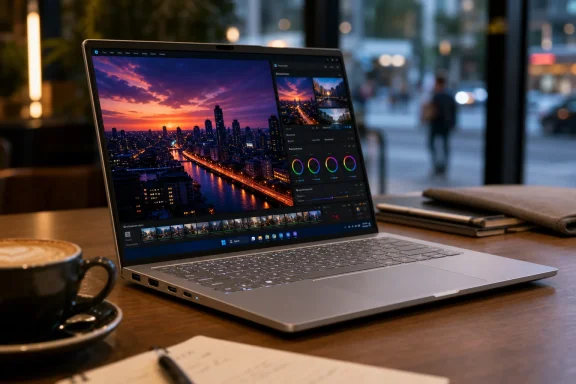
Acer's Swift Go 14 is a 14-inch Windows ultraportable sold in current configurations with OLED display options, Intel Core Ultra processors, 16GB-class memory and SSD storage, aimed at students, mobile professionals and creators who want premium-looking screen technology without stepping into flagship laptop pricing. The pitch is simple, and that is why it matters: Acer is trying to make the OLED thin-and-light feel normal rather than exotic. For Windows buyers, that makes the Swift Go 14 less a luxury object than a test of how much “premium” the mid-range can absorb. For Acer, it is also a reminder that the PC business is now fought one component upgrade at a time.
The laptop market has spent years teaching buyers to read spec sheets from the processor outward. Acer’s Swift Go 14 flips that emphasis, or at least tries to. The processor matters, the RAM matters, the SSD matters, but the first thing most people will notice is the panel.
That is not accidental. OLED gives Acer a clean retail-story advantage in a category where many machines otherwise blur into the same silver wedge. Deep blacks, high contrast and saturated color are immediately legible in a shop, on a product page, or in a YouTube review thumbnail.
The Swift Go 14 therefore sits in a very modern middle ground. It is not trying to be the thinnest laptop in the world, the longest-lasting Windows machine, or a portable workstation. It is trying to be the machine that makes a buyer say, “That screen looks expensive,” while the price tag still behaves like a mainstream purchase.
That is a smart bet because the laptop replacement cycle has become emotionally dull. Most people are not excited by another small CPU bump or another half-generation of Wi-Fi support. A better display, by contrast, changes every interaction with the device.
That distinction matters. A mid-range OLED laptop is still a mid-range laptop. Buyers should expect compromises in fan noise, speaker depth, chassis rigidity, webcam quality, repairability, and sometimes battery life.
But those compromises are no longer obvious at first glance. A crisp 14-inch OLED screen can make an otherwise ordinary notebook feel more expensive than it is. Acer understands that perception, and the Swift Go 14 is built around it.
This is the same trick that reshaped the smartphone market years ago. Once excellent displays became common below flagship prices, buyers began to expect them everywhere. Windows laptops are late to that party, but they are getting there.
A useful thin-and-light still needs to survive the messy world outside marketing renders. That means projectors in conference rooms, USB-A accessories in offices, external monitors at home, and chargers borrowed from whatever bag happens to be nearby. Acer’s continued inclusion of USB-C, HDMI and USB-A on typical Swift Go 14 configurations is not glamorous, but it is the kind of decision users appreciate six months later.
This is where some of the more aggressively minimalist laptops become irritating. A laptop with only USB-C ports can look elegant in product photography while becoming a dongle tax in daily life. Acer is not immune to configuration variation, but the Swift Go line generally understands that students and mobile workers do not live inside a perfectly modern accessory ecosystem.
That port mix also helps explain why the Swift Go 14 can appeal beyond casual home use. It is a café laptop, yes, but it is also a classroom laptop, a hotel-desk laptop, and a “please connect to the meeting-room display in three minutes” laptop.
Yet OLED also exposes the unevenness of the Windows experience. Some legacy apps still look like they belong to another era. Scaling can remain awkward. Battery behavior can swing depending on brightness, theme, browser workload, video codec and background activity.
That is the quiet bargain behind OLED on a mobile PC. The screen is gorgeous, but it is not free. Bright white documents, video calls, high brightness and HDR content all have energy costs, and buyers who expect every OLED laptop to behave like a marathon machine may be disappointed.
For Windows enthusiasts, this is familiar territory. The platform offers variety and value, but that variety means the user has to understand the trade. The Swift Go 14 can look far better than its price suggests, but it cannot repeal physics.
That story is still ahead of everyday reality for many users. Most students, office workers and travelers will not buy the Swift Go 14 because of an NPU. They will buy it because it feels quick, wakes reliably, handles browser overload, and does not become a space heater during ordinary tasks.
Still, Core Ultra helps Acer position the machine as current rather than merely cheap. In a market full of discounted older designs, that matters. A mid-range laptop with a modern Intel platform and OLED screen can feel like a safer long-term buy than a bargain-bin notebook with a tired LCD and last-generation silicon.
The risk is that AI branding becomes noise. Buyers have heard too many vague promises about “AI PCs” already. Acer’s stronger argument is more grounded: here is a light Windows laptop with a strong display, modern connectivity and enough performance for real work.
Acer’s chiclet keyboards are usually competent rather than memorable. That is not a criticism so much as a category truth. In a 14-inch thin-and-light, “quiet, precise and not annoying” is often the realistic target.
The touchpad is similarly important because Windows laptops no longer get a free pass here. Apple raised expectations years ago, and premium Windows machines have followed. A mid-range laptop that skimps on the touchpad immediately feels cheaper than its spec sheet.
The Swift Go 14’s best version of itself is therefore not the machine that dazzles for five minutes. It is the one that remains unremarkably comfortable after a long typing session. In the mid-range, boring competence is a feature.
This matters because the Swift Go 14’s target audience is mobile. Students move between lectures, commuters work from trains, and freelancers camp out in cafés where the best seat may not be near an outlet. A thin laptop that needs constant charging loses part of its point.
The answer is not that OLED is bad for mobile work. It is that OLED requires more user awareness. Dark mode helps. Moderate brightness helps. Local video playback behaves differently from browser-based collaboration. A laptop can be efficient in one workflow and merely average in another.
Acer can optimize around the edges, but it cannot make a bright OLED panel consume no power. Buyers should treat battery claims as a best-case reference, not a promise. That is especially true for anyone who spends the day in Teams, Chrome, Slack, Office and a dozen cloud dashboards.
But calling a machine creator-friendly is not the same as making it a creator workstation. Sustained performance, thermal headroom, memory ceilings, color calibration, GPU capability and port bandwidth all matter once the work becomes serious. The Swift Go 14 is better understood as a laptop for people who create sometimes, not people whose income depends on heavy production workloads.
That is not a weakness if Acer is honest about it. Many buyers do not need a workstation. They need a machine that can edit a batch of photos, cut a short video, run Canva or Photoshop, and then go back to email and research.
The OLED panel helps there because visual confidence matters. A user editing images on a poor display is always guessing. The Swift Go 14 reduces that guesswork, even if it does not replace a calibrated external monitor.
That last comparison is unavoidable. The MacBook Air remains the default recommendation for many people who want a thin, reliable laptop and do not need Windows. Acer cannot beat Apple by becoming Apple. It has to win on display choice, ports, price promotions and Windows compatibility.
The Swift Go 14’s best argument against the Air is not ideological. It is practical. Some users need Windows, prefer Windows, own Windows software, or simply want better retail specs for the money. For them, a mid-range OLED Windows laptop can be more appealing than a base Mac with less storage or a non-OLED display.
Against other Windows machines, Acer’s challenge is consistency. The Swift brand has to mean something recognizable across regions and configurations. If one market gets the desirable OLED model and another gets a less compelling panel or storage mix, the product story becomes muddier.
That is not unique to Acer. It is endemic to the PC industry. Retailers want exclusive SKUs, vendors want price segmentation, and regions differ in demand and supply. The result is a market where the buyer must decode suffixes and part numbers like a sysadmin reading firmware notes.
For WindowsForum readers, this is familiar but still annoying. A laptop family can earn good reviews while a cheaper configuration quietly loses the component that made the review unit attractive. The difference between OLED and IPS, 512GB and 1TB, or 16GB and 32GB of memory can be the difference between a bargain and a regret.
That is why the Swift Go 14 should be evaluated as a configuration, not a brand phrase. The name gets you into the right aisle. The SKU decides whether you should actually buy it.
But one laptop model does not define Acer’s investment case. PC makers live inside a complex cycle of component costs, channel inventory, regional demand, currency movement and competitive discounting. A popular notebook can help, but it does not magically transform the economics of the business.
That said, the Swift Go 14 does show how Acer tries to defend relevance. The company is not merely pushing low-cost plastic machines into the channel. It is adding higher-perceived-value features to mainstream devices, which can support better pricing when the market cooperates.
The danger is that competitors can do the same. OLED panels, Intel platforms and thin metal chassis are not exclusive assets. Acer’s task is to combine them at the right price, ship enough configurations people actually want, and avoid quality-control stories that travel faster than product marketing.
That combination feels more aligned with how people actually buy laptops than some prestige designs do. Most users do not want a museum object. They want a machine that looks good, travels well, connects to existing hardware and does not feel obsolete after two Windows feature updates.
This is where Acer’s conservatism becomes a strength. The Swift Go 14 does not appear to be chasing a radical new form factor or asking users to relearn anything. It is a conventional clamshell with a better screen and modern internals.
There is a lesson in that. The PC market often talks as if innovation must be dramatic. In practice, the most successful upgrades are often the ones that make a familiar machine feel meaningfully nicer without making it stranger.
That may sound obvious, but it is easy to forget during platform transitions. Vendors want to sell the next era. Users want the next semester, the next trip, the next client presentation, the next three years of stable daily use.
If AI workloads become more useful locally, machines with newer silicon will age better. That is a fair argument. But buyers should not let speculative future use cases distract from the present-tense basics: display, battery life, thermals, keyboard, ports, memory and storage.
Acer’s strongest play is to let the AI branding sit in the background. The Swift Go 14 does not need to pretend to be a revolution. It only needs to be a well-priced Windows laptop whose screen makes older mid-range machines feel tired.
This creates a strange rhythm for buyers. At full price, the Swift Go 14 may face tough competition from premium sale models or refurbished business laptops. At a strong discount, the same machine can become one of the more compelling OLED ultraportables in its class.
Retail volatility also complicates reviews. A verdict written at launch pricing may age poorly once the laptop is discounted. Conversely, a bargain configuration can disappear quickly, leaving buyers with a less attractive SKU at a higher price.
For sysadmins and family tech-support volunteers, the practical advice is simple: judge the exact configuration against the exact price on the day of purchase. In this segment, timing can matter almost as much as brand.
This pressure will not stop at displays. Expectations around webcams, microphones, touchpads and battery behavior are rising too. Remote work and hybrid learning made those components more visible, and users are less forgiving when a laptop fails at the basics of being seen, heard and connected.
Acer’s machine reflects that pressure. The Swift Go 14 cannot simply be thin and affordable. It has to feel like a modern communications device, a media device and a productivity device at once.
That is the Windows laptop market in miniature. The category is mature, but not finished. The improvements are incremental, but they are not trivial.
That is the reality of Acer’s position. The company is strongest when it offers more visible hardware for less money. It is weaker when the comparison shifts to fit, finish, speakers, battery consistency or long-term serviceability.
None of that makes the Swift Go 14 a bad laptop. It makes it a very Windows laptop: configurable, competitive, occasionally confusing, and potentially excellent if purchased carefully. The freedom to choose is also the burden of checking.
For many buyers, that burden is worth it. A good Swift Go 14 configuration can deliver exactly the kind of everyday upgrade people actually notice. The danger is assuming the name alone guarantees the experience.
 Acer Turns the Screen Into the Sales Pitch
The laptop market has spent years teaching buyers to read spec sheets from the processor outward. Acer’s Swift Go 14 flips that emphasis, or at least tries to. The processor matters, the RAM matters, the SSD matters, but the first thing most people will notice is the panel.That is not accidental. OLED gives Acer a clean retail-story advantage in a category where many machines otherwise blur into the same silver wedge. Deep blacks, high contrast and saturated color are immediately legible in a shop, on a product page, or in a YouTube review thumbnail.
The Swift Go 14 therefore sits in a very modern middle ground. It is not trying to be the thinnest laptop in the world, the longest-lasting Windows machine, or a portable workstation. It is trying to be the machine that makes a buyer say, “That screen looks expensive,” while the price tag still behaves like a mainstream purchase.
That is a smart bet because the laptop replacement cycle has become emotionally dull. Most people are not excited by another small CPU bump or another half-generation of Wi-Fi support. A better display, by contrast, changes every interaction with the device.
The Mid-Range Laptop Is Learning a Premium Trick
OLED used to be the kind of feature vendors reserved for halo models, creator machines, or sharply upsold configurations. Now it is migrating downward, and the Swift Go 14 is part of that migration. The result is a laptop that borrows the visual language of premium devices without fully accepting their price or design discipline.That distinction matters. A mid-range OLED laptop is still a mid-range laptop. Buyers should expect compromises in fan noise, speaker depth, chassis rigidity, webcam quality, repairability, and sometimes battery life.
But those compromises are no longer obvious at first glance. A crisp 14-inch OLED screen can make an otherwise ordinary notebook feel more expensive than it is. Acer understands that perception, and the Swift Go 14 is built around it.
This is the same trick that reshaped the smartphone market years ago. Once excellent displays became common below flagship prices, buyers began to expect them everywhere. Windows laptops are late to that party, but they are getting there.
Thin, Light, and Still Sensible About Ports
The Swift Go 14’s physical appeal is not just about being slim. Plenty of laptops are slim. What helps Acer’s machine is that it does not fully surrender practicality in the name of minimalism.A useful thin-and-light still needs to survive the messy world outside marketing renders. That means projectors in conference rooms, USB-A accessories in offices, external monitors at home, and chargers borrowed from whatever bag happens to be nearby. Acer’s continued inclusion of USB-C, HDMI and USB-A on typical Swift Go 14 configurations is not glamorous, but it is the kind of decision users appreciate six months later.
This is where some of the more aggressively minimalist laptops become irritating. A laptop with only USB-C ports can look elegant in product photography while becoming a dongle tax in daily life. Acer is not immune to configuration variation, but the Swift Go line generally understands that students and mobile workers do not live inside a perfectly modern accessory ecosystem.
That port mix also helps explain why the Swift Go 14 can appeal beyond casual home use. It is a café laptop, yes, but it is also a classroom laptop, a hotel-desk laptop, and a “please connect to the meeting-room display in three minutes” laptop.
OLED Makes Windows Look Better, but It Also Exposes Windows
A good OLED panel does more than make movies look better. It changes how Windows itself feels. Text looks cleaner, dark mode looks more intentional, and photo-heavy websites gain a kind of polish that ordinary LCD panels often flatten.Yet OLED also exposes the unevenness of the Windows experience. Some legacy apps still look like they belong to another era. Scaling can remain awkward. Battery behavior can swing depending on brightness, theme, browser workload, video codec and background activity.
That is the quiet bargain behind OLED on a mobile PC. The screen is gorgeous, but it is not free. Bright white documents, video calls, high brightness and HDR content all have energy costs, and buyers who expect every OLED laptop to behave like a marathon machine may be disappointed.
For Windows enthusiasts, this is familiar territory. The platform offers variety and value, but that variety means the user has to understand the trade. The Swift Go 14 can look far better than its price suggests, but it cannot repeal physics.
Intel’s Core Ultra Era Gives Acer a Better Story Than Raw Speed
The current Swift Go 14 configurations lean into Intel’s Core Ultra branding, and that matters less because of any single benchmark than because of the story Intel and PC makers are trying to tell. The new mainstream pitch is not merely faster cores. It is efficiency, integrated graphics, AI acceleration and a more modern platform.That story is still ahead of everyday reality for many users. Most students, office workers and travelers will not buy the Swift Go 14 because of an NPU. They will buy it because it feels quick, wakes reliably, handles browser overload, and does not become a space heater during ordinary tasks.
Still, Core Ultra helps Acer position the machine as current rather than merely cheap. In a market full of discounted older designs, that matters. A mid-range laptop with a modern Intel platform and OLED screen can feel like a safer long-term buy than a bargain-bin notebook with a tired LCD and last-generation silicon.
The risk is that AI branding becomes noise. Buyers have heard too many vague promises about “AI PCs” already. Acer’s stronger argument is more grounded: here is a light Windows laptop with a strong display, modern connectivity and enough performance for real work.
The Keyboard and Touchpad Are Where the Romance Ends
A laptop review can fall in love with a display and still be won or lost at the keyboard. That is where the Swift Go 14 has to behave like a working machine rather than a showroom object. A thin chassis leaves only so much room for key travel, acoustics and palm-rest solidity.Acer’s chiclet keyboards are usually competent rather than memorable. That is not a criticism so much as a category truth. In a 14-inch thin-and-light, “quiet, precise and not annoying” is often the realistic target.
The touchpad is similarly important because Windows laptops no longer get a free pass here. Apple raised expectations years ago, and premium Windows machines have followed. A mid-range laptop that skimps on the touchpad immediately feels cheaper than its spec sheet.
The Swift Go 14’s best version of itself is therefore not the machine that dazzles for five minutes. It is the one that remains unremarkably comfortable after a long typing session. In the mid-range, boring competence is a feature.
Battery Life Is the Trade-Off Acer Cannot Market Away
Every OLED ultraportable lives with the same tension. The display is the reason to buy the laptop, and also one of the reasons runtime can vary dramatically. Marketing language likes “all-day” claims; real users live in brightness sliders, browser tabs and video calls.This matters because the Swift Go 14’s target audience is mobile. Students move between lectures, commuters work from trains, and freelancers camp out in cafés where the best seat may not be near an outlet. A thin laptop that needs constant charging loses part of its point.
The answer is not that OLED is bad for mobile work. It is that OLED requires more user awareness. Dark mode helps. Moderate brightness helps. Local video playback behaves differently from browser-based collaboration. A laptop can be efficient in one workflow and merely average in another.
Acer can optimize around the edges, but it cannot make a bright OLED panel consume no power. Buyers should treat battery claims as a best-case reference, not a promise. That is especially true for anyone who spends the day in Teams, Chrome, Slack, Office and a dozen cloud dashboards.
The Swift Go 14 Is Not a Creator Laptop, but It Borrows the Costume
Acer’s messaging around students, content creators and mobile professionals is predictable because every laptop maker now wants those words somewhere on the page. The Swift Go 14 can certainly serve casual creators. It has the screen quality for photo review, enough CPU performance for light editing, and the portability to move between locations.But calling a machine creator-friendly is not the same as making it a creator workstation. Sustained performance, thermal headroom, memory ceilings, color calibration, GPU capability and port bandwidth all matter once the work becomes serious. The Swift Go 14 is better understood as a laptop for people who create sometimes, not people whose income depends on heavy production workloads.
That is not a weakness if Acer is honest about it. Many buyers do not need a workstation. They need a machine that can edit a batch of photos, cut a short video, run Canva or Photoshop, and then go back to email and research.
The OLED panel helps there because visual confidence matters. A user editing images on a poor display is always guessing. The Swift Go 14 reduces that guesswork, even if it does not replace a calibrated external monitor.
Acer’s Real Competition Is Not Just Lenovo, Asus or HP
It is easy to place the Swift Go 14 against rival Windows ultraportables from Asus, Lenovo, HP and Dell. That is the obvious comparison set. But Acer is also competing against buyer inertia, tablets with keyboards, refurbished premium laptops, and the MacBook Air.That last comparison is unavoidable. The MacBook Air remains the default recommendation for many people who want a thin, reliable laptop and do not need Windows. Acer cannot beat Apple by becoming Apple. It has to win on display choice, ports, price promotions and Windows compatibility.
The Swift Go 14’s best argument against the Air is not ideological. It is practical. Some users need Windows, prefer Windows, own Windows software, or simply want better retail specs for the money. For them, a mid-range OLED Windows laptop can be more appealing than a base Mac with less storage or a non-OLED display.
Against other Windows machines, Acer’s challenge is consistency. The Swift brand has to mean something recognizable across regions and configurations. If one market gets the desirable OLED model and another gets a less compelling panel or storage mix, the product story becomes muddier.
Regional Configurations Turn Buying Into Homework
One of the most frustrating parts of the Windows laptop market is that model names are often less precise than buyers think. “Swift Go 14” can describe multiple display panels, processor tiers, SSD capacities, RAM arrangements and wireless configurations. Two shoppers in two countries may be reading about machines that share a name but differ in meaningful ways.That is not unique to Acer. It is endemic to the PC industry. Retailers want exclusive SKUs, vendors want price segmentation, and regions differ in demand and supply. The result is a market where the buyer must decode suffixes and part numbers like a sysadmin reading firmware notes.
For WindowsForum readers, this is familiar but still annoying. A laptop family can earn good reviews while a cheaper configuration quietly loses the component that made the review unit attractive. The difference between OLED and IPS, 512GB and 1TB, or 16GB and 32GB of memory can be the difference between a bargain and a regret.
That is why the Swift Go 14 should be evaluated as a configuration, not a brand phrase. The name gets you into the right aisle. The SKU decides whether you should actually buy it.
The Investor Angle Is Real, but It Should Not Swallow the Product
The source material’s nod to Acer shares and the ISIN is not random. Acer is a public company, and consumer notebooks remain part of the broader PC-demand story investors watch. Thin-and-light machines like the Swift Go 14 can help maintain visibility in a crowded market where margins are often narrow.But one laptop model does not define Acer’s investment case. PC makers live inside a complex cycle of component costs, channel inventory, regional demand, currency movement and competitive discounting. A popular notebook can help, but it does not magically transform the economics of the business.
That said, the Swift Go 14 does show how Acer tries to defend relevance. The company is not merely pushing low-cost plastic machines into the channel. It is adding higher-perceived-value features to mainstream devices, which can support better pricing when the market cooperates.
The danger is that competitors can do the same. OLED panels, Intel platforms and thin metal chassis are not exclusive assets. Acer’s task is to combine them at the right price, ship enough configurations people actually want, and avoid quality-control stories that travel faster than product marketing.
Windows Buyers Are Rewarding Sensible Hybrids
The most interesting thing about the Swift Go 14 is not any single specification. It is the way the machine blends formerly premium features with very ordinary user needs. OLED sits beside USB-A. Core Ultra sits beside mid-range pricing. A slim chassis sits beside HDMI.That combination feels more aligned with how people actually buy laptops than some prestige designs do. Most users do not want a museum object. They want a machine that looks good, travels well, connects to existing hardware and does not feel obsolete after two Windows feature updates.
This is where Acer’s conservatism becomes a strength. The Swift Go 14 does not appear to be chasing a radical new form factor or asking users to relearn anything. It is a conventional clamshell with a better screen and modern internals.
There is a lesson in that. The PC market often talks as if innovation must be dramatic. In practice, the most successful upgrades are often the ones that make a familiar machine feel meaningfully nicer without making it stranger.
The AI PC Label Is Less Important Than the Everyday PC
By 2026, the phrase AI PC has been stretched across so many machines that it risks becoming decorative. The Swift Go 14 can be sold within that broader wave, especially when equipped with modern Intel processors, but its immediate value is not dependent on a killer AI app. It is dependent on being a good laptop.That may sound obvious, but it is easy to forget during platform transitions. Vendors want to sell the next era. Users want the next semester, the next trip, the next client presentation, the next three years of stable daily use.
If AI workloads become more useful locally, machines with newer silicon will age better. That is a fair argument. But buyers should not let speculative future use cases distract from the present-tense basics: display, battery life, thermals, keyboard, ports, memory and storage.
Acer’s strongest play is to let the AI branding sit in the background. The Swift Go 14 does not need to pretend to be a revolution. It only needs to be a well-priced Windows laptop whose screen makes older mid-range machines feel tired.
The Retail Discount Is Part of the Product
Acer’s mid-range machines often become more interesting once discounts arrive. That is not a side note; it is part of how the Windows laptop market works. Official pricing establishes the tier, but street pricing decides the recommendation.This creates a strange rhythm for buyers. At full price, the Swift Go 14 may face tough competition from premium sale models or refurbished business laptops. At a strong discount, the same machine can become one of the more compelling OLED ultraportables in its class.
Retail volatility also complicates reviews. A verdict written at launch pricing may age poorly once the laptop is discounted. Conversely, a bargain configuration can disappear quickly, leaving buyers with a less attractive SKU at a higher price.
For sysadmins and family tech-support volunteers, the practical advice is simple: judge the exact configuration against the exact price on the day of purchase. In this segment, timing can matter almost as much as brand.
The Swift Go 14 Shows Where Mainstream Windows Laptops Are Heading
The broader significance of the Swift Go 14 is that it makes a premium-feeling display less special. That is good for buyers and uncomfortable for vendors. Once users get used to OLED or high-quality high-resolution panels, it becomes harder to sell mediocre screens in $700-to-$1,000 machines.This pressure will not stop at displays. Expectations around webcams, microphones, touchpads and battery behavior are rising too. Remote work and hybrid learning made those components more visible, and users are less forgiving when a laptop fails at the basics of being seen, heard and connected.
Acer’s machine reflects that pressure. The Swift Go 14 cannot simply be thin and affordable. It has to feel like a modern communications device, a media device and a productivity device at once.
That is the Windows laptop market in miniature. The category is mature, but not finished. The improvements are incremental, but they are not trivial.
The Buying Decision Lives in the Fine Print
The Swift Go 14 is easiest to recommend when the buyer confirms the OLED panel, gets at least 16GB of memory, chooses enough SSD capacity, and finds a price that undercuts premium rivals. It becomes harder to recommend when the configuration loses the display advantage or creeps too close to better-built machines.That is the reality of Acer’s position. The company is strongest when it offers more visible hardware for less money. It is weaker when the comparison shifts to fit, finish, speakers, battery consistency or long-term serviceability.
None of that makes the Swift Go 14 a bad laptop. It makes it a very Windows laptop: configurable, competitive, occasionally confusing, and potentially excellent if purchased carefully. The freedom to choose is also the burden of checking.
For many buyers, that burden is worth it. A good Swift Go 14 configuration can deliver exactly the kind of everyday upgrade people actually notice. The danger is assuming the name alone guarantees the experience.
The Acer Bargain Works Only If Buyers Read the SKU
The Swift Go 14’s appeal is concrete, but so are its caveats. Anyone considering it should treat Acer’s product family as a starting point rather than the final answer.- The OLED display is the feature that most clearly separates the Swift Go 14 from older mid-range Windows laptops.
- The port selection is a practical advantage for students, office workers and travelers who still use HDMI and USB-A accessories.
- The Intel Core Ultra configurations make the machine feel current, but everyday performance and battery behavior matter more than AI branding.
- The exact regional SKU determines whether the laptop is a smart buy or merely an average one with a familiar name.
- The best value is likely to appear during retailer promotions, where the OLED model can undercut more premium ultraportables.
- The main trade-offs to watch are battery life at high brightness, fan noise under sustained load, and the usual mid-range limits in chassis and audio quality.
References
- Primary source: AD HOC NEWS
Published: 2026-06-23T05:50:38.571318
The Swift Go 14 from Acer Inc. - OLED display and slim 14-inch chassis
The Swift Go 14 brings a 14-inch OLED panel, a thin magnesium chassis and current Intel processors to Acer’s mid-range. This bestseller keeps the price of Acer shares in focus (ISIN TW0002353000).www.ad-hoc-news.de - Related coverage: acer.com
- Related coverage: pcworld.com
Acer Swift Go 14 review: It just keeps going and going | PCWorld
The Acer Swift Go 14 is a reliable travel workhorse through and through.www.pcworld.com - Related coverage: tomsguide.com
Acer Swift Go 14 review: The AI laptop has arrived | Tom's Guide
One of the first Meteor Lake "AI laptops" has arrived - here's how it holds upwww.tomsguide.com - Related coverage: rtings.com
Acer Swift Go 14 (2024) Review - RTINGS.com
The Acer Swift Go 14 (2024) is a 14-inch Windows ultraportable. It replaces the Swift Go 14 from 2023 (Intel 13th Gen, model SFG14-71). This 2024 model is availa... www.rtings.com
- Related coverage: notebookcheck.net
Acer Swift Go 14 (2023) review: The 14-inch laptop with a 2.9k OLED panel for US$800 - Notebookcheck Review
We have tested the Acer Swift Go 14 with a Core i5-1335U, PCIe 4 SSD and an OLED screen with a 16:10 aspect ratio. How does the 14-inch laptop compare to the competition? www.notebookcheck.net
- Related coverage: techradar.com
Acer Swift Go 14 review | TechRadar
The Acer Swift Go 14 is a fine mid-range laptop. What it lacks in style, it more than makes up for in substance. Just don’t expect it to perform the more intensive tasks.www.techradar.com - Related coverage: ultrabookreview.com
Acer Swift Go 14 review (SFG14-53 model, AMD Ryzen 7 8845HS)
This is my detailed review of the AMD-powered Acer Swift Go 14 series.www.ultrabookreview.com - Related coverage: laptopmag.com
Acer Swift Go 14 review — a low-cost MacBook Air killer with a stellar display | Laptop Mag
The Acer Swift Go 14 is a masterclass in productivity, offering superb performance for an affordable cost that demolishes its most formidable competitors. But it’s made unforgettable thanks to a gorgeous 2.8K OLED display, championing one of the most vibrant screens we’ve ever seen.www.laptopmag.com - Related coverage: notebookcheck.com
Acer Swift Go 14 (2023) im Test: 14-Zoll-Laptop mit 2,8k-OLED-Panel für 769 Euro - Notebookcheck Test
Wir testen das Acer Swift Go 14 in der Ausstattung mit Core i5-1335U, PCIe-4-SSD und OLED-Bildschirm im 16:10-Format. Wie schlägt sich das 14-Zoll-Notebook im Vergleich zur Konkurrenz? www.notebookcheck.com
- Related coverage: itpro.com
Acer Swift Edge 14 AI review | IT Pro
An impressive super-light ultraportable with epic battery life and a superb, anti-reflective OLED screenwww.itpro.com - Related coverage: annualreports.com
