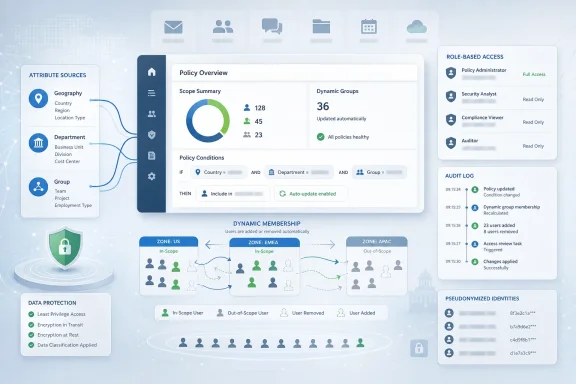
Microsoft updated Microsoft 365 Roadmap item 98186 on June 23, 2026, confirming that Microsoft Purview Communication Compliance support for adaptive policy scopes is launched for worldwide standard multi-tenant customers after preview began in January 2023 and general availability arrived in April 2025. The feature sounds administrative, almost clerical, but it changes how compliance teams decide who is watched, when policies apply, and how quickly governance follows organizational change. Microsoft is not merely adding another Purview checkbox; it is pushing Communication Compliance toward a model where identity attributes, not manually curated user lists, become the control plane. For IT pros, that is both the appeal and the danger.
The central idea behind adaptive policy scopes is simple enough: stop asking administrators to keep static lists current when the directory already knows who people are, where they sit, what department they belong to, and what groups define their role. Instead of building a Communication Compliance policy around a fixed set of users, an organization can define a scope using attributes such as geography, group membership, or Microsoft Entra ID properties, and let Purview update membership automatically.
That matters because Communication Compliance policies are not decorative. They are used to detect activity that may violate regulatory obligations or internal policy, including inappropriate sharing of sensitive information, harassing or threatening language, adult content, or communications that fall under financial-sector supervision requirements. When the wrong people are omitted from a policy, the organization may have a blind spot. When the wrong people are included, it may have a privacy problem.
Microsoft’s roadmap language frames the change as a reduction in administrative toil, and that is true as far as it goes. But the more consequential shift is that policy coverage becomes conditional. A user’s inclusion in a compliance policy can now follow changes in the identity system, rather than waiting for a compliance administrator to notice a transfer, promotion, relocation, acquisition, or risk classification change.
That is the promise of modern compliance platforms: governance that follows the user. It is also where the operational stakes rise, because a bad attribute, stale HR feed, or misunderstood query can now propagate into policy enforcement without the friction that used to slow mistakes down.
The weakness is that organizations are not static. Sales teams shift territories, regulated roles move between subsidiaries, employees transfer across jurisdictions, and temporary teams form around investigations, deals, or restricted projects. In that environment, a manually maintained compliance scope is not a control so much as a promise that somebody remembered to maintain the control.
Adaptive scopes attack that failure mode directly. If a policy should apply to users in a particular country, department, group, or attribute-defined population, the scope can be expressed as a query rather than a roster. Microsoft’s documentation describes adaptive scopes as query-based collections whose membership is evaluated automatically, with daily processing against the selected attributes or properties.
Daily evaluation is an important detail. This is not instantaneous enforcement at the moment a manager updates an HR field, and administrators should not pretend otherwise. But it is a meaningful improvement over the spreadsheet-and-ticket workflow that still defines too many compliance operations in Microsoft 365 estates.
The practical effect is that scoping becomes less about remembering people and more about trusting data. That is a better architecture, but only if the data deserves the trust.
Adding adaptive scopes pulls that workload deeper into the identity fabric. Microsoft Entra attributes are no longer just login metadata or address book trivia; they become policy determinants. Department, geography, group, and other attributes can decide whether a user falls inside a surveillance-like compliance workflow.
That is a powerful pattern for organizations with clear regulatory boundaries. A broker-dealer, for example, may need communications supervision for specific registered employees. A multinational company may need different policy coverage in different regions. A healthcare organization may want stricter review around teams handling protected information. Adaptive scoping makes these designs less brittle.
But it also means compliance teams must work more closely with identity administrators, HR system owners, and security architects. The days when Purview policy configuration could be treated as a back-office compliance task are fading. If identity data drives the policy, identity governance becomes part of the compliance evidence chain.
That may be the feature’s quietest but most important consequence. Microsoft is asking customers to believe that their directory is accurate enough to decide who falls under sensitive monitoring controls.
Pseudonymization helps separate initial review from immediate identity exposure. Role-based access controls help constrain who can investigate. Audit logs create accountability for the people using the tool. None of these controls eliminates the tension, but they make the tension governable.
Adaptive scopes intensify the privacy question because they can expand or contract policy coverage automatically. If a user moves into a department covered by a policy, the system can include that user without a compliance admin manually selecting them. That is operationally efficient, but it also places more weight on whether employees have been given clear notice about monitoring, whether policy criteria are defensible, and whether the organization can explain its logic.
This is where “privacy by design” becomes a baseline rather than a shield. Organizations still need policy governance, legal review, works council consultation where applicable, and careful documentation of why specific populations are covered. The tool can pseudonymize a username; it cannot make a sloppy monitoring program legitimate.
Microsoft’s design choices are sensible for enterprise compliance, but they do not absolve customers from the hard part. The hard part is deciding what should be monitored in the first place.
That long runway suggests Microsoft did not treat adaptive scopes in Communication Compliance as a trivial bolt-on. The feature intersects with policy creation, identity queries, licensing, privacy workflows, and administrative UX. In Purview, those intersections tend to be where simple concepts become messy products.
For customers, the long preview period cuts two ways. On one hand, a feature that has spent years maturing before broad launch is less likely to be a raw experiment. On the other, administrators should expect accumulated constraints and edge cases rather than a perfectly clean abstraction.
Microsoft’s own Learn guidance makes clear that adaptive scopes must be created before they can be selected in a Communication Compliance policy. It also distinguishes adaptive scopes from administrative units, which are configured in Microsoft Entra ID for delegated administration rather than compliance targeting. That distinction will matter in real deployments, because many tenants already use administrative units, dynamic groups, static groups, and custom attributes in overlapping ways.
The feature may be launched, but “launched” in Microsoft 365 rarely means “self-explanatory.” It means customers can now put it into production and discover whether their governance model is as coherent as their architecture diagram.
There is also a policy-sprawl argument. Adaptive scopes can allow fewer policies to cover more dynamic populations, especially when policy settings are consistent but membership changes frequently. Instead of creating and maintaining separate policies for a long list of departments, regions, or cohorts, an organization may define reusable scopes and attach them where needed.
That sounds like simplification, but it creates a new object that must be governed: the scope itself. Who can create it? Who reviews the query? How is it named? How are changes approved? How does the organization verify membership? What happens when an attribute source changes? These are not theoretical concerns in environments where compliance tooling is subject to audit.
The best deployments will treat adaptive scopes as controlled infrastructure, not convenience filters. They should have owners, change records, review cadence, and validation steps. Otherwise the organization has simply moved the manual error from the policy list into the query definition.
That trade is still worth making for many enterprises. But it is a trade, not magic.
In that world, a static list is a liability. If a registered representative joins a covered business unit and the compliance policy does not catch up, the firm may have a records and supervision gap. If someone leaves that role and remains unnecessarily covered, the firm may have excessive monitoring and unnecessary review burden. Both outcomes are bad, though in different ways.
Adaptive scopes can also help in less obviously regulated scenarios. A company may want Communication Compliance policies focused on teams handling confidential product plans, sensitive acquisitions, executive communications, or customer support channels where harassment and abusive language risks are higher. If those teams are represented accurately in Entra attributes or groups, policy coverage can follow the business.
The feature is especially relevant as Microsoft 365 communication channels proliferate. Email is no longer the only concern. Teams chats, channels, user-reported messages, and newer AI-adjacent communication artifacts increasingly feed compliance conversations. Scoping must keep up with that sprawl, or the organization ends up governing yesterday’s communications stack.
Adaptive scopes do not solve every channel limitation. Microsoft’s documentation notes channel-specific caveats, including areas where adaptive scopes do not cover certain public channel scenarios. That is a reminder that scoping is only one layer of the compliance puzzle; signal coverage and workload support still matter.
This is where many Microsoft 365 tenants will feel pain. The directory often reflects years of migrations, reorganizations, mergers, emergency fixes, and naming conventions that seemed reasonable in 2018. Compliance teams may assume attributes mean one thing while identity teams know they mean something messier.
A department field might say “Finance” for corporate finance, regional accounting, payroll, and temporary contractors assigned to a finance cost center. A country attribute might represent legal entity location rather than work location. A group might exist for licensing, not business function. An extension attribute might have been quietly repurposed by an automation script nobody has touched in years.
Adaptive policy scopes force these ambiguities into the open. That is painful, but useful. If an organization cannot define a population reliably in identity data, it probably should not pretend it can govern that population cleanly in compliance policy.
The best preparation for this feature may not happen in Purview at all. It may happen in Entra ID, HR integration, group lifecycle management, and data ownership meetings that administrators have been trying to schedule for years.
That means smaller organizations or mixed-license enterprises need to check entitlement before designing around adaptive scoping. A beautiful policy that assumes universal coverage is not useful if part of the target population lacks the required license. In mixed environments, licensing gaps can become compliance gaps, and those are much harder to explain than budget gaps.
There are also service limits and behavioral constraints to understand. Microsoft’s documentation says adaptive scopes can reduce the need for many separate policies, but tenants remain subject to maximum policy limits. Queries run on a schedule, so membership changes are not immediate. Scope types matter, and not every Purview scenario supports the same scope objects.
This is not a reason to avoid the feature. It is a reason to pilot it with real populations instead of demo attributes. Pick a department, region, or regulated cohort where the organization understands the data, then compare expected membership with actual membership before attaching the scope to a sensitive policy.
Enterprise IT learns these lessons the hard way when a compliance feature is treated like a checkbox. Adaptive scopes deserve a rollout plan.
That direction makes sense. Microsoft 365 is too large and too fluid for governance models built around static collections. Users generate data across Exchange, Teams, SharePoint, OneDrive, Copilot experiences, and third-party-adjacent workflows. Policies must follow people, content, and context.
Adaptive scopes are one expression of that strategy. They let policy targeting behave more like conditional access or dynamic group membership, even though the compliance consequences are different. The familiar enterprise pattern is emerging: define intent once, let the platform evaluate membership continuously, and audit the result.
The danger is that Microsoft’s integrated platform story can obscure the amount of local governance required. Purview can expose the controls, but it cannot define a company’s risk appetite. Entra can store attributes, but it cannot guarantee those attributes have clear business meaning. Communication Compliance can surface alerts, but humans still decide whether the behavior is a violation.
Microsoft is building the machinery. Customers still own the judgment.
But investigators will feel the downstream effects. Better scoping should mean fewer irrelevant alerts from users who should never have been in a policy. It should also mean fewer missed populations when people enter covered roles. If the underlying scope is accurate, review queues become more defensible.
The opposite is also true. A bad adaptive scope can flood investigators with irrelevant material or starve them of the alerts they expected. Because the scope updates automatically, the root cause may not be obvious from the alert queue. An investigator may see a sudden change in volume and assume user behavior changed, when the real cause was an attribute update or group sync issue.
That argues for operational telemetry around policy membership. Compliance teams should know not just how many alerts a policy generated, but how many users the scope currently includes and how that number has changed. Sharp movement in scope membership should be reviewed like any other compliance-relevant change.
Adaptive scopes reduce list maintenance, but they increase the importance of monitoring the monitor.
A scope definition may depend on HR data, Entra attributes, group ownership, compliance policy intent, regional legal obligations, and investigator workflows. No single administrator should be expected to own all of that alone. If the scope is wrong, the blast radius crosses departmental lines.
A mature deployment needs clear responsibilities. Compliance should define policy intent. Legal and privacy teams should approve monitoring boundaries. Identity teams should validate attributes and group logic. Security teams should review access controls and audit logging. IT operations should monitor sync and service behavior. Business owners should confirm that the populations represented by the data match reality.
This sounds bureaucratic, but bureaucracy is not always the enemy. In compliance systems, unreviewed convenience is often the enemy. A scope that automatically updates sensitive monitoring coverage should not be created casually because it was faster than opening a ticket.
The irony is that adaptive scopes may reduce administrative drudgery only after organizations accept more governance discipline. Automation pays off when the process around it is clear.
That complexity is not unique to Microsoft. Any serious compliance platform must encode messy legal and organizational requirements. But Microsoft’s advantage is also its burden: because Purview is woven into Microsoft 365, customers expect the controls to behave consistently across workloads. They do not always.
For WindowsForum.com readers who administer Microsoft estates, the lesson is to read the fine print before promising coverage. “Purview supports adaptive scopes” is not the same as “every communication channel and every policy scenario behaves exactly as expected.” The difference matters in audits and incident reviews.
The roadmap item’s launched status is therefore a beginning, not an ending. It confirms availability. It does not replace implementation testing, documentation review, or tenant-specific validation.
That is the rhythm of Microsoft 365 administration in 2026: the cloud service moves forward, and the admin’s job is to discover where the abstraction leaks.
A sensible deployment begins with inventory. Which Communication Compliance policies exist today? How are they scoped? Who owns the membership lists? How often are they reviewed? Which populations generate the most maintenance work? Those answers will reveal where adaptive scopes can provide immediate value and where static scoping may remain safer until the identity data improves.
From there, administrators should validate scope membership outside the pressure of an active investigation. Create the adaptive scope, compare expected users with actual users, review anomalies, and document the attribute logic. Only then should the scope become part of a live policy covering sensitive communications.
This is also a good moment to review privacy controls. Pseudonymization, RBAC, investigator opt-in, and audit logs are strongest when paired with a clear internal governance model. If employees, managers, or regulators ask why a group is covered, the answer should be more substantial than “because the query matched.”
Adaptive scopes make Communication Compliance more scalable. They do not make it self-justifying.
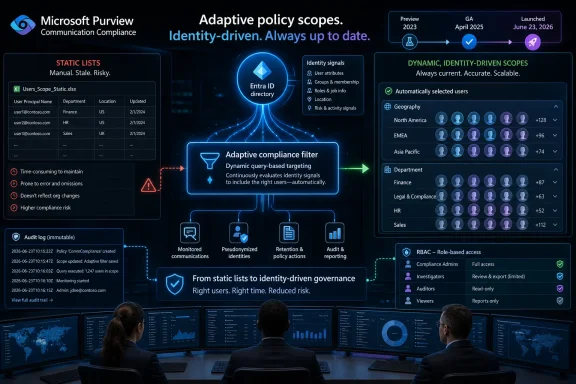 Microsoft Turns Compliance Scoping Into a Moving Target
The central idea behind adaptive policy scopes is simple enough: stop asking administrators to keep static lists current when the directory already knows who people are, where they sit, what department they belong to, and what groups define their role. Instead of building a Communication Compliance policy around a fixed set of users, an organization can define a scope using attributes such as geography, group membership, or Microsoft Entra ID properties, and let Purview update membership automatically.That matters because Communication Compliance policies are not decorative. They are used to detect activity that may violate regulatory obligations or internal policy, including inappropriate sharing of sensitive information, harassing or threatening language, adult content, or communications that fall under financial-sector supervision requirements. When the wrong people are omitted from a policy, the organization may have a blind spot. When the wrong people are included, it may have a privacy problem.
Microsoft’s roadmap language frames the change as a reduction in administrative toil, and that is true as far as it goes. But the more consequential shift is that policy coverage becomes conditional. A user’s inclusion in a compliance policy can now follow changes in the identity system, rather than waiting for a compliance administrator to notice a transfer, promotion, relocation, acquisition, or risk classification change.
That is the promise of modern compliance platforms: governance that follows the user. It is also where the operational stakes rise, because a bad attribute, stale HR feed, or misunderstood query can now propagate into policy enforcement without the friction that used to slow mistakes down.
Static Lists Were Always a Compliance Smell
Static scoping has survived for so long because it is easy to understand. A policy applies to these people, not those people. Someone adds names, removes names, and perhaps exports a list for audit evidence when a regulator or internal reviewer asks how coverage was defined.The weakness is that organizations are not static. Sales teams shift territories, regulated roles move between subsidiaries, employees transfer across jurisdictions, and temporary teams form around investigations, deals, or restricted projects. In that environment, a manually maintained compliance scope is not a control so much as a promise that somebody remembered to maintain the control.
Adaptive scopes attack that failure mode directly. If a policy should apply to users in a particular country, department, group, or attribute-defined population, the scope can be expressed as a query rather than a roster. Microsoft’s documentation describes adaptive scopes as query-based collections whose membership is evaluated automatically, with daily processing against the selected attributes or properties.
Daily evaluation is an important detail. This is not instantaneous enforcement at the moment a manager updates an HR field, and administrators should not pretend otherwise. But it is a meaningful improvement over the spreadsheet-and-ticket workflow that still defines too many compliance operations in Microsoft 365 estates.
The practical effect is that scoping becomes less about remembering people and more about trusting data. That is a better architecture, but only if the data deserves the trust.
Communication Compliance Gets Closer to the Identity Fabric
Microsoft Purview has been steadily absorbing more of the work that used to sit across separate compliance tools, Exchange transport rules, eDiscovery practices, and manual review processes. Communication Compliance is one of the more sensitive pieces of that puzzle because it deals with employee communications and policy violations that may touch harassment, confidential data, regulated financial communications, or internal misconduct.Adding adaptive scopes pulls that workload deeper into the identity fabric. Microsoft Entra attributes are no longer just login metadata or address book trivia; they become policy determinants. Department, geography, group, and other attributes can decide whether a user falls inside a surveillance-like compliance workflow.
That is a powerful pattern for organizations with clear regulatory boundaries. A broker-dealer, for example, may need communications supervision for specific registered employees. A multinational company may need different policy coverage in different regions. A healthcare organization may want stricter review around teams handling protected information. Adaptive scoping makes these designs less brittle.
But it also means compliance teams must work more closely with identity administrators, HR system owners, and security architects. The days when Purview policy configuration could be treated as a back-office compliance task are fading. If identity data drives the policy, identity governance becomes part of the compliance evidence chain.
That may be the feature’s quietest but most important consequence. Microsoft is asking customers to believe that their directory is accurate enough to decide who falls under sensitive monitoring controls.
The Privacy Story Is Necessary, Not Decorative
Microsoft’s roadmap note emphasizes privacy by design: usernames are pseudonymized by default, role-based access controls are built in, investigators must be opted in by an administrator, and audit logs help support user-level privacy. That language is not boilerplate in this context. Communication Compliance sits in a fraught space where legitimate corporate governance can easily look, to employees, like workplace surveillance.Pseudonymization helps separate initial review from immediate identity exposure. Role-based access controls help constrain who can investigate. Audit logs create accountability for the people using the tool. None of these controls eliminates the tension, but they make the tension governable.
Adaptive scopes intensify the privacy question because they can expand or contract policy coverage automatically. If a user moves into a department covered by a policy, the system can include that user without a compliance admin manually selecting them. That is operationally efficient, but it also places more weight on whether employees have been given clear notice about monitoring, whether policy criteria are defensible, and whether the organization can explain its logic.
This is where “privacy by design” becomes a baseline rather than a shield. Organizations still need policy governance, legal review, works council consultation where applicable, and careful documentation of why specific populations are covered. The tool can pseudonymize a username; it cannot make a sloppy monitoring program legitimate.
Microsoft’s design choices are sensible for enterprise compliance, but they do not absolve customers from the hard part. The hard part is deciding what should be monitored in the first place.
The April 2025 Launch Took the Long Road From Preview
The timeline is notable. Microsoft created the roadmap item in September 2022, preview availability began in January 2023, and general availability landed in April 2025. The item’s latest update came on June 23, 2026, with the status marked as launched.That long runway suggests Microsoft did not treat adaptive scopes in Communication Compliance as a trivial bolt-on. The feature intersects with policy creation, identity queries, licensing, privacy workflows, and administrative UX. In Purview, those intersections tend to be where simple concepts become messy products.
For customers, the long preview period cuts two ways. On one hand, a feature that has spent years maturing before broad launch is less likely to be a raw experiment. On the other, administrators should expect accumulated constraints and edge cases rather than a perfectly clean abstraction.
Microsoft’s own Learn guidance makes clear that adaptive scopes must be created before they can be selected in a Communication Compliance policy. It also distinguishes adaptive scopes from administrative units, which are configured in Microsoft Entra ID for delegated administration rather than compliance targeting. That distinction will matter in real deployments, because many tenants already use administrative units, dynamic groups, static groups, and custom attributes in overlapping ways.
The feature may be launched, but “launched” in Microsoft 365 rarely means “self-explanatory.” It means customers can now put it into production and discover whether their governance model is as coherent as their architecture diagram.
The Admin Benefit Is Real, but It Is Not Free
The most obvious win is reduced maintenance. If a compliance policy applies to a defined class of users, administrators no longer need to manually update a list every time somebody changes role or location. In large tenants, that alone can prevent a steady drip of errors.There is also a policy-sprawl argument. Adaptive scopes can allow fewer policies to cover more dynamic populations, especially when policy settings are consistent but membership changes frequently. Instead of creating and maintaining separate policies for a long list of departments, regions, or cohorts, an organization may define reusable scopes and attach them where needed.
That sounds like simplification, but it creates a new object that must be governed: the scope itself. Who can create it? Who reviews the query? How is it named? How are changes approved? How does the organization verify membership? What happens when an attribute source changes? These are not theoretical concerns in environments where compliance tooling is subject to audit.
The best deployments will treat adaptive scopes as controlled infrastructure, not convenience filters. They should have owners, change records, review cadence, and validation steps. Otherwise the organization has simply moved the manual error from the policy list into the query definition.
That trade is still worth making for many enterprises. But it is a trade, not magic.
Where the Feature Helps Regulated Firms Most
The roadmap note explicitly mentions SEC and FINRA obligations, and that is not accidental. Financial services firms are among the most obvious beneficiaries because they often have well-defined populations requiring supervision, retention, review, or escalation. Those populations change as employees become registered, change functions, move between business units, or fall under different jurisdictional rules.In that world, a static list is a liability. If a registered representative joins a covered business unit and the compliance policy does not catch up, the firm may have a records and supervision gap. If someone leaves that role and remains unnecessarily covered, the firm may have excessive monitoring and unnecessary review burden. Both outcomes are bad, though in different ways.
Adaptive scopes can also help in less obviously regulated scenarios. A company may want Communication Compliance policies focused on teams handling confidential product plans, sensitive acquisitions, executive communications, or customer support channels where harassment and abusive language risks are higher. If those teams are represented accurately in Entra attributes or groups, policy coverage can follow the business.
The feature is especially relevant as Microsoft 365 communication channels proliferate. Email is no longer the only concern. Teams chats, channels, user-reported messages, and newer AI-adjacent communication artifacts increasingly feed compliance conversations. Scoping must keep up with that sprawl, or the organization ends up governing yesterday’s communications stack.
Adaptive scopes do not solve every channel limitation. Microsoft’s documentation notes channel-specific caveats, including areas where adaptive scopes do not cover certain public channel scenarios. That is a reminder that scoping is only one layer of the compliance puzzle; signal coverage and workload support still matter.
The Risk Moves From Policy Lists to Directory Hygiene
The less glamorous story is directory hygiene. Adaptive scopes are only as good as the attributes beneath them. If geography is wrong, department names are inconsistent, group membership is stale, or custom attributes are overloaded for unrelated purposes, the policy outcome will be wrong too.This is where many Microsoft 365 tenants will feel pain. The directory often reflects years of migrations, reorganizations, mergers, emergency fixes, and naming conventions that seemed reasonable in 2018. Compliance teams may assume attributes mean one thing while identity teams know they mean something messier.
A department field might say “Finance” for corporate finance, regional accounting, payroll, and temporary contractors assigned to a finance cost center. A country attribute might represent legal entity location rather than work location. A group might exist for licensing, not business function. An extension attribute might have been quietly repurposed by an automation script nobody has touched in years.
Adaptive policy scopes force these ambiguities into the open. That is painful, but useful. If an organization cannot define a population reliably in identity data, it probably should not pretend it can govern that population cleanly in compliance policy.
The best preparation for this feature may not happen in Purview at all. It may happen in Entra ID, HR integration, group lifecycle management, and data ownership meetings that administrators have been trying to schedule for years.
Licensing and Limits Will Shape the Real Deployment
Purview features have a way of making licensing feel like architecture. Communication Compliance and adaptive scopes are not simply switches available in every Microsoft 365 plan. Microsoft’s planning guidance ties Communication Compliance coverage to specific licensing, including Microsoft Purview Suite, E5-class compliance capabilities, or appropriate add-ons.That means smaller organizations or mixed-license enterprises need to check entitlement before designing around adaptive scoping. A beautiful policy that assumes universal coverage is not useful if part of the target population lacks the required license. In mixed environments, licensing gaps can become compliance gaps, and those are much harder to explain than budget gaps.
There are also service limits and behavioral constraints to understand. Microsoft’s documentation says adaptive scopes can reduce the need for many separate policies, but tenants remain subject to maximum policy limits. Queries run on a schedule, so membership changes are not immediate. Scope types matter, and not every Purview scenario supports the same scope objects.
This is not a reason to avoid the feature. It is a reason to pilot it with real populations instead of demo attributes. Pick a department, region, or regulated cohort where the organization understands the data, then compare expected membership with actual membership before attaching the scope to a sensitive policy.
Enterprise IT learns these lessons the hard way when a compliance feature is treated like a checkbox. Adaptive scopes deserve a rollout plan.
Microsoft’s Broader Purview Strategy Is Showing
This launch fits a broader pattern in Microsoft Purview: make governance more dynamic, more identity-aware, and more embedded in the Microsoft 365 control plane. Retention, records management, eDiscovery, DLP, insider risk, and communication monitoring increasingly depend on shared signals rather than isolated admin lists.That direction makes sense. Microsoft 365 is too large and too fluid for governance models built around static collections. Users generate data across Exchange, Teams, SharePoint, OneDrive, Copilot experiences, and third-party-adjacent workflows. Policies must follow people, content, and context.
Adaptive scopes are one expression of that strategy. They let policy targeting behave more like conditional access or dynamic group membership, even though the compliance consequences are different. The familiar enterprise pattern is emerging: define intent once, let the platform evaluate membership continuously, and audit the result.
The danger is that Microsoft’s integrated platform story can obscure the amount of local governance required. Purview can expose the controls, but it cannot define a company’s risk appetite. Entra can store attributes, but it cannot guarantee those attributes have clear business meaning. Communication Compliance can surface alerts, but humans still decide whether the behavior is a violation.
Microsoft is building the machinery. Customers still own the judgment.
The Investigators Will Feel the Change Last
For the people reviewing Communication Compliance alerts, adaptive scopes may not feel revolutionary at first. Investigators will still work through alerts, review detected communications, escalate cases, and operate within role-based permissions and audit trails. The interface may not scream that the policy population is now dynamic.But investigators will feel the downstream effects. Better scoping should mean fewer irrelevant alerts from users who should never have been in a policy. It should also mean fewer missed populations when people enter covered roles. If the underlying scope is accurate, review queues become more defensible.
The opposite is also true. A bad adaptive scope can flood investigators with irrelevant material or starve them of the alerts they expected. Because the scope updates automatically, the root cause may not be obvious from the alert queue. An investigator may see a sudden change in volume and assume user behavior changed, when the real cause was an attribute update or group sync issue.
That argues for operational telemetry around policy membership. Compliance teams should know not just how many alerts a policy generated, but how many users the scope currently includes and how that number has changed. Sharp movement in scope membership should be reviewed like any other compliance-relevant change.
Adaptive scopes reduce list maintenance, but they increase the importance of monitoring the monitor.
The Governance Model Needs a RACI, Not a Hero Admin
In smaller Microsoft 365 environments, Purview administration often falls to a small number of capable people who understand enough compliance, Exchange, Teams, security, and identity to keep things moving. Adaptive scopes make that heroic model less sustainable.A scope definition may depend on HR data, Entra attributes, group ownership, compliance policy intent, regional legal obligations, and investigator workflows. No single administrator should be expected to own all of that alone. If the scope is wrong, the blast radius crosses departmental lines.
A mature deployment needs clear responsibilities. Compliance should define policy intent. Legal and privacy teams should approve monitoring boundaries. Identity teams should validate attributes and group logic. Security teams should review access controls and audit logging. IT operations should monitor sync and service behavior. Business owners should confirm that the populations represented by the data match reality.
This sounds bureaucratic, but bureaucracy is not always the enemy. In compliance systems, unreviewed convenience is often the enemy. A scope that automatically updates sensitive monitoring coverage should not be created casually because it was faster than opening a ticket.
The irony is that adaptive scopes may reduce administrative drudgery only after organizations accept more governance discipline. Automation pays off when the process around it is clear.
The Feature Also Exposes Microsoft’s Documentation Burden
Microsoft has improved Purview documentation over the years, but the product remains broad, licensing-heavy, and full of scenario-specific caveats. Adaptive scopes are understandable in concept, yet administrators still need to know where they are created, which policy types support them, how often they evaluate, which attributes are available, how administrative units differ, and which workloads have exceptions.That complexity is not unique to Microsoft. Any serious compliance platform must encode messy legal and organizational requirements. But Microsoft’s advantage is also its burden: because Purview is woven into Microsoft 365, customers expect the controls to behave consistently across workloads. They do not always.
For WindowsForum.com readers who administer Microsoft estates, the lesson is to read the fine print before promising coverage. “Purview supports adaptive scopes” is not the same as “every communication channel and every policy scenario behaves exactly as expected.” The difference matters in audits and incident reviews.
The roadmap item’s launched status is therefore a beginning, not an ending. It confirms availability. It does not replace implementation testing, documentation review, or tenant-specific validation.
That is the rhythm of Microsoft 365 administration in 2026: the cloud service moves forward, and the admin’s job is to discover where the abstraction leaks.
The April Launch Gives Admins a New Lever, Not a New Excuse
The most useful way to read this roadmap item is not as a feature announcement but as a governance test. If your organization can express compliance populations through reliable identity attributes, adaptive scopes can remove a major source of drift. If it cannot, the feature will expose that weakness quickly.A sensible deployment begins with inventory. Which Communication Compliance policies exist today? How are they scoped? Who owns the membership lists? How often are they reviewed? Which populations generate the most maintenance work? Those answers will reveal where adaptive scopes can provide immediate value and where static scoping may remain safer until the identity data improves.
From there, administrators should validate scope membership outside the pressure of an active investigation. Create the adaptive scope, compare expected users with actual users, review anomalies, and document the attribute logic. Only then should the scope become part of a live policy covering sensitive communications.
This is also a good moment to review privacy controls. Pseudonymization, RBAC, investigator opt-in, and audit logs are strongest when paired with a clear internal governance model. If employees, managers, or regulators ask why a group is covered, the answer should be more substantial than “because the query matched.”
Adaptive scopes make Communication Compliance more scalable. They do not make it self-justifying.
A Few Things WindowsForum Readers Should Not Miss
The feature’s value is practical, but the implementation details decide whether it becomes a control improvement or another tenant mystery. Treat it as a production governance change, not a portal enhancement.- Microsoft Purview Communication Compliance support for adaptive policy scopes is now launched for worldwide standard multi-tenant customers, with general availability listed for April 2025.
- Adaptive scopes let organizations target Communication Compliance policies through dynamic criteria such as geography, group membership, and Microsoft Entra ID attributes instead of static user lists.
- Scope membership is driven by query logic and directory data, so identity hygiene becomes part of the compliance control surface.
- The feature can reduce administrative drift for regulated or fast-changing populations, but it can also magnify errors if attributes or groups are wrong.
- Privacy controls such as pseudonymized usernames, role-based access, investigator opt-in, and audit logging remain essential because dynamic scoping can change who is covered without manual list edits.
- Administrators should pilot adaptive scopes against known populations and compare expected membership with actual membership before attaching them to sensitive live policies.
References
- Primary source: Microsoft 365 Roadmap
Published: 2026-06-23T23:15:39.6678540Z
Microsoft 365 Roadmap | Microsoft 365
The Microsoft 365 Roadmap lists updates that are currently planned for applicable subscribers. Check here for more information on the status of new features and updates.www.microsoft.com
- Official source: learn.microsoft.com
Adaptive scopes | Microsoft Learn
Learn about Microsoft Purview adaptive scopes for policies.learn.microsoft.com - Official source: directionsonmicrosoft.com
Purview Adaptive Scopes Ease Policy Management - Directions on Microsoft
Purview adaptive scopes use queries to define a collection of users, groups, and SharePoint sites that should be included within a retention policy or a communication compliance policy. Adaptive scopes enable complex membership within policies without requiring manual manipulation or updating...www.directionsonmicrosoft.com - Official source: microsoft.github.io