

AMD’s latest Adrenalin WHQL driver, revision 26.1.1, lands as an AI-focused package that adds an optional “AI Bundle” to the Windows 10/11 driver installer — a choice that can materially affect how much disk space the full Radeon driver experience consumes. The official release (dated January 21, 2026) introduces the streamlined AI Bundle installer and updates to AMD’s ROCm ecosystem, while keeping the core driver package and installation controls familiar to Windows users. This change gives users two levers to manage storage: (1) the ability to opt out of the AI tooling when installing the driver, and (2) continued use of AMD’s cleanup guidance for removing legacy or preview driver residues — both of which can reduce temporary and long-term disk use depending on which components are selected.
AMD has positioned Adrenalin 26.1.1 as an “AI Bundle” release: the standard Radeon driver now surfaces an optional package intended to simplify local AI setup on Windows systems. The AI Bundle aims to bundle the essential tooling — frameworks, libraries and integrations (for example PyTorch on Windows and ComfyUI integration) — so users can more easily run image-generation apps, local LLMs, and other on-device AI workloads without wrestling with many separate downloads and environment configurations. AMD’s public announcement and the driver release notes both describe the AI Bundle as an optional, streamlined installer integrated with the Adrenalin package. This release also references AMD’s ROCm roadmap and expanded Windows support: AMD has been promoting ROCm 7.2 and updated PyTorch builds as part of the same AI push, which underpins many of the local AI scenarios targeted by the AI Bundle. The corporate messaging ties the driver update, ROCm changes, and the optional AI tooling together as part of a platform-level effort to make AMD hardware easier to use for AI tasks. Why disk-space headlines? There are two practical reasons this matters to Windows users:
However, the “disk saving” angle needs context. The primary storage win for most users derives from not installing the AI Bundle (and from removing legacy driver leftovers), not from a new magic compression trick. Any headline claiming a universal multi-gigabyte saving misstates the situation: real savings depend on what was previously installed, whether large sample models are downloaded, and whether the system previously accumulated orphaned installer files. AMD’s release notes and public blog make the optional nature explicit; independent coverage from multiple outlets corroborates the feature and the rollout timeline. Where numbers matter (exact MB/GB saved), those must be measured on real installs because AMD doesn’t publish a single universal figure for AI Bundle size.
Adrenalin 26.1.1 ties driver maintenance to AMD’s broader AI platform ambitions while leaving storage choice in the hands of users. The practical upshot for Windows 10/11 users is clear: opt-in for AI tooling when you need it, skip it when you don’t, and follow AMD’s cleanup guidance to reclaim installer leftovers — a modest, user-facing approach that brings AI tooling to the desktop without foisting extra bloat on everyone by default.
Source: Neowin https://www.neowin.net/news/amds-ne...ts-you-save-huge-disk-space-with-new-feature/
 Background / Overview
AMD has positioned Adrenalin 26.1.1 as an “AI Bundle” release: the standard Radeon driver now surfaces an optional package intended to simplify local AI setup on Windows systems. The AI Bundle aims to bundle the essential tooling — frameworks, libraries and integrations (for example PyTorch on Windows and ComfyUI integration) — so users can more easily run image-generation apps, local LLMs, and other on-device AI workloads without wrestling with many separate downloads and environment configurations. AMD’s public announcement and the driver release notes both describe the AI Bundle as an optional, streamlined installer integrated with the Adrenalin package. This release also references AMD’s ROCm roadmap and expanded Windows support: AMD has been promoting ROCm 7.2 and updated PyTorch builds as part of the same AI push, which underpins many of the local AI scenarios targeted by the AI Bundle. The corporate messaging ties the driver update, ROCm changes, and the optional AI tooling together as part of a platform-level effort to make AMD hardware easier to use for AI tasks. Why disk-space headlines? There are two practical reasons this matters to Windows users:- The optional AI Bundle can install additional frameworks and toolchains that occupy tens to hundreds of megabytes or more, and local model files (if downloaded) can range from hundreds of megabytes to multiple gigabytes.
- AMD’s driver ecosystem has previously implemented automatic cleanup of stale installer artifacts (for example, older Adrenalin releases added auto-clear behavior for the C:\AMD installation folder), demonstrating the company’s willingness to reduce wasted space created by driver installer leftovers. That precedent influences how readers interpret the new optional bundle: opting out keeps the driver lean; opting in could add significant local storage usage depending on selected components.
What’s actually new in Adrenalin 26.1.1
Optional “AI Bundle” installer
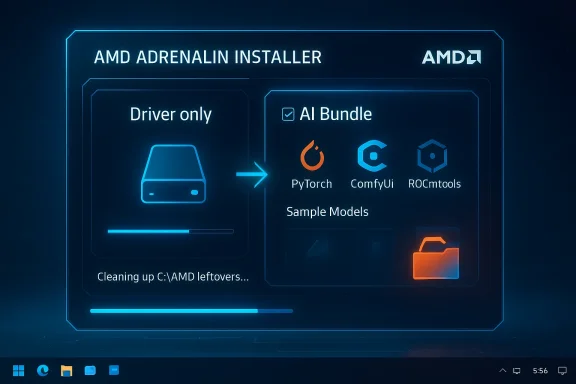
- The AI Bundle is integrated as an optional install item in the Adrenalin setup flow. AMD describes it as a “streamlined installer that equips your AMD-powered system with the essential tools for AI development and creative workflows.” It’s designed to remove much of the manual configuration historically required to run local AI workloads on Windows.
- At a technical level, the bundle is reported to include easier access to PyTorch builds for Windows, integration points with ComfyUI (a popular GUI front end for generative models), and simplified access to ROCm tooling where applicable. The goal is to make image generation and experimentation with local LLMs “work out of the box” on supported AMD hardware.
Driver compatibility, sizes, and packaging
- The Adrenalin 26.1.1 package is distributed as AMD’s typical unified installer for Windows; the driver package itself is listed on AMD’s download pages with a typical file size in the range of the company’s current installers (the Windows download entries for 26.1.1 show package sizes such as ~623–908 MB depending on the specific product page and build). The AI Bundle is presented as an optional add-on during installation rather than being forcibly included inside every minimal driver installation.
- Because the AI Bundle is optional, users can intentionally avoid installing extra frameworks and models and keep the installed footprint close to a “driver-only” configuration. Conversely, installing the AI Bundle and choosing to download sample models or large frameworks may add significant storage usage. AMD’s product pages and PR material make the optional nature explicit.
Continued support and cleanup guidance
- The 26.1.1 release notes reiterate AMD’s installation and downgrade guidance — the company continues to recommend use of the AMD Cleanup Utility when downgrading drivers and explains installer behavior in its support documentation. This echoes earlier decisions (seen in previous Adrenalin releases) to clear leftover installer folders to reduce unnecessary disk consumption. That history is important context when assessing the user benefits of an optional AI Bundle.
How this can actually save you disk space — practical effects
The claim that the new driver “lets you save huge disk space” is partially a matter of installer choices and partially a matter of what you choose to install after the driver prompts you.- If you select a driver-only or minimal install and do not opt into the AI Bundle, your installed footprint will remain roughly equivalent to previous driver-only installations. That means you won’t acquire the extra runtime frameworks or model caches the bundle can deliver, and you will avoid the potentially large storage footprints associated with model downloads.
- If you opt into the AI Bundle and then download sample data, models, or extra frameworks, disk usage will grow — in some AI scenarios by hundreds of megabytes to multiple gigabytes. Model files, especially modern LLM weights or high-quality image-generation models, are the main storage culprits. AMD’s materials do not publish a single “AI Bundle” disk-size number because the final footprint depends on the combination of optional frameworks and user-downloaded models. This is why generalized headlines that promise a specific “huge” disk saving should be read with caution: the savings are conditional.
- On systems where older installers or preview drivers left large folders behind (for example C:\AMD), users can reclaim space by following AMD’s cleanup procedures. AMD previously implemented automatic clearing of previously installed drivers in C:\AMD in earlier updates, and it continues to advise cleanup when downgrading — practical steps that can free up sizeable temporary storage.
Step-by-step: How to install with disk usage in mind
- Before installing Adrenalin 26.1.1, note the download page file size (the unified package is typically around 600–900 MB depending on the specific product). Plan for additional space if you intend to add the AI Bundle or later download models.
- Run the Adrenalin installer with Administrator privileges and choose the custom/advanced install flow if available. The installer surfaces the optional AI Bundle checkbox — deselect it to avoid the extra frameworks and potential model downloads.
- If you previously used preview drivers or are downgrading, run the AMD Cleanup Utility as recommended to remove leftover artifacts before or after installing the new driver. This helps reclaim the C:\AMD folder and other installer remnants.
- If disk space is already tight, avoid choosing any options that say “Install sample models” or “Download demo models” during AI Bundle setup; these are the likely sources of multi-gigabyte downloads. The AI Bundle itself is primarily a convenience installer for frameworks, but the model files create the largest storage impact.
- Post-install, use Windows’ storage tools (Storage Settings, Disk Cleanup/Storage Sense) to inspect and clear temporary files. Check the Program Files, AppData, and any ComfyUI or ROCm installation folders if you opted into AI tooling. These directories are where sizable model caches typically appear. (Generic Windows cleanup guidance applies; check vendor instructions for components you install.
Benefits: Why AMD’s approach is helpful
- Lower barrier to local AI: For creators and developers who want to experiment with on-device AI, AMD’s AI Bundle reduces friction by bundling everything in one optional installer rather than requiring manual pip installs and dependency hunting. This is especially valuable for newcomers.
- Opt-in model protects minimal setups: Making AI tools optional means gamers and users who don’t want the extra software won’t receive it by default. That protects the majority of users who need drivers primarily for graphics.
- Cleaner installs and downgrade guidance: AMD’s continued guidance on cleanup utilities and the historical auto-clear behavior reduce the odds of installer leftovers consuming valuable NVMe/SSD space. That’s a tangible win for systems with small boot drives.
Risks, caveats, and what to watch for
- Unclear total footprint until models are downloaded: AMD does not publish one-size-fits-all disk numbers for the AI Bundle. The base frameworks consume moderate space, but downloaded models can dominate storage usage. Any claim that the driver will “save X GB” without qualifiers is incomplete. Treat specific disk-savings figures as estimates unless confirmed by measuring the actual installed components on a test system.
- Version conflicts and environment weirdness: Bundling frameworks and integrating PyTorch on Windows simplifies setup, but it also creates potential version conflicts with third-party Python environments, developer toolchains, or other GPU runtimes on the same machine. Users who maintain custom Python setups should be cautious and consider using virtual environments or containerized workflows.
- Privacy and security surface area: Installing local AI tooling brings new executables, background services, and third-party frameworks to the system. Users should vet what’s being installed and ensure they keep those components updated for security patches. The installation of frameworks that enable local LLMs and image-generation tools increases the attack surface if left unpatched.
- OEM driver considerations: AMD repeats the long-standing recommendation that laptop and AIO customers should favor OEM-provided drivers for validated system-specific optimizations. Installing the generic Adrenalin package (with or without the AI Bundle) can change system behavior on vendor-tuned platforms and may disable vendor-specific functionality. That is a standard caveat but one worth repeating before pressing “Install.”
- Community noise vs. facts: Some outlets and community posts have amplified worst-case or speculative claims — for example claims that AMD forces a large preinstalled chatbot or a fixed multi-gigabyte model on every install. Those assertions are inconsistent with AMD’s stated optional model and with the release notes: the bundle is optional and the final disk usage depends on user choices. Treat social commentary and hyperbolic summaries with caution and verify by observing the installer prompts during a test installation. If a particular publisher makes a concrete claim about a bundled model size, look for corroboration from two independent sources or measure an install on a test machine before treating it as definitive.
Recommendations for Windows 10/11 users, IT admins, and enthusiasts
- For gamers and users on constrained SSDs: perform a custom install and leave the AI Bundle deselected unless you actually intend to experiment with local AI. That avoids unintended growth of disk usage.
- For creators and AI tinkerers: try the AI Bundle in a controlled environment first (a secondary Windows machine or a VM), so you can quantify the added disk usage and identify where models and caches land. Use virtual environments or containerized Python where possible to reduce interference with existing dev setups.
- For IT administrators and managed endpoints: treat the AI Bundle as an optional component to be controlled via your standard deployment tooling. When mass-deploying Adrenalin drivers across a fleet, explicitly set installation flags (or use the driver-only deployment packages) to avoid unmonitored storage or software installs. Check vendor guidance for silent install switches and MSI/command-line options.
- To reclaim space from older installers and artifacts: run AMD’s recommended cleanup steps when downgrading drivers, manually inspect the C:\AMD folder and other Adrenalin-related temporary directories, and use Windows’ storage utilities to remove temporary files. If problems occur, Device Driver Uninstall tools like DDU (third-party) remain a last-resort option — follow vendor guidance and caution before using them.
Final analysis: meaningful change or marketing flourish?
Adrenalin 26.1.1 is a pragmatically sensible step for AMD’s stated strategy: it acknowledges that local AI workflows are now a component of the modern PC experience and lowers the entry barrier by packaging frameworks and tooling as an optional installer component. For users who do not want the extra software, the opt-out model preserves a compact driver footprint. For creators and developers, it reduces setup friction by consolidating steps that were previously error-prone or time-consuming. Those are genuine, measurable benefits.However, the “disk saving” angle needs context. The primary storage win for most users derives from not installing the AI Bundle (and from removing legacy driver leftovers), not from a new magic compression trick. Any headline claiming a universal multi-gigabyte saving misstates the situation: real savings depend on what was previously installed, whether large sample models are downloaded, and whether the system previously accumulated orphaned installer files. AMD’s release notes and public blog make the optional nature explicit; independent coverage from multiple outlets corroborates the feature and the rollout timeline. Where numbers matter (exact MB/GB saved), those must be measured on real installs because AMD doesn’t publish a single universal figure for AI Bundle size.
Adrenalin 26.1.1 ties driver maintenance to AMD’s broader AI platform ambitions while leaving storage choice in the hands of users. The practical upshot for Windows 10/11 users is clear: opt-in for AI tooling when you need it, skip it when you don’t, and follow AMD’s cleanup guidance to reclaim installer leftovers — a modest, user-facing approach that brings AI tooling to the desktop without foisting extra bloat on everyone by default.
Source: Neowin https://www.neowin.net/news/amds-ne...ts-you-save-huge-disk-space-with-new-feature/
