

Holi’s colours have always been tactile — powdered gulal, drenched whites, and the quicksilver flash of laughter — but in 2026 an equally vivid digital ritual has taken hold: people are using generative AI to craft bespoke Holi greetings and share them with family and friends. The trend — described in recent coverage of the festival and amplified across community threads — shows users turning simple ideas into polished greeting-card visuals in minutes, using tools ranging from Microsoft Copilot in Office apps to Google’s Gemini image models, ChatGPT’s image tools, xAI’s Grok Imagine, and Anthropic’s Claude for creative refinement. i is a festival of colour, playfulness, and social warmth. In parallel, digital greetings have long been part of the celebration for families scattered across cities and continents. Today’s change is not merely that people send images — it’s that many want personalized images that reflect inside jokes, family names, or photos incorporated into a Holi-themed layout. AI image-generation tools lower the technical bar: you no longer need design software fluency to get a high-quality card. That shift is reshaping how Windows and Office users — and broader social-platform communities — plan their festival messages.
This article walks through the practe in 2026, explains how each platform fits into a Holi workflow, provides step-by-step tips for producing a polished greeting, and evaluates the key safety, legal, and provenance issues you should consider before hitting “send.”
Generative AI is roughly split into two roles for Holi greetings: (A) image creation and editing, and (B) creative orchestration — prompt writing, caption craft, and layout assembly. The principal players you’ll encounter:
Benefits:
OpenAI’s developer docs show the GPT Image family (gpt-image-1.5, etc.) as the primary modern image models, and the Responses API supports multi-turn edits that are handy for iterative greeting design.
There is also a broader social effect: as more people adopt AI-made greetings, expectations for originality rise. That raises interesting questions about cultural value and authenticity — are AI-assisted greetings “less sincere,” or is the sincerity defined by intent and context rather than the tool used? The answer will vary by family and community.
Source: Sakshi Post https://www.sakshipost.com/news/nat...-personalized-festive-images-ai-tools-477795/
This article walks through the practe in 2026, explains how each platform fits into a Holi workflow, provides step-by-step tips for producing a polished greeting, and evaluates the key safety, legal, and provenance issues you should consider before hitting “send.”
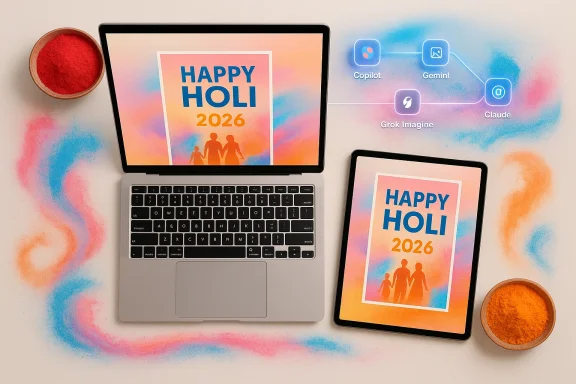 Overview of the main tools and what they do
Generative AI is roughly split into two roles for Holi greetings: (A) image creation and editing, and (B) creative orchestration — prompt writing, caption craft, and layout assembly. The principal players you’ll encounter:- Microsoft Copilot — embedded into Word and PowerPoint (and other Office apps) to create layout-first, editable templates and apply brand or style guidance. Microsoft’s Copilot features include design suggestions and template generation geared for presentations and cards.
- Google Gemini (Nano Banana family) — a text-to-image and image-editing pipeline optimized for vivid, photoreal or stylized outputs. Gemini’s “Nano Banana” image models (and recent Nano Banana Pro upgrades) produce high-quality stills and now support higher resolutions and richer editing controls. Google has also integrated provenance tools (SynthID and detection) into its ecosystem to mark AI-generated content.
- OpenAI / ChatGPT Images (GPT Image family) — conversational image creation and iterative editing through ChatGPT and the OpenAI Images API (gpt-image models). These let you generate, refine, and re-edit images inside a chat flow, making them convenient for a one-stop creative loop.
- xAI’s Grok Imagine (on X) — now a direct image- and short-video-generation feature inside X, letting social users quickly spin up vibrant visuals, sometimes with a more conversational, meme-friendly playground. Grok’s rollout has been rapid and sometimes controversial; access and moderation controls have varied across regions and time.
- Anthropic’s Claude — while Claude doesn’t natively render images, it excels at creative scaffolding: crafting precise prompts, writing Holi captions, generating variant copy, and iterating creative direction that you can then pass to an image generator. Claude is widely used as a prompt-engineering partner rather than a picture maker.
Microsoft Copilot: design-first templates inside Word and PowerPoint
What Copilot does well
If your goal is a printable or slide-friendly Holi card — something that will be printed, handed out, or embedded in an Outlook email — Copilot’s Office integration is often the fastest path. You can prompt Copilot with style directions like “create a pastel Holi greeting with bold headline, space for a family photo, and a playful two-line poem,” and it will produce an editable PowerPoint slide or Word layout that you can personalize.Benefits:
- Seamless layout and typography choices tuned for Office defaults.
- Easy insertion of personal photos and resizing with automatic alignment.
- Brand and theme consistency if you’re using an organization template or specific font set.
Practical tips for Holi cards in PowerPoint/Word
- Start with a specific instruction: “Design a 5x7 portrait Holi card with soft-pastel background, bold sans headline, and placeholder for a 4:3 family photo.”
- After Copilot produces a slide, use PowerPoint’s Export/PDF options to create print-ready files, or adjust the slide size to standard card dimensions.
- Replace any generic images with your family photo using Office’s built-in “remove background” and “crop to shape” features to create a cohesive composition.
Caveats
Copilot’s outputs are layout- and text-focused; the image quality of any generated art embedded by Copilot will depend on the image model it calls (Microsoft integrates OpenAI models in some scenarios). Always double-check image provenance and, if printing, confirm color profiles to avoid saturation surprises on paper.Google Gemini (Nano Banana): vivid, high-resolution Holi imagery
Why Gemini stands out
Google’s Gemini image models (marketed internally as the Nano Banana family) have emphasized stable, reproducible edits and consistent text rendering across iterative edits. Nano Banana Pro versions bring higher-resolution capabilities and advanced editing features that make them well-suited for colorful festival scenes — exploding gulal, rangoli motifs, and layered textures. Google has also pushed provenance features (SynthID) so users can check whether an image was created or edited by Google AI.How to get the best Holi output from Gemini
- Use descriptive, sensory prompts: “A sunlit courtyard after Holi: multicolour gulal clouds mid-air, children in white kurtas laughing, warm golden-hour lighting, highly saturated but soft shadows, 'Happy Holi 2026' in gold serif, 3:2 aspect ratio.”
- Iterate with “keep details” edits. Gemini’s Nano Banana lineage preserves details across edits better than older image models, so you can tune colour intensity, add text overlays, and adjust composition without losing earlier decisions.
Limitations and safeguards
Gemini enforces safety guardrails and may refuse or alter requests that violate its terms (for example, generating realistic images of identifiable people without consent). Google’s SynthID watermarking and provenance detection are important to understand — they can mark images produced by Google’s tools to help recipients verify origin. That increases transparency but also means generated images may include invisible provenance markers.ChatGPT / OpenAI Images: conversational image creation and iteration
Conversational workflows
OpenAI’s ChatGPT Images and the GPT Image API allow you to have a back-and-forth where the assistant generates an image, you point to parts that need tweaking, and the system edits accordingly. That iterative, conversational style is useful for dialing in a specific Holi mood: “less neon, more pastel,” or “move main subject left 20%.”OpenAI’s developer docs show the GPT Image family (gpt-image-1.5, etc.) as the primary modern image models, and the Responses API supports multi-turn edits that are handy for iterative greeting design.
Practical prompt examples for Holi cards
- “Generate a festive Holi greeting: powder-puff explosion behind an ornate rangoli, smiling family silhouette, warm bokeh background, hand-lettered ‘Happy Holi 2026’ in marigold — soft watercolor texture.”
- If you want the image to accommodate text, instruct the model: “Leave a 600-pixel-high clear area at the top for an overlay headline.”
When to use ChatGPT images vs Gemini
If you prefer a chat-like iterative approach and want to combine text and image edits inside the same conversational flow, ChatGPT’s image tools are convenient. Gemini is often faster for one-shot, high-resolution edits; the best choice depends on the level of iteration and the platform you prefer.Grok Imagine on X: social-native, rapid, and sometimes experimental
A quick social-first option
xAI’s Grok Imagine (integrated into X) excels when your aim is an instant social card or animated short to post on timelines. It’s tuned for speed and shareability, and users often use it to produce eye-catching, meme-ready visuals. That makes Grok attractive for immediate festival posting, especially for audiences already active on X.Moderation and access nuances
Grok’s image features have been the subject of regulatory and moderation scrutiny (including regional limits after controversial outputs), and the availability of Grok Imagine can change (free vs paid tiers, restrictions on image types, and moderation filters). If you plan to use Grok for Holi greetings, verify the current feature set and content rules in your region.Claude: the prompt engineer and caption writer
Where Claude fits in
Anthropic’s Claude is not typically used to render images. Instead, it’s one of the best tools for turning fuzzy creative ideas into high-quality prompts, catchy captions, and alternative wording for cards. If you want five caption options that vary by tone — playful, formal, poetic, marketing-friendly, or family-focused — Claude will produce well-structured text you can drop under any generated image.Example uses
- Generate caption variants: “Write five short Holi captions for a family greeting: joyful, nostalgic, spiritual, funny, and formal.”
- Create systematic prompts: Claude can expand a single idea into technical image-generation prompts suitable for Gemini, ChatGPT, or Midjourney-style engines, ensuring consistent style wording and explicit constraints (e.g., “no logos,” “no realistic likeness of individuals without consent”).
A step-by-step Holi image workflow (practical guide)
- Clarify your aim: share on social, print a card, or send a private message.
- Choose the primary tool:
- For print-ready cards: Copilot → PowerPoint/Word template.
- For photographic or painterly art: Gemini (Nano Banana Pro) or ChatGPT Images.
- For fast social posts: Grok Imagine on X.
- Use Claude or ChatGPT to craft a detailed image prompt (if needed): include mood, composition, colours, aspect ratio, and text placeholders.
- Generate the image and iterate: ask for colour tweaks, text placement changes, or cropping.
- Verify provenance and policy compliance: check for SynthID or platform watermarks and ensure you have consent for anybody featured.
- Finalize layout in Word/PowerPoint for print or export optimized PNG/JPEG for sharing.
- Keep aspect ratio in mind for platform targets (Instagram square, WhatsApp portrait, printed 5x7).
- Preserve an editable layered copy (PowerPoint slide or PSD export) if you intend to print or promptly adjust names and dates.
Safety, legal, and provenance considerations
Creating shareable Holi images with AI is delightful, but it raises real questions you need to understand before sending family photos or using someone’s likeness.- Likeness and consent: Generating highly realistic images of identifiable people (including family members) can cross ethical and, in some jurisdictions, legal lines if you don’t have consent. Most image models now refuse to create realistic images of public figures and often restrict creating exact likenesses of private people. Always ask permission before sharing images that depict someone recognizably.
- Provenance & watermarking: Google’s SynthID marks images generated or edited by Google tools; other vendors use equivalent provenance methods or metadata standards like C2PA. When authenticity matters — e.g., press, evidence, or identity-sensitive contexts — be mindful that invisible watermarks or content credentials may be present and that detection tools exist. This is a double-edged sword: provenance helps fight misuse, but it also signals to viewers that an image is AI-generated.
- Platform policies and moderation: Each provider enforces content rules. Grok Imagine has faced moderation and regulatory pushback; Gemini and ChatGPT enforce identity and safety guardrails. A requested Holi image that includes realistic minors, sexually suggestive content, or identifiable public figures may be blocked, altered, or flagged.
- Copyright and commercial reuse: If you plan to sell or commercially use Holi designs, review the tool’s license and terms of service. Some generated images may be free for personal use but restricted for commercial exploitation unless you hold the necessary rights. Check API and app license terms before monetizing.
- Image persistence and privacy: Uploading family photos to cloud-based generators may leave copies on vendor servers. Terms vary: some services retain generated or uploaded content for model training unless you opt out. If privacy matters, prefer on-device or offline tools, or check the provider’s content retention and training policies.
Design advice: colour, text, and print li cards
- Colour profiles: AI-generated images are typically sRGB. If printing, convert to a CMYK workflow and soft-proof before printing, or use a professional print lab that accepts sRGB. Expect saturation loss when moving to print; reduce vibrancy slightly in the master image.
- Fonts and legibility: If you want a text overlay (e.g., “Happy Holi 2026”), ask the model to leave space for the headline area, then add the text in Copilot/PowerPoint or a dedicated editor for crisp vector text. AI-generated text rendered within images can be inconsistent; prefer placing text as a separate layer when clarity matters.
- Resolution: For print, aim for 300 DPI at actual print size (for a 5x7 card, that’s a 1500×2100 pixel image). Gemini Nano Banana Pro and OpenAI’s gpt-image-1.5 support higher resolution outputs suitable for printing, while social-native Grok outputs are often optimized for on-screen sharing.
- File formats: Use PNG for images requiring transparency, JPEG for smaller file sizes, and PDF/PNG for print submissions. Keep an editable PowerPoint or layered source for last-minute name changes.
Critical analysis: strengths, trade-offs, and risks
Strengths
- Accessibility: Generative AI democratizes design, letting people with no layout training produce attractive greetings quickly. This is especially helpful for Windows users who are comfortable in Office apps and want a smooth path from idea to printable card.
- Speed and iteration: Conversational tools like ChatGPT Images or Copilot let you iterate rapidly: change a colour, move copy, or adjust mood without rebuilding assets from scratch.
- Creative diversity: AI can suggest unexpected styles (traditional rangoli, pastel minimalism, or neon splash art), expanding the range of possible greetings without hiring a designer.
Trade-offs and risks
- Authenticity vs artifice: While AI can craft heartfelt visuals, the ease of creation amplifies the risk of misuse — deepfakes, impersonation, or deceptive images that can cause reputational harm. Provenance tools (SynthID, C2PA) improve transparency but are not universal.
- Platform governance and inconsistency: Grok’s moderation changes and regional policy shifts illustrate that access and outputs can be inconsistent; a friendly prompt today may be restricted tomorrow. This unpredictability affects planning, especially for businesses or community organizations.
- Privacy and data retention: Uploading private photos to generate derivatives or composites may expose personal images to vendor storage and potential reuse in model training, depending on terms. Users must weigh convenience against privacy exposure.
- Legal ambiguity: Copyright, model training provenance, and commercial rights for generated images remain areas of evolving practice and law. Iognizable logo or protected artwork, you could face takedowns or legal friction.
Practical checklist before you send a Holi greeting
- Confirm you have consent from anyone depicted in the image.
- Verify platform terms: can you use the generated image for personal or commercial purposes?
- Check provenance: if the platform marks content as AI-generated, decide whether you wish to disclose that to recipients.
- Export final files in the right format and resolution for your target (print vs social).
- Keep an editable master file in case you need to change names or correct typos.
The cultural angle: why personalized AI greetings matter
Personalized AI greetings tap into the same motive that fuels handmade cards: emotional specificity. A greeting that includes a family inside joke, a shared holiday photo, or a name in a bespoke hand-lettered headline feels more thoughtful than a generic forward. Generative AI amplifies that affordance by making personalization low-friction: you can iterate quickly, try different tones, and land on something that resonates.There is also a broader social effect: as more people adopt AI-made greetings, expectations for originality rise. That raises interesting questions about cultural value and authenticity — are AI-assisted greetings “less sincere,” or is the sincerity defined by intent and context rather than the tool used? The answer will vary by family and community.
Final recommendations
- For families and small communities: use Copilot with personal photos for reliably printable, editable cards; rely on Claude or ChatGPT to craft captions and prompts that reflect the right tone.
- For social-first posts: Grok Imagine is fast and attention-grabbing but verify moderation rules and be cautious with real-person likenesses.
- For high-fidelity art and prints: Gemini’s Nano Banana Pro or OpenAI’s GPT Image models offer resolution and editability that suit print labs; confirm licensing and provenance settings first.
- Always prioritize consent and transparency: when in doubt, label the image as AI-generated and get consent from anyone depicted.
Source: Sakshi Post https://www.sakshipost.com/news/nat...-personalized-festive-images-ai-tools-477795/
