

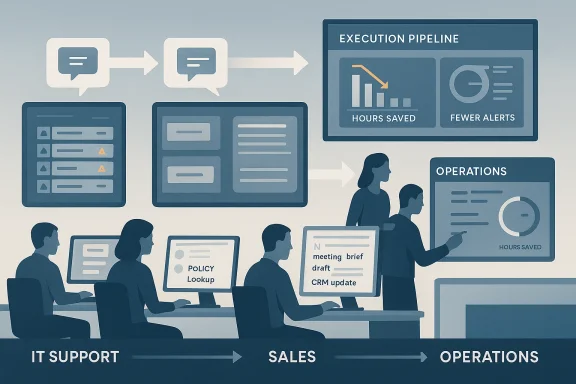
AI productivity use cases in 2026 are no longer judged by how impressive they look in a demo. They are judged by whether they remove friction from real work, shorten cycle times, and help teams move from conversation to execution faster. That is why the strongest opportunities now sit inside IT service, customer support, HR, sales, and operations workflows where repetitive admin still slows everything down. The pattern is consistent across the market: the best AI is the AI that quietly makes people more effective, not the AI that makes the loudest promise.
The conversation around workplace AI has matured quickly. A few years ago, most organizations were still experimenting with generic chatbots, draft-writing assistants, or broad “copilot” concepts that sounded useful but were hard to tie to measurable outcomes. By 2026, buyers are asking different questions: which workflows should be automated first, what should remain human-led, and where does AI genuinely improve throughput instead of simply producing more content for employees to review. That shift toward practical value is a major reason AI workflow optimization has become such a central evaluation-stage topic.
This matters because productivity software has always sold on time savings, but AI raises the stakes. If the system only drafts a message, the value is limited. If it drafts the message, files the case, updates the record, and triggers the next task, the value compounds. The best deployments are therefore workflow engines as much as writing engines, and that distinction separates credible enterprise AI from expensive novelty.
The same logic is visible in the broader enterprise market. Microsoft, Salesforce, UiPath, and other vendors are all pushing AI deeper into operational systems, while customer examples increasingly focus on measurable gains such as fewer alerts, faster case throughput, or hours saved through automation. In other words, the market has moved from proving that AI can produce output to proving that it can improve operations.
It is also clear that AI value is not evenly distributed across departments. IT benefits from incident triage and support routing, HR from employee case handling, sales from preparation and follow-up, operations from approval routing, and customer teams from faster resolution and knowledge retrieval. That departmental specificity is why one-size-fits-all AI adoption strategies tend to disappoint.
That is also why the most relevant purchasing conversations are now centered on workflow design rather than feature checklists. A good implementation does not merely answer a question. It changes the next step in the process, updates the right system, and passes context forward. Without that, AI becomes another tool employees must manage rather than a layer that reduces their burden.
A strong example is Ecolab, which reported using Azure SRE Agent to triage incidents across multiple data sources. The company said its site reliability teams were dealing with about 30 daily performance alerts before the change, and that number dropped to less than 10 on average within months. That is not a cosmetic improvement. It is a meaningful reduction in operational distraction that frees engineers to focus on optimization rather than constant firefighting.
The best IT deployments also recognize that support and operations are different. Service desks benefit from knowledge retrieval, ticket summarization, and routing support, while SRE and infrastructure teams need event correlation and remediation assistance. The more specific the use case, the stronger the payoff.
Microsoft’s own HR operation provides a good benchmark. The company said that using Dynamics 365 Customer Service with Copilot helped its HR organization achieve a 20% increase in case throughput, along with 72% monthly active adoption among users. That is a strong sign that productivity gains can be paired with real adoption when the workflow is aligned with daily work.
HR also benefits from a unified knowledge base because fragmented policy documentation is a common cause of delay. When employees get faster answers and HR advisors spend less time hunting across systems, the organization gains both service quality and operating efficiency. That combination is hard to beat.
Microsoft’s sales scenario guidance is revealing because it focuses on customer research, meeting preparation, proposal creation, post-sale insights, and follow-up drafting. That framework reflects a simple truth: sales productivity is often lost before and after the call, not during it. The rep who reaches the meeting better prepared and follows up faster is usually the rep who wins more often.
The caution here is obvious: sales AI can become spam very quickly if it is not governed well. Personalization, relevance, and human review still matter, especially in outbound motion. The opportunity is real, but so is the reputational downside if automation gets lazy.
UiPath customer EDP Global Solutions is a useful example. The company said its automation program had saved 220,000 hours, automated more than 450 processes, and trained over 170 employees as automation advocates. Those figures point to a deeper lesson: operational productivity gains scale best when automation becomes part of the organization’s operating culture, not just a one-off project.
Operations is therefore a strong use case category, but not an excuse to automate blindly. The aim is to remove waste, not to hide bad process design behind a layer of software. That distinction matters more in 2026 than it did even a year earlier.
Salesforce’s Agentic Enterprise Index found that customer service was the top area where AI agents were being used, followed by internal or business automation and sales. It also reported a strong rise in agent-led customer service conversations during the first half of 2025. That suggests customer operations are already becoming the proving ground for agentic AI at scale.
The challenge, of course, is trust. Customers can forgive speed if the answer is correct; they do not forgive polished nonsense. That means AI should help agents stay consistent and informed, not make them feel like they are negotiating with a black box.
This distinction is important because many organizations make the mistake of starting with what looks impressive instead of what is operationally useful. A summary generator can be helpful, but a summary that triggers the next task, updates the system of record, and routes the issue to the right person is a far more valuable deployment. That is where productivity gains become measurable.
The deeper lesson is that AI succeeds when it fits into existing work habits without demanding heroic behavior from users. If people have to constantly copy, paste, correct, and re-enter information, the tool is not really optimizing the workflow. It is just adding another step.
That difference explains why generic assistants can be useful but incomplete. A broad model may draft a note or brainstorm ideas, but a business workflow model has to work with policies, records, permissions, and audit needs. Microsoft’s enterprise approach reflects that split by pushing both broad copilots and more constrained, workflow-specific agents.
The opportunity is especially strong in departments where repetitive coordination still consumes too much time. IT, HR, customer service, sales, and operations all have workflows that are structured enough to automate and important enough to matter. The organizations that focus on those friction points are likely to see the fastest returns.
There is also a governance problem. As AI moves closer to customer-facing decisions, employee cases, and operational approvals, organizations need stronger guardrails, clearer accountability, and better data discipline. Without that, productivity gains can be offset by mistakes, drift, or trust issues.
For IT and customer teams, the biggest gains will probably come from narrowing the scope rather than widening it. The best deployments will focus on one pain point at a time, prove time savings, and then expand into adjacent workflows once the process is stable. That is a more durable route to adoption than chasing a broad transformation story.
The companies most likely to win with productivity AI in 2026 will be the ones that treat it as an operating model choice, not a feature purchase. They will know where AI should assist, where it should act, and where people still need to lead. That balance is what turns AI from a buzzword into a practical productivity engine.
Source: UC Today Which AI Productivity Use Cases Actually Deliver in 2026? The Workflows Saving IT, HR, Sales, Ops and Customer Teams the Most Time - UC Today
 Overview
The conversation around workplace AI has matured quickly. A few years ago, most organizations were still experimenting with generic chatbots, draft-writing assistants, or broad “copilot” concepts that sounded useful but were hard to tie to measurable outcomes. By 2026, buyers are asking different questions: which workflows should be automated first, what should remain human-led, and where does AI genuinely improve throughput instead of simply producing more content for employees to review. That shift toward practical value is a major reason AI workflow optimization has become such a central evaluation-stage topic.This matters because productivity software has always sold on time savings, but AI raises the stakes. If the system only drafts a message, the value is limited. If it drafts the message, files the case, updates the record, and triggers the next task, the value compounds. The best deployments are therefore workflow engines as much as writing engines, and that distinction separates credible enterprise AI from expensive novelty.
The same logic is visible in the broader enterprise market. Microsoft, Salesforce, UiPath, and other vendors are all pushing AI deeper into operational systems, while customer examples increasingly focus on measurable gains such as fewer alerts, faster case throughput, or hours saved through automation. In other words, the market has moved from proving that AI can produce output to proving that it can improve operations.
It is also clear that AI value is not evenly distributed across departments. IT benefits from incident triage and support routing, HR from employee case handling, sales from preparation and follow-up, operations from approval routing, and customer teams from faster resolution and knowledge retrieval. That departmental specificity is why one-size-fits-all AI adoption strategies tend to disappoint.
Why Productivity AI Now Has to Prove Itself
AI productivity tools are under more scrutiny in 2026 because buyers have seen enough hype. The easiest mistake is to confuse volume with value: more drafts, more summaries, more generated text, but no meaningful reduction in manual work. The strongest use cases are the ones that remove friction at the points where teams lose the most time, especially in drafting, routing, approval, follow-up, and retrieval.That is also why the most relevant purchasing conversations are now centered on workflow design rather than feature checklists. A good implementation does not merely answer a question. It changes the next step in the process, updates the right system, and passes context forward. Without that, AI becomes another tool employees must manage rather than a layer that reduces their burden.
The new productivity test
The practical test for any AI use case is simple. Does it reduce cycle time, cut rework, or speed decision-making? If the answer is yes, the use case deserves attention. If the answer is no, even a polished interface may not justify the cost or complexity.- Does it eliminate repetitive admin?
- Does it shorten handoffs between teams?
- Does it help users find information faster?
- Does it trigger the next action automatically?
- Does it reduce the number of times work gets touched?
IT Service and Incident Workflows
IT is one of the clearest winners because its work is already structured around queues, alerts, tickets, and repeatable escalation paths. AI does not need to invent a new process here; it needs to reduce noise and accelerate the path from signal to action. That is why incident triage, alert summarization, and service desk automation consistently show up as high-value use cases.A strong example is Ecolab, which reported using Azure SRE Agent to triage incidents across multiple data sources. The company said its site reliability teams were dealing with about 30 daily performance alerts before the change, and that number dropped to less than 10 on average within months. That is not a cosmetic improvement. It is a meaningful reduction in operational distraction that frees engineers to focus on optimization rather than constant firefighting.
Incident triage and alert noise
The value of AI in IT is often less about being “smart” and more about being selective. Engineers do not need more notifications; they need better prioritization. A model that can cluster alerts, summarize context, and recommend the most likely cause can save more time than one that merely writes a cleaner report.- Alert summarization
- Root-cause assistance
- Incident prioritization
- Ticket classification
- Automated status updates
The best IT deployments also recognize that support and operations are different. Service desks benefit from knowledge retrieval, ticket summarization, and routing support, while SRE and infrastructure teams need event correlation and remediation assistance. The more specific the use case, the stronger the payoff.
HR and Employee Service
HR is another strong candidate because so much of the work is repetitive but still sensitive. Employees need quick answers on policy, benefits, onboarding, and case status, but HR teams also need accuracy, consistency, and a reliable audit trail. AI is useful here when it lowers the burden of case handling without eroding trust.Microsoft’s own HR operation provides a good benchmark. The company said that using Dynamics 365 Customer Service with Copilot helped its HR organization achieve a 20% increase in case throughput, along with 72% monthly active adoption among users. That is a strong sign that productivity gains can be paired with real adoption when the workflow is aligned with daily work.
Employee case handling
The HR use cases that matter most are the ones that reduce time spent searching, writing, and routing. Case summaries, policy lookup, response drafting, onboarding assistance, and better escalation all help HR teams deal with more requests without linear headcount growth. That is exactly the kind of pressure relief many people operations teams need.- Case summarization
- Policy retrieval
- Draft response generation
- Onboarding guidance
- Employee self-service
HR also benefits from a unified knowledge base because fragmented policy documentation is a common cause of delay. When employees get faster answers and HR advisors spend less time hunting across systems, the organization gains both service quality and operating efficiency. That combination is hard to beat.
Sales Productivity and Revenue Support
Sales teams may look like a natural fit for AI, but the best use cases are not the flashiest ones. The value comes from removing prep work, reducing CRM friction, and speeding follow-up so reps can spend more time with customers and less time assembling context. In that sense, AI is a force multiplier for execution rather than a replacement for selling skill.Microsoft’s sales scenario guidance is revealing because it focuses on customer research, meeting preparation, proposal creation, post-sale insights, and follow-up drafting. That framework reflects a simple truth: sales productivity is often lost before and after the call, not during it. The rep who reaches the meeting better prepared and follows up faster is usually the rep who wins more often.
Prep, follow-up, and CRM hygiene
The best sales AI use cases tend to be highly repeatable. Meeting prep, call summarization, pipeline note generation, CRM enrichment, and proposal drafts all save time immediately. They also reduce the risk that important details get lost between tools or people.- Account research
- Meeting brief generation
- Follow-up drafting
- CRM record updates
- Proposal support
The caution here is obvious: sales AI can become spam very quickly if it is not governed well. Personalization, relevance, and human review still matter, especially in outbound motion. The opportunity is real, but so is the reputational downside if automation gets lazy.
Operations and Back-Office Flow
Operations is where AI productivity becomes most visible in the finance, admin, and coordination layers that often slow a business down. Approvals, reconciliations, routing, and cross-department follow-up are all classic bottlenecks, and they tend to exist because work moves between systems rather than inside one clean workflow. AI helps most when it reduces that friction.UiPath customer EDP Global Solutions is a useful example. The company said its automation program had saved 220,000 hours, automated more than 450 processes, and trained over 170 employees as automation advocates. Those figures point to a deeper lesson: operational productivity gains scale best when automation becomes part of the organization’s operating culture, not just a one-off project.
Approval routing and process standardization
Operations teams often struggle less with complexity than with delay. AI can standardize repeatable steps, route requests to the right person, and make sure nothing sits in limbo longer than necessary. That kind of compression is enormously valuable when small pauses add up across many transactions.- Approval routing
- Request handling
- Policy checking
- Escalation support
- Cross-team follow-up
Operations is therefore a strong use case category, but not an excuse to automate blindly. The aim is to remove waste, not to hide bad process design behind a layer of software. That distinction matters more in 2026 than it did even a year earlier.
Customer Service and Frontline Support
Customer-facing teams are among the biggest beneficiaries of AI because they deal with high volumes, recurring issues, and constant pressure for speed. The strongest use cases are the ones that help agents find answers quickly, summarize cases accurately, and hand off issues without losing context. That is where customer experience and productivity improve together.Salesforce’s Agentic Enterprise Index found that customer service was the top area where AI agents were being used, followed by internal or business automation and sales. It also reported a strong rise in agent-led customer service conversations during the first half of 2025. That suggests customer operations are already becoming the proving ground for agentic AI at scale.
Case resolution and knowledge retrieval
The most practical customer service use cases are rarely the most futuristic. They are the ones that help agents answer faster, search better, and reduce the number of times a customer has to repeat themselves. Better knowledge access can be as important as better language generation.- Case summarization
- Knowledge retrieval
- Intelligent routing
- Response drafting
- Proactive follow-up
The challenge, of course, is trust. Customers can forgive speed if the answer is correct; they do not forgive polished nonsense. That means AI should help agents stay consistent and informed, not make them feel like they are negotiating with a black box.
What Makes a Workflow Actually Worth Automating
Not every workflow deserves AI. The best candidates are structured, repeatable, high-volume, and slowed down by manual coordination or information retrieval. If a process is mostly unstructured, highly sensitive, or heavily dependent on nuanced human judgment, AI may still support it, but it should not be the first thing to own the workflow.This distinction is important because many organizations make the mistake of starting with what looks impressive instead of what is operationally useful. A summary generator can be helpful, but a summary that triggers the next task, updates the system of record, and routes the issue to the right person is a far more valuable deployment. That is where productivity gains become measurable.
What to automate first
A good sequencing strategy is usually more useful than a broad AI rollout. Teams should start with the highest-frequency pain points, measure time saved or quality improved, then expand only after the pilot proves value. That approach reduces risk and creates early wins that employees can actually feel.- Identify one or two priority use cases.
- Define what good output looks like.
- Establish review rules for sensitive work.
- Measure time saved or quality improved.
- Expand only after the pilot proves value.
The deeper lesson is that AI succeeds when it fits into existing work habits without demanding heroic behavior from users. If people have to constantly copy, paste, correct, and re-enter information, the tool is not really optimizing the workflow. It is just adding another step.
Consumer-Style AI Versus Enterprise Productivity AI
One reason AI adoption debates keep getting muddled is that consumer AI and enterprise AI are not the same product category. Consumer tools reward flexibility, speed, and convenience, while enterprise tools reward precision, governance, traceability, and integration. The best workplace AI in 2026 is therefore less about broad versatility and more about fit-for-purpose design.That difference explains why generic assistants can be useful but incomplete. A broad model may draft a note or brainstorm ideas, but a business workflow model has to work with policies, records, permissions, and audit needs. Microsoft’s enterprise approach reflects that split by pushing both broad copilots and more constrained, workflow-specific agents.
Why embedded AI matters
Enterprise buyers increasingly prefer AI that appears inside the tools people already use. That reduces context switching, improves adoption, and makes governance easier. It also means the real competitive battle is shifting from who has AI to whose AI is more useful inside the daily flow of work.- Better user adoption
- Stronger data governance
- Less context switching
- Easier auditability
- More durable differentiation
Strengths and Opportunities
The biggest strength of AI productivity tooling in 2026 is that the value proposition has become much clearer. The best use cases are concrete, measurable, and tied to real work patterns rather than abstract innovation narratives. That makes it easier for buyers to justify investment and easier for teams to see immediate benefit.The opportunity is especially strong in departments where repetitive coordination still consumes too much time. IT, HR, customer service, sales, and operations all have workflows that are structured enough to automate and important enough to matter. The organizations that focus on those friction points are likely to see the fastest returns.
- Faster incident response in IT
- Better employee service in HR
- Shorter prep and follow-up in sales
- Smoother approvals in operations
- Quicker case resolution in customer service
- Stronger knowledge retrieval across teams
- More consistent handoffs between systems
Risks and Concerns
The biggest risk is over-AI, or the assumption that every workflow should be automated just because it can be. That often leads to extra review work, inconsistent outputs, or brittle processes that depend too heavily on model behavior. In sensitive workflows, the cure can become a new source of complexity.There is also a governance problem. As AI moves closer to customer-facing decisions, employee cases, and operational approvals, organizations need stronger guardrails, clearer accountability, and better data discipline. Without that, productivity gains can be offset by mistakes, drift, or trust issues.
- Hallucination or incorrect output
- Poorly governed automation
- Data quality and integration issues
- Over-reliance on generic assistants
- Reputational risk in customer-facing use
- Audit and compliance gaps
- Training fatigue without clear ROI
Looking Ahead
The next phase of workplace AI is likely to be less about dramatic demos and more about embedded execution. The trendline already points toward agents that do specific jobs inside specific workflows, with governance and observability layered around them. That means the best products will increasingly feel less like novelty apps and more like operational infrastructure.For IT and customer teams, the biggest gains will probably come from narrowing the scope rather than widening it. The best deployments will focus on one pain point at a time, prove time savings, and then expand into adjacent workflows once the process is stable. That is a more durable route to adoption than chasing a broad transformation story.
The companies most likely to win with productivity AI in 2026 will be the ones that treat it as an operating model choice, not a feature purchase. They will know where AI should assist, where it should act, and where people still need to lead. That balance is what turns AI from a buzzword into a practical productivity engine.
- Start with high-volume, repeatable workflows
- Measure time saved and error reduction
- Keep humans in the loop for sensitive decisions
- Embed AI where work already happens
- Expand only after the workflow proves reliable
Source: UC Today Which AI Productivity Use Cases Actually Deliver in 2026? The Workflows Saving IT, HR, Sales, Ops and Customer Teams the Most Time - UC Today
